Some ERP questions are about connections, not rows. “Which finished goods and open orders are affected if supplier S9 delivers late?” means following supplier to component, component to sub-assembly, sub-assembly to product, over an unknown number of levels. In SQL that is a recursive query that grows hard to read and slow as the depth grows. A graph database is built for it. Apache AGE (“A Graph Extension”) adds graph storage and the openCypher query language to PostgreSQL, so the graph lives in the same database as the ERP tables. It is a NON CNCF tool: the CNCF Landscape lists it under AI Agent › Knowledge Graph, described as a graph database optimised for fast analysis and real-time data processing, provided as an extension to PostgreSQL. It is an Apache Software Foundation project, not a CNCF one.
CNCF daily · Sprint 6, post 11 of 26 · AI Agent (Knowledge Graph) · NON CNCF
At a glance
| Category | AI Agent › Knowledge Graph |
| CNCF status | NON CNCF, listed in the CNCF Landscape |
| What it is | A PostgreSQL extension (CREATE EXTENSION age) that stores graphs and runs openCypher through a cypher() SQL function |
| Data model | Property graph: vertices and edges with labels and properties, returned as the agtype type |
| Version seen | Docker tags for 1.7.0 on PostgreSQL 18 and 1.6.0 on PostgreSQL 14; check the repository for the current release |
| PostgreSQL versions | Each AGE release is built for specific PostgreSQL major versions; the image tags carry both (for example release_PG18_1.7.0) |
| Managed availability | Documented for Azure Database for PostgreSQL and TencentDB for PostgreSQL. I could not confirm it on Amazon RDS (see below) |
| Not for | Very large graph analytics at the scale of purpose-built graph engines |
The problem Apache AGE solves
| Question | Plain SQL | Apache AGE |
|---|---|---|
| Follow a chain of unknown depth (supplier → item → assembly → product) | Recursive CTE with joins at every level | One MATCH with a variable-length path |
| Readability of “who is connected to whom” | Grows with each hop | Reads like the drawing on a whiteboard |
| Keep the graph next to business data | Same database | Same database, so one transaction and one backup |
| Run the traversal and then aggregate orders | One SQL statement | Cypher inside SQL, then ordinary joins |
| Where it falls short | Deep, wide traversals get slow | Not a replacement for a dedicated engine at very large scale |
Key concepts
| Term | Meaning |
|---|---|
| Graph | A named collection of vertices and edges created with create_graph('name') |
| Vertex (node) | An entity such as a Supplier, Item or Product, with a label and properties |
| Edge | A directed relationship such as SUPPLIES or USED_IN, with its own properties (for example quantity) |
| Label | The type of a vertex or edge; each label is stored in its own table |
| openCypher | The graph query language that AGE implements |
| cypher() | The SQL function that runs a Cypher query and returns rows |
| agtype | AGE’s JSON-like value type for results |
| ag_catalog | The schema where AGE keeps its catalog tables, including ag_graph and ag_label |
| Variable-length path | A pattern such as [*1..5] that follows edges up to a given number of hops |
Architecture
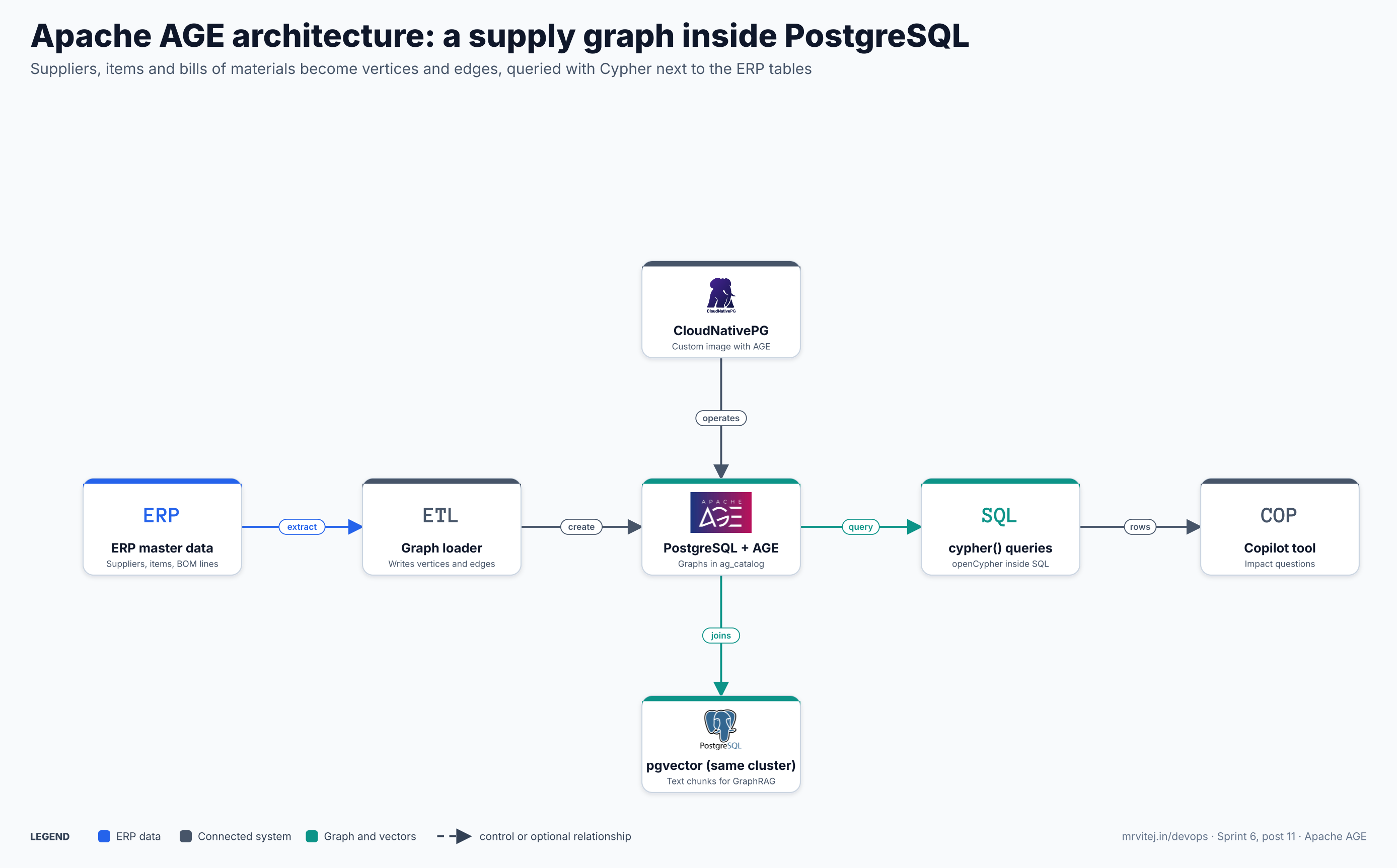
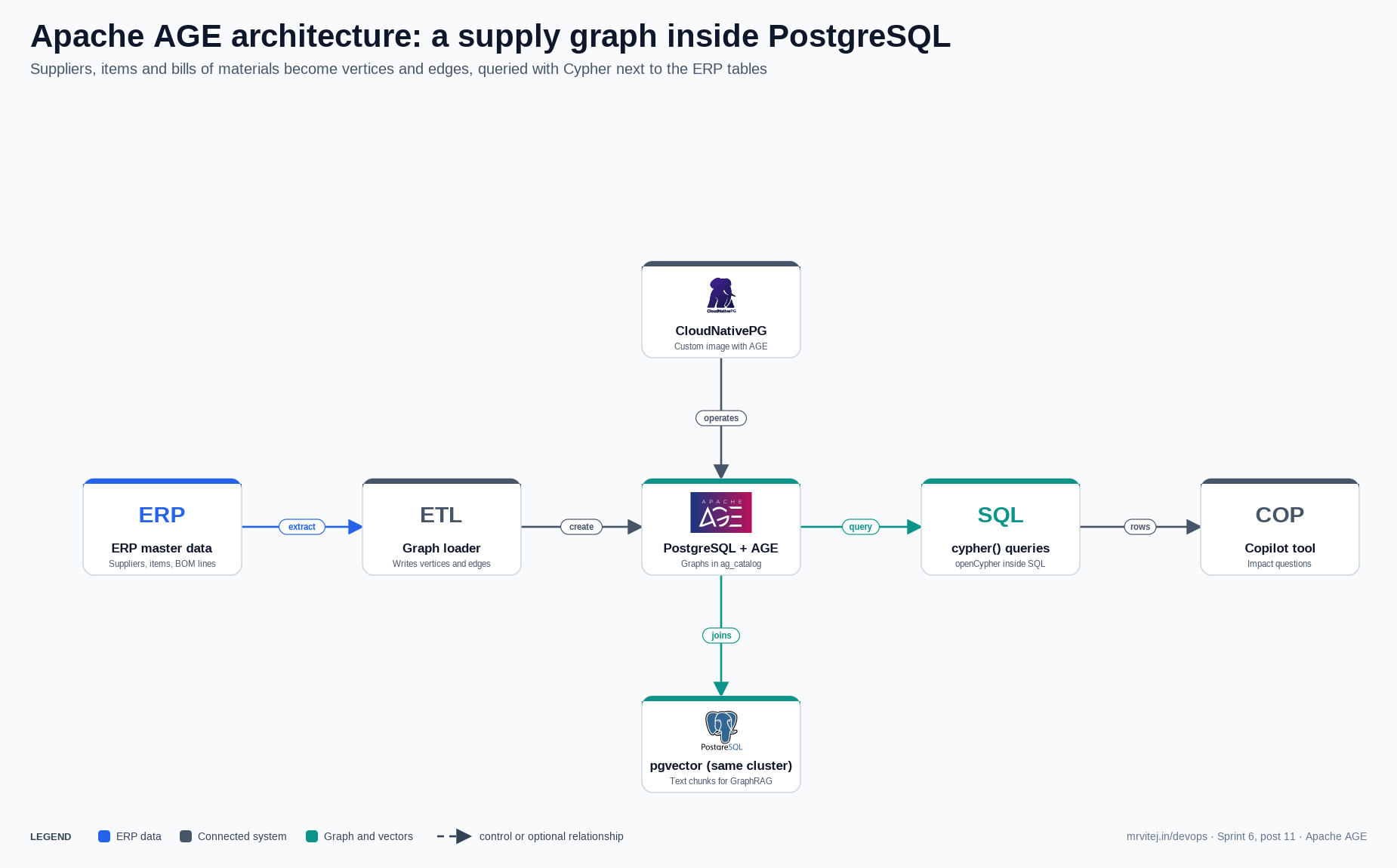
Blue is ERP data, grey is a connected system and teal is the graph and vector side. Open the zoomable diagram, or download it as SVG or PNG.
| Component | Responsibility |
|---|---|
| ERP master data | Suppliers, items and bill-of-materials lines, which stay the source of truth. |
| Graph loader | A job that reads those tables and creates or updates vertices and edges. |
| PostgreSQL + AGE | Stores the graph in ag_catalog and the label tables, beside the ERP schemas. |
| CloudNativePG | Runs the cluster. See the CloudNativePG brief. The pods need an image that contains AGE. |
| pgvector | Text chunks in the same cluster, so a copilot can combine graph results with semantic search. See the pgvector brief. |
| cypher() queries | Cypher inside SQL, returning rows. |
| Copilot tool | Calls a fixed, reviewed query for impact questions and returns the rows to the model. |
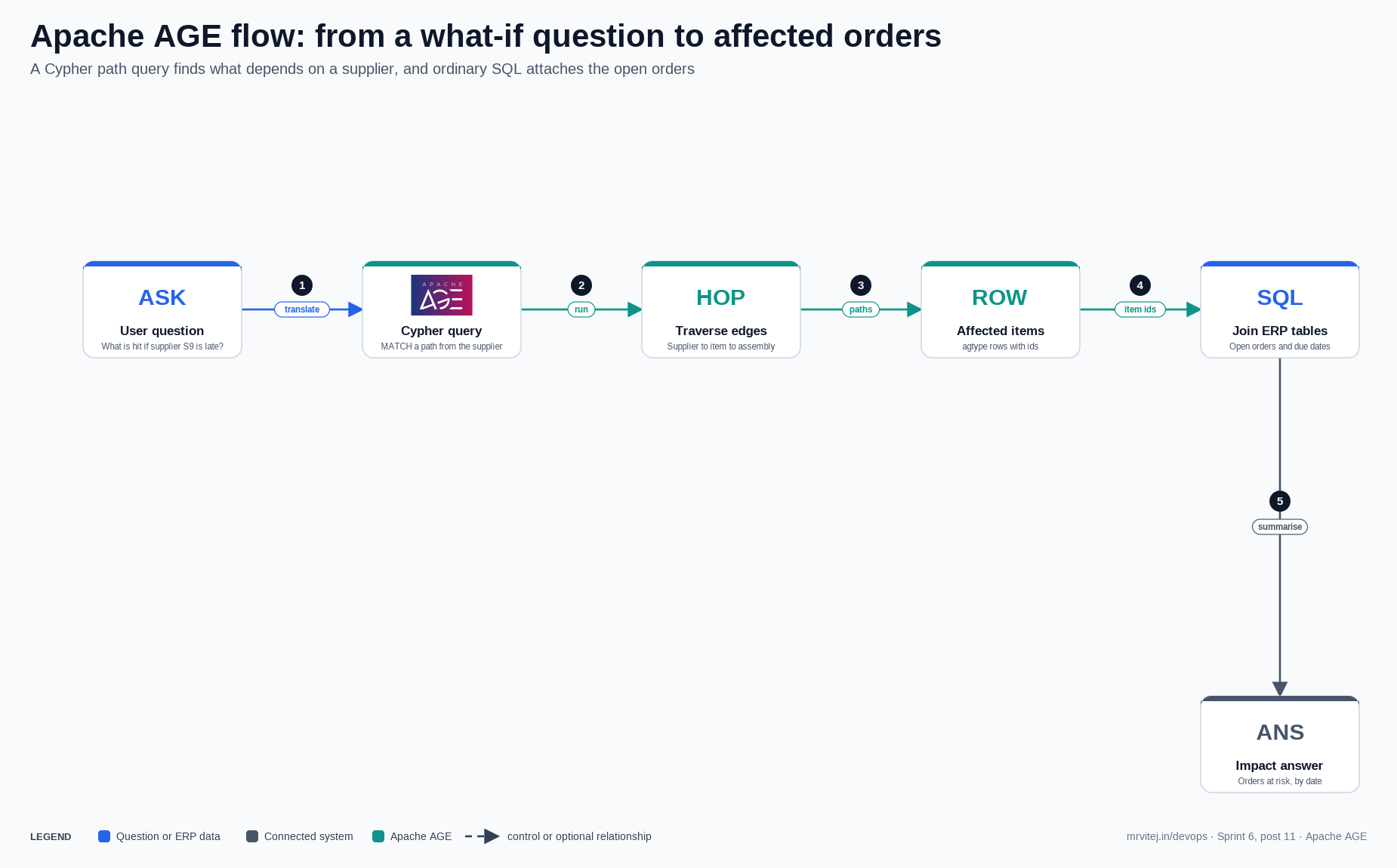
From a what-if question to affected orders
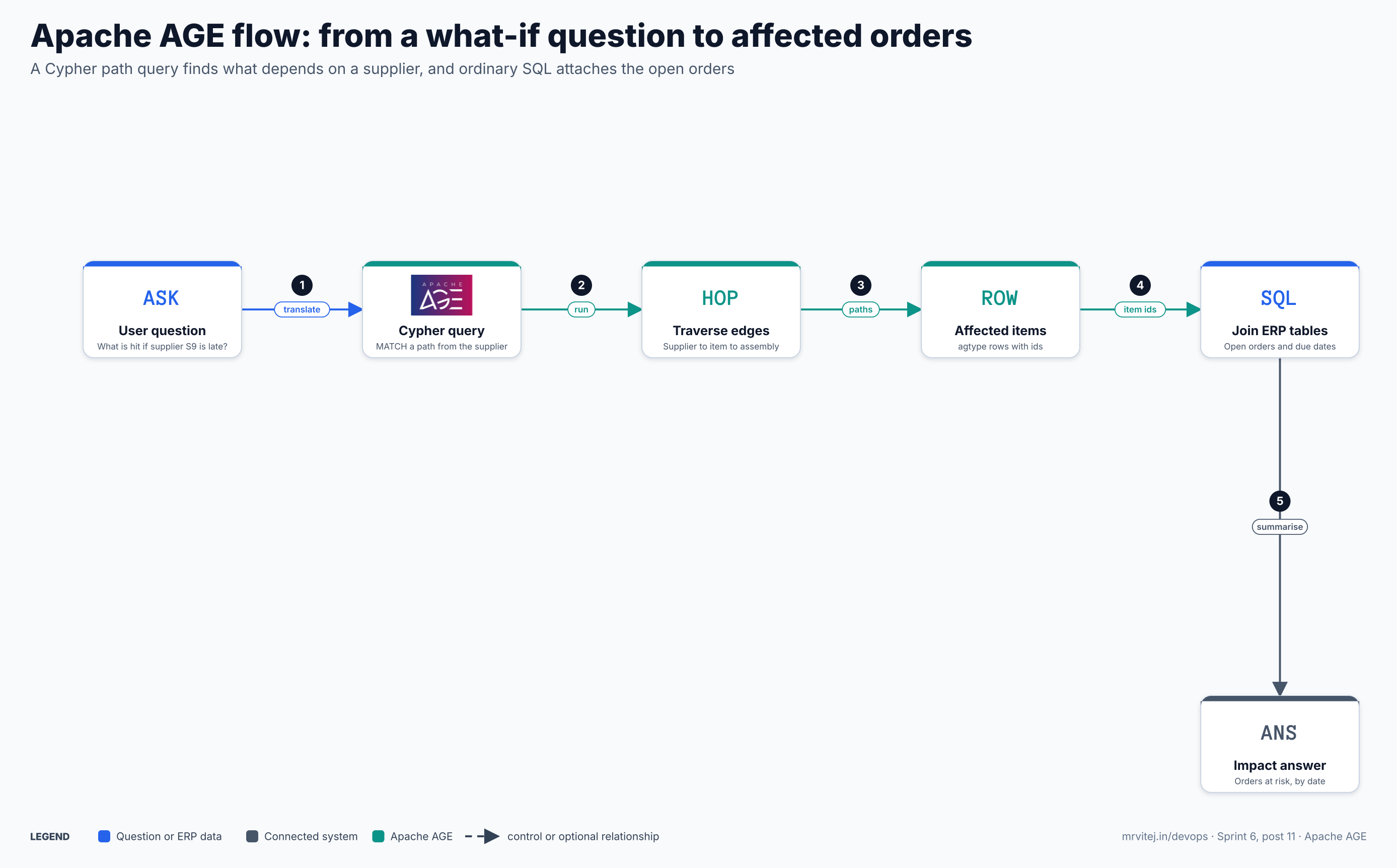
- Question. “What is hit if supplier S9 is late?” is mapped to a prepared query.
- Cypher. A
MATCHstarts from the supplier vertex. - Traverse. AGE follows
SUPPLIESandUSED_INedges up to a hop limit. - Rows. The affected item ids come back as
agtyperows. - Join. Ordinary SQL joins those ids to open orders and due dates, and the result is summarised.
Open the zoomable flow diagram, or download it as SVG or PNG.
Real world: the late supplier
A bearing supplier warns of a two-week delay. The planner needs to know which assemblies use those bearings, which finished products use those assemblies, and which customer orders are due in the next three weeks. In SQL this is four or five self-joins over the bill-of-materials table, and it changes whenever the structure gets deeper. In AGE, one path query from the supplier finds every affected item at any depth, and a join to the orders table gives the dates. The planner gets a list in seconds instead of waiting for a report.
Install Apache AGE
These steps follow the AGE quick-start and setup pages. I did not run them for this post.
Try it in Docker
docker pull apache/age
docker run --name age -p 5455:5432 \
  -e POSTGRES_USER=postgresUser -e POSTGRES_PASSWORD=postgresPW -e POSTGRES_DB=postgresDB \
  -d apache/age
docker exec -it age psql -d postgresDB -U postgresUser
Image tags carry the PostgreSQL major version and the AGE version, such as release_PG18_1.7.0; pick one tag and pin it.
Per-connection setup
The AGE docs say that for every connection you must load the library and put ag_catalog on the search path:
CREATE EXTENSION IF NOT EXISTS age;   -- once per database
LOAD 'age';                            -- every connection
SET search_path = ag_catalog, "$user", public;   -- every connection
Applications can set the search path in the connection options, as the Azure docs show for Python. The upstream Docker image also starts PostgreSQL with shared_preload_libraries=age, so LOAD is not needed in that image.
Non-superusers
The setup guide describes two steps for application roles: a symlink so a non-superuser can load age.so from the plugins directory, and a grant:
GRANT USAGE ON SCHEMA ag_catalog TO erp_graph_user;Install the extension before giving other roles the CREATE privilege on the database, because the README warns that a role that can create schemas could otherwise pre-create ag_catalog.
On Kubernetes with CloudNativePG, using a custom image
CloudNativePG runs whatever PostgreSQL image the Cluster names, so AGE needs an image that contains it. There are two routes, and I verified neither end to end:
- Custom image. Build one that installs AGE on top of the PostgreSQL image your CloudNativePG version expects (the upstream AGE Dockerfile shows the build and which files to copy:
age.so,age.controland the version SQL), push it to ECR, and setimageNameon the Cluster. Addagetoshared_preload_librariesthrough the Cluster’s PostgreSQL configuration. - Image volume extensions. CloudNativePG documents loading extensions at pod start from a separate OCI image, but it requires PostgreSQL 18 or later, and Kubernetes 1.35 or later (1.33 and 1.34 with the ImageVolume feature gate on). That route needs an AGE extension image packaged for it; I did not find an official one, so treat it as something you would build.
Either way, create the extension in the database through bootstrap SQL or a migration, and test the pod on a copy of your data.
Amazon RDS
The Sprint 6 plan assumed AGE is not offered on Amazon RDS, which is why it runs on CloudNativePG here. I could not confirm that from the pages I read: the RDS extension lists were not readable in full, so I found neither an AGE entry nor a statement that it is missing. Check the supported-extensions table for your RDS engine version, or SHOW rds.extensions;, before you rely on this. AWS also accepts requests for additional extensions by email, per the RDS FAQ.
Try it
SELECT create_graph('supply');

-- Vertices and edges (ids come from the ERP tables)
SELECT * FROM cypher('supply', $$
  CREATE (s:Supplier {id: 9, name: 'S9 Bearings'}),
         (c:Item {id: 101, name: 'Bearing 6204'}),
         (a:Item {id: 201, name: 'Gearbox GB-2'}),
         (p:Item {id: 301, name: 'Conveyor CV-7'}),
         (s)-[:SUPPLIES]->(c),
         (c)-[:USED_IN {qty: 4}]->(a),
         (a)-[:USED_IN {qty: 1}]->(p)
$$) AS (v agtype);

-- Everything downstream of supplier 9, up to 6 hops
SELECT * FROM cypher('supply', $$
  MATCH (s:Supplier {id: 9})-[:SUPPLIES]->(:Item)-[:USED_IN*0..6]->(i:Item)
  RETURN DISTINCT i.id, i.name
$$) AS (item_id agtype, item_name agtype);
Then join to the ERP tables by casting the ids:
WITH hit AS (
  SELECT (item_id::text)::int AS item_id
  FROM cypher('supply', $$
    MATCH (:Supplier {id: 9})-[:SUPPLIES]->(:Item)-[:USED_IN*0..6]->(i:Item)
    RETURN DISTINCT i.id
  $$) AS (item_id agtype)
)
SELECT o.order_no, o.due_date
FROM sales_order_lines o JOIN hit USING (item_id)
WHERE o.due_date < now() + interval '21 days';
The agtype result cast and the table name sales_order_lines are for the example; check the AGE docs for casting rules in your version. Do not build Cypher strings by concatenating user input; use prepared queries with parameters.
Production reference design
- ERP stays the source of truth. The graph is a derived copy that can be rebuilt from master data.
- Load incrementally. Update vertices and edges from change events or a nightly job, and keep ids that match the ERP keys.
- Index properties. AGE supports property indexes on vertices and edges; index the ids you match on.
- Cap hops. Always put an upper bound on variable-length paths.
- Fixed queries for the copilot. Expose reviewed, parameterised queries as tools; do not let a model write Cypher against production.
- Dedicated role. A read-only role with
USAGEonag_catalogandSELECTon the graph schema for the copilot. - Pin versions. Pin the PostgreSQL and AGE versions together in the image tag and test upgrades on a copy.
- Backups. The graph is in normal PostgreSQL backups; test a restore, and also test rebuilding from the ERP.
- Monitor. Track query time per tool, and the size of the label tables.
Security
- Catalog ownership. Install the extension before granting
CREATEon the database to other roles, as the README warns. - Least privilege. Give application roles only the grants they need on
ag_catalogand the graph schema. - Injection. Cypher is passed to
cypher()as a string; build it from fixed text and pass values as parameters. - Tenant data. A graph shared by tenants needs a tenant property on every vertex and a mandatory filter in every query; row-level security does not automatically cover graph traversal, so test it.
- Model access. The copilot should call named queries only, never run free-form Cypher or SQL.
Troubleshooting
This table comes from the AGE docs, the README and the pages I read. I did not run AGE for this post, so test each entry on your own cluster.
| Symptom | Likely cause | How to check | Fix |
|---|---|---|---|
could not open extension control file ".../age.control" |
AGE is not installed in this PostgreSQL image | Look for age.control in the extension directory |
Use an image that contains AGE, or build one |
extension "age" must be loaded via shared_preload_libraries or LOAD errors |
Library not loaded | SHOW shared_preload_libraries; |
Add age to shared_preload_libraries and restart, or LOAD 'age' per session |
function cypher(unknown, unknown) does not exist |
ag_catalog is not on the search path |
SHOW search_path; |
SET search_path = ag_catalog, "$user", public; or call ag_catalog.cypher(...) |
graph "x" does not exist |
The graph was not created, or a different database | SELECT * FROM ag_catalog.ag_graph; |
Create it with create_graph in this database |
a column definition list is required for functions returning "record" |
The AS (...) list is missing or does not match the RETURN |
The query text | Add one agtype column per returned value |
| Non-superuser cannot run queries | Missing grants or library path | The error message and role grants | GRANT USAGE ON SCHEMA ag_catalog; follow the symlink step in the setup guide |
CREATE EXTENSION age refuses to install |
ag_catalog already exists and is owned by another role |
\dn+ ag_catalog |
Remove or reassign the pre-created schema as an administrator |
| Graph disappears after reconnecting in a client | Changes were made in a transaction that was never committed | Client’s autocommit setting | Commit, or use autocommit; the README notes psql defaults to autocommit |
| Path queries are slow | No hop limit, no property index | EXPLAIN the SQL, check hop range |
Bound the path, index the match properties, reduce the pattern |
| Pods will not start on CloudNativePG after the image change | Image does not match the operator’s expected layout or PostgreSQL version | kubectl describe pod; instance manager logs |
Base the image on one supported by your CloudNativePG version |
Usage cases
- Impact analysis. What depends on this supplier, plant or component.
- Bill-of-materials explosion. All parts and levels of a product.
- Access and ownership graphs. Who can reach what through roles and groups.
- Knowledge graphs for copilots. Entities and relations extracted from documents, used with vector search.
- In the Sprint 6 project. The supply graph answers impact questions for the copilot. Part 4 wires it in beside pgvector.
Operational considerations
- Maturity of tooling. Graph tools, drivers and managed-service support are smaller than for plain PostgreSQL; budget time for gaps.
- Version coupling. AGE releases are tied to PostgreSQL major versions, so a PostgreSQL upgrade means an AGE upgrade.
- Image ownership. A custom image means you patch it: rebuild on PostgreSQL and base-image security releases.
- Per-connection setup. Connection pools must run the
LOADandSET search_pathsteps on every new connection. - Scale. Treat AGE as a good fit for tens of millions of edges at most until you have measured your own workload.
- Not CNCF. It is governed by the Apache Software Foundation, so follow its releases and licence.
Adoption
AGE is listed as a managed extension in Azure Database for PostgreSQL and TencentDB for PostgreSQL, and EnterpriseDB documents it. The Docker Hub page shows more than 100,000 pulls. I did not find a verified list of named production users, so none are named.
Alternatives
| Solution | Model | Best suited to |
|---|---|---|
| Recursive SQL (CTEs) in PostgreSQL | Plain SQL, no extension | Shallow hierarchies where a few joins are enough |
| FalkorDB | Dedicated graph database listed in the Landscape | Low-latency graph and GraphRAG workloads |
| Neo4j | Dedicated property-graph database | Large graphs, rich graph tooling and algorithms |
| Amazon Neptune | Managed graph database | Teams that want a managed graph service on AWS |
| Graph tables in other SQL engines | Graph features inside a relational engine | Teams already on an engine that offers them |
Strengths and limitations
| Strengths | Limitations |
|---|---|
| Graph and relational data in one database and one transaction | Smaller ecosystem than dedicated graph databases |
| openCypher for traversals that are awkward in SQL | Not available on every managed PostgreSQL service |
| Full PostgreSQL features, tooling and backups | Version tied to the PostgreSQL major version |
| Property indexes on vertices and edges | Per-connection LOAD and search path need care |
| Apache-governed open source | Very large graph analytics are better on purpose-built engines |
Recommendation
Adopt, carefully and small. Use AGE only for the questions that are really about connections: supplier impact and bill-of-materials explosion. Run it on CloudNativePG with a pinned custom image, keep the ERP tables as the source of truth, and treat the graph as a rebuildable copy. Expose fixed, parameterised queries to the copilot rather than free-form Cypher. If the graph grows beyond what one PostgreSQL cluster handles comfortably, or you need graph algorithms and mature tooling, move that part to a dedicated graph database.
References: Apache AGE website · Quick start · Setup manual · Apache AGE repository · apache/age on Docker Hub · AGE Dockerfile · CloudNativePG image volume extensions · AGE on Azure Database for PostgreSQL · RDS for PostgreSQL extension versions · CNCF Landscape entry