Backstage is an open framework for building developer portals. As an organisation grows, services, repositories, pipelines, dashboards and runbooks end up in different tools, and nobody can say quickly who owns a service, where its docs are or how to create a new one the approved way. Backstage answers with a software catalog: metadata files stored next to the code are collected into one searchable system, and a plugin architecture puts the other tools around those catalog entries. It started at Spotify and was accepted into the CNCF Sandbox on 8 September 2020; it moved to Incubating on 15 March 2022.
CNCF daily · Sprint 6, post 2 of 26 · Application Definition & Image Build
At a glance
| Category | App Definition and Development › Application Definition & Image Build |
| CNCF status | Incubating. Accepted September 8, 2020; moved to Incubating March 15, 2022 |
| Written in | TypeScript (a Node.js backend and a React frontend) |
| License | Apache 2.0 |
| Core features | Software Catalog, Software Templates (Scaffolder), TechDocs, Kubernetes, Search |
| Production database | PostgreSQL. SQLite is for tests and local trials |
| Release rate | Monthly, per the CNCF Landscape entry |
| Extension model | Frontend and backend plugins, backend modules and extension points |
| Security audit | X41 D-Sec, published August 23, 2022 |
The problem Backstage solves
A platform team usually gets the same four questions every week. Who owns this service? Where are its docs? How do I start a new service that passes our checks? Is it running, and where? Each answer lives somewhere different: a wiki, a spreadsheet, a CI dashboard, the cluster. Backstage does not replace those tools. It gives them one front door and one data model.
| Person | What Backstage gives them |
|---|---|
| Developer | One place to find any service, its owner, docs, pipelines and running pods, and a form to create a new service from an approved template |
| Platform engineer | A way to publish golden paths as templates and to add tools as plugins instead of building a portal from scratch |
| Engineering manager | A catalog that shows ownership and lifecycle for everything, so orphaned software stands out |
The project’s own overview describes the same three groups: engineering managers who maintain standards, end users who build components in a standard way, and platform engineers who extend the portal through plugins.
Key concepts
| Term | Meaning |
|---|---|
| Entity | One item in the catalog, described by a YAML file with apiVersion, kind, metadata and spec |
| Kinds | Component, API, Resource, System, Domain, Group, User, Template and Location |
| catalog-info.yaml | The recommended name for the descriptor file, kept in the repository it describes |
| Software Template | A Template entity: a form of inputs plus an ordered list of actions that fetch a skeleton, publish a repository and register it |
| TechDocs | Docs-like-code: Markdown in the repository, built with MkDocs and shown in the portal |
| Plugin | A feature of the portal. A plugin can have a frontend part, a backend part and shared packages |
| Backend module | An add-on to one backend plugin, such as a new catalog entity provider or a scaffolder action |
| Annotation | A key in an entity’s metadata.annotations that connects it to a tool, for example backstage.io/techdocs-ref |
Architecture
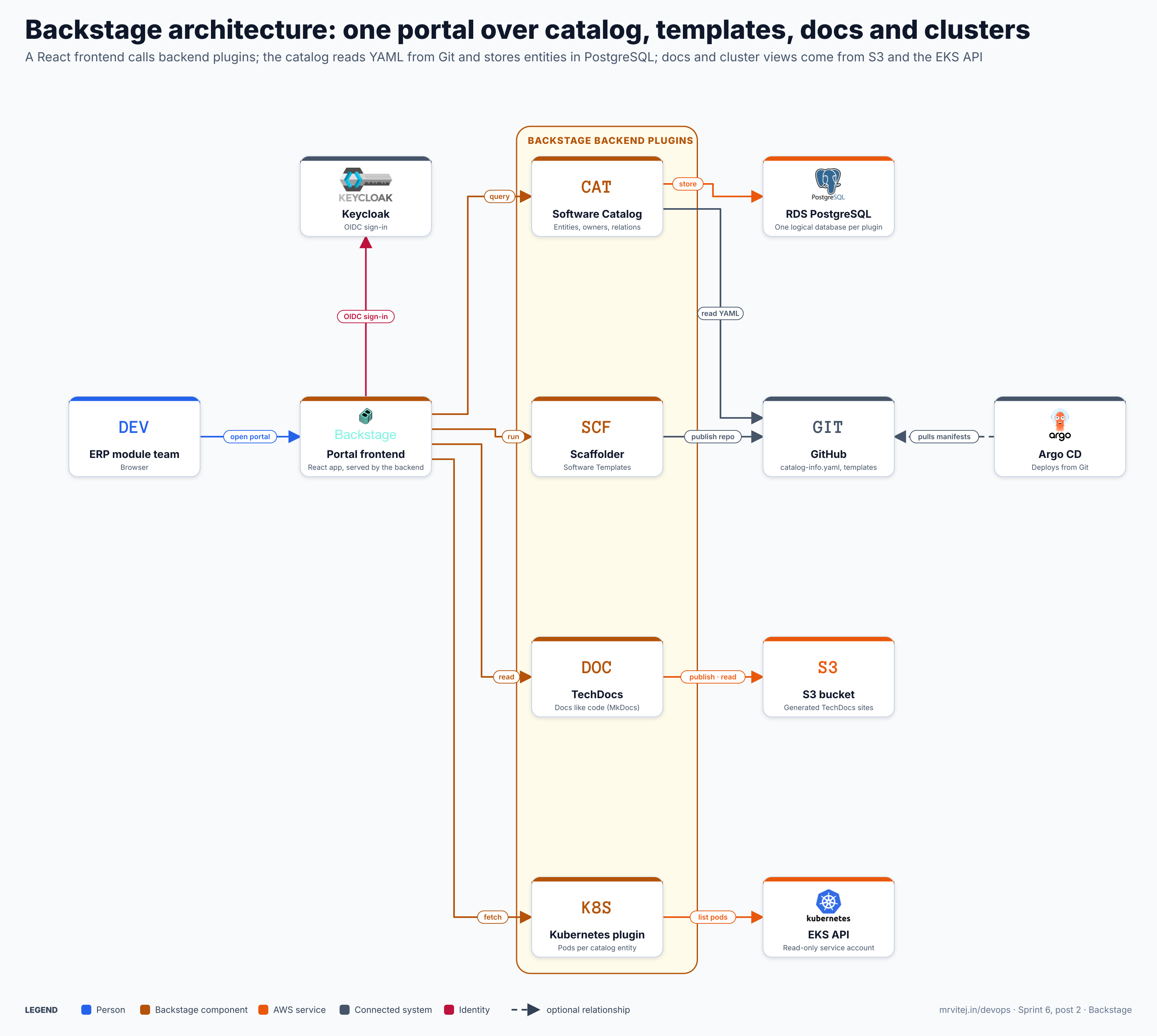
Blue is a person, amber is a Backstage component, orange is an AWS service, grey is a connected system and red is identity. Open the zoomable diagram, or download it as SVG or PNG.
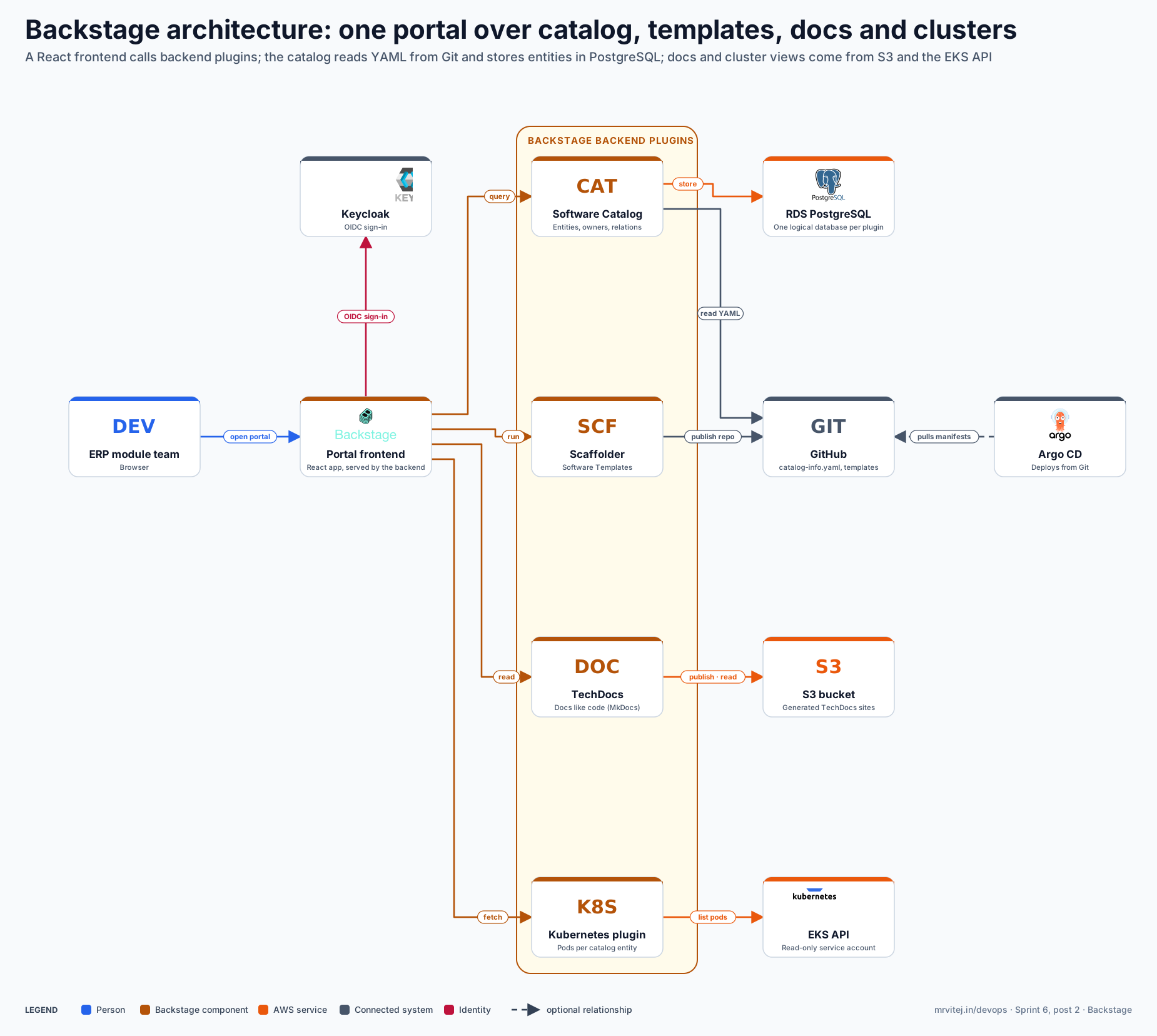
| Component | Responsibility |
|---|---|
| ERP module team | The users: developers, owners and managers working in a browser. |
| Portal frontend | The React app. It is a thin shell that loads the pages of the installed plugins. |
| Keycloak | The identity provider. Backstage signs users in through its generic OIDC provider. |
| Software Catalog | Stores entities and their relations, and keeps them in step with the YAML in Git. |
| Scaffolder | Runs Software Templates: fetch a skeleton, publish a repository, register the result. |
| TechDocs | Builds Markdown into a documentation site and serves it from storage. |
| Kubernetes plugin | Shows the pods, deployments and other objects behind a catalog entity. |
| RDS PostgreSQL | Holds the Backstage data. Each plugin gets its own logical database. |
| GitHub | Source of the descriptors and templates, and the target of new repositories. |
| S3 bucket | Storage for generated TechDocs sites, instead of the backend’s local disk. |
| EKS API | The cluster API that the Kubernetes plugin reads. |
| Argo CD | Optional here. It pulls the manifests that a template put into a new repository. |
Design principle. Plugins are independent. Each backend plugin runs as if it were its own microservice, and plugins cannot call each other’s code directly; they talk over the wire. The backend instance is only the unit of deployment, so you can run one backend with everything, or split plugins across several deployments when you need to scale or isolate them.
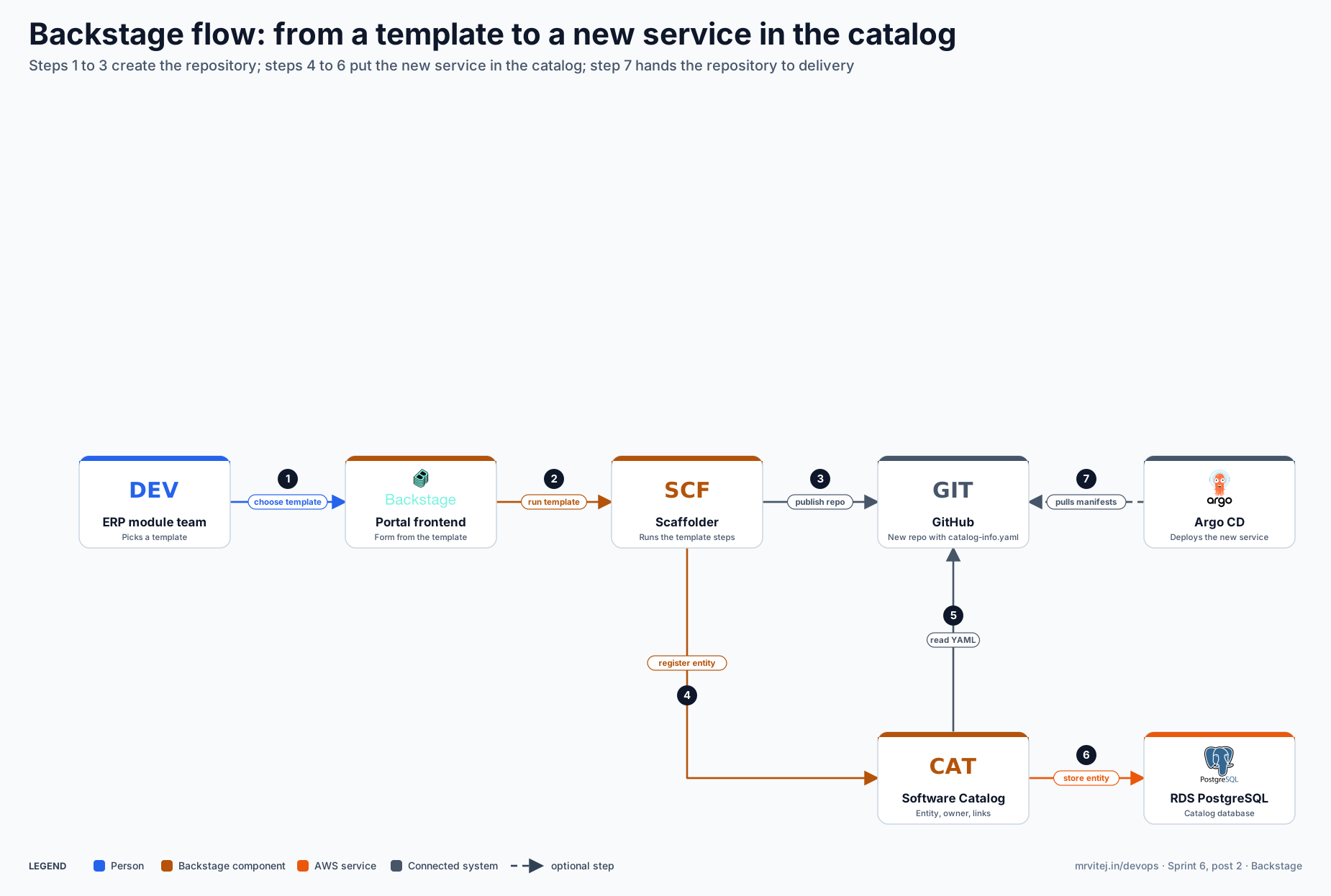
From a template to a new service in the catalog
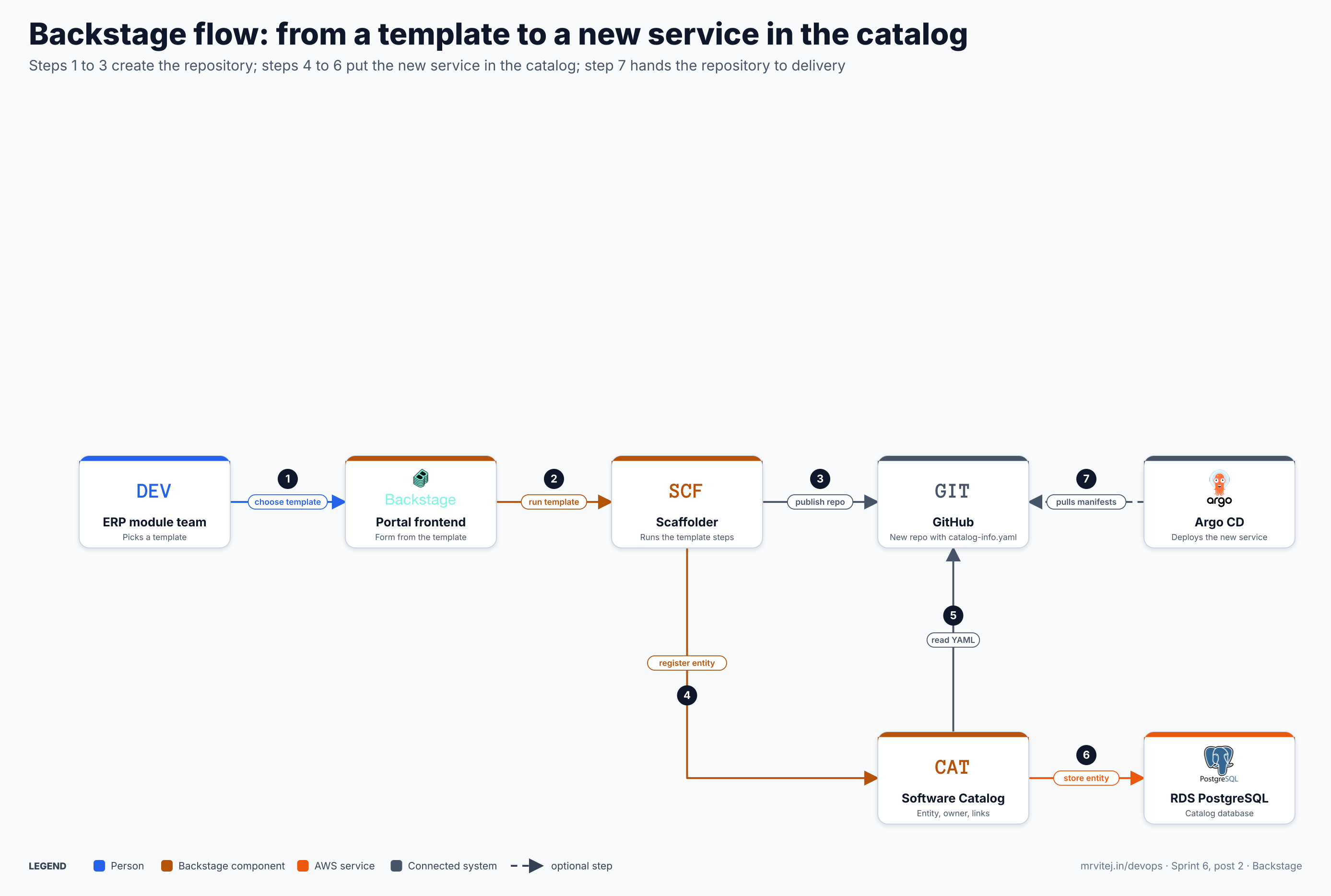
- Choose a template. A team member opens
/create, picks a template and fills in its form (name, owner, repository location). - Run the template. The portal sends the answers to the Scaffolder, which runs the template’s steps in order.
- Publish the repository. A
publish:githubstep creates the repository from the fetched skeleton, which already contains acatalog-info.yaml. - Register the entity. A
catalog:registerstep tells the Software Catalog about the new descriptor. - Read the YAML. The catalog fetches
catalog-info.yamlfrom the new repository and processes it. - Store the entity. The catalog writes the entity and its relations to PostgreSQL. It now appears in the portal with its owner.
- Deploy (optional). If the skeleton includes manifests and Argo CD watches the organisation, it pulls them and deploys the service.
Open the zoomable flow diagram, or download it as SVG or PNG.
Install Backstage
Backstage is not a package you install and configure; it is an app you create from a generator, then customise and build into your own container image. The Helm chart and the Kubernetes manifests deploy an image, they do not replace that step.
Prerequisites
From the project’s installation guide:
- A Unix-like system (Linux, macOS or WSL) with a build environment (
makeandbuild-essentialon Debian or Ubuntu). - At least 20 GB of disk and 6 GB of memory for the standalone app with demo data.
- A supported Node.js release. The guide recommends Node 24 or 26, and the versioning policy states that Backstage supports Node.js 24 and 26 as of the 1.57.0 release.
- Yarn 4.4.1 (run
corepack enable, thenyarn set version 4.4.1), Docker and Git. - Ports 3000 (frontend) and 7007 (backend) reachable if the machine is remote.
Create and run an app locally
npx @backstage/create-app@latest      # asks for an app name, then runs yarn install and yarn tsc
cd my-backstage-app
yarn start                            # frontend on :3000, backend on :7007
Open http://localhost:3000. The standalone app uses an in-memory SQLite database and demo content, so it is for evaluation only. The generated folder has app-config.yaml (main configuration), catalog-info.yaml (example descriptors), and packages/app and packages/backend.
Build the image
The project’s Docker guide builds the backend, which also serves the bundled frontend:
yarn install --immutable
yarn tsc
yarn build:backend
docker image build . -f packages/backend/Dockerfile --tag backstage
docker run -it -p 7007:7007 backstage
For repeatable builds use the multi-stage Dockerfile from the same guide, which caches the dependency layer.
Move to PostgreSQL
Change the backend.database block in app-config.yaml (and app-config.production.yaml) from SQLite to pg. The values come from environment variables, which Kubernetes fills from a Secret:
backend:
  database:
    client: pg
    connection:
      host: ${POSTGRES_HOST}
      port: ${POSTGRES_PORT}
      user: ${POSTGRES_USER}
      password: ${POSTGRES_PASSWORD}
The database guide also describes passwordless access to Amazon RDS for PostgreSQL with AWS IAM authentication. Check the connection options in the configuration reference for TLS settings against your RDS version.
Deploy on Kubernetes
The Kubernetes guide runs Backstage as a stateless Deployment with an external PostgreSQL. A minimal Deployment from that guide:
apiVersion: apps/v1
kind: Deployment
metadata:
  name: backstage
  namespace: backstage
spec:
  replicas: 1
  selector:
    matchLabels:
      app: backstage
  template:
    metadata:
      labels:
        app: backstage
    spec:
      containers:
        - name: backstage
          image: backstage:1.0.0          # use a full registry URL, for example ECR
          ports:
            - name: http
              containerPort: 7007
          envFrom:
            - secretRef:
                name: postgres-secrets
            - secretRef:
                name: backstage-secrets
Add a Service on port 80 targeting http, and an Ingress or load balancer to expose it. app.baseUrl and backend.baseUrl in the configuration must match the public address.
Or use the Helm chart
helm repo add backstage https://backstage.github.io/charts
helm install my-release backstage/backstage
The chart (version 2.11.0 when this post was written) needs Kubernetes 1.25 or later and Helm 3.10 or later, and has ingress and networkPolicy values. Its README is explicit that, by default, it deploys a pre-packaged vanilla Backstage image for demo purposes that is probably not suitable for production. To run your own app, point the chart at the image you built. It can also install a Bitnami PostgreSQL subchart (postgresql.enabled, off by default); with RDS you leave that off.
Check the install
kubectl -n backstage get pods
kubectl -n backstage logs deploy/backstage | head -40
curl -s http://<backstage-host>/api/catalog/entities | head -c 300
The logs should list the initialised plugins (app, catalog, scaffolder, techdocs, auth, kubernetes and others). The catalog API call needs a signed-in session or a token when authentication is on, so a 401 there is expected in a production-style setup.
Your first catalog entity
apiVersion: backstage.io/v1alpha1
kind: Component
metadata:
  name: erp-ledger
  description: General ledger service for the ERP
  annotations:
    backstage.io/techdocs-ref: dir:.
    backstage.io/kubernetes-id: erp-ledger
    backstage.io/kubernetes-namespace: acme-prod
spec:
  type: service
  lifecycle: production
  owner: group:default/finance-team
  system: erp
Save this as catalog-info.yaml in the repository root, then register it from /create with Register existing component and the full URL of the file. A catalog location can also be set in app-config.yaml:
catalog:
  locations:
    - type: url
      target: https://github.com/<org>/erp-ledger/blob/main/catalog-info.yaml
The three annotations are the ones the documentation describes: techdocs-ref points TechDocs at the docs in the same repository, and the two Kubernetes annotations tie the entity to its cluster objects. The name erp-ledger and the namespace here are examples for this series, not a tested setup.
Software Templates
A template is an entity of kind Template that you can keep in Git like any other. This trimmed version follows the structure in the project’s “Writing Templates” guide:
apiVersion: scaffolder.backstage.io/v1beta3
kind: Template
metadata:
  name: erp-module
  title: New ERP module
  description: A service skeleton with docs, a pipeline and a catalog entry
spec:
  owner: group:default/platform-team
  type: service
  parameters:
    - title: Module details
      required: [name, owner]
      properties:
        name:
          title: Name
          type: string
        owner:
          title: Owner
          type: string
          ui:field: OwnerPicker
          ui:options:
            catalogFilter:
              kind: Group
    - title: Repository
      required: [repoUrl]
      properties:
        repoUrl:
          title: Repository location
          type: string
          ui:field: RepoUrlPicker
          ui:options:
            allowedHosts: [github.com]
  steps:
    - id: fetch
      name: Fetch skeleton
      action: fetch:template
      input:
        url: ./skeleton
        values:
          name: ${{ parameters.name }}
          owner: ${{ parameters.owner }}
    - id: publish
      name: Publish
      action: publish:github
      input:
        repoUrl: ${{ parameters.repoUrl }}
        defaultBranch: main
    - id: register
      name: Register
      action: catalog:register
      input:
        repoContentsUrl: ${{ steps.publish.output.repoContentsUrl }}
        catalogInfoPath: /catalog-info.yaml
  output:
    links:
      - title: Repository
        url: ${{ steps.publish.output.remoteUrl }}
      - title: Open in catalog
        icon: catalog
        entityRef: ${{ steps.register.output.entityRef }}
The ./skeleton directory next to the template is not shown here; it holds the files to copy, including a catalog-info.yaml and a mkdocs.yml. When you write your own scaffolder actions, the project warns to use camelCase action ids, because a dash makes expressions such as steps.fetch-component-id.output evaluate as subtraction.
Sign-in, docs and clusters
Sign-in with Keycloak
Backstage has a generic OIDC provider that you can re-badge as Keycloak. Install the backend module @backstage/plugin-auth-backend-module-oidc-provider, add it in packages/backend/src/index.ts, register an OIDC client in Keycloak, and configure it:
auth:
  environment: production
  session:
    secret: ${AUTH_SESSION_SECRET}
  providers:
    oidc:
      production:
        metadataUrl: https://<keycloak-host>/realms/<realm>/.well-known/openid-configuration
        clientId: ${AUTH_OIDC_CLIENT_ID}
        clientSecret: ${AUTH_OIDC_CLIENT_SECRET}
        signIn:
          resolvers:
            - resolver: emailMatchingUserEntityProfileEmail
The provider also needs a sign-in page entry in the frontend. A sign-in resolver maps the identity to a User entity in the catalog; if no entity matches, sign-in fails with a NotFoundError. So the catalog must hold User and Group entities for the people who sign in. The guest provider is for development only and is explicitly disabled outside development.
TechDocs on S3
Out of the box TechDocs builds docs inside the Backstage backend (builder: local), runs MkDocs in Docker (runIn: docker) and stores the result on local disk. The project recommends generating docs in CI instead, and storing them in a bucket:
techdocs:
  builder: external
  publisher:
    type: awsS3
    awsS3:
      bucketName: <techdocs-bucket>
      region: ap-south-1
The backend needs s3:ListBucket and s3:GetObject to read, and the CI job that publishes needs s3:PutObject and the delete permissions as well. Bucket names are globally unique.
The Kubernetes plugin
Add @backstage/plugin-kubernetes to packages/app and @backstage/plugin-kubernetes-backend to packages/backend, then add the backend with backend.add(import('@backstage/plugin-kubernetes-backend')). Cluster access is configured in app-config.yaml:
kubernetes:
  serviceLocatorMethod:
    type: multiTenant
  clusterLocatorMethods:
    - type: config
      clusters:
        - name: erp-hub
          url: https://<eks-api-endpoint>
          authProvider: serviceAccount
          serviceAccountToken: ${K8S_SERVICE_ACCOUNT_TOKEN}
          skipTLSVerify: false
Give that service account a read-only role; the plugin documentation lists what it reads. The Kubernetes objects of an entity are found by the backstage.io/kubernetes-id label, or by a backstage.io/kubernetes-label-selector annotation, which takes precedence.
Production reference design
- Image. Build your own app image in CI and push it to a registry such as Amazon ECR. Do not run the Helm chart’s demo image in production.
- Database. Amazon RDS for PostgreSQL, private subnets, credentials from a secret store or IAM authentication. Backstage creates one logical database per plugin.
- Deployment. At least two replicas of the backend in a dedicated namespace, health checks enabled, resource requests set, behind an Ingress or gateway with TLS.
- Identity. Keycloak or another OIDC provider, with
UserandGroupentities in the catalog that match the sign-in resolver. - Catalog ingestion. A GitHub integration and catalog locations or entity providers, so descriptors are discovered rather than registered by hand.
- Docs.
techdocs.builder: external, a CI step that builds and publishes docs, and an S3 bucket as the publisher. - Cluster view. A read-only service account per cluster for the Kubernetes plugin.
- Upgrades. Pin dependencies, and upgrade through the project’s release notes; the project releases monthly.
Typical production uses: a service catalog with enforced ownership, a set of templates that carry the organisation’s defaults, and a single place for docs and runbooks.
Security
- Authentication. Configure a real sign-in provider, and do not expose the portal to the internet without one.
- Guest access. Never enable the guest provider outside development.
- Secrets. Kubernetes Secrets are base64, not encryption; the Kubernetes guide says to enable encryption at rest and suggests SealedSecrets or a similar tool for Git.
- Cluster access. Use read-only roles for the Kubernetes plugin and keep service account tokens in a secret, not in
app-config.yaml. - Docs. TechDocs does not allow
svg_objectPlantUML output, because of CVE-2021-32661; usesvg_inline. - Audit. The project published an external security audit by X41 D-Sec on 23 August 2022.
Troubleshooting
This section is built from the project’s documentation. I did not run Backstage for this post, so test each entry on your own install.
| Symptom | Likely cause | How to check | Fix |
|---|---|---|---|
npx @backstage/create-app fails or yarn install errors |
Unsupported Node.js version, missing build tools or no Yarn 4 | node -v, yarn -v, make --version |
Use Node 24 or 26 (nvm), run corepack enable and yarn set version 4.4.1, install build-essential |
Docker build says can't create directory 'packages/': Permission denied |
The app directory was created as root | Build log | Enable BuildKit (DOCKER_BUILDKIT=1), as the Docker guide says |
| Pod crashes or the catalog cannot start in Kubernetes | The app still points at in-memory SQLite, or the PostgreSQL env vars are missing | Pod logs; the backend.database block; kubectl describe pod |
Use client: pg and supply POSTGRES_HOST, POSTGRES_PORT, POSTGRES_USER, POSTGRES_PASSWORD; rebuild the image after config changes |
| Portal opens but shows errors or CORS failures behind an Ingress | app.baseUrl, backend.baseUrl or backend.cors.origin do not match the public address |
The browser console; app-config.production.yaml |
Set all three to the public URL and rebuild the image |
Sign-in fails with NotFoundError |
The sign-in resolver found no matching User entity |
Backend log at login; the catalog for a User with that email |
Add User and Group entities, or change the resolver |
| An entity is registered but does not appear, or shows as unprocessed | The descriptor is invalid, or the location is unreachable | The catalog’s Unprocessed Entities page; backend logs | Fix the YAML or the integration credentials, then refresh |
| The Kubernetes tab is empty for an entity | The entity annotation does not match the labels on the cluster objects | curl -X POST <backend>/api/kubernetes/services/<name> with the entity metadata, as the plugin guide shows |
Label objects with backstage.io/kubernetes-id, or use backstage.io/kubernetes-label-selector |
| TechDocs says documentation is not found when generating | A .gitattributes export-ignore rule hides the docs from the tar archive |
The repository’s .gitattributes |
Remove the rule, or generate docs in CI and use builder: external |
| MkDocs build errors in TechDocs | Missing mkdocs.yml or a bad MkDocs configuration |
npx @techdocs/cli serve in the repository |
Fix the MkDocs file; preview locally before pushing |
| TechDocs fails inside the Backstage container | The generator tries to start Docker inside Docker | techdocs.generator.runIn |
Set runIn: local and install mkdocs-techdocs-core, or build docs in CI |
Usage cases
- Service catalog. One place that answers who owns a service and where its docs and pipelines are.
- Golden paths. Templates that create a repository, a pipeline and a catalog entry in one action.
- Docs next to code. TechDocs keeps runbooks in the same repository as the service.
- Operational view. The Kubernetes plugin shows pods and deployments on the same page as the entity.
- In the Sprint 6 project. The ERP product uses Backstage as its developer portal: one catalog entry per ERP module, a template for a new module, and a cluster view of each module’s tenant namespace. Part 5 wires it in.
Operational considerations
- It is an app you own. You build, test and upgrade your own Backstage image; the project does not ship a hosted service. Plan time for a platform engineer to maintain it.
- Data quality is the real work. A catalog is only useful if descriptors are kept in Git, owners exist as
Groupentities, and templates register what they create. - Plugins multiply upgrades. Every added plugin is a dependency to track. Prefer the core plugins first.
- Generate docs in CI. Docs built inside the backend take its CPU and need Docker, which complicates a container deployment.
- Scale the backend by splitting. You can deploy more than one backend and give heavy plugins their own deployment.
Adoption
The project’s ADOPTERS file lists organisations that use Backstage, including Spotify, American Airlines, Expedia Group, Zalando, HelloFresh, Wayfair, Twilio and Fidelity Investments. The file asks organisations to add themselves, so it is a self-reported list rather than an audited one, and it says nothing about how deep each use is.
Alternatives
| Solution | Model | Best suited to |
|---|---|---|
| Wiki pages and spreadsheets | Manual lists of services and owners | A small team with few services |
| Hosted internal developer portals (for example Port, Cortex, OpsLevel) | Commercial SaaS configured through a UI | Teams that want a portal without owning a Node.js application |
| Backstage-based distributions (for example the OpenShift chart derived from the Helm chart) | Backstage packaged and supported by a vendor | Teams that want Backstage with a support contract |
| Backstage, self-built | Open source framework you customise | Teams that want full control of the data model and plugins and can maintain the app |
Strengths and limitations
| Strengths | Limitations |
|---|---|
| One catalog, one UI and one data model for services, docs and clusters | You build and maintain your own app and image |
| Templates make the approved way the easy way | A catalog needs ongoing data hygiene and owners |
| Plugin architecture with a large open source ecosystem | Many plugins mean many dependencies to upgrade |
| Docs live next to the code | TechDocs needs thought about where docs are built and stored |
| Standard Kubernetes-style YAML, so GitOps fits | Production use needs real authentication, PostgreSQL and TLS set up by you |
Recommendation
Adopt if you have enough services and teams that finding owners and creating services consistently is a daily cost, and you can give a small team time to run the portal. Assess a hosted portal first if you want the result without maintaining a Node.js app. Start with the catalog only: register ten services from Git, add owners, then add one template and TechDocs.
References: Backstage on CNCF · Backstage website and documentation · Repository · Standalone installation guide · Deploying with Kubernetes · Helm chart · Adopters · CNCF Landscape entry