
An ERP is full of processes that take time: a purchase request waits for a manager, a month-end close runs for hours across many steps, an order waits for a payment that may arrive tomorrow. If that logic lives in a web request handler, a restart loses it; if it lives in status columns and cron jobs, it becomes a tangle that nobody trusts. Cadence lets you write the process as one function and keeps its progress safe on the server. The Landscape lists it as a Sandbox project, accepted on 22 May 2025, described as a distributed, scalable, durable and highly available platform for fault-oblivious stateful code.
CNCF daily · Sprint 6, post 4 of 26 · Automation & Configuration
At a glance
| Category | Provisioning › Automation & Configuration |
| CNCF status | Sandbox. Accepted May 22, 2025 |
| Written in | Go (server). Client libraries for Go and Java; the docs also cover a Python client |
| License | Apache 2.0 |
| Origin | Built at Uber |
| Server parts | Four services: frontend, history, matching and worker |
| Storage | Cassandra, MySQL or PostgreSQL for state; Elasticsearch or OpenSearch is optional for advanced visibility |
| Ports in the Docker Compose file | 7933 (TChannel frontend), 7833 (gRPC frontend), 8088 (web UI), 9090 (Prometheus) |
| Not a Landscape AI Native placement | The Landscape lists it only under Automation & Configuration, so it gets no AI Native tag here |
The problem Cadence solves
Consider a purchase approval: notify the manager, wait for a decision, escalate after 48 hours, post to the ledger, publish an event. Written without a workflow engine, each step needs a database row for state, a job to poll for timeouts, retry logic for every call, and care for the case where the server restarts between steps two and three.
| Concern | Hand-built (status columns, cron, queues) | Cadence |
|---|---|---|
| Where state lives | Your tables, updated by every step | The workflow’s recorded history on the server |
| A worker crashes mid-process | You write recovery code | Another worker replays the history and continues |
| Waiting for a person for days | Polling job and a timeout table | A durable timer and a signal, with no polling |
| Retrying a flaky call | Per-call retry code | A retry policy on the activity |
| Seeing where a process is | Query your own tables | The web UI shows each execution and its event history |
| The cost | Plumbing code, repeated | A server to run, and a strict rule that workflow code must be deterministic |
Key concepts
| Term | Meaning |
|---|---|
| Workflow | A durable function that defines the process. It survives restarts, and its code must be deterministic |
| Activity | A unit of work that talks to the outside world: an API call, a database write, an email. It is retried independently of the workflow |
| Worker | A process you run that polls task lists, runs workflow and activity code and reports results |
| Task list | A named queue that routes work to a pool of workers |
| Domain | The unit of isolation in a Cadence cluster. You register one per application or team |
| Signal | An asynchronous message sent to a running workflow, for example “approved” |
| Query | A read-only call that returns a workflow’s current state without changing it |
| Timer | A durable wait. The workflow can sleep for minutes or months without polling |
| Child workflow | A workflow started by another workflow to split a large process into parts |
| History | The recorded sequence of events for one workflow execution. Replaying it rebuilds the workflow’s state |
The docs describe four primitives that compose together: workflow, activity, task list and worker. Everything else builds on them.
Architecture
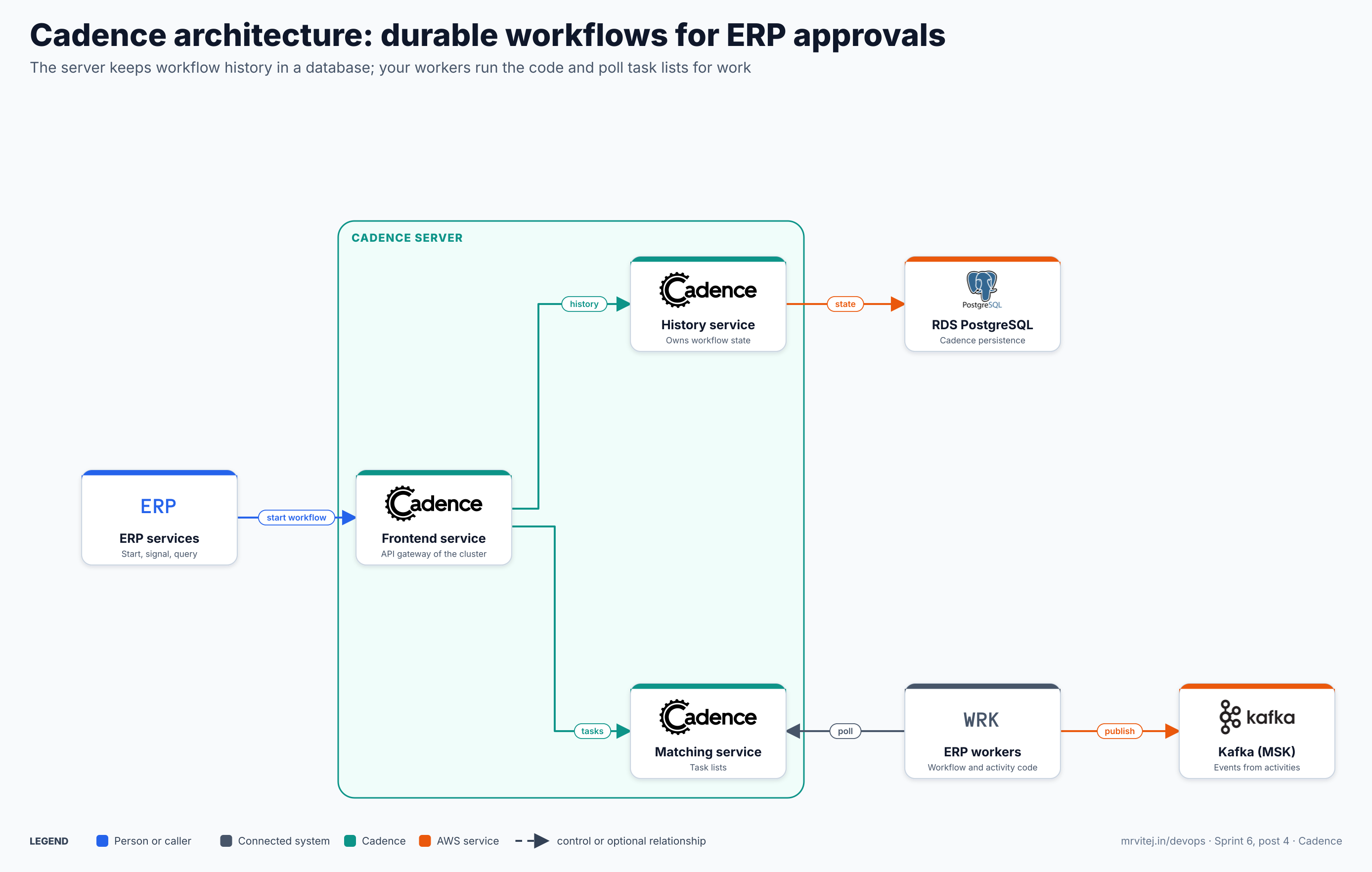
Blue is a caller, grey is a connected system, teal is Cadence and orange is an AWS service. Open the zoomable diagram, or download it as SVG or PNG.
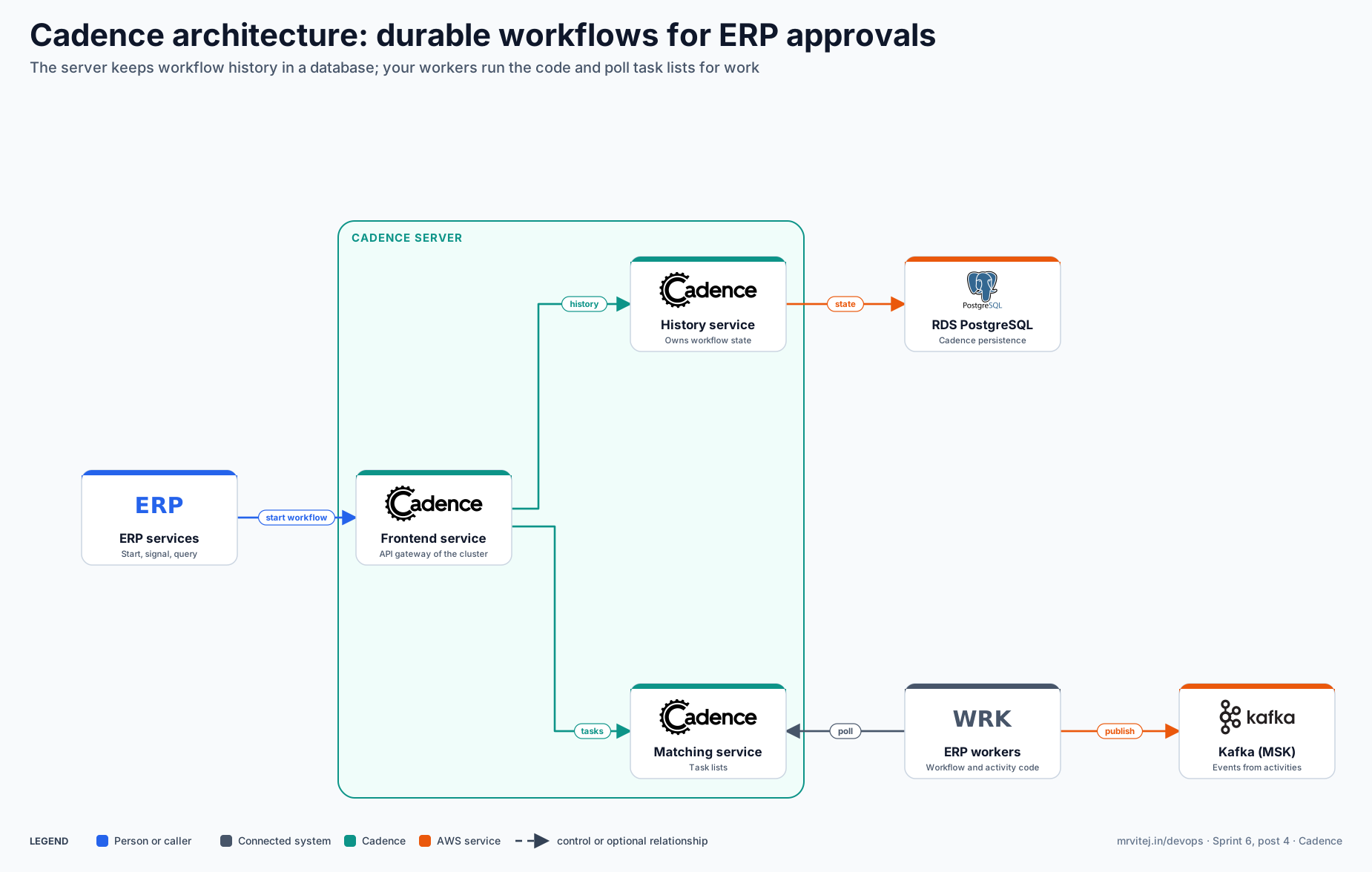
| Component | Responsibility |
|---|---|
| ERP services | Start workflows, send signals and run queries through the frontend. |
| Frontend service | The cluster’s API entry point. Handles requests from clients and workers. |
| History service | Owns each workflow’s state and event history, and writes it to the database. |
| Matching service | Holds the task lists and hands tasks to polling workers. |
| Worker service (inside Cadence) | Runs Cadence’s own internal background workflows. It is separate from your workers. |
| ERP workers | Your processes. They run the workflow and activity code and poll task lists. |
| RDS PostgreSQL | Persistence for workflow state. Cassandra and MySQL are the other supported stores. |
| Kafka (MSK) | Where activities publish business events, such as purchase.approved. |
The docs recommend deploying the server’s service types separately on Kubernetes so they scale independently: frontend for API traffic, history for execution, matching for task lists.
A purchase approval that waits for a person
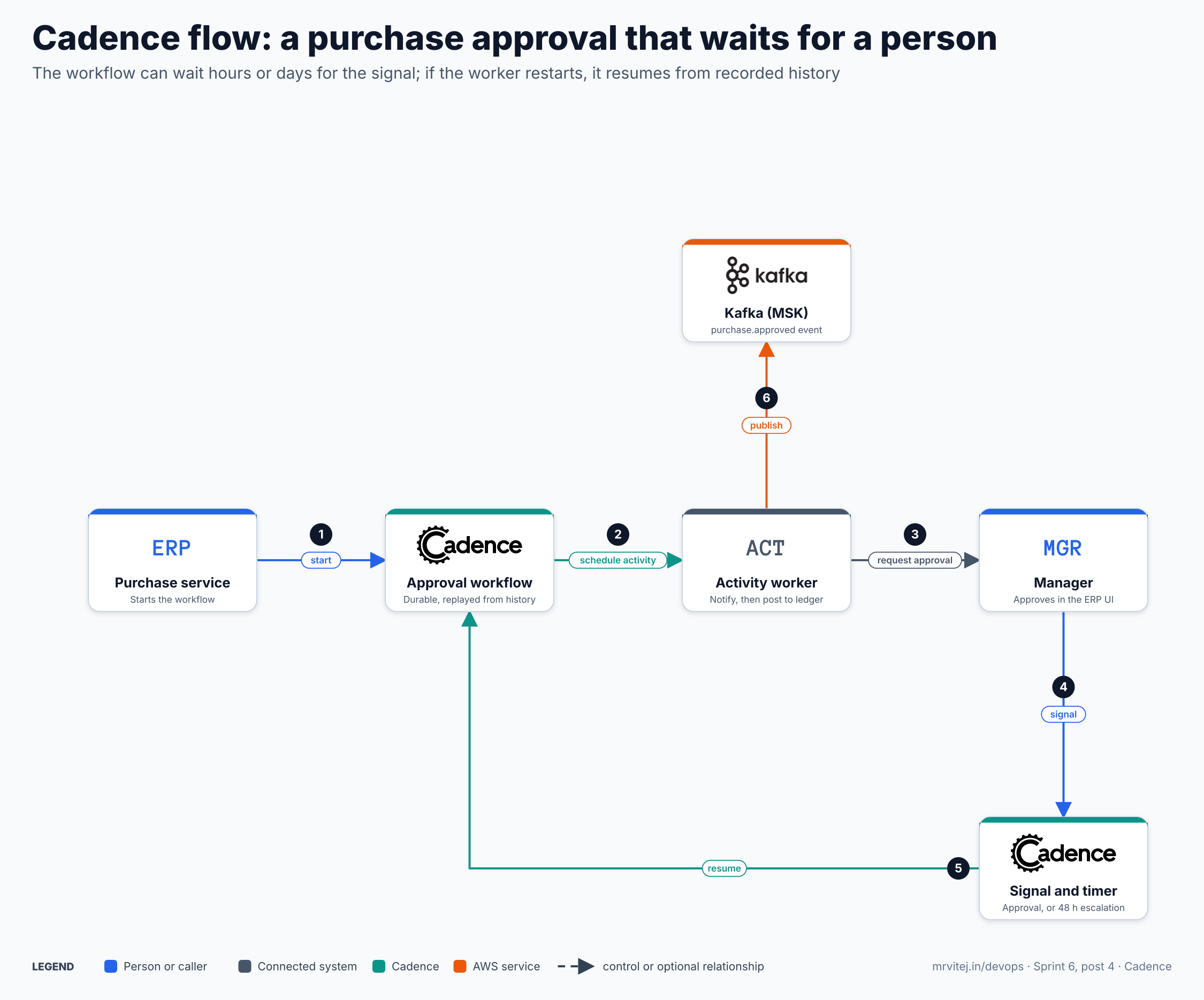
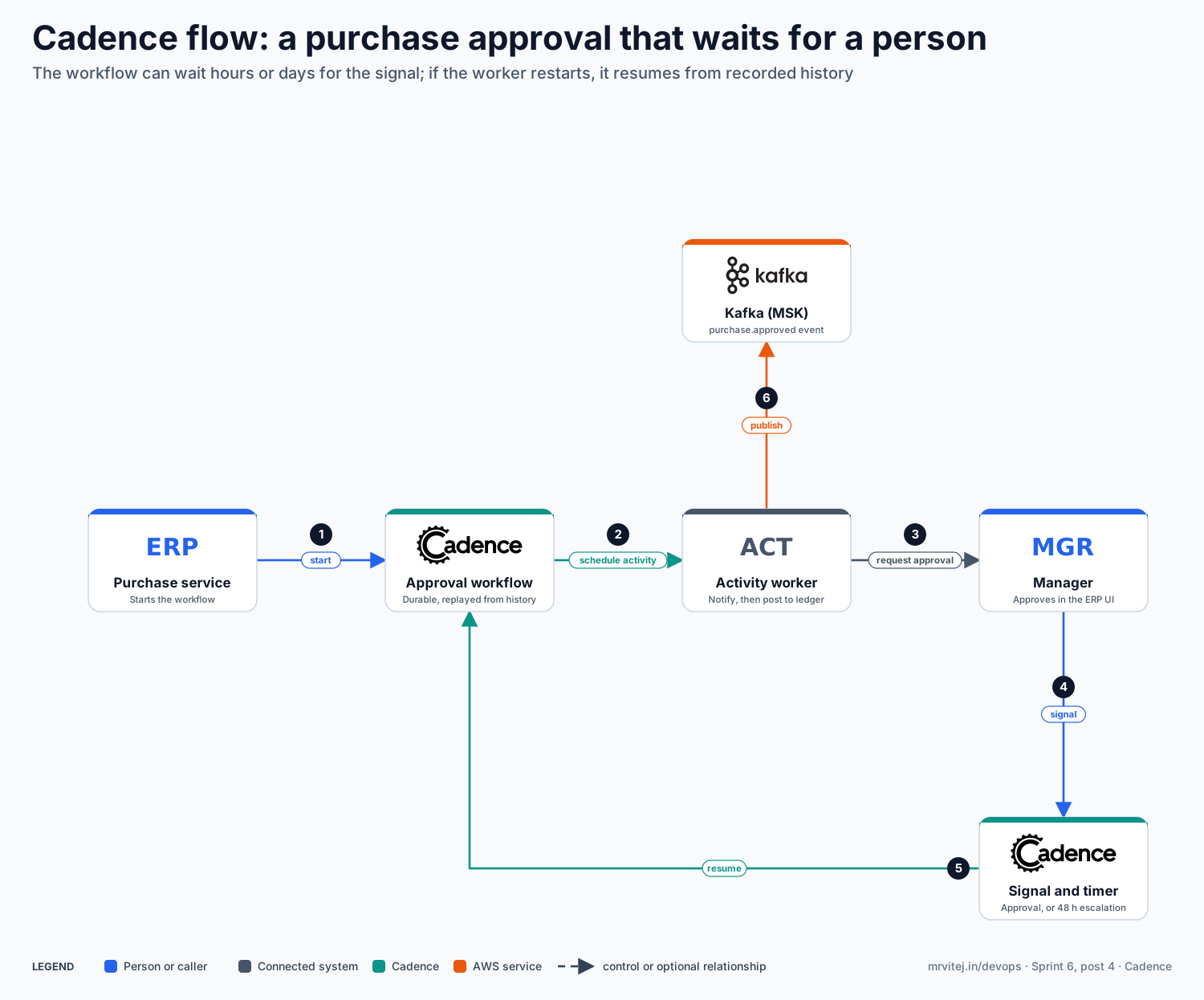
- Start. The purchase service starts an approval workflow with a workflow ID such as
po-10452. - Schedule an activity. The workflow asks for the “notify manager” activity to run.
- Request approval. An activity worker notifies the manager and returns.
- Signal. The manager approves in the ERP screen, and the ERP sends a signal to the workflow. A 48-hour timer runs beside it.
- Resume. Whichever comes first, the signal or the timer, resumes the workflow.
- Publish. An activity posts to the ledger and publishes the event to Kafka.
Open the zoomable flow diagram, or download it as SVG or PNG.
Real world: why replay needs deterministic code
When a worker restarts, it does not remember where the workflow was. It replays the recorded history through your workflow function, and each step must make the same decisions it made the first time. That is why the docs forbid reading the clock, using random numbers, making direct I/O calls or starting your own threads inside workflow code. Time comes from timers, and anything that touches the outside world goes in an activity. The Python client docs list the same rules.
An example: if your workflow called time.Now() to decide whether 48 hours had passed, replay a day later would take a different branch from the original run and the workflow would break. A durable timer records the wait in history, so replay gives the same answer.
Install Cadence
Local, with Docker Compose
The official installation page gives these steps. Docker must be installed first.
curl -O https://raw.githubusercontent.com/uber/cadence/master/docker/docker-compose.yml
curl -O https://raw.githubusercontent.com/uber/cadence/master/docker/prometheus/prometheus.yml
docker compose up
The page itself uses the older docker-compose spelling. The repository has since moved to the cadence-workflow organisation, so if the uber URLs stop working, clone github.com/cadence-workflow/cadence and run docker compose -f docker/docker-compose.yml up from the repository root.
The compose file starts Cassandra, Prometheus, a node exporter, the Cadence server (image ubercadence/server:master-auto-setup) and the web UI (ubercadence/web). The web UI is on http://localhost:8088. The repository also ships variants for MySQL, PostgreSQL and Elasticsearch persistence, for example docker-compose-postgres.yml.
Register a domain in a second terminal, then check it:
docker run --network=host --rm ubercadence/cli:master --do test-domain domain register -rd 1
docker run --network=host --rm ubercadence/cli:master --do test-domain domain describe
Here -rd 1 is the retention period in days. Keep the domain name; your workers and CLI commands use it. The CLI is also available through Homebrew as brew install cadence-workflow.
On Kubernetes, with Helm
The project publishes a Helm chart in the cadence-charts repository, announced in October 2024 as the starting point for standardising Cadence on Kubernetes.
helm repo add cadence-workflow https://cadenceworkflow.github.io/cadence-charts
helm repo update
helm install cadence cadence-workflow/cadence --namespace cadence --create-namespace --values values.yaml
The chart includes subcharts for its dependencies, and the repository has example values files, including one for PostgreSQL with OpenSearch that the project’s GKE codelab uses. For the ERP on EKS, point the values at RDS PostgreSQL instead of an in-cluster database. I did not run the chart for this post, so read the example values file before you copy it, and see the Helm codelab for the exact keys.
Try it: a workflow with a signal and a timer
Write the workflow with the Go client. This sketch shows the shape; the names are examples for this series and it has not been compiled or run.
package erp

import (
	"time"

	"go.uber.org/cadence"
	"go.uber.org/cadence/workflow"
)

type PurchaseRequest struct {
	ID      string
	Amount  float64
	Manager string
}

func PurchaseApproval(ctx workflow.Context, req PurchaseRequest) (string, error) {
	ctx = workflow.WithActivityOptions(ctx, workflow.ActivityOptions{
		ScheduleToStartTimeout: time.Minute,
		StartToCloseTimeout:    time.Minute,
		RetryPolicy: &cadence.RetryPolicy{
			InitialInterval:    time.Second,
			BackoffCoefficient: 2,
			MaximumAttempts:    5,
		},
	})

	if err := workflow.ExecuteActivity(ctx, NotifyManager, req).Get(ctx, nil); err != nil {
		return "", err
	}

	// Wait for the approval signal or the 48-hour escalation timer.
	approvals := workflow.GetSignalChannel(ctx, "approval")
	timerCtx, cancelTimer := workflow.WithCancel(ctx)
	timer := workflow.NewTimer(timerCtx, 48*time.Hour)

	decision := ""
	sel := workflow.NewSelector(ctx)
	sel.AddReceive(approvals, func(c workflow.Channel, more bool) {
		c.Receive(ctx, &decision)
		cancelTimer()
	})
	sel.AddFuture(timer, func(f workflow.Future) {
		if f.Get(ctx, nil) == nil {
			decision = "escalated"
		}
	})
	sel.Select(ctx)

	if decision == "approved" {
		if err := workflow.ExecuteActivity(ctx, PostToLedger, req).Get(ctx, nil); err != nil {
			return "", err
		}
		return decision, workflow.ExecuteActivity(ctx, PublishApproved, req).Get(ctx, nil)
	}
	return decision, nil
}
The activities (NotifyManager, PostToLedger, PublishApproved) are ordinary Go functions. The worker setup, which connects to the frontend at 127.0.0.1:7833 over gRPC and registers the workflow and activities on a task list, follows the project’s Go HelloWorld sample; copy that setup instead of writing it from memory.
Start, signal and inspect it from the CLI:
cadence --do test-domain workflow start --tl erp-approvals --wt PurchaseApproval \
  --et 604800 --wid po-10452 -i '{"ID":"po-10452","Amount":4200,"Manager":"asha"}'
cadence --do test-domain workflow signal --wid po-10452 --name approval -i '"approved"'
cadence --do test-domain workflow show --wid po-10452
The flags above follow the CLI’s usual shape, but I did not run them, so confirm them with cadence workflow start --help on your version. You can also watch the execution and its event history in the web UI on port 8088.
Production reference design
- A dedicated database. Run RDS PostgreSQL for Cadence separately from your application data, with backups and a Multi-AZ setup.
- Separate service deployments. Run frontend, history and matching as separate Deployments, each with its own scaling and resource limits.
- Domains per team. Register one domain per ERP module or team, with a retention period that fits your audit needs.
- Task lists per worker pool. Give each worker deployment its own task list so you can scale and roll them separately.
- Idempotent activities. Activities are retried, so each one must be safe to run twice: use an idempotency key on ledger posts and on Kafka messages.
- Version carefully. Changing workflow code that has running executions can break replay. Use the client’s versioning support, or start new work on a new workflow type.
- Metrics and alerts. Scrape the server’s Prometheus endpoints, as the compose file does, and alert on task list backlog and failed workflows.
- Visibility. Add Elasticsearch or OpenSearch only if you need advanced search over executions; the basic setup works without it.
Security
- Network. Keep the frontend private inside the VPC and allow only ERP services and workers to reach it.
- Database credentials. Keep the database password in a Kubernetes Secret or AWS Secrets Manager, not in values files in Git.
- Payloads. Workflow inputs and results are stored in history. Do not put card numbers or full personal records in them; pass IDs and fetch the data inside activities.
- Access. The docs describe authorization and authentication hooks; check what your version supports before exposing the web UI beyond the cluster.
- Isolation. Domains separate applications, but they share a cluster, so treat them as a convenience boundary and not a hard security one.
Troubleshooting
This table comes from the project’s installation page, the compose file and the concepts docs. I did not run Cadence for this post, so test each entry on your setup.
| Symptom | Likely cause | How to check | Fix |
|---|---|---|---|
| Server container is slow to start or restarts | Cassandra is not healthy yet; the compose file makes Cadence wait for it | docker logs -f docker_cassandra_1 and docker logs -f docker_cadence_1 |
Wait for the health check, give Docker more memory, then retry |
| Stale or broken local images | An old master-auto-setup image |
docker images |
docker pull ubercadence/server:master-auto-setup; as a last resort the docs suggest docker system prune --all |
| Domain not found | The domain was never registered, or the name differs | cadence --do <name> domain describe |
Register it with domain register and use the same name in the worker |
| Workflow starts but nothing runs | No worker is polling that task list, or the task list name differs | Check the task list in the web UI and the worker config | Start a worker on the same task list name |
| Web UI at 8088 will not load | The cadence-web container is down, or cannot reach the server |
docker logs -f docker_cadence-web_1 |
Check it can reach cadence:7833, per the CADENCE_GRPC_PEERS setting |
| Worker cannot connect | Wrong host or port, or TChannel and gRPC mixed up | Compare with the compose ports: 7933 TChannel, 7833 gRPC | Use the port your client version expects |
| Workflow fails on replay | Non-deterministic code, or code changed under a running execution | Read the failure in the web UI’s history view | Remove clock, random and I/O calls from workflow code; use versioning for changes |
| Activity runs twice | Retries after a timeout | Look at the activity attempts in the history | Make the activity idempotent and set the timeouts deliberately |
| Work piles up on a task list | Too few workers, or a worker rate limit | Watch the task list backlog in metrics | Add workers, or raise the worker’s rate limit |
| Helm install fails | Missing dependency or values for the database | helm template with your values, then kubectl describe pod |
Start from the project’s example values file and change one thing at a time |
Usage cases
- Approvals. A purchase, expense or access request waits for a person, escalates on a timer and records the outcome.
- Order to cash. A sequence of calls across inventory, billing and shipping, with compensation steps when something fails.
- Month-end close. A long run of dependent jobs where each step can be retried and you can see which one is stuck.
- Scheduled and cron work. Recurring processes that need history and retries.
- In the Sprint 6 project. The ERP product uses Cadence for approval flows and for the close, started by the ERP services and publishing events to Kafka. The AI agent plan also uses it for approvals where a person stays in the loop. Part 2 wires it in.
Operational considerations
- It needs a database you trust. All workflow state lives there, so size it, back it up and monitor it as a core system.
- Determinism is a discipline. Code review has to catch clock, random and I/O calls inside workflow functions.
- History grows. Very long-running workflows accumulate large histories. Split them with child workflows or continue-as-new style restarts.
- Operate it deliberately. The project’s own Helm announcement admitted that deploying Cadence had been a challenge, with thin operational documentation; that has improved, but plan time for it.
- Do not run two engines. The plan skips Temporal because it would duplicate Cadence. Temporal began as a fork of Cadence, so the concepts carry over, but the two projects are separate and not interchangeable.
Adoption
Cadence was built at Uber and has been used there in production for several years. I did not find an adopters list in the Landscape entry, so this post does not name other users. Check the project’s own site for current references before you cite any.
Alternatives
| Solution | Model | Best suited to |
|---|---|---|
| Temporal | Workflow engine with the same core ideas, forked from Cadence | Teams that want a larger SDK ecosystem and a managed cloud option |
| AWS Step Functions | Managed state machines in JSON | Teams all-in on AWS who prefer a hosted service over running a server |
| Argo Workflows | Kubernetes-native DAG and step workflows | Batch and CI-style pipelines, not long waits for people |
| Camunda or other BPMN engines | Visual process models | Business analysts who design processes in diagrams |
| A queue plus a state table | Hand-built | Very small flows with simple retries |
| Cadence | Workflow as code, durable history, signals and timers | Developers who want complex, long-running processes written as code and are happy to run a server |
Strengths and limitations
| Strengths | Limitations |
|---|---|
| Processes written as plain code with durable state | Workflow code must be deterministic |
| Durable timers and signals for waiting on people and events | You run and operate a multi-service server and its database |
| Independent retries per activity | Changing running workflows needs careful versioning |
| Pluggable storage: Cassandra, MySQL or PostgreSQL | Official client libraries cover Go and Java first |
| Apache 2.0, with years of production use at Uber | Sandbox status, and a smaller community than some alternatives |
Recommendation
Adopt for long-running, human-in-the-loop flows, after a pilot. Start with one process, the purchase approval, on a single domain with PostgreSQL, and run it through a worker restart and a deploy to see replay work. Keep workflow code small, put every outside call in an activity and make activities idempotent. If your team already uses Temporal, do not add Cadence; use the one you have.
References: Cadence on CNCF · Cadence documentation · Installation guide · Cadence repository · Helm charts · CNCF Landscape entry