Capsule is a Kubernetes operator that adds multi-tenancy to a single cluster. Kubernetes namespaces have no hierarchy, so a platform that serves many teams or customers must either make cluster administrators create every namespace, invent a custom API that exists only on that cluster, or run one cluster per tenant and live with cluster sprawl. Capsule groups namespaces into a Tenant, a lightweight cluster-scoped resource. Administrators describe the tenant’s owners, rules and budgets once, and every namespace in the tenant inherits them. Owners then create ordinary namespaces themselves. It was created by Clastix and accepted into the CNCF Sandbox on 13 December 2022.
CNCF daily · Sprint 6, post 1 of 26 · Scheduling & Orchestration
At a glance
| Category | Orchestration & Management › Scheduling & Orchestration |
| CNCF status | Sandbox. Accepted December 13, 2022 |
| Written in | Go |
| License | Apache 2.0 |
| API | capsule.clastix.io/v1beta2 (v1beta1 is still served) |
| Project status | The README calls the project stable, using the Kubernetes definition of stable |
| Main objects | Tenant, TenantOwner, CapsuleConfiguration, GlobalResourceQuota, ResourcePool, TenantResource, GlobalTenantResource |
| Install | Helm chart oci://ghcr.io/projectcapsule/charts/capsule; webhook certificates from cert-manager by default |
| Optional add-on | Capsule Proxy, released separately, lets tenant users list only their own cluster-scoped objects |
The problem Capsule solves
Three ways of sharing a cluster are common, and each has a cost. With plain namespaces, a cluster administrator becomes a bottleneck, because creating a namespace, a quota and a set of role bindings is a privileged job, and developers cannot even list the namespaces that belong to them. With a custom CRD per team, developers must learn an API that exists on your cluster and nowhere else. With one cluster per team, every team gets its own control plane to upgrade, secure and pay for.
Capsule keeps the single cluster and the native Kubernetes experience. The three people involved get clear roles:
| Role | Responsibility |
|---|---|
| Cluster admin | Installs Capsule, creates Tenants, sets budgets and policy |
| Tenant owner | Creates and manages namespaces inside the Tenant and grants access to team members |
| Tenant user | Deploys workloads in tenant namespaces within the limits the owner has set |
The boundary is enforced at the Kubernetes API by admission control, not by a separate API. Tenant namespaces are ordinary namespaces, so Helm, Argo CD, kubectl and every other tool keep working.
Key concepts
| Term | Meaning |
|---|---|
| Tenant | Cluster-scoped resource (tnt) that groups namespaces and defines owners, rules, quotas and options |
| Tenant owner | A user, group or service account named in spec.owners. Capsule keeps their rights in every tenant namespace |
| TenantOwner | A separate cluster-scoped object that names an owner once so several Tenants can match it with permissions.matchOwners |
| Rules | Entries in spec.rules that mutate or enforce policy per namespace, with a namespace selector, an audience and conditions |
| CapsuleConfiguration | Cluster-wide settings: who counts as a Capsule user, the namespace prefix rule, webhook TLS, impersonation and managed RBAC |
| GlobalResourceQuota | One shared ceiling across the namespaces it selects |
| ResourcePool | Capacity allocated to namespaces through claims, with optional ordered queueing |
| TenantResource / GlobalTenantResource | Replicate Secrets, NetworkPolicies, LimitRanges and other objects into tenant namespaces |
| Capsule Proxy | Optional proxy that filters list calls to what a tenant owns |
Architecture
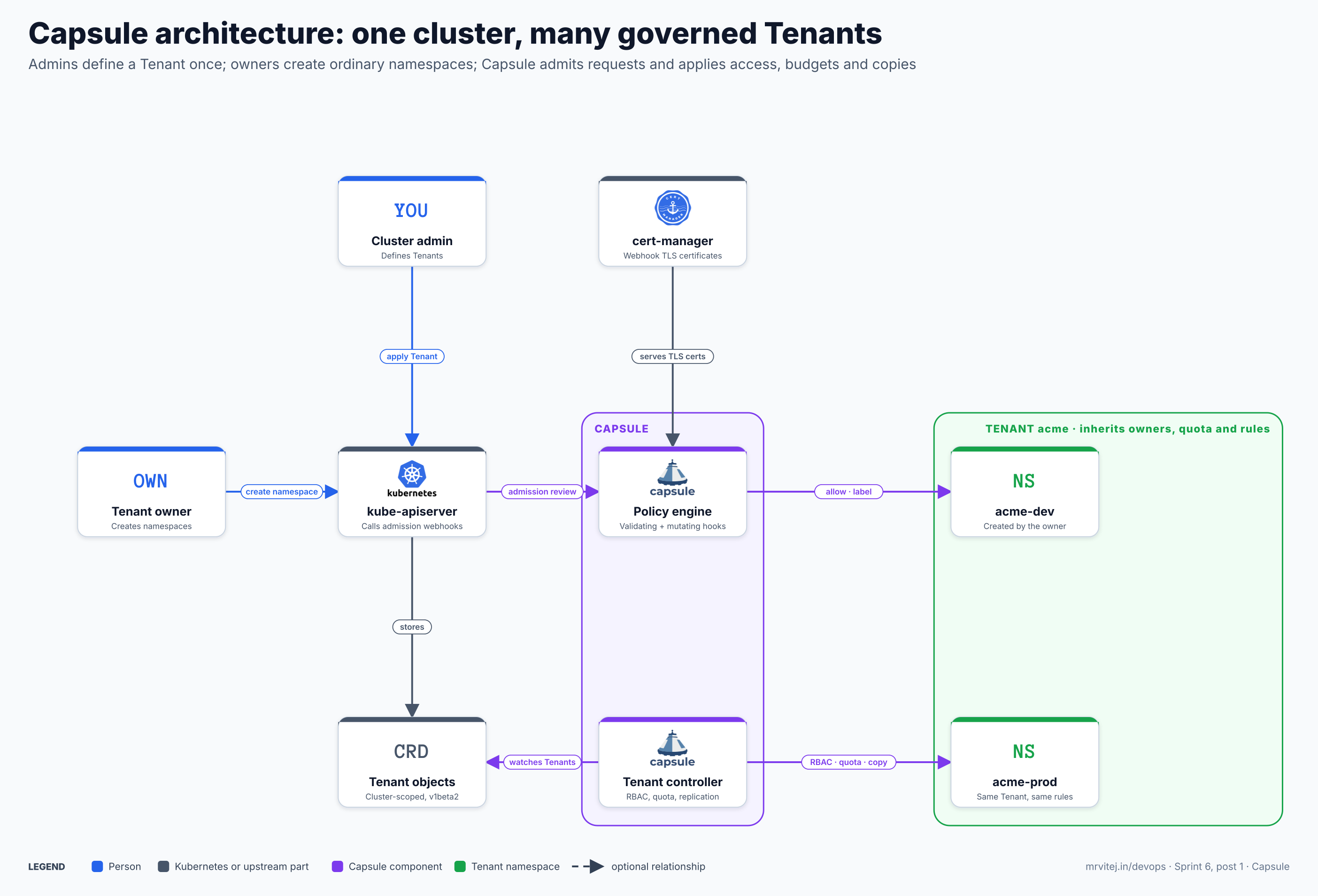
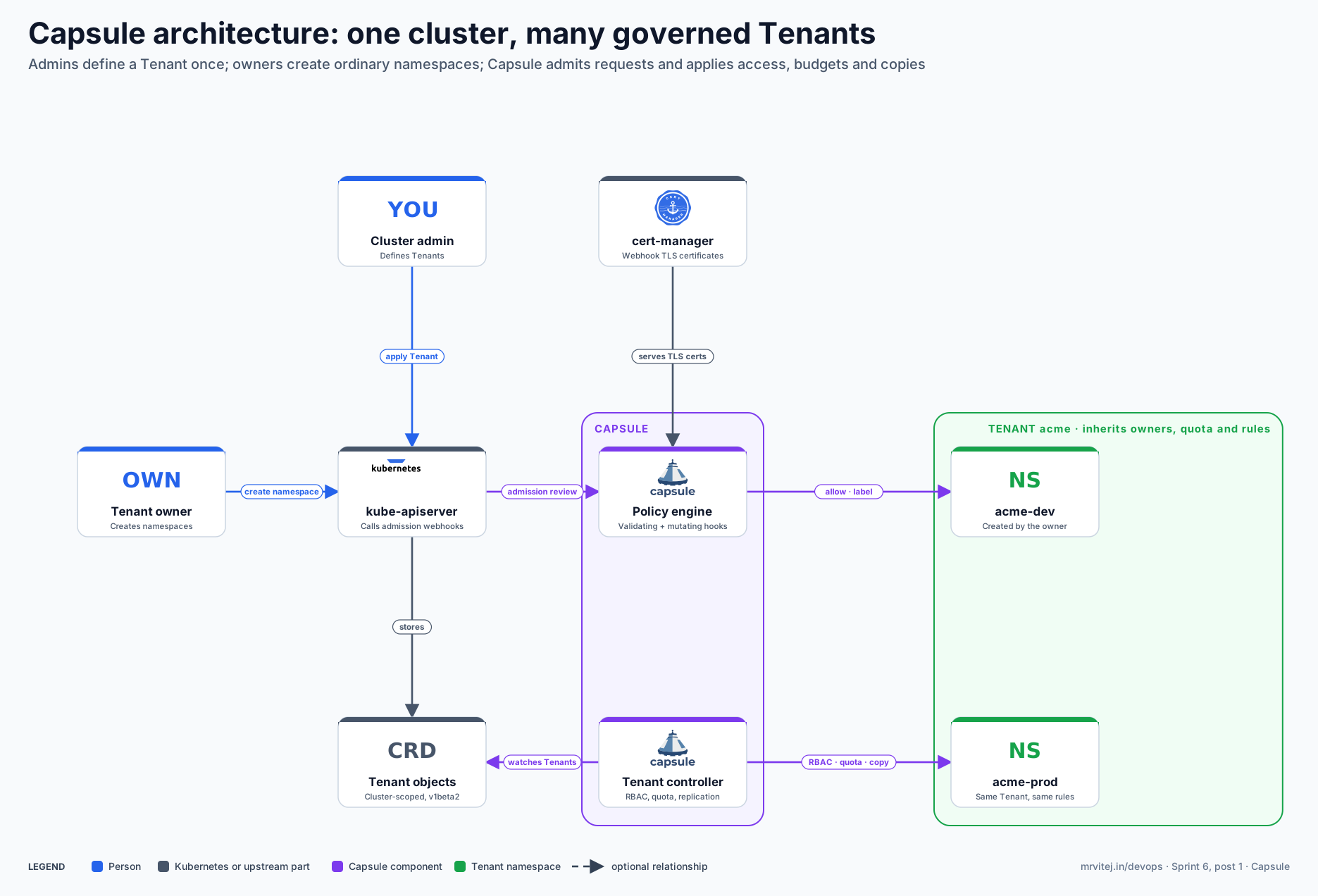
Purple is a Capsule component, grey is Kubernetes or an upstream part, blue is a person and green is a tenant namespace. Open the zoomable diagram, or download it as SVG or PNG.
| Component | Responsibility |
|---|---|
| Cluster admin | Defines Tenants and cluster-wide settings. |
| Tenant owner | Creates namespaces in the Tenant. Needs no cluster-admin rights. |
| kube-apiserver | Stores Tenant objects and calls Capsule’s admission webhooks on requests. |
| cert-manager | Issues the TLS certificates the webhooks need (the chart default; Capsule can generate its own instead). |
| Policy engine | Capsule’s validating and mutating webhook server. It admits or rejects requests and applies rules. |
| Tenant controller | Reconciles each Tenant: owner role bindings, quotas, replicated objects and namespace metadata. |
| Tenant objects | The Tenant custom resources, cluster-scoped, in capsule.clastix.io/v1beta2. |
| acme-dev, acme-prod | Ordinary namespaces that belong to the Tenant acme and inherit its owners, quota and rules. |
Design principle. Capsule adds no new API layer between users and Kubernetes. It runs as an operator, uses only upstream Kubernetes mechanisms (CRDs, admission webhooks, RBAC) and records tenancy as labels and role bindings on plain namespaces, so removing a tool in the ecosystem does not strand a tenant.
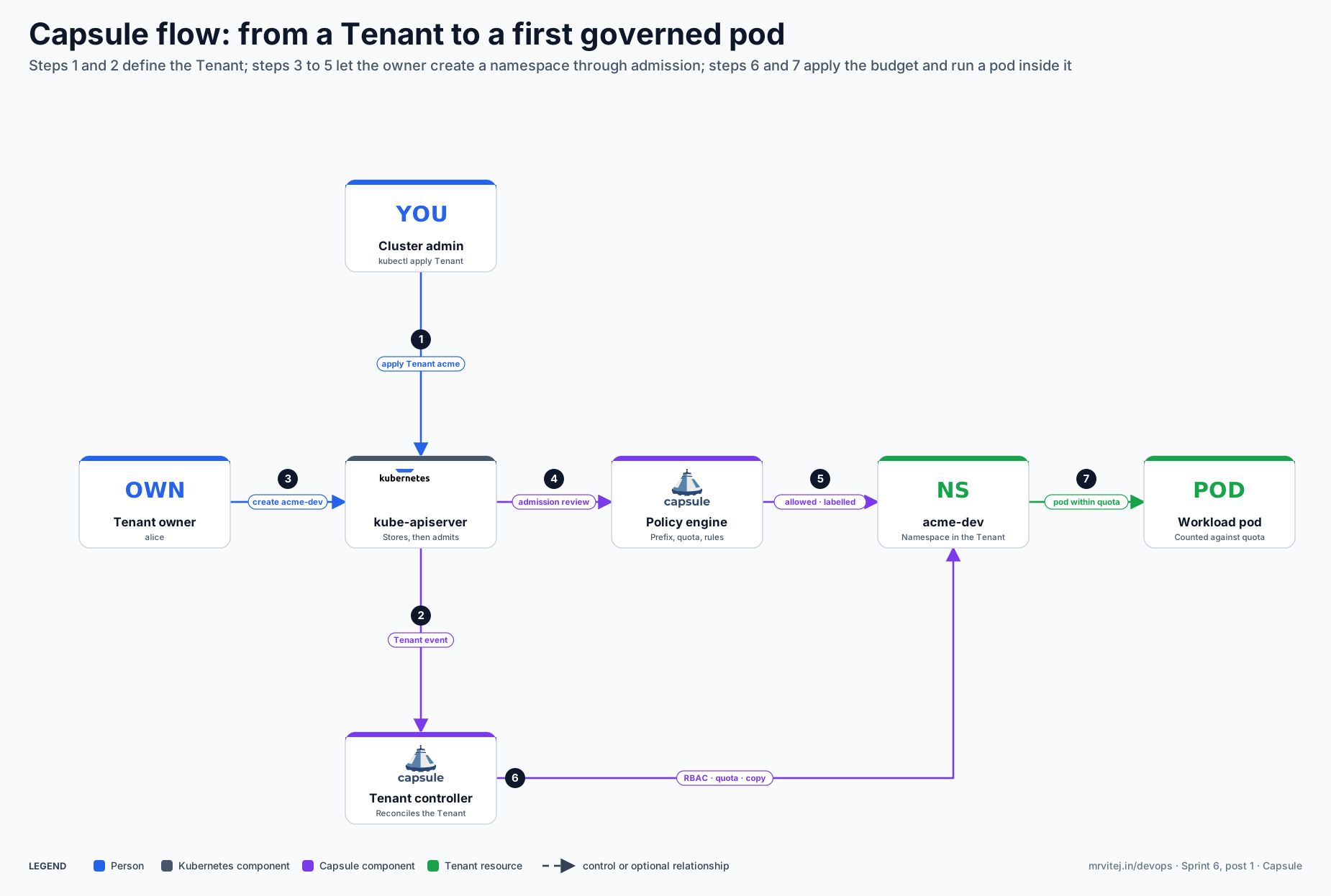
From a Tenant to a first governed pod
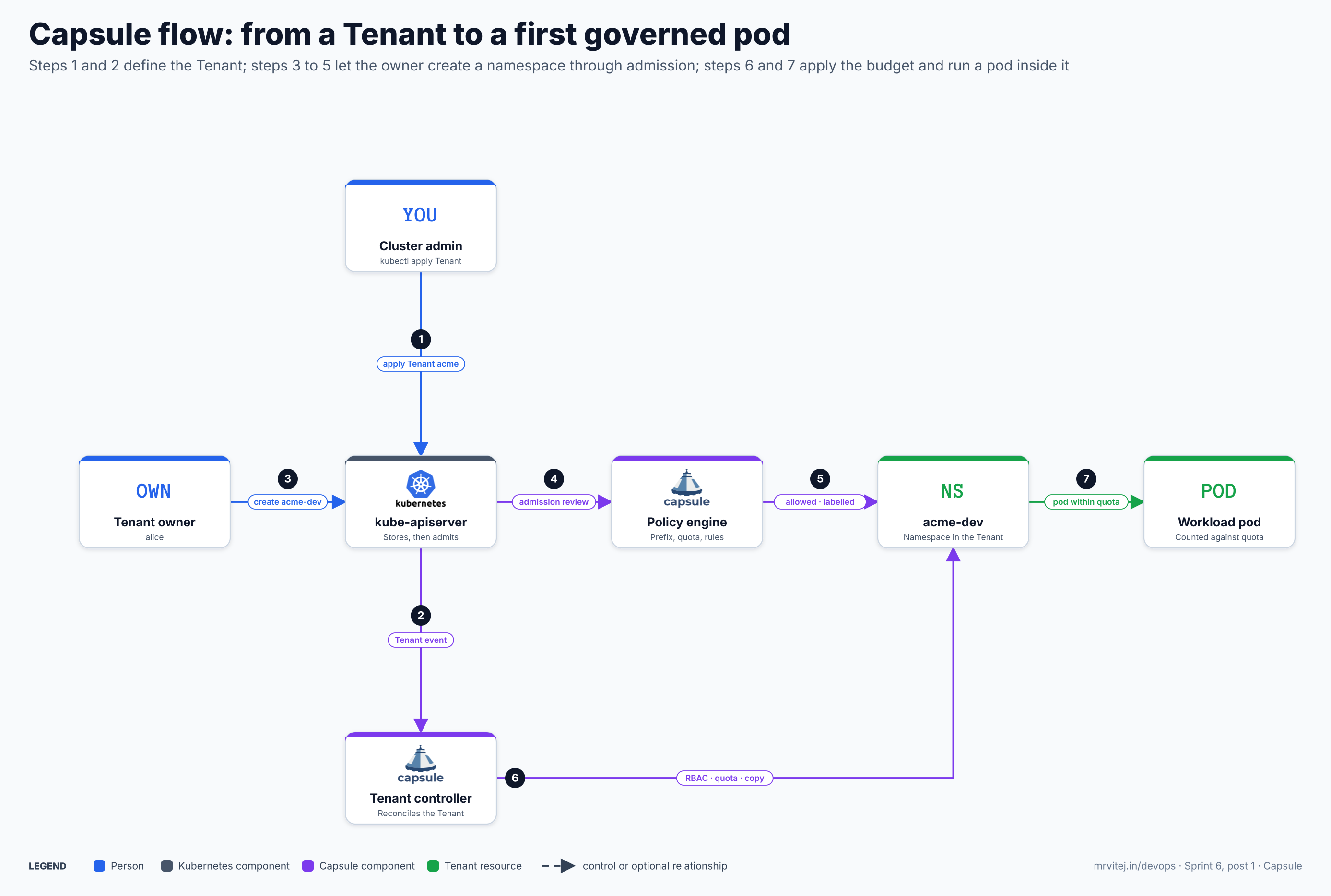
- Apply Tenant acme. The cluster admin applies a
Tenantwith owners and rules; kube-apiserver stores it. - Tenant event. The Tenant controller sees the new object and starts reconciling it.
- Create acme-dev. The owner, alice, runs
kubectl create namespace acme-devwith her own credentials. - Admission review. kube-apiserver sends the request to Capsule’s webhooks.
- Allowed and labelled. The policy engine checks, for example, the name prefix and the tenant’s namespace limit, then admits the namespace with tenant metadata.
- RBAC, quota and copy. The controller binds the owner’s rights, applies the quota and copies any replicated objects into the namespace.
- Pod within quota. A pod created in the namespace is checked against the tenant quota; one that exceeds it is rejected.
Open the zoomable flow diagram, or download it as SVG or PNG.
Install Capsule
Prerequisites
A conformant Kubernetes cluster, kubectl and Helm 3. The webhooks need TLS certificates; the chart gets them from cert-manager by default, so install cert-manager first (see the cert-manager brief from Sprint 1). The README documents no minimum Kubernetes version, so read the installation guide for the release you pick.
Install with cert-manager
helm install capsule oci://ghcr.io/projectcapsule/charts/capsule \
  -n capsule-system --create-namespace
Install without cert-manager
helm install capsule oci://ghcr.io/projectcapsule/charts/capsule \
  -n capsule-system --create-namespace \
  --set 'certManager.generateCertificates=false' \
  --set 'tls.enableController=true' \
  --set 'tls.create=true'
Check the install
kubectl -n capsule-system get pods
kubectl get crd | grep capsule.clastix.io
kubectl get validatingwebhookconfigurations,mutatingwebhookconfigurations | grep -i capsule
You should see the controller pod running, the Capsule CRDs, and the webhook configurations. The chart installs the CRDs by default (crds.install: true) and ships the optional Capsule Proxy as a subchart that is off by default (proxy.enabled: false).
Lab setup
For a laptop lab, a kind or k3d cluster with cert-manager and the Helm command above is enough. The project also links a live demo scenario from its README. In a lab you need a second identity to act as the tenant owner; use Kubernetes user impersonation (kubectl --as alice) or create a client certificate for alice. Which user or group name Capsule treats as a tenant user is set in CapsuleConfiguration (see below).
Your first Tenant
apiVersion: capsule.clastix.io/v1beta2
kind: Tenant
metadata:
  name: solar
spec:
  owners:
    - kind: User
      name: alice
  forceTenantPrefix: true
  rules:
    - quota:
        - name: shared-compute
          hard:
            requests.cpu: "8"
            requests.memory: 16Gi
This is the example from the project README. After kubectl apply -f tenant.yaml as a cluster admin, alice creates namespaces on her own. The README shows what Capsule does with three requests:
$ kubectl create namespace solar-dev
namespace/solar-dev created

$ kubectl create namespace experiments
The Namespace name must start with 'solar-' when ForceTenantPrefix is enabled in the Tenant.

$ kubectl apply -n solar-dev -f pod.yaml
resource exceeds GlobalResourceQuota "solar-shared-compute": requests.cpu (requested=2, current=7, projected=9, hard=8, exceededBy=1)
Note the third message: a quota written under rules is one ceiling shared by all namespaces of the tenant, not one quota per namespace.
What a Tenant can control
Owners and access
spec.owners accepts users, groups and service accounts, each with optional extra cluster roles and optional Capsule Proxy settings. Capsule keeps the owner’s role bindings in every namespace of the tenant. spec.additionalRoleBindings adds more bindings to every namespace. TenantOwner objects let one identity own several Tenants, and permissions.matchOwners plus allowOwnerPromotion control whether service accounts inside a tenant can be promoted to owners.
Namespaces
forceTenantPrefix makes owners name namespaces with the tenant name as a prefix, which avoids collisions between tenants. namespaceOptions.quota sets the maximum number of namespaces. cordoned blocks deletion of resources while it is enabled, and preventDeletion protects the Tenant itself from accidental deletion.
Rules
spec.rules is the current way to express policy. Each rule can select namespaces, limit itself to an audience of subjects, and gate itself on conditions. A rule carries one or more of these parts:
quota: native ResourceQuota specifications shared across the selected namespaces.enforce: checks on workloads (registries, security profile, resources, placement, scheduler and class names, disruption budgets, QoS classes), ingress and Gateway API hostnames and classes, Services, native NetworkPolicies, storage access, device classes and object metadata.mutate: ordered, typed mutations applied before enforcement.permissions: extra permissions for the rule’s scope.
Older tenant fields such as resourceQuotas, limitRanges, networkPolicies, containerRegistries, imagePullPolicies, podOptions and serviceOptions are marked deprecated in the v1beta2 schema, in favour of rules and replications. Fields that remain first-class include nodeSelector (placement on a pool of nodes), ingressOptions, gatewayOptions, storageClasses, priorityClasses, runtimeClasses and deviceClasses. Check the schema of your release, because this area is moving.
Resource budgets
Besides quotas inside a Tenant, three cluster-scoped objects manage capacity. GlobalResourceQuota enforces one ceiling across the namespaces it selects. ResourcePool allocates capacity through claims (ResourcePoolClaim) and can queue claims in order. CustomQuota and GlobalCustomQuota limit custom quantities calculated from any Kubernetes object.
Replications
TenantResource (namespaced, created by a tenant owner if allowed) and GlobalTenantResource (cluster-scoped, picks Tenants with tenantSelector) copy objects into tenant namespaces. They accept raw items, items that already exist in other namespaces and generators, support Go templates for values like the namespace or tenant name, can wait for health checks, prune on delete, and re-run on a period or on watched events. This is how a default NetworkPolicy or a shared Secret reaches every namespace:
apiVersion: capsule.clastix.io/v1beta2
kind: GlobalTenantResource
metadata:
  name: default-network-policy
spec:
  tenantSelector:
    matchLabels:
      tier: standard
  resyncPeriod: 60s
  pruningOnDelete: true
  resources:
    - rawItems:
        - apiVersion: networking.k8s.io/v1
          kind: NetworkPolicy
          metadata:
            name: deny-from-other-namespaces
          spec:
            podSelector: {}
            policyTypes: [Ingress]
            ingress:
              - from:
                  - podSelector: {}
This example is written from the CRD schema and was not applied to a live cluster; check the field names against the CRD of your version, in particular how rawItems entries are templated.
Who is a Capsule user
CapsuleConfiguration decides which users and groups Capsule treats as tenant users (users, which replaces the deprecated userGroups and userNames), which entities are administrators, whether service accounts can be promoted to owners, whether the tenant prefix is forced cluster-wide (forceTenantPrefix), and a regular expression of namespace names that nobody may create (protectedNamespaceRegex). It also holds webhook, TLS-reconciler, impersonation and managed-RBAC settings. A request from an identity Capsule does not recognise as a user is not governed as a tenant request, so this object is the first place to look when nothing seems to happen.
Production reference design
- Cluster. One regional Kubernetes cluster (EKS, GKE, AKS or on-premises) with a node pool for tenant workloads and a separate one for platform components.
- Webhook certificates. cert-manager installed first, so the chart can issue the webhook certificates.
- Capsule. Installed with Helm from a GitOps repository, with
replicaCountabove its default of 1 andpodDisruptionBudget.enabledset to true (the chart default is off). Most webhooks in the chart default tofailurePolicy: Fail, so an unavailable Capsule can block the requests it governs; plan its availability like you would plan the API server’s add-ons. - Tenants as code. One
Tenantper customer or team in Git, applied by Argo CD or Flux. Owners are groups from your identity provider, not individual users. - Defaults by replication. A
GlobalTenantResourcefor the baseline NetworkPolicy and aGlobalResourceQuotaorrules.quotafor budgets. - Observability. Prometheus scrapes the controller through the chart’s
monitoring.serviceMonitoroptions; dashboards and alerts read quota usage and webhook errors.
Typical production uses: an internal platform where each product team owns a Tenant, a managed Kubernetes or Container-as-a-Service product where each customer is a Tenant, and CI environments where each pipeline gets short-lived tenant namespaces.
Security
- What it isolates. Capsule isolates through RBAC, admission and namespace-level objects. Pods of different tenants still share the nodes and the kernel unless you add node pools per tenant (
nodeSelector), sandboxed runtimes (runtimeClasses) or network policy on top. - Network. Tenant namespaces are not isolated at the network level by default. Add NetworkPolicies through replications or
enforce.networkrules. - Registries and pods. Use
enforcerules to restrict image registries and pod security profiles. - Admin rights. Owners get namespace-scoped administration only. Keep tenant owners out of cluster-admin groups.
- Supply chain. The project publishes an SBOM in CycloneDX JSON with every OCI release artifact and follows the OpenSSF Best Practices programme.
- Reporting. Vulnerabilities go to the maintainers’ mailing list named in SECURITY.md.
Monitoring and day-2 operations
- Health.
kubectl -n capsule-system get pods; look at the controller logs when a Tenant does not reconcile. - Metrics. Enable the chart’s service monitor and alert on controller restarts and webhook failures.
- Upgrades. Helm manages the CRDs by default, so read the release notes and the “What’s new” page for removed or deprecated Tenant fields before an upgrade (the move from
resourceQuotasandnetworkPoliciestorulesand replications is an example). - Backups. Back up Tenant, TenantOwner and CapsuleConfiguration objects with the rest of your cluster state; Velero and Argo CD both work because they are plain Kubernetes objects.
- Changing a tenant. Edit the Tenant in Git; the controller reconciles every namespace.
Troubleshooting
This section is built from the project’s README, CRD descriptions and chart values. I did not run Capsule for this post, so confirm each entry on a test cluster.
| Symptom | Likely cause | How to check | Fix |
|---|---|---|---|
| Helm install succeeds but the pod does not start or webhooks fail with TLS errors | cert-manager is missing, so the chart cannot issue certificates | kubectl get certificate -n capsule-system; controller events |
Install cert-manager first, or install with the no-cert-manager flags shown above |
Every kubectl create namespace is refused or hangs after Capsule is installed |
A webhook with failurePolicy: Fail cannot reach an unready controller |
kubectl -n capsule-system get pods; webhook configurations |
Restore the controller, run more than one replica, and keep a PodDisruptionBudget |
| An owner creates a namespace, but it carries no tenant and nothing is enforced | Capsule does not recognise the caller as a Capsule user | Look at users in CapsuleConfiguration and the groups of the caller |
Add the user or group to users in CapsuleConfiguration |
| “The Namespace name must start with ‘ |
forceTenantPrefix is enabled on the Tenant or cluster-wide |
Tenant spec and CapsuleConfiguration |
Name the namespace with the tenant prefix, or disable the option for that Tenant |
| “resource exceeds GlobalResourceQuota …” | The shared tenant quota is used up | The Tenant’s rules.quota and the message values |
Reduce usage or raise the quota; remember the budget is shared by all namespaces |
A tenant owner cannot list their namespaces with kubectl get ns |
Listing cluster-scoped objects needs more than namespace RBAC | Owner’s cluster roles | Enable Capsule Proxy, which filters list calls to the tenant’s objects |
| A field in an old Tenant manifest has no effect after an upgrade | The field is deprecated in v1beta2 (for example resourceQuotas, networkPolicies) |
The CRD description of the field | Move the policy to rules or to a replication |
| A replicated object does not appear in a namespace | The TenantResource or GlobalTenantResource is cordoned, its selector matches nothing, or it conflicts with an existing object |
kubectl describe on the resource and its status |
Fix the selector, uncordon, and review the policy settings for existing objects |
Usage cases
- Internal developer platforms. Each product team owns a Tenant with a quota and a baseline policy, and creates its own namespaces.
- Container-as-a-Service and managed Kubernetes products. Each customer is a Tenant on shared clusters.
- CI and preview environments. Short-lived namespaces inside a tenant’s budget.
- Cost control. A shared quota per tenant makes consumption visible and limited.
- In the Sprint 6 project. The final project, a multi-tenant ERP product on AWS, uses one Capsule Tenant per customer on a shared EKS cluster.
Operational considerations
- Tenancy is soft isolation. Treat Capsule as namespace-level governance. For hostile tenants add node pools, sandboxed runtimes and network policy, or use separate clusters.
- Keep the controller available. Webhooks with
failurePolicy: Failmake Capsule part of the request path of the namespaces it governs. - Prefer groups from your identity provider as owners. Changing a team then needs no Tenant edit.
- Plan for API changes. The schema is on
v1beta2and fields are being replaced by rules and replications; pin the chart version and read release notes. - Combine with other policy engines. Capsule’s rules cover common cases; Kyverno or Gatekeeper still fit cluster-wide or very specific policy.
Adoption
The project’s ADOPTERS file lists Bedag Informatik AG, Bison Schweiz AG, the US Department of Defense, Enreach, Fastweb, Klarrio, KubeRocketCI, ODC-Noord, PITS Global Data Recovery Services, Politecnico di Torino, Reevo, Seeweb, the University of Torino, Velocity and Wargaming.net. The list is self-reported through pull requests, and I did not verify individual deployments.
Alternatives
| Solution | Model | Best suited to |
|---|---|---|
| Namespaces with RBAC, ResourceQuota and NetworkPolicy by hand | DIY, one set of objects per namespace | A few teams where a platform engineer still creates every namespace |
| One cluster per tenant | Hard isolation, separate control planes | Regulated or hostile tenants; accept the cost of cluster sprawl |
| Virtual clusters (for example vCluster) | A virtual control plane per tenant inside a shared host cluster | Tenants that need their own API server or CRDs |
| Stakater Multi Tenant Operator | Commercial, namespace-based tenancy with a Tenant resource | Teams that want a complete platform with cost visibility, per its own comparison page |
| Capsule | Open source operator, Tenant CRD, admission control | Namespace-based tenancy with native Kubernetes UX and GitOps |
Strengths and limitations
| Strengths | Limitations |
|---|---|
| Native Kubernetes objects and admission, no new API layer | Soft isolation: shared nodes, kernel and control plane |
| Self-service namespaces within platform-defined limits | Needs extra work for network, node and runtime isolation |
| Declarative and GitOps ready | Webhook availability sits in the request path |
| Shared quotas, resource pools and replications | Schema is evolving; deprecated fields need migration |
| Works with the existing ecosystem (Argo CD, Kyverno, Velero, Crossplane, Tekton) | Capsule Proxy is a separate component to run and secure |
Recommendation
Adopt for platform teams that serve many internal teams or customers from shared clusters and want self-service namespaces with budgets and baseline policy, as long as you add network and node isolation where tenants do not trust each other. Assess it against separate clusters or virtual clusters when tenants are untrusted or need their own control plane. Start with one Tenant, a shared quota and a replicated NetworkPolicy, run it in two replicas, and put the Tenants in Git.
References: Capsule on CNCF · Capsule repository and README · Project documentation · Adopters · CNCF Landscape entry