An ERP database such as PostgreSQL is built for many small reads and writes: one invoice, one stock movement. Management asks different questions: sales by region by month, ageing by customer, stock turns by warehouse over three years. Those questions scan millions of rows but need only a few columns, and a row store handles them slowly. ClickHouse is a column-oriented database built for exactly this. It is a NON CNCF tool: the CNCF Landscape lists it under App Definition and Development › Database, with a second placement under AI Native › Data Architecture, but it is not a CNCF project. It is an open source project maintained by ClickHouse, Inc., with the code on GitHub.
CNCF daily · Sprint 6, post 9 of 26 · Data (AI Native) · NON CNCF
At a glance
| Category | App Definition and Development › Database; also AI Native Infra › Data Architecture (second placement in the Landscape) |
| CNCF status | NON CNCF, listed in the CNCF Landscape |
| Model | Column-oriented, SQL, built for analytics (OLAP) |
| Main table engine family | MergeTree and its replicated variants |
| Replication coordination | ClickHouse Keeper |
| Kafka integration | A Kafka table engine, with a materialized view to move rows into a storage table |
| Kubernetes | An official ClickHouse Operator (announced January 2026); a separate community operator from Altinity also exists |
| Not for | Frequent single-row updates and strict multi-row transactions |
The problem ClickHouse solves
| Question | Row store (PostgreSQL) | ClickHouse |
|---|---|---|
| Sales by region over three years | Reads whole rows of every matching order | Reads only the date, region and amount columns |
| Many small updates to one record | Strong | Weak; designed for appending data |
| Compression | Moderate | High, because each column holds similar values |
| Dashboards with many concurrent queries | Competes with the live ERP workload | Runs on its own store, away from transactions |
| Schema for events | Normalised tables | Wide, denormalised event tables |
| The cost | One system | A second system, plus a pipeline to feed it |
Key concepts
| Term | Meaning |
|---|---|
| Column store | Data is stored column by column, so a query reads only the columns it uses |
| MergeTree | The main table engine. Data arrives as sorted parts that are merged in the background |
| Sorting key | The ORDER BY of a MergeTree table; it decides how data is laid out and what queries can skip |
| Partition | An optional split of a table, often by month, which makes dropping old data cheap |
| Part | An immutable chunk of rows written by one insert, later merged with others |
| Kafka table engine | A table that acts as a consumer of a Kafka topic |
| Materialized view | A trigger-style view. On each batch read from the Kafka table, it inserts the rows into a target table |
| ReplicatedMergeTree | MergeTree with replication between replicas |
| ClickHouse Keeper | The coordination service for replication and cluster management |
| Shard and replica | A shard holds part of the data; a replica is a copy of a shard |
Architecture
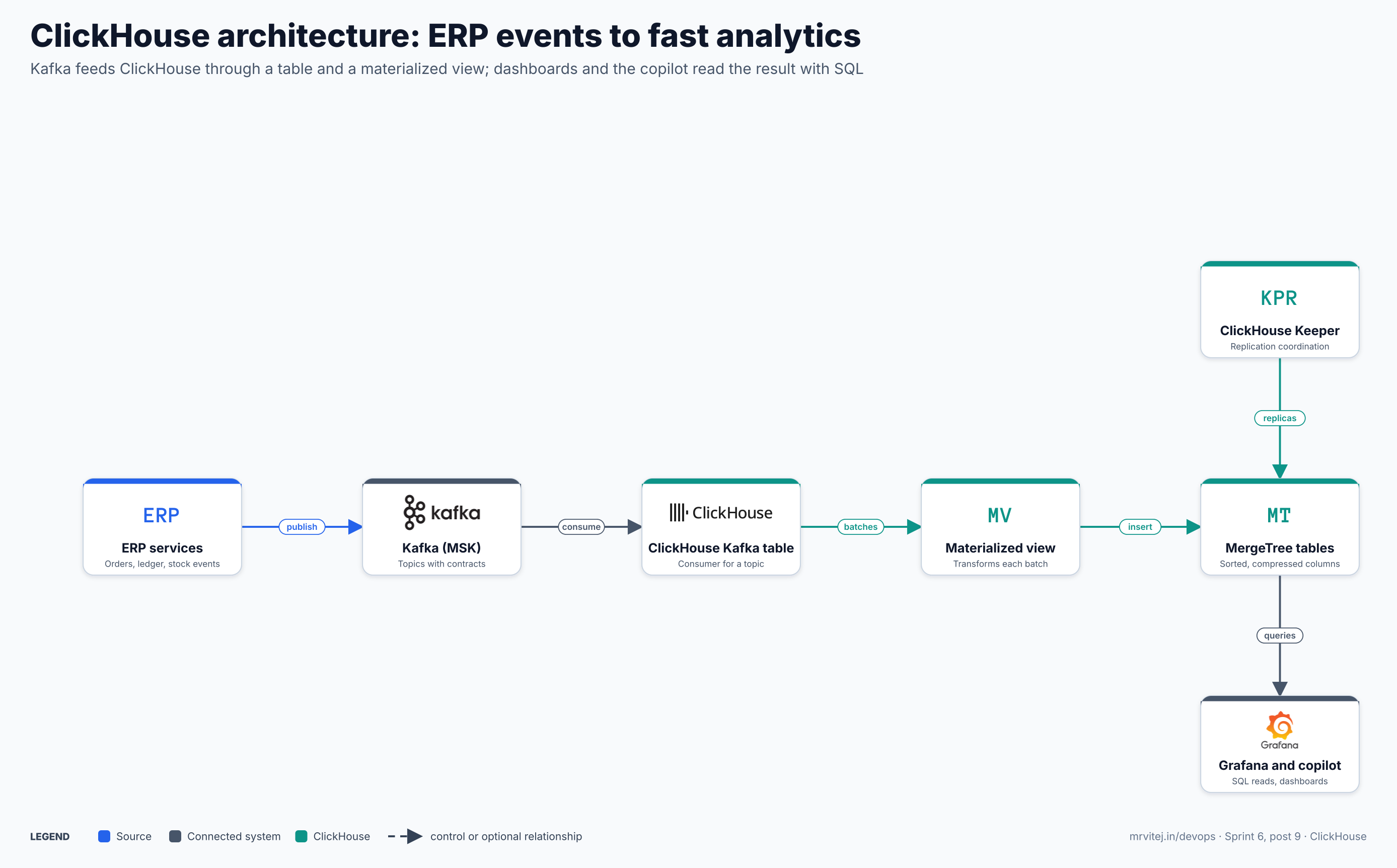
Blue is the source, grey is a connected system and teal is ClickHouse. Open the zoomable diagram, or download it as SVG or PNG.
| Component | Responsibility |
|---|---|
| ERP services | Publish order, ledger and stock events. See the Kafka brief for the topics and contracts. |
| Kafka (MSK) | Holds the events; ClickHouse is one consumer group among others. |
| ClickHouse Kafka table | Reads a topic. It stores nothing itself. |
| Materialized view | Runs on each batch and inserts the rows into a storage table, applying any transformation. |
| MergeTree tables | The durable, sorted, compressed storage that queries read. |
| ClickHouse Keeper | Coordinates replicas of replicated tables. |
| Grafana and copilot | Read with SQL; the copilot should use a read-only user. |
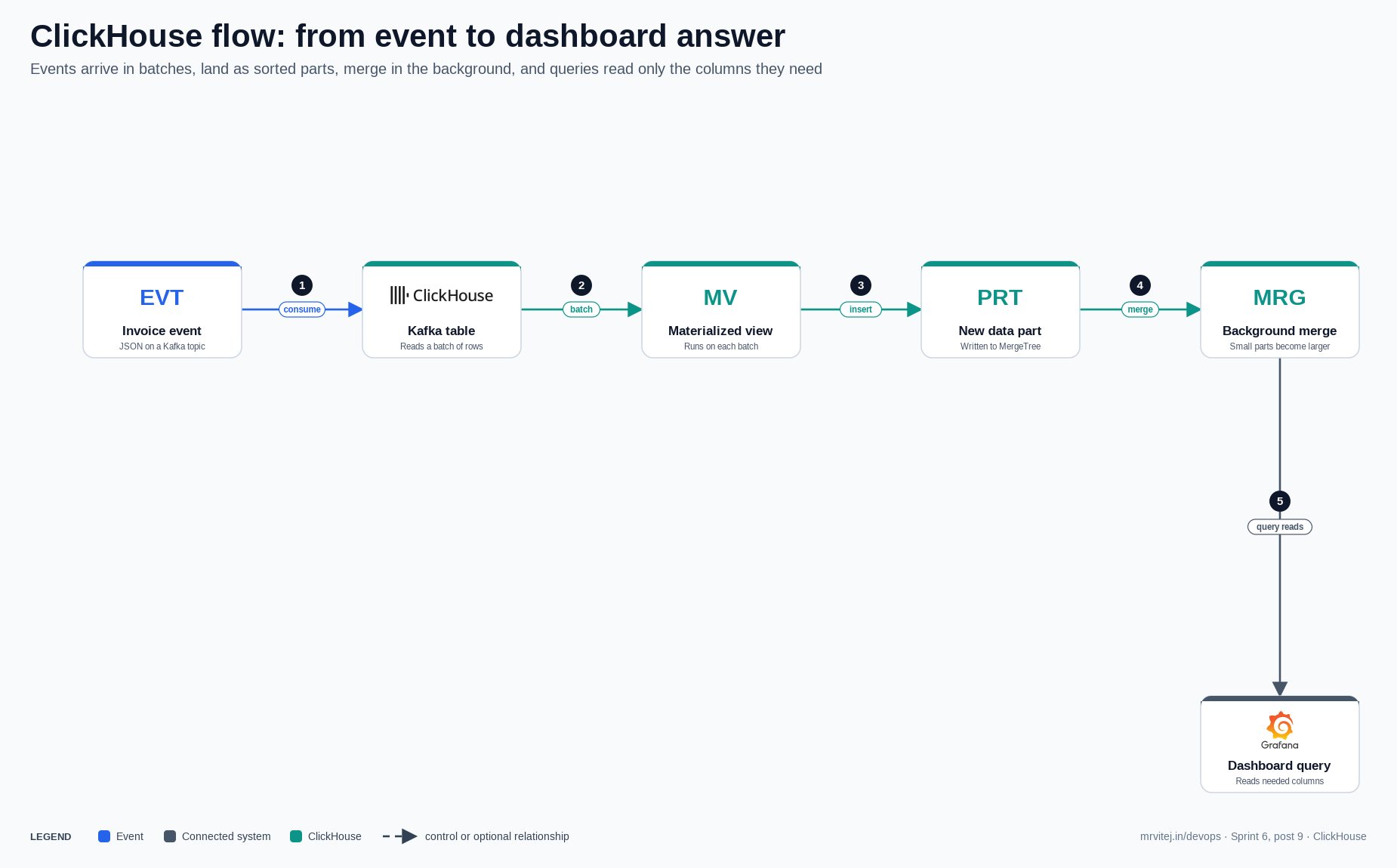
From event to dashboard answer
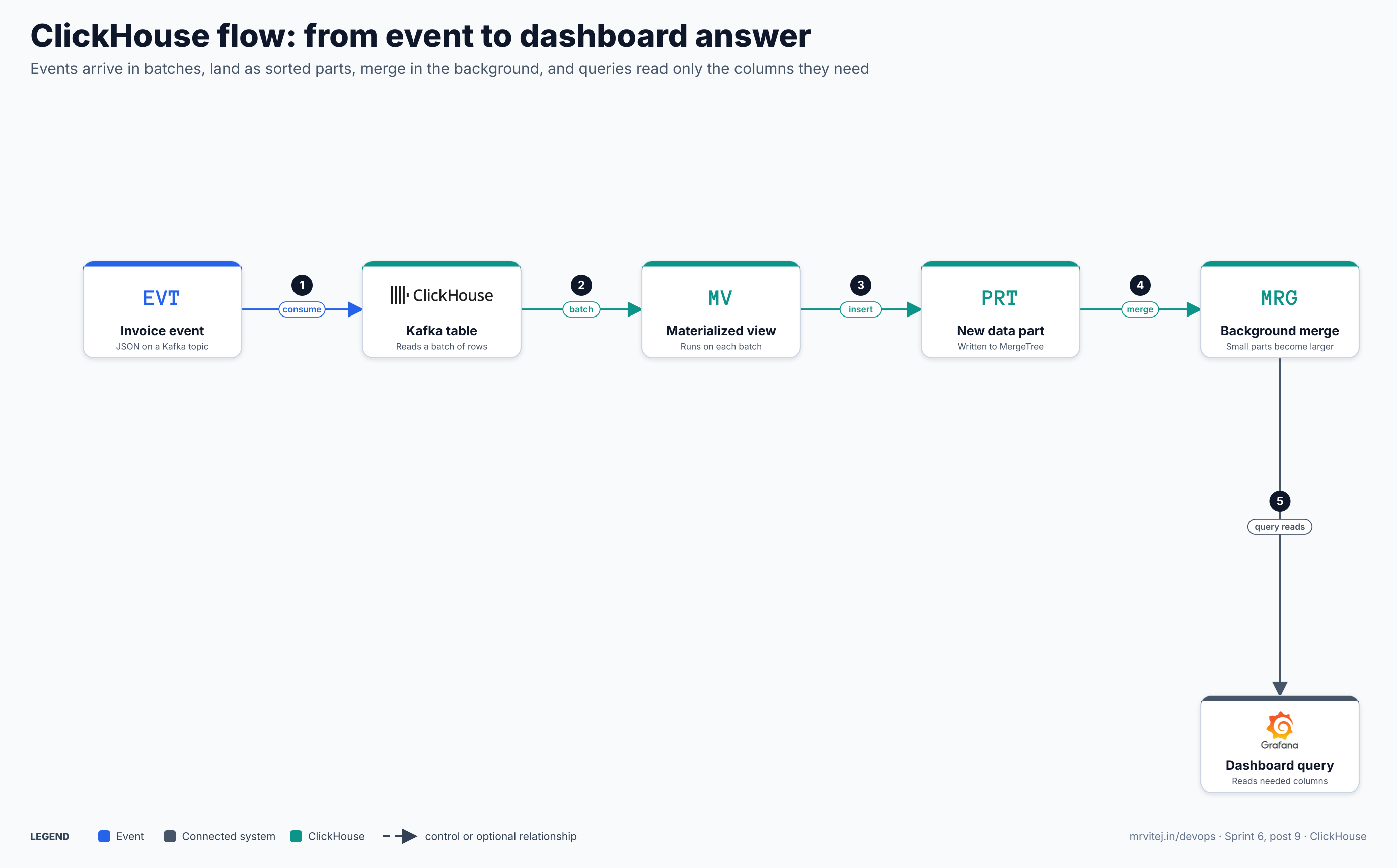
- Consume. The Kafka table reads a batch of messages from the topic.
- Batch. The materialized view is triggered with that batch.
- Insert. Its rows are written as a new, sorted part of the MergeTree table.
- Merge. Background merges combine small parts into larger ones.
- Query. A dashboard query reads the table, skips data using the sort key and reads only the columns it needs.
Open the zoomable flow diagram, or download it as SVG or PNG.
Real world: the month-end ageing report
Finance wants receivables ageing by customer and region at month end. On the live PostgreSQL database, the query scans the invoice and payment tables while clerks are posting entries, and it slows both. With ClickHouse, every invoice and payment event is already in a wide table sorted by customer and date. The same report reads two or three columns, skips every month it does not need, and runs on a separate system, so posting is not affected. The trade-off is freshness: the figures are as current as the pipeline, usually seconds to minutes behind.
Install ClickHouse
A single server, to learn
The ClickHouse documentation offers an install script and packages for Linux. For a quick local trial, a container is easiest. I did not run these commands for this post:
docker run -d --name ch -p 8123:8123 -p 9000:9000 \
  --ulimit nofile=262144:262144 clickhouse/clickhouse-server
docker exec -it ch clickhouse-client
Port 8123 is the HTTP interface and 9000 is the native client port.
On Kubernetes with the operator
The ClickHouse documentation describes a Kubernetes operator that automates deployment, configuration and management of ClickHouse and ClickHouse Keeper clusters. Its Helm chart installs the operator with webhooks enabled by default, which requires cert-manager (see the cert-manager brief). The commands below follow that guide:
helm install cert-manager oci://quay.io/jetstack/charts/cert-manager \
  -n cert-manager --create-namespace --set crds.enabled=true

helm install clickhouse-operator oci://ghcr.io/clickhouse/clickhouse-operator-helm \
  --create-namespace -n clickhouse-operator-system
The documented prerequisites are Helm 3 and a recent Kubernetes version; the minimum version differs between pages I read (1.28 and 1.33), so check the page for the operator version you install. The cluster itself is then declared with the operator’s custom resources, with Keeper deployed before the ClickHouse cluster. I did not write a cluster manifest here because the resource kinds and fields differ between the official operator and the older Altinity operator, and I did not verify either. Use the operator’s own examples.
Try it: Kafka to MergeTree
This is the pattern from the ClickHouse Kafka guide: a target table, a Kafka table, and a materialized view that connects them. The table, topic and broker names are for the ERP example, and I did not run this:
-- 1. Where the data will live
CREATE TABLE erp.invoices
(
    event_time   DateTime,
    tenant_id    UInt32,
    customer_id  UInt64,
    region       LowCardinality(String),
    amount       Decimal(18, 2),
    status       LowCardinality(String)
)
ENGINE = MergeTree
PARTITION BY toYYYYMM(event_time)
ORDER BY (tenant_id, customer_id, event_time);

-- 2. A consumer of the Kafka topic (it stores nothing)
CREATE TABLE erp.invoices_queue
(
    event_time DateTime, tenant_id UInt32, customer_id UInt64,
    region String, amount Decimal(18, 2), status String
)
ENGINE = Kafka
SETTINGS kafka_broker_list = 'b-1.msk.example:9092',
         kafka_topic_list = 'erp.invoices',
         kafka_group_name = 'clickhouse-invoices',
         kafka_format = 'JSONEachRow';

-- 3. The bridge: runs on each batch and inserts the rows
CREATE MATERIALIZED VIEW erp.invoices_mv TO erp.invoices AS
SELECT * FROM erp.invoices_queue;
Then query it:
SELECT region, toStartOfMonth(event_time) AS month, sum(amount) AS total
FROM erp.invoices
WHERE tenant_id = 42 AND event_time >= now() - INTERVAL 12 MONTH
GROUP BY region, month
ORDER BY month, region;
Two points from the docs. The Kafka engine has at-least-once delivery, so rare duplicates are possible, for example if the connection drops after rows are inserted but before the offset is committed; a replicated or distributed target table can deduplicate identical blocks, but not in every case. And a plain SELECT on the Kafka table moves its consumer offset, so use it for testing only.
Production reference design
- Dedicated analytics store. Keep ClickHouse separate from the transactional PostgreSQL, fed by events.
- Design the sort key first. Choose
ORDER BYfrom the filters dashboards use most, with tenant first in a multi-tenant ERP. - Partition by month. Keep the number of partitions small and use them to drop old data.
- Replicate. Use replicated tables with ClickHouse Keeper, run Keeper with an odd number of nodes, and spread replicas over availability zones.
- Batch inserts. Insert in large batches; many tiny inserts create too many parts.
- Idempotent loading. Plan for duplicates from at-least-once delivery, using deduplication or a design where repeated rows do no harm.
- Separate users. One user for ingestion, one read-only user for Grafana and one for the copilot, each with quotas and limits.
- Backups. Back up to object storage on a schedule and test a restore.
- Monitor. Watch parts per partition, merge backlog, replication lag, consumer lag in Kafka and query latency.
Security
- Network. Do not expose ports 8123 and 9000 outside the cluster; put them behind a ClusterIP service and a NetworkPolicy.
- Authentication. Disable the default user with no password; create named users with the least rights they need.
- TLS. Turn on TLS for client and inter-server traffic. The operator documentation covers securing with TLS.
- Copilot access. Give the copilot a read-only user, with row limits and query-time limits, and with access only to views it should see.
- Tenant data. In a shared table, enforce the tenant filter with row policies, not only in the application.
- Secrets. Keep Kafka credentials in a Secret, not in the table definition where possible.
Troubleshooting
This table comes from the ClickHouse documentation and the guides I read. I did not run ClickHouse for this post, so test each entry on your own cluster.
| Symptom | Likely cause | How to check | Fix |
|---|---|---|---|
| Rows are not arriving from Kafka | The materialized view was not created, or the consumer is stuck or the broker list is wrong | SELECT * FROM system.kafka_consumers; server logs |
Create the view; fix broker, topic, group and format settings |
SELECT on the Kafka table errors or returns rows only once |
Direct select is restricted and moves the offset | Error text | Query the target table instead; use direct select only for testing |
| Duplicate rows | At-least-once delivery after a rebalance or a lost connection | Count by a unique key | Use a replicated target table, deduplicate in queries or use an engine that collapses duplicates |
Too many parts error on inserts |
Many tiny inserts or too many partitions | SELECT count() FROM system.parts WHERE active per table |
Batch inserts; reduce partitions; let merges catch up |
| Queries are slow | The sort key does not match the filters, or whole columns are read | EXPLAIN and system.query_log |
Change ORDER BY, add skip indexes or a projection, select fewer columns |
| Replicas drift or a table goes read-only | Keeper is unreachable or has lost quorum | system.replicas; Keeper logs |
Restore Keeper quorum; then check replica queues |
| Out-of-memory in a query | A large GROUP BY or join |
system.query_log memory column |
Set memory limits; aggregate in stages; pre-aggregate with a materialized view |
| Operator webhook errors on install | cert-manager is missing or not ready | kubectl get pods -n cert-manager |
Install cert-manager first, or follow the documented option to disable webhooks |
Cluster pods stuck Pending |
No storage class or volumes cannot be created | kubectl describe pod; kubectl get pvc |
Create a storage class (gp3 on EKS) and check the EBS CSI driver |
| Cannot connect from Grafana | Wrong port or protocol for the data source | Test with curl http://host:8123/ping |
Use the right port, user and TLS settings for the plugin |
Usage cases
- ERP reporting. Sales, receivables, stock and cost reports over years of data.
- Event analytics. Clickstream, audit and activity logs.
- Observability data. Logs, traces and metrics stored in a wide table, when a SQL store is wanted.
- Copilot queries. Natural-language questions turned into SQL over governed views.
- In the Sprint 6 project. Kafka feeds ClickHouse for ERP analytics and dashboards. Part 2 wires the feed, and the copilot in Part 4 queries it read-only.
Operational considerations
- Not a transactional store. Keep PostgreSQL as the system of record. ClickHouse is a derived copy that can be rebuilt from events.
- Schema changes. Altering the sort key means a new table and a backfill; plan table design early.
- Upgrades. Test upgrades on a copy; the Kafka engine, operator and server versions need to move together.
- Cost. Memory and disk grow with data and with query concurrency; set TTLs for old data and move cold data to cheaper storage.
- Two operators. The official operator is new (announced January 2026) and the Altinity operator is older; pick one and read its upgrade notes.
- Not CNCF. The project is governed by a company, so follow its licence and roadmap.
Adoption
ClickHouse is widely used for analytics, and the Landscape lists the company as a CNCF member. I did not read a verified list of named production users for this post, so none are named here.
Alternatives
| Solution | Model | Best suited to |
|---|---|---|
| PostgreSQL with read replicas | Row store with SQL | Small reporting needs that do not justify a second system |
| PostgreSQL with a columnar extension | Row store plus column storage | Teams that want one database and moderate analytics |
| Apache Druid | Real-time analytics store | Event data with time-based queries at high ingest rates |
| Apache Pinot | Real-time OLAP store | User-facing analytics with low latency |
| Amazon Redshift or a cloud warehouse | Managed warehouse | Teams that prefer a managed service and batch loading |
| Amazon Athena over S3 | SQL on files in object storage | Occasional queries on data lakes without running a cluster |
Strengths and limitations
| Strengths | Limitations |
|---|---|
| Very fast scans over few columns of many rows | Weak for frequent updates and deletes |
| High compression and efficient storage | No general multi-row transactions |
| SQL, with a rich set of table engines | Table design and sort keys need care |
| Direct Kafka integration | Kafka engine is at-least-once; duplicates need a plan |
| Operators for Kubernetes | Two operators, and operator docs are still young |
| Open source and widely used | Company-governed, not a CNCF project |
Recommendation
Adopt for the analytics path. Keep PostgreSQL as the system of record and feed ClickHouse from Kafka through a Kafka table and a materialized view. Start with one wide invoice table and a handful of dashboards, choose the sort key from the filters those dashboards use, and run a replicated three-node setup with Keeper only once the numbers justify it. Give Grafana and the copilot read-only users with limits. For a small ERP with modest reporting, PostgreSQL read replicas may be enough for the first release, and ClickHouse can be added when reports start to slow the live system.
References: ClickHouse documentation · ClickHouse Operator overview · Install the operator with Helm · Kafka table engine guide · Kafka table engine reference · Official ClickHouse Kubernetes Operator announcement · ClickHouse repository · CNCF Landscape entry