An ERP stores a lot of files: invoice PDFs, scanned receipts, exported reports, and later the datasets that train the forecasting models. Some of those files are written by services that speak the S3 API; others are read by pods that expect a normal directory they can mount. CubeFS is a distributed file system that serves both from one place. A file written through the S3 gateway shows up as a file in the mounted volume, and the other way round. The Landscape describes it as a cloud native distributed file system and object store, formerly ChubaoFS. It was accepted into the CNCF on 16 December 2019, moved to Incubating on 3 July 2022 and Graduated on 11 December 2024.
CNCF daily · Sprint 6, post 5 of 26 · Cloud Native Storage, also listed under AI Native Infra
At a glance
| Category | Runtime › Cloud Native Storage. Also in the AI Native group under AI Native Infra › Storage |
| CNCF status | Graduated (accepted 2019, Incubating 2022, Graduated December 11, 2024) |
| Written in | Go |
| License | Apache 2.0 |
| Access protocols | POSIX (FUSE client), S3 (ObjectNode) and HDFS |
| Storage engines | Multi-replica, and erasure coding |
| Features listed by the project | Multi-tenancy, multi-AZ deployment, cross-region replication |
| Main components | Master, MetaNode, DataNode, ObjectNode, client and CSI driver |
| Formerly | ChubaoFS |
The problem CubeFS solves
On a single machine, a file system is a directory. Across a cluster, it needs somewhere to keep the directory tree, somewhere to keep the bytes, and a way to keep both safe when disks and nodes fail. Teams often end up with two systems: an object store for the application and a shared file system for the jobs that need a mount.
| Need | Typical answer | With CubeFS |
|---|---|---|
| Services store documents | An object store with the S3 API | ObjectNode gives an S3-compatible API |
| Pods need a shared directory | NFS or a cloud file service | A CSI volume mounted through a FUSE client |
| The same data in both worlds | Copy between the two systems | One volume, reached by either route |
| Cheaper storage for cold data | A second tier and a mover job | Erasure coding as a storage engine option |
| Survive node and disk loss | Whatever each system offers | Replication or erasure coding across DataNodes |
| The cost | Two systems to run | One system, but a distributed storage cluster you must operate |
Key concepts
| Term | Meaning |
|---|---|
| Volume | The unit users see: a file system namespace with a capacity, an owner and an access policy |
| Master | The resource manager. It tracks nodes and volumes, creates partitions and is run as a group of nodes |
| MetaNode | Stores metadata (directory entries and file attributes) in metadata partitions |
| DataNode | Stores file data in data partitions on local disks |
| ObjectNode | A stateless S3-compatible gateway that reads and writes a volume’s files |
| Client | A FUSE client that mounts a volume as a POSIX file system |
| CSI driver | Lets Kubernetes create and mount CubeFS volumes through PersistentVolumeClaims |
| Replica engine | Keeps several copies of each data partition |
| Erasure coding engine | Splits data into coded pieces, using less space than full copies for large cold data |
| Authnode | An optional authentication service described in the project docs |
The project describes the architecture as a metadata subsystem, a data subsystem, a resource manager and an object gateway.
Architecture
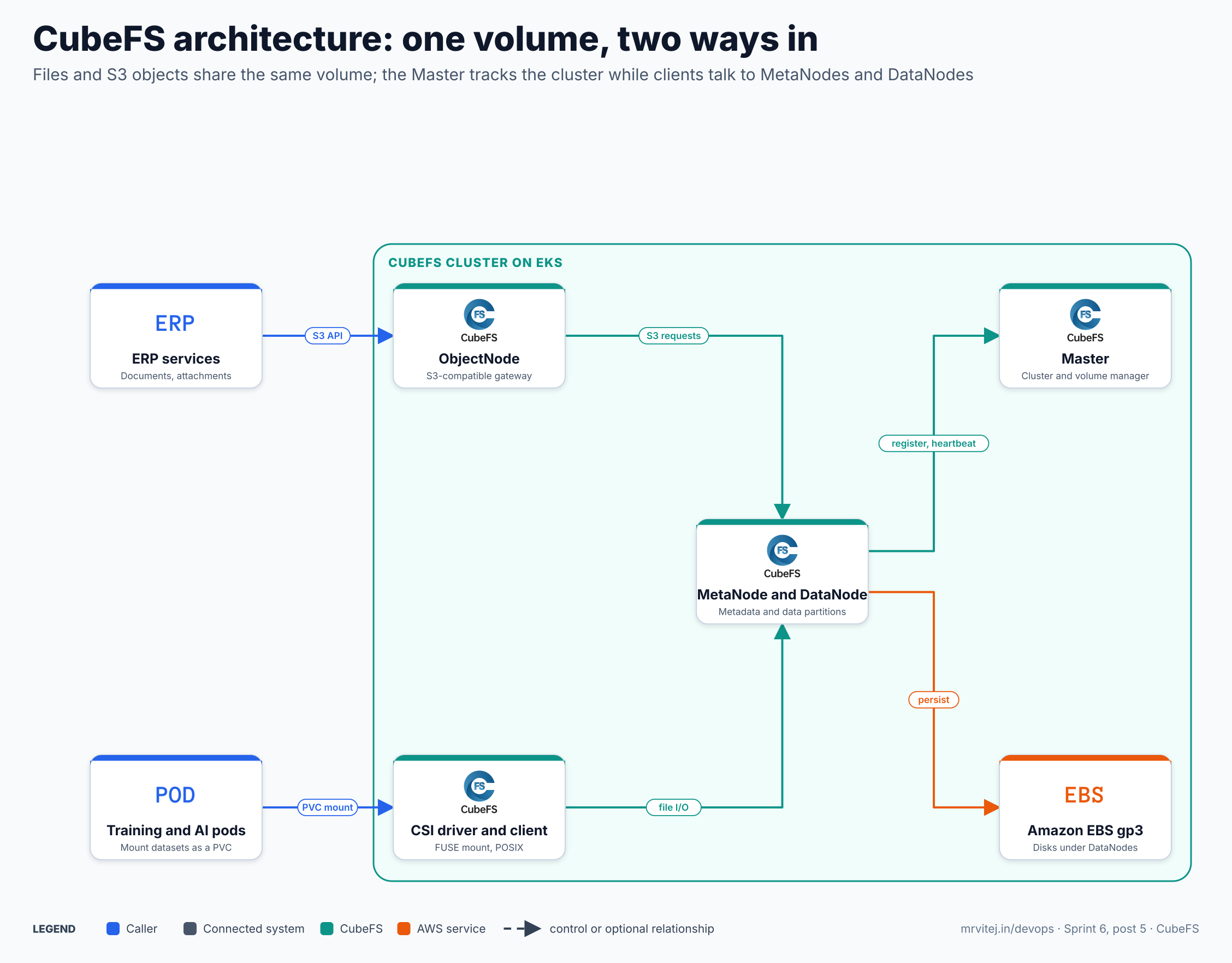
Blue is a caller, teal is CubeFS and orange is an AWS service. Open the zoomable diagram, or download it as SVG or PNG.
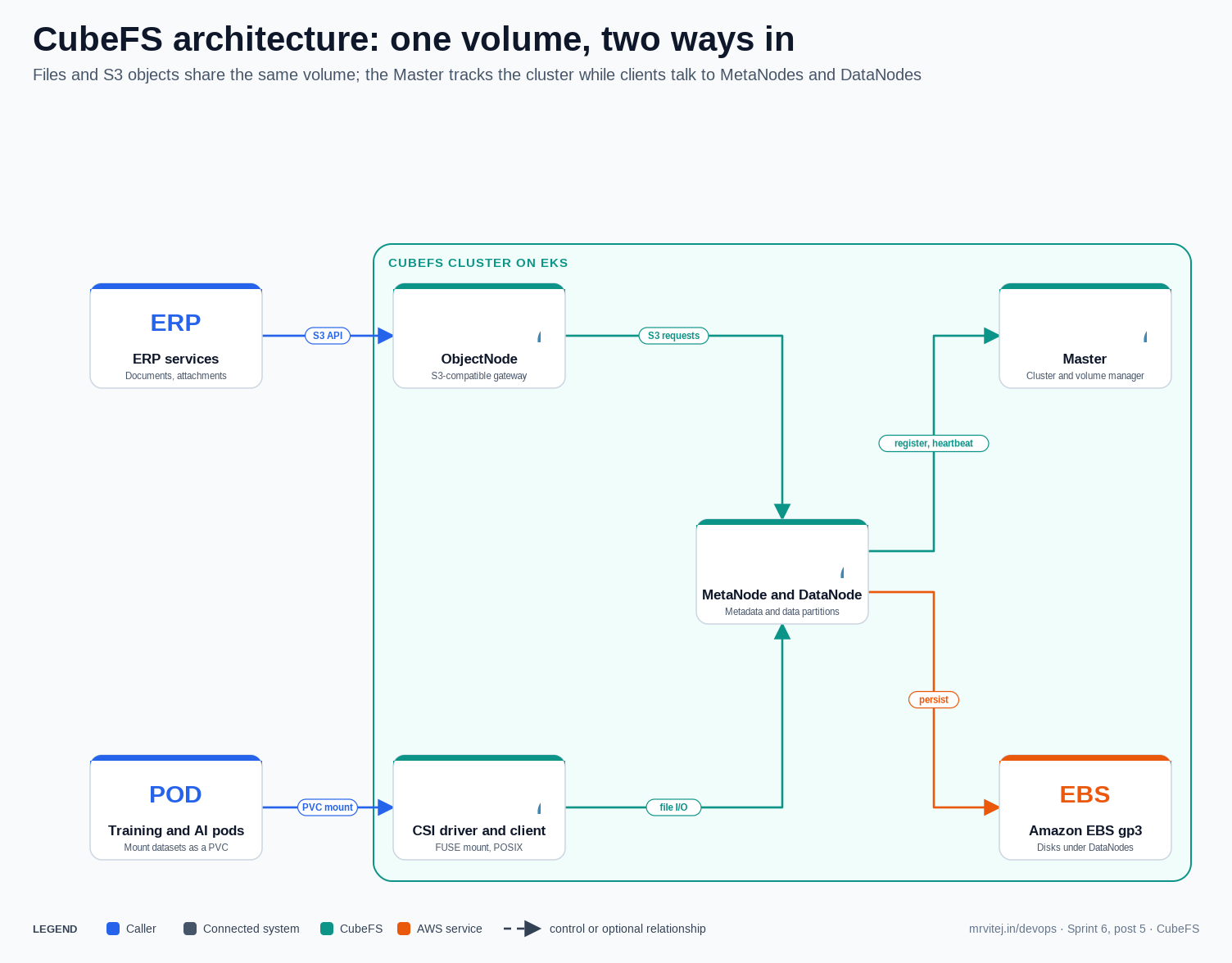
| Component | Responsibility |
|---|---|
| ERP services | Store and fetch documents and attachments with an S3 SDK. |
| Training and AI pods | Mount a dataset volume as a normal directory through a PVC. |
| ObjectNode | Translates S3 requests into file operations on a volume. |
| CSI driver and client | Mounts a volume into a pod through FUSE. |
| MetaNode and DataNode | Hold the metadata and the data. The diagram shows them as one card, but they are separate roles that scale separately. |
| Master | Tracks the cluster, creates partitions and manages volumes. Nodes register with it and send heartbeats. |
| Amazon EBS gp3 | The disks under the DataNodes on EKS. |
Clients fetch a volume’s layout from the Master and then talk to MetaNodes and DataNodes directly. The ObjectNode works the same way: the docs describe it as fetching the volume view on demand from the Master and talking to the MetaNodes and DataNodes directly, with no mount needed.
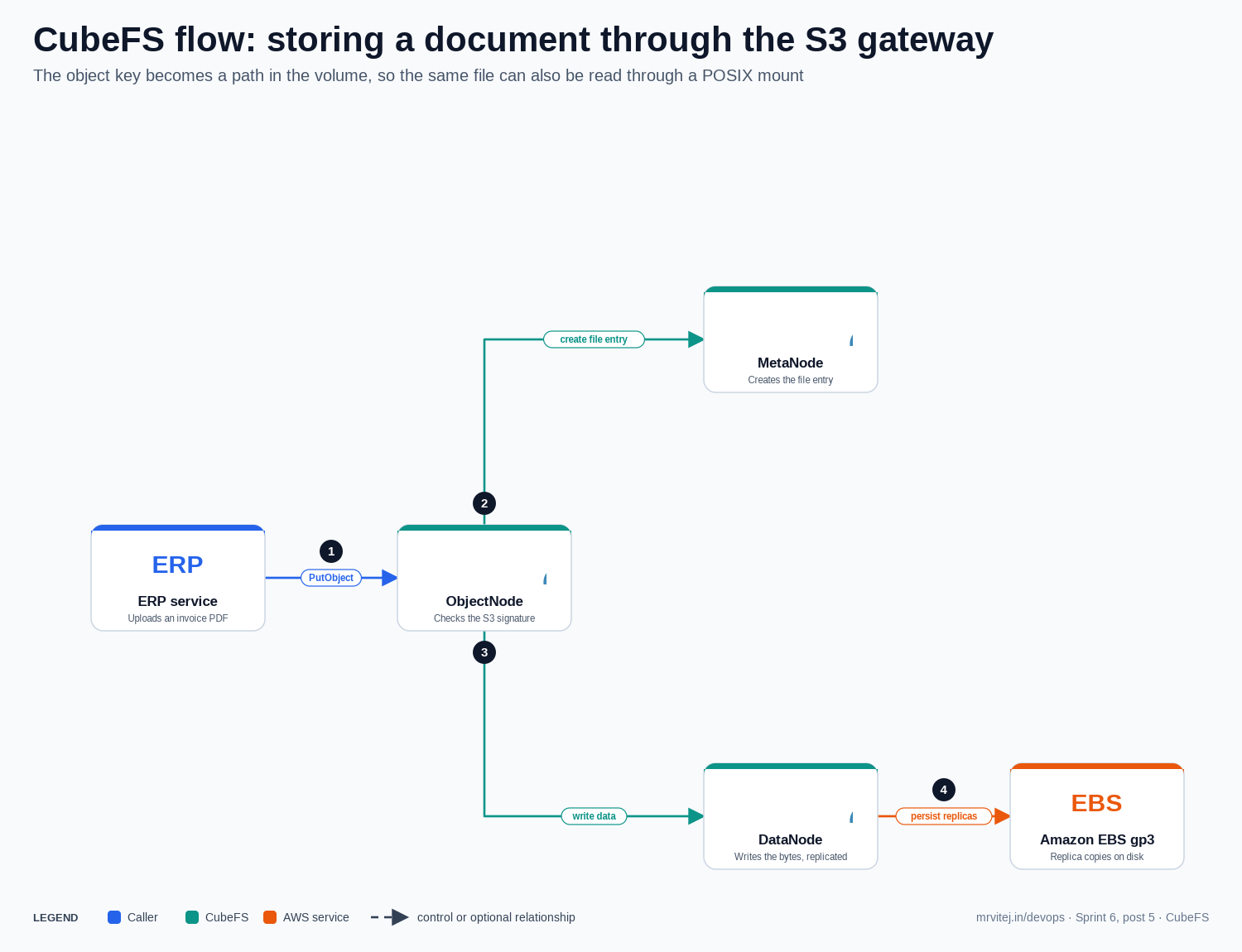
Storing a document through the S3 gateway
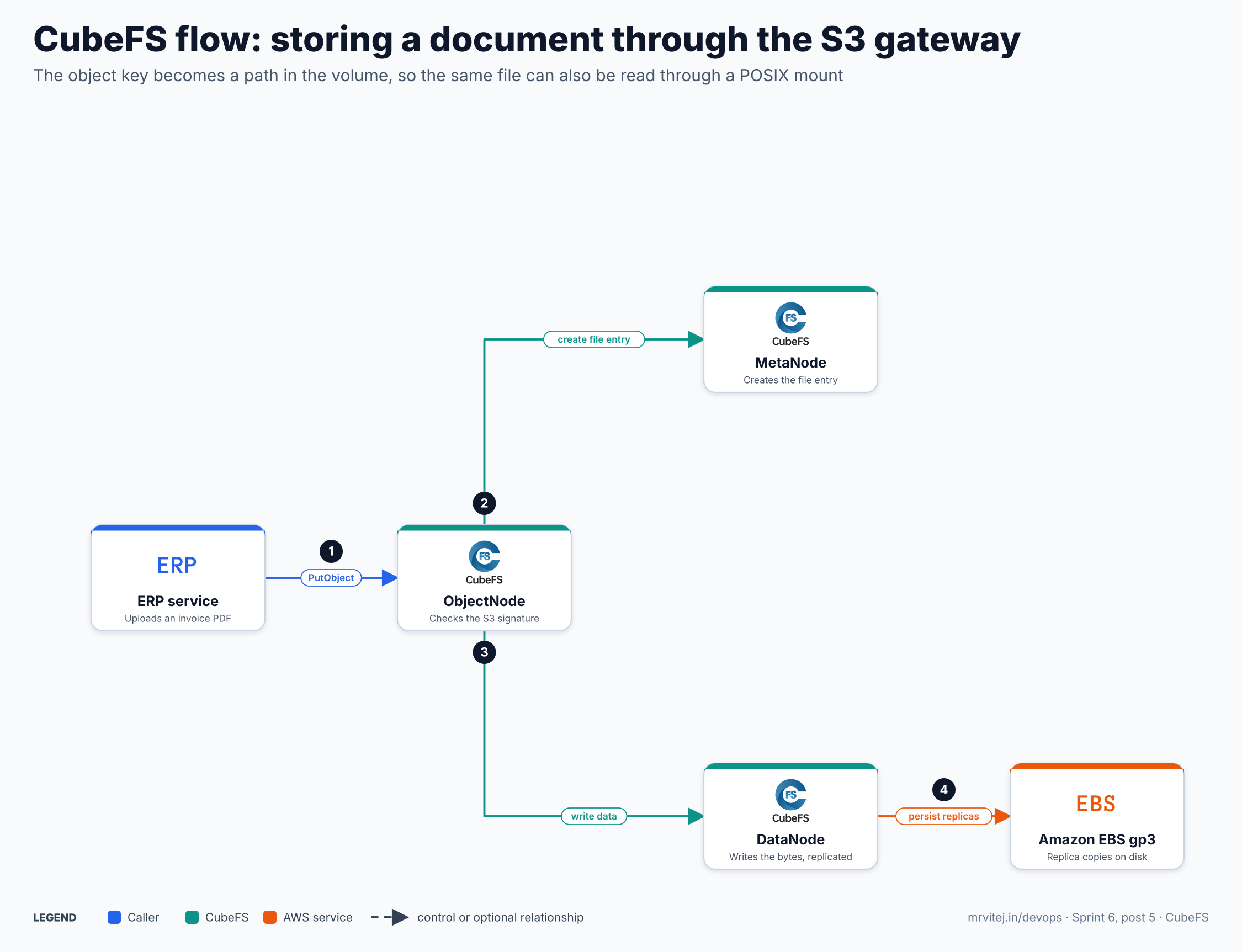
- PutObject. The ERP service uploads
invoices/2026/po-10452.pdfto the bucket named after a volume. - Create the file entry. The ObjectNode asks a MetaNode to create the entry for the file.
- Write the data. The ObjectNode sends the bytes to a DataNode.
- Persist replicas. The DataNodes keep copies on their disks.
The project docs give the mapping: an object put to example/a/b.txt creates and writes the file /a/b.txt in the volume example. Open the zoomable flow diagram, or download it as SVG or PNG.
Real world: one file, two views
A finance service uploads a month-end report to the erp-docs bucket over S3. An analytics job in a pod mounts the erp-docs volume and reads the same file at /mnt/erp-docs/reports/2026-11.pdf with ordinary file calls, no download step. When the job writes a result file into the mount, the S3 side can list it as an object. That shared view is the main reason to pick CubeFS over running a separate object store and a separate file system.
Install CubeFS
Local test cluster
The project README lists several ways to run a cluster. The simplest for a laptop or a test VM is to build it and use the deploy script, which an integration guide from AutoMQ also uses:
git clone https://github.com/cubefs/cubefs.git
cd cubefs
make
# Starts Master, MetaNode and DataNode on this machine.
# Replace the last argument with your own network interface name.
sh ./shell/deploy.sh /home/data eth0
./build/bin/cfs-cli cluster info
A healthy cluster prints a summary with the cluster name, the Master nodes, the MetaNode and DataNode counts as active over total, and the capacity. The older Docker route, docker/run_docker.sh -r -d /data/disk, needs at least 30 GB of free space according to the project’s older docs. The deploy.sh script and the exact build requirements change between releases, so check the repository’s own install page for the version you use.
Kubernetes with Helm
The cubefs-helm chart deploys the cluster and the CSI driver. The project’s CSI documentation shows the shape:
git clone https://github.com/cubefs/cubefs-helm
cd cubefs-helm

# Label the nodes for each role you want them to play
kubectl label node <node> component.cubefs.io/csi=enabled

helm upgrade --install cubefs ./cubefs -f ~/cubefs.yaml -n cubefs --create-namespace
In the values file, booleans such as datanode, metanode, objectnode, client, csi, monitor and ingress switch components on and off, and the image block names the images. The CSI driver needs Kubernetes 1.16 or newer. The label keys have changed between releases (older charts used chubaofs-* labels), so read the chart’s README for the version you install. The chart also needs a kubeconfig file placed in its config directory so the CSI driver can reach the API server.
For the ERP on EKS, run the Master on a small stateful node group, the MetaNodes on memory-rich nodes and the DataNodes on nodes with attached EBS gp3 volumes, and let the cluster autoscaler or Karpenter manage only the stateless parts.
Try it: create a volume and use both interfaces
Volume creation goes through the Master. The CLI is the simplest way. The command shape is below, but I did not run it, so confirm it with cfs-cli volume create --help:
./build/bin/cfs-cli volume create erp-docs erp-owner --capacity 10Creating a volume also creates a user named after the owner if none exists, and gives the volume an access key and secret key. The ObjectNode uses those keys for S3 signatures. A minimal ObjectNode configuration listens on port 17410 and points at the Master addresses (the Master listens on 17010 in the project’s examples):
nohup ./build/bin/cfs-server -c objectnode.json &Then use any S3 client against the ObjectNode endpoint with the volume’s keys, and mount the same volume with the FUSE client:
aws --endpoint-url http://<objectnode>:17410 s3 cp po-10452.pdf s3://erp-docs/invoices/
# on a client node:
modprobe fuse
nohup ./build/bin/cfs-client -c fuse.json &
ls /mnt/fuse/invoices/
From Kubernetes, a PVC against a CubeFS StorageClass gives pods the same mount through the CSI driver. The StorageClass parameters (master addresses, volume name, owner) come from the chart’s documentation for your version.
Production reference design
- Three Masters. Run an odd number, at least three, so the Master group keeps working when one fails.
- Separate node groups. Put Master, MetaNode and DataNode on different node groups with their own sizing. MetaNodes need memory; DataNodes need disks.
- Disk planning. Give each DataNode dedicated gp3 volumes and reserve space for the file system’s own needs.
- Choose the engine per volume. Use replicas for hot, small files such as attachments and erasure coding for large cold datasets.
- Spread across zones. Use the multi-AZ option and place DataNodes in at least three zones so a zone outage does not lose a majority.
- Scale the gateway separately. ObjectNodes are stateless, so run several behind a Service and scale them by request rate.
- Monitor. The project ships Prometheus and Grafana configuration; alert on node count, partition health and disk usage.
- Back up. Replication is not backup. Plan snapshots or copies for important volumes; Velero and Kanister from this series cover the Kubernetes side.
Security
- Access keys. Each volume has an owner with an AccessKey and SecretKey used for S3 signatures. Keep them in Kubernetes Secrets, not in Git.
- Least privilege. Create one owner per application volume so keys can be rotated separately.
- Network. Keep Master, MetaNode and DataNode ports private; expose only the ObjectNode, behind your gateway and TLS.
- Authentication service. The project documents an optional Authnode for stronger authentication of its internal calls; evaluate it before a production rollout.
- Audit history. CNCF’s security group published a self-assessment, and the project’s release notes record fixes that came from a CNCF security audit. Read the current release notes before choosing a version.
- Versions. The release notes say a client or ObjectNode newer than the servers is not supported in a cluster with older servers, so upgrade servers first.
Troubleshooting
This table comes from the project’s install and CSI documentation and release notes. I did not run CubeFS for this post, so test each entry on your own setup.
| Symptom | Likely cause | How to check | Fix |
|---|---|---|---|
| Build fails | Missing build tools or libraries | Read the first compiler error | Follow the install page for your OS; the README lists the required libraries |
cfs-cli cluster info shows fewer active nodes than total |
A MetaNode or DataNode cannot reach the Master | Node logs, and the node’s configured Master address | Fix the address or network, and make sure the Master started first |
| Volume cannot be created | Not enough MetaNode or DataNode capacity, or too few nodes for the replica count | cfs-cli cluster info |
Add nodes or disks, or lower the replica count for a test volume |
| FUSE mount fails | The FUSE module or library is missing | modprobe fuse; check for the fuse package |
Install FUSE and retry |
| Mount works but is slow | Network distance to DataNodes, or small-file load on MetaNodes | Client and node metrics | Co-locate clients with DataNodes, scale MetaNodes and tune per the project’s FUSE guide |
| S3 request returns a signature or access error | Wrong keys or endpoint, or the key belongs to another volume | Compare the AccessKey to the volume owner | Use the keys of the volume’s owner and the ObjectNode address |
| CSI pods stay Pending | The CSI node label is missing | kubectl get nodes --show-labels |
Apply the label the chart expects on the nodes that should run the CSI driver |
| PVC stays Pending | StorageClass parameters point at the wrong Master or volume | kubectl describe pvc and the CSI provisioner logs |
Correct the Master addresses and volume parameters in the StorageClass |
| Clients fail after an upgrade | Client newer than servers | Compare component versions | Upgrade servers first, then clients and ObjectNodes |
| DataNode full | Disk reserve exhausted | Node disk usage | Add disks or nodes, move volumes, or use erasure coding for cold data |
Usage cases
- Document store. Invoices, receipts and attachments written over S3 and readable as files by batch jobs.
- Shared datasets. Training and evaluation data mounted by many pods at once, as in the AI parts of this series.
- Compute-storage separation. The project lists databases, big data and middleware among its uses, with storage separated from compute on Kubernetes.
- Private object storage. An S3-compatible store inside your own network, on any cloud or on-prem.
- In the Sprint 6 project. The ERP keeps documents and attachments in a CubeFS volume, and the AI side reads datasets from it. Part 2 wires it in.
Operational considerations
- It is a storage system. You run Masters, MetaNodes and DataNodes, replace failed disks and watch rebalancing. Plan for that on-call load.
- On AWS, S3 already exists. For plain document storage, Amazon S3 is simpler and cheaper to operate. CubeFS earns its place when you need a shared POSIX volume, one namespace for both S3 and file access, or the same storage on-prem and in other clouds.
- Metadata memory. MetaNodes keep metadata in memory, so file count drives memory sizing.
- Rebalancing. Adding or losing nodes moves data around; do large changes outside peak hours.
- Upgrades. Roll servers before clients and read the release notes for each step.
Adoption
CubeFS began as ChubaoFS at JD.com, and the CNCF graduation in December 2024 followed. I did not find a verified adopters list for this post, so no companies are named. Use the project’s own adopters page and community channels for current references.
Alternatives
| Solution | Model | Best suited to |
|---|---|---|
| Amazon S3 | Managed object store | AWS-only workloads that need objects and not a POSIX mount |
| Amazon EFS | Managed NFS | Simple shared directories on AWS without running storage yourself |
| MinIO | S3-compatible object store | Teams that need S3 only, with a simpler architecture |
| Ceph with Rook | Block, file and object storage | Teams that want one platform for all three and can operate it |
| JuiceFS | POSIX file system on top of an object store and a metadata database | Teams that want POSIX over S3 and prefer fewer storage nodes to run |
| Longhorn | Replicated block volumes for Kubernetes | Per-pod persistent volumes rather than a shared namespace |
| CubeFS | One volume served over POSIX, S3 and HDFS | Teams that need shared files and S3 on the same data and can run the cluster |
Strengths and limitations
| Strengths | Limitations |
|---|---|
| One volume reached over POSIX, S3 and HDFS | A multi-role cluster to deploy and operate |
| Replication and erasure coding, per volume | Metadata sizing and memory need planning |
| Multi-tenancy, multi-AZ and cross-region replication | Documentation and chart details vary between releases |
| Kubernetes CSI driver and Helm chart | Helm and CSI parameters need care across versions |
| Apache 2.0, and Graduated in the CNCF | On AWS, managed services cover simpler needs |
Recommendation
Assess, then adopt for the shared-volume and dataset use cases. Start with a three-node test cluster on EKS and one volume. Write a few thousand documents over S3, mount the volume in a pod and read them back, then kill a DataNode and watch what happens. If you only need object storage on AWS, stay with S3 and keep CubeFS for the workloads that need a shared mount or a store that is portable across environments.
References: CubeFS on CNCF · CubeFS website · CubeFS repository · CubeFS Helm chart · CSI driver · CNCF security self-assessment · CNCF Landscape entry