A container image tells you nothing about how it was made. Was it built from the reviewed commit? By your CI, or by someone’s laptop? Did the vulnerability scan actually run, or was it skipped? A signature on the image proves who signed it, not what happened before. in-toto adds the missing record: each step in the pipeline signs a statement about what it consumed and produced, and a verifier checks those statements against a plan before anything is released. The Landscape describes it as a framework to protect supply chain integrity. It was accepted into the CNCF on 14 August 2019, became Incubating on 10 March 2022 and Graduated on 10 February 2025.
CNCF daily · Sprint 6, post 7 of 26 · Security & Compliance
At a glance
| Category | Provisioning › Security & Compliance |
| CNCF status | Graduated (accepted 2019, Incubating 2022, Graduated February 10, 2025) |
| Written in | Python reference implementation, Go implementation (in-toto-golang); attestation bindings for Go, Python, Rust and Java |
| License | Apache 2.0 |
| Two parts | The original layout and link-metadata framework, and the in-toto Attestation Framework (statements and predicates) |
| Command-line tools | in-toto-run, in-toto-record, in-toto-verify, in-toto-sign |
| Integrations listed in the Landscape | Datadog, GitLab, Grafeas, Jenkins, Rebuilderd, SLSA, SolarWinds, Tekton Chains, Sigstore |
| Install | pip install in-toto |
The problem in-toto solves
Supply chain attacks rarely break the finished artifact; they break a step before it: a compromised build machine, a swapped dependency, a skipped test. Checking the final image cannot see those.
| Question | Image signature only | With in-toto |
|---|---|---|
| Who signed the image | Answered | Answered |
| Was it built from the expected source | Not answered | A signed provenance statement names the source |
| Did every required step run | Not answered | The layout lists the steps, and the verifier checks each one |
| Was each step done by an authorised party | Not answered | Each step is signed by a key the layout allows for that step |
| Were the files changed between steps | Not answered | Artifact rules compare what one step produced with what the next consumed |
| The cost | One signing step | Keys for each step, a layout to maintain, and a verification point |
Key concepts
| Term | Meaning |
|---|---|
| Supply chain step | One action in the chain, such as clone, build or scan |
| Functionary | The party that carries out a step, identified by a key |
| Project owner | The party that defines and signs the layout |
| Layout | The signed plan: steps, which keys may perform them, artifact rules and inspections, plus an expiry date |
| Link metadata | A signed record of one step, with its materials (inputs), products (outputs) and command |
| Artifact rules | Rules in the layout that link steps, for example “this step’s materials must match the previous step’s products” |
| Inspection | A check the verifier runs itself, for example unpacking the final package and comparing it |
| Attestation | Authenticated metadata about an artifact, in a standard format |
| Statement and predicate | The attestation envelope binds subjects (artifacts and their digests) to a predicate, such as SLSA provenance |
| SLSA | A supply-chain framework whose provenance format is an in-toto attestation |
The project’s own documents say the attestation framework defines a standard format that binds subjects, the artifacts being described, to arbitrary authenticated metadata about them. It was designed so that automated policy engines, such as in-toto-verify, can consume the data.
Two ways to use in-toto
There are two styles, and the ERP uses the second one.
| Style | How it works | Best for |
|---|---|---|
| Layout and links | The owner signs a layout; each step runs with in-toto-run and signs a link file; in-toto-verify checks them all |
Small, controlled pipelines where you can place a key on each step |
| Attestations | A pipeline tool produces signed statements (such as SLSA provenance) next to the image; an admission controller or verifier checks them | Kubernetes delivery, where a tool like Tekton Chains writes the statements and Kyverno checks them |
Architecture
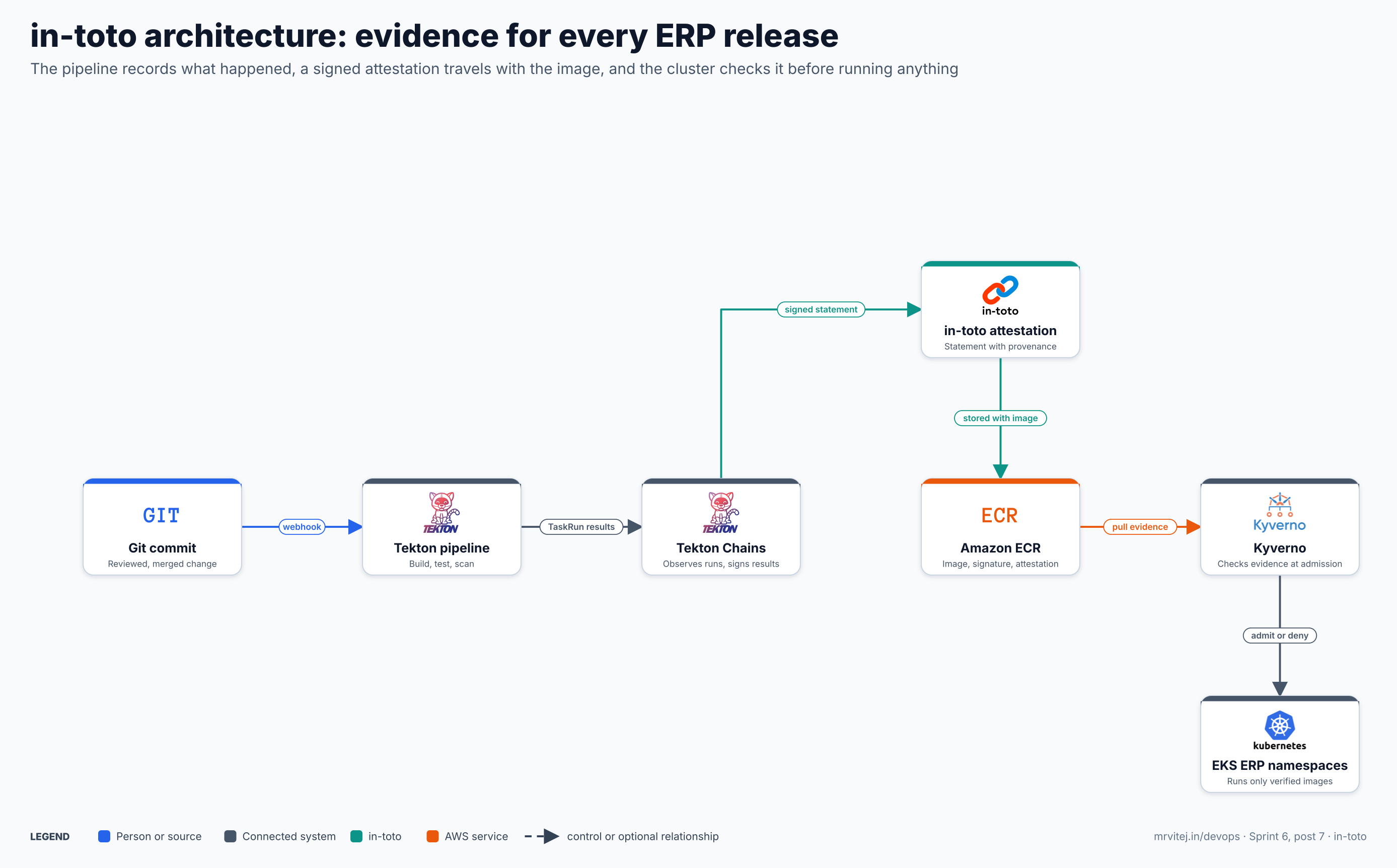
Blue is a person or source, grey is a connected system, teal is in-toto and orange is an AWS service. Open the zoomable diagram, or download it as SVG or PNG.
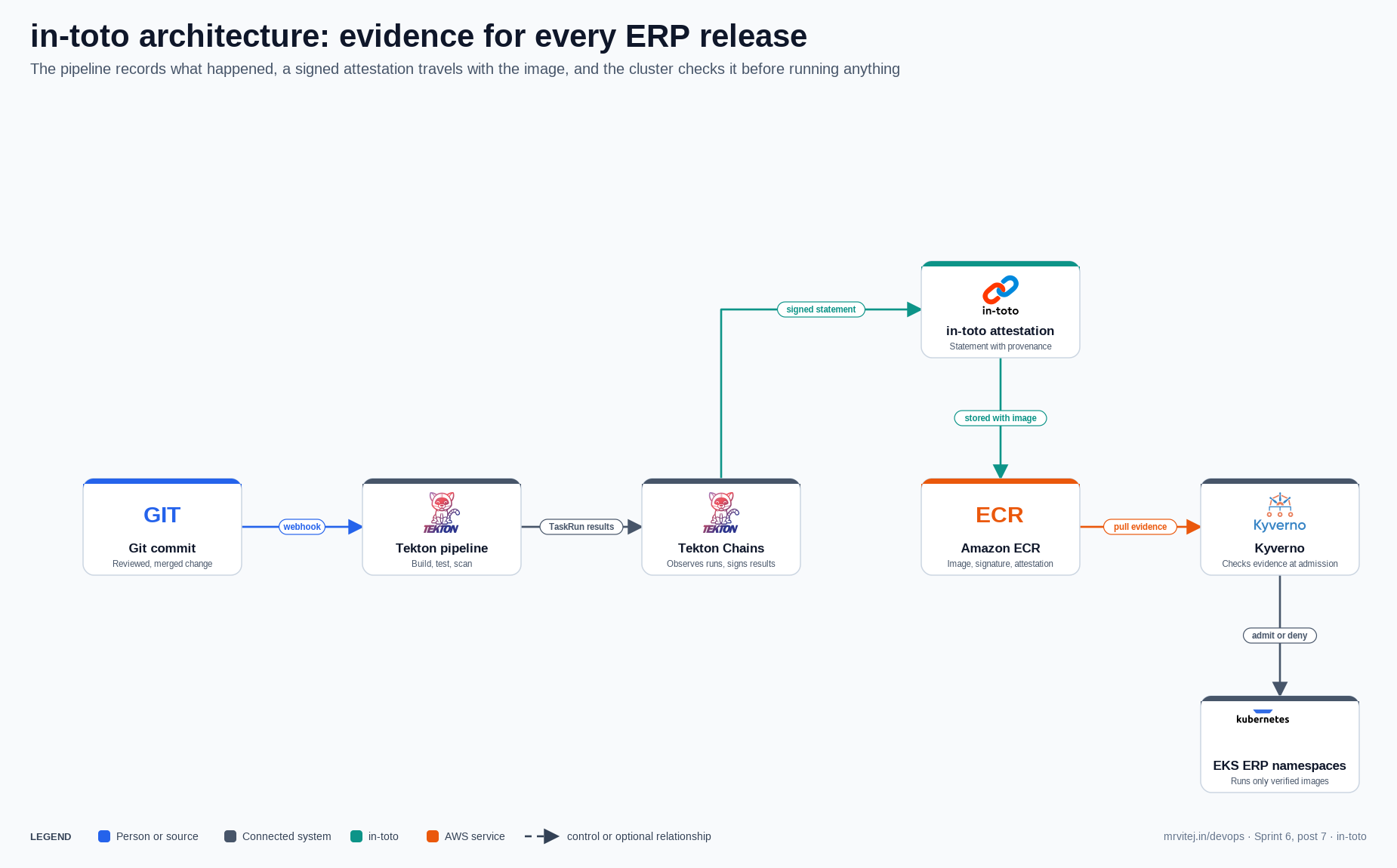
| Component | Responsibility |
|---|---|
| Git commit | The reviewed change the release is built from. |
| Tekton pipeline | Builds, tests and scans, and pushes the image. See the Tekton brief. |
| Tekton Chains | Watches the runs, signs the results and writes provenance as an in-toto attestation. |
| in-toto attestation | A signed statement that names the image digest and describes how it was built. |
| Amazon ECR | Stores the image together with its signature and attestation. |
| Kyverno | Pulls and verifies the evidence when a pod is created, and admits or denies it. See the Kyverno brief. |
| EKS ERP namespaces | Run only images that came with valid evidence. |
Tekton Chains supports an in-toto payload format for task runs and pipeline runs, and the Tekton documentation maps its formatter names to SLSA versions: slsa/v1 or in-toto for SLSA 0.2, and slsa/v2alpha3 and slsa/v2alpha4 for SLSA 1.0. Chains can store signatures and attestations in an OCI registry, next to the image.
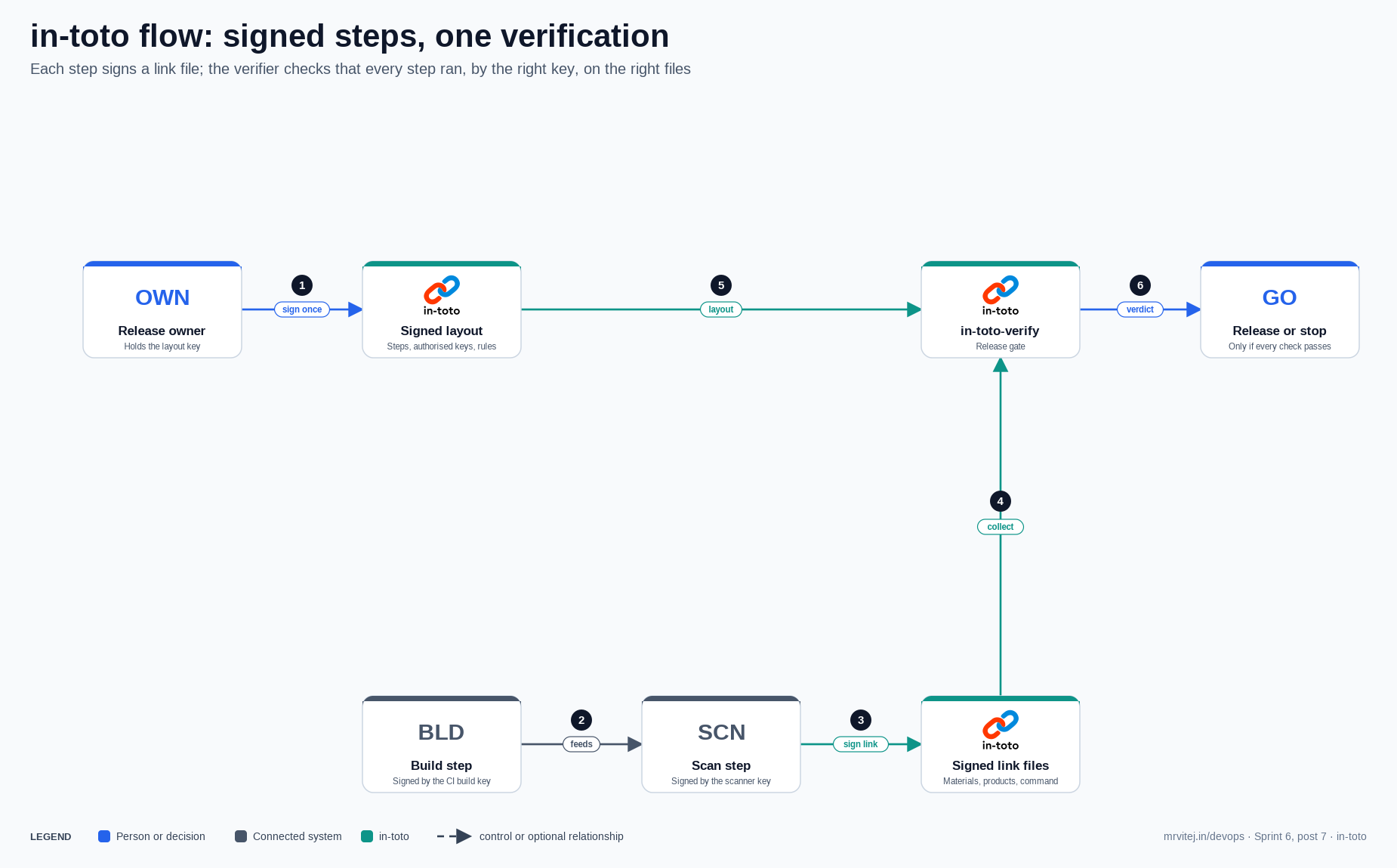
Signed steps and one verification
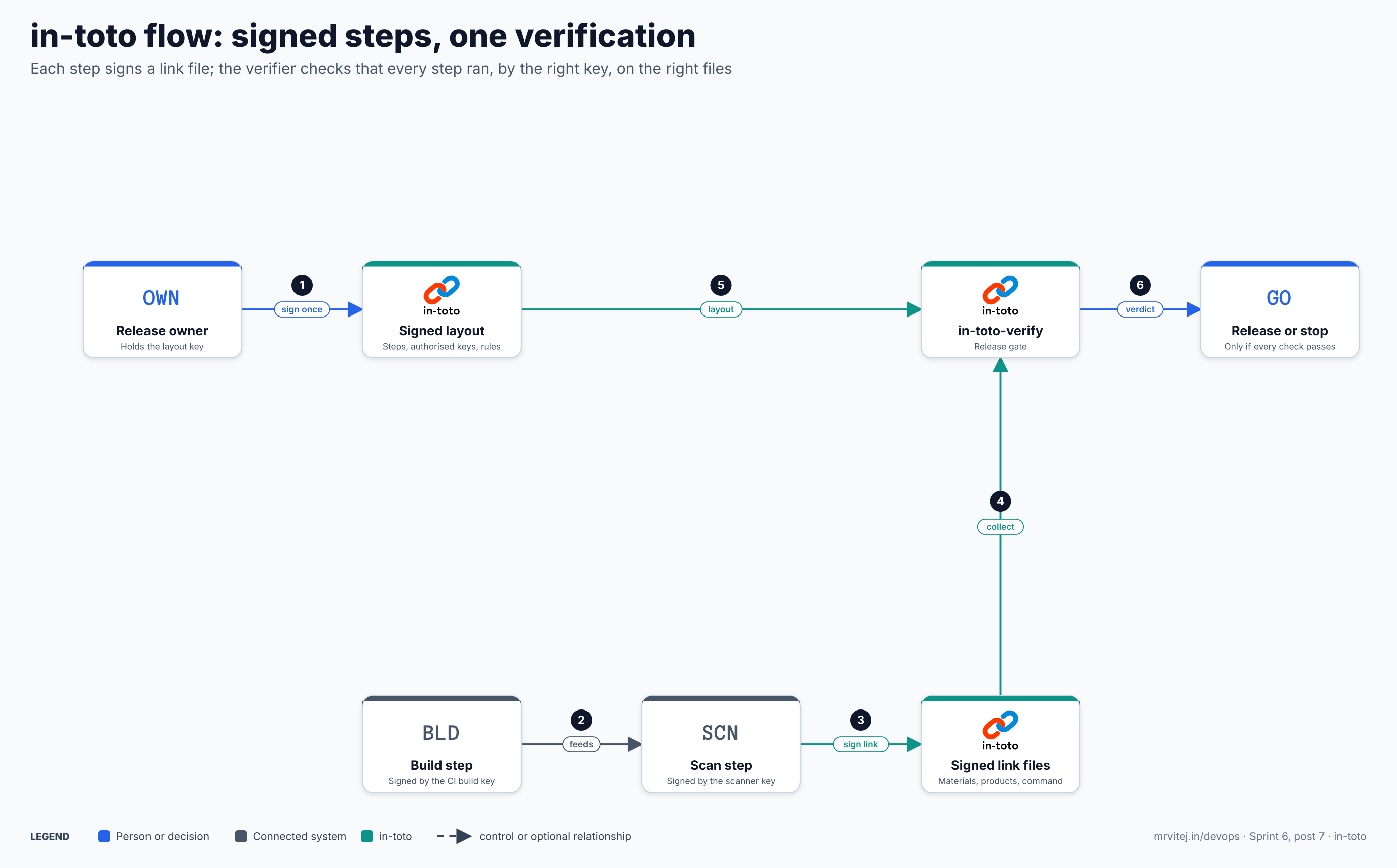
- Sign the layout. The release owner writes the plan once and signs it with the owner key.
- Run the steps. The build step produces files; those products are the materials of the scan step.
- Sign link files. Each step records its materials, products and command in a link file signed with that step’s key.
- Collect. The link files are gathered with the release.
- Supply the layout. The verifier takes the layout and the owner’s public key.
- Verdict.
in-toto-verifychecks the layout signature and expiry, that each step was signed by an authorised key, that the artifact rules hold, and runs the inspections. Only a pass releases.
Open the zoomable flow diagram, or download it as SVG or PNG.
Real world: the skipped scan
A developer’s pull request changes a build script so the vulnerability scan step is quietly removed. The image still builds, still gets signed by CI and still passes a simple signature check. With a layout that lists the scan step, or a Kyverno policy that requires a scan attestation, the missing evidence is the failure: the verifier finds no signed record that the scan ran, and the release stops. The attack was not on the image; it was on the process, which is exactly what the evidence covers.
Install in-toto
The reference tools
The project documents installation through PyPI, and recommends an isolated Python environment:
python3 -m venv in-toto-env
source in-toto-env/bin/activate
pip install in-toto
in-toto-run --help
The Go implementation and the attestation bindings are libraries for your own tooling:
go get github.com/in-toto/in-toto-golang
go get github.com/in-toto/attestation
Evidence from Tekton Chains
If you already run Tekton (see the Tekton brief), Chains produces in-toto attestations with configuration alone. The settings below come from the Tekton Chains documentation. I did not apply them for this post:
# Format of task-level and pipeline-level provenance (SLSA v0.2 shown)
kubectl patch configmap chains-config -n tekton-chains \
  -p='{"data":{"artifacts.taskrun.format":"slsa/v1","artifacts.pipelinerun.format":"slsa/v1"}}'

# Store signatures and attestations in the OCI registry, next to the image
kubectl patch configmap chains-config -n tekton-chains \
  -p='{"data":{"artifacts.oci.storage":"oci","artifacts.taskrun.storage":"oci"}}'
For SLSA v1.0 provenance, the docs say to use the slsa/v2alpha3 or slsa/v2alpha4 formatter instead. Chains signs with a key you provide through a Secret, or with a KMS key; generate and store it as the Tekton Chains docs describe.
Try it: three signed steps by hand
The project’s demo has the same shape: Alice is the project owner, and Bob and Carl are functionaries. You can follow it with the demo repository:
git clone https://github.com/in-toto/demo.git
cd demo
pip install -r requirements.txt
A step is run under in-toto-run, which executes the command and writes a signed link file. The shape of a call, from the project’s usage notes, is below. Flag names have changed between major versions, so confirm with in-toto-run --help:
in-toto-run --step-name build \
  --key ci-build-key \
  --materials src/ \
  --products dist/erp-api.tar.gz \
  -- tar czf dist/erp-api.tar.gz src/
The layout then lists the steps (build, scan), the public key allowed to do each, and rules such as “the scan step’s materials must MATCH the build step’s products”, with an expires date. After the steps run, verification is one command, run with the owner’s public key and the link files in the working directory:
in-toto-verify --layout root.layout --layout-key owner.pubThe command exits with a non-zero status if any check fails, so a pipeline can use it as a release gate. The project’s PyPI page lists what it checks: the layout was signed with the owner’s key, has not expired, each step was performed by an authorised functionary, materials and products follow the rules, and the inspections pass.
Check the evidence at admission with Kyverno
When Chains has produced provenance, Kyverno can require it. Kyverno’s verifyImages rule verifies in-toto attestations stored in an OCI registry; each attestation has a predicate type, attestors that verify its signature, and conditions on the predicate’s contents. A policy for the ERP namespaces might look like this. It is an example for this series, not a tested policy:
apiVersion: kyverno.io/v1
kind: ClusterPolicy
metadata:
  name: require-build-provenance
spec:
  validationFailureAction: Enforce
  webhookConfiguration:
    failurePolicy: Fail
    timeoutSeconds: 30
  background: false
  rules:
    - name: check-provenance
      match:
        any:
          - resources:
              kinds: [Pod]
              namespaces: ["erp-*"]
      verifyImages:
        - imageReferences:
            - "123456789012.dkr.ecr.ap-south-1.amazonaws.com/erp/*"
          attestations:
            - predicateType: https://slsa.dev/provenance/v0.2
              attestors:
                - entries:
                    - keys:
                        publicKeys: |-
                          -----BEGIN PUBLIC KEY-----
                          <your Chains signing public key>
                          -----END PUBLIC KEY-----
              conditions:
                - all:
                    - key: "{{ builder.id }}"
                      operator: Equals
                      value: "https://tekton.dev/chains/v2"
Set the predicate type to match the Chains formatter you chose (SLSA v1.0 uses a different type from v0.2), and set the builder ID to the value your Chains installation writes. Newer Kyverno releases also describe an ImageValidatingPolicy type that can check in-toto attestations by predicate type, so read the Kyverno brief for which style your version uses. To see what Chains wrote for an image, cosign verify-attestation with the matching --type prints the statement.
Production reference design
- Decide what must be true. Write down the rules: built by the pipeline, from a protected branch, scanned, and signed. Each rule becomes a step or a condition.
- Evidence comes from the platform. Let Tekton Chains produce provenance; do not rely on developers adding it by hand.
- Keys outside the pipeline’s reach. Keep the signing key in a KMS or in a Secret that tasks cannot read.
- Store evidence with the image. Keep signatures and attestations in ECR next to the image digest.
- Verify at the cluster. Use Kyverno in Enforce mode for production namespaces, and in Audit mode first.
- Verify at the pipeline too. For high-risk releases, run
in-toto-verifywith a layout as a final gate before promotion. - Short expiries. Put an expiry on every layout and rotate keys on a schedule.
- Record and monitor. Alert on admission denials; they are the signal that something skipped the process.
Security
- Key protection is the whole game. If an attacker can use a step’s signing key, they can forge that step. Use a KMS or hardware-backed keys, and separate keys per step.
- Separate owner and functionary keys. The layout key should be held by a small group, and never by the pipeline itself.
- Pin the verification key. Admission policies must carry the public key or certificate identity they trust, not accept any signer.
- Check what the statement says. A valid signature on an unexpected builder or source is still a failure; use conditions on the predicate.
- Expiry. An expired layout fails verification, which is intended; renew it deliberately.
- Registry access. Restrict who can write attestations to the registry, so evidence cannot be added by anyone with push rights.
Troubleshooting
This table comes from the project’s PyPI page and docs, the Tekton Chains documentation and Kyverno’s verify-images documentation. I did not run in-toto for this post, so test each entry on your own setup.
| Symptom | Likely cause | How to check | Fix |
|---|---|---|---|
pip install in-toto fails on crypto libraries |
Missing system headers or an old Python | The install error and python3 --version |
Follow the install notes in the docs for system dependencies; use a virtual environment |
in-toto-verify reports an unsigned or unauthorised step |
The link was signed with a key that the layout does not list for that step | Compare the link’s key ID with the layout’s step keys | Re-run the step with the right key, or update and re-sign the layout |
| Verification fails on materials or products | An artifact rule does not hold, because files changed between steps | Read the rule that failed in the output | Find what changed the file, or fix a wrong rule |
| Layout expired | Past the expires date |
Read the layout’s expiry | Create and sign a new layout |
| Link file not found | Wrong working directory, or link file names do not match step names | List *.link files |
Put the link files next to the layout, using the names the tool wrote |
| Chains produces no attestation | Chains is not running, or the format and storage keys are empty | kubectl get pods -n tekton-chains; check chains-config |
Install Chains and set the format and storage keys |
| Attestation is not found next to the image | Storage backend is not oci, or the image digest was not recorded |
cosign tree <image> |
Set artifacts.oci.storage to oci and make sure the task reports the image digest and URL |
| Kyverno denies a pod that was built correctly | Predicate type or builder ID in the policy does not match what Chains wrote | cosign verify-attestation --type <predicate-type> and read the output |
Align the policy’s predicate type and conditions with the real statement |
| Kyverno cannot reach the registry | Missing pull credentials for ECR | Kyverno admission controller logs | Configure image pull credentials for the controller |
| Every pod is blocked after enabling the policy | Enforce mode was turned on before all images had evidence | Policy reports and admission denials | Start in Audit mode, fix the pipelines, then move to Enforce |
Usage cases
- Release gates. Block images that lack provenance, a scan record or review evidence.
- Source-to-image traceability. Answer “which commit and which pipeline run produced this image” from the image itself.
- Regulated releases. Keep signed records that auditors can verify without trusting a spreadsheet.
- Third-party software. Require suppliers to ship attestations, and check them on arrival.
- In the Sprint 6 project. Every ERP image carries signed provenance, and Kyverno refuses unverified images in the ERP namespaces. Part 5 wires the release gates.
Operational considerations
- Start small. Begin with provenance and a single condition, then add scan and review evidence one at a time.
- Audit before enforce. Run policies in Audit mode until every pipeline produces evidence.
- Keys and rotation. Plan how keys are created, stored, rotated and revoked before the first release depends on them.
- Version drift. Predicate types and formatter names change between SLSA and Chains versions; pin versions and test upgrades.
- Not a scanner. in-toto records and verifies what happened; it does not find vulnerabilities by itself.
- Complements, not replaces. Image signing, SBOMs and vulnerability scanning each cover a different question; in-toto ties the answers together.
Adoption
The Landscape lists integrations with Datadog, GitLab, Grafeas, Jenkins, Rebuilderd, SLSA, SolarWinds, Tekton Chains and Sigstore, and the in-toto Attestation Framework is the format that SLSA provenance uses. I did not find a verified list of production end users for this post, so none are named; the project’s own site and the CNCF page are the places to check.
Alternatives
| Solution | Model | Best suited to |
|---|---|---|
| Cosign image signatures alone | Signs the image, with optional attestations | Teams that only need to know who signed the image |
| Notary Project and Ratify | Signatures verified at admission; see the Notary and Ratify brief | Teams that want signature verification and supply chain artefacts through a registry-centric flow |
| GitHub artifact attestations | Hosted provenance for GitHub workflows, verifiable by Kyverno | Teams that build on GitHub Actions and want a managed path |
| Binary Authorization | A cloud policy engine that checks attestations before deploy | Teams on the cloud services that offer it |
| SBOM and scanner reports alone | Lists of components and known vulnerabilities | Teams whose first need is knowing what is inside an image |
Strengths and limitations
| Strengths | Limitations |
|---|---|
| Evidence about the whole process, not only the final image | Needs signing keys and a plan for protecting them |
| Standard attestation format used by SLSA, Tekton Chains and Kyverno | Layouts and rules take effort to write and maintain |
| Works with tools you may already run | Version changes in predicate types and formatters need care |
| Graduated CNCF project with Go and Python implementations | Verification is only as good as the policy that checks it |
| Supports both a layout-based and an attestation-based style | Does not scan for vulnerabilities by itself |
Recommendation
Adopt, in stages. Begin with what you already have: turn on Tekton Chains provenance for the ERP images, store it in ECR, and run a Kyverno policy in Audit mode that only checks that provenance exists and names your builder. Once every pipeline passes, switch the production namespaces to Enforce and add a second condition, such as a scan attestation. Reach for hand-written layouts and in-toto-verify only for the few releases where you can put a separate key on each step.
References: in-toto on CNCF · in-toto website · Getting started · in-toto repository · in-toto Attestation Framework · in-toto demo · Tekton Chains SLSA provenance · Kyverno verify images · CNCF Landscape entry