k0s is an open-source Kubernetes distribution that arrives as one self-contained executable. The same binary embeds the Kubernetes components, installs itself as a system service, runs a controller or a worker, and ships tools for tokens, backup, restore and diagnostics. It needs nothing from the host beyond the kernel, which makes it easy to put on a small VM, a rack server, a gateway or a laptop, and to keep upgraded. It is certified and tracks upstream Kubernetes, so manifests, Helm charts and operators behave as they do on any other conformant cluster. Mirantis created k0s and is its main commercial sponsor, and the project joined the CNCF Sandbox on January 19, 2025. This brief explains k0s from the problem it solves to installing, configuring, operating and securing it, so one read is enough to decide whether it belongs in your platform.
CNCF daily · Sprint 5, post 1 of 14 · Certified Kubernetes - Distribution
At a glance
| Category | Platform › Certified Kubernetes - Distribution (as listed in the CNCF Landscape for comparable distributions; confirm on the project page) |
| CNCF status | Sandbox. Accepted January 19, 2025. An incubation application has been submitted |
| Written in | Go |
| License | Open source; see the LICENSE file in the repository for the exact terms |
| Versioning | Follows Kubernetes: 1.<minor>.<patch>+k0s.<n>. A new minor release roughly every four months, each maintained for about 14 months |
| Datastore | k0s-managed etcd by default, or kine in front of SQLite, MySQL or PostgreSQL |
| Container runtime and network | containerd with runc; kube-router by default, Calico or a custom CNI as options |
| Architectures | x86_64, aarch64 and armv7l with CI coverage; riscv64 has no pre-built binaries |
| Minimum size (approx.) | Controller 1 GB RAM and 1 vCPU; worker 0.5 GB RAM and 1 vCPU; controller and worker together 1 GB and 1 vCPU |
| Install | curl -sSf https://get.k0s.sh | sudo sh for the binary; k0sctl for multi-node clusters |
The problem k0s solves
A Kubernetes cluster is more than the API server. Someone has to choose and install a container runtime, a datastore, a network plugin and a certificate scheme, wire them together, and then upgrade all of them as the host operating system moves on a different schedule. On a cloud that is mostly handled for you. On bare metal, in a branch office, at an edge site, in a lab or inside an appliance, it is the real work, and a distribution that expects a package manager, a particular OS version or a pile of dependencies makes it worse.
k0s attacks that gap from the packaging side. Everything the cluster needs is in one binary that has no host dependencies apart from the kernel, so the same file runs on a wide range of Linux distributions (and, as an early option, Windows workers). Installing is a handful of commands, and tearing a node down with k0s reset removes what k0s put there. The project’s stated aim is to make a conformant cluster something you bootstrap in minutes rather than assemble. It deliberately bundles only a small set of add-ons, so you add the ones you want instead of removing the ones you do not.
Key concepts
| Term | Meaning |
|---|---|
| Controller | A node that runs the control plane: API server, scheduler, controller manager, the datastore and the Konnectivity server. |
| Worker | A node that runs pods: kubelet, containerd with runc, kube-proxy and the CNI. |
| Controller + worker | One node with both roles, started with --enable-worker. --single is the shortcut for a one-node cluster. |
| Naked process | How k0s runs control-plane components: as plain host processes that the k0s binary supervises, not as pods. |
| Konnectivity | A reverse tunnel. Workers dial the controller and the controller uses that connection to reach kubelets (for logs, exec and webhooks), so workers do not need to be reachable from the control plane. |
| Join token | A short-lived credential created on a controller that lets a new worker (or controller) join the cluster. |
| k0s.yaml | The cluster configuration file (kind: ClusterConfig). Partial files are fine; missing values take defaults. |
| k0sctl | A separate command-line tool that connects over SSH, installs k0s on a list of hosts and brings them into one cluster. |
| Kine | A shim that lets the API server use SQL databases instead of etcd. |
| Autopilot | k0s’s built-in controller for coordinated, in-cluster upgrades of controllers and workers. |
Architecture
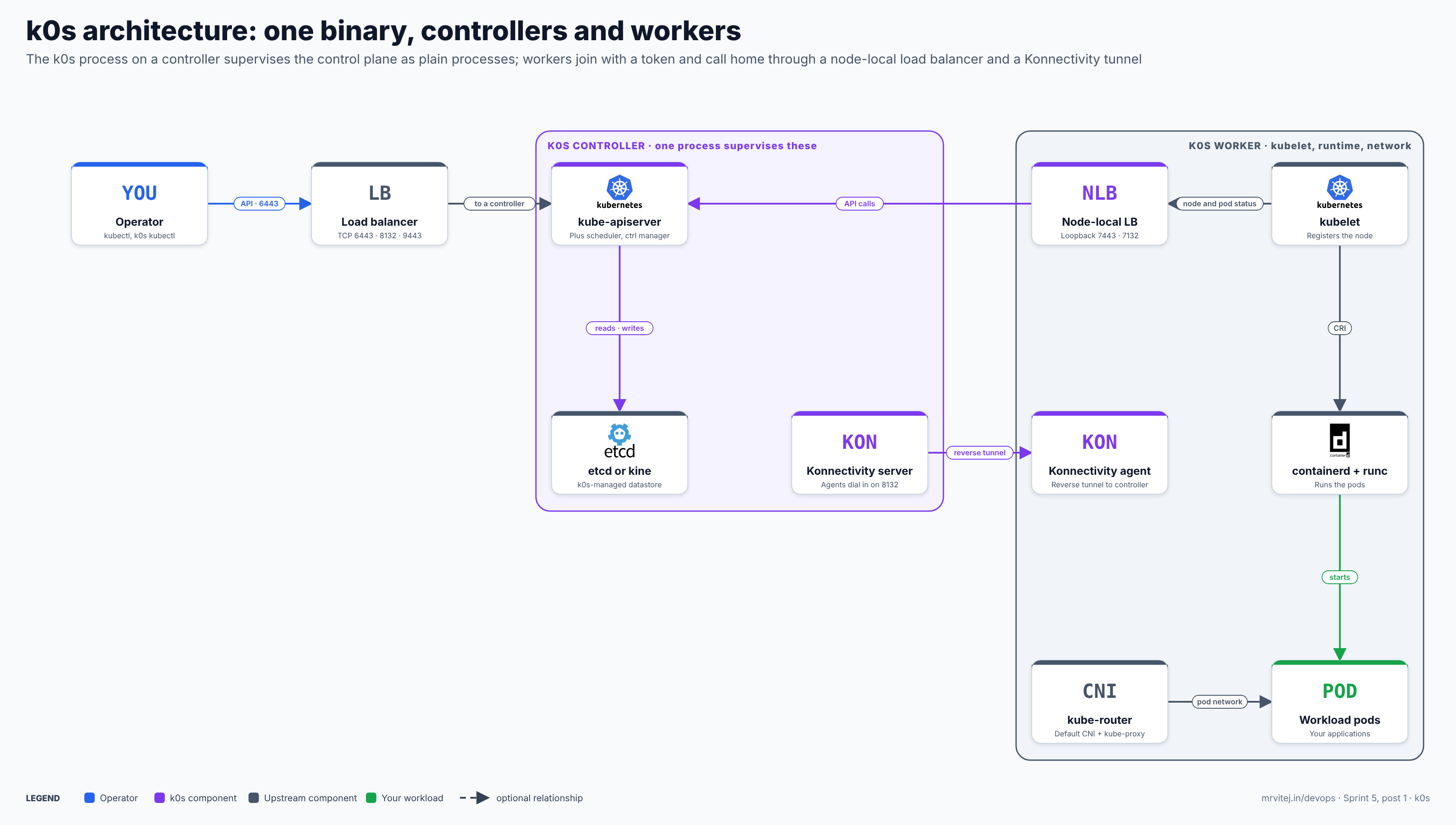
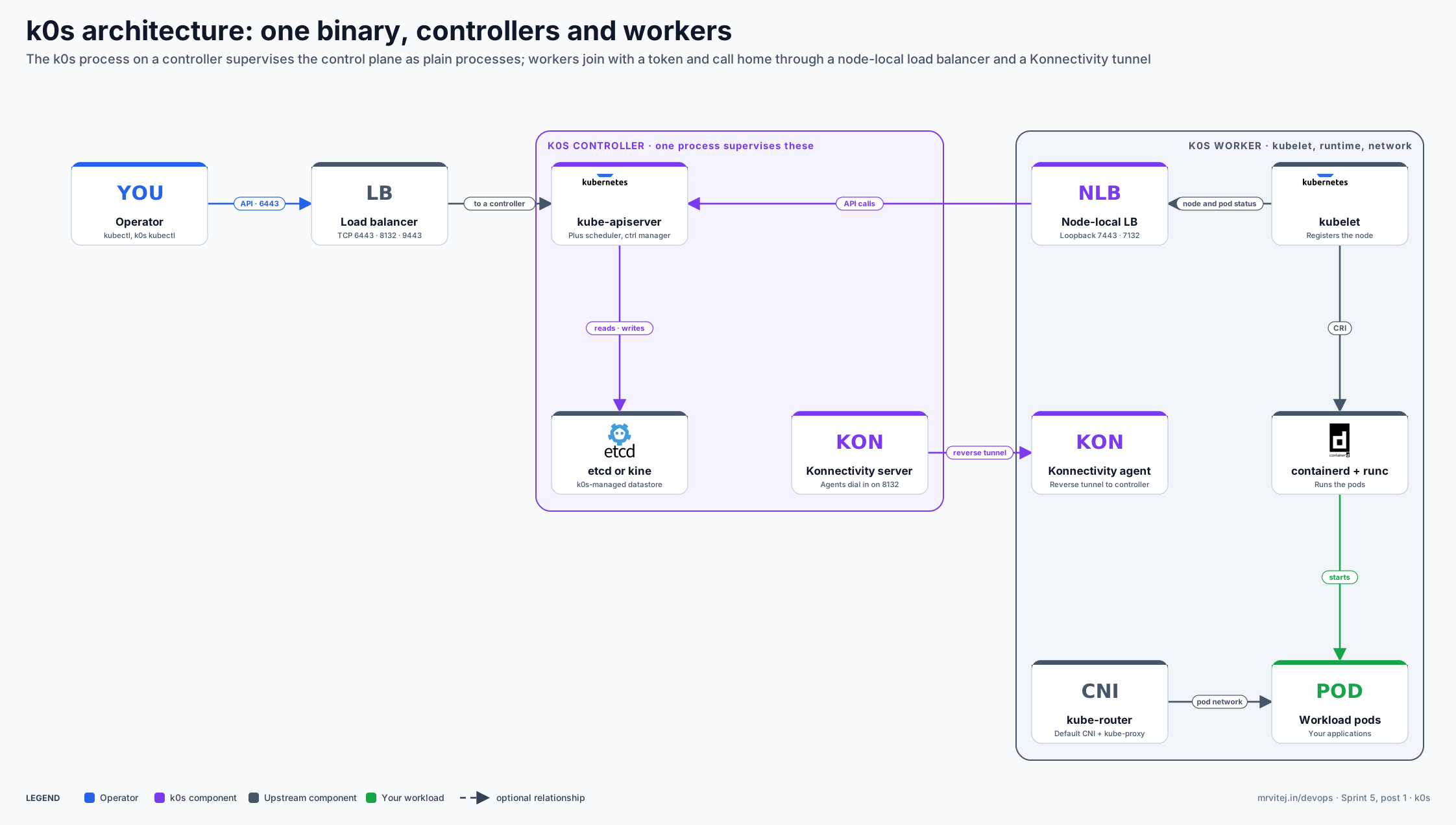
The diagram shows one controller and one worker; a production cluster has three or five controllers and many workers. Purple is a k0s component, grey is an upstream component, green is your workload and blue is the operator. Open the zoomable diagram, or download it as SVG or PNG.
| Component | Responsibility |
|---|---|
| k0s controller process | Installed as a system service. Starts and supervises kube-apiserver, kube-scheduler, kube-controller-manager, the datastore and the Konnectivity server as plain processes. |
| Datastore | etcd managed by k0s, co-located on the controllers, or an external SQL database through kine. k0s cannot shrink an etcd cluster, so plan the controller count before you grow it. |
| Load balancer (HA) | A TCP load balancer in front of the controllers on 6443 (Kubernetes API), 8132 (Konnectivity) and 9443 (controller join API). |
| Konnectivity server and agent | The server runs on controllers, the agent on workers. Agents dial in, so workers can sit behind NAT. Defaults: agent port 8132, admin port 8133. |
| Node-local load balancing (optional) | An Envoy proxy on each worker’s loopback (ports 7443 for the API and 7132 for Konnectivity) that spreads a worker’s calls across controllers without an external load balancer. Disabled by default. |
| Control plane load balancing (optional) | A k0s-run virtual IP (IPVS) across controllers, for networks where you cannot provide a load balancer. Disabled by default. |
| Worker | kubelet, containerd with runc, kube-proxy (iptables by default) and the CNI. kube-router is the default CNI. |
| Extensions | Helm repositories and charts listed in k0s.yaml that k0s installs during bootstrap and keeps reconciled. |
Design principle. Make the Kubernetes distribution a single, self-contained artifact and keep it neutral. k0s supervises the control plane itself instead of relying on the host or a runtime, bundles only what a cluster needs to start, and leaves ingress, storage, monitoring and policy to you.
From k0sctl apply to a Ready node
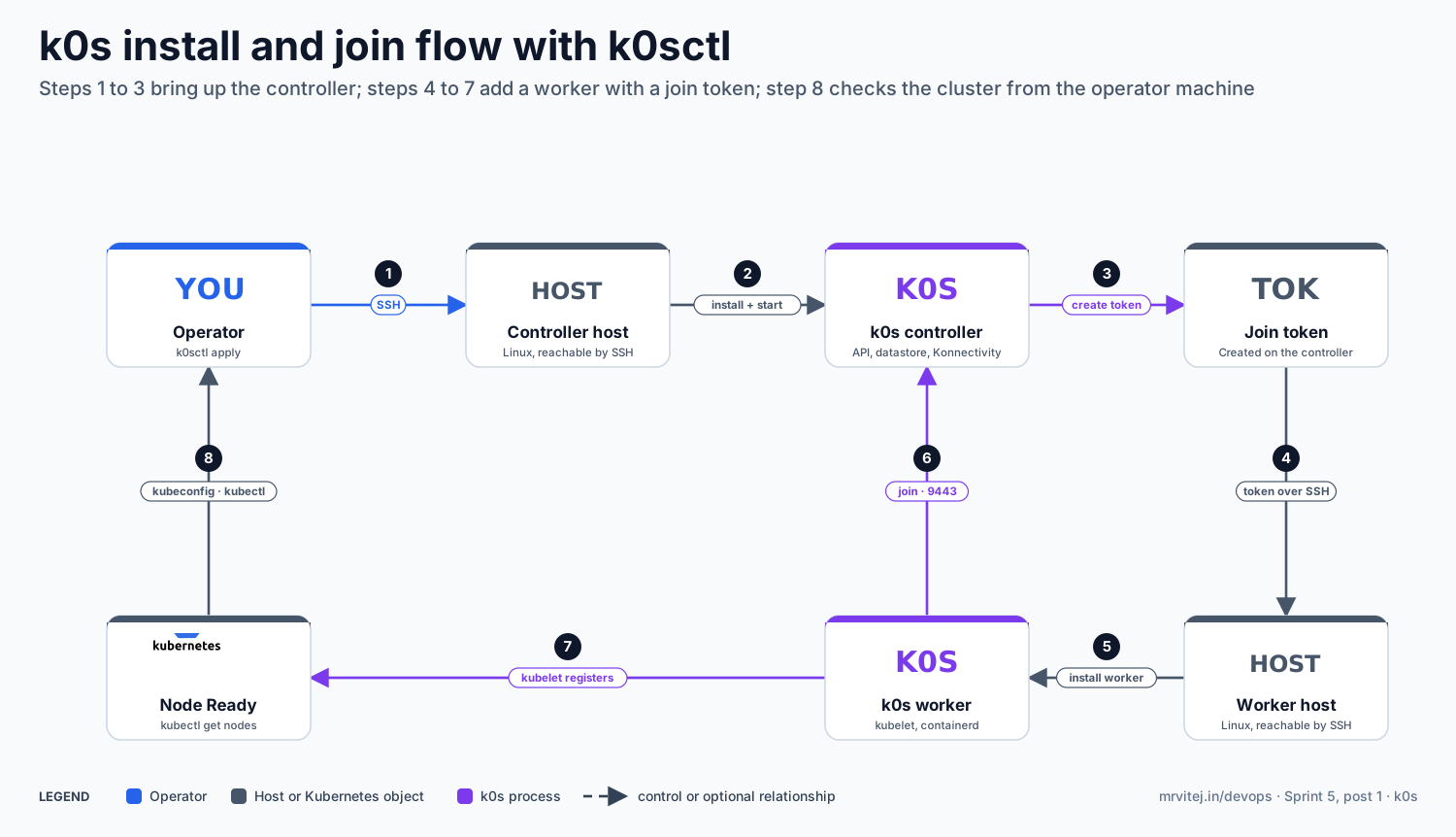
The second diagram follows a two-node cluster, one controller and one worker, from the first command to a node showing Ready.
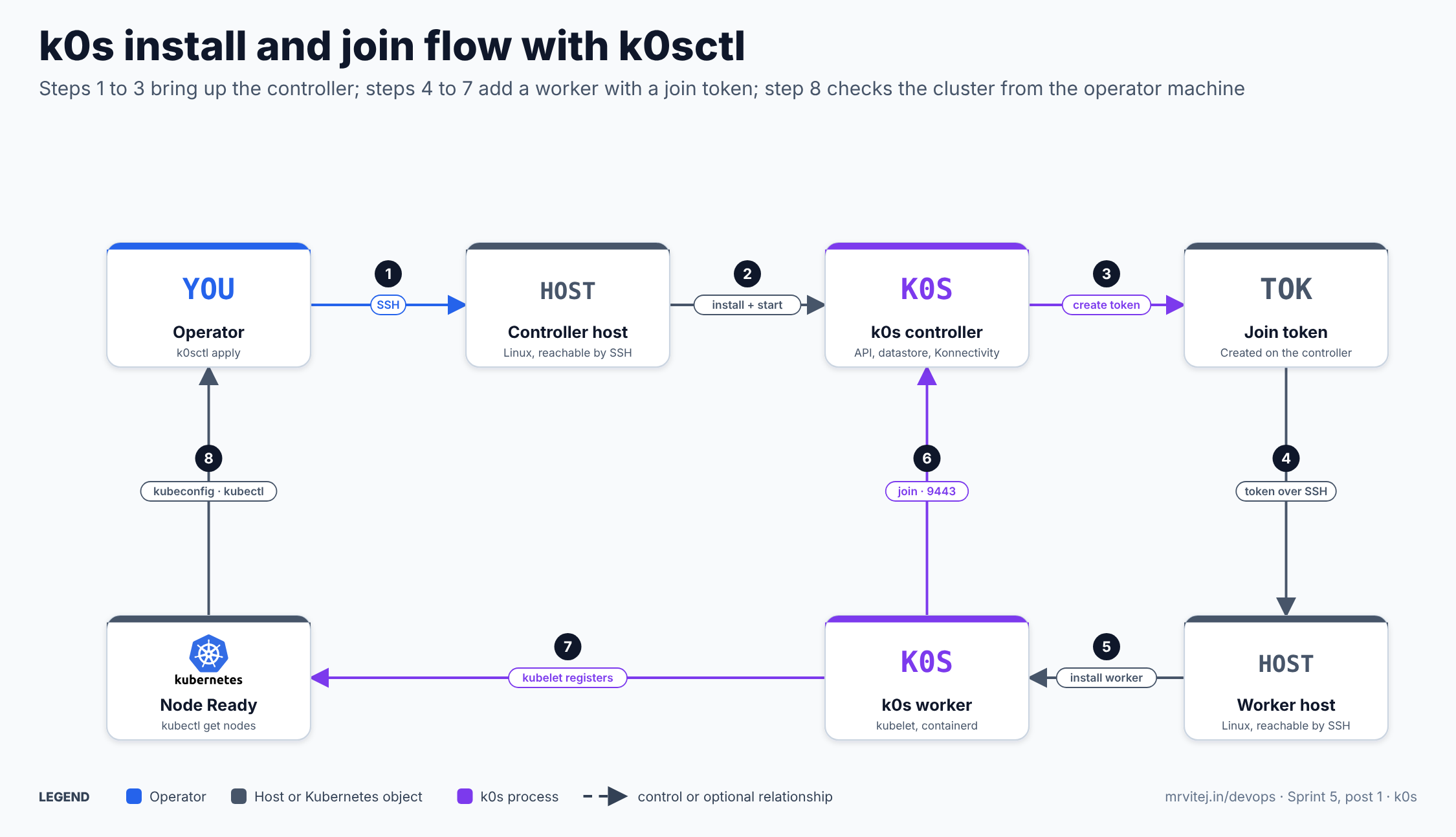
- SSH. The operator runs
k0sctl applywith ak0sctl.yaml; k0sctl connects to each host over SSH, checks the OS and prepares it. - Install and start. k0sctl downloads k0s onto the controller host, writes the configuration and starts the k0s controller service.
- Create a token. Once the controller is initialised, k0sctl creates a worker join token on it.
- Token over SSH. k0sctl carries the token to the worker host.
- Install the worker. It installs k0s there as a worker using the token.
- Join. The worker contacts the controller (join API on 9443) and receives its cluster credentials.
- Register. The worker’s kubelet registers the node and the Konnectivity agent opens its tunnel.
- Check. The operator runs
k0sctl kubeconfig, thenkubectl get nodesshows the node Ready.
The phases k0sctl actually reports are: connect to hosts, detect the OS, prepare hosts, gather facts, download k0s, configure k0s, initialise the controller, install workers and disconnect. Open the zoomable flow diagram, or download it as SVG or PNG.
Install k0s
Check the host
Run k0s sysinfo after downloading the binary to test the host against k0s’s requirements. The system requirements page lists the approximate minimums above, recommends an SSD, asks that workers keep at least 15% disk space free, and says k0s uses roughly 0.5 GB on a controller, 1.3 GB on a worker and 1.7 GB on a combined node, before the OS and your applications. CI covers a long list of distributions, among them Ubuntu 20.04, 22.04 and 24.04, Debian 11 and 12, RHEL 8 and 9, Rocky Linux 8 and 9, Amazon Linux 2023, SUSE Linux Enterprise Server 15, Alpine, Flatcar and Fedora CoreOS. The page does not list kernel requirements itself; it points to the external runtime dependencies page, so check that page for your kernel.
One node, in four commands
This is the Quick Start path: one machine that is both controller and worker.
curl --proto '=https' --tlsv1.2 -sSf https://get.k0s.sh | sudo sh
sudo k0s install controller --single
sudo k0s start
sudo k0s kubectl get nodes
sudo k0s install controller --single --start combines the install and start. If you may want to add workers later, install with --enable-worker --no-taints instead of --single. Give the node a minute or two before expecting it to be ready for applications, and check the service with sudo k0s status. In an air-gapped environment, download the binary from the releases page instead of the script and follow the air-gap guide for images.
Add a worker by hand
On a controller, create a token. Then, on the new machine with the same binary installed, install the worker with it:
sudo k0s token create --role=worker --expiry=24h > worker.token
sudo k0s install worker --token-file worker.token
sudo k0s start
Move the token file to the worker securely and delete it afterwards. The manual multi-node guide covers the controller case and the ports to open.
A multi-node cluster with k0sctl
k0sctl is the recommended path for production, because it makes multi-node installs repeatable. It is a single binary, runs wherever Go does, and needs only SSH access to the hosts. k0sctl init > k0sctl.yaml writes a starter file. A small high-availability layout, with a load balancer you provide in front of three controllers, looks like this:
apiVersion: k0sctl.k0sproject.io/v1beta1
kind: Cluster
metadata:
  name: demo
spec:
  hosts:
  - role: controller
    ssh: { address: 10.0.0.11, user: ubuntu, keyPath: ~/.ssh/id_ed25519 }
  - role: controller
    ssh: { address: 10.0.0.12, user: ubuntu, keyPath: ~/.ssh/id_ed25519 }
  - role: controller
    ssh: { address: 10.0.0.13, user: ubuntu, keyPath: ~/.ssh/id_ed25519 }
  - role: worker
    ssh: { address: 10.0.0.21, user: ubuntu, keyPath: ~/.ssh/id_ed25519 }
  - role: worker
    ssh: { address: 10.0.0.22, user: ubuntu, keyPath: ~/.ssh/id_ed25519 }
  k0s:
    version: <k0s version, for example the current 1.36.x+k0s.0 release>
    config:
      spec:
        api:
          externalAddress: k8s.example.internal
          sans:
          - k8s.example.internal
k0sctl apply --config k0sctl.yaml
k0sctl kubeconfig --config k0sctl.yaml > kubeconfig
kubectl --kubeconfig kubeconfig get nodesThe example addresses and host names are placeholders. Each entry in hosts has a role and an ssh block, and k0sctl manages only the hosts listed. The docs note two limits: k0sctl does not discover hosts, and it can add nodes to a cluster but cannot remove them. k0sctl also generates and shares the controllers’ certificates for you, which is the main reason to use it for HA.
Configuration reference
k0s.yaml uses apiVersion: k0s.k0sproject.io/v1beta1 and kind: ClusterConfig, with everything under spec. k0s config create writes a file full of defaults to start from; partial files are accepted. Pass it with --config at install time on each controller, or put it under spec.k0s.config in k0sctl.yaml.
| Section | What it sets | Defaults worth knowing |
|---|---|---|
api |
How components reach the API server | port 6443, k0sApiPort 9443, CA lifetime 87600h (10 years), server certificates 8760h (1 year); externalAddress and sans for a load balancer |
storage |
type: etcd or kine |
etcd with peerAddress; kine.dataSource takes the database URL; etcd.externalCluster for etcd you run yourself |
network |
CNI and address ranges | provider kuberouter (or calico, custom); podCIDR 10.244.0.0/16; serviceCIDR 10.96.0.0/12; clusterDomain cluster.local; kube-proxy mode iptables |
network.nodeLocalLoadBalancing |
Envoy on each worker | disabled; API on 7443, Konnectivity on 7132 |
network.controlPlaneLoadBalancing |
Virtual IP across controllers | disabled |
konnectivity |
Tunnel ports | agent 8132, admin 8133 |
extensions.helm |
Charts installed at bootstrap | concurrencyLevel 5 in the sample |
images |
Per-component image overrides | repository redirects every pull to one registry (air-gapped use); overriding an image does not disable its component |
telemetry |
Anonymous usage reports | enabled by default; set enabled: false to turn off |
The pod and service ranges cannot be changed casually on a live cluster, so choose them before the first install and keep them clear of your node and site networks. If a site will use a different network plugin, set network.provider: custom and install your own CNI.
Helm charts from the configuration
k0s can install and reconcile Helm charts for you, which is useful for the first add-ons a cluster always needs (ingress, a metrics stack, a CNI addon). Add them under extensions.helm:
spec:
  extensions:
    helm:
      repositories:
      - name: jetstack
        url: https://charts.jetstack.io
      charts:
      - name: cert-manager
        chartname: jetstack/cert-manager
        version: "<chart version>"
        namespace: cert-manager
        values: |
          crds:
            enabled: true
The chart, version and values here are an example of the shape; take the exact values from the chart’s own documentation. Charts can also come from OCI registries. Because the list lives in the cluster configuration, it fits the same Git workflow as the rest of k0s.yaml.
Features
- Single binary, no host dependencies. One file, plus the kernel. Install, token, backup, restore, reset and a bundled
kubectlare subcommands. - Certified upstream Kubernetes. Unmodified Kubernetes, with k0s version numbers that start with the Kubernetes minor.
- Flexible control plane. Controller-only, worker-only, controller-and-worker and single-node roles. Controllers run as supervised processes, so they do not appear as pods and by default there is no kubelet on a controller.
- Datastore choice. etcd, or kine with SQLite, MySQL or PostgreSQL. Single-node edge clusters can use SQLite and avoid running etcd.
- Konnectivity tunnels. Workers behind NAT or a firewall only need outbound access to the controllers.
- Built-in HA options. Node-local load balancing, a control-plane load balancer, or your own TCP load balancer.
- Backup and restore.
k0s backupcaptures the PKI, the datastore snapshot (etcd or kine),k0s.yaml, manifests, images and Helm configuration. It does not include PersistentVolumes, which you protect separately. - Upgrades. k0sctl can upgrade a cluster by applying a new version, and Autopilot gives a plan-driven, in-cluster alternative with update channels.
- Windows workers. Available as an alpha capability since 1.34.
- Other ways to run. Air-gapped installs, k0s in Docker, and the k0smotron companion project for running control planes as pods and managing hosted k0s clusters through Cluster API.
- Runtime and network flexibility. Custom CNI, CRI and CSI are supported; k0s does not choose storage for you.
Production reference design
This design is a small production cluster of three controllers and three workers on VMs or servers in one site, using k0sctl from a bastion or CI runner.
- Plan the network. Reserve a stable DNS name and a TCP load balancer for the API. It must route 6443, 8132 and 9443 to every controller. HAProxy, nginx and cloud load balancers all work. Pick pod and service CIDRs that do not overlap anything routed to the site.
- Prepare the hosts. Install the OS, set time sync, open SSH for the k0sctl user, run
k0s sysinfoonce on each model of machine, and keep SSD storage for the controllers. - Write
k0sctl.yamlas in the example above, with three controllers, three workers,externalAddressset to the load balancer name and the k0s version pinned. Addextensions.helmfor the first add-ons. - Apply and verify.
k0sctl apply, then fetch the kubeconfig and check nodes, system pods andk0s statuson each controller. Take the first backup immediately and store it off the cluster. - Rehearse failure. Stop one controller and confirm the API still answers through the load balancer; drain and rejoin a worker; restore a backup onto a spare machine to prove the procedure.
- Operate through Git. Keep
k0sctl.yamlin Git, apply it from CI with the SSH key held as a secret, and roll upgrades one minor version at a time.
For high availability the docs recommend three or five controllers for etcd (an odd number), and note that a two-controller control plane is considered highly available even though it is not HA from etcd’s perspective. All controllers must share the same CA certificates and service-account key pair; k0sctl handles that automatically.
Security
- Certificates and keys. The cluster CA and service-account keys live under
/var/lib/k0s/pkion each controller. The CA lasts 10 years and server certificates 1 year by default, so plan certificate rotation and protect those files like any other root of trust. Controllers in an HA cluster must share them. - Join tokens. Create them with short expiries (
--expiry=24hor less), transfer them over SSH, and never commit them to Git. - Fewer exposed components. Control-plane processes are supervised by k0s on the host rather than being pods, so there is no kubelet or container runtime on a controller by default to compromise.
- Network exposure. Expose only 6443 to clients and 8132 and 9443 to the nodes. Workers connect outward to the controllers, so worker networks need no inbound path from the control plane for kubelet traffic.
- Telemetry. Anonymous telemetry is on by default and reports every ten minutes; turn it off with
spec.telemetry.enabled: falsewhere policy requires it. - Images and supply chain. Use
spec.images.repositoryto pull everything from your own registry and pin versions. The binary is downloaded from the project’s releases, so verify what you fetch in automated installs. - Host hardening. k0s does not harden the OS, apply Pod Security Standards or ship network policy by default; add those as you would on any cluster. kube-router handles NetworkPolicy in the default setup.
Monitoring and day-2 operations
| Task | How |
|---|---|
| Is a node healthy? | sudo k0s status on the host; k0s kubectl get nodes on a controller. |
| Logs | The services are k0scontroller and k0sworker; use journalctl -u k0scontroller (or k0sworker). Control-plane component logs are in the same journal because k0s supervises them. |
| Metrics | Not bundled. Deploy a metrics stack through extensions.helm or any GitOps flow, as you would on any Kubernetes cluster. |
| Backup | k0s backup on a controller; copy the archive off the node. PersistentVolumes need their own backup. |
| Restore | k0s restore on a fresh controller before starting it. Rehearse this. |
| Upgrade | Change the version in k0sctl.yaml and k0sctl apply, or use Autopilot plans. Upgrade controllers first, then workers, one minor at a time. |
| Add a worker | Add a host to k0sctl.yaml and apply, or create a token and join by hand. |
| Remove a node | Drain and delete it in Kubernetes, then run k0s reset on the host. k0sctl does not remove nodes for you. |
| Clean a host | k0s reset stops k0s processes and containers, unmounts under the data directory and removes the service registration. |
| Symptom | Check |
|---|---|
| Worker will not join | Token expired or already used; port 9443 not reachable through the load balancer; externalAddress missing from the API certificate SANs |
logs or exec fail on a worker |
The Konnectivity agent is not connected; check port 8132 on the controllers and the agent’s logs on the worker |
| API unavailable after a controller fails | Load balancer health checks; etcd quorum (with three controllers, two must be up) |
| Pods cannot reach each other | CNI mode and kube-proxy mode; pod CIDR overlaps with the host network |
Usage cases
- Edge and branch sites. Small clusters on a few mini-PCs or one server, where installation must be a few commands and upgrades must not need an expert on site.
- Single-node developer and CI clusters.
k0s install controller --singlegives a throwaway conformant cluster; the k0s maintainers use k0s to host their own CI runners. - Bare-metal and on-premises clusters. Multi-node clusters from k0sctl on servers with no managed Kubernetes available.
- Embedded clusters in products. Vendors ship k0s inside their installers so that customers get a Kubernetes cluster as part of an appliance or software package.
- Hosted control planes. With the k0smotron companion project, run k0s control planes as pods in a management cluster and attach workers from anywhere.
- In the Sprint 5 project. The final project of this sprint, a cold-chain logistics monitoring platform on AWS, uses k0s as lightweight Kubernetes for depot and vehicle gateways.
Operational considerations
- Two components, two releases. k0s and k0sctl are separate projects with separate versions. Pin both and upgrade them deliberately.
- Controller count is hard to undo. The docs say k0s cannot shrink an etcd cluster, so start with one, three or five controllers on purpose.
- No kubelet on controllers. Control-plane processes are not pods, so you will not see them in
kubectl get pods. Monitor them through the host service and the API server’s own metrics. Add--enable-workeronly when you want workloads on a controller. - Version follow-through. The project follows Kubernetes’ cadence, with a new minor roughly every four months and about 14 months of maintenance each. Older minors reach end of life quickly, as the project noted for 1.30 and 1.31, so budget for regular upgrades.
- Docs versions. The documentation has
head,mainandstabletrees. Use the one that matches your installed version, because defaults and features change. - Windows is early. Windows workers are alpha, and riscv64 has no pre-built binaries.
- Backups are not volumes. Backup covers cluster state, not PersistentVolume data.
- Telemetry default. It is on until you turn it off.
Adoption
The project keeps an official Adopters list, and these are the entries on it that describe production use:
- Mirantis provides commercial support for k0s, and k0s is included in a number of Mirantis products such as MKE.
- Replicated builds its Embedded Cluster project on top of k0s, and Progress Chef 360 uses it for embedded Kubernetes clusters.
- k0smotron manages hosted k0s clusters and offers a full Cluster API provider for k0s.
- AudioCodes uses it for its VoIP and voice-AI products, and DeepSquare for high-performance computing as a service.
- Defense Unicorns uses it as a lightweight Kubernetes for mission-critical environments, and KubeArmor lists support for it in its security product.
- The k0s maintainers run their build and CI infrastructure on it, mainly dynamic GitHub runners.
- The list also includes a research use for NVIDIA GPU data analysis at the National Astronomical Observatory of Japan, and community write-ups such as a New England Research Cloud option and a Tokyo smart-cities project.
Treat the list as self-reported. It tells you that k0s runs in many settings, from embedded products to HPC, not how large any given deployment is.
Alternatives
| Solution | Model | Best suited to |
|---|---|---|
| K3s | Lightweight Kubernetes distribution with bundled add-ons such as an ingress controller and a service load balancer; see the K3s brief | Teams who want a batteries-included small cluster and a large community |
| kubeadm | Upstream bootstrap tool; you provide runtime, network and OS packaging | Teams who want to assemble and manage every part themselves |
| MicroK8s | Snap-packaged Kubernetes with add-ons you enable | Ubuntu-centric developer and edge use |
| Talos Linux | An immutable, API-managed OS built around Kubernetes | Teams ready to adopt a Kubernetes-specific OS |
| KubeEdge | Cloud-managed edge nodes and device management; see the KubeEdge brief | Edge fleets controlled from a central cluster rather than independent clusters |
| Managed Kubernetes (EKS, AKS, GKE) | The provider runs the control plane | Cloud workloads where nobody should operate a control plane |
Strengths and limitations
| Strengths | Limitations |
|---|---|
| One binary with no host dependencies, so installs and upgrades are simple | Sandbox-stage project with Mirantis as the dominant maintainer; check the contributor mix before betting on it |
| Certified, upstream Kubernetes, so workloads are portable | Few add-ons are bundled; ingress, storage and monitoring are yours to choose |
| Konnectivity tunnels and optional node-local load balancing suit awkward networks | etcd clusters cannot be shrunk, and k0sctl cannot remove nodes |
| k0sctl makes multi-node and HA installs repeatable; backup and restore are built in | Backup excludes PersistentVolumes; k0sctl is a separate tool to version |
| Small footprint, from 1 GB RAM for a controller | Fast release cadence needs regular upgrades; Windows workers are alpha |
| Flexible datastore, CNI and runtime choices | The documentation is split across several version trees |
Project status and roadmap
k0s was accepted into the CNCF Sandbox on January 19, 2025 and has submitted an incubation application. CNCF’s 2025 review reports 39 stable releases in that year and a roadmap that targeted v1.35 for February 2026. Patch releases on the 1.34, 1.35 and 1.36 lines and a 1.37 alpha were visible on the project’s releases when this brief was written, so check the releases page for the latest version before you pin one. The project holds community calls and office hours, and is promoting a governance and contributor expansion as part of its CNCF journey. Mirantis sells commercial support for k0s, including prioritised support and verified extensions, and a LabCare to ProdCare range of subscriptions.
Recommendation
Trial. k0s earns a place on the shortlist when you need many small or awkwardly networked clusters, or a Kubernetes you can embed in a product or install on bare metal with very little ceremony. Start with a single-node install on a spare VM, then build a three-controller, two-worker cluster with k0sctl behind a TCP load balancer, and rehearse a controller failure, an upgrade and a backup restore before relying on it. Compare it with K3s on the points that matter to you, which are bundled add-ons, the datastore options and how you want to upgrade. If your workloads run in a cloud account that already has a managed Kubernetes service, that service is usually the simpler choice.
References: CNCF project page · k0s documentation · Quick Start · System requirements · Configuration · Install with k0sctl · High availability · Architecture · Release and support model · Adopters · k0s repository · k0s in 2025 (CNCF blog) · k0s joins the CNCF Sandbox (Mirantis) · CNCF Landscape