
Apache Kafka is an open-source distributed event streaming platform. Applications called producers append records to named topics, Kafka stores those records in partitioned, replicated logs on a cluster of servers called brokers, and applications called consumers read them back at their own pace, in order within a partition, and as many times as they like until the data expires. It is used as the backbone between systems: a place where services publish what happened and other services react, without the two sides knowing about each other. Kafka began at LinkedIn and is now a top-level project of the Apache Software Foundation, under the Apache License 2.0. Since version 4.0 it runs with its own consensus layer, KRaft, and no ZooKeeper. NON CNCF: Kafka is not a CNCF project. It is listed in the CNCF Landscape under Streaming & Messaging, and this brief covers it as a Landscape item. This brief is a standalone introduction: the problem Kafka solves, how it works, how to install it (including KRaft), worked examples, security, operations, limits and how it compares with the managed Amazon MSK.
CNCF daily · Sprint 5, post 4 of 14 · Streaming & Messaging · NON CNCF
At a glance
| Category | App Definition and Development › Streaming & Messaging (a Landscape item hosted by the Apache Software Foundation) |
| CNCF status | NON CNCF. Listed in the CNCF Landscape. Strimzi, a CNCF Incubating project, runs Kafka on Kubernetes; see the Strimzi brief |
| Written in | Java and Scala; the newest major features are written in Java |
| License | Apache License 2.0 |
| Model | A cluster of brokers storing partitioned, replicated, append-only logs. Clients pull data from brokers |
| Metadata layer | KRaft, a Raft-based controller quorum inside Kafka. ZooKeeper mode was removed in 4.0 |
| Core APIs | Producer, Consumer, Admin, Kafka Connect, Kafka Streams (the project lists six core APIs) |
| Delivery | At-most-once, at-least-once, or exactly-once with idempotent producers and transactions |
| Java | Java 17, 21 and 25 are fully supported; Java 11 only for clients and Streams-related modules |
| Release cadence | The project aims for three releases a year. 4.4.0 shipped on October 22, 2026; 4.3.2 and 4.2.2 are also supported. Check the downloads page for the current one |
| Install | Binary tarball, official apache/kafka and apache/kafka-native images, Helm or operators (such as Strimzi), or a managed service |
The problem Kafka solves
A system of many services needs to share what happens in it. Point-to-point calls make every service depend on every other one, and a slow consumer slows the producer. A traditional queue removes the coupling but deletes a message once it is read, so a second consumer, a replay after a bug, or a new analytics job cannot see history.
Kafka keeps the history. It treats each topic as a durable log: producers append, the log is replicated across brokers for fault tolerance, and each consumer keeps its own position (an offset). A new consumer can start from the beginning, a failed one resumes where it stopped, and a hundred consumers can read the same data without slowing the writers. Partitioning a topic spreads the load across brokers and gives ordering per key, so the same system can serve both low-latency messaging and high-throughput data pipelines.
Key concepts
| Term | Meaning |
|---|---|
| Record | A key, a value, a timestamp and optional headers. The unit that is written and read. |
| Topic | A named category of records. A topic is split into partitions. |
| Partition | An ordered, append-only log. Ordering is guaranteed only within a partition. Records with the same key go to the same partition by default. |
| Offset | A record’s position in its partition. Consumers track offsets. |
| Broker | A server that stores partitions and serves producers and consumers. |
| Replica, leader and follower | Each partition has copies on several brokers. One replica is the leader and takes the reads and writes; followers copy it. |
| ISR | The in-sync replicas: the replicas that are caught up with the leader. |
| High watermark | The highest offset replicated to all in-sync replicas. Consumers read only up to it. |
| Controller and KRaft | The controller quorum keeps cluster metadata (topics, partitions, leaders, configs) in a replicated log, using Raft. |
| Consumer group | Consumers sharing a group.id. Each partition is read by one member of the group at a time, so a group scales up to the number of partitions. |
| Share group (queues) | A newer kind of group where several consumers can read the same partitions with per-record acknowledgement and delivery counting, giving queue-like consumption. |
| Log compaction | A cleanup policy that keeps the latest record for each key, instead of deleting by age or size. |
| Retention | How long, or how much, data a topic keeps before deleting it. |
| Kafka Connect | A framework and runtime for source and sink connectors that move data in and out of Kafka. |
| Kafka Streams | A Java library for stateful stream processing on top of topics. |
Architecture
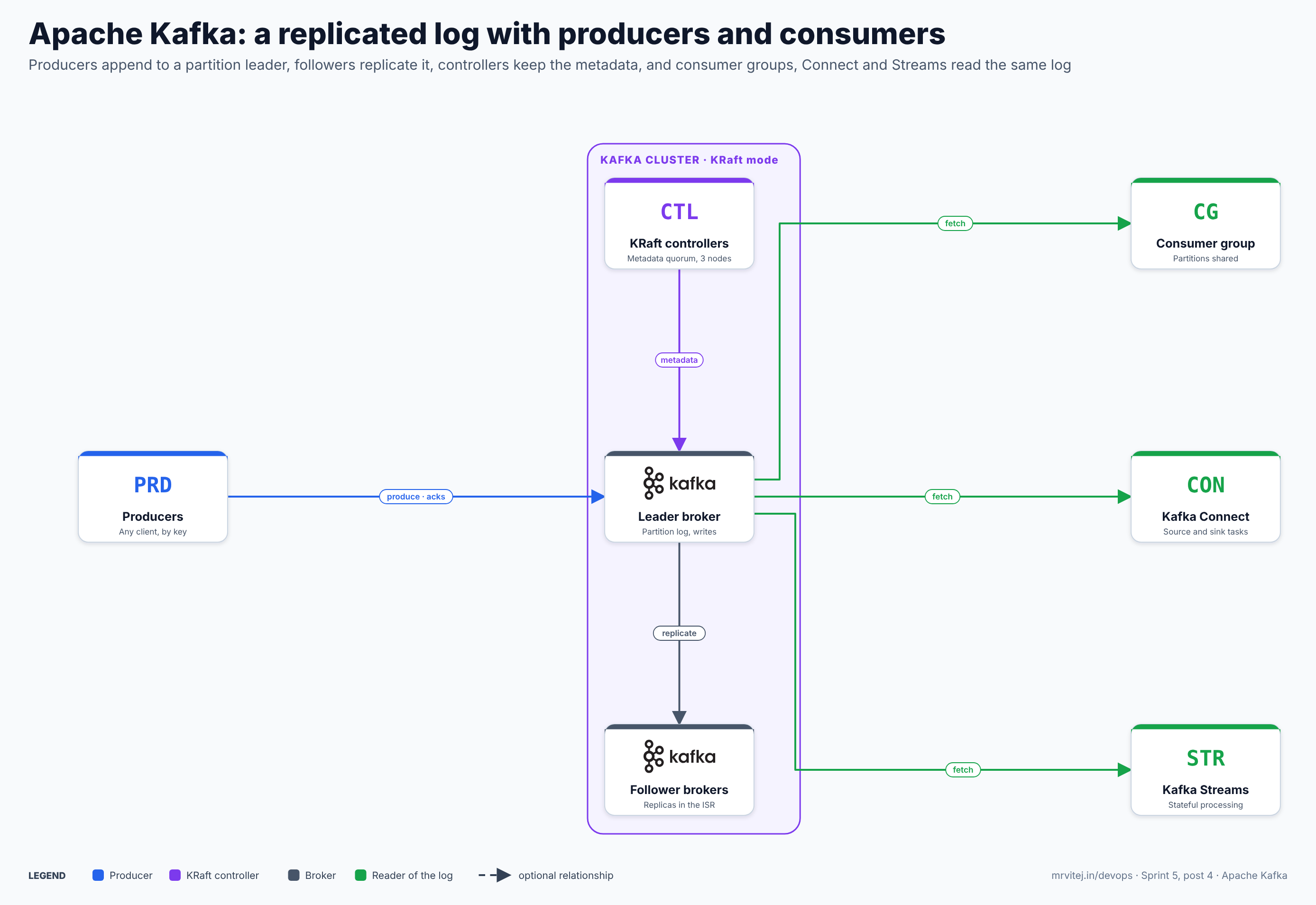
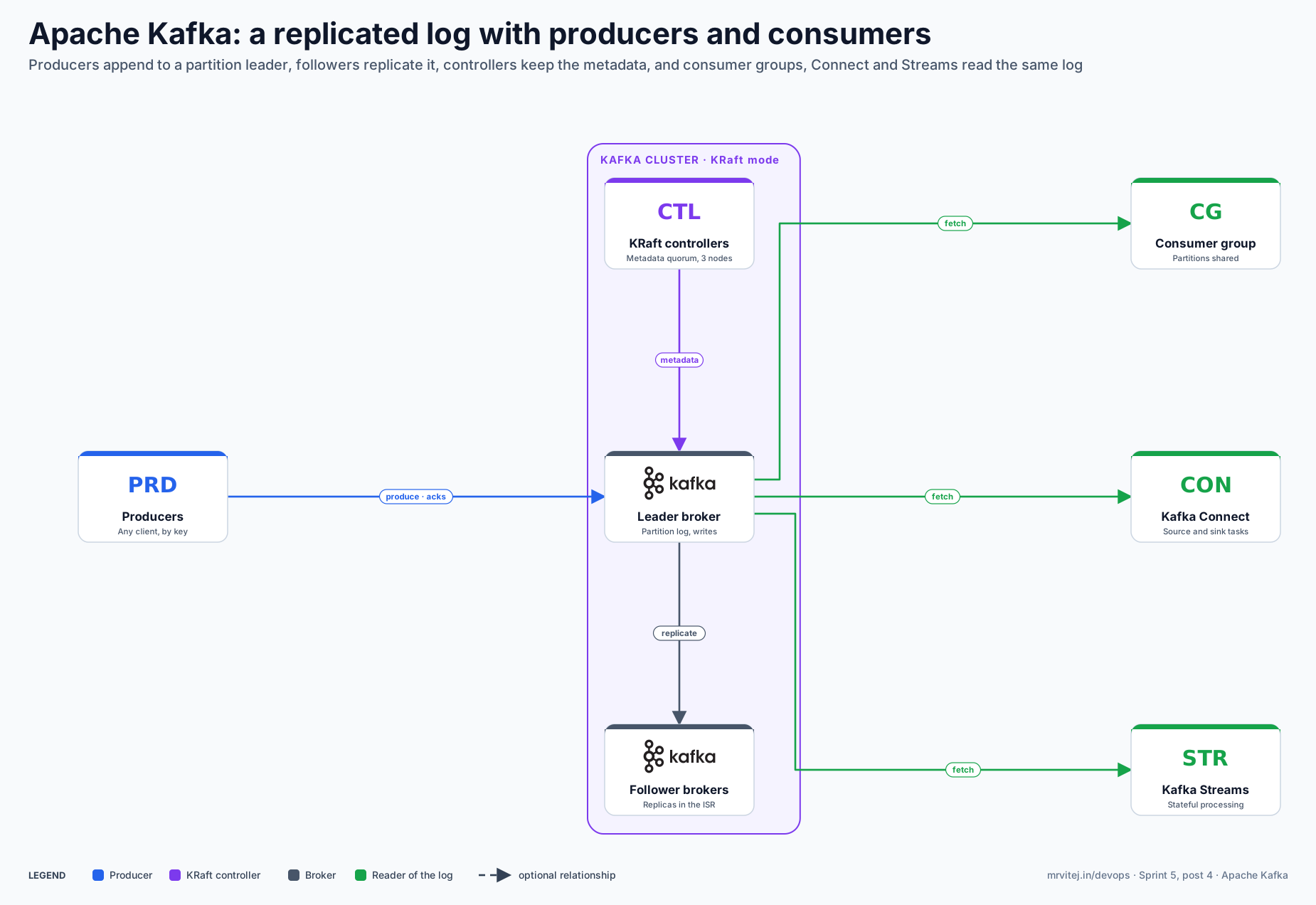
The diagram shows one partition; a real topic has many, with leaders spread across all brokers. Blue is a producer, purple is the KRaft controller quorum, dark grey is a broker and green is anything that reads the log. Open the zoomable diagram, or download it as SVG or PNG.
| Component | Responsibility |
|---|---|
| Broker | Stores partition logs on disk, serves produce and fetch requests, and replicates as a leader or a follower. Set process.roles=broker. |
| Controller (KRaft) | Holds cluster metadata in a Raft quorum, elects partition leaders and tracks broker liveness. Set process.roles=controller. A server can be both (combined mode), which is for development. |
| Producer client | Batches records, picks a partition (by key or round-robin) and sends them to the partition leader. |
| Consumer client | Joins a group, is assigned partitions, fetches records and commits offsets. |
| Group coordinator | A broker component that manages group membership, assignments and committed offsets (stored in an internal topic). |
| Admin client and tools | Create topics, change configs, manage ACLs and groups. The kafka-*.sh scripts wrap it. |
| Connect workers | Run connector tasks that copy data between Kafka and external systems. |
| Streams applications | Your own services using the Streams library; they are clients, not part of the cluster. |
Design principle. Make the log the product. Writes are sequential appends, reads are sequential scans from an offset, replication copies the log, and everything else (consumer groups, Connect, Streams, compaction) is a way of using that one structure. Clients pull, so each consumer sets its own pace.
From a produced record to a committed offset
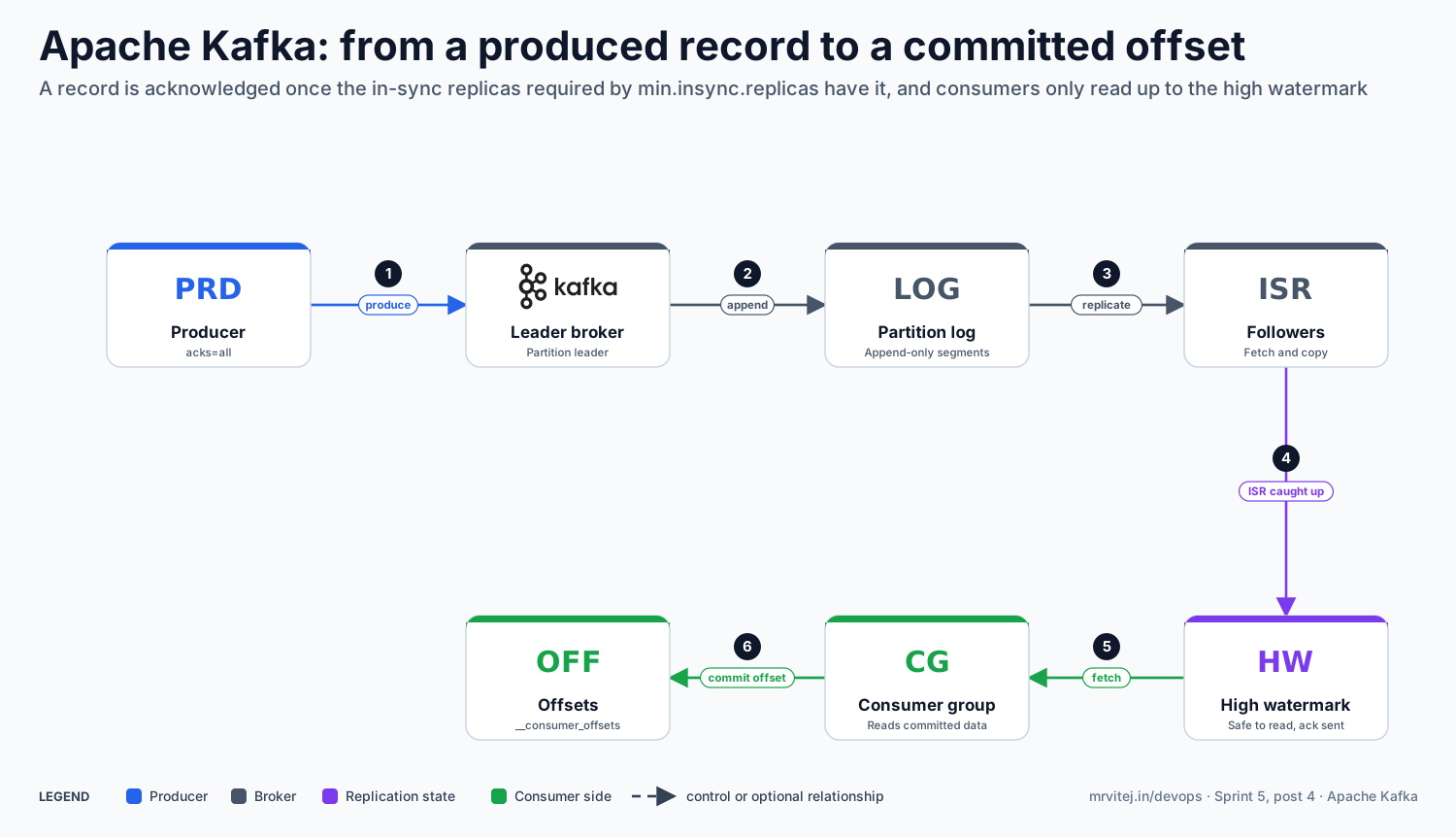
The second diagram follows one record through a replicated partition and a consumer group.
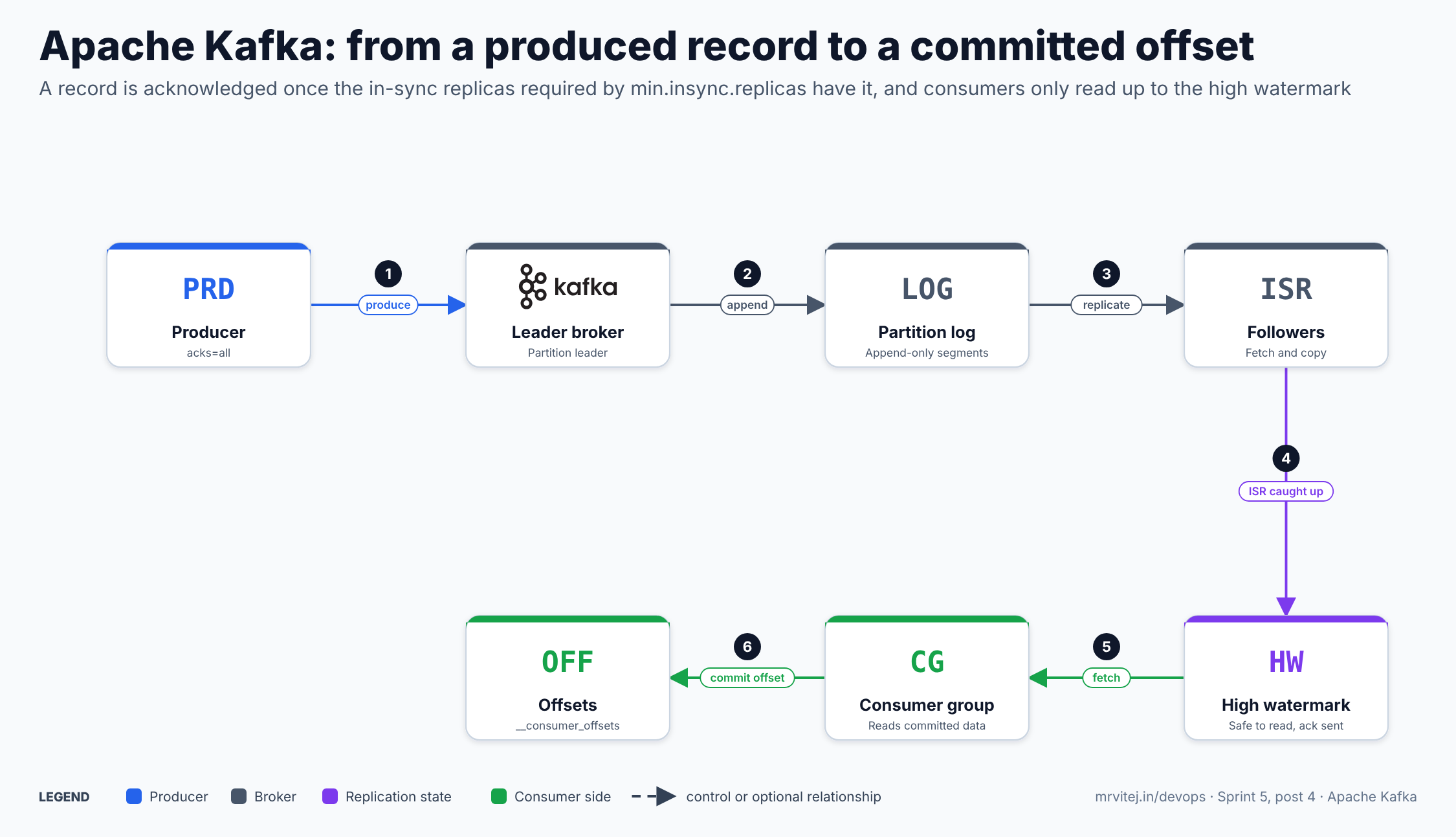
- Produce. The producer sends a batch to the leader of the target partition and waits for the acknowledgement level it asked for (
acks). - Append. The leader appends the records to the end of the partition log.
- Replicate. Followers fetch from the leader and copy the records.
- Advance the high watermark. When the in-sync replicas have the data, the high watermark moves forward. With
acks=all, the producer is acknowledged once the in-sync replica count is at leastmin.insync.replicas; with fewer, the write is rejected. - Fetch. A consumer in a group fetches records up to the high watermark from the partitions it owns.
- Commit. The consumer commits its offset to the internal offsets topic, so a restart resumes from there.
Open the zoomable flow diagram, or download it as SVG or PNG.
Install Apache Kafka
Try it with Docker
The quick start offers a JVM-based image and a GraalVM native image. Check the downloads page for the current version number:
docker pull apache/kafka:4.4.0
docker run -p 9092:9092 apache/kafka:4.4.0
The image starts a single node in KRaft mode with default settings meant for trying things out.
From the tarball, in KRaft mode
You need Java 17 or newer. Download a release from the downloads page, verify it with the published signature and checksum, and extract it:
tar -xzf kafka_2.13-4.4.0.tgz
cd kafka_2.13-4.4.0

KAFKA_CLUSTER_ID="$(bin/kafka-storage.sh random-uuid)"
bin/kafka-storage.sh format --standalone -t "$KAFKA_CLUSTER_ID" -c config/server.properties
bin/kafka-server-start.sh config/server.properties
KRaft needs a one-time format step: every server’s log directory must be formatted with the cluster ID before first start. The --standalone flag is for a single-node development setup; check the quick start for your version, because the flags have changed between releases. Since 4.4, a broker must be the same version as or newer than the kafka-storage tool that formatted its directory.
A three-controller, three-broker cluster
For anything real, run dedicated controllers and brokers. A sketch with static voters (newer releases also support a dynamic quorum, where controller.quorum.bootstrap.servers is used and controllers can be added and removed; read the KRaft operations page for your version):
# controller-1.properties (repeat for node.id 2 and 3)
process.roles=controller
node.id=1
controller.quorum.voters=1@ctrl-1:9093,2@ctrl-2:9093,3@ctrl-3:9093
controller.listener.names=CONTROLLER
listeners=CONTROLLER://:9093
log.dirs=/var/lib/kafka/controller

# broker-101.properties (repeat for 102 and 103)
process.roles=broker
node.id=101
controller.quorum.voters=1@ctrl-1:9093,2@ctrl-2:9093,3@ctrl-3:9093
controller.listener.names=CONTROLLER
listeners=BROKER://:9092
advertised.listeners=BROKER://broker-101.internal:9092
inter.broker.listener.name=BROKER
listener.security.protocol.map=CONTROLLER:PLAINTEXT,BROKER:PLAINTEXT
log.dirs=/var/lib/kafka/data
Generate one cluster ID, format every node’s directory with it, and start the controllers first. Use three controllers; the documentation advises against more than three in critical environments. PLAINTEXT here is only to keep the sketch short; see Security before you expose anything.
On Kubernetes and as a managed service
On Kubernetes, use an operator rather than hand-built StatefulSets. Strimzi, a CNCF Incubating project, is the established one; see the Strimzi brief. On AWS, Amazon MSK runs Kafka for you: it offers provisioned clusters with Standard or Express brokers, and a serverless option; the broker types differ in how much you can configure and what MSK manages for you. Express brokers start at Kafka version 3.6, and you cannot switch a cluster from Standard to Express in place. Check the MSK documentation for the Kafka versions it currently supports, because they trail the Apache releases.
Using Kafka
Create a topic and move data
bin/kafka-topics.sh --create --topic orders.created \
  --partitions 6 --replication-factor 3 \
  --config min.insync.replicas=2 \
  --config retention.ms=604800000 \
  --bootstrap-server localhost:9092

bin/kafka-topics.sh --describe --topic orders.created --bootstrap-server localhost:9092

bin/kafka-console-producer.sh --topic orders.created --bootstrap-server localhost:9092
bin/kafka-console-consumer.sh --topic orders.created --from-beginning --bootstrap-server localhost:9092
Choose the partition count with care: you can add partitions later, but it changes which partition a key maps to, and you cannot reduce the count. The replication factor of 3 with min.insync.replicas=2 is the common durable setting; the quick start uses a replication factor of 1 only because it is a single node.
Producer settings that decide durability
# producer.properties
bootstrap.servers=broker-101.internal:9092,broker-102.internal:9092
acks=all
enable.idempotence=true
compression.type=zstd
linger.ms=10
batch.size=65536
delivery.timeout.ms=120000
acks=0 can lose data and never duplicates; acks=all waits for the in-sync replicas and, with a sensible min.insync.replicas, is the at-least-once setting. Idempotence makes a retry not create a duplicate within a producer session. The values for linger.ms and batch.size above are illustrative starting points, not recommendations; measure with your own load.
Consumer groups and offsets
# consumer.properties
bootstrap.servers=broker-101.internal:9092
group.id=billing
enable.auto.commit=false
auto.offset.reset=earliest
group.protocol=consumer
Run more consumers with the same group.id to share partitions, up to the number of partitions. The new consumer rebalance protocol (KIP-848) is generally available since 4.0 and is enabled on the broker by default, but the consumer client uses the classic protocol unless you set group.protocol=consumer. Commit offsets after you have processed the records, not before, so a crash repeats work and does not skip it.
bin/kafka-consumer-groups.sh --bootstrap-server localhost:9092 --list
bin/kafka-consumer-groups.sh --bootstrap-server localhost:9092 --describe --group billing
--describe shows the current offset, log end offset and lag per partition. Lag is the number to watch.
Exactly-once, with the caveats
Idempotent producers, transactions (transactional.id) and isolation.level=read_committed on consumers let a read-process-write loop commit its output records and its input offsets atomically. This covers Kafka-to-Kafka work, including Kafka Streams with processing.guarantee=exactly_once_v2. It does not make an external side effect (an email, a database write) happen once; for those, make the receiver idempotent.
Keep only the latest value per key
bin/kafka-configs.sh --bootstrap-server localhost:9092 --alter \
  --entity-type topics --entity-name customer.profile \
  --add-config cleanup.policy=compact
A compacted topic keeps at least the last record for each key and is used for state and change streams. Records need keys; a delete is a record with a null value (a tombstone).
Move data in and out with Connect
Kafka Connect runs connectors as tasks on distributed workers. You submit a connector as JSON to the Connect REST API and the workers keep it running, store offsets in internal topics and rebalance tasks when workers come and go. Since 4.4 you can turn off automatic creation of Connect’s internal topics with internal.topics.automatic.creation.enable=false and create them yourself. Connectors are not part of the Apache Kafka download except for a small set of examples and MirrorMaker 2; most come from the community or vendors, so check the licence and support of each.
Process streams with Kafka Streams
Kafka Streams is a Java library: you write an application with a topology of operations (filter, map, join, aggregate, window), and the library handles partitioned parallelism, local state stores backed by changelog topics, and fault recovery. In 4.2 the server-side Streams rebalance protocol (KIP-1071) became production-ready for its core features, though the default protocol is still the classic one.
Queue-style consumption with share groups
Queues for Kafka (KIP-932) added share groups, where several consumers can work on the same partition and acknowledge records one by one, with delivery counts and retries. It is production-ready from 4.2. Use a consumer group when you need ordering per partition; consider a share group when you want a work queue and can accept that per-key ordering is not preserved.
Features
- Durable, replicated logs with configurable retention by time or size, and compaction by key.
- Horizontal scale through partitions, and consumer groups that divide partitions among members.
- Delivery controls:
acks,min.insync.replicas, idempotent producers and transactions. - KRaft metadata quorum inside Kafka, with dynamic controller membership (3.9 onward) and controller unregistration (4.4).
- Tiered storage (KIP-405), which keeps recent data on local disks and older segments in remote storage. Enable it deliberately: it is off by default, and 4.3.2 fixed two potential data-loss bugs in tiered storage retention and index truncation, so run a patched release.
- New group protocols: consumer groups (KIP-848), Streams groups (KIP-1071) and share groups (KIP-932).
- Kafka Connect and MirrorMaker 2 for integration and cross-cluster replication.
- Kafka Streams for stateful processing as a library.
- Quotas to limit the bandwidth and request time of a user or client.
- Security: TLS, SASL (PLAIN, SCRAM, GSSAPI, OAUTHBEARER) and ACLs, plus delegation tokens.
- Metrics over JMX for brokers, clients, Connect and Streams.
Production reference design
This design runs one regional cluster for a few dozen producers and consumers.
- Separate roles. Three dedicated controllers and at least three brokers, spread across three failure domains (for example availability zones). Combined mode is for development.
- Choose a version policy. Run a supported release and keep to the latest patch. The project supports three release lines at a time, and security advice is to use the latest patch.
- Set defaults for durability. Replication factor 3 and
min.insync.replicas=2for topics that matter,unclean.leader.election.enable=false, andacks=allplus idempotence in producers. - Size storage and network first. Partition and retention choices decide disk use. Use fast local or block storage with room to grow, and plan inter-broker bandwidth because replication triples every write.
- Plan partitions. Enough partitions to give consumers the parallelism they need, not so many that broker and controller overhead grows. Name topics by a convention and keep configs in code.
- Secure it from the start. TLS and SASL on client listeners, a separate and firewalled listener for controllers and inter-broker traffic, and ACLs.
- Observe. Export JMX metrics to your monitoring system and alert on under-replicated partitions, consumer lag, offline partitions and disk use.
- Rehearse failure. Stop a broker, fill a disk, partition the network, and confirm what producers and consumers do before an incident teaches you.
- Plan upgrades. Rolling upgrade brokers, then finalise the metadata version with
kafka-features.shonce you have verified behaviour, as the upgrade notes describe.
Security
- Security is off by default. A fresh cluster accepts unauthenticated PLAINTEXT connections on every listener and applies no authorization. That is meant only for closed test environments.
- Listeners. Each listener has its own protocol, mapped with
listener.security.protocol.map:PLAINTEXT,SSL,SASL_PLAINTEXTorSASL_SSL. Use a separate listener for clients, brokers and controllers; never expose the controller listener to client networks. Treatadvertised.listenersas part of your security configuration. - Authentication. SASL mechanisms include OAUTHBEARER (for an identity provider; production needs a JWKS endpoint and validation, and from 4.4 the broker fails at startup if the JWKS endpoint is set without an expected audience or issuer), SCRAM and PLAIN. PLAIN sends the password in clear text inside the SASL exchange, so use it only on
SASL_SSL. Mutual TLS is also available. - Authorization. Set
authorizer.class.name=org.apache.kafka.metadata.authorizer.StandardAuthorizerfor KRaft. With no authorizer, any authenticated principal has full access; with one and no matching ACL, access is denied, except forsuper.users, which bypass ACLs and should be treated like a root password. - ACLs. Manage them with
kafka-acls.sh. The--producerand--consumerconvenience options grant the usual sets.
bin/kafka-acls.sh --bootstrap-server broker:9092 --command-config admin.properties \
  --add --allow-principal User:billing --consumer \
--topic orders.created --group billing- Encryption in transit. Disable TLS below 1.2 and prefer 1.3 where the JDK supports it; use distinct keystores for broker and client listeners; keep hostname verification on.
- No encryption at rest by itself. Kafka does not encrypt its log files; use volume or disk encryption, or encrypt the payload in the producer.
- Trust model. Kafka assumes a trusted operator and a trusted broker fleet: anyone with shell access to a broker or its disks can read every topic. Limit that access.
Monitoring and day-2 operations
| Task | How |
|---|---|
| Cluster health | JMX on each node. Watch UnderReplicatedPartitions (normal value 0), UnderMinIsrPartitionCount (0), OfflineReplicaCount (0), and that partition and leader counts are roughly even across brokers |
| Consumer lag | kafka-consumer-groups.sh --describe, or the consumer metric records-lag-max; the guidance is that max lag must stay below a threshold and the minimum fetch rate above zero |
| Throughput and latency | Broker request metrics (produce and fetch times), bytes in and out per topic, request handler idle ratio |
| Topic changes | kafka-topics.sh --alter to add partitions; kafka-configs.sh for dynamic configs; kafka-reassign-partitions.sh to move replicas |
| Controller quorum | kafka-metadata-quorum.sh describe --status; add or remove controllers when using the dynamic quorum |
| Upgrade | Read the notes for each version, roll brokers, verify, then run kafka-features.sh upgrade --release-version <x.y> to finalise. Clusters in ZooKeeper mode must be migrated to KRaft before they can move to 4.x; clusters older than 3.3 should first go to 3.9 |
| Scale out | Add brokers, then reassign partitions to use them; moving data is slow and uses network and disk |
| Back up and recover | Kafka is not a backup system. Rely on replication for node failures, and MirrorMaker 2 or another cluster for site loss |
| Symptom | Check |
|---|---|
Producers fail with NotEnoughReplicas |
Fewer in-sync replicas than min.insync.replicas: a broker is down or lagging, or the setting is too tight for the cluster size |
| Consumer lag keeps growing | Slow processing, too few consumers or partitions, long GC pauses, or repeated rebalances; check max.poll.interval.ms and group state |
| Frequent rebalances | Consumers missing heartbeats or poll() deadlines; consider static membership or the newer consumer protocol |
| Broker will not start after upgrade | A KRaft directory formatted by a newer kafka-storage tool than the broker version (4.4 change), or a config key that was removed |
| Disk fills | Retention too long for the volume, a stuck compaction, or a topic with unexpected volume; lower retention or add storage |
| Clients connect, then hang | advertised.listeners points to an address the client cannot reach |
Usage cases
- Event backbone between services. Services publish facts and others react, with replay for new consumers.
- Data pipelines. Move data between databases, search, storage and analytics through Connect.
- Log and metric aggregation. A buffer between many collectors and a few backends.
- Change data capture. Stream database changes into topics, often compacted by key.
- Stream processing. Aggregations, joins and windows with Kafka Streams or another engine such as Flink.
- Work queues. Share groups give queue semantics on the same platform.
- Event sourcing. Keep the log of state changes as the source of truth.
- In the Sprint 5 project. The final project of this sprint, a cold-chain logistics monitoring platform on AWS, uses Kafka as the ingest backbone between AWS IoT Core and the platform.
Operational considerations
- Kafka is an operations commitment. Brokers, controllers, storage, upgrades, quotas and security are yours unless you use a managed service.
- Partition count is a one-way door. You can add but not remove partitions, and adding them changes key placement.
- Ordering is per partition. If you need order across records, they must share a key (or a partition).
- At-least-once means duplicates happen. Make consumers idempotent.
- Retention is not a backup. Data older than the retention is gone, and compaction deletes old values.
- Large messages are a smell. The defaults are sized for small records; put big payloads in object storage and send a reference.
- Rebalances pause consumers. Design processing to tolerate them, and use cooperative or the newer protocols.
- Version skew has rules. Upgrade brokers before clients as a habit, read KIPs that change the protocol, and keep
kafka-storageand broker versions in step. - Tiered storage is newer. It is useful for long retention but has had data-loss fixes; test restore and retention behaviour in your version.
- Cost. Replication, cross-zone traffic and long retention can dominate the bill, especially on a cloud.
Adoption
- The project’s own site says Kafka is used by thousands of companies, including over 80 percent of the Fortune 100, and names Box, Goldman Sachs, Target, Cisco and Intuit.
- The official Powered By page lists self-described users, including Cloudflare (log processing and analytics), adidas (a fast data streaming platform), Agoda (its data pipeline), Grab (event logs and stream processing) and ByteDance (a data hub for events and logs). These are statements by the companies themselves.
- Kafka is also offered as a managed service by cloud and data vendors; Amazon MSK is the AWS one.
Alternatives
| Solution | Model | Best suited to |
|---|---|---|
| Amazon MSK | Managed Apache Kafka on AWS: provisioned (Standard or Express brokers) or serverless | Teams on AWS that want Kafka’s API and ecosystem without running brokers |
| Strimzi | Operators that run Kafka on Kubernetes; see the Strimzi brief | Teams that run Kafka on Kubernetes themselves |
| NATS and JetStream | Lightweight messaging with persistence; see the NATS brief | Simple, low-latency messaging and request-reply at modest scale |
| RabbitMQ | Broker with exchanges, queues and routing | Task queues and rich routing, with less emphasis on replayable history |
| Redpanda | Kafka-API-compatible streaming platform from a vendor | Teams that want the Kafka API on a different engine |
| Apache Pulsar | Separate compute and storage tiers with multi-tenancy | Teams that need Pulsar’s tenancy and geo-replication model |
| Amazon Kinesis | AWS-managed streams | AWS-only teams that prefer a native service to the Kafka API |
Strengths and limitations
| Strengths | Limitations |
|---|---|
| Durable, replayable log with many independent readers | Real operational effort: capacity, upgrades, security, rebalancing |
| Scales by partitions to very high throughput | Ordering only within a partition; partition count is hard to change |
| Mature ecosystem: Connect, Streams, MirrorMaker, many clients | Security is off by default and must be set up deliberately |
| Strong delivery controls, including transactions | Exactly-once stops at the Kafka boundary |
| KRaft removes the ZooKeeper dependency | Not a CNCF project; governed by the Apache Software Foundation |
| Large community and many managed offerings | Moves fast: new group protocols, tiered storage and queues are still maturing |
Project status and roadmap
Kafka is an active Apache top-level project. Version 4.0 (March 2025) removed ZooKeeper, so KRaft is the only mode. 4.2 (February 2026) made Queues for Kafka and the Streams rebalance protocol production-ready. Apache Kafka 4.4.0 was announced on October 22, 2026, with 25 KIPs and 963 commits since 4.3.0, and 4.3.2, a bug-fix release of about 60 fixes including two tiered-storage data-loss fixes, followed on October 23. The project’s goal is three releases a year. The 4.4 notes deprecate broker.id in favour of node.id (removal planned for 5.0), and several deprecations are marked for removal in Kafka 5.0. For what comes next, use the Kafka Improvement Proposals (KIPs) and the release plan pages.
Recommendation
Adopt, as the event backbone, when you need replayable, ordered-per-key streams with several independent consumers and you can pay the operational cost, or use a managed service to avoid it. On AWS, start by deciding between Amazon MSK and self-managed Kafka; MSK removes most broker operations, while self-managed gives you full control of versions and configuration. Start with the Docker quick start, then build a three-broker KRaft test cluster, create a topic with replication factor 3 and min.insync.replicas=2, and write a producer and consumer with idempotence and manual commits. Kill a broker during a load test and watch lag, under-replicated partitions and client errors. If you only need a simple task queue or request-reply messaging, a smaller broker such as NATS or RabbitMQ may be easier to run.
References: Apache Kafka · Downloads · Quick Start (4.4) · Apache Kafka 4.4.0 release announcement · Release announcements · Upgrading to 4.4 · Upgrading to 4.3 · Java version · Security model · Listener configuration · Authorization and ACLs · KRaft operations · Broker configs · Monitoring · Design · Powered By · Amazon MSK broker types · CNCF Landscape