
Kanister is an open-source framework for application-level data management on Kubernetes. You describe what “back up this database” means for one application, as a Blueprint made of phases that call Kanister functions. You then create an ActionSet that asks the Kanister controller to run that action against a particular workload. The controller runs the phases, records what they produced (for example the S3 path of a dump), and later actions such as restore and delete consume those records.
The point is application consistency. A volume snapshot copies blocks; a Kanister blueprint can run the database’s own dump or flush tools first, so the backup is something the application can restore from.
CNCF daily · Sprint 5, post 12 of 14 · Cloud Native Storage
At a glance
| Category | Runtime, subcategory Cloud Native Storage (CNCF Landscape) |
| CNCF status | Sandbox. The CNCF project page says it was accepted on 20 September 2023 at the Sandbox maturity level |
| Created by | The Kasten team (now Veeam Kasten). It launched alongside the Kasten K10 product in 2017 |
| Written in | Go |
| Components | A controller (operator), three custom resources (Blueprint, ActionSet, Profile), the kanctl CLI and the kando helper tool |
| Install route | Helm chart kanister/kanister-operator from https://charts.kanister.io/ |
| Targets | Any workload you can describe with commands or Kubernetes operations: databases, queues, search indexes. Object stores (S3-compatible, GCS, Azure) and CSI volume snapshots are supported by built-in functions |
| Release cadence | Frequent; a release tracker listed 119 releases at about one every three to four weeks. I did not confirm the exact latest version, so check the releases page and pin one |
| State | Kubernetes custom resources. There is no separate database |
| Relationship to Kasten K10 | K10 uses Kanister for application-consistent backups. Kanister can be used alone or with Velero |
The problem Kanister solves
A snapshot is not always a backup you can restore. Copying a database’s volume while it is writing can capture a state the database cannot recover from. Consistent protection means running the application’s own steps: flush, dump, quiesce.
Every database has its own procedure. MySQL, PostgreSQL, MongoDB, Kafka and Elasticsearch each have different tools and flags. Teams end up with ad-hoc scripts in CronJobs with no common model for credentials, output, retries or restore.
Cloud-native storage has gaps. The Cloud Native Now overview says traditional infrastructure backups and CSI VolumeSnapshots are insufficient for distributed application data at rest, and that Kanister fills the gap in application-consistent backup and recovery.
Kanister gives those procedures one declarative shape: a Blueprint that says how, an ActionSet that says now, and a Profile that says where.
Key concepts
| Term | Meaning |
|---|---|
| Controller | The operator, deployed as a Kubernetes Deployment. It watches ActionSets in its namespace and creates the CRDs when it starts |
| Blueprint | Maps action names (backup, restore, delete) to BlueprintActions. Each has an ordered list of phases, optional input and output artifact names, required ConfigMaps and Secrets, an optional type or kind of target, and an optional deferPhase |
| Phase | One step that calls a Kanister function (func) with arguments. Arguments are Go templates rendered from runtime parameters |
| Function | A built-in operation such as KubeExec, KubeTask, CreateCSISnapshot or ScaleWorkload |
| ActionSet | A request to run one or more actions. It names the Blueprint, the target object, and optionally artifacts, ConfigMaps, Secrets, options, a Profile and pod overrides |
| Profile | A custom resource describing a storage location and the credentials for it, held in a Kubernetes Secret |
| Artifact | An output recorded by one action (for example an S3 path) and passed as input to another |
| deferPhase | A phase that runs after the regular phases whatever their outcome, suited to cleanup |
| kanctl | CLI that creates Profiles and ActionSets and can derive a restore from a backup |
| kando | Helper used inside phase pods to push and pull data to a Profile location and to emit outputs |
Architecture
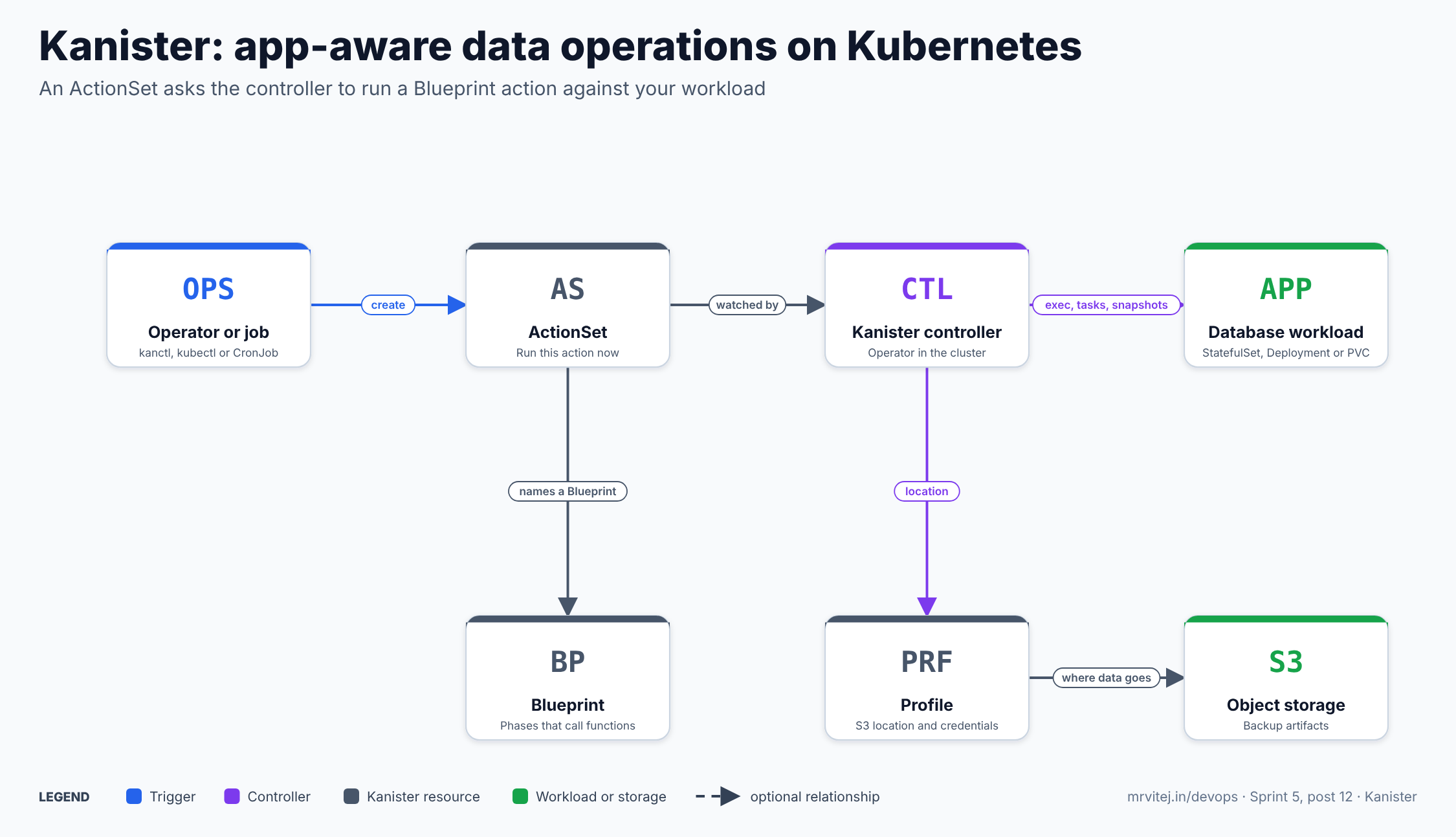
An ActionSet asks the controller to run a Blueprint action against a workload. Blue is the trigger, purple is the controller, grey is a Kanister resource and green is the workload or storage. Open the zoomable diagram, or download it as SVG or PNG.
| Component | Responsibility |
|---|---|
| Kanister controller | Resolves templates, runs phases, updates ActionSet status and emits Kubernetes events |
| Blueprint CR | The reusable how-to for one application |
| ActionSet CR | The one-off request and the record of what happened |
| Profile CR | The where: object-store location and credentials |
| Phase pods | Pods the controller starts (for KubeTask) or execs into (for KubeExec) to do the work |
| Object storage or snapshots | Where artifacts end up |
Design principle. Keep the framework generic and put the application knowledge in a Blueprint. Domain experts write the blueprint once, and operators run the same action across many instances.
Backup, restore and delete
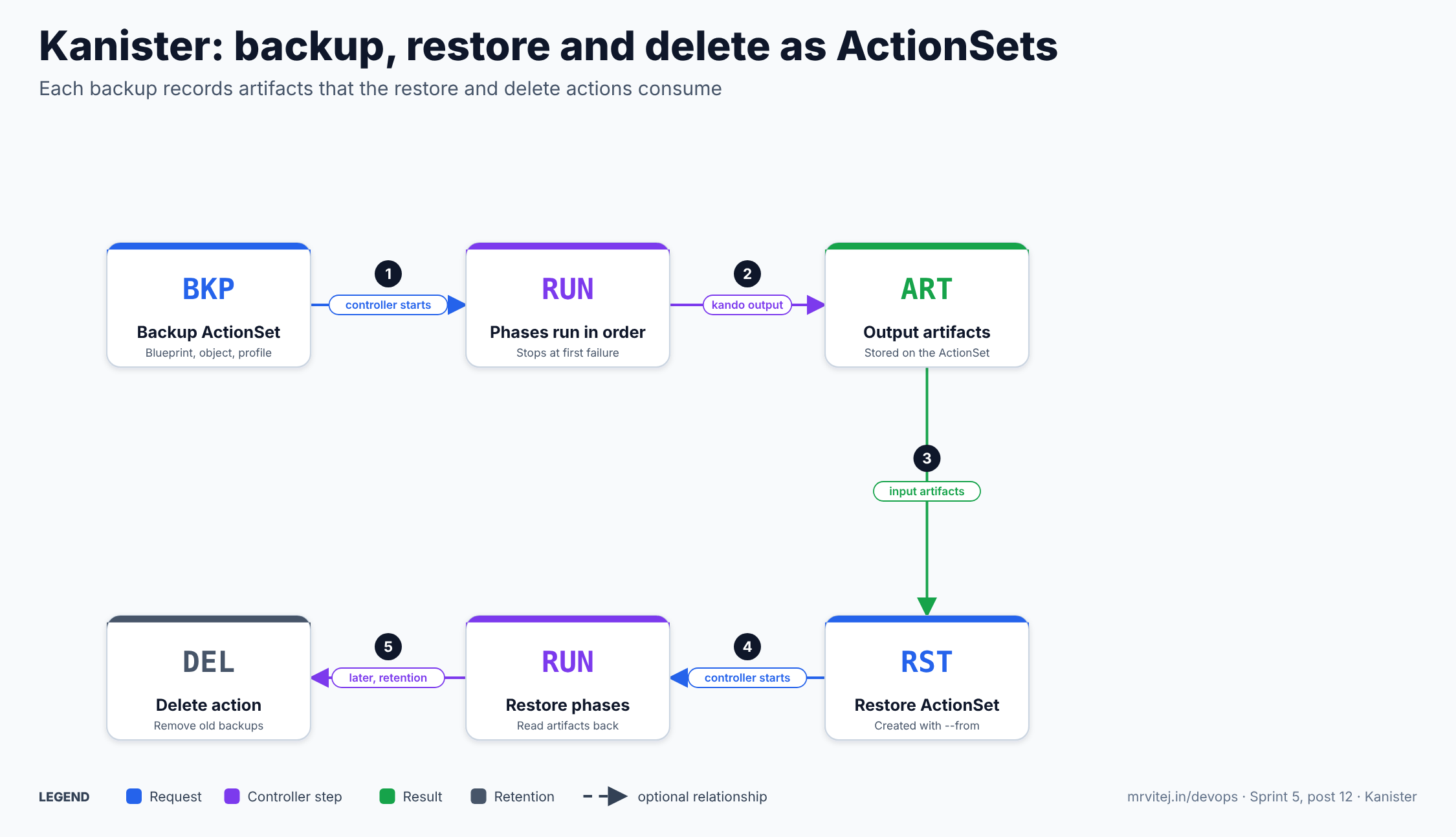
Each backup records artifacts that the restore and delete actions consume. Open the zoomable diagram, or download it as SVG or PNG.
- A backup ActionSet is created. The controller first resolves templates; if a required object, Secret or artifact is missing, the ActionSet fails.
- It runs each phase in order and stops at the first failed phase. Phases can emit outputs with
kando output, which are stored on the ActionSet. Separate actions inside one ActionSet run in parallel. - A restore ActionSet is created from the backup, for example with
kanctl create actionset --action restore --from <backup>; the backup’s artifacts become the restore’s input artifacts. - The restore phases read the data back into the application.
- Later a delete action removes old backups. The controller does not clean up finished ActionSets for you; you delete them.
Kanister documentation · Architecture
Install Kanister
Commands follow the docs and community guides. I did not run them here. Pin the chart and image versions.
The controller
helm repo add kanister https://charts.kanister.io/
helm repo update
kubectl create namespace kanister
helm install kanister --namespace kanister kanister/kanister-operator

kubectl get pods -n kanister
kubectl get crds | grep kanister
Older guides add --set image.tag=<version>; check the chart for your version.
The CLI tools
Kanister’s tooling page documents kanctl. A community guide installs it with the project’s get.sh script from the repository; review any script before running it, or download the release binary instead.
A Profile for AWS S3
kanctl create profile s3compliant \
  --access-key <aws-access-key-id> \
  --secret-key <aws-secret-key> \
  --bucket <bucket> --region <region> \
  --namespace <app-namespace>

kubectl get profile -n <app-namespace>
This stores the location and a Secret holding the keys. Long-lived keys on the command line are fine for a lab; for production prefer a restricted IAM user, shorter-lived credentials where your setup allows, and secret management for the key pair. I did not research whether the Profile supports role-based (IRSA) credentials, so check the docs before relying on it.
Using Kanister
Snippets are adapted from the official tutorial and examples and are untested here.
A first Blueprint
apiVersion: cr.kanister.io/v1alpha1
kind: Blueprint
metadata:
  name: time-log-bp
  namespace: kanister
actions:
  backup:
    phases:
      - func: KubeExec
        name: backupToS3
        args:
          namespace: "{{ .Deployment.Namespace }}"
          pod: "{{ index .Deployment.Pods 0 }}"
          container: test-container
          command:
            - sh
            - -c
            - echo "backing up"
KubeExec is like kubectl exec into a pod. Parameters such as .Deployment.Namespace and .Deployment.Pods are filled from the target object.
Run it
kanctl create actionset --action backup --namespace kanister \
  --blueprint time-log-bp \
  --deployment kanister/time-logger \
  --profile s3-profile

kubectl --namespace kanister describe actionset <name>
Restore from that backup
kanctl create actionset --action restore --from <backup-actionset> --namespace kanisterA database backup that stores a dump
The community MySQL blueprint pattern runs mysqldump in a KubeTask pod, pushes the compressed output to the Profile location with kando location push, and records the path with kando output s3path. The restore reads it back with kando location pull, and the delete action calls kando location delete. In sketch form:
actions:
  backup:
    outputArtifacts:
      mysqlCloudDump:
        keyValue:
          s3path: "{{ .Phases.dumpToObjectStore.Output.s3path }}"
    phases:
      - func: KubeTask
        name: dumpToObjectStore
        args:
          image: <image that has mysqldump and kando>
          command:
            - bash
            - -o
            - errexit
            - -o
            - pipefail
            - -c
            - |
              s3_path="<generated path>"
              mysqldump ... | gzip | kando location push --profile '{{ toJson .Profile }}' --path "${s3_path}" -
              kando output s3path ${s3_path}
Use the maintained blueprint in the kanisterio/blueprints repository as your starting point rather than this sketch; I abbreviated it.
Schedule it
Kanister runs actions when an ActionSet is created. To schedule, create the ActionSet from a Kubernetes CronJob. A community project, Taweret, shows this: a CronJob with a service account allowed to create ActionSets and read Blueprints and Profiles in the Kanister namespace. Using Argo Workflows or another scheduler also works. I did not find a built-in scheduler in the pages I read.
Features
| Area | What you get |
|---|---|
| Execution | KubeExec, KubeExecAll (several pods in parallel), KubeTask (a new pod), MultiContainerRun, PrepareData, KubeOps (create, patch or delete Kubernetes resources) |
| Workload control | ScaleWorkload for Deployments, StatefulSets and DeploymentConfigs, for example to scale down before a restore |
| Waiting | WaitV2 with a template condition; the older Wait is deprecated |
| Object-store backup | CopyVolumeData (recommended), RestoreData, DeleteData, LocationDelete, BackupDataStats. BackupData and BackupDataAll are documented as going to be deprecated |
| AWS RDS | CreateRDSSnapshot, ExportRDSSnapshotToLocation, RestoreRDSSnapshot, DeleteRDSSnapshot |
| CSI snapshots | CreateCSISnapshot, CreateCSISnapshotStatic, RestoreCSISnapshot, DeleteCSISnapshot, DeleteCSISnapshotContent |
| Removed | The older volume snapshot functions were deprecated and removed in favour of the CSI ones |
| Templating | Go templates over the target object, Profile, Secrets, ConfigMaps, options, artifacts and earlier phase outputs |
| Artifacts | Outputs from one action become inputs to another |
| Cleanup phase | deferPhase runs after the main phases regardless of status |
| Events and status | Kubernetes events per action and phase; ActionSet status shows pending, running and complete or failed states |
| Blueprint library | Community blueprints for common databases in the kanisterio/blueprints repository, and examples in the main repository |
Configuration reference
| Object or setting | Purpose |
|---|---|
Blueprint (cr.kanister.io/v1alpha1) |
actions.<name>.phases[] with func, name, args; optional type, configMapNames, secretNames, inputArtifactNames, outputArtifacts, deferPhase |
ActionSet |
spec.actions[] with name, blueprint, object (kind, name, namespace), plus optional artifacts, configMaps, secrets, options, profile, podOverride |
Profile |
Storage location type and credentials; the credentials live in a Secret; there is an option to skip SSL verification |
kanctl create actionset |
--action, --blueprint, --deployment or --statefulset, --profile, --from, and overrides for secrets, config maps and options |
kanctl create profile |
Creates a Profile; the S3-compatible form takes access key, secret key, bucket, region and namespace |
| Controller namespace | The controller watches ActionSets in the namespace where it runs; the docs examples use kanister |
| Helm chart values | Image tag, resources and RBAC for the operator; check the chart for your version |
podOverride |
Customize the pods that phases create, for example node selection or tolerations |
Production reference design
- Pin versions of the chart, controller image and the images your phases run.
- Start from a maintained blueprint for your database, test restore, then adapt.
- Keep phase images small and trusted.
KubeTaskruns whatever image you give it, with the credentials you pass. - Keep Profiles and backups separate from the cluster they protect, in a bucket in another account or region where possible.
- Schedule with a CronJob or workflow, and give the creator a minimal role (create ActionSets, read Blueprints and Profiles).
- Design retention. Create delete actions and a rule for pruning finished ActionSets, since they are not cleaned up automatically.
- Test restores regularly into a scratch namespace.
- Alert on failed ActionSets. Watch ActionSet status or events; I did not verify whether the controller exposes metrics, so check the chart.
Security
| Area | What to know |
|---|---|
| Credentials | Profile credentials sit in a Kubernetes Secret and are passed to phase pods. Use a bucket-scoped IAM identity and restrict who can read Secrets |
| Who can create ActionSets | Anyone who can create an ActionSet can trigger a Blueprint against a workload. Limit that with RBAC |
| Blueprint content | Blueprints run arbitrary commands in your pods. Review them as code |
| Namespaces | The controller watches its own namespace, so keep Blueprints, Profiles and ActionSets where the controller expects them and separate teams by controller instance if needed |
| Image supply chain | Phase pods pull images at run time. Pin and scan them |
| Data protection | Dumps contain real data. Enable bucket encryption and versioning, and consider object lock on the bucket |
| Pod overrides | Powerful; review who may set them |
| Project health | Sandbox status means early-stage governance; check recent activity before depending on it |
Monitoring and day-2 operations
| Task | How |
|---|---|
| See progress | kubectl describe actionset <name>; events show action and phase start and end |
| Clean up | Delete completed ActionSets yourself |
| Upgrade | Upgrade the Helm release; check release notes for removed functions (older snapshot functions are gone) |
| Rotate keys | Update the Secret behind the Profile |
| Test a restore | Create a restore ActionSet from a backup ActionSet into a test namespace |
| Debug a failed phase | Read the ActionSet status and the phase pod logs; for failing KubeTask pods, a community thread suggests kando output to attach logs to the ActionSet |
| Prune backups | Run the delete action using the stored artifacts |
| Symptom | First checks |
|---|---|
| ActionSet fails at once | Missing Blueprint, Secret, ConfigMap, artifact or target object; template errors |
| Phase pod fails | Image, command and credentials; the pod may be gone, so capture logs |
| Cannot reach S3 | Profile bucket, region, endpoint, SSL setting and IAM policy |
| Restore finds no data | Wrong --from ActionSet or artifact path |
| Nothing runs on schedule | CronJob service account lacks permission to create ActionSets |
| Many old ActionSets | They are never deleted automatically |
Usage cases
- Database backup and restore. Logical dumps or native tools run by a Blueprint, stored in S3.
- Application-consistent snapshots. Quiesce, create a CSI snapshot, resume.
- Managed database export. Snapshot an AWS RDS instance and export a dump to object storage.
- Migration and cloning. Back up in one cluster, restore in another using the same blueprint.
- Multi-step maintenance. Scale a workload down, run a task, scale it back up.
- Used inside Kasten K10. K10 runs Kanister blueprints for application-consistent backups.
- Cold-chain sprint project. The Sprint 5 final project uses Kanister-style backup and restore workflows for its databases.
Operational considerations
- You write or adopt the Blueprints. Quality of backups depends on them.
- No built-in schedule or retention policy in what I read; add a CronJob or workflow and delete actions.
- Manual ActionSet cleanup.
- Sandbox maturity. Smaller governance and adoption than graduated projects.
- Function deprecations.
BackupDataandBackupDataAllare marked as going away, and older snapshot functions are removed; preferCopyVolumeDataand CSI functions in new blueprints. - Cluster-scoped backup is out of scope. Kanister protects application data, not the whole cluster’s resources; pair it with a cluster-level tool if you need that.
- Restore is your design. Test it, including scaling, ordering and credentials.
Adoption
The Sandbox announcement coverage quotes the EDB Postgres for Kubernetes team saying its Kanister blueprint support extends its operator to provide application-consistent backup and recovery, and a Kasten customer quote about protecting application-level data. Kanister is also the engine inside Kasten K10’s application-consistent backups. I did not find an adopters file in the pages I read, so I am not listing further named adopters.
Alternatives
| Solution | Model | Best suited to |
|---|---|---|
| Velero | Cluster-level backup of Kubernetes resources and volumes, with hooks | Cluster and namespace backup and migration. Often used together with Kanister, which supplies the application-consistent part |
| Kasten K10 | Commercial platform built on Kanister | Teams that want a UI, policies and support; a free edition exists with node limits per vendor material |
| Stash and K8up | Operators that back up volumes to object storage with Restic | Declarative volume backup with less scripting |
| Database operators with built-in backup | The operator handles backup for its own database | One database type, where the operator’s feature is enough |
| Cloud snapshots (EBS, RDS automated backups) | Provider-native | Simple crash-consistent or managed backups |
| Plain CronJob scripts | Your own scripts | Small setups; no common model, so more to maintain |
Strengths and limitations
| Strengths | Limitations |
|---|---|
| Application-consistent backups using the app’s own tools | You must write and maintain Blueprints |
| One declarative model for backup, restore and delete | No built-in scheduler or retention in what I read |
| Rich function library, including CSI and RDS | Completed ActionSets need manual cleanup |
| Works with Velero or Kasten K10 | Sandbox project; smaller community than graduated tools |
| Open-source and extensible | Not a cluster-wide backup tool |
Project status and roadmap
Kanister launched with Kasten K10 in 2017 and joined CNCF at Sandbox level on 20 September 2023, when Kasten by Veeam described the donation. It releases often. I did not find a published roadmap page in this pass, so I am not stating one. Watch the releases page and the CNCF project page for current activity.
Recommendation
Trial Kanister if you run stateful workloads on Kubernetes and need application-consistent backup and restore that you can describe declaratively, especially if you already use Velero or Kasten K10 and want the consistency layer. Adopt it for a specific database once a tested blueprint and a restore drill pass in a scratch namespace. Assess a database operator’s built-in backup, Stash or K8up if you only need volume copies, and Velero if you need cluster-level backup. Before production: scope the Profile credentials, use RBAC on ActionSet creation, schedule with a CronJob, add delete actions and cleanup, and rehearse restores.
References: Kanister documentation · Architecture · Functions · Tutorial · Tooling · Template parameters · kanister.io · CNCF project page · Kanister blueprints (MySQL) · Sandbox announcement (Veeam) · Cloud Native Now overview · InfraCloud walkthrough · Taweret scheduling example