Keycloak is an open source identity and access management server. Applications delegate sign-in to it instead of storing passwords themselves, and Keycloak returns signed tokens using standard protocols: OpenID Connect and OAuth 2.0, and SAML 2.0. It provides single sign-on across applications, user and role management, multi-factor authentication, social login and federation to LDAP or other identity providers. It solves a problem every platform meets sooner or later: each service re-implementing login, sessions and password reset, with no common place to enforce policy or revoke access. Keycloak was created in 2014 by Bill Burke and Stian Thorgersen at Red Hat, runs on Quarkus and is packaged as a single container image. The CNCF accepted it as an Incubating project on 10 April 2023.
CNCF daily · Sprint 3, post 14 of 21 · Security & Compliance
At a glance
| Category | Provisioning › Security & Compliance |
| CNCF status | Incubating. Accepted April 10, 2023 |
| Written in | Java, on the Quarkus framework |
| License | Apache 2.0 |
| Protocols | OpenID Connect, OAuth 2.0, SAML 2.0 |
| Core concepts | Realms (tenants), clients (applications), users, roles and groups, identity providers |
| Storage | A relational database (PostgreSQL, MySQL, MariaDB and others) plus an Infinispan cache for sessions |
| Kubernetes | Keycloak Operator with a Keycloak custom resource |
| Recent features | Organizations for multi-tenant B2B login, passkeys (preview), TLS certificate hot reload |
Architecture
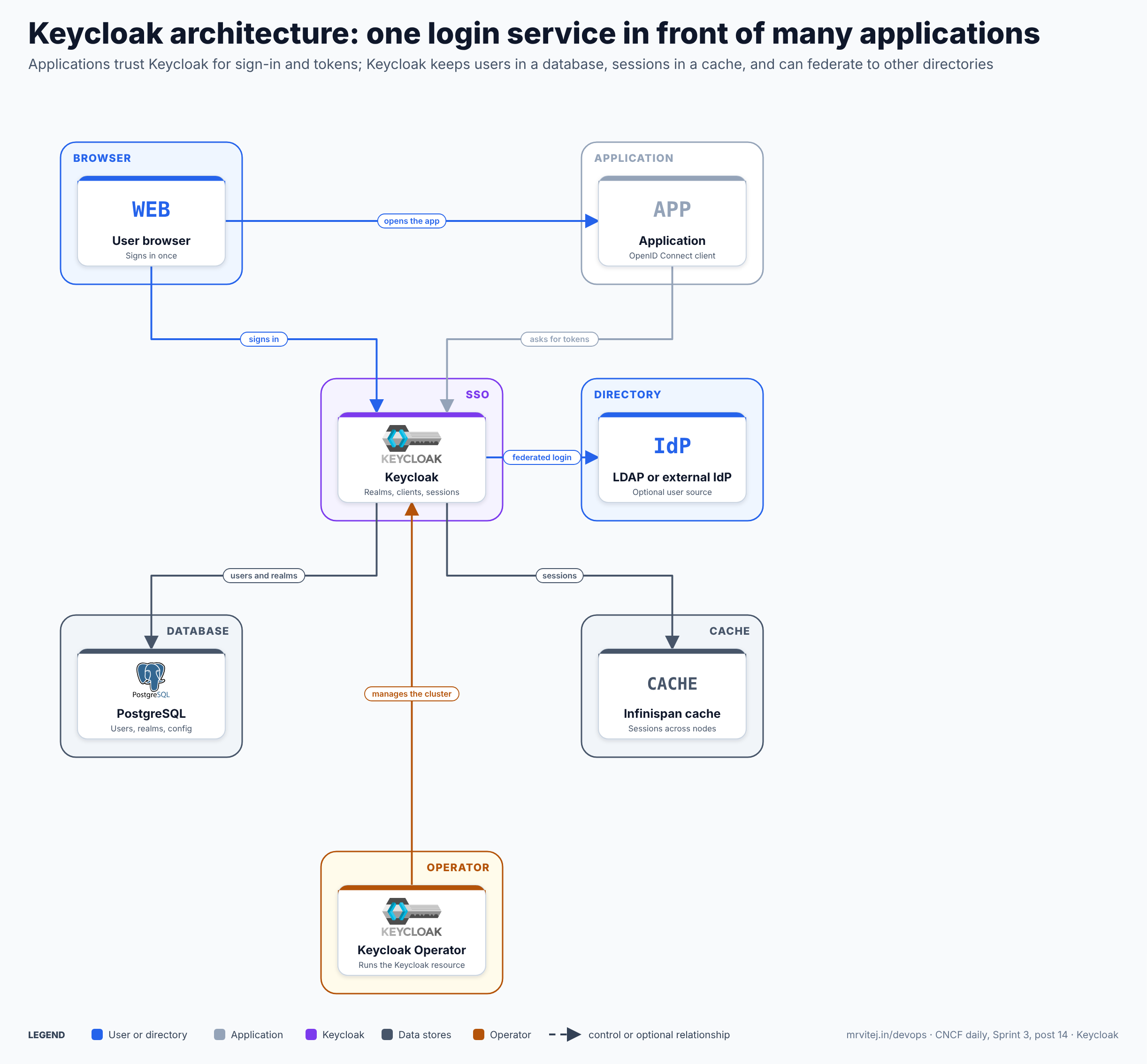
Blue is the user and the optional directory, grey the application, purple Keycloak, slate the data stores and amber the operator. The application never sees the user’s password: it only receives tokens that Keycloak signs. Open the zoomable diagram, or download it as SVG or PNG.
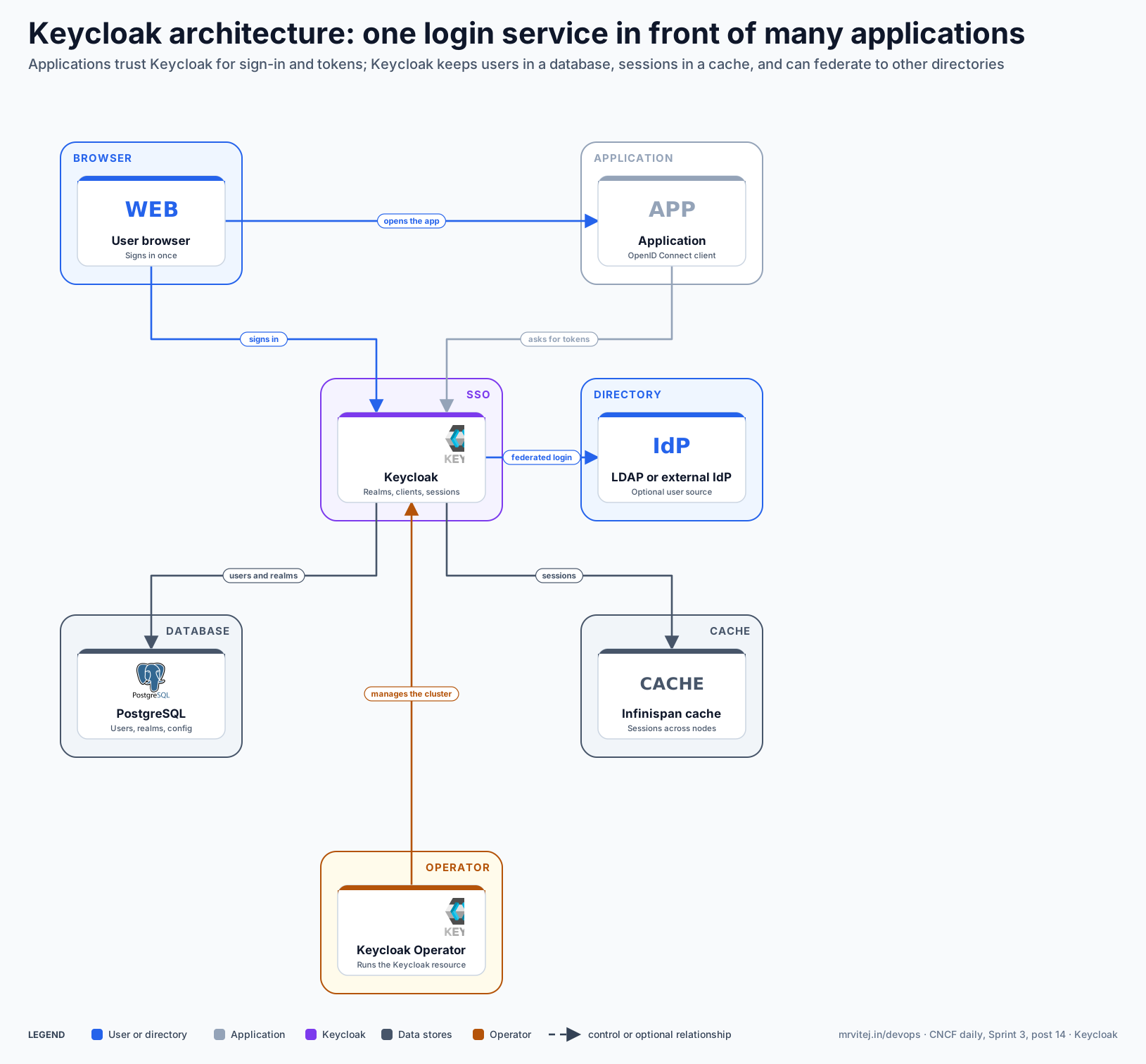
| Component | Responsibility |
|---|---|
| User browser | Where the user signs in. The browser is redirected between the application and Keycloak. |
| Application | An OpenID Connect client that trusts Keycloak, redirects users to it and validates the tokens it issues. |
| Keycloak | Authenticates users, applies realm policy and issues ID, access and refresh tokens. |
| PostgreSQL | Stores users, credentials, realm and client configuration. |
| Infinispan cache | Holds sessions and short-lived data, shared between Keycloak nodes. |
| LDAP or external IdP | Optional source of users: Keycloak can check passwords in a directory or send users to another identity provider. |
| Keycloak Operator | Creates and updates the Keycloak StatefulSet, services and configuration from a Keycloak resource. |
Design principle. Centralise authentication, not authorisation logic. Applications keep their own business rules but trust one issuer for who the user is, so sign-in methods, password policy and access revocation change in one place.
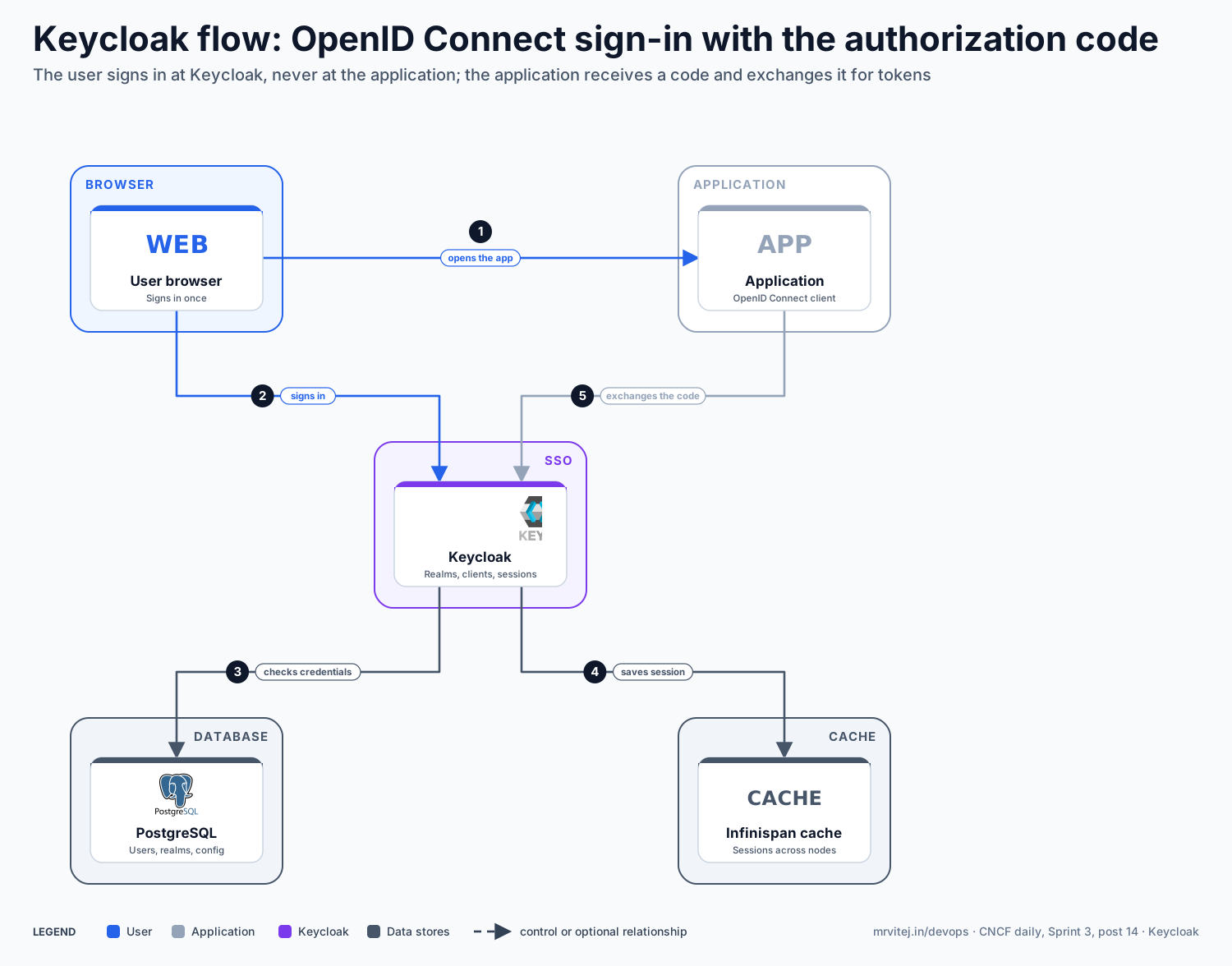
OpenID Connect sign-in with the authorization code
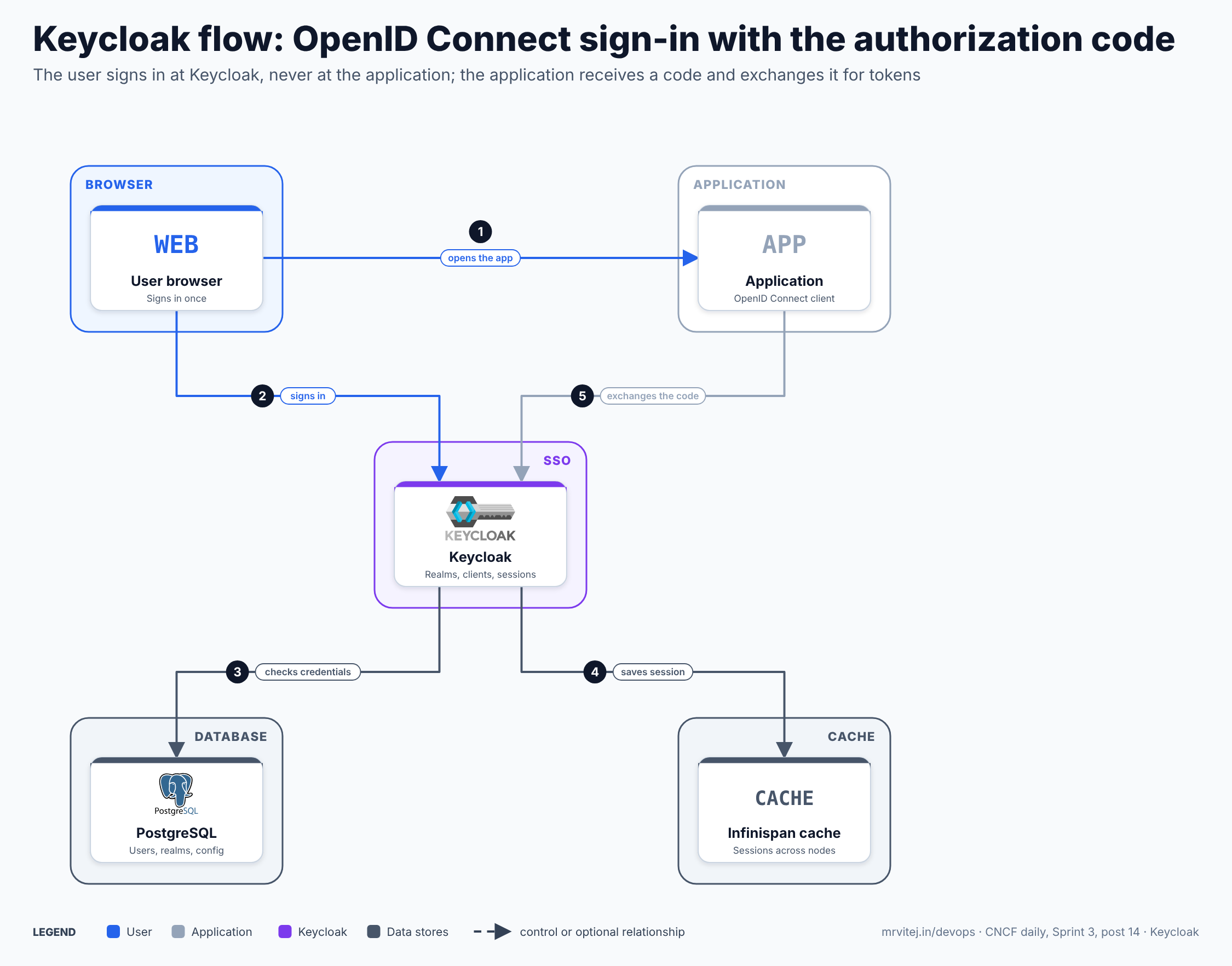
- Open the application. The user visits the application, which has no session and redirects the browser to Keycloak’s authorization endpoint.
- Sign in. The browser reaches Keycloak, which shows the login page for the realm. The user enters credentials, possibly with a second factor.
- Check credentials. Keycloak verifies them against its database, or against a federated directory.
- Save the session. Keycloak stores the session in its cache and redirects the browser back to the application with a short-lived authorization code.
- Exchange the code. The application sends the code to Keycloak’s token endpoint, directly and not through the browser, and receives the tokens. It validates their signatures and creates its own session.
Later applications in the same realm find the Keycloak session and skip the login page, which is single sign-on.
Open the zoomable flow diagram, or download it as SVG or PNG.
Production reference design
A typical design is a highly available Keycloak behind an ingress, with an external PostgreSQL database. On Google Cloud, Cloud SQL for PostgreSQL fits this role; on-premises, use a managed or replicated PostgreSQL.
- Provision the database with automated backups and private networking, create a
keycloakdatabase and user, and store the credentials in a Secret:kubectl create secret generic keycloak-db-secret \ --from-literal=username=keycloak --from-literal=password='<generated>' - Install the operator by applying the custom resource definitions and operator manifests published for the Keycloak release you choose, into a
keycloaknamespace. - Create the TLS Secret (for example with cert-manager) and reserve a hostname such as
login.example.com. - Declare Keycloak:
apiVersion: k8s.keycloak.org/v2alpha1 kind: Keycloak metadata: name: login namespace: keycloak spec: instances: 2 db: vendor: postgres host: <database-host> usernameSecret: { name: keycloak-db-secret, key: username } passwordSecret: { name: keycloak-db-secret, key: password } http: tlsSecret: login-tls hostname: hostname: login.example.com - Create a realm and clients for each application, with redirect URIs restricted to known addresses, and keep the realm definition in version control.
- Wire in the applications with an OpenID Connect library or a gateway that validates tokens, and test login, logout and token expiry.
Typical uses include single sign-on for internal tools, token-based protection of APIs between services, customer identity for B2B products, and a broker in front of a corporate identity provider.
Operational considerations
- Availability. Run at least two instances so sign-in survives a node loss. Sessions live in Infinispan and the database holds the rest, so size and back up both; if Keycloak is down, users cannot sign in.
- Database and cache. The database is the system of record: back it up, test restores and monitor connection use. Cache clustering needs the pods to discover each other, so follow the version’s guidance.
- Security. Restrict redirect URIs, enable multi-factor authentication and brute-force protection, keep the admin console off the public internet, and rotate realm keys.
- Upgrades. Keycloak releases often and changes behaviour between versions, so test upgrades in a copy of production and read the upgrade guide. Take a database backup first.
- Custom code. Themes and extensions (providers) must be rebuilt for each release, which adds work to the upgrade process.
Adoption
- Accenture, CERN, Cisco, the Ohio Supercomputing Center, Hitachi, Okta and Quest are named by the CNCF as users in its announcement of Keycloak’s acceptance, which also says the project had been in production for more than eight years.
- Red Hat created Keycloak and offers a supported distribution, Red Hat build of Keycloak.
- The project also keeps a list of users in its repository and documentation.
Alternatives
| Solution | Model | Best suited to |
|---|---|---|
| Dex (CNCF Sandbox) | Lightweight OpenID Connect federation | Kubernetes clusters that only need to bridge existing identity providers |
| Authentik and Zitadel | Open source identity platforms | Teams that want a lighter or newer self-hosted option |
| Auth0, Okta, Entra ID | Managed identity services | Teams that prefer a vendor-run service over operating their own |
| Cloud identity platforms (Google Cloud Identity Platform, Amazon Cognito) | Provider-managed user pools | Applications that live on one cloud |
| SPIRE (CNCF Graduated) | Workload identity | Service-to-service identity rather than human login; see the SPIRE brief |
Strengths and limitations
| Strengths | Limitations |
|---|---|
| Complete feature set: OIDC, SAML, MFA, federation, social login | Heavy to run and tune compared with a simple OIDC proxy |
| Mature project with a large community and long production use | Frequent releases and upgrade effort |
| Operator and container image for Kubernetes | Needs a database and a clustered cache to be highly available |
| Apache 2.0 with vendor-neutral CNCF governance | Admin console and realm model have a learning curve |
| Extensible with themes and providers | Custom extensions must track each release |
Recommendation
Adopt for teams that need self-hosted single sign-on and API token issuance with standard protocols. Start with one realm, two instances, an external PostgreSQL and the operator, and drill a failover and a restore before onboarding applications. Teams that only need to bridge a cluster to an existing identity provider may prefer Dex, and teams that do not want to operate identity infrastructure should consider a managed service.
References: CNCF project page · Keycloak website · Keycloak joins CNCF as an incubating project · Keycloak 26 announcement · Keycloak repository · CNCF Landscape