
An ERP that exposes a public API has to answer three questions on every request: who are you, are you allowed, and have you asked too often. Most teams answer them in application code or in a vendor gateway’s console, and every service ends up with its own version. Kuadrant moves those answers into Kubernetes policies attached to the Gateway API objects you already have. The Landscape describes it as a combination of Gateway API and Istio-based gateway controllers that enhances application connectivity, with policies for TLS, DNS, application authentication and authorization, and rate limiting, across multiple clusters. It joined the CNCF Sandbox on 19 June 2024.
CNCF daily · Sprint 6, post 6 of 26 · API Gateway
At a glance
| Category | Orchestration & Management › API Gateway |
| CNCF status | Sandbox. Accepted June 19, 2024 |
| Written in | Go for the operators and Authorino; Rust for Limitador and the wasm shim |
| License | Apache 2.0 |
| Policy CRDs | AuthPolicy, RateLimitPolicy, DNSPolicy, TLSPolicy. The project announced these four at v1 as stable |
| Instance CRDs | Kuadrant, Limitador, Authorino |
| Enforcement parts | Authorino (authentication and authorization), Limitador (rate limiting), a Proxy-Wasm shim in the gateway |
| Gateway providers | Istio is the documented provider. See the compatibility note below |
| Sponsor | Red Hat, which also ships a supported product built on Kuadrant |
The problem Kuadrant solves
Gateway API gives you a standard way to describe routes and listeners. It does not say how to authenticate callers, count requests per customer, issue certificates or publish DNS records. Gateway implementations answer those in their own ways, so the answers change when the gateway changes.
| Concern | Typical answer | With Kuadrant |
|---|---|---|
| Who is calling | JWT checks in each service, or gateway-specific filters | An AuthPolicy on the Gateway or an HTTPRoute, enforced by Authorino |
| How much may they call | A plugin per gateway, or code in the app | A RateLimitPolicy with counters per tenant or per plan, enforced by Limitador |
| TLS for listeners | cert-manager objects written by hand | A TLSPolicy that asks cert-manager for the certificates a Gateway needs |
| DNS for the gateway | A separate DNS tool and scripts | A DNSPolicy that manages records in Route 53 or Google Cloud DNS |
| Platform team vs app team | Everything in one gateway config | Platform sets defaults on the Gateway; app teams override on their own HTTPRoute |
| The cost | Less glue code | More components to run: operators, Authorino, Limitador, a shared store, a wasm filter |
Key concepts
| Term | Meaning |
|---|---|
| Gateway API | The Kubernetes standard for Gateway and HTTPRoute resources |
| Policy attachment | The Gateway API pattern where a policy points at a target with targetRef, so behaviour is added without editing the route |
| AuthPolicy | Authentication and authorization rules for a Gateway or an HTTPRoute |
| RateLimitPolicy | Request limits, with counters that can be keyed by a claim such as the tenant |
| TLSPolicy | Certificate management for Gateway listeners, using cert-manager |
| DNSPolicy | DNS record management for a Gateway, including load-balancing options for multi-cluster use |
| Authorino | The service that checks identity and permissions. The gateway calls it as an external authorizer |
| Limitador | The rate-limit service. It speaks the Envoy rate limit protocol and can keep counters in Redis |
| wasm shim | A Proxy-Wasm module loaded into Envoy that talks to Authorino and Limitador for each request |
| Defaults and overrides | Policy sections that let a Gateway policy set a baseline, or force a rule, while a route policy refines it |
| CEL | The expression language used for conditions and counters in AuthPolicy and RateLimitPolicy |
Compatibility note: what I could and could not confirm
The plan for this series said “kgateway with Kuadrant”. Before writing, I looked for a statement that Kuadrant supports kgateway as a Gateway API provider and did not find one. The sources I could read say Kuadrant relies on Istio and the Gateway API; a Red Hat architecture post said Istio is the supported provider and listed Envoy Gateway support as a future priority; the project’s operator integrates through Istio’s Gateway API and, in the code, loads its filter from an OCI image wasm-shim. I could not open the current Kuadrant documentation page that lists providers, so Envoy Gateway may be supported today. kgateway has its own policy resources, so it overlaps with Kuadrant instead of plugging into it.
For the ERP, this post therefore puts Kuadrant on an Istio gateway. The kgateway brief stays valid as a different way to do the same job. Before you install, check the provider list on docs.kuadrant.io for your version.
Architecture
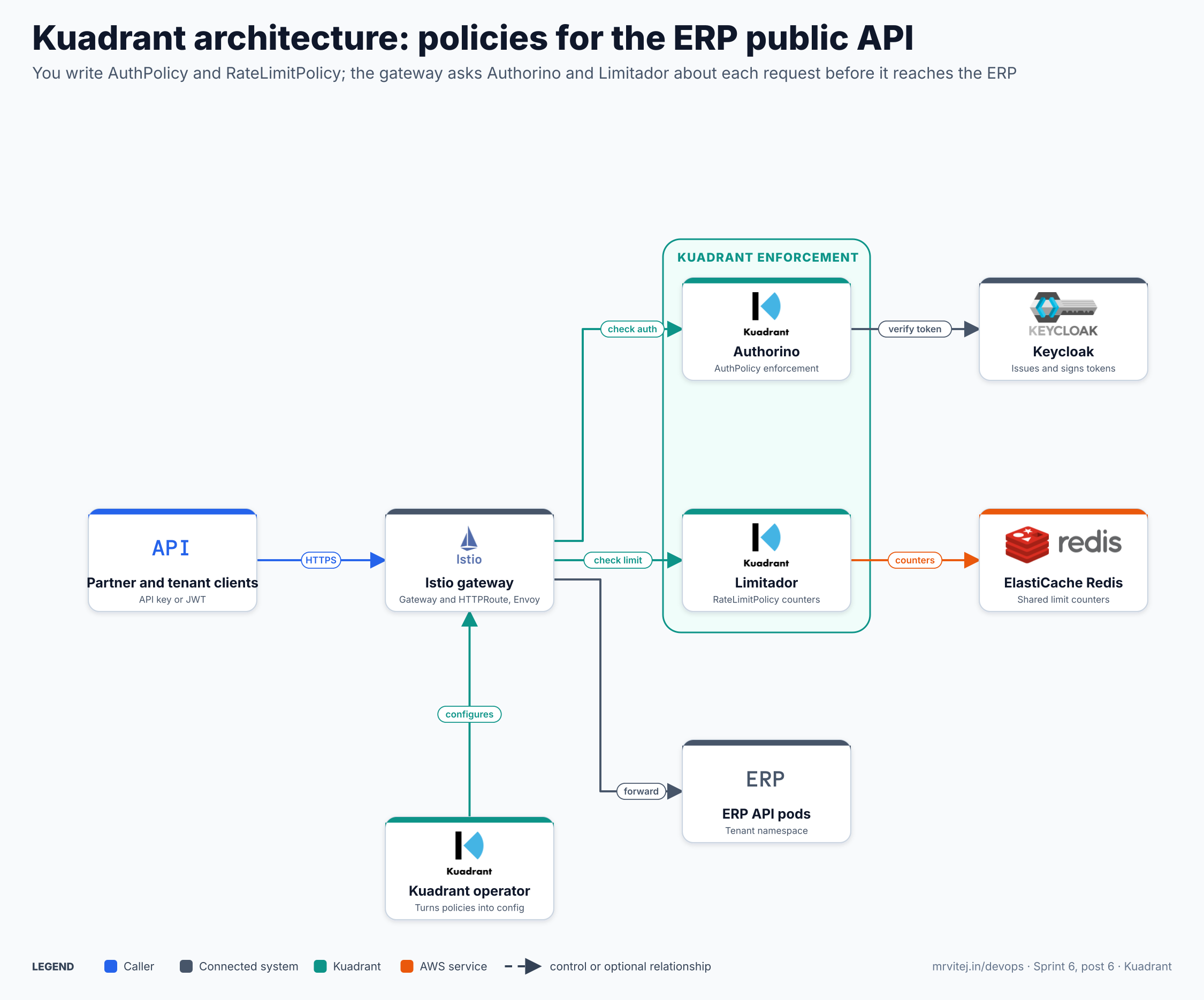
Blue is a caller, grey is a connected system, teal is Kuadrant and orange is an AWS service. Open the zoomable diagram, or download it as SVG or PNG.
| Component | Responsibility |
|---|---|
| Partner and tenant clients | Call the public API with an API key or a JWT. |
| Istio gateway | Terminates TLS, routes with HTTPRoute, and runs the Kuadrant wasm filter inside Envoy. See the Istio brief. |
| Authorino | Authenticates the request and checks authorization rules. |
| Limitador | Counts the request against the limit that matches it. |
| Keycloak | Issues the tokens that Authorino verifies. See the Keycloak brief. |
| ElastiCache Redis | Holds the counters when Limitador runs with more than one replica. |
| ERP API pods | The backend. They only see requests that passed both checks. |
| Kuadrant operator | Watches the policy resources and configures the gateway, Authorino and Limitador. |
The project’s architecture overview splits the system into a control plane, where policies are exposed as Kubernetes APIs and reconciled, and a data plane, where Authorino and Limitador enforce them at request time. It also names a DNS operator for DNSPolicy and relies on cert-manager for TLSPolicy.
One request through the gateway
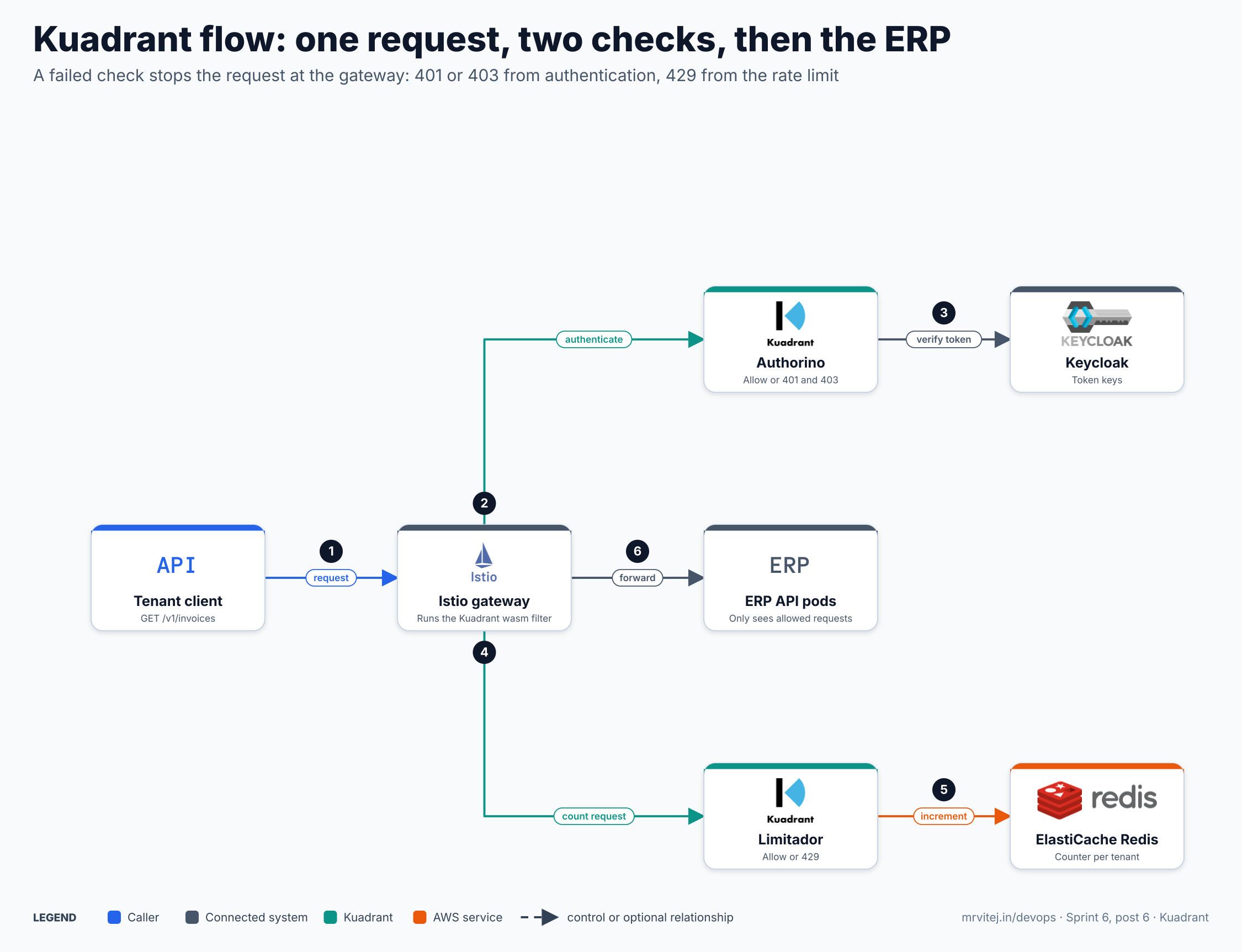
- Request. A tenant client calls
GET /v1/invoiceswith a bearer token. - Authenticate. The wasm filter in the gateway calls Authorino.
- Verify. Authorino checks the token against the issuer’s keys from Keycloak. A bad token ends here with 401 or 403.
- Count. The gateway asks Limitador whether this tenant is within its limit.
- Increment. Limitador updates the counter, in Redis when counters are shared. Over the limit, the caller gets 429.
- Forward. Only an allowed request reaches the ERP API.
Open the zoomable flow diagram, or download it as SVG or PNG.
Real world: a platform default and a team override
The platform team puts a deny-all AuthPolicy on the shared Gateway and an artificially low RateLimitPolicy, so any route nobody has thought about is closed. The invoices team then adds an AuthPolicy on its own HTTPRoute that accepts Keycloak tokens, and a RateLimitPolicy that sets limits per plan. The Red Hat guide for the same product follows exactly this pattern: a default deny-all on the Gateway, then a policy in another namespace that overrides it for one route. The result is that a forgotten endpoint is protected by default, and a team opens only what it owns.
Install Kuadrant
Prerequisites
- A Kubernetes cluster. For the ERP this is EKS.
- The Gateway API CRDs, installed from the Gateway API release you intend to use.
- A Gateway API provider. This post uses Istio, installed with Gateway API support enabled (for example through the Sail operator or
istioctl; see the Istio brief). - cert-manager, if you want
TLSPolicy. See the cert-manager brief. - A Redis-compatible store, if you run more than one Limitador replica and want shared counters. The Red Hat guide calls for a secure, highly available datastore for this.
- Cloud DNS credentials and a hosted zone, if you want
DNSPolicy. Route 53 and Google Cloud DNS are the providers named in the project’s announcement.
The operator, with Helm
The project added Helm installation with its v1 release, with the chart indexed on ArtifactHub:
helm repo add kuadrant https://kuadrant.io/helm-charts/ --force-update
helm repo update
helm install kuadrant-operator kuadrant/kuadrant-operator \
  --create-namespace --namespace kuadrant-system
Then ask for an instance of Kuadrant. This creates the Authorino and Limitador instances the operator manages:
kubectl apply -f - <<EOF
apiVersion: kuadrant.io/v1beta1
kind: Kuadrant
metadata:
  name: kuadrant
  namespace: kuadrant-system
spec: {}
EOF

kubectl get kuadrant kuadrant -n kuadrant-system \
  -o jsonpath='{.status.conditions[?(@.type=="Ready")]}'
The v1beta1 version of the Kuadrant resource comes from the project’s examples; confirm it with kubectl api-resources | grep kuadrant for the release you install. The chart’s exact flags change between releases, so read its values on ArtifactHub first. I did not run the install for this post.
Shared counters in Redis
By default Limitador keeps counters in its own memory. With more than one replica, each replica counts separately and the real limit is higher than the one you wrote. Point Limitador at Redis instead, using the storage settings of the Limitador resource and a Secret that holds the Redis URL. I did not verify the field names, so follow the Limitador operator documentation for your version.
Try it: protect an ERP route
A route first, then the two policies. These are examples written for this series and have not been applied to a cluster:
apiVersion: gateway.networking.k8s.io/v1
kind: HTTPRoute
metadata:
  name: erp-api
  namespace: erp-api
spec:
  parentRefs:
    - name: public
      namespace: gateways
  hostnames: ["api.example.com"]
  rules:
    - matches:
        - path: { type: PathPrefix, value: /v1 }
      backendRefs:
        - name: erp-api
          port: 8080
---
apiVersion: kuadrant.io/v1
kind: AuthPolicy
metadata:
  name: erp-api-auth
  namespace: erp-api
spec:
  targetRef:
    group: gateway.networking.k8s.io
    kind: HTTPRoute
    name: erp-api
  rules:
    authentication:
      keycloak-tokens:
        jwt:
          issuerUrl: https://sso.example.com/realms/erp
---
apiVersion: kuadrant.io/v1
kind: RateLimitPolicy
metadata:
  name: erp-api-limits
  namespace: erp-api
spec:
  targetRef:
    group: gateway.networking.k8s.io
    kind: HTTPRoute
    name: erp-api
  limits:
    standard:
      rates:
        - limit: 100
          window: 1m
      counters:
        - expression: auth.identity.tenant
The counters line keys the limit on a tenant claim in the token, so each tenant gets its own budget instead of sharing one. For paid plans, the project’s v1 announcement says conditions in both policies can use CEL, so a second entry under limits can carry a when predicate on a plan claim and a higher rate. The field spellings above follow the shape of the project’s v1 examples, but check them against the CRD with kubectl explain authpolicy.spec before you rely on them.
Check that the policies were accepted and are enforced:
kubectl get authpolicy erp-api-auth -n erp-api \
  -o jsonpath='{.status.conditions[?(@.type=="Accepted")].message}'
kubectl get ratelimitpolicy erp-api-limits -n erp-api -o yaml | grep -A4 conditions
For API keys instead of tokens, the Red Hat guide stores each key as a Secret in the Kuadrant namespace, labelled for Authorino, with the user ID in an annotation; the AuthPolicy then selects those Secrets.
Production reference design
- Policies at two levels. A deny-all
AuthPolicyand a low globalRateLimitPolicyon each shared Gateway, owned by the platform team. Route policies owned by the app teams. - Per-tenant counters. Key limits on the tenant claim so one tenant cannot use up another’s budget.
- Shared counter store. Run Limitador with Redis (ElastiCache with Multi-AZ) before you run more than one replica.
- Separate the failure modes. Decide what happens if Authorino or Limitador is down. The gateway will fail the request or let it through depending on how the filter is configured, so test it.
- Replicas and resources. Run at least two replicas of Authorino and Limitador, with resource requests set.
- Certificates and DNS as code. Use
TLSPolicyandDNSPolicyfor the public listener so they live in Git with the rest. - Observe. Watch rejected requests (401, 403 and 429) per tenant, and the latency added by the two checks.
- Pin versions. Pin the operator chart and the wasm shim image. A
latesttag on the shim means a gateway can change behaviour on restart.
Security
- Default deny. Start with a deny-all policy on the Gateway so that new routes are closed until a team opens them.
- Keep keys in Secrets. API keys are Kubernetes Secrets in the Kuadrant namespace; restrict who can read and create them.
- Verify the issuer. Set
issuerUrlto your own Keycloak realm and keep that realm’s keys reachable only through TLS. - Policy ownership. Use RBAC so only the platform team can write policies that target the Gateway, and app teams only those that target their own routes.
- Network. Keep Authorino, Limitador and Redis inside the cluster or VPC and allow only the gateway to reach them.
- Supply chain. The wasm shim is pulled as an OCI image into the gateway; mirror it into your own registry and verify it, as the series’ in-toto post describes.
Troubleshooting
This table comes from the project’s operator documentation and the Red Hat guide for its product. I did not run Kuadrant for this post, so test each entry on your own setup.
| Symptom | Likely cause | How to check | Fix |
|---|---|---|---|
| Policy exists but has no effect | The gateway provider is not one Kuadrant supports, or the operator cannot reach it | kubectl describe the policy and read its status conditions |
Use a supported provider and check the provider list in the docs for your version |
Policy status is not Accepted |
Wrong targetRef, or the target is in another namespace |
kubectl get <policy> -o yaml and read the condition message |
Put the policy in the same namespace as its target and fix the group, kind and name |
Kuadrant resource never becomes Ready |
Gateway API CRDs or the provider are missing | kubectl get crd | grep gateway.networking.k8s.io; operator logs |
Install the Gateway API CRDs and the provider first, then re-apply |
| Every request returns 403 | A Gateway-level deny-all policy and no override on the route | List AuthPolicy objects for the Gateway and the route |
Add an AuthPolicy on the HTTPRoute that allows what you intend |
| 401 for valid tokens | Wrong issuer URL, or Authorino cannot reach Keycloak | Authorino logs; curl the issuer’s .well-known URL from inside the cluster |
Fix the issuer and the network path |
| Limits are looser than configured | Each Limitador replica counts on its own | kubectl get limitador -o yaml and check the storage setting |
Configure Redis storage so replicas share counters |
| 429 for everyone | A low global limit on the Gateway applies to routes without their own limit | Look at the Gateway’s RateLimitPolicy |
Add a route-level policy with the limit you want, or raise the default |
| Gateway pod fails to load the filter | The wasm shim image cannot be pulled | Gateway pod events and logs | Allow egress to the registry, or mirror the image and point the operator at it |
TLSPolicy stays pending |
The cert-manager issuer is missing or not ready | kubectl get certificate -A, kubectl describe the issuer |
Create the ClusterIssuer the policy names and fix its credentials |
DNSPolicy creates no records |
Missing DNS credentials or hosted zone | Operator logs and the policy status | Create the credentials Secret and the hosted zone the policy expects |
Usage cases
- Public API for partners. Tokens or API keys, per-tenant limits and certificates, all declared as policy.
- Plans and tiers. Different request budgets for different plans, selected by a claim in the token.
- Platform guardrails. A deny-all and a low global limit on every shared Gateway, with teams opting in.
- Multi-cluster gateways. The project’s announcement describes a hub controller that manages DNS and TLS across spoke clusters.
- In the Sprint 6 project. The ERP’s public API sits behind an Istio gateway with Kuadrant policies, Keycloak tokens per tenant and Redis counters. Part 5 wires it in.
Operational considerations
- More moving parts. Operators, Authorino, Limitador, a store and a wasm filter all need monitoring and upgrades.
- Per-request cost. Two extra calls per request add latency. Measure it under load before you set budgets.
- Provider lock-in. Kuadrant ties you to the gateway providers it supports; check before choosing the gateway.
- Policy conflicts. Defaults, overrides and several policies on one target can interact in ways that surprise people. Keep the hierarchy simple and read each policy’s status.
- Sandbox project. APIs went to
v1for the four policies, but the surrounding components move fast, so read release notes before each upgrade.
Adoption
Kuadrant is sponsored by Red Hat, which ships a supported product built on it called Connectivity Link. I did not find a verified list of end users for this post, so none are named. Check the project’s own site and the CNCF project page for current references.
Alternatives
| Solution | Model | Best suited to |
|---|---|---|
| kgateway policies (CNCF Sandbox) | The gateway’s own policy resources for auth, rate limits and more; see the kgateway brief | Teams that already run kgateway and prefer its native resources |
| Envoy Gateway policies | SecurityPolicy and BackendTrafficPolicy on Envoy Gateway |
Teams that run Envoy Gateway and want policy in its own API |
| Istio native security | RequestAuthentication and AuthorizationPolicy on the mesh |
JWT checks and allow rules, without per-tenant plans |
| Amazon API Gateway | Managed API front door with usage plans | Teams that want a managed service and accept the vendor API |
| Commercial API gateways (Kong, Apigee and others) | Full API management with portals and analytics | Teams that need a developer portal and billing features |
| AWS WAF rate rules | Edge request limits by IP or header | Coarse abuse protection in front of any gateway |
Strengths and limitations
| Strengths | Limitations |
|---|---|
| Auth, rate limits, TLS and DNS as Kubernetes policies | A provider list narrower than Gateway API itself |
| Defaults at the Gateway, overrides at the route | Several components to run and upgrade |
| Per-tenant counters with CEL expressions | Extra latency from two checks per request |
| Built on standard Gateway API policy attachment | Counter sharing needs a Redis-compatible store |
| Four policy APIs declared stable at v1 | Sandbox project, documentation spread across several repositories |
Recommendation
Assess, then adopt if you run Istio ingress and need per-tenant limits. Start with one HTTPRoute and one tenant: apply the deny-all default, add a token-based AuthPolicy, and set a small RateLimitPolicy. Send a burst, watch the 429s, then scale Limitador to two replicas and confirm the limit holds with Redis. If you run kgateway and do not use Istio, try kgateway’s own policies first, and do not assume Kuadrant works on it until the project’s provider list says so.
References: Kuadrant on CNCF · Kuadrant website · Kuadrant documentation · Kuadrant operator · Authorino · Limitador · CNCF Landscape entry