A model is not one script. It is a chain: pull data, clean it, train, evaluate, and only then register the result. Run by hand, that chain lives in someone’s notebook, and nobody can say which data produced which model. Kubeflow Pipelines (KFP) turns the chain into code. You write each step as a Python function, wire the outputs of one step into the inputs of the next, compile the result to a YAML file, and the platform runs every step as its own container, recording what went in and what came out. The CNCF Landscape lists “Kubeflow Pipelines” with the description “Machine Learning Pipelines for Kubeflow” under AI Native Infra › Continuous Integration and Delivery. The Landscape entry carries no CNCF project label of its own, so this brief uses NON CNCF, even though the code lives in the Kubeflow project, which the previous brief covered as CNCF Graduated.
CNCF daily · Sprint 6, post 18 of 26 · AI Native Infra (Continuous Integration and Delivery) · NON CNCF label
At a glance
| Category | AI Native Infra › Continuous Integration and Delivery (Landscape) |
| Label | NON CNCF on the Landscape entry; part of the Kubeflow project (see the Kubeflow Trainer brief) |
| Repository | github.com/kubeflow/pipelines |
| Versions seen | Install page shows backend 2.17.2; PyPI shows kfp 2.18.2, released 23 Nov 2026, Python 3.9 or newer |
| Authoring | kfp Python SDK with @dsl.component, @dsl.pipeline, @dsl.container_component |
| Compiled form | A YAML intermediate representation, no longer tied to Argo Workflows YAML (from the v2 migration guide) |
| Install | Standalone with kustomize, or as part of the Kubeflow platform distribution |
| Interfaces | Python SDK and kfp CLI, REST API, web UI |
| Newer option | Kubernetes native API mode, where pipelines compile to Kubernetes manifests (per the compile docs) |
The problem Kubeflow Pipelines solves
| Question | Notebooks and scripts | Kubeflow Pipelines |
|---|---|---|
| Which data trained this model? | Ask whoever ran it | Run record with inputs, outputs and lineage |
| Re-run last month’s training | Find the right notebook | Re-run the same pipeline with the same parameters |
| One step fails | Start from the top | Steps are separate containers, with caching of unchanged steps |
| Different step needs a GPU | One machine for everything | Each step sets its own resources |
| Gate on quality | Someone checks by eye | A condition step stops the run |
| Scheduling | A cron job on a laptop | Recurring runs managed by the platform |
Key concepts
| Term | Meaning |
|---|---|
| Component | One step: a Python function or a container, with typed inputs and outputs |
| Pipeline | A function that connects components into a graph |
| Compile | The SDK turns the pipeline into a YAML file you can store and upload |
| Run | One execution of a pipeline with chosen parameters |
| Artifact | A dataset, model or metrics file produced by a step and stored in object storage |
| Parameter | A small value such as a learning rate, passed between steps |
| Experiment | A folder of runs you want to compare |
| Caching | A step with identical inputs can reuse an earlier result |
| Recurring run | A pipeline run on a schedule |
Architecture
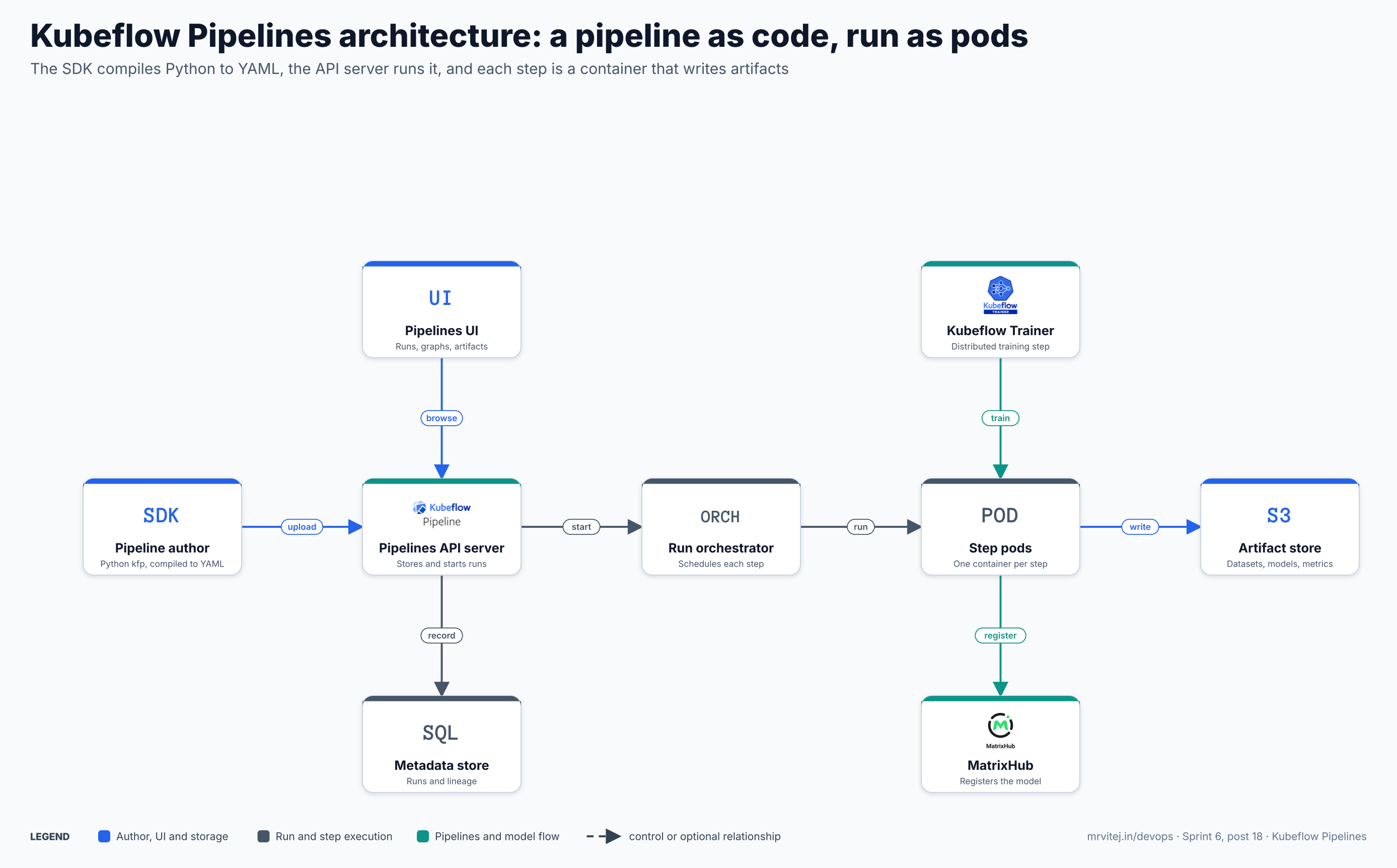
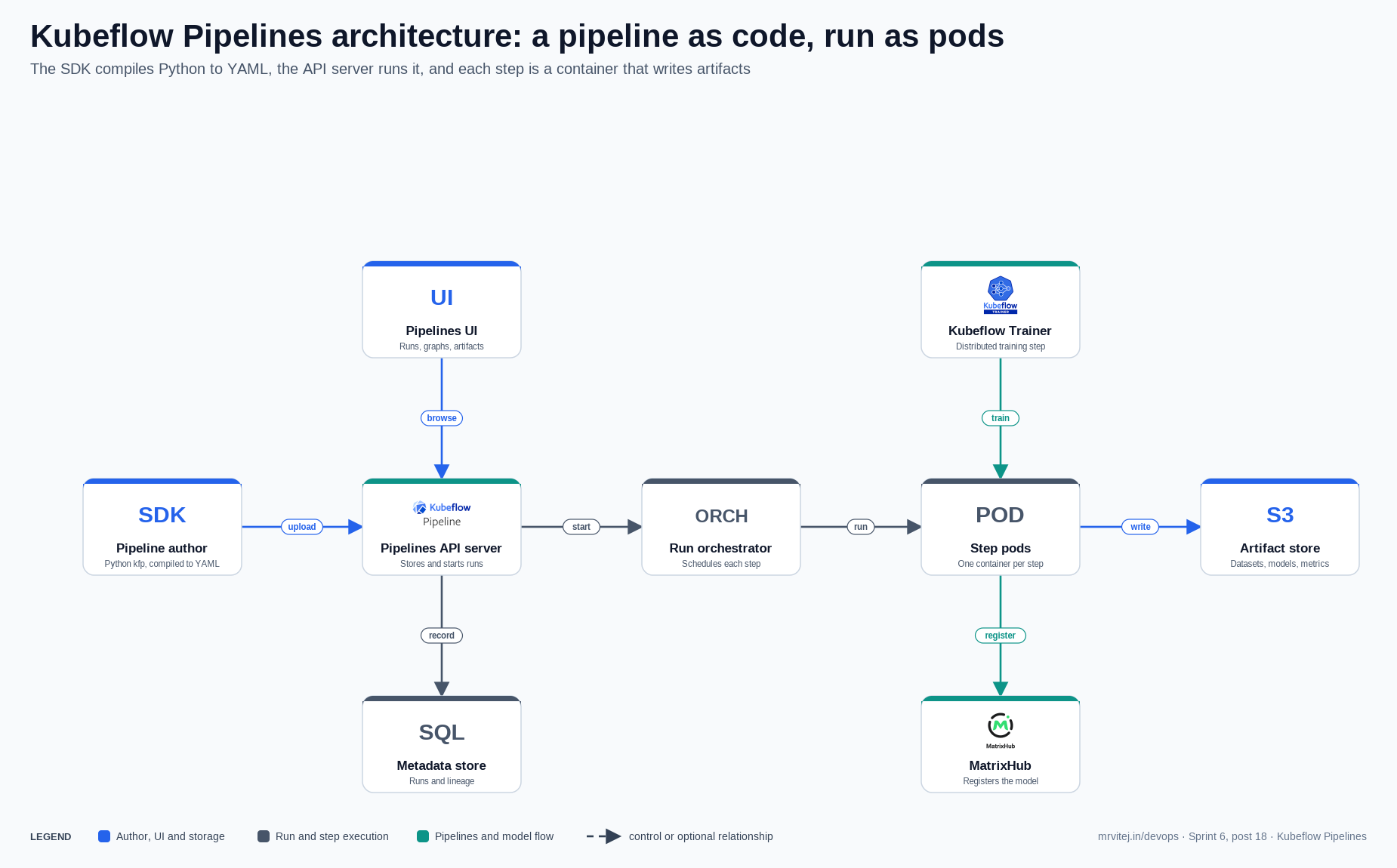
Blue is the author, UI and storage, grey is run and step execution and teal is the pipeline and model flow. Open the zoomable diagram, or download it as SVG or PNG.
| Component | Responsibility |
|---|---|
| Pipeline author | Writes Python, compiles to YAML, uploads or submits a run. |
| Pipelines API server | Stores pipelines, creates runs and serves the UI and SDK. |
| Pipelines UI | Shows run graphs, logs, metrics and artifacts. |
| Metadata store | Keeps run history and lineage in a database. |
| Run orchestrator | Schedules each step in order. The exact engine differs by version and mode; check the docs for yours. |
| Step pods | One container per step, with its own image and resources. |
| Kubeflow Trainer | A step can start a distributed training job. See the Trainer brief. |
| Artifact store | Object storage such as S3 for datasets, models and metrics. |
| MatrixHub | Final step registers a versioned model. See the MatrixHub brief. |
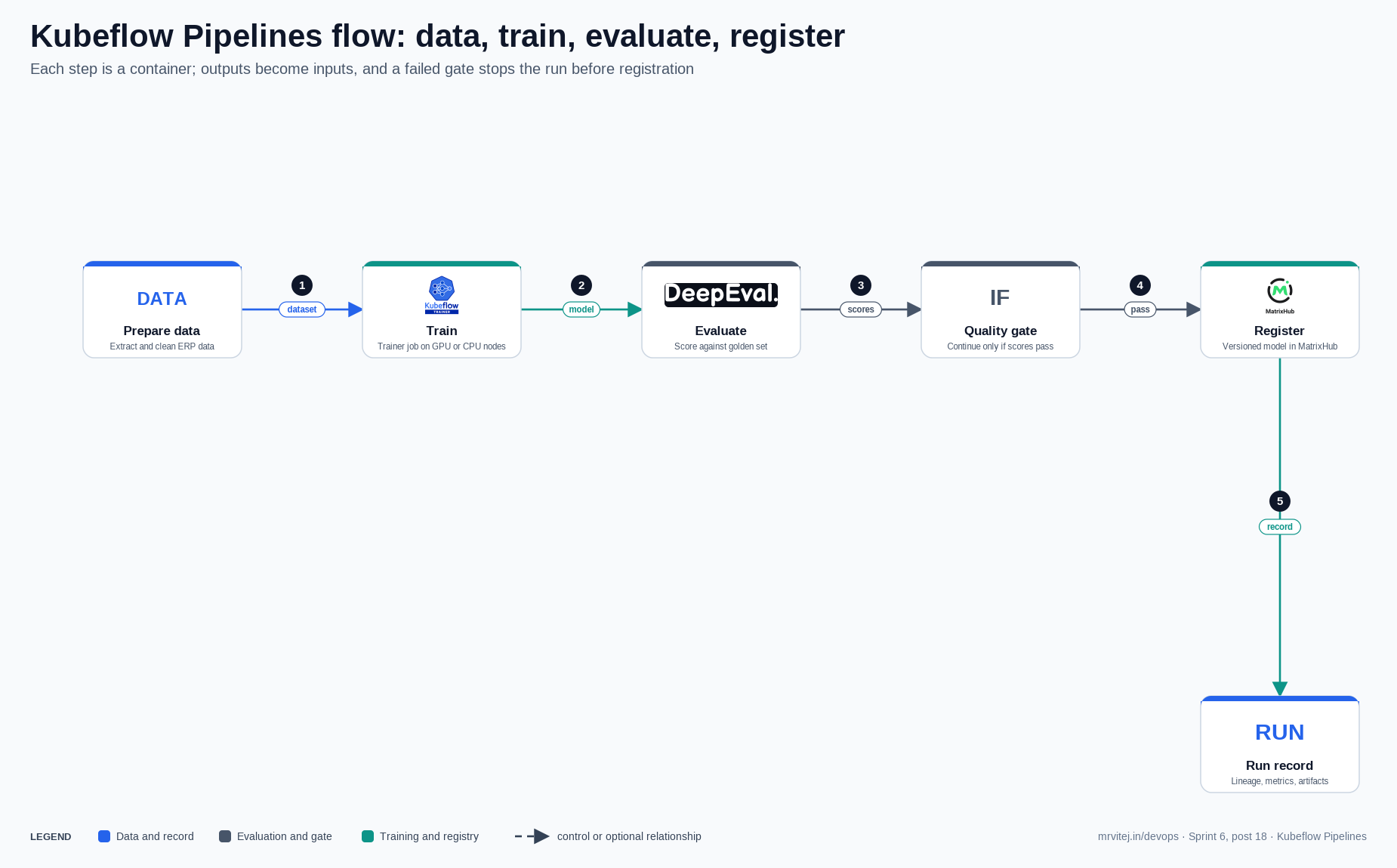
The ERP forecasting pipeline
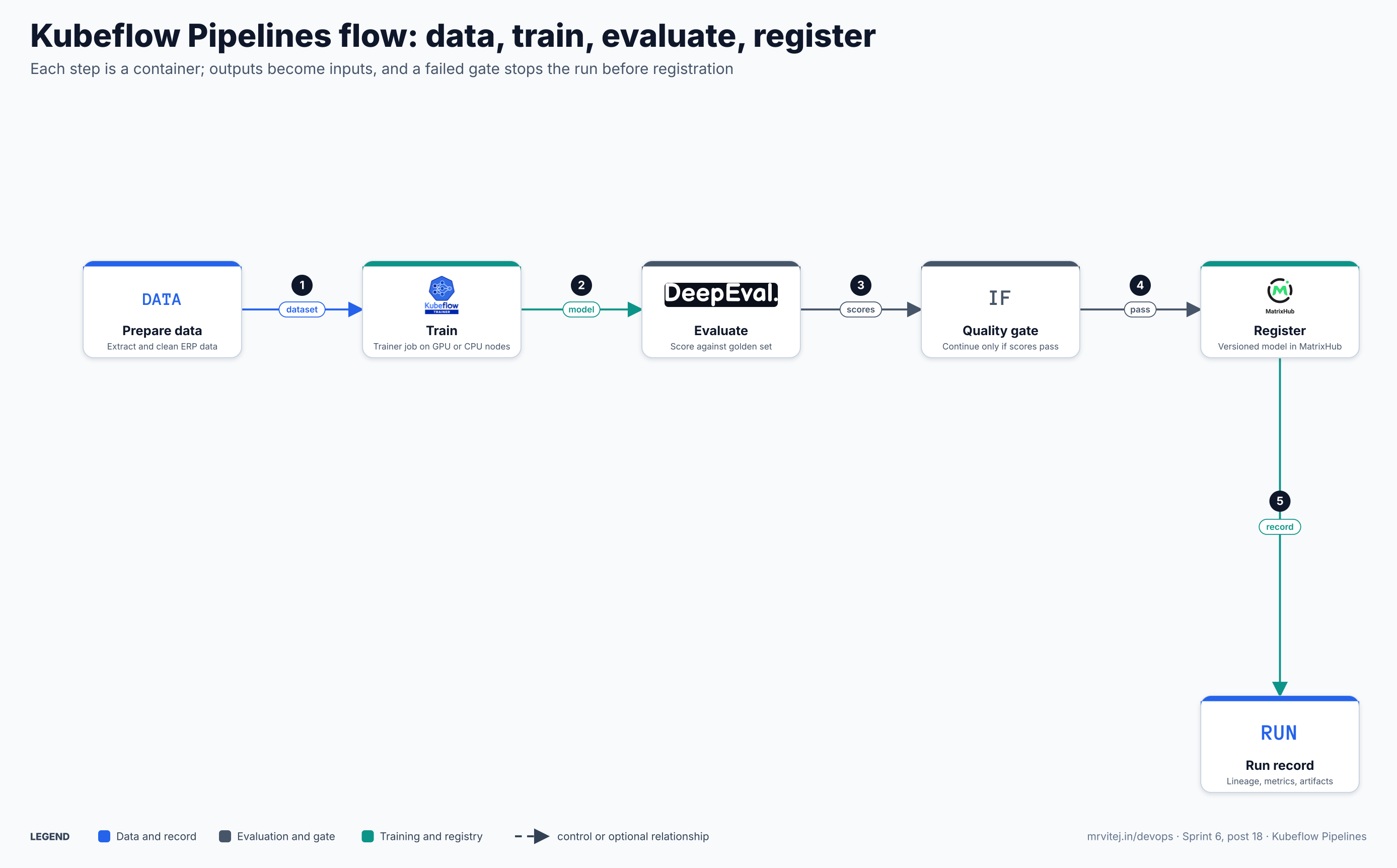
- Dataset. Extract and clean the ERP data.
- Model. Train with a Trainer job.
- Scores. Evaluate with DeepEval. See the DeepEval brief.
- Pass. A condition continues only if the scores meet the thresholds.
- Record. Register the model and keep the run record.
Open the zoomable flow diagram, or download it as SVG or PNG.
Real world: the demand forecast nobody could reproduce
The finance team asks why this month’s demand forecast changed. The data scientist who trained it has left, and the notebook still points at a file that was overwritten. With Pipelines, the forecast came from a recorded run: the exact data snapshot, the code image, the parameters and the evaluation scores are all in the run record. Rerunning it with last month’s parameters takes one click, and a change that lowers the evaluation score never reaches the registry because the gate step stops the run.
Install Kubeflow Pipelines
These steps follow the Kubeflow installation page and the PyPI page. I did not run them for this post.
# Standalone, development flavour: for first experiments, not production
export PIPELINE_VERSION=2.17.2     # the version shown on the install page; check for newer
kubectl apply -k "github.com/kubeflow/pipelines/manifests/kustomize/env/dev?ref=$PIPELINE_VERSION"

kubectl get pods -n kubeflow       # wait until the pods are Running (docs say about 3 minutes)
kubectl port-forward -n kubeflow svc/ml-pipeline-ui 8080:80
# open http://localhost:8080

pip install kfp                    # the SDK; 2.18.2 was on PyPI when I checked
The page also describes a production-ready path through the Kubeflow community distribution. The standalone dev flavour is labelled non-production, so for EKS use the distribution or a hardened overlay, and plan the database, object storage and authentication first.
Try it
This follows the Hello World pipeline in the docs.
# hello.py
from kfp import dsl, compiler

@dsl.component
def say_hello(name: str) -> str:
    hello_text = f"Hello, {name}!"
    print(hello_text)
    return hello_text

@dsl.pipeline
def hello_pipeline(recipient: str) -> str:
    hello_task = say_hello(name=recipient)
    return hello_task.output

compiler.Compiler().compile(hello_pipeline, "pipeline.yaml")
python hello.py # writes pipeline.yaml
kfp dsl compile --py hello.py --output pipeline.yaml --function hello_pipeline # CLI route
# Upload pipeline.yaml in the UI and start a run, or submit it with kfp.ClientThe kfp.Client host and the authentication details depend on how your cluster is exposed; the SDK docs describe the options.
The ERP pipeline has the same shape with four components (prepare_data, train, evaluate, register) and a dsl.If around register that checks the evaluation score. I have not run that pipeline, so treat it as the design, not a tested sample.
Production reference design
- Pin versions. Pin the backend and
kfpversions and the base images of components, and upgrade them together. - Real storage. Use managed object storage (S3) for artifacts and a managed database for metadata, with backups.
- Authentication. Put the UI and API behind your identity provider; do not expose the port-forward setup.
- Namespaces per team. Separate teams by namespace and set resource quotas.
- Nodes for steps. Give GPU steps node selectors and tolerations so Karpenter can add GPU nodes, and keep data steps on cheap CPU nodes.
- Gate before register. Put an evaluation condition ahead of the registry step, as in the flow above.
- Cache with care. Caching saves time, but disable it for steps that read changing data.
- Pipelines in Git. Keep pipeline code and compiled YAML in Git, and run through CI.
- Retention. Clean up old runs and artifacts, or storage cost keeps growing.
- Image supply chain. Build step images in CI, scan them and pull from a private registry.
Security
- Steps run arbitrary code. Anyone who can submit a pipeline can run containers in your cluster; control who can, and use namespace RBAC.
- Credentials. Give steps access to S3 and the registry through scoped service accounts, not long-lived keys in the code.
- Multi-user mode. The standalone dev flavour is not a multi-tenant setup; use the distribution’s profiles and authentication for shared clusters.
- Artifacts can hold sensitive data. Training data and models in object storage need encryption and access control.
- Image provenance. Pin step images by digest and scan them.
- Network policy. Limit what step pods can reach, especially for steps that fetch data from outside.
Troubleshooting
This table is built from the documentation and common failure patterns. I did not install or run Pipelines for this post, so verify each entry on your own cluster.
| Symptom | Likely cause | How to check | Fix |
|---|---|---|---|
ml-pipeline pods not Ready |
Dependencies still starting, or low resources | kubectl get pods -n kubeflow, kubectl describe pod |
Wait the few minutes the docs mention, then check events and node capacity |
| UI not reachable | The port-forward is not running | The terminal running kubectl port-forward |
Restart it and open http://localhost:8080 |
| SDK cannot connect | Wrong host or missing auth | The kfp.Client(host=...) value and error text |
Use the right endpoint and credentials for your setup |
| Compile error about types | v2 type checking is stricter than v1 | Error message; the migration guide | Fix the type annotations, or follow the v1 to v2 migration steps |
| Old v1 pipeline will not run | v1 YAML is not v2 YAML | The SDK version that compiled it | Recompile with the v2 SDK |
| A step is Pending | No node fits its resources | kubectl describe pod |
Fix requests and limits, or add nodes |
| A step cannot pull its image | Private registry or wrong tag | Pod events | Add image pull secrets, check the tag |
| Step cannot write artifacts | Object storage credentials or bucket missing | Step logs | Configure the artifact store and permissions |
| A stale result is reused | Caching | Look for a cached marker in the UI | Disable caching for that step |
ModuleNotFoundError in a step |
The component’s base image lacks the package | Step logs | Add the package in the component decorator or build a custom image |
Usage cases
- Training and evaluation pipelines. Data, train, evaluate and register as one reviewed workflow.
- Hyperparameter runs. The same pipeline with different parameters, compared in an experiment.
- Scheduled retraining. A recurring run that retrains on fresh data.
- Document pipelines. Steps that convert documents and load a vector database, such as the Docling brief flow.
- In the Sprint 6 project. The ERP’s demand forecast and the copilot’s fine-tuned model are produced by pipelines on Karpenter GPU or CPU nodes.
Operational considerations
- Version differences. The v1 to v2 change was large; read the migration guide before moving old pipelines.
- Operating the platform. Pipelines adds a database, an artifact store and several services; someone must own upgrades and backups.
- Not every job needs it. A single nightly script is simpler as a Kubernetes CronJob. Pipelines pays off when you need lineage, caching and comparison.
- Landscape label. The Landscape lists it without a project label, so check the entry again before quoting its status.
- Alternatives overlap. Workflow engines can run similar graphs; the difference is the ML-specific tracking and the Python authoring.
Adoption
The AWS SageMaker documentation describes installing Kubeflow Pipelines on a cluster as a standalone or full-distribution deployment, and Google’s Vertex AI Pipelines documentation says it uses the Kubeflow Pipelines SDK (v2 or later) to define pipelines. I did not verify named end-user companies.
Alternatives
| Solution | Model | Best suited to |
|---|---|---|
| Argo Workflows | General Kubernetes workflow engine, CNCF graduated | Teams that want a generic engine without ML-specific tracking |
| Apache Airflow | Python DAG scheduler with many integrations | Data teams that already run Airflow |
| Flyte | Typed workflow platform for data and ML | Teams that want strong typing and a managed-style experience |
| MLflow | Experiment tracking and model registry, listed in the same Landscape group | Tracking and registry without running the pipelines |
| Tekton | Kubernetes-native CI/CD pipelines | Build and release pipelines more than ML runs |
| Cloud services | Managed pipelines from cloud providers | Teams that prefer a managed service over running the platform |
Strengths and limitations
| Strengths | Limitations |
|---|---|
| Python-first authoring with typed steps | A real platform to run: database, storage, services |
| Per-step containers and resources | Learning curve for the component model and types |
| Run history, lineage and caching | v1 to v2 migration was significant |
| Works with Trainer for distributed training | Standalone install is for experiments, not production |
| Same pipeline runs on any conformant Kubernetes | Multi-user setup needs the wider Kubeflow platform |
| Open source with an active release stream | Landscape label differs from the graduated parent project |
Recommendation
Adopt for repeatable ML workflows that need lineage and gates; skip it for one-off scripts. For the ERP project, run the forecasting and fine-tuning pipelines on it, with the Trainer for training, DeepEval as the gate and MatrixHub as the registry. Start with the standalone flavour only to learn, then move to the platform distribution or a hardened install with managed storage and database, authentication and pinned versions. If you only need to schedule a few jobs, a CronJob or Argo Workflows is simpler.
References: Kubeflow Pipelines repository · Installation quickstart · Hello World pipeline · Compile a pipeline · KFP CLI · Migrate to Pipelines v2 · kfp on PyPI · AWS: install Kubeflow Pipelines · Vertex AI: build a pipeline · CNCF Landscape