Kubescape answers a question every platform team gets asked sooner or later: “how secure is this Kubernetes setup, and what exactly should we fix first?” It reads Kubernetes resources, from a directory of YAML, a Helm chart, a Git repository or a live cluster, checks them against a library of security controls, and reports which resources fail which controls, with remediation guidance. The same engine runs as a command-line tool on a laptop or in CI, and as an operator inside the cluster for continuous scanning.
CNCF daily · Sprint 4, post 10 of 15 · Security & Compliance
At a glance
| Category | Provisioning › Security & Compliance |
| CNCF status | Incubating (accepted 13 December 2022, moved to incubating 13 January 2025) |
| Origin | Created by ARMO and contributed to the CNCF |
| Written in | Go |
| License | Apache 2.0 |
| Latest CLI release | v4.0.19, tagged 5 November 2026 |
| Latest operator chart tag | kubescape-operator-1.41.0, tagged 28 October 2026 |
| Control library | regolibrary, latest tag v2.0.39 (20 October 2026), about 295 control definitions and around 20 framework files |
| Frameworks | NSA-CISA, MITRE ATT&CK, CIS Kubernetes Benchmark (including EKS, AKS and GKE variants), SOC2-related controls, ISM, ArmoBest, DevOpsBest and others |
| Inputs | Live cluster, YAML files, Helm charts, Kustomize directories, Git repositories, container images |
| Output formats | Terminal, JSON, JUnit, SARIF, HTML, PDF, CSV, Markdown, Prometheus, GitLab SAST, GitHub Actions annotations and more |
| Install | One-line script, Homebrew, Krew and others for the CLI; Helm chart for the operator |
The problem Kubescape solves
A Kubernetes cluster is configured by hundreds of small decisions: whether a container runs as root, whether it may escalate privileges, whether a namespace has a network policy, which service accounts can read secrets, whether the API server logs audit events. Each decision is easy to get wrong and hard to see. Guidance exists (the NSA and CISA hardening guide, the MITRE ATT&CK matrix for Kubernetes, the CIS Benchmarks), but turning a PDF into a repeatable check is the part teams skip.
Kubescape turns that guidance into executable controls and runs them in the three places where a mistake can be caught:
- Before merge. Scan the manifests and Helm charts in a pull request, so a privileged container never reaches a cluster.
- Before and after deploy. Scan the live cluster on demand to see what is actually running.
- Continuously. Run the operator so new workloads are scanned without anyone remembering to do it, and results stay in the cluster as Kubernetes objects.
A scanner is only useful if people read its output, so Kubescape also tries to make the output actionable: findings are grouped by control, each control links to a documentation page with remediation, and a compliance score and a coverage score show how much was checked.
Key concepts
- Control. One potential weakness to check, such as “Privileged container” (C-0057) or “Missing network policy” (C-0260). A control has an ID, a severity score and remediation text, and is implemented by one or more rules.
- Rule. A single test, written in Rego for the Open Policy Agent engine. A control can contain several rules.
- Framework. A named set of controls: NSA, MITRE, a CIS benchmark version, and so on. One control can belong to many frameworks.
- Control library. The
regolibraryrepository, where controls, rules and frameworks live. The CLI downloads it at scan time, or uses a copy you saved for offline use. - Compliance score. The share of resources that passed, aggregated per control and per framework. It is a measure of how much of a checklist passes, nothing more.
- Scan coverage. A separate score that tells you how many controls could actually be evaluated. A scan that skips most controls because of missing permissions can look clean, so Kubescape reports coverage next to the score.
- Exception. A recorded decision that a specific finding is accepted, matched by resource and control, with a reason.
- Operator. The in-cluster deployment, installed with a Helm chart, that schedules scans, scans images and stores results as custom resources.
- Validating Admission Policy (VAP). A Kubernetes-native admission rule written in CEL. Kubescape ships a CEL policy library that can enforce a subset of controls at admission time.
Architecture
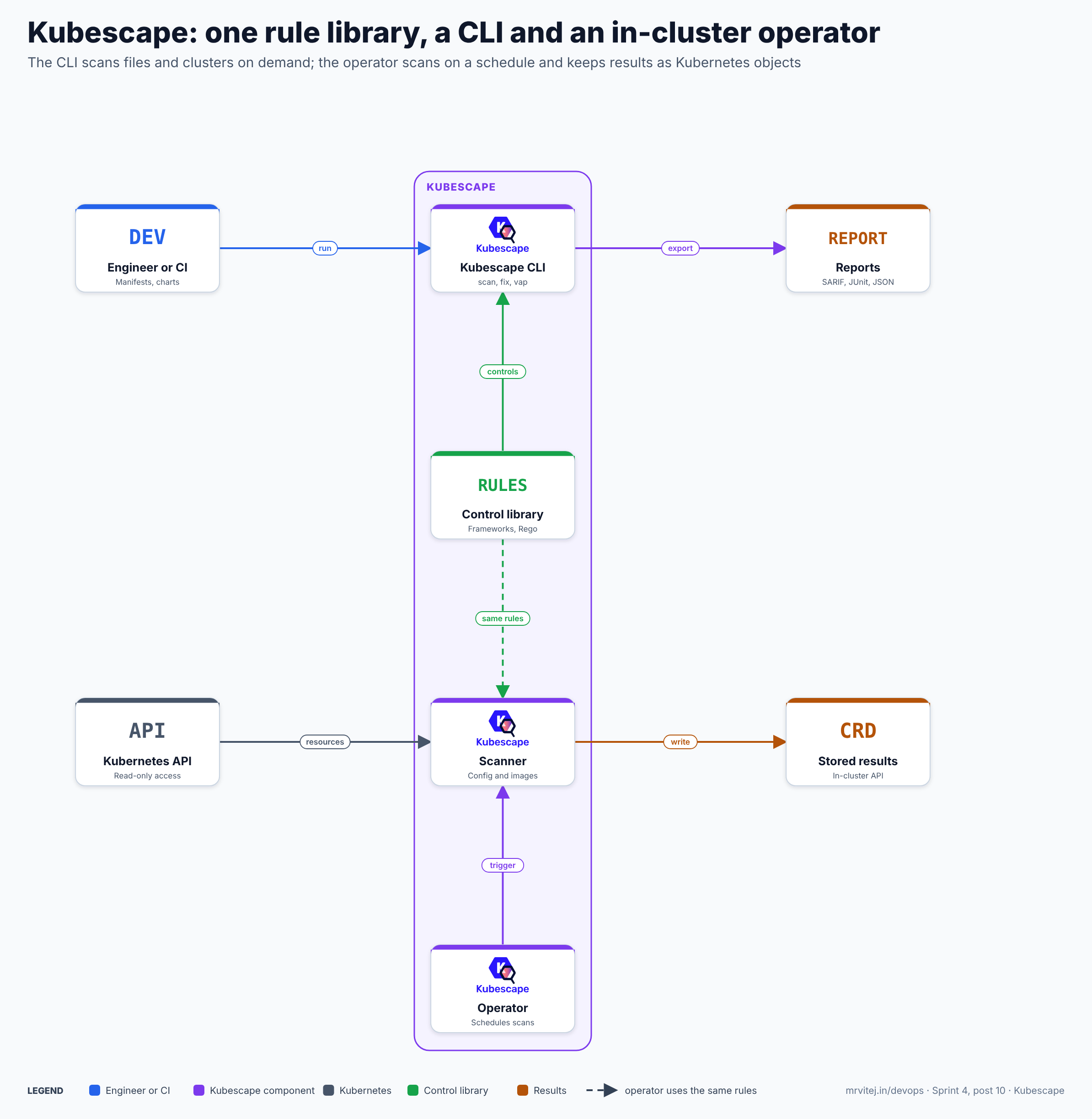
One rule library feeds both modes. The CLI answers “scan this now”; the operator answers “keep scanning and remember the results”. Blue is an engineer or CI job, purple a Kubescape component, slate Kubernetes, green the control library and orange results.
| Component | Responsibility |
|---|---|
| CLI | A single binary. Loads controls, collects resources from files or a cluster, evaluates them, prints or exports the result. Also hosts fix, patch, vap, download and the MCP server |
| Control library | The frameworks, controls and Rego rules from regolibrary. The documentation describes the policy engine as Open Policy Agent |
| Operator | In the cluster. Triggers scheduled scans and exposes commands the CLI can send with kubescape operator scan |
| Scanner | The in-cluster component that reads resources through the API and evaluates them with the same rules |
| Vulnerability scanner and node agent | Image scanning uses Grype and an SBOM per image; a node-level agent provides node data and runtime features. Both are on by default in the chart, with runtime detection switched off |
| Storage | An in-cluster API that keeps results as custom resources such as workloadconfigurationscans and vulnerabilitymanifests |
| Reports | What the CLI writes: JSON, SARIF, JUnit, HTML, PDF and others |
Design principle. Controls are data, and the engine is generic. Because the CLI and the operator share one library, a finding in a pull request and a finding in the cluster mean the same thing, and a control improved upstream improves every mode.
From a pull request to an accepted risk
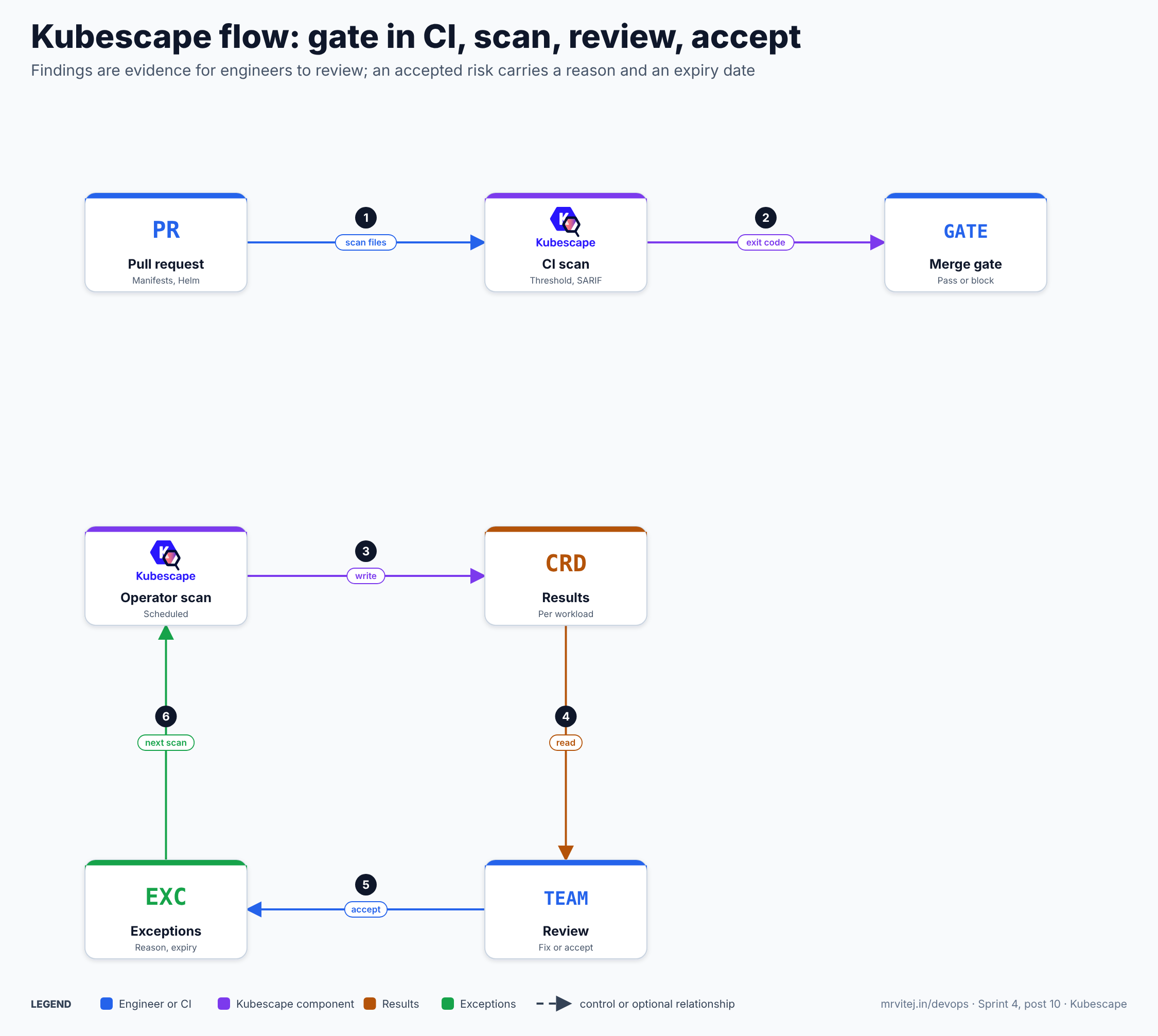
- Scan files. CI scans the manifests or charts in the pull request.
- Gate. The scan’s exit code, driven by a severity or score threshold, passes or blocks the merge.
- Write. The operator scans the running cluster on its schedule and writes results per workload.
- Read. The team reads the results, with the CLI,
kubectlor an exported report. - Accept. A finding that is deliberately accepted is recorded as an exception with a reason, otherwise it is fixed.
- Next scan. The next scan applies the exceptions, so the report shows only open decisions.
Recap: gate early, scan continuously, decide explicitly, and record why.
Install the CLI
The project’s one-line installer:
curl -s https://raw.githubusercontent.com/kubescape/kubescape/master/install.sh | /bin/bashThe project’s own getting-started guide adds “we’re a security product; please read the file before you run it”, which is good advice for any piped installer. Alternatives from the README:
| Platform | Command |
|---|---|
| Homebrew | brew install kubescape |
| Krew | kubectl krew install kubescape |
| Arch Linux | yay -S kubescape |
| NixOS | nix-shell -p kubescape |
| Chocolatey | choco install kubescape |
| Scoop | scoop install kubescape |
For CI, pin the version you install and verify what you download, rather than tracking the master script.
Your first scan
# Scan the cluster your kubeconfig points at
kubescape scan
The default view is a posture overview grouped into areas: control plane, access control, secrets, network and workload. For the control plane it checks things such as whether anonymous access is enabled, whether audit logs are on and whether secrets are encrypted in etcd. For each failed control it prints a ready-made command to drill in, for example kubescape scan control C-0057 -v for privileged containers. It also lists the “highest-stake workloads”, the ones Kubescape estimates would hurt most if exploited, and finishes with compliance scores for MITRE and NSA.
Useful follow-ups:
kubescape scan framework nsa              # a full NSA report
kubescape scan framework mitre            # a full MITRE report
kubescape scan control C-0005 -v          # one control, verbose
kubescape scan workload Deployment/nginx --namespace default
kubescape list frameworks                 # what frameworks are available
kubescape list controls                   # what controls exist
To narrow or widen a cluster scan:
kubescape scan --include-namespaces production,staging
kubescape scan --exclude-namespaces kube-system,kube-public
kubescape scan --kubeconfig /path/to/other.kubeconfig
Real world. A new platform engineer joins a team that inherited a cluster. Instead of reading every manifest, they run kubescape scan, see that six workloads fail “Non-root containers” and one runs privileged, and start the conversation with the owners of those seven workloads rather than with a blank page.
Scanning files, Helm charts and Git
The cheapest place to fix a finding is before it is deployed:
kubescape scan /path/to/manifests/
kubescape scan /path/to/helm/chart/
kubescape scan /path/to/kustomize/directory/
kubescape scan https://github.com/example-org/example-repo
Details worth knowing:
- Helm. A directory with a
Chart.yamlis detected as a chart and rendered as a new installation. Use--values my-values.yamland--set image.tag=1.2.3to scan the values you really deploy. Kubescape renders only dependencies already vendored incharts/and never fetches or updates them; a missing dependency produces a warning and can stop the whole chart from rendering. Runhelm dependency buildyourself first, after reviewing where the dependencies come from. - Kustomize. A directory with a
kustomization.yamlis built and the generated objects are scanned. Kustomize may follow references outside the scan root and ahelmCharts.repomay fetch remote content, so scan only sources you trust to build. - Chart and Kustomize together. If a directory has both, Kubescape treats it as a Helm chart.
A scan of files can only see what is in the files. It cannot see admission mutations, controllers that rewrite objects, or anything created outside Git, which is why the cluster scan still matters.
Frameworks and controls
kubescape scan with no arguments uses a broad default view; kubescape scan framework <name> picks one. The control library in regolibrary ships these framework files:
| Framework file | What it covers |
|---|---|
nsaframework |
The NSA-CISA Kubernetes hardening guidance (26 controls) |
mitre |
The MITRE ATT&CK matrix for Kubernetes (27 controls) |
cis-v1.10.0, cis-v1.12.0 |
CIS Kubernetes Benchmark versions (131 controls in v1.12.0) |
cis-eks-t1.7.0, cis-eks-t1.8.0 |
CIS benchmark for Amazon EKS |
cis-aks-t1.2.0, cis-aks-t1.8.0 |
CIS benchmark for Azure AKS |
cis-gke-v1.9.0 |
CIS benchmark for Google GKE |
soc2 |
A small set of SOC2-related controls (7 controls) |
ism |
ISM-related controls (15 controls) |
armobest, devopsbest, security |
Best-practice sets from the project and ARMO |
agent-runtime-hardening |
Resources for agent sandbox workloads (9 controls) |
allcontrols, clusterscan, workloadscan |
Broad sets used for the default and workload views |
The control counts are read from the framework files at the time of writing and change between releases, so check kubescape list frameworks and the release you install. To see what a given framework contains, kubescape list controls prints the controls, and --format json makes that scriptable.
Two things to keep straight. First, a framework in this list is a set of Kubescape’s own checks inspired by that guidance. Passing it does not mean an audit against the original standard passed. Second, controls differ in strength: some are exact, some are heuristics, and some need data a scan does not always have. That is what the coverage score is for.
Scores and coverage
There are two scores:
- Control compliance score: the ratio of resources that passed to the resources evaluated for that control.
- Framework compliance score: the average of the control scores in the framework.
Scores gate CI only in some views. --compliance-threshold applies to scan framework, scan control and --view resource|control. The default view does not evaluate a score threshold. --severity-threshold and --fail-coverage-below apply in every view.
Coverage deserves attention. The project’s own documentation puts it bluntly: without it, a scan that evaluates five controls out of a hundred and finds nothing wrong could look fully compliant. Controls can go unevaluated when an API or CRD is missing, when the scanning identity cannot read a resource, or when a control is switched off by configuration. Kubescape reports the evaluated and total control counts and marks a scan as degraded when something was skipped, in the terminal, JSON, JUnit, SARIF, GitHub Actions, PDF and CSV outputs. --fail-coverage-below turns that into a gate, and the coverage score subtracts penalties for runtime gaps, so a scan that evaluated every control can still score below 100.
Kubescape in CI
A CI scan has three jobs: fail the build on what you will not accept, publish the findings where developers look, and keep the output as evidence.
# Fail on high or critical findings; keep a JSON and a SARIF copy
kubescape scan ./manifests \
  --severity-threshold high \
  --format sarif --output results.sarif

# Gate on a framework score instead
kubescape scan framework nsa --compliance-threshold 80
GitHub
The project documents a SARIF upload to GitHub Code Scanning:
name: Kubescape
on:
  push:
    branches: [main]
  pull_request:
    branches: [main]

jobs:
  kubescape:
    runs-on: ubuntu-latest
    permissions:
      security-events: write
      actions: read
      contents: read
    steps:
      - uses: actions/checkout@v4
      - name: Install Kubescape
        run: |
          curl -s https://raw.githubusercontent.com/kubescape/kubescape/master/install.sh | bash
          echo "$HOME/.kubescape/bin" >> "$GITHUB_PATH"
      - name: Scan manifests
        run: kubescape scan . --format sarif --output results.sarif
        continue-on-error: true   # still upload when findings exist
      - uses: github/codeql-action/upload-sarif@v3
        with:
          sarif_file: results.sarif
Code Scanning is free for public repositories and needs GitHub Advanced Security for private ones. SARIF output is supported for local files and Git repositories, not for a live-cluster scan. There is also a kubescape/github-action if you prefer an action to a manual install; pin whichever you use to a version or commit.
GitLab, Jenkins and others
For GitLab the project’s example scans the repository and publishes JUnit as a report artifact:
scan_with_kubescape:
  stage: scan
  image: alpine:latest
  script:
    - apk add --no-cache bash curl gcompat
    - curl -s https://raw.githubusercontent.com/kubescape/kubescape/master/install.sh | /bin/bash
    - export PATH=$PATH:$HOME/.kubescape/bin
    - kubescape scan . --format junit --output results.xml
  artifacts:
    reports:
      junit: results.xml
The repository also documents Jenkins, Azure Pipelines and CircleCI, and a gitlab-sast output format exists. For pull-request workflows with an existing backlog, the baseline flags are valuable: save a JSON report from the main branch and run later scans with --baseline <report.json> --baseline-fail-on-new, so the pipeline fails only on findings that are new compared with the baseline, optionally restricted with --baseline-severity-threshold.
Real world. A team with a hundred existing findings cannot turn on a hard gate on day one. They commit a baseline, make the pipeline fail only on new high-severity findings, and chip away at the backlog in a separate project. New code is held to the standard while old code is fixed at the team’s own pace.
Other CI controls
| Flag | Purpose |
|---|---|
--format json,exceptions |
Write several outputs in one run |
--fail-on-degraded-config |
Fail if control configuration or exceptions could not be loaded and defaults were used instead |
--use-artifacts-from <dir> |
Scan with controls downloaded earlier, for reproducible and offline runs |
--controls-version <tag> |
Pin the regolibrary release used for controls |
--notify <url> |
Post a short summary to Slack, Teams or a generic webhook |
--hide, --encrypt |
Pseudonymise or encrypt sensitive metadata in reports |
Pinning the control version matters more than it first appears: if the control library moves under your pipeline, a build can start failing with no change in your code.
Exceptions
Some findings are deliberate. A CNI daemon needs host networking; a node agent needs a host path. An exception records that decision. The CLI reads a JSON file:
[
  {
    "name": "accept-hostpath-for-node-agent",
    "policyType": "postureExceptionPolicy",
    "actions": ["disable"],
    "resources": [
      {
        "designatorType": "Attributes",
        "attributes": { "namespace": "monitoring", "kind": "DaemonSet" }
      }
    ],
    "posturePolicies": [
      { "controlName": "HostPath mount" }
    ]
  }
]
kubescape scan --exceptions exceptions.jsonHow the pieces behave:
- Matching. Several items in
resourcescombine with OR, and several attributes inside one item combine with AND. Names, kinds and namespaces accept regular expressions, and labels can be used as selectors. Every exception needs at least one resource and one policy. Policies can be selected byframeworkName,controlNameorcontrolID. disableandalertOnly. Withdisable, matched resources count as passed with exceptions. WithalertOnly, the finding is acknowledged but stays failed and keeps lowering the score.- Framework scope. An exception scoped to one framework applies only when that framework is selected. A control shared by NSA and MITRE can pass in the NSA view and still fail in the MITRE view.
- SARIF. A finding removed by
disablestays in the SARIF report as a suppressed result with the exception’s reason, so code-scanning tools that honour suppressions show it as dismissed instead of losing it. - Inline annotations. Resources can carry
kubescape.io/skip-*annotations that act as inline exceptions. This is on for local manifest files and off for live-cluster scans, controlled by--honor-inline-exceptions. - Audit.
--audit-exceptionsadds an audit of exception use to supported outputs, with counts of active, expired, matched, unused and invalid exceptions. An exception that matches nothing, or has expired, is a cleanup task. - Baseline.
--format exceptionswrites the current findings as an exceptions file, which is a quick way to adopt Kubescape on an existing estate and make only new findings fail.
Treat the exceptions file as code: review it in pull requests, put a reason on every entry and revisit it on a schedule. A large, unreviewed exceptions file turns a scanner into a rubber stamp.
Fixing findings
For manifests in Git, Kubescape can propose fixes:
kubescape scan ./manifests --format json --output results.json
kubescape fix results.json --dry-run                 # preview
kubescape fix results.json --interactive             # approve per resource
kubescape fix results.json --output-dir ./fixed      # keep originals untouched
For a cluster scan, kubescape fix cluster.json prints patched manifests and never applies them for you, so you can review the diff and apply it yourself. Automatic fixes cover common cases such as security-context settings; treat them as a first draft, and review each one, because a change that makes a workload “more secure” can also stop it from starting.
Image vulnerabilities and patching
Misconfigurations are only half of the picture. Kubescape also scans container images, using Grype:
kubescape scan image nginx:1.27
kubescape scan image nginx:1.27 --platform linux/amd64
kubescape scan --scan-images            # images used by workloads
kubescape scan image --severity-threshold high --only-fixable nginx:1.27
Useful options include --fail-on-kev, which fails when a vulnerability appears in the CISA Known Exploited Vulnerabilities catalog whatever its severity, and --epss-threshold, which fails on a high exploit-prediction score. Both are meant to be paired with a bound on the age of the vulnerability database. For air-gapped sites, run an offline Grype database server and point --grype-db-url at it. SBOM output is available as CycloneDX or SPDX JSON when --scan-images is used.
kubescape patch --image <image> uses Copacetic and BuildKit to patch operating-system packages in an image without a full rebuild. It needs a running buildkitd and elevated privileges, so run it in a controlled build environment, and test the patched image before using it.
A scanner lists what is in an image, not whether the vulnerable code path is reachable. The chart’s relevancy capability, enabled by default, uses runtime information to help prioritise the list, but even then the result is an aid for an engineer to judge.
Admission control with Validating Admission Policies
Scanning finds problems after the fact. For a few high-value controls you can block them at admission using Kubernetes’ built-in Validating Admission Policy mechanism, so there is no extra webhook to run:
# Install the CEL policy library: configuration CRD, control configs and policies
kubescape vap deploy-library | kubectl apply -f -

# Bind the "privileged container" policy to one namespace, in audit and warn mode
kubescape vap create-policy-binding \
  --name privileged-containers \
  --policy c-0057 \
  --namespace production \
  --action Audit --action Warn | kubectl apply -f -
The binding action defaults to Deny; Deny and Warn cannot be combined. The sensible rollout is the one the documentation suggests: bind in Audit and Warn first, read the findings, and only then switch the same binding to Deny. Only a subset of controls has a VAP equivalent, so this complements scanning and does not replace it. A dedicated admission controller such as Gatekeeper or Kyverno is the better fit when you need custom logic.
Install the operator
The operator brings continuous scanning into the cluster:
helm repo add kubescape https://kubescape.github.io/helm-charts/
helm repo update
helm upgrade --install kubescape kubescape/kubescape-operator \
  --namespace kubescape --create-namespace \
  --set clusterName=$(kubectl config current-context)
The chart documentation supports installation with Helm or Argo CD. If a GitOps controller re-renders the chart continuously, set certificates.strategy=initContainer so the admission and storage certificates are generated at runtime and not at template time.
Verify the install and look at the results:
kubectl get pods -n kubescape            # kubescape, kubevuln, operator, storage, node-agent
kubectl get workloadconfigurationscans -A    # configuration scan results
kubectl get vulnerabilitymanifests -A        # image vulnerability results
kubescape operator scan configurations       # trigger a scan from the CLI
kubescape operator scan vulnerabilities
Results appear gradually as scans finish.
What the chart enables by default
Capabilities are switched with capabilities.<name>: enable|disable. At the time of the chart version above:
| Capability | Default | Notes |
|---|---|---|
configurationScan |
enable | A scheduled scan job, kubescapeScheduler.scanSchedule, default 0 0 * * * (daily) |
vulnerabilityScan |
enable | Scheduled by kubevulnScheduler.scanSchedule, also daily by default |
nodeScan, nodeSbomGeneration |
enable | Node-level data and SBOMs |
relevancy |
enable | Narrows the vulnerability list using runtime information from the node agent |
continuousScan |
disable | Continuous evaluation of the cluster’s posture, beyond the schedule |
runtimeDetection, malwareDetection |
disable | eBPF-based detection is opt-in |
admissionController |
enable | Admission component of the operator; read the chart documentation before relying on it |
networkPolicyService |
enable | Network policy generation |
riskAcceptance |
disable | Cluster-side exceptions for vulnerabilities |
remediation |
disable | Lets the operator patch workloads; grants mutating RBAC |
autoUpgrading |
disable | Experimental; the operator upgrades its own release |
prometheusExporter |
disable | Export metrics to Prometheus |
Read the opt-in features before turning them on. remediation in particular changes the operator from read-only to a component that can annotate workloads and manage network policies, which the chart documents as an elevated security risk.
Production reference design
A pattern that scales from a team to a platform:
- Shift left in Git. Every repository with Kubernetes manifests or charts runs
kubescape scanin CI, with a pinned CLI version and a pinned control version. Start with a baseline and gate on new findings athighseverity, then tighten. - One shared exceptions file. Keep it in a platform repository, reviewed by the security owner, with a reason on every entry and a recurring review that uses
--audit-exceptionsto find expired or unused rules. - Operator in every cluster. Install it with Helm or Argo CD, pinned to a chart version, with
clusterNameset to something meaningful. Choose scan schedules deliberately, setdefaultFrameworksto the frameworks you actually care about, and exclude or include namespaces to match your tenancy. - Right-size permissions. Decide on
global.enableClusterWideSecretAccess. It defaults to true and lets the scanner read secrets cluster-wide; setting it to false removes that access at the cost of limiting some vulnerability scanning capabilities. - Export and review. Pipe JSON or SARIF to a place engineers look (a code-scanning dashboard, a ticket queue, Prometheus). Make one team own the weekly review of new high-severity findings.
- Admission for the few things that must never happen. Use VAP bindings or a dedicated admission controller for a short list, rolled out as audit, warn, deny.
- Treat the output as evidence. Keep reports with the change that produced them, and have a person decide what a finding means.
Reviewing results
Results live where Kubernetes already puts data, so the usual tools work:
kubectl get workloadconfigurationscans -A
kubectl get workloadconfigurationscans -n production -o yaml
kubectl get vulnerabilitymanifests -A
For an AI assistant or agent, kubescape mcpserver runs a Model Context Protocol server over scan data, and the chart can expose a read-only MCP endpoint through the in-cluster API (storage.mcp.enabled: true). The documented design checks every read against the caller’s own RBAC, so an agent sees only what its service account may read. As with any new integration, bind the least access it needs.
Security
Kubescape is a security tool with real access to a cluster, so apply the same scrutiny you would to any component with that reach.
- What the scanner can read. The chart’s cluster role grants read-only access (
get,list,watch) to a wide range of resources, and to secrets whenenableClusterWideSecretAccessis true. Review the role in your cluster before installing. - Opt-in mutating features.
remediationandautoUpgradingchange the operator’s privileges. Leave them off unless you have a reason and have read the design documents the chart links. - Network policies. The chart creates NetworkPolicies by default, but they restrict ingress only, to the traffic between Kubescape components, the API server and Prometheus. Egress stays open unless
global.networkPolicy.createEgressRulesis set. A tool outside the chart that calls a Kubescape pod directly needs its own policy. - Supply chain. Pin the CLI, the chart and the control library. Read the installer script before piping it to a shell. Operational tasks such as certificate generation and release upgrades run in a single
kubescape-ops-toolimage, a statically linked Go binary on a distroless non-root base, replacing earlier shell-based images. - Telemetry. The operator can report to a version-check endpoint.
capabilities.kubescapeOffline: enablesuppresses the operator’s daily report, andkubescape.skipUpdateCheckcovers the scanner. Check the settings if your cluster has no outbound access. - Report contents. Reports can contain resource names and other identifiers. Use
--hidefor pseudonymisation or--encryptwith a master key of at least 16 characters, and send notifications only to trusted webhook endpoints. - Offline use.
kubescape download artifactsand--use-artifacts-fromlet the CLI run without reaching the control library at scan time.
A scan result is evidence, not a certificate
This needs saying plainly. A Kubescape report shows which of its checks passed or failed on the resources it could see, at the moment it looked. It is evidence for engineers and reviewers. It is not a compliance certificate, not an audit, and not proof that a system meets a regulation or a standard. The SOC2 framework file, for example, holds seven controls; passing them says nothing about a SOC2 audit. A 90 percent score still leaves open questions about the other 10 percent, about the controls that could not be evaluated, about everything outside Kubernetes, and about whether the exceptions are justified. In regulated environments, use the output as an input to your own review and record keeping, and let qualified people make the compliance call.
Monitoring and day-2 operations
- Is it scanning? Watch the pods in the
kubescapenamespace and the scan CronJobs. If results stop updating, check the scheduler jobs, the operator logs and storage before suspecting the cluster. - Metrics. Enable
prometheusExporterfor posture metrics, andkubescape.serviceMonitor.enabledif you run the Prometheus Operator. The CLI can emit--format prometheusand export traces and metrics to an OpenTelemetry collector with--otel-endpoint. - Resource use. The node agent runs as a DaemonSet with a high priority class so it schedules on every node, Set resource requests and limits in the chart values and watch actual use on your own clusters.
- Upgrades.
helm upgradedoes not update the CRDs in the chart’scrds/directory. When a release changes a CRD schema, apply them yourself withkubectl apply --server-side --force-conflicts -fon the unpacked chart’scrds/directory before upgrading. Read the release notes for breaking value changes. One recent example is that three per-task image blocks in the values were replaced by a singlekubescapeOpsTool.image. - Control drift. New controls and changed thresholds arrive with
regolibraryreleases. Re-baseline deliberately after an upgrade and watch for sudden score changes that are really rule changes. - Exception hygiene. Review exception audit output on a schedule, and remove expired and unused entries.
- Namespace filters. The default exclusion list covers
kubescape,kube-system,kube-public,kube-node-leaseand a few cloud-provider namespaces. AdjustexcludeNamespacesandincludeNamespacesto match what you want scanned, or use live namespace filters to change them without restarts.
Limits worth knowing
- Static analysis, not a runtime guarantee. Configuration scanning reads resources. It does not prove a running container behaves safely. Runtime detection exists but is opt-in and a separate decision.
- Rule quality varies. Controls are generic, so some produce false positives for legitimate workloads, and others cannot see your site-specific rules.
- Coverage depends on access. Missing RBAC permissions or CRDs leave controls unevaluated. Watch the coverage score.
- Scores can mislead. A single number hides which risks matter. Read the failed controls and the highest-stake workloads, and do not chase the score.
- Helm and Kustomize rendering is partial. Unvendored dependencies and external references limit what a file scan can see.
- Fast-moving project. The CLI and chart release often, with behaviour changes in thresholds, coverage and exception semantics. Pin versions and read release notes.
- A commercial platform exists. Kubescape was created by ARMO, and some documented flows reference a hosted service (for example
--submit,--account). Scans can run without it, as--keep-localand the offline options show, but check that your setup does not report where you do not intend it to.
Usage cases
- Pull-request gate. Scan manifests and charts in CI with a baseline, fail on new high-severity findings and publish SARIF to the repository’s security dashboard.
- Cluster posture review. Run NSA, MITRE or CIS scans on demand before a release, an audit conversation or a cluster upgrade, and turn the failed controls into a work list.
- Continuous scanning. Install the operator so every new workload is checked, and let teams read results with
kubectlor a dashboard. - Image hygiene. Scan images in CI and in the cluster, fail on known exploited vulnerabilities, and patch operating-system layers with Copacetic where a rebuild is slow.
- Managed Kubernetes baselines. Use the EKS, AKS and GKE benchmark frameworks to check provider-specific settings.
- Edge and plant clusters. In the pharmaceutical-plant machine monitoring design on GCP, Kubescape would scan the manifests in CI and the cluster on a schedule, with engineers reading the results; the output would support, never replace, the plant’s own validation and review process.
Adoption
The project keeps its adopters list in a central governance repository. An earlier version of that list named organisations including Accenture, Amazon, IBM, Intel, Meetup, Red Hat and Scaleway, and one entry described an IT company using Kubescape for continuous compliance of edge Kubernetes clusters. Check the current list in the project-governance repository before quoting any organisation, since I could only confirm the earlier text. The project’s incubation application also pointed to nine active maintainers and public governance, security, roadmap and architecture documents. The community meets in the CNCF Slack and the project publishes a public roadmap.
Alternatives
| Solution | Model | Best suited to |
|---|---|---|
| Kubescape | CLI and operator; Rego controls, frameworks, image scanning, VAP library | Teams that want one tool from pull request to cluster, with framework-based reporting |
| Trivy and Trivy Operator | Scanner for images, IaC and clusters, with an operator | Teams that already use Trivy for images and want one scanner for several targets |
| kube-bench | Checks nodes against the CIS Kubernetes Benchmark | Node-level CIS checks for self-managed clusters |
| Checkov and KICS | Static scanners for infrastructure as code, including Kubernetes manifests | Teams that scan Terraform, Helm and Kubernetes in one tool |
| Kyverno or Gatekeeper | Admission policy engines with audit | Enforcing custom policy at admission, rather than reporting on a framework |
| Polaris | Manifest and cluster checks with a dashboard | Simple best-practice checks and a quick dashboard |
| Kubernetes Pod Security Admission | Built-in enforcement of the Pod Security Standards | A baseline hardening gate with nothing to install |
These tools overlap rather than compete: a scanner reports, an admission engine enforces, and many teams run one of each.
Strengths and limitations
| Strengths | Limitations |
|---|---|
| One engine and one control library across CLI, CI and in-cluster operator | Fast-moving CLI and chart; thresholds and coverage semantics have changed between releases |
| Wide framework coverage, including provider-specific CIS benchmarks | Framework scores are the project’s own checks, not an audit result |
| Coverage reporting makes skipped controls visible | Needs read access across the cluster, including optional secret access |
| Many output formats, SARIF and JUnit for CI, baselines for existing estates | A single score can hide which findings matter |
| Image scanning, SBOM output, patching and a VAP policy library in the same tool | Admission control covers a subset of controls; dedicated engines are stronger for custom policy |
Results stored as Kubernetes objects, readable with kubectl |
Operator brings several components and optional high-privilege features to manage |
Project status
Kubescape is a CNCF incubating project: accepted on 13 December 2022 and moved to incubating on 13 January 2025. The repository carries the Apache 2.0 license, and its governance, contributing, security and roadmap documents live in a central project-governance repository. The CLI, the operator chart and the control library release separately, and all three moved within the last few weeks of this writing.
Recommendation
Adopt Kubescape as the posture scanner for Kubernetes if you want one tool that spans pull requests and clusters. Start with the CLI in CI on one repository, pin the CLI and control versions, commit a baseline so only new findings fail, and publish SARIF where developers will see it. Add the operator to one non-production cluster next, keep the opt-in privileged features off, and set a weekly review of new high-severity findings. Roll out admission policies as audit, then warn, then deny, and only for the few rules that must never be broken. Keep exceptions in a reviewed file with reasons. And always remember what the output is: evidence for your engineers to weigh, not a certificate that anything is compliant or secure.
References: Kubescape repository and README · Getting started · CLI reference · Scan coverage · GitHub Code Scanning guide · Exceptions · Operator Helm chart · Control library · CNCF project page