An image tag is a promise that can be broken: app:1.4 can point at different content tomorrow, and a registry account that is compromised can push anything. Image signing replaces that promise with something checkable. The build signs the image digest with a key only the build can use, and the cluster refuses to run images whose signature does not verify against a policy you wrote. This post covers the two CNCF projects that do the two halves: the Notary Project, whose CLI is Notation, signs and verifies OCI artifacts; Ratify is the verification engine that runs in Kubernetes and plugs into Gatekeeper at admission.
CNCF daily · Sprint 4, post 12 of 15 · Security & Compliance
At a glance
| Notary Project (Notation) | Ratify | |
|---|---|---|
| Role | Specifications and tools to sign and verify OCI artifacts | Verification engine for artifact security metadata, as a CLI and on Kubernetes |
| CNCF status | Incubating (Landscape: accepted and incubating 24 October 2017) | Sandbox (accepted 30 August 2024) |
| Category | Provisioning › Security & Compliance | Provisioning › Security & Compliance |
| Written in | Go | Go |
| License | Apache 2.0 | Apache 2.0 |
| Latest stable I found | Notation v1.3.2 (a v2.0.0-alpha.1 tag also exists) | v1.4.8 (22 October 2026); v2.0.0-beta.2 dated 16 September 2026 |
| Install | A CLI binary, plus a plugin if the key lives in a KMS | A Helm chart that installs next to Gatekeeper |
| Signature formats | JWS and COSE envelopes, stored as OCI artifacts in the registry | Verifies Notary Project signatures and Cosign signatures, plus SBOM and vulnerability-report artifacts |
| Built-in key plugins | AWS Signer, Azure Key Vault, HashiCorp Vault (marked experimental when announced), others from vendors; no Google Cloud KMS plugin found | Cloud authentication providers for Azure, AWS and Alibaba Cloud registries, plus Kubernetes secrets |
Two caveats to keep in mind from the start. The two projects have different maturity, and Ratify’s main branch is now under development for v2, so everything about Ratify configuration below is for v1 (the stable line) unless stated.
The problem
Container supply chains have two separate questions that are easy to confuse:
- Integrity and origin. Is this the exact image my build produced, and did my build produce it? A digest answers the first part, and a signature from a key you trust answers the second.
- Contents. Is what is inside the image free of known vulnerabilities, licence problems or malware? A signature says nothing about this. Scanners (Trivy, Grype and similar) answer it.
Without signatures, a cluster can only check where an image comes from by trusting the registry and the tag. With them, the cluster can check a statement that was made at build time. The two projects in this post solve that single problem and nothing more: they make the statement, and they check it.
Key concepts
- Digest. The content hash of an image manifest. Notation signs the digest, not the tag. If you sign
app:1.4, Notation resolves the tag to a digest first, and the signature then belongs to that digest. - Signature. A detached signature over a descriptor of the image, stored in the registry as its own OCI artifact that refers to the image (“referrer”). The image itself is untouched.
- Signature envelope. The format of the signature: Notary Project defines JWS and COSE envelopes. Pick one and keep it consistent.
- Signing key and certificate. Notation uses X.509 certificates. Signing uses a private key; verification uses the certificate chain. The key can sit in a local file or behind a plugin in a KMS or signing service.
- Plugin. An external program that Notation calls for operations such as signing with a key that never leaves the KMS. The plugin protocol is a published specification.
- Trust store. A named set of certificates you trust, with a type:
ca(certificate authority certificates),signingAuthority, ortsa(timestamping authorities). - Trust policy. A JSON document that says which images are covered (by registry scope), which trust stores and which signer identities are trusted, and how strict verification is.
- Verification level.
strict,permissive,auditorskip, each enforcing a different set of checks. - Ratify. The verification engine. In Kubernetes it runs as a service that Gatekeeper calls through the external data mechanism whenever a pod is created or updated.
- Verifier, store, policy. Ratify’s three building blocks: verifiers check one kind of artifact (a Notation signature, a Cosign signature, an SBOM); the store is where artifacts are fetched from (an OCI registry, through ORAS); the policy decides how verifier results combine into one answer.
Architecture
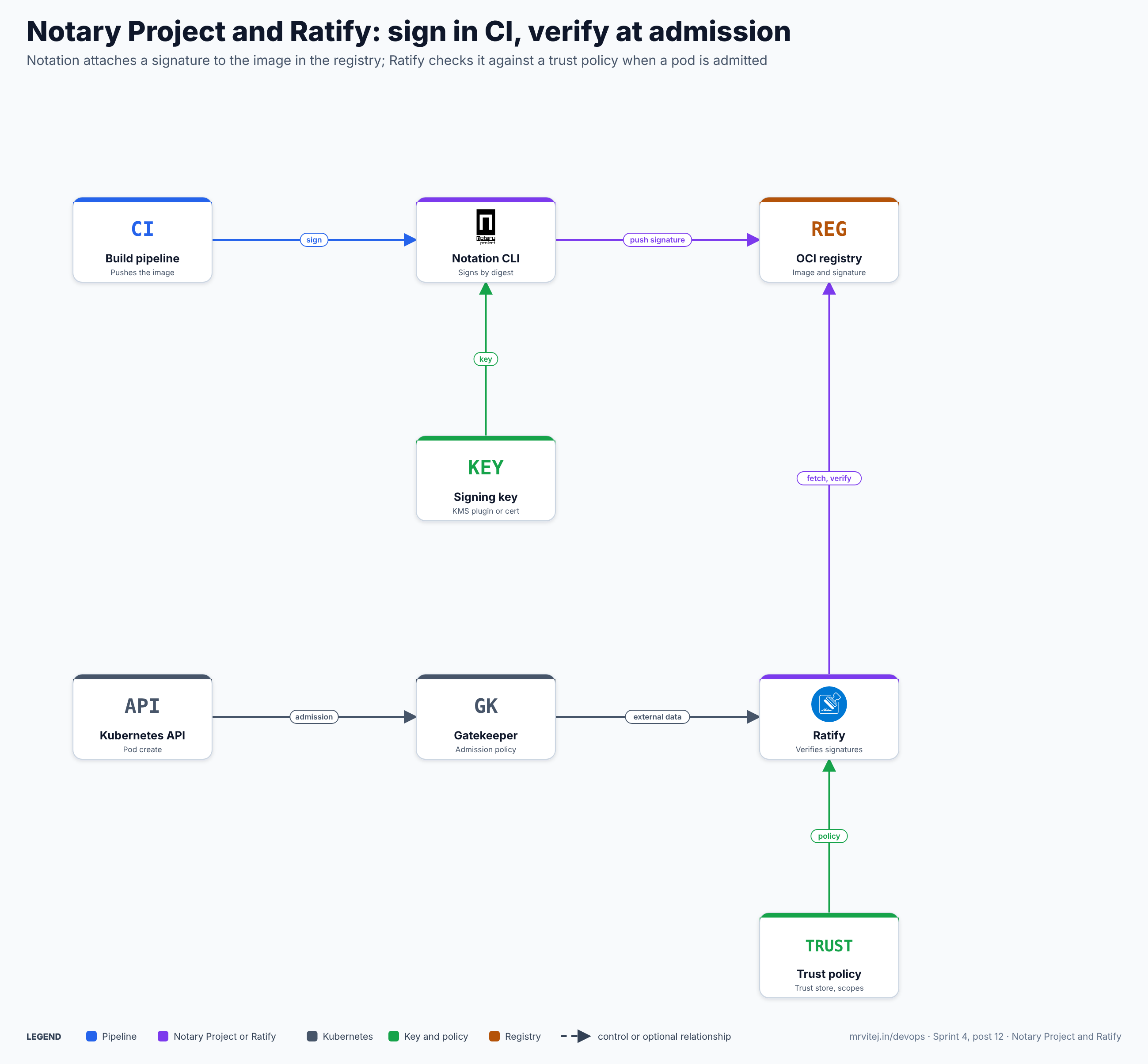
Top row: the publisher side. Bottom rows: the cluster side. The registry is the only thing both sides share, and the trust policy lives on the verifying side, so a registry compromise alone cannot add a trusted signer.
| Component | Responsibility |
|---|---|
| Notation CLI | Signs an artifact by digest, pushes the signature to the registry, lists and inspects signatures, and verifies them with a trust policy |
| Plugin | Optional. Performs signing (and for some plugins, verification steps) with a key held in a KMS or signing service |
| OCI registry | Stores the image and the signature artifact that refers to it |
| Trust store and trust policy | Held locally by the Notation CLI, and by a Ratify verifier in the cluster. They define who is trusted |
| Gatekeeper | The admission controller. Its constraint template calls Ratify for the images in a pod |
| Ratify | Fetches signatures from the registry and verifies them with its configured verifiers, returning a result per image |
Design principle. Verification happens against local, explicit trust configuration. The registry holds signatures, not the rules for trusting them.
From a signed build to an admitted pod
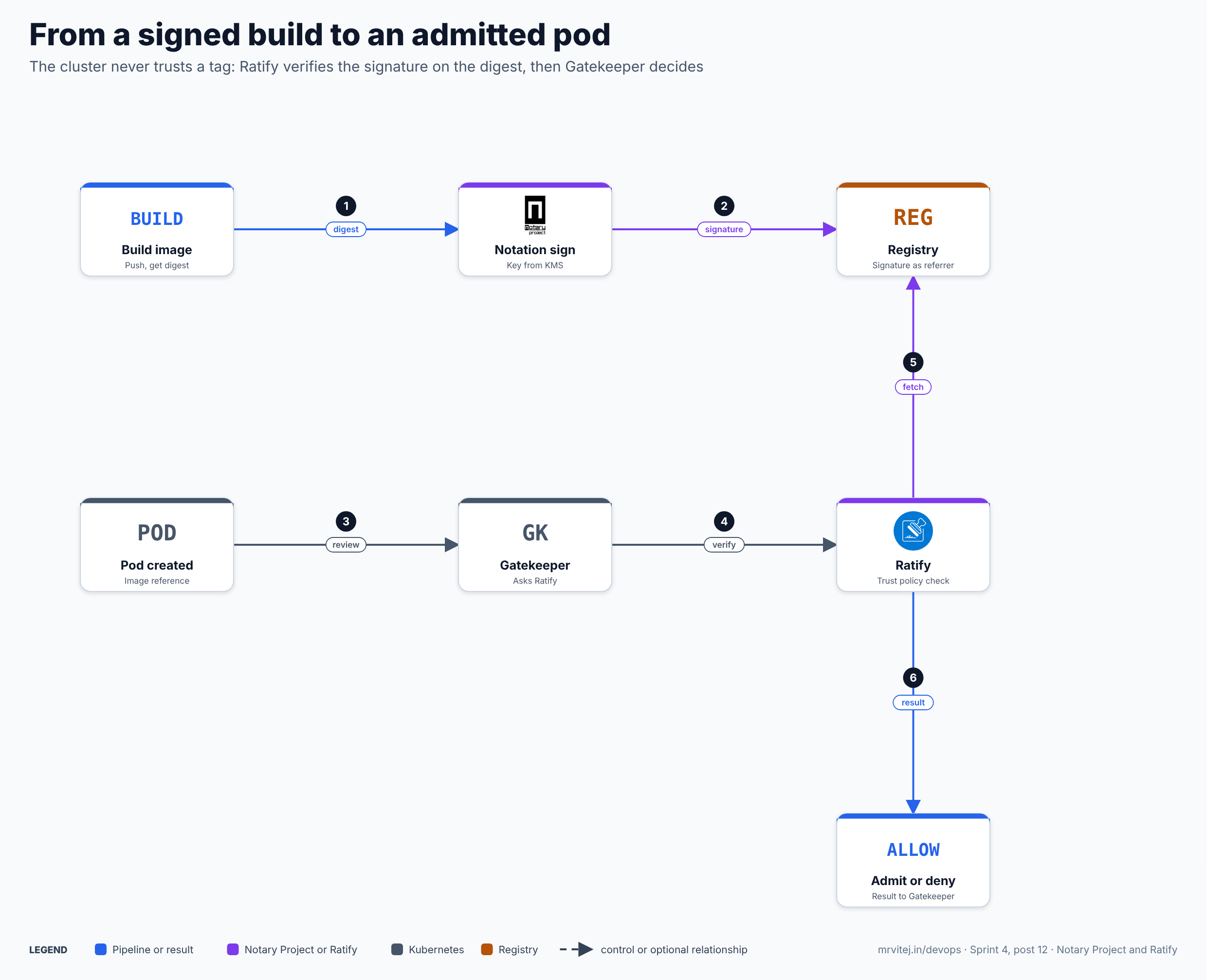
- Digest. The build pushes the image and obtains its digest.
- Signature. Notation signs that digest and stores the signature in the registry.
- Review. A pod is created and the Kubernetes API sends it to Gatekeeper.
- Verify. Gatekeeper’s constraint calls Ratify with the pod’s image references.
- Fetch. Ratify lists the signatures attached to each image and verifies them against its trust policy.
- Result. Ratify returns a result per image and Gatekeeper admits or denies the pod.
Recap: sign the digest once, verify it on every deploy, and keep the trust rules in the cluster.
Install Notation
Notation ships as a single binary; the project’s installation guide covers each platform. The short version for Linux is to download the release archive for your architecture, verify its checksum, and put the notation binary on your path. In CI, pin the version and verify what you download. Then:
notation version
notation plugin list           # plugins installed on this machine
notation cert list             # trust stores
notation key list              # signing keys
The CLI has these command groups: sign, verify, list, inspect, login, logout, cert, key, plugin, policy and blob (for signing arbitrary files rather than images).
A first signature, end to end
This example uses a throwaway key, purely to learn the flow. A test certificate from notation cert generate-test is for experiments only; a real pipeline uses a certificate issued by a CA you trust, with the key protected as described later.
# 1. A registry login (credentials are stored by your Docker credential helper)
notation login registry.example.com

# 2. Create a test signing key and certificate, and make it the default key
notation cert generate-test --default "example-signer"

# 3. Sign by digest
IMAGE=registry.example.com/team/app@sha256:<digest>
notation sign "$IMAGE"

# 4. Look at what is attached
notation list "$IMAGE"
notation inspect "$IMAGE"
notation sign also accepts a tag and resolves it to a digest, but the digest form removes the ambiguity. Useful options:
| Flag | Purpose |
|---|---|
--signature-format cose |
Use the COSE envelope; JWS is the default |
--expiry 24h |
Give the signature a limited lifetime |
--timestamp-url, --timestamp-root-cert |
Add an RFC 3161 trusted timestamp |
--plugin <name> --id <key-id> |
Sign with a key in a KMS through a plugin |
--key <name> |
Use a named key from the local key list |
--user-metadata key=value |
Attach metadata to the signature |
--force-referrers-tag |
Control whether the referrers tag schema is used instead of the OCI referrers API; check notation sign --help for the default in your version |
--plugin-config key=value |
Pass settings to the plugin |
Signing has no effect on the image’s digest and does not rewrite it. Pulling the image still works for everyone; the signature is a separate artifact that only verifiers read.
Verification on the command line
Verification needs two things on the verifying machine: the certificate you trust, in a trust store, and a trust policy.
# Put the signer's certificate (or its CA) in a named store
notation cert add --type ca --store example-store example-signer.crt
Then a trust policy, trustpolicy.json:
{
  "version": "1.0",
  "trustPolicies": [
    {
      "name": "example-images",
      "registryScopes": [ "registry.example.com/team/app" ],
      "signatureVerification": { "level": "strict" },
      "trustStores": [ "ca:example-store" ],
      "trustedIdentities": [
        "x509.subject: CN=example-signer"
      ]
    }
  ]
}
notation policy import trustpolicy.json
notation policy show
notation verify "$IMAGE"On success, notation verify reports that the signature verified and prints the digest; on failure it exits non-zero with the reason, which is what makes it usable as a pipeline gate.
The trust policy in detail
| Field | Meaning |
|---|---|
name |
A label for the policy statement |
registryScopes |
Which artifacts the statement covers: fully qualified repository URIs in the form registry/namespace/repository, or "*" for all. The specification does not describe partial wildcards, so list repositories explicitly |
signatureVerification.level |
One of strict, permissive, audit, skip |
trustStores |
Which stores to trust, as <type>:<name>, for example ca:example-store |
trustedIdentities |
Which signers within those stores are accepted: the subject attributes of the signing certificate, or "*" for any identity in the store |
The four verification levels differ in which of five checks are enforced and which are only logged:
| Level | Use it for | Integrity | Authenticity | Authentic timestamp | Expiry | Revocation |
|---|---|---|---|---|---|---|
strict |
Development, build and deploy time | enforced | enforced | enforced | enforced | enforced |
permissive |
Deploy time or runtime | enforced | enforced | enforced | logged | logged |
audit |
Adopting signing without breaking workflows | enforced | logged | logged | logged | logged |
skip |
Artifacts you deliberately leave unsigned | skipped | skipped | skipped | skipped | skipped |
The specification says permissive suits verification at deploy or run time, because an artifact that was valid when deployed should not be killed by an expiry or revocation event on a restart. You can also keep a level but relax individual checks with an override map, for example "signatureVerification": { "level": "strict", "override": { "expiry": "log" } }. Overrides apply to strict, permissive and audit (not skip); integrity cannot be overridden; authenticity, authentic timestamp and expiry accept enforce or log, and revocation also accepts skip.
The skip level is why rolling out is gentler than it sounds: you can cover one repository at strict and another legacy one at skip, and tighten later.
Real world. A team signs only the images built by one pipeline. Their trust policy has one statement for their own application repositories at strict with the pipeline’s certificate as the only trusted identity, and another statement for a third-party base-image repository at audit while they collect signatures from the upstream. Nothing breaks on the first day, and the audit statement is promoted to strict once the evidence is in.
Where the signing key lives
A signing key that sits in a CI secret is only as safe as the CI system. The Notary Project’s answer is to keep the private key in a KMS or signing service and have Notation call a plugin to sign:
notation plugin install --file notation-plugin.zip        # or --url ... with a checksum
notation plugin list
notation key add --plugin <plugin-name> --id <remote-key-id> my-key
notation sign --key my-key "$IMAGE"
The plugins I could confirm from the project’s materials are:
| Plugin | Key location |
|---|---|
| AWS Signer plugin | Keys and certificates managed by AWS Signer |
Azure Key Vault plugin (notation-azure-kv) |
A key and certificate in Azure Key Vault |
| HashiCorp Vault plugin | Described as experimental when Notation v1.0 was announced |
| Venafi CodeSign Protect plugin | Mentioned among the plugins available as of Notation v1.1 |
| Alibaba Cloud KMS plugin | A separate project, maintained by Alibaba Cloud’s container service team |
Google Cloud KMS: no plugin found. I searched the project’s repositories, specifications and documentation for a Google Cloud KMS plugin and found none, so I will not invent one. If your keys must live in Cloud KMS, you have three real options:
- Write a plugin. The Notation plugin specification defines the protocol: a plugin is an executable that implements commands such as describing its capabilities and generating a signature, and Notation handles the rest. This is a development effort, and a plugin you install is code that runs with your signing credentials, so review it like any other signing dependency.
- Sign with a CA-issued key held elsewhere. Keep a certificate and key from a CA you control in a secret manager, loaded into the signing job only for the signing step, with a short-lived certificate and a documented rotation. This is simpler but weaker than a KMS because the key is exported to the job.
- Use Cosign with Cloud KMS. Cosign supports Google Cloud KMS keys natively, and Ratify can verify Cosign signatures. This is covered in the comparison section.
Whatever you choose, the verifier side does not change: Ratify and notation verify check a certificate chain against a trust store.
Signing in CI
The Notary Project publishes GitHub Actions (notaryproject/notation-action) with setup, sign and verify steps; the sign action takes the plugin name, URL and checksum and the key ID, so the plugin download is pinned by checksum. Pin the action to a version or commit. For other CI systems, the pattern is the same: install a pinned, checksum-verified notation binary, log in to the registry with a short-lived credential, sign the digest the build produced, and fail the job if signing fails.
# After the build and push, in the signing step
DIGEST=$(crane digest registry.example.com/team/app:1.4)       # or read it from your build tool
notation sign --signature-format cose "registry.example.com/team/app@${DIGEST}"
notation verify "registry.example.com/team/app@${DIGEST}"       # sanity check in the same job
Signing the digest your build produced, rather than re-resolving a tag later, closes a race in which the tag moves between push and sign.
Ratify: verification in the cluster
notation verify is a good pipeline gate, but it runs where someone remembers to run it. Ratify moves the check to the cluster’s admission path so that it runs for every pod.
Ratify v1 works with Gatekeeper’s external data feature: the Gatekeeper constraint template calls a Provider named ratify-provider with the image references of the pod, and Ratify returns one result per image. Ratify also offers an optional mutation provider that rewrites a tag to its digest, so the image that was verified is the image that runs.
Install
Gatekeeper first, with timeouts that match Ratify, then Ratify:
helm repo add gatekeeper https://open-policy-agent.github.io/gatekeeper/charts
helm install gatekeeper gatekeeper/gatekeeper \
  --namespace gatekeeper-system --create-namespace \
  --set enableExternalData=true \
  --set validatingWebhookTimeoutSeconds=5 \
  --set mutatingWebhookTimeoutSeconds=2

helm repo add ratify https://ratify-project.github.io/ratify
helm install ratify ratify/ratify --atomic \
  --namespace gatekeeper-system \
  --set featureFlags.RATIFY_CERT_ROTATION=true
The matching timeouts matter. Ratify’s chart defaults the provider timeouts to 5 seconds for validation and 2 seconds for mutation and states that they must match Gatekeeper’s webhook timeouts; Gatekeeper’s own chart defaults to 3 and 1 seconds. A mismatch produces confusing timeouts at admission. The Gatekeeper chart default for the webhook failure policy is Ignore, which means an unreachable webhook lets pods through; decide on that consciously, as the OPA and Gatekeeper post in this series describes. Ratify chart v1.15.9 installs Ratify v1.4.8 and its values default Gatekeeper to 3.18.0, so check that your Gatekeeper version is compatible with the Ratify release you install.
The objects Ratify uses
Ratify is configured with custom resources in the group config.ratify.deislabs.io:
| Kind | Purpose |
|---|---|
Store |
Where artifacts come from: the ORAS store for OCI registries, with caching and an authentication provider |
Verifier |
One per artifact type: notation, cosign, sbom, vulnerabilityreport, schemavalidator, licensechecker |
Policy |
How verifier results combine: config-policy, or a Rego policy |
KeyManagementProvider |
Where certificates and keys come from: inline, or a vault such as Azure Key Vault |
A Notation verifier, with its certificate in an inline KeyManagementProvider, taken from the project’s sample files:
apiVersion: config.ratify.deislabs.io/v1beta1
kind: KeyManagementProvider
metadata:
  name: ratify-notation-inline-cert-0
spec:
  type: inline
  parameters:
    contentType: certificate
    value: |
      -----BEGIN CERTIFICATE-----
      ...the CA or signer certificate, public part only...
      -----END CERTIFICATE-----
---
apiVersion: config.ratify.deislabs.io/v1beta1
kind: Verifier
metadata:
  name: verifier-notation
spec:
  name: notation
  artifactTypes: application/vnd.cncf.notary.signature
  parameters:
    verificationCertStores:
      ca:
        ca-certs:
          - ratify-notation-inline-cert-0
    trustPolicyDoc:
      version: "1.0"
      trustPolicies:
        - name: default
          registryScopes:
            - "registry.example.com/team/app"
          signatureVerification:
            level: strict
          trustStores:
            - ca:ca-certs
          trustedIdentities:
            - "x509.subject: CN=example-signer"
In the Helm chart you do not hand-write these: you set notation.trustPolicies (name, registryScopes, trustedIdentities, trustStores) and notationCerts (the certificates) in the values, and the chart creates the verifier and inline certificate store. The chart’s default policy is a wildcard scope with strict and a wildcard identity, so replace the defaults with your own scopes and identities rather than shipping them. A trust policy of “any identity in the store, any repository” is the signature equivalent of a firewall rule that allows everything.
The policy object, applied cluster-wide, and named ratify-policy:
apiVersion: config.ratify.deislabs.io/v1beta1
kind: Policy
metadata:
  name: ratify-policy
spec:
  type: config-policy
  parameters:
    artifactVerificationPolicies:
      default: "all"
With "all", every verifier that applies to the image must pass. A Rego policy is also supported for custom combination logic (policy.useRego in the chart), for example “at least one signature must verify and no vulnerability report may be older than a week”.
The Gatekeeper side
Gatekeeper needs a constraint template that calls the provider and a constraint that says where to apply it. The project’s library template gathers every container, init container and ephemeral container image from a pod and calls external_data with provider ratify-provider; it reports a violation on a system error, on an error for any image, and when any image’s isSuccess is false. The constraint:
apiVersion: constraints.gatekeeper.sh/v1beta1
kind: RatifyVerification
metadata:
  name: ratify-constraint
spec:
  enforcementAction: deny
  match:
    kinds:
      - apiGroups: [""]
        kinds: ["Pod"]
    namespaces: ["team-a"]
Roll this out the way you would any admission rule: start with enforcementAction: dryrun or warn in one namespace, read the Gatekeeper audit results for pods that would fail, fix the unsigned or mis-scoped images, then switch to deny, and then widen the namespaces list. Excluding system namespaces avoids breaking the cluster’s own components, which are rarely signed with your keys.
A Google Cloud reference design
A typical setup for a team on Google Cloud with Artifact Registry and GKE, using only what I could confirm:
- Registry. Images are pushed to Artifact Registry. Notation and Ratify talk to it as an ordinary OCI registry; signatures are stored next to the images.
- CI signing identity. The build runs in Cloud Build, GitHub Actions or another runner with a Google service account that can push to the repository. Use Workload Identity Federation for CI-to-Google authentication so there is no long-lived key; for Notation’s registry login use a short-lived access token with
notation login. - Signing key. There is no Google Cloud KMS plugin for Notation that I could find, so choose from the three options above. If you must stay on Notation without writing a plugin, use a CA-issued certificate whose key is available only to the signing job, and make the certificate short-lived.
- Trust configuration in the cluster. The CA or signer certificate (public part only) goes into the
notationCertsHelm value, theregistryScopesname your Artifact Registry repository paths, andtrustedIdentitiesnames the signing certificate’s subject. - Registry access from Ratify. Ratify v1’s built-in authentication providers cover Azure workload and managed identity, AWS ECR, Alibaba Cloud ACR and Kubernetes secrets. I did not find a Google-specific provider in the v1 code, so on GKE the documented route is the Kubernetes secrets provider: a Docker-config secret that Ratify’s service account can read, referenced by the
StorethroughauthProvider: name: k8Secrets. Because the credential in that secret is long-lived unless you refresh it, give it read-only access to the one repository and rotate it on a schedule. Check the current Ratify documentation for any Google authentication provider added after the v1.4.8 chart. - Gatekeeper. Install it with external data enabled and matching timeouts, then Ratify, then the constraint, rolled out in
warnbeforedeny. - Observe. Gatekeeper audit shows existing pods that fail verification; Ratify can expose Prometheus metrics (
instrumentation.metricsEnabled, port 8888 in the chart values).
Whether Artifact Registry stores signatures through the OCI referrers API or through the tag-schema fallback is something to check in your own environment with a test sign and notation list; Notation supports both ways of storing them.
Ratify’s other verifiers
Notation signatures are only one input:
- Cosign. The chart enables the Cosign verifier by default with key-based and keyless settings (
cosign.keyless.certificateIdentity,certificateOIDCIssuer, and so on) and acosignKeyslist for inline public keys. - SBOM verifier. Checks that an SBOM artifact is present and valid, and can reject disallowed licences or packages. Disabled by default.
- Vulnerability report verifier. Reads a vulnerability report attached to the image, can require that it was signed with Notation, and can reject disallowed severities, listed CVEs, or reports older than a maximum age. Disabled by default.
The last one is worth understanding. The signature says who made the image; a vulnerability report attached and signed by your scanning pipeline can say something about its contents at a point in time, and Ratify can require both. It turns “scanned before release” from a convention into an admission rule. It is also only as good as the scanner and the freshness window you configure.
Ratify v2
The main branch of the Ratify repository is under active development for v2, and the project says it may be unstable. The v2 design proposal in the repository describes the direction: a separate core library that only validates security metadata, with the CLI and the Kubernetes entry point in separate repositories; plugins as importable libraries running in the same process, instead of separate binaries; and one configuration model that works for both the CLI and Kubernetes. Pre-releases exist (v2.0.0-beta.2 is the latest tag I found, dated 16 September 2026), and v1 development continues on the v1-dev branch with the v1.4.x releases. For a production cluster today, install a v1 chart release and plan a deliberate migration once v2 is generally available, reading the project’s migration notes first.
Security
- Key custody is the whole game. A signature is as trustworthy as its private key. Use a KMS-backed key where a plugin exists, a short-lived certificate otherwise, and never a key in a repository.
- Trust configuration is code. Trust policies and certificates are the entire security boundary of the verifier. Keep them in Git, review changes, and avoid wildcard scopes and identities.
- Plugins run with your signing credentials. Install plugins from sources you trust, verify their checksums, and pin versions.
- Revocation and expiry. Use
strictwhere you can afford it, and rotate signing certificates on a schedule. When a key is compromised, the response is to revoke the certificate and change the trust store, then re-sign what you still trust. - Admission failure mode. Gatekeeper’s webhook failure policy decides whether an unreachable Ratify blocks or admits pods. Decide that deliberately and keep Ratify highly available if you choose to fail closed.
- Registry access. Ratify needs read access to the registries it verifies. Give it read-only credentials limited to the needed repositories.
- What a signature does not prove. A valid signature proves that a holder of a trusted key signed this digest and that the content has not changed since. It does not prove the image is free of vulnerabilities, was built from the source you expect, or contains nothing malicious: a trusted pipeline can sign a bad image. Treat verification as one control among several, next to scanning, provenance and least-privilege runtime settings.
Monitoring and day-2 operations
- Is verification working? Watch the Ratify deployment, its logs, and the Gatekeeper audit results for the constraint. A sudden rise in denials usually means an expired certificate, a changed registry path, or a new unsigned image.
- Metrics. Ratify can export Prometheus metrics (the chart enables them by default); watch verification latency and errors, since latency counts against the Gatekeeper timeout. Check the metrics names for your release.
- Cache. Ratify caches registry lookups and verification results (a Ristretto cache by default, Redis supported). Caching speeds admission and reduces registry traffic, but a short TTL on revocation-sensitive environments is worth considering.
- Certificate rotation. Plan the rotation of both the signing certificate and Ratify’s own TLS certificates (
RATIFY_CERT_ROTATIONfeature flag), and keep old and new trust anchors in the store during the overlap. - Upgrades. Read the chart release notes. The chart upgrades its CRDs through a hook, and deprecated values are marked in
values.yaml; migrate off them before the next major version. - Registry limits. Verifying many pods at once can hit registry rate limits; the cache and the mutation to digests both help.
Limits worth knowing
- Two projects, two maturities. Notary Project is incubating; Ratify is a sandbox project in the middle of a v1 to v2 transition.
- Signatures are not scanners. See the security section.
- No Google Cloud KMS plugin found. Teams on Google Cloud must write a plugin, manage a certificate and key themselves, or use Cosign with Cloud KMS.
- Ratify v1 registry authentication. The built-in providers are Azure, AWS, Alibaba and Kubernetes secrets; Google registries need the secrets route.
- Admission adds latency and a dependency. Every pod creation calls Ratify, and a slow registry lookup counts against the webhook timeout.
- Tags move. Without digest mutation or digest pinning, the digest that was verified may differ from what is later pulled. Enable Ratify’s tag-to-digest mutation or pin digests in manifests.
- Notation’s experimental features. OCI-layout signing and scope flags are marked experimental in the CLI.
Usage cases
- Gate a pipeline. Run
notation verifybefore a deploy step, so only artifacts signed by the release pipeline reach an environment. - Admission control in a cluster. Ratify with Gatekeeper rejects any pod whose image is not signed by a trusted identity, with
warnfirst anddenylater. - Third-party images. Verify vendor-signed images at
auditlevel while collecting evidence, then enforce. - Signing non-image artifacts. Helm charts, SBOMs and other OCI artifacts can be signed too, and
notation blobsigns plain files. - Industrial edge clusters. In the pharmaceutical-plant machine monitoring design on Google Cloud, signed images and a Ratify admission check would let the plant’s clusters accept only builds from the release pipeline; that is one control among several, and it never replaces the plant’s own validation and review.
Adoption
The Ratify repository’s adopters file lists Alibaba Cloud, Amazon, Microsoft and Venafi, each integrating Ratify into a service: Alibaba Cloud’s Kubernetes service documents a Notation and Ratify setup, AWS Signer uses Ratify for verification, Microsoft’s AKS Image Integrity is built on Ratify, and Venafi’s CodeSign Protect uses it. I did not confirm a separate adopters list for the Notary Project and make no claims beyond the plugin vendors above. Both projects hold community meetings and have channels in the CNCF Slack (#notary-project and #ratify).
Alternatives and neighbours
| Solution | Model | Best suited to |
|---|---|---|
| Notary Project and Ratify | X.509 certificates and trust policies; signatures stored as OCI artifacts; admission through Gatekeeper | Teams that want certificate-based trust, KMS plugins and an explicit trust policy |
| Cosign and Sigstore | Key-based or keyless signing (short-lived certificates tied to an OIDC identity, with a transparency log); native support for several cloud KMS providers including Google Cloud KMS | Teams that want keyless signing from CI identities, or Cloud KMS keys without a plugin; Ratify can verify Cosign signatures too |
| Kyverno image verification | Admission policies that verify Cosign and Notation signatures | Teams that already use Kyverno and want one engine for admission |
| Binary Authorization (Google Cloud) | A managed GKE and Cloud Run policy service based on attestations | Teams that want a managed Google Cloud control |
| Connaisseur and other admission webhooks | Admission webhooks that verify signatures | Teams that want a lighter standalone webhook |
| Registry-native signing features | Signing offered by a registry vendor | Teams committed to one registry |
Cosign deserves a longer comparison, because the choice between the two families is the real decision. Notation’s model is certificate-based: you decide which certificates and subjects you trust, in a trust store, per repository scope, with revocation and timestamp checks built in. Cosign’s keyless mode instead trusts an identity provider and a public transparency log: you trust that a certificate was issued to a given OIDC identity (for example, a CI workflow) at a certain time. Keyless removes key management for the signer but moves trust to the public Sigstore infrastructure and your identity configuration; the certificate model keeps trust entirely in your own configuration and works in air-gapped environments, at the price of managing keys or a CA. Neither is wrong; they are different trust models. Because Ratify can verify both, a mixed estate can start with whichever fits and migrate later. These Cosign statements are from general knowledge of the project rather than from a source I read for this post, so confirm the commands against its current documentation before you rely on them; for example, a Cloud KMS key is referenced with a gcpkms:// URI.
Strengths and limitations
| Strengths | Limitations |
|---|---|
| Explicit, local trust policy with four verification levels | Trust configuration must be designed and maintained |
| Signatures live in the registry beside the image, no extra service | No Google Cloud KMS plugin found for Notation |
| Plugin model keeps private keys in a KMS | Ratify v1 has no Google-specific registry authentication provider |
| Ratify verifies several artifact types: signatures, SBOMs and vulnerability reports | Ratify is a sandbox project and v2 is in beta |
| Gatekeeper integration gives audit, warn and deny rollout | Admission adds a dependency and latency to every pod |
Project status
The Notary Project is a CNCF incubating project, and its Landscape entry dates from October 2017, when it was accepted as the original Notary; the project was rebuilt around Notation, previously known as Notary v2, which reached v1.0 and is now at v1.3.2 with a v2 alpha tag. Ratify is a CNCF sandbox project accepted on 30 August 2024. Its v1.0 release was on 27 September 2023, v1.4.8 was tagged on 22 October 2026, and the main branch is under development for v2. Both are Apache 2.0 licensed Go projects, and both keep governance and security documents in public repositories.
Recommendation
Adopt signing and admission verification as a staged programme rather than a switch. Start by signing in CI with a pinned Notation and a short-lived certificate, and run notation verify as a pipeline gate. Write a narrow trust policy: one scope, one identity, strict. Then install Gatekeeper and Ratify v1 in a test cluster, with matching timeouts, a warn constraint in one namespace and digest mutation on, and read the audit results for a few weeks before moving to deny. If your keys must be in Google Cloud KMS, decide early between writing a Notation plugin and using Cosign with Cloud KMS, since that choice shapes everything downstream. And keep the claim modest: a verified signature tells you who built an image and that it is unchanged; scanning and provenance have to tell you the rest.
References: Notation repository · Notary Project specifications · Trust store and trust policy specification · Plugin specification · Notation GitHub Actions · Ratify repository · Ratify v1 Helm chart · Ratify v2 architecture proposal · Notary Project website · Ratify website · CNCF Notary Project page · CNCF Ratify page