Open Cluster Management (OCM) is an open-source platform for managing many Kubernetes clusters from one place. It uses a hub-and-agent model: one cluster is the hub, every other cluster runs a small agent called the klusterlet, and the agent calls the hub rather than the hub calling the cluster. A cluster joins by registering with the hub, and both sides must approve the join. The hub then describes what each cluster should run, using a ManifestWork written into that cluster’s own namespace, and the cluster’s agent pulls the work, applies it and reports status back. Placement rules choose clusters by labels, claims or scores, and an add-on framework lets other tools, such as policy engines or Argo CD, ride on the same connection. OCM was developed by IBM and Red Hat, joined the CNCF Sandbox in November 2021 and moved to the Incubating level on November 4, 2026. This brief explains OCM from the problem it solves to installing, using, securing and operating it, so one read is enough to decide whether it belongs in your platform.
CNCF daily · Sprint 5, post 2 of 14 · Scheduling & Orchestration
At a glance
| Category | Orchestration & Management › Scheduling & Orchestration (the category Karmada uses; confirm on the project page) |
| CNCF status | Incubating since November 4, 2026. Accepted into the Sandbox on November 9, 2021 |
| Written in | Go |
| License | Apache License 2.0 |
| Model | Hub and agents. Managed clusters dial the hub; the hub never pushes into them |
| Core APIs | ManagedCluster, ManagedClusterSet, Placement, PlacementDecision, ManifestWork, ManifestWorkReplicaSet (alpha), ClusterManagementAddOn, ManagedClusterAddOn |
| Operators | ClusterManager (hub) and Klusterlet (managed cluster) install and upgrade the components |
| Command line | clusteradm, for init, join, accept, get token, add-on and work commands |
| Release cadence | About one release every three to four months. v1.0.0 shipped on June 20, 2025; later releases add features such as gRPC-based communication. Check the release page for the current one |
| Install | clusteradm, Helm charts from https://open-cluster-management.io/helm-charts, or declaratively with the FleetConfig Controller |
The problem OCM solves
One cluster is a platform problem; ten or a hundred is a fleet problem. The same questions come back for each cluster. How do you add one, and prove it is yours? How do you send the same namespace, quota, policy or application to a chosen group, and not to the others? How do you see which clusters are healthy? And how do you do all of that when many of the clusters sit behind firewalls or NAT, so a central controller cannot reach them?
Pushing manifests from a central place with credentials for every cluster is the simple answer, and it has a cost: the hub must hold powerful credentials, and every cluster must be reachable from it. OCM turns that around. A cluster opens one outbound connection to the hub, holds only credentials scoped to its own namespace there, and pulls what it should run. That keeps the network requirement small (clusters only need to reach the hub), limits what a compromised cluster can see, and lets a cluster keep working on its own if the hub is down.
Key concepts
| Term | Meaning |
|---|---|
| Hub cluster | The cluster that holds the control plane: registration, work, placement and add-on managers, installed by the ClusterManager. |
| Managed cluster | Any cluster registered with the hub. On the hub it is a cluster-scoped ManagedCluster; on the cluster itself it runs a klusterlet. |
| Klusterlet | The agent on a managed cluster, made of a registration agent and a work agent. It dials the hub, pulls work and reports status. |
| Cluster namespace | A namespace on the hub named after each managed cluster. ManifestWorks and status for that cluster live there. |
| Double opt-in | The join protocol: the cluster asks to join with a CSR and the hub administrator must approve, and the cluster only trusts a hub it was pointed at. |
| ManagedClusterSet | A group of managed clusters that share attributes, selected by an exclusive label or a label selector. |
| ManagedClusterSetBinding | Makes a set usable from a namespace, so Placements in that namespace can choose from it. |
| Placement and PlacementDecision | Placement states the rules (input); PlacementDecision lists the selected clusters (output). Other APIs watch the decisions. |
| ManifestWork | A group of Kubernetes resources that the hub wants applied on one managed cluster. |
| ManifestWorkReplicaSet | Creates a ManifestWork for every cluster a Placement selects, with a rollout strategy. Alpha. |
| Add-on | A hub manager plus an agent on each cluster, for ongoing multicluster features such as policy, GitOps or a proxy. |
Architecture
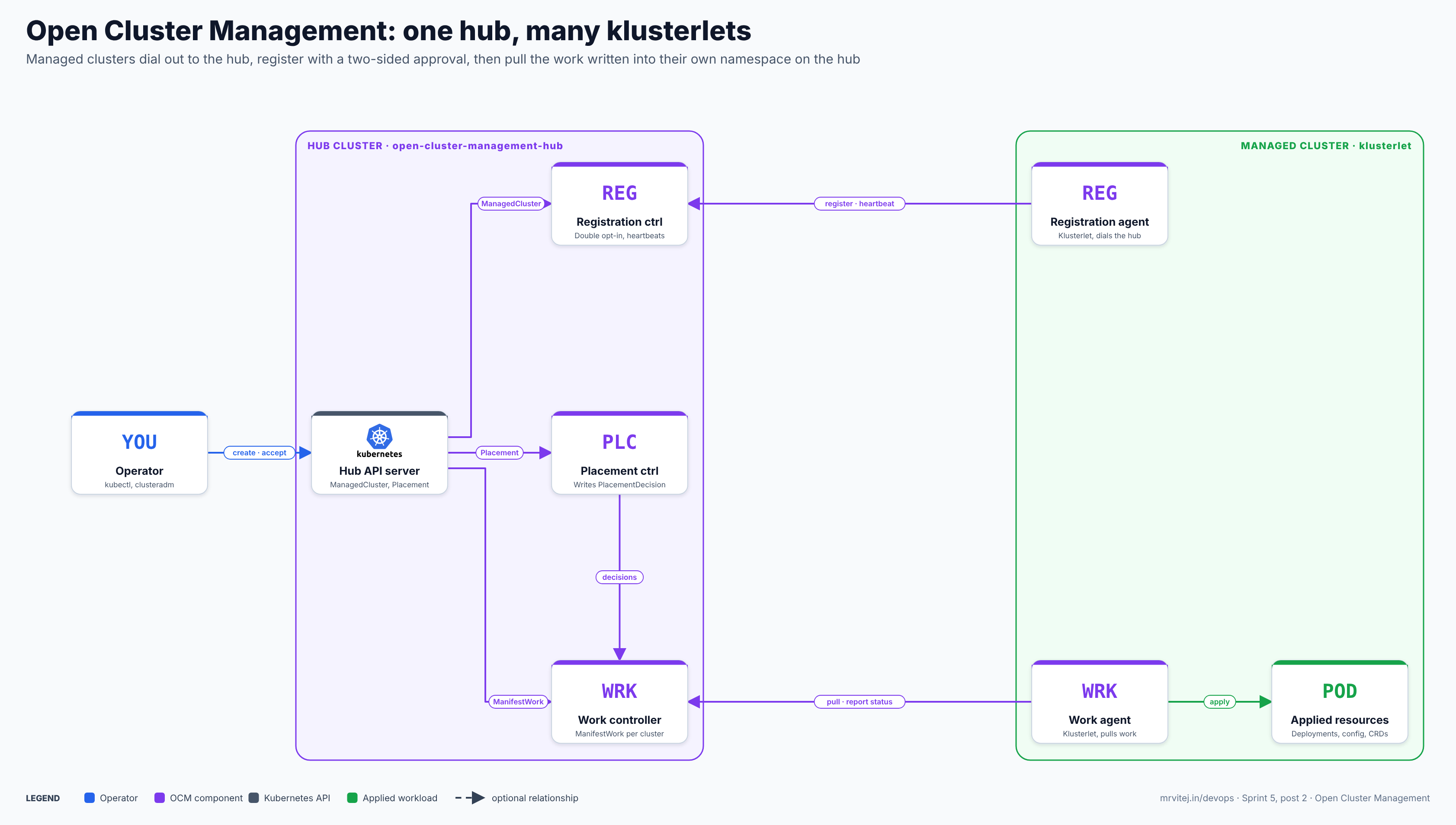
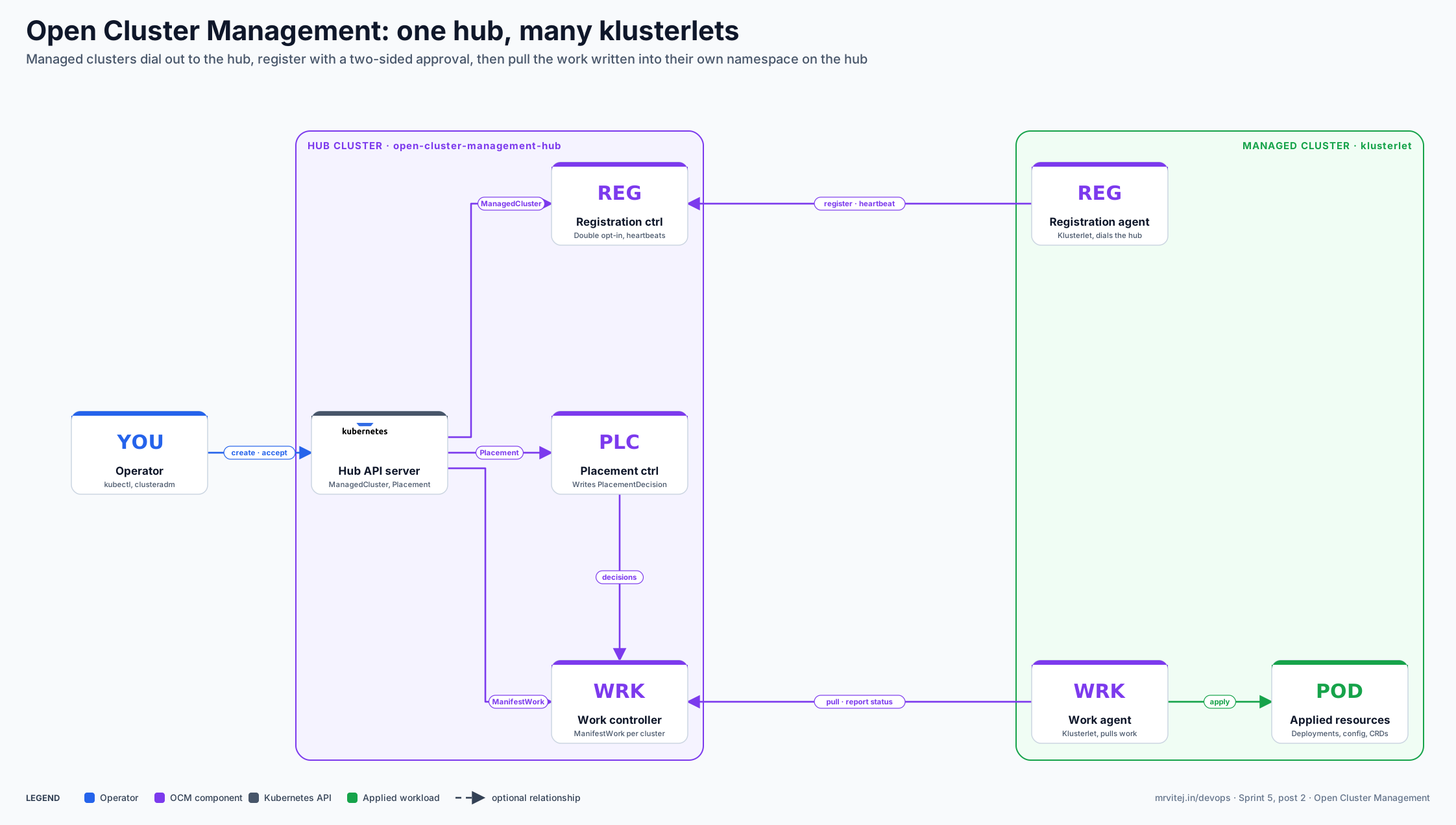
The diagram shows one managed cluster; a hub serves many, each with its own klusterlet and its own namespace on the hub. Purple is an OCM component, grey is the Kubernetes API, blue is the operator and green is what lands on the managed cluster. Open the zoomable diagram, or download it as SVG or PNG.
| Component | Responsibility |
|---|---|
| ClusterManager | A hub resource (named cluster-manager) that installs and upgrades the hub components in the open-cluster-management-hub namespace and holds feature gates. |
| Registration controller and agent | The controller on the hub handles join requests, approval and heartbeats; the agent on the managed cluster asks to join and keeps its certificate fresh. |
| Work controller and agent | The hub side maintains ManifestWorks in each cluster namespace; the agent applies them on the managed cluster under the service account klusterlet-work-sa and reports conditions back. |
| Placement controller | Evaluates Placements against current ManagedClusters and writes the selected names into PlacementDecisions. |
| Add-on manager | Installs add-ons on the clusters a Placement selects and rolls their configuration out in stages. |
| Klusterlet | A resource on the managed cluster that installs and upgrades the agents in open-cluster-management-agent, and sets feature gates and cluster claims. |
| clusteradm | The command-line tool that initialises a hub, joins and accepts clusters, and manages add-ons and work. |
Design principle. Make cluster management a pull model with explicit consent. The hub declares intent, each cluster fetches only its own intent over an outbound connection, and every part beyond registration and work (placement, add-ons, policy) is built on those two primitives.
From clusteradm init to applied work
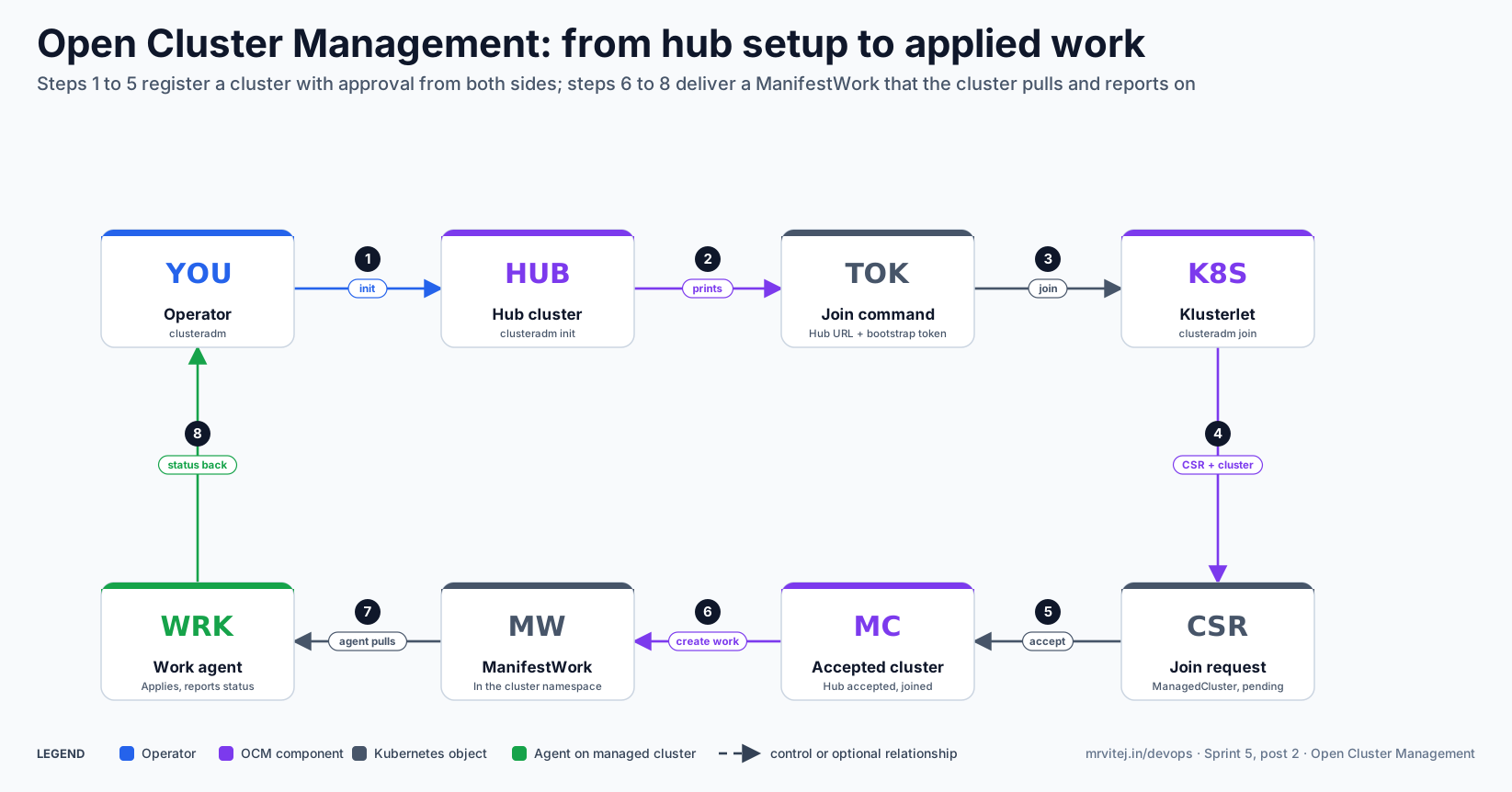
The second diagram follows one managed cluster from hub setup to a ManifestWork it has applied.
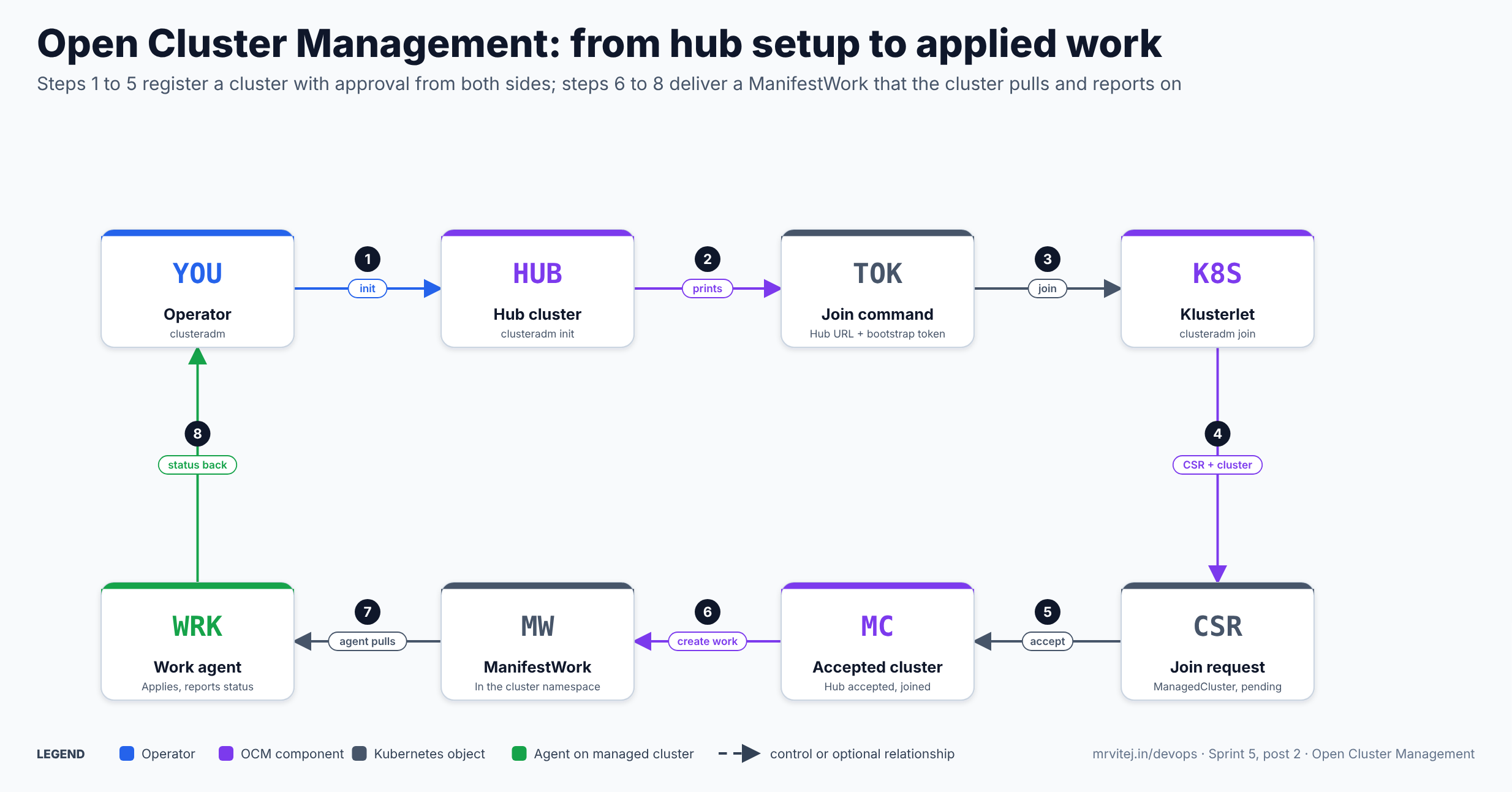
- Init. The operator runs
clusteradm init --waitagainst the hub, which installs the cluster manager. - Join command.
initprints aclusteradm joincommand containing the hub address and a bootstrap token.clusteradm get tokenprints it again later. - Join. On the managed cluster, the operator runs that command with a cluster name; it installs the klusterlet.
- Request. The registration agent uses a short-lived bootstrap credential to create a certificate signing request and a
ManagedClusteron the hub. - Accept. The hub administrator approves it with
clusteradm accept --clusters <name>, which approves the CSR and setshubAcceptsClient: true. The agent stores its signed certificate and switches to it. - Create work. A ManifestWork is written into the cluster’s namespace on the hub.
- Pull. The work agent sees it, applies the resources and records them locally.
- Status. Conditions such as
AppliedandAvailableare written back to the ManifestWork on the hub.
If the hub becomes unavailable, each klusterlet keeps working on its own; the agents resume when it returns. Open the zoomable flow diagram, or download it as SVG or PNG.
Install Open Cluster Management
Try it locally
The Quick Start needs kubectl, kustomize and kind. It installs clusteradm and then builds a hub and two managed clusters on one machine:
curl -L https://raw.githubusercontent.com/open-cluster-management-io/clusteradm/main/install.sh | bash
curl -L https://raw.githubusercontent.com/open-cluster-management-io/OCM/main/solutions/setup-dev-environment/local-up.sh | bash
For production or other distributions, use the manual steps below. Review any script before you pipe it to a shell.
Initialise a hub
export CTX_HUB_CLUSTER=<hub context>
clusteradm init --wait --context ${CTX_HUB_CLUSTER}
Useful options from the installation guide: --use-bootstrap-token is needed for hub versions v1.16 to v1.19; --bundle-version=latest installs development builds, while the default is the latest release; --resource-qos-class, --resource-limits and --resource-requests size the hub components; and --registration-drivers="csr,grpc" with --grpc-endpoint-type loadBalancer enables gRPC registration. Save the printed join command.
Join a managed cluster
export CTX_MANAGED_CLUSTER=<managed context>
clusteradm join \
  --hub-token <token> \
  --hub-apiserver <hub endpoint> \
  --wait \
  --cluster-name "cluster1" \
  --context ${CTX_MANAGED_CLUSTER}
Add --force-internal-endpoint-lookup only for local kind clusters on the same machine; a localhost hub address does not work for cloud-hosted clusters, which need a hub endpoint they can reach. --singleton runs the agents as one pod (clusteradm v0.12.0 or later), and --mode hosted with --managed-cluster-kubeconfig runs the klusterlet outside the managed cluster (experimental). --resource-* flags size the agents. To register the hub as its own managed cluster, join with --cluster-name "local-cluster" against the hub context.
Accept and verify
kubectl get csr -w --context ${CTX_HUB_CLUSTER} | grep cluster1
clusteradm accept --clusters cluster1 --context ${CTX_HUB_CLUSTER}

kubectl -n open-cluster-management-agent get pod --context ${CTX_MANAGED_CLUSTER}
kubectl get managedcluster --context ${CTX_HUB_CLUSTER}
Expect klusterlet-registration-agent and klusterlet-work-agent pods on the managed cluster, and the ManagedCluster showing HUB ACCEPTED, JOINED and AVAILABLE as true. Helm charts for the cluster manager and the klusterlet are also published, and clusters created through Cluster API can be imported with the ClusterImporter feature gate on the ClusterManager.
Using OCM
Group clusters with labels and sets
Label each ManagedCluster, then group them. An exclusive-label set contains every cluster that carries the set’s label:
apiVersion: cluster.open-cluster-management.io/v1beta2
kind: ManagedClusterSet
metadata:
  name: sites
spec:
  clusterSelector:
    selectorType: ExclusiveClusterSetLabel
---
apiVersion: cluster.open-cluster-management.io/v1beta2
kind: ManagedClusterSetBinding
metadata:
  name: sites
  namespace: fleet-ops
spec:
  clusterSet: sites
kubectl label managedcluster cluster1 cluster.open-cluster-management.io/clusterset=sites --overwriteThe binding makes the set usable from the fleet-ops namespace and needs the managedclustersets/bind permission. Adding a cluster to a set needs managedclustersets/join plus update access on ManagedClusters. The workspace namespace must not be a cluster namespace. spec.managedNamespaces on a set creates namespaces automatically on every member cluster. Two default sets exist, default and global, behind a feature gate.
Send work to one cluster
A ManifestWork lives in the namespace named after the target cluster and wraps the resources to apply:
apiVersion: work.open-cluster-management.io/v1
kind: ManifestWork
metadata:
  namespace: cluster1
  name: hello
spec:
  workload:
    manifests:
    - apiVersion: v1
      kind: Pod
      metadata:
        name: hello
        namespace: default
      spec:
        containers:
        - name: hello
          image: busybox
          command: ["sh", "-c", "echo hello; sleep 3600"]
kubectl apply -f manifest-work.yaml --context ${CTX_HUB_CLUSTER}
kubectl -n cluster1 get manifestwork/hello --context ${CTX_HUB_CLUSTER} -o yaml
kubectl -n default get pod --context ${CTX_MANAGED_CLUSTER}The shape follows the project’s quick start; the image and command here are only an example. The FAQ also shows clusteradm create work to wrap resources in a ManifestWork. The agent records what it applied as an AppliedManifestWork on the managed cluster and syncs conditions back to the hub.
Choose clusters with Placement
Placement picks clusters from the bound sets and writes the result to a PlacementDecision:
apiVersion: cluster.open-cluster-management.io/v1beta1
kind: Placement
metadata:
  name: sites-with-gpu
  namespace: fleet-ops
spec:
  numberOfClusters: 3
  clusterSets:
  - sites
  predicates:
  - requiredClusterSelector:
      labelSelector:
        matchLabels:
          purpose: test
  prioritizerPolicy:
    mode: Additive
    configurations:
    - scoreCoordinate:
        builtIn: ResourceAllocatableMemory
      weight: 2
  tolerations:
  - key: gpu
    value: "true"
    operator: Equal
Selection happens in two stages, modelled on the Kubernetes scheduler: predicates are hard requirements and prioritizers rank what is left. Predicates can use labels, claims or CEL expressions, and clusters in a terminating state are never chosen. Prioritizers score each cluster from -100 to 100 and the final score is the sum of weight times score, with weights from -10 to 10. Built-ins include Balance, Steady, ResourceAllocatableCPU and ResourceAllocatableMemory, and add-ons can supply their own scores. Taints on ManagedClusters repel placements unless a toleration allows them; the built-in unavailable and unreachable taints keep Placements away from clusters that are down or silent. decisionStrategy can split the result into named decision groups for staged rollouts.
Deliver to many clusters
A ManifestWorkReplicaSet combines a ManifestWork template with a Placement and creates one ManifestWork for every selected cluster:
apiVersion: work.open-cluster-management.io/v1alpha1
kind: ManifestWorkReplicaSet
metadata:
  name: baseline
  namespace: fleet-ops
spec:
  placementRefs:
  - name: sites-with-gpu
    rolloutStrategy:
      type: Progressive
      progressive:
        maxConcurrency: 2
  manifestWorkTemplate:
    workload:
      manifests:
      - apiVersion: v1
        kind: Namespace
        metadata:
          name: monitoring
placementRefs must name a Placement in the same namespace. The rollout types are All, Progressive (with minSuccessTime, progressDeadline, maxFailures, maxConcurrency and mandatoryDecisionGroups) and ProgressivePerGroup. Rollout relies on the Applied, Progressing and Degraded conditions; the last two are not built in and must be defined with CEL in manifestConfigs. The API is alpha, and field details can change, so check the current schema before you rely on this example.
Extend with add-ons
An add-on is a hub manager and an agent on each cluster. clusteradm addon enable --names <add-on> --clusters <list> installs one, and a ClusterManagementAddOn with installStrategy.type: Placements installs it on whichever clusters a Placement selects, with configs overrides and a rollout strategy. The project lists add-ons such as governance-policy-framework for policy, an Argo CD add-on for pull-based GitOps, cluster-proxy (a reverse proxy tunnel built on Konnectivity), and managed-serviceaccount. You can also write your own with the add-on framework.
Features
- Pull-based registration with approval on both sides, using CSRs and short-lived bootstrap credentials.
- Cluster inventory through
ManagedCluster, with status, labels, claims and properties. - Cluster sets and bindings for grouping and for scoping who can use a group.
- Placement with predicates, prioritizers, taints and tolerations, and decision groups.
- ManifestWork for per-cluster delivery with status feedback, and ManifestWorkReplicaSet for fleet delivery with staged rollouts.
- Add-on framework with placement-driven install strategies and rollouts.
- Resilience. Agents continue to run if the hub is down, and the klusterlet admin can cut the connection without stopping anything else.
- Flexible deployment. Singleton agents, an experimental hosted mode, Helm charts, gRPC-based communication, and Cluster API import.
- Resource sizing and feature gates on both the cluster manager and the klusterlet.
Production reference design
This design runs a hub on a managed Kubernetes cluster with three nodes and manages a few dozen small clusters in separate sites.
- Choose the hub. A highly available cluster that every site can reach over HTTPS. Put it behind a stable DNS name, size the hub components with
--resource-requestsand--resource-limits, and back up its etcd; the hub holds your fleet’s desired state. - Pin versions. Pin
clusteradmand the OCM bundle version (--bundle-version) in automation, and plan upgrades hub first, then agents. - Initialise. Run
clusteradm init --wait. Keep the join command out of chat and tickets; treat the bootstrap token like a credential. - Onboard sites. Join each site with a unique
--cluster-namethat is meaningful (for example the site code). Accept withclusteradm accept, then label the ManagedCluster with the site’s attributes and its ManagedClusterSet. - Separate roles with RBAC. Give the team that approves clusters the accept permission, and a separate team permission to bind sets. They are distinct permissions by design.
- Declare baselines in Git. Keep Placements, ManifestWorkReplicaSets and add-on strategies in a repository and apply them to the hub, ideally from a pipeline or an Argo CD instance on the hub.
- Roll out in stages. Use decision groups with a canary group and
ProgressiveorProgressivePerGrouprollouts so that a bad change stops at one site. - Observe. Watch
kubectl get managedclusterforAVAILABLE, ManifestWork conditions, and the hub components’ own metrics and logs.
Security
- Both sides consent. Joining needs a CSR approved on the hub and the
hubAcceptsClientflag set. Approving the CSR and accepting the cluster are separate RBAC permissions, and a webhook gates the accept permission. - Credentials are scoped and short-lived. Agents bootstrap with a short-lived
bootstrap-hub-kubeconfigsecret and then use a signed client certificate stored ashub-kubeconfig-secretinopen-cluster-management-agent. Certificates rotate periodically. - Outbound only. Managed clusters connect to the hub; the hub does not need network access into them.
- Revocation. Set
hubAcceptsClientto false or delete the ManagedCluster; deleting it also revokes the RBAC permissions that cluster was given. - Blast radius. A hub administrator can change anything every klusterlet will apply, so protect hub admin access like production root. The work agent runs with its own service account on each cluster; review what it is allowed to do there.
- Supply chain. Component images default to
quay.io/open-cluster-management/...; mirror and pin them for restricted sites.
Monitoring and day-2 operations
| Task | How |
|---|---|
| Is a cluster healthy? | kubectl get managedcluster on the hub. Heartbeats default to one minute (.spec.leaseDurationSeconds); a cluster that stops answering gets the unavailable or unreachable taint, which keeps Placements away |
| Did the work apply? | kubectl -n <cluster> get manifestwork <name> -o yaml and its conditions; on the managed cluster, AppliedManifestWork and the resources themselves |
| Agent problems | Pods in open-cluster-management-agent on the managed cluster; hub components in open-cluster-management-hub |
| Upgrade | Update clusteradm, then the images or bundle version on the ClusterManager and each Klusterlet. Placement and some add-ons have their own version numbers, so read the release notes |
| Remove a cluster | clusteradm unjoin on the managed cluster, or delete the ManagedCluster on the hub (clusteradm clean removes OCM components from a hub) |
| Rotate trust | Certificates rotate automatically; revoke by setting hubAcceptsClient: false |
| Symptom | Check |
|---|---|
| Cluster stays Pending | The CSR was not approved; run clusteradm accept; confirm the hub endpoint is reachable from the managed cluster and the bootstrap token has not expired |
AVAILABLE is Unknown |
Heartbeat path to the hub is broken; check network, proxy and the hub-kubeconfig secret |
| ManifestWork not applied | The work agent is not running; the resource is invalid; the work agent’s service account lacks permission to create it |
| Placement selects nothing | Is the set bound in the Placement’s namespace; do predicates match; are taints blocking it |
Usage cases
- Fleet inventory and grouping. One place to see every cluster, with labels and sets for environment, region or site.
- Baselines everywhere. Roll namespaces, quotas, network policies or agents out to a group of clusters, with a canary first.
- Edge and branch clusters behind firewalls. Clusters only need outbound access to the hub, so they can sit in networks the hub cannot reach.
- Policy and compliance. Distribute and report on policies across clusters through the governance add-on.
- GitOps at fleet scale. Combine Placement with an Argo CD add-on so each cluster pulls its applications.
- Building a multicluster product. Use the add-on framework and the APIs as a foundation for your own tooling.
- In the Sprint 5 project. The final project of this sprint, a cold-chain logistics monitoring platform on AWS, uses OCM to manage many depot clusters from a hub.
Operational considerations
- The hub is critical. If it is down, agents keep running what they have, but you cannot register clusters, change work or see fresh status. Make it highly available and back it up.
- Pull is eventually consistent. Work arrives at the next sync and status returns the same way; design rollouts with that delay in mind.
- Alpha corners. ManifestWorkReplicaSet is alpha,
PreferNoSelecttaints are not implemented, hosted mode is experimental and the default cluster sets are behind a feature gate. Read the feature-gate list before you depend on them. - API versions move. Placement is
v1beta1, sets arev1beta2, and several add-on APIs are stillv1alpha1. Pin the bundle version and test upgrades. - Release cadence. A new release every three to four months, with different versions for some add-ons and Placement, needs a regular upgrade routine.
- Not a provisioner. OCM registers and manages clusters that already exist, or imports ones that Cluster API created. It does not create clusters itself.
- Names matter. The ManagedCluster name becomes a namespace on the hub, so choose stable, DNS-safe names before you onboard.
Adoption
- Red Hat and IBM originated the project. Red Hat documents its Advanced Cluster Management product as building on the open-source Open Cluster Management repository.
- The CNCF page for the project reports 512 total contributors, up 22 percent on the previous year, and a project health score of 79.
- Maintainers named in the incubation blog work for Red Hat, SpectroCloud, AppsCode, Guidewire, ZTE and Craftsman Software. Those are contributing organisations, not a list of production users.
- I did not find an official public adopters list for OCM, so ask the community for current references and review the incubation due-diligence material before relying on it for a large fleet.
Alternatives
| Solution | Model | Best suited to |
|---|---|---|
| Karmada | A central control plane with propagation policies and replica scheduling across clusters; see the Karmada brief | Teams who want to distribute standard Kubernetes resources and scheduling from one API endpoint |
| Argo CD with ApplicationSets | GitOps controller on a hub that renders applications per cluster; see the Argo brief | Application delivery by Git, without cluster registration semantics |
| Flux | GitOps agents per cluster pulling from Git; see the Flux brief | Pure pull-based GitOps with no hub |
| Red Hat Advanced Cluster Management | Commercial product built on OCM | Organisations on OpenShift that want support and a console |
| Cluster API | Declarative cluster provisioning and lifecycle | Creating and upgrading clusters, which OCM can then manage |
| Fleet management in a cloud provider | Provider-managed multicluster tooling | Teams whose clusters all live in one cloud |
Strengths and limitations
| Strengths | Limitations |
|---|---|
| Pull model needs only outbound connectivity from managed clusters | Eventually consistent; the hub is a critical dependency for changes |
| Explicit two-sided approval and scoped, rotating credentials | Several APIs are alpha or beta and still moving |
| Placement is rich: predicates, scores, taints, decision groups | A larger concept count than a GitOps tool; the learning curve is real |
| Composable core: registration and work, with add-ons on top | Does not provision clusters or manage applications by itself |
| CNCF Incubating, with a Red Hat-backed downstream product | No public adopters list that I could find |
| Agents keep working when the hub is unavailable | Separate version numbers for some add-ons and Placement |
Project status and roadmap
OCM was accepted into the CNCF Sandbox on November 9, 2021, and the CNCF Technical Oversight Committee voted it to Incubating, recorded as November 4, 2026; the CNCF announced it on November 10, 2026. The project ships a release every three to four months, reached v1.0.0 on June 20, 2025, and has added gRPC-based communication to improve scalability (v1.1.0). The v1.1.0 release notes describe work on scalability through gRPC, namespace management and add-on operations. I did not find a published roadmap page, so use the project’s issues and release notes for what is planned.
Recommendation
Trial. OCM is a strong choice when you have many clusters behind firewalls or NAT, want explicit approval for each one that joins, and want fleet-wide rollouts that stop at a canary. Start with the local kind quick start, then join two real clusters to a test hub, create a set and a Placement, and push a ManifestWorkReplicaSet with a progressive rollout. Break a cluster’s network on purpose and see how status and placement react. If your need is only to deploy applications from Git to a handful of clusters, a GitOps tool alone is simpler.
References: CNCF project page · OCM becomes a CNCF Incubating project (CNCF) · OCM documentation · Quick start and installation · Concepts: registration, placement, sets, ManifestWorkReplicaSet, add-ons · FAQ · Release notes · OCM repository · OCM API repository · clusteradm · CNCF Landscape