
Most teams change database schemas with numbered migration files: 001_create_users.sql, 002_add_email.sql, and so on. Each file is a step, and the real schema is whatever all the steps add up to. SchemaHero takes the other approach. You write down what each table should look like, in YAML, and SchemaHero reads the live database, works out the difference and generates the ALTER TABLE for you. It was accepted into the CNCF Sandbox on 10 November 2020. The project’s own description is a Kubernetes operator for declarative database schema management, with GitOps for database schemas as the idea behind it.
CNCF daily · Sprint 6, post 3 of 26 · Database
At a glance
| Category | App Definition and Development › Database |
| CNCF status | Sandbox. Accepted November 10, 2020 |
| Written in | Go |
| License | Apache 2.0 |
| Resources | Three CRDs at v1alpha4: Database, Table and Migration |
| Databases | PostgreSQL, MySQL, CockroachDB, TimescaleDB, SQLite, rqlite and Cassandra (the connection types in the CRD) |
| Ways to run it | A schemahero CLI (plan, then apply), or an in-cluster operator with a kubectl schemahero plugin |
| What it manages | Schemas: tables, columns, keys, indexes. It does not move data |
The problem SchemaHero solves
With imperative migrations, the history of changes is the source of truth. That works, but it has costs: migration files pile up, two branches can add conflicting steps, and nobody can open one file and see what a table looks like today. With a declarative approach the table definition is the source of truth, and the tool produces the steps.
| Concern | Versioned migration files | Declarative (SchemaHero) |
|---|---|---|
| What is in Git | A growing list of change scripts | The current shape of each table |
| Reading a table | Replay the scripts in your head | Open one YAML file |
| Different environments | Every environment replays the same scripts | Each environment is diffed against the same YAML: empty gets CREATE, behind gets ALTER, current gets nothing |
| Review | Review the script you wrote | Review the SQL the tool generated, shown before it runs |
| Risk | The script you wrote is what runs | The tool decides the SQL, so you must read it, especially drops and renames |
SchemaHero is built around that last row. It separates plan (compute the SQL, change nothing) from apply (run exactly that SQL), so the generated SQL can be reviewed in a pull request first.
Key concepts
| Term | Meaning |
|---|---|
| Table | A YAML resource (kind: Table) describing one table: its database, name, columns, primary key, indexes and foreign keys |
| Database | A resource (kind: Database) holding the connection to a real database, with the URI inline or from a Kubernetes Secret |
| Migration | A resource (kind: Migration) the operator creates for a planned change. It carries the generated DDL and a phase, and is approved or rejected |
| Plan | Reads the live schema, compares it with your YAML and writes the SQL. Changes nothing |
| Apply | Runs the SQL a plan produced |
| DDL | The data definition SQL (CREATE TABLE, ALTER TABLE) that SchemaHero generates |
| Operator | The in-cluster controller that turns Table resources into Migrations and runs approved ones |
immediateDeploy |
A flag on the Database resource. The CRD does not describe it, so treat it as something to test before use |
Architecture
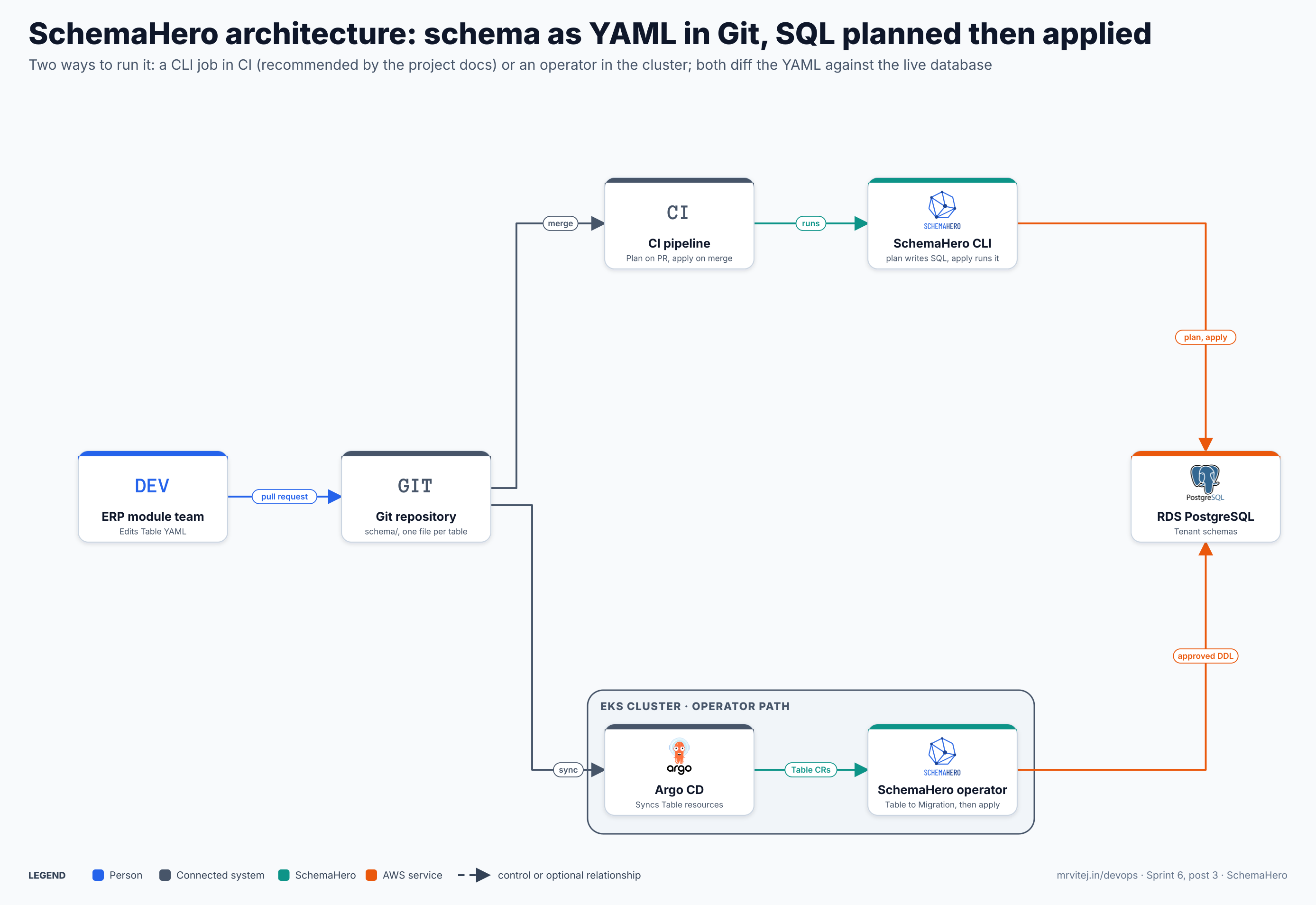
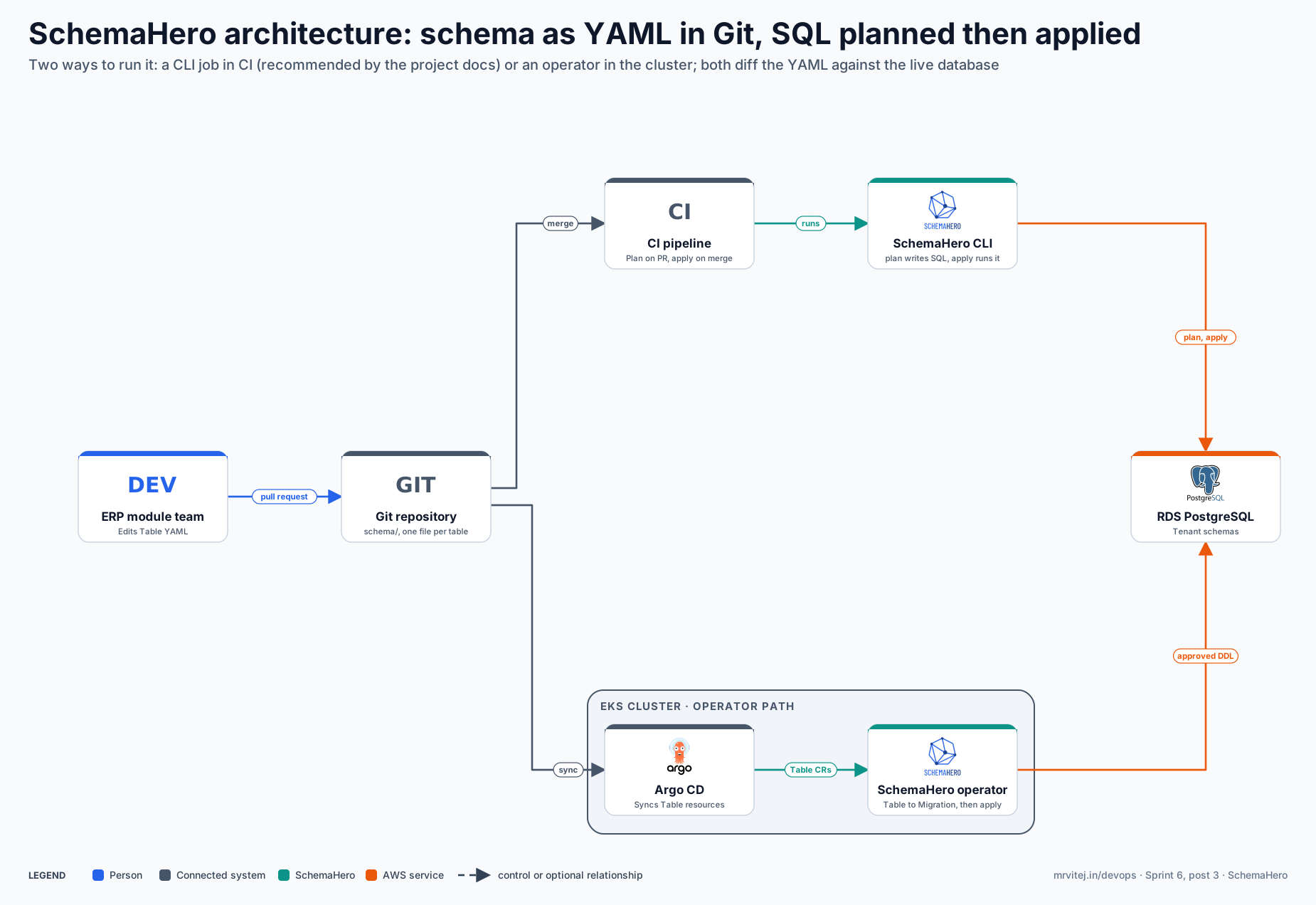
Blue is a person, grey is a connected system, teal is SchemaHero and orange is an AWS service. Open the zoomable diagram, or download it as SVG or PNG.
| Component | Responsibility |
|---|---|
| ERP module team | Edits the Table YAML next to the service code and opens a pull request. |
| Git repository | Holds the schema/ directory, one file per table. The source of truth. |
| CI pipeline | Runs schemahero plan on the pull request and schemahero apply after merge. |
| SchemaHero CLI | One binary. plan writes SQL, apply runs it. No cluster needed. |
| Argo CD | Operator path only. Syncs the Table resources from Git into the cluster. |
| SchemaHero operator | Operator path only. Watches Table resources, creates Migrations and runs approved ones. |
| RDS PostgreSQL | The database being managed. Both paths connect to it with a connection URI. |
Which path to choose. The project’s current documentation recommends the CLI path (schemahero plan and schemahero apply) for simpler, more predictable deployments, and describes the operator workflow as a different one. The operator is still in the repository and still works through kubectl; its extra value is approvals as Kubernetes objects and a reconcile loop. The rest of this post shows the CLI path first, then the operator.
From a column change to the database
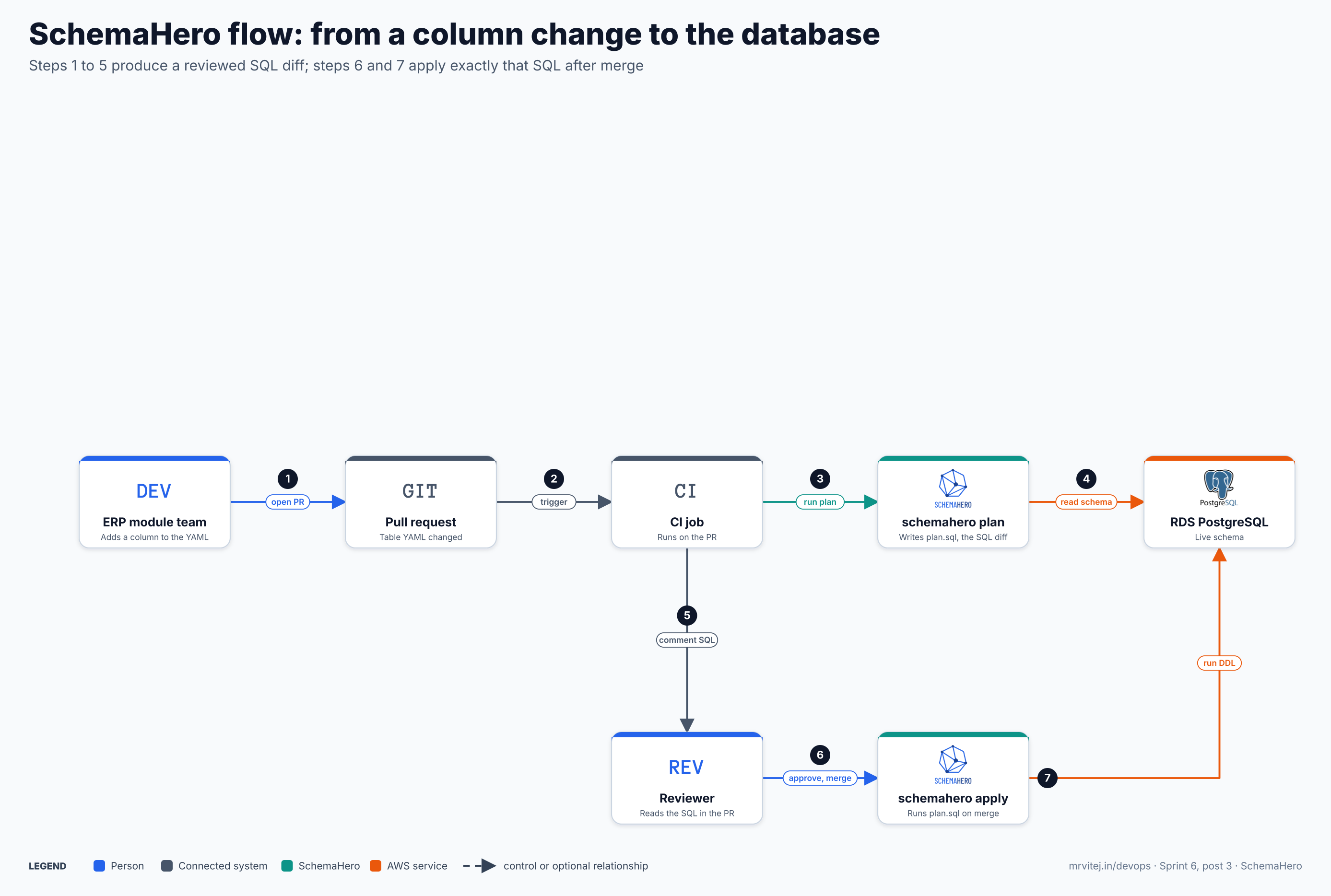
- Open a pull request. A developer adds a column to a Table YAML file.
- Trigger. The pull request starts the CI job for changes under
schema/. - Run plan. The job runs
schemahero planwith the database URI and the schema directory. - Read the schema. Plan connects to the database, reads the current schema and compares it with the YAML.
- Comment the SQL. The job saves
plan.sqland posts it on the pull request. - Approve and merge. A reviewer reads the SQL and merges.
- Run the DDL. After merge the job plans again and applies the plan.
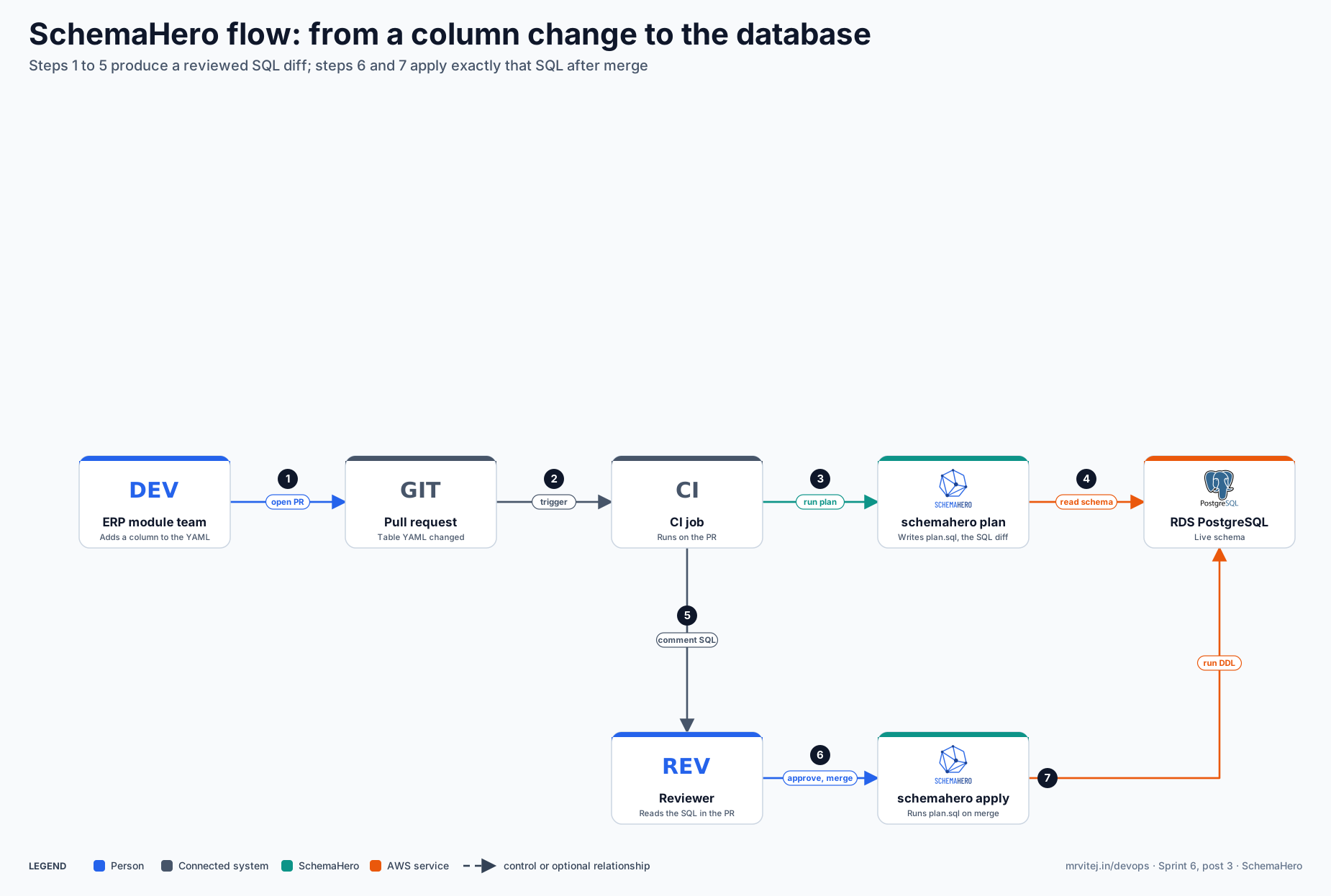
Open the zoomable flow diagram, or download it as SVG or PNG.
Install SchemaHero
The CLI
# macOS (Homebrew)
brew install schemahero/tap/schemahero

# Linux
curl -sSL https://github.com/schemahero/schemahero/releases/latest/download/schemahero_linux_amd64.tar.gz | tar xz
sudo mv schemahero /usr/local/bin/

schemahero version
There is also a schemahero/schemahero container image that contains the CLI, which suits any CI system that runs Docker. Pin a version in CI instead of using latest; the project’s GitLab example pins one.
The operator and kubectl plugin
kubectl krew install schemahero       # the kubectl plugin (needs krew)
kubectl schemahero version

kubectl schemahero install            # installs the operator and 3 CRDs
# or, to review and commit the YAML first:
kubectl schemahero install --yaml > schemahero.yaml

kubectl get pods -n schemahero-system
The install guide says this creates the schemahero-system namespace with three CRDs and the operator, and that you should see one pod (schemahero-0) running. The install guide I read is from an older docs build, so check the pod name against what your version creates.
Try it: a table, a plan and an apply
This is the project’s quick start, which uses a local PostgreSQL in Docker.
docker run -d --name quickstart-postgres \
  -e POSTGRES_PASSWORD=password -e POSTGRES_DB=myapp \
  -p 5432:5432 postgres:16
Create users.yaml:
apiVersion: schemas.schemahero.io/v1alpha4
kind: Table
metadata:
  name: users
spec:
  database: myapp
  name: users
  schema:
    postgres:
      primaryKey: [id]
      columns:
        - name: id
          type: uuid
          default: gen_random_uuid()
        - name: email
          type: varchar(255)
          constraints:
            notNull: true
        - name: created_at
          type: timestamp
          default: now()
Plan it. Nothing changes in the database yet:
schemahero plan --driver postgres \
  --uri "postgres://postgres:password@localhost:5432/myapp?sslmode=disable" \
  --spec-file users.yaml --out plan.sql
cat plan.sql
The quick start shows output like this:
create table "users" (
  "id" uuid default gen_random_uuid(),
  "email" varchar (255) not null,
  "created_at" timestamp default now(),
  primary key ("id")
);
Apply the saved plan, then add a name column to the YAML and plan again:
schemahero apply --driver postgres \
  --uri "postgres://postgres:password@localhost:5432/myapp?sslmode=disable" \
  --ddl plan.sql
The second plan should show only alter table "users" add column "name" varchar (255);. That is the point of the declarative model: you edited the end state, and the tool produced the step.
An ERP table with a key and an index
The Table CRD supports columns, a primary key, indexes and foreign keys for PostgreSQL. A table for an ERP invoice might look like this. The names are examples for this series, not a tested schema:
apiVersion: schemas.schemahero.io/v1alpha4
kind: Table
metadata:
  name: invoices
spec:
  database: erp
  name: invoices
  schema:
    postgres:
      primaryKey: [id]
      columns:
        - name: id
          type: uuid
          default: gen_random_uuid()
        - name: customer_id
          type: uuid
          constraints:
            notNull: true
        - name: total
          type: numeric(14,2)
          constraints:
            notNull: true
        - name: issued_on
          type: date
      indexes:
        - name: invoices_customer_idx
          columns: [customer_id]
      foreignKeys:
        - name: invoices_customer_fk
          columns: [customer_id]
          references:
            table: customers
            columns: [id]
          onDelete: restrict
A directory of such files works as one schema: schemahero plan --spec-file ./schema/ processes the YAML files in it recursively and produces a combined set of changes. The Postgres block also has an optional schema field, and the connection has a schema field too, which is where a schema-per-tenant layout would be set. I have not tested how planning behaves across many schemas, so the project post in Part 2 decides that.
Connect to Amazon RDS
The docs say SchemaHero manages a MySQL or PostgreSQL database in RDS without extra requirements, and recommend putting the connection details in a Secret:
apiVersion: v1
kind: Secret
metadata:
  name: rds-postgres
  namespace: erp
stringData:
  uri: postgresql://<user>:<password>@<instance>.<region>.rds.amazonaws.com/<db>?sslmode=require&connect_timeout=10&application_name=schemahero
---
apiVersion: databases.schemahero.io/v1alpha4
kind: Database
metadata:
  name: erp
  namespace: erp
spec:
  connection:
    postgres:
      uri:
        valueFrom:
          secretKeyRef:
            name: rds-postgres
            key: uri
For the CLI path, put the same URI in a CI secret and pass it with --uri "$DATABASE_URL". The docs also show IAM authentication, where a token from aws rds generate-db-auth-token goes in the password position of the URI. Use sslmode=require for RDS. Your CI runner, or the operator pod, must be able to reach the instance on port 5432, so check the security group.
Run it in CI
The project’s CI guide plans on pull request and applies on merge. This is an adapted version:
name: Schema plan
on:
  pull_request:
    paths: ["schema/**"]
permissions:
  contents: read
  pull-requests: write
jobs:
  plan:
    runs-on: ubuntu-latest
    env:
      DB_URL: ${{ secrets.DATABASE_URL }}
    steps:
      - uses: actions/checkout@v4
      - name: Get schemahero
        run: |
          curl -sSL https://github.com/schemahero/schemahero/releases/latest/download/schemahero_linux_amd64.tar.gz | tar xz
          sudo mv schemahero /usr/local/bin/
      - name: Generate plan
        run: schemahero plan --driver postgres --uri "$DB_URL" --spec-file ./schema/ --out plan.sql
      - uses: actions/upload-artifact@v4
        with:
          name: schema-plan
          path: plan.sql
The apply workflow runs on push to main with a protected environment: production, builds the plan again and runs schemahero apply --ddl plan.sql. The guide’s cautions are worth keeping: separate secrets for staging and production, save the plan as an artifact for an audit trail, roll out staging first, and use plan --dry-run with a placeholder URI to validate YAML syntax without any database access. A simple check can grep the plan for drop and fail the job, but the guide notes that it can match names containing the word, so review flagged plans by hand.
The operator path
With the operator, you apply Table resources and manage Migrations with kubectl:
kubectl apply -f schema/invoices.yaml -n erp
kubectl schemahero get tables -n erp
kubectl schemahero get migrations -n erp
kubectl schemahero describe migration <id> -n erp
kubectl schemahero approve migration <id> -n erp     # or: reject migration <id>
The operator generates a Migration for each planned change and shows the DDL. Approved migrations are executed automatically. The Migration resource records the phase, who approved it and when, and a hash of the plan. Because approval is a Kubernetes action, anyone with RBAC on the Migration resource can approve it; one competing vendor’s comparison page makes the same point, so give approval rights to a small group.
Other fields on the Database resource: batchWindow (collect table changes for a duration, such as 10s, and process them in one migration), deploySeedData, enableShellCommand, immediateDeploy and schemahero (image, node selector and tolerations for the pod that runs migrations). One caution: a docs preview page lists requireApproval and disableDestructive under spec.schemahero, but the CRD on the repository’s main branch lists only image, nodeSelector and tolerations there. Before relying on those two policy keys, run kubectl explain database.spec.schemahero against the CRD you installed.
Production reference design
- One source of truth. A
schema/directory per service in Git, one file per table, reviewed like code. - Plan on the pull request. Post
plan.sqlas a comment so reviewers read the SQL, not just the YAML. - Apply after merge. Use the saved plan, from a protected environment, with the database URI as a secret.
- Stage first. Roll out to a staging database before production, using the same YAML.
- Guard destructive changes. Fail the job or require a label when a plan contains
drop. - Pin versions. Pin the CLI or container image version, and the operator version if you use it.
- Separate roles. Give the migration user the DDL rights it needs and give the application user only data rights.
- Backups. Take an RDS snapshot before large changes; SchemaHero does not roll back data.
Security
- Connection strings are secrets. Keep them in Kubernetes Secrets, a CI secret store or a secrets manager. The CRD also accepts Doppler references, and the 0.9 release notes describe HashiCorp Vault support.
- Least privilege. The migration user needs DDL rights; the application does not.
- Network. Allow only the CI runners or the operator pod to reach the database port.
- Approvals. With the operator, restrict who can approve a Migration through Kubernetes RBAC.
- TLS. Use
sslmode=requireor stricter for RDS.
Troubleshooting
This table is built from the project’s docs and CRDs. I did not run SchemaHero for this post, so test each entry on your own setup.
| Symptom | Likely cause | How to check | Fix |
|---|---|---|---|
kubectl schemahero is not found |
krew is not installed, or its bin directory is not on PATH |
kubectl krew version; echo $PATH |
Install krew, add its bin directory to PATH, then kubectl krew install schemahero |
| Operator pod is not running | Install did not complete, or the image cannot be pulled | kubectl get pods -n schemahero-system; kubectl describe pod and logs |
Fix the image pull or resource issue; reinstall with kubectl schemahero install --yaml to review the manifests |
| Database shows as not connected | Wrong URI, wrong Secret key, or the database is unreachable | kubectl get database <name> -o yaml and read status.isConnected and status.lastPing |
Check the Secret name and key, the host, the credentials and the security group |
| Table applied but nothing changes | A Migration is waiting for approval | kubectl schemahero get migrations |
Approve it, or reject it. Test immediateDeploy only in a dev database |
| Plan fails to connect | CI runner cannot reach the database, or SSL mode is wrong | Run psql with the same URI from the runner |
Open the network path, set sslmode=require, or use --dry-run for syntax-only checks |
Plan shows drop where you meant a rename |
A declarative tool sees the old column missing and a new one present | Read plan.sql before apply |
Treat it as a drop plus an add; do the rename by hand in a separate step, then update the YAML |
no matches for kind "Table" |
The operator CRDs are not installed, or the apiVersion is wrong | kubectl api-resources | grep schemahero.io |
Install the operator, and use schemas.schemahero.io/v1alpha4 for Table |
| Plan is large or slow with many tables | Each table is planned separately | Count the files under schema/ |
With the operator, set spec.batchWindow on the Database; with the CLI, plan a directory in one run |
| A column type is not accepted or differs | The type string must match the database’s types | Compare with the type shown by \d <table> in psql |
Use the exact PostgreSQL type, such as varchar(255) or numeric(14,2) |
| Policy keys have no effect | The installed CRD does not define them | kubectl explain database.spec.schemahero |
Enforce the policy in CI by checking the plan instead |
Usage cases
- GitOps for schemas. Table definitions live next to the code that uses them, and changes arrive through pull requests.
- Many identical environments. The same YAML takes an empty dev database, a staging database and production to the same state.
- Reviewed SQL. The plan shows exactly which statements will run before anyone approves.
- Managed databases. It manages databases outside the cluster, such as RDS, as well as ones inside it.
- In the Sprint 6 project. The ERP product keeps its table definitions in Git and runs them against RDS PostgreSQL. Part 2 wires it in.
Operational considerations
- Declarative is not safe by itself. Read every plan. A generated
dropis as destructive as a written one. - Schema only. The project focuses on schema migration. Data migrations, backfills and seed changes need another tool or script.
- Renames and type changes. The plan shows them as changes you must judge; do tricky changes in several backwards-compatible steps.
- Two ways to run it. Pick one path per database. Running CLI applies and the operator against the same database leads to confusion about who owns a change.
- Small project. It is a Sandbox project with a small community, so budget time to read the source or ask in the Kubernetes Slack channel when something is unclear.
Adoption
The project’s ADOPTERS file lists one organisation: Replicated, which says it uses SchemaHero to manage its databases in production. Replicated also sponsors the project’s container images. A short list is a fact about the project’s size, not a verdict on its quality, but it means there is little public experience to lean on at scale.
Alternatives
| Solution | Model | Best suited to |
|---|---|---|
| Flyway or Liquibase | Versioned migration files applied in order | Teams that want an explicit, ordered history and data migrations in the same tool |
| Atlas | Declarative schema, with a CLI and a Kubernetes integration | Teams that want declarative plans with a larger feature set and vendor-backed support |
| Bytebase | A web platform for reviewing and rolling out database changes | Teams that need routed approvals and audit across many databases |
| ORM migrations (for example in the application framework) | Generated or hand-written migrations tied to the code | Single applications that already own their schema in code |
| SchemaHero | Declarative YAML, plan then apply, CLI or operator | Teams that want schema as reviewed YAML in Git and are happy to read the generated SQL |
Strengths and limitations
| Strengths | Limitations |
|---|---|
| The table definition is the source of truth, readable in one file | Generated SQL must be reviewed; renames and drops need care |
| Plan and apply are separate, so SQL is reviewed first | Schema only, not data |
| Works with databases inside or outside the cluster | A small set of supported databases |
| CLI path needs no cluster; operator path fits Kubernetes workflows | Approvals via the operator rely on Kubernetes RBAC and are not routed |
| Apache 2.0, single binary | Sandbox maturity and one listed adopter |
Recommendation
Assess, then adopt the CLI path in CI if the plan output convinces your reviewers. Start with one service: put its tables in schema/, run plan on pull requests for a few weeks without applying anything, and compare the SQL with what you would have written by hand. Add the operator only if you want migrations and approvals as Kubernetes objects.
References: SchemaHero on CNCF · SchemaHero repository · Project website and documentation · Adopters · CNCF Landscape entry