
A general model knows a lot about the world and nothing about how your company codes its expenses. Prompting can only go so far: you can paste five examples into a prompt, but not five thousand. Fine-tuning teaches the model from your own examples, and the usual reason teams avoid it is cost: a full fine-tune of even a mid-size model needs several large GPUs. Unsloth is an open source project that makes the cheap kind of fine-tuning, LoRA and QLoRA, run on much smaller hardware by using custom kernels and 4-bit loading. The CNCF Landscape lists it under Training › Post Training, as “a web UI for training and running open models”. It is a NON CNCF tool, a company-led open source project that is not a CNCF project.
CNCF daily · Sprint 6, post 16 of 26 · Training (Post Training) · NON CNCF
At a glance
| Category | Training › Post Training (AI Native group in the Landscape) |
| CNCF status | NON CNCF, listed in the CNCF Landscape |
| Maintained by | Unsloth AI; repository github.com/unslothai/unsloth |
| Licence | Dual: the core package is Apache 2.0; optional parts such as the Studio web UI are AGPL-3.0 |
| Two ways to use it | Unsloth Core (Python library, notebooks) and Unsloth Studio (web UI, beta) |
| Methods | LoRA, QLoRA, full fine-tuning, pretraining, and reinforcement learning such as GRPO and DPO; FP8 is also listed |
| Export | GGUF (llama.cpp, Ollama), Hugging Face formats, and deployment to vLLM and SGLang, per the project |
| Hardware | NVIDIA (training on RTX 30/40/50, Blackwell, DGX), AMD training added; CPU is for chat inference and data recipes only |
| Versions seen | PyPI releases 2026.7.6 and a marketplace listing of 2026.8.18; check PyPI for the current one |
| Project claims | 2x faster training and about 70% less VRAM with no accuracy loss; these are the project’s own figures, so measure on your workload |
The problem Unsloth solves
| Question | Plain Hugging Face training | Unsloth |
|---|---|---|
| GPU memory for an 8B model | Often needs a large GPU | 4-bit QLoRA is documented to fit on consumer cards with about 8 GB (a third-party guide’s figure) |
| Training speed | Standard kernels | Custom Triton kernels, which the project claims are about 2x faster |
| Setup | Match PyTorch, CUDA, bitsandbytes and PEFT versions | Install script, pip extras or a Docker image |
| No-code option | Write your own script | Studio web UI with dataset tools and live charts |
| Getting the result out | Merge and convert by hand | Helpers to save an adapter, merge it, or write GGUF |
| Compatibility | Native | Works with Hugging Face models, TRL and PEFT |
Key concepts
| Term | Meaning |
|---|---|
| Fine-tuning | Further training of an existing model on your own examples |
| LoRA | Train small added layers (adapters) and leave the base weights alone; the output is a small file |
| QLoRA | LoRA on top of a base model loaded in 4-bit, to save memory |
| Adapter | The LoRA weights; load them on the base model, or merge them into it |
| SFT | Supervised fine-tuning on prompt and answer pairs |
| GRPO and DPO | Reinforcement and preference methods for shaping behaviour after SFT |
| GGUF | A file format used by llama.cpp and Ollama for local inference |
| Unsloth Core | The Python library and notebooks |
| Unsloth Studio | The web UI for training, chat and data recipes |
| Data Recipes | A Studio feature that builds datasets from PDFs, CSVs and DOCX files |
Architecture
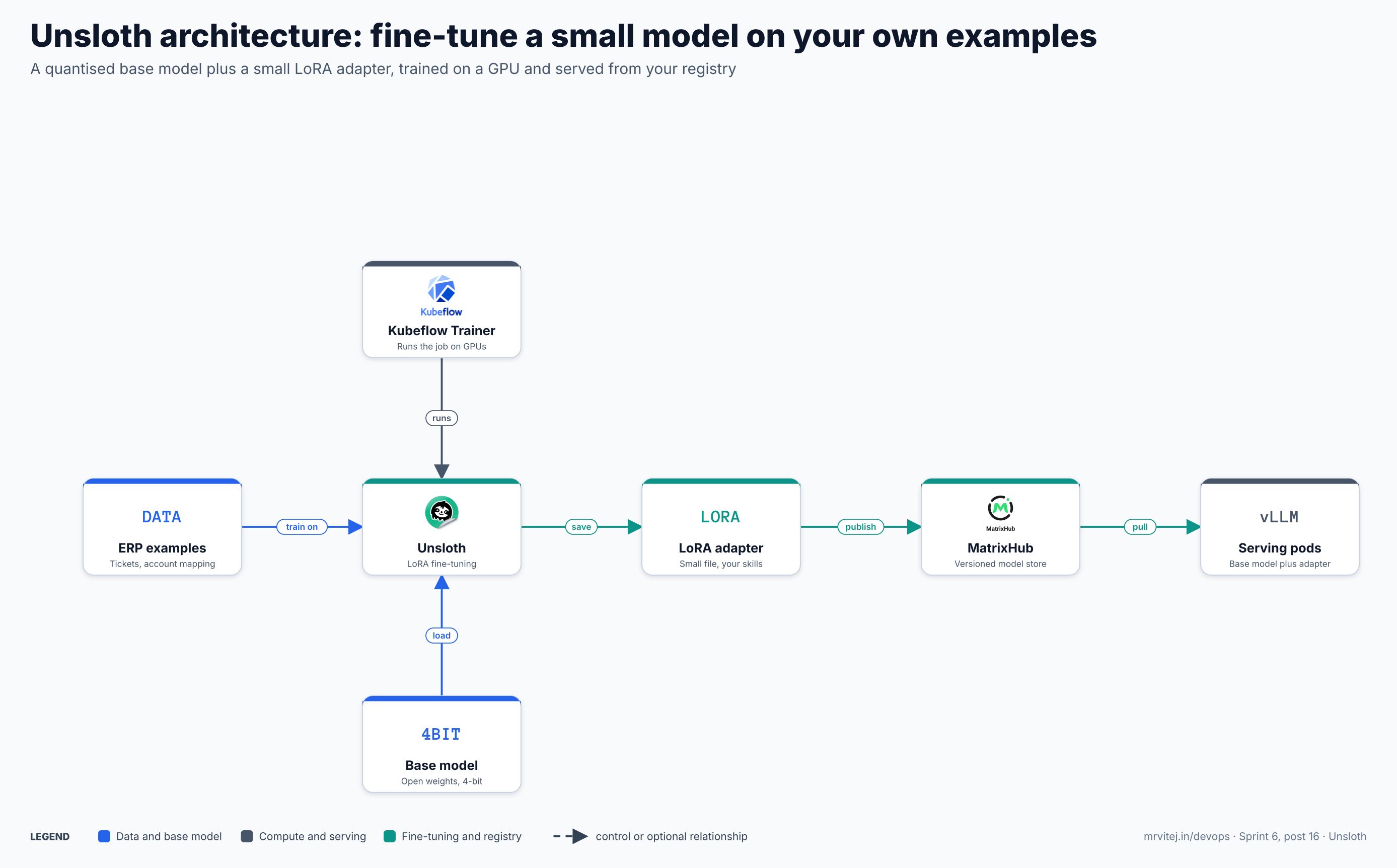
Blue is data and the base model, grey is compute and serving and teal is fine-tuning and the registry. Open the zoomable diagram, or download it as SVG or PNG.
| Component | Responsibility |
|---|---|
| ERP examples | Approved, reviewed examples: ticket text with the right category, vendor lines with the right account. |
| Base model | An open-weight model loaded in 4-bit. |
| Unsloth | Loads the model, attaches LoRA layers and trains them. |
| Kubeflow Trainer | Can schedule the job on the GPU pool; see the Kubeflow Trainer brief. A single plain Kubernetes Job also works for one GPU. |
| LoRA adapter | The small result file. |
| MatrixHub | Stores base models and adapters with versions; see the MatrixHub brief. |
| Serving pods | vLLM loads the base model and the adapter, or a merged model. |
From examples to a tested adapter
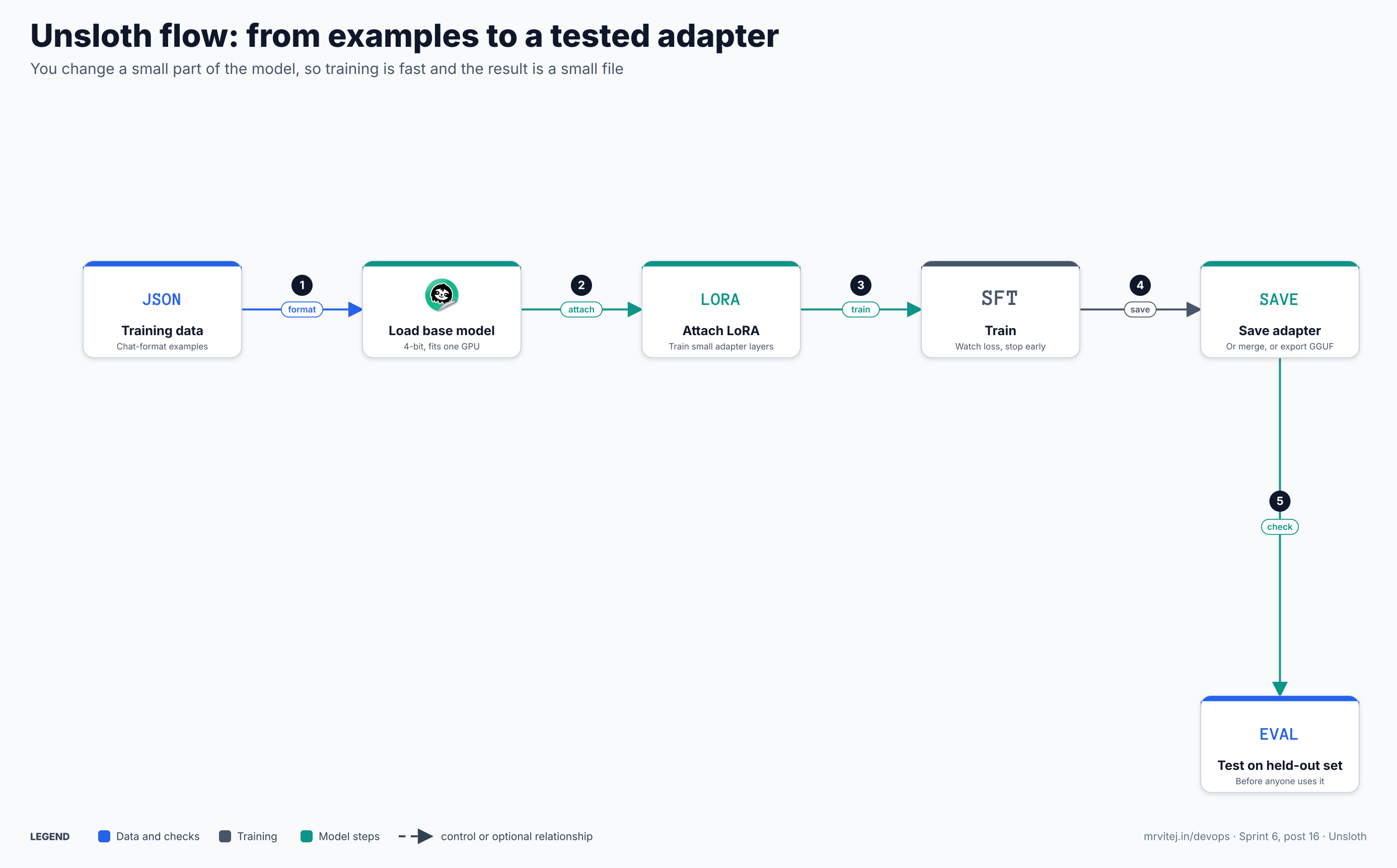
- Format. Turn examples into chat-style prompt and answer records.
- Attach. Load the 4-bit base model and attach LoRA layers.
- Train. Run supervised fine-tuning and watch the loss.
- Save. Save the adapter, merge it, or export GGUF.
- Check. Test on examples the model never saw, before anyone uses it.
Open the zoomable flow diagram, or download it as SVG or PNG.
Real world: mapping vendor lines to the chart of accounts
Every invoice line has to be coded to a ledger account. Finance staff do it from habit: “cloud hosting” goes to one account, “conference travel” to another, and your own odd cases to a third. A general model gets most of it right and some of it plausibly wrong, in ways that differ from your rules. You have two years of lines that were coded and reviewed. You fine-tune a small open model on them with QLoRA. On a held-out set of last quarter’s lines, the tuned model matches the human coding more often than the base model with a long prompt, and it runs on one GPU. The numbers on your own data are what matter, so keep a test set, and keep a person in the loop for anything the model is unsure about.
Install Unsloth
These steps follow the Unsloth README, PyPI page and docs. I did not run them for this post.
Python library (Unsloth Core)
python3 -m venv .venv && source .venv/bin/activate
pip install unsloth          # the project's recommended path on Linux
On Windows, the README says pip install unsloth works only if PyTorch is already installed. If your CUDA and PyTorch versions are unusual, the README also lists pip install "unsloth[<cuda-torch-extra>] @ git+https://github.com/unslothai/unsloth.git"; pick the extra that matches your versions from the README.
Studio and the install script
curl -fsSL https://unsloth.ai/install.sh | sh     # macOS, Linux, WSL; also: brew install --cask unsloth
unsloth studio -p 8888
Piping a script into a shell runs whatever the server returns. Download it, read it, and then run it, especially on a machine with GPUs and data.
Docker
On Linux, set up GPU access first with the NVIDIA container toolkit (the README links an install script). Then:
docker run -d --gpus all --ipc=host \
  -p 8000:8000 -p 8888:8888 \
  -e UNSLOTH_STUDIO_PASSWORD="change-me" -e JUPYTER_PASSWORD="change-me" \
  -v "$PWD":/workspace/host \
  unsloth/unsloth
docker logs -f <container>
The image is unsloth/unsloth on Docker Hub; a tag core is for notebooks only. Older README versions used a different port and mount layout, so check the README for your version. A community image maintainer says the official image can lag behind the main branch, so pin a tag and test it.
On Kubernetes
I did not find an official Helm chart or manifest for Unsloth. A single-GPU job can run the image above as a Kubernetes Job. This sketch is an example for this series, not a tested manifest:
apiVersion: batch/v1
kind: Job
metadata: { name: unsloth-ticket-tune, namespace: ml-team }
spec:
  backoffLimit: 0
  template:
    spec:
      restartPolicy: Never
      containers:
        - name: train
          image: unsloth/unsloth:<tag>          # pin a tag
          command: ["python", "/work/train.py"]  # your training script
          env:
            - name: HF_ENDPOINT
              value: http://matrixhub.matrixhub.svc.cluster.local:<port>
          resources:
            limits: { nvidia.com/gpu: 1 }
          volumeMounts: [{ name: work, mountPath: /work }]
      volumes:
        - name: work
          persistentVolumeClaim: { claimName: unsloth-work }
For several GPUs or nodes, Unsloth’s own docs describe multi-GPU training; I did not verify how it runs under Kubeflow Trainer, so test that on your cluster before planning around it.
Try it
The pattern below is from the Hugging Face TRL page on Unsloth; the dataset and model name are placeholders.
from unsloth import FastLanguageModel
from trl import SFTTrainer, SFTConfig

model, tokenizer = FastLanguageModel.from_pretrained(
    model_name="<a 4-bit or base model you have access to>",
    max_seq_length=2048,
    load_in_4bit=True,            # QLoRA: 4-bit base, about 4x less memory per the TRL page
)
model = FastLanguageModel.get_peft_model(
    model,
    r=16,
    target_modules=["q_proj", "k_proj", "v_proj", "o_proj",
                    "gate_proj", "up_proj", "down_proj"],
    lora_alpha=16,
)
# build `dataset` from your reviewed ticket examples, then:
trainer = SFTTrainer(model=model, tokenizer=tokenizer, train_dataset=dataset,
                     args=SFTConfig(output_dir="out", per_device_train_batch_size=2,
                                    num_train_epochs=1, learning_rate=2e-4))
trainer.train()
model.save_pretrained("ticket-adapter")   # save only the small adapter
Argument names change between Unsloth, TRL and Transformers releases, so check the docs for the versions you pin. Exports are available too, for example a merged 16-bit model or a GGUF file; the exact method names are in the Unsloth docs.
Production reference design
- Data first. Fine-tuning learns whatever your examples say. Review them, remove personal and confidential data you do not need, and keep a held-out test set that never enters training.
- One GPU per job to start. Run each fine-tune as a Kubernetes Job on a labelled GPU node pool; move to Kubeflow Trainer when you need queues, quotas or several nodes.
- Store inputs and outputs. Keep datasets in S3, base models and adapters in MatrixHub, with a version and a note of the data and settings used.
- Adapters, not copies. Serve the base model once and load small adapters per task, if your serving stack supports it; otherwise merge.
- Evaluate before release. Compare the tuned model with the base model on the test set, and set a pass mark. A later post in this series covers an evaluation tool.
- Guard Studio. If you run the web UI, bind it to localhost or put it behind your gateway with authentication; do not expose it.
- Pin everything. Pin the image tag, Unsloth, PyTorch, Transformers, TRL and PEFT together; a version change can change results.
- Keep humans in the loop. Route low-confidence outputs to a person, and feed their corrections into the next round.
- Track cost. Record GPU hours per run; fine-tuning is cheap only if you stop experimenting blindly.
Security
- Training data is the biggest risk. A model can repeat text it was trained on; do not train on data that people who will use the model may not see.
- Studio is a code-running service. The project’s own docs warn that a publicly reachable Studio lets anyone with the link and key use it and run code. Keep it private and keep keys secret.
- Licences. The core is Apache 2.0, while the Studio UI is AGPL-3.0, which has network-use obligations if you modify and serve it; check with your legal team before offering Studio as a service.
- Base model licences. Each open model has its own licence and use terms; record which one you used.
- Untrusted downloads. Models, datasets and notebooks from the internet are untrusted; pull them through MatrixHub and scan them.
- Install scripts. Review
install.shbefore running it, and prefer pinned images in production. - Poisoned data. Someone who can edit training examples can change behaviour; control write access to the dataset.
Troubleshooting
This table comes from the Unsloth documentation, README and general QLoRA experience. I did not run Unsloth for this post, so test each entry on your own GPU.
| Symptom | Likely cause | How to check | Fix |
|---|---|---|---|
| CUDA out of memory | Sequence length, batch size or model too large | GPU memory in nvidia-smi |
Use 4-bit, lower max_seq_length and batch size, raise gradient accumulation |
| Install fails or imports break | PyTorch, CUDA and extras mismatch | python -c "import torch; print(torch.__version__, torch.version.cuda)" |
Use the extra that matches your versions, or the Docker image |
--gpus all fails in Docker |
NVIDIA container toolkit is not set up | nvidia-smi inside a CUDA container |
Install the toolkit as the README describes |
| Windows install fails | PyTorch not installed first | Python environment | Install PyTorch, then Unsloth, or use WSL or Docker |
| Training runs on CPU | No supported GPU backend | Logs at start-up | Use a supported NVIDIA or AMD GPU; Studio’s CPU mode is chat only |
| Loss does not fall, or the model repeats itself | Bad data, wrong chat template, or learning rate too high | Inspect a few formatted samples | Fix formatting, use the model’s own template, lower the learning rate |
| Great on training data, poor on test data | Overfitting | Compare train and test loss | Fewer epochs, more varied data, lower rank |
| Exported model behaves differently | Different template or quantisation at export | Compare outputs before and after | Use the same template, test each export format |
| Port or login problem with the container | Port mapping or password variable | docker logs |
Set the ports and password variables from the README |
| Behaviour changed after an upgrade | Library versions moved | Release notes | Pin versions and re-run your test set |
Usage cases
- Domain classification. Ticket triage, document types, account coding.
- Style and format. A model that always answers in your structured format, which pairs well with a validation layer such as Instructor.
- Small local models. Smaller models fine-tuned for a narrow task, cheap to serve.
- Reasoning with rewards. GRPO runs with a reward function for tasks you can check automatically.
- In the Sprint 6 project. A small model is fine-tuned on reviewed ticket and chart-of-accounts examples for the copilot, stored in MatrixHub, and served by vLLM in the next post.
Operational considerations
- Fine-tuning is not a substitute for retrieval. Facts that change (prices, policies) belong in retrieval; stable behaviour and format belong in fine-tuning.
- Retrain on a schedule. Data and rules drift; plan a retrain-and-evaluate cycle, not a one-off.
- Version everything. Data, base model, settings and adapter belong together.
- Beta parts. Studio is labelled beta, and multi-GPU support is described as having a major upgrade on the way, so expect changes.
- Fast-moving. Release names and supported models change often; pin and test upgrades.
- Not CNCF. It is governed by its company and maintainers, so follow its releases and licence changes.
Adoption
The project is integrated into the Hugging Face TRL documentation, and NVIDIA publishes a DGX Spark playbook for fine-tuning with it, last updated on 31 July 2026. A cloud marketplace also lists an Unsloth Studio image. I did not verify named production users, so none are listed.
Alternatives
| Solution | Model | Best suited to |
|---|---|---|
| Hugging Face TRL with PEFT | The standard open source training stack that Unsloth builds on | Teams that want the plain upstream tools |
| Axolotl | Config-driven fine-tuning | Teams that prefer YAML recipes and many methods |
| LLaMA-Factory | Fine-tuning toolkit with a web UI | Teams that want a UI and broad model support |
| torchtune | PyTorch-native fine-tuning recipes | Teams that want minimal dependencies |
| NVIDIA NeMo | Enterprise training framework | Large-scale training on NVIDIA infrastructure |
| Managed fine-tuning services | A provider runs the training | Teams that do not want to run GPUs |
Strengths and limitations
| Strengths | Limitations |
|---|---|
| Lower memory use makes one-GPU fine-tuning practical | Speed and memory figures are the project’s own claims |
| Works with Hugging Face models and TRL | Fast-moving, version-sensitive |
| Studio gives a no-code path | Studio is beta and AGPL-licensed |
| Exports to GGUF, vLLM and SGLang | Training support is strongest on NVIDIA GPUs |
| Docker image and install script | No official Kubernetes manifest that I found |
| LoRA output is a small file | A tuned model still needs evaluation and guardrails |
Recommendation
Adopt for narrow fine-tuning, carefully. Start with one task where you have reviewed examples, such as ticket triage or account coding. Run a QLoRA job on one GPU in a Kubernetes Job, store the adapter in MatrixHub, and compare it with the base model on a held-out set before it touches production. Keep Studio private, review the licence split, and pin versions. If a prompt with retrieved examples already meets your accuracy, skip fine-tuning; if you need distributed training across nodes, use it with a proper scheduler and test the multi-GPU path first.
References: Unsloth repository · Unsloth on PyPI · Unsloth documentation · Unsloth Studio announcement · Hugging Face TRL: Unsloth integration · NVIDIA DGX Spark playbook for Unsloth · DigitalOcean Unsloth Studio listing · DataCamp Unsloth Studio guide · CNCF Landscape entry