Sprint 1 covered 21 projects, one per CNCF category. This post connects them into a single system that can be built, operated and broken on purpose: a small order platform where a customer places an order, the order is stored, an event is published, and an inventory service reacts. The business logic is deliberately trivial. The point is to show how identity, networking, delivery, storage, observability and safety tooling fit around a workload, and in which order to build them. The infrastructure runs on AWS, and the build guide targets the Mumbai region (ap-south-1), because Elastic Kubernetes Service (EKS), Route 53, S3 and IAM cover every external need with the fewest moving parts. The same layout maps to GCP and Azure, and a mapping table follows the build order.
The platform at a glance
| Layer | Tool | Role in the platform | Brief |
|---|---|---|---|
| Automation and configuration | OpenTofu | Creates the VPC, EKS cluster, node groups, Route 53 zone, S3 buckets and IAM roles | OpenTofu |
| Container runtime | containerd | Runs every container on the EKS nodes | containerd |
| Scheduling and orchestration | Kubernetes | Schedules and heals all workloads | Kubernetes |
| Cloud native network | Cilium | Pod networking, network policy and kube-proxy replacement | Cilium |
| Service discovery | CoreDNS | Cluster DNS and service names | CoreDNS |
| Cloud native storage | Rook | Ceph block volumes on local NVMe disks for stateful workloads | Rook |
| Container registry | Harbor | Private registry, vulnerability scanning and signed images | Harbor |
| Application definition | Helm | Packages every component and the services as charts | Helm |
| CI/CD | Argo | Argo CD syncs the cluster from Git, Argo Workflows runs pipelines | Argo |
| Security and certificates | cert-manager | Public TLS certificates from Let’s Encrypt for the edge | cert-manager |
| Key management and identity | SPIRE | Short-lived workload identities for mutual TLS | SPIRE |
| Service mesh | Istio | Mutual TLS, traffic policy and mesh telemetry | Istio |
| Service proxy | Envoy | The data plane inside Istio and Emissary-Ingress | Envoy |
| API gateway | Emissary-Ingress | Public entry point, routing and TLS termination | Emissary-Ingress |
| RPC | gRPC | Service-to-service calls between the order and inventory services | gRPC |
| Streaming and messaging | NATS | JetStream carries order events asynchronously | NATS |
| Database | Vitess | Sharded MySQL for orders | Vitess |
| Observability | OpenTelemetry | Traces, metrics and logs through one Collector | OpenTelemetry |
| Continuous optimization | OpenCost | Cost per namespace and workload | OpenCost |
| Feature flagging | OpenFeature | Runtime flags without redeploys | OpenFeature |
| Chaos engineering | Chaos Mesh | Controlled failure experiments | Chaos Mesh |
Architecture
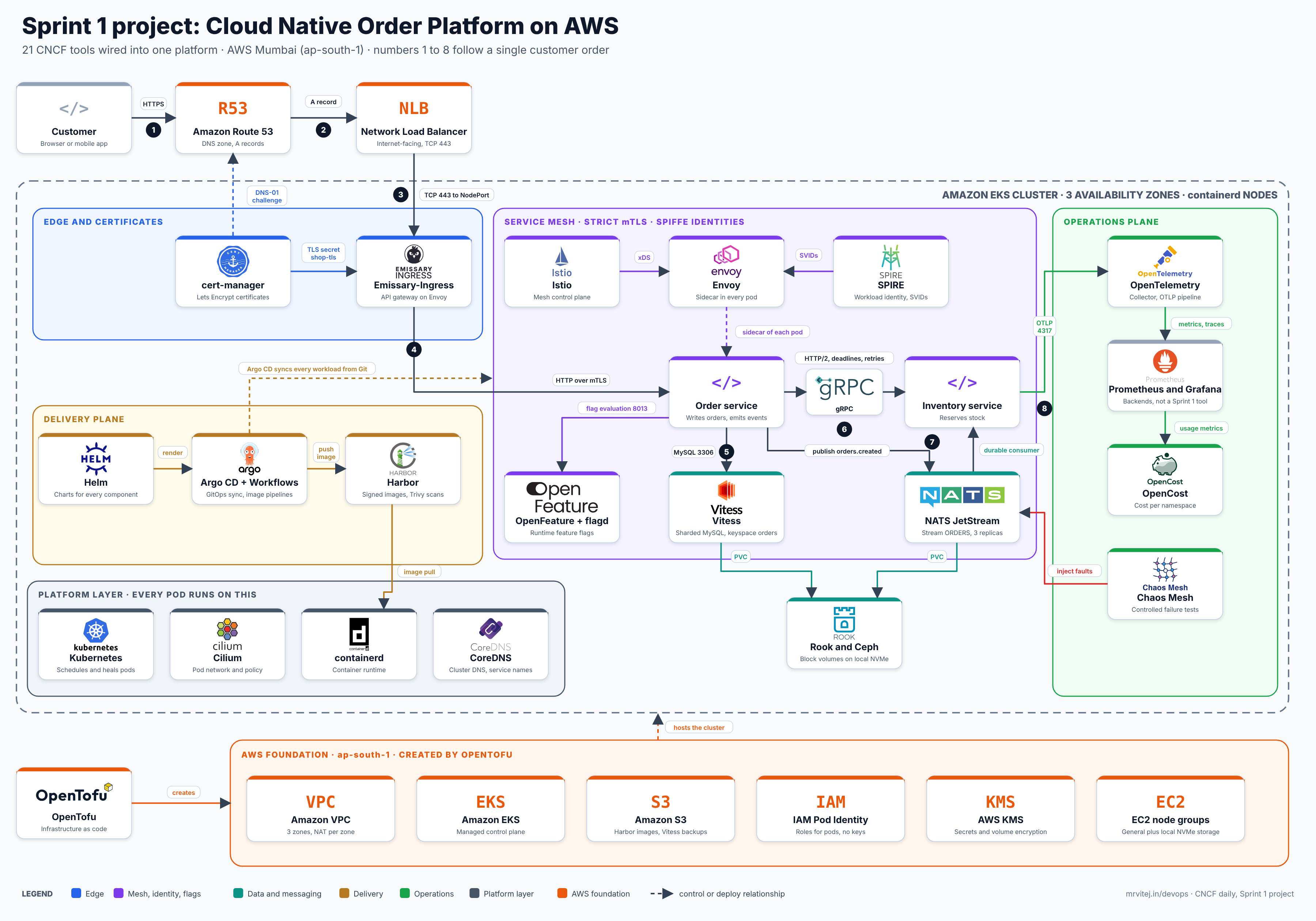
One image, every tool with its logo. The numbers 1 to 8 follow a customer request. Open the zoomable diagram (scroll or pinch to zoom, drag to pan), or download it as SVG or PNG.
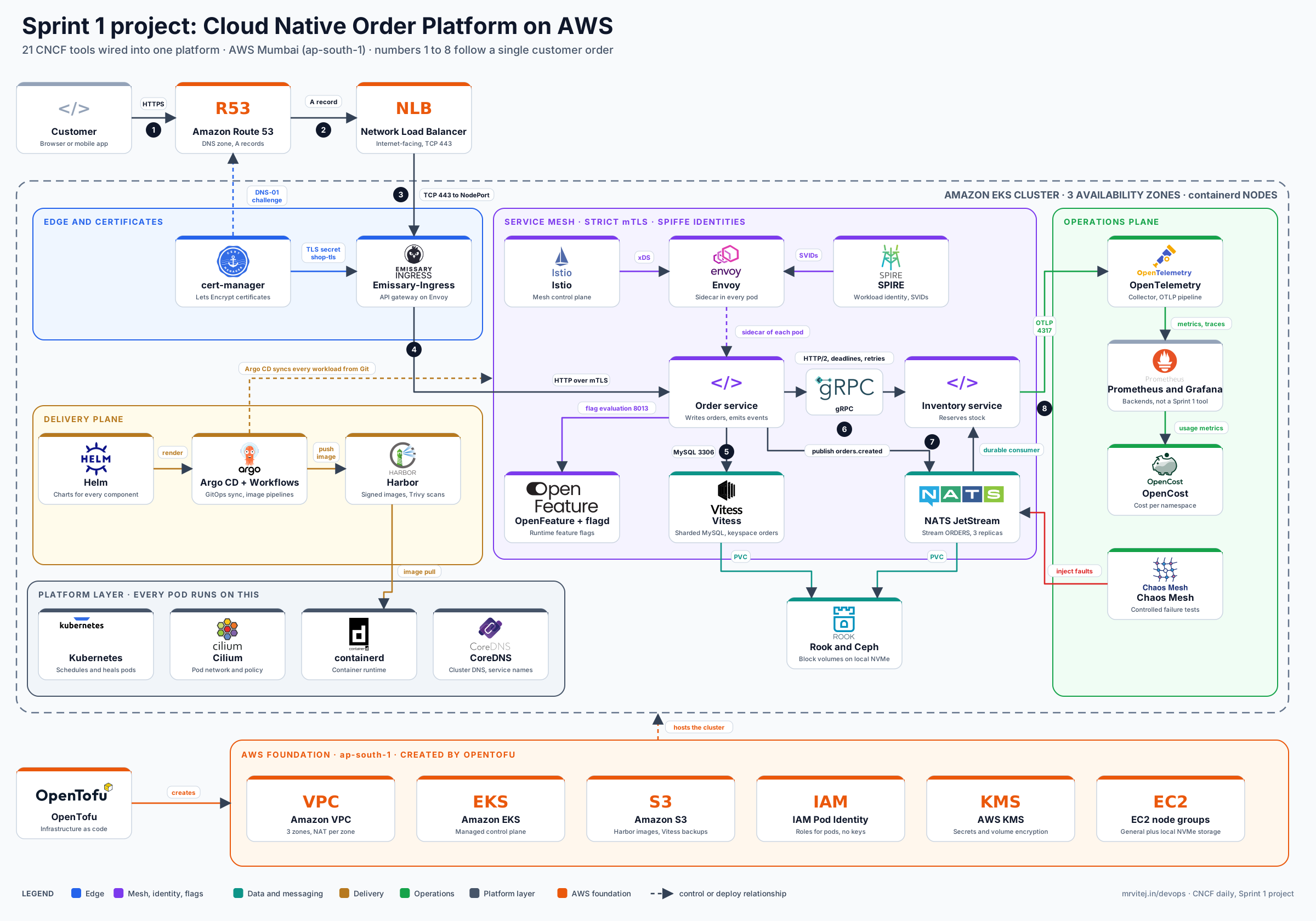
The platform is easier to read as three views of the same system: the request and data path that serves customers, the delivery and identity plane that builds, ships and secures the workloads, and the operations plane that observes, costs and stress-tests them. Every one of the 21 tools appears in at least one view, and each arrow is labelled with what travels over it.
View 1: request and data path
flowchart TB
  USER[Customer browser] -->|HTTPS 443| R53[Route 53 DNS]
  R53 -->|A and CNAME records from OpenTofu| NLB[AWS Network Load Balancer]
  subgraph EKS[EKS cluster, containerd nodes, Cilium network, CoreDNS]
    NLB -->|TCP 443 to NodePort| EMI[Emissary-Ingress<br/>Envoy based API gateway]
    CERT[cert-manager<br/>Lets Encrypt certificate] -.->|TLS secret shop-tls| EMI
    EMI -->|HTTP routes by Host and Mapping<br/>mTLS via sidecar| ORD
    subgraph MESH[Istio mesh, Envoy sidecars, SPIRE identities, strict mTLS]
      ORD[Order service] -->|gRPC over HTTP 2<br/>per request load balancing| INV[Inventory service]
      ORD -->|MySQL protocol 3306| VTG[Vitess vtgate]
      ORD -->|flag evaluation gRPC 8013| FLG[flagd<br/>OpenFeature provider]
      ORD -->|publish orders.created<br/>JetStream 4222| NATS[NATS JetStream<br/>stream ORDERS]
      NATS -->|durable consumer inventory<br/>at least once delivery| INV
      VTG --> VTT[vttablet and MySQL<br/>keyspace orders]
    end
    VTT -->|PVC rook-ceph-block| ROOK[Rook and Ceph<br/>OSDs on local NVMe]
    NATS -->|PVC rook-ceph-block| ROOK
    ORD -.->|service names<br/>port 53| DNS[CoreDNS<br/>and NodeLocal DNSCache]
    INV -.-> DNS
  end
  VTT -->|backups through IAM role| S3[S3 backup bucket]
  CIL[Cilium<br/>default deny policy<br/>allow edge to order to inventory] -.->|enforces in kernel with eBPF| MESH
View 2: delivery and identity plane
flowchart TB
  OTF[OpenTofu<br/>state in S3 with locking] -->|creates VPC, EKS, node groups,<br/>Route 53, S3, IAM| AWS[AWS APIs]
  OTF -->|helm_release bootstrap| ACD
  DEV[Developer] -->|git push| GIT[Git repository<br/>charts, values, flags]
  GIT -->|webhook triggers pipeline| AWF[Argo Workflows<br/>build, scan, sign]
  AWF -->|push image and Cosign signature| HAR[Harbor<br/>Trivy scan on push]
  AWF -->|commit new image tag in values| GIT
  GIT -->|poll or webhook| ACD[Argo CD<br/>app of apps, sync waves]
  ACD -->|render Helm charts and apply| K8S[Kubernetes API server]
  HAR -->|OCI charts optional| ACD
  HAR -->|layers stored| S3H[S3 image bucket]
  K8S -->|CRI over gRPC| CTD[containerd on each node]
  CTD -->|pull over TLS using hosts.toml<br/>proxy cache for public images| HAR
  K8S -->|CNI plugin| CIL[Cilium agent<br/>kube-proxy replacement]
  K8S -->|CoreDNS add-on| COREDNS[CoreDNS]
  CMGR[cert-manager<br/>ClusterIssuer letsencrypt-prod] -->|DNS-01 TXT records through IAM role| R53[Route 53]
  CMGR -->|signing certificate as upstream authority| SPS[SPIRE server]
  SPS -->|node attestation k8s_psat<br/>SVIDs over gRPC| SPA[SPIRE agents<br/>DaemonSet]
  SPA -->|Workload API on Unix socket<br/>mounted by SPIFFE CSI driver| ENV[Envoy sidecars]
  ISTIOD[Istiod<br/>xDS config server] -->|xDS over gRPC 15012<br/>routes, policies, PeerAuthentication| ENV
  EMI[Emissary-Ingress<br/>Envoy gateway] -->|Host and Mapping resources<br/>reference cert-manager secrets| CMGR
  ROOKOP[Rook operator<br/>CephCluster, CephBlockPool] -->|StorageClass rook-ceph-block| K8S
View 3: operations plane
flowchart TB
  APPS[Order and inventory services<br/>OpenTelemetry SDKs] -->|OTLP gRPC 4317| COL
  ENVS[Envoy sidecars and Emissary<br/>mesh telemetry] -->|OTLP traces and metrics| COL
  COL[OpenTelemetry Collector<br/>agent and gateway tiers] -->|traces OTLP| TEMPO[Trace backend<br/>Tempo or Jaeger]
  COL -->|metrics remote write| PROM[Prometheus]
  COL -->|logs| LOKI[Log backend<br/>Loki]
  HUB[Hubble from Cilium<br/>flow metrics] -->|scrape 9965| PROM
  NATSM[NATS exporter] -->|scrape| PROM
  ROOKM[Ceph manager metrics<br/>from Rook] -->|scrape 9283| PROM
  VTM[Vitess exporter] -->|scrape| PROM
  PROM --> GRAF[Grafana dashboards and alerts]
  TEMPO --> GRAF
  LOKI --> GRAF
  PROM -->|usage metrics| OCOST[OpenCost<br/>AWS pricing and namespace labels]
  OCOST -->|cost per namespace and workload| GRAF
  FLAGCFG[Flag definitions in Git<br/>synced by Argo CD as ConfigMap] -->|file or Kubernetes provider| FLAGD[flagd]
  FLAGD -->|flag change events| APPS
  CMESH[Chaos Mesh controller and daemon<br/>runtime containerd socket] -->|PodChaos, NetworkChaos, IOChaos| APPS
  CMESH -->|NetworkChaos on NATS and Vitess pods| DATA[NATS and Vitess pods]
  GRAF -->|alert on SLO breach| OPS[On call engineer]
  OPS -->|abort experiment or flip flag| CMESH
  OPS -->|disable feature| FLAGD
Wiring reference
Every integration point in the three views, with what is configured at each one.
| From | To | Protocol and port | What is configured |
|---|---|---|---|
| OpenTofu | AWS | HTTPS to AWS APIs | VPC, EKS, node groups, Route 53 zone, S3 buckets, IAM roles. State lives in S3 with locking and client-side encryption. |
| OpenTofu | Argo CD | Helm release over the Kubernetes API | One bootstrap Application that points at the Git repository. |
| Argo CD | Git, Kubernetes | HTTPS and Kubernetes API | App of apps with sync waves, automated sync with self-heal and prune. |
| Argo Workflows | Harbor, Git | HTTPS | Builds the image, runs Trivy, signs with Cosign, pushes, then commits the new tag to the values file. |
| Harbor | S3 | HTTPS | S3 storage backend through an IAM role, Trivy scanner enabled, a proxy-cache project for public images. |
| containerd | Harbor | HTTPS pull | hosts.toml per registry, TLS trust, mirror for Docker Hub through Harbor. |
| Kubernetes | containerd | CRI over a Unix socket | systemd cgroup driver on both the kubelet and containerd. |
| Kubernetes | Cilium | CNI | kube-proxy replacement, native routing or ENI mode, default-deny CiliumNetworkPolicy, Hubble enabled. |
| Kubernetes | CoreDNS | DNS 53 | Cluster domain, NodeLocal DNSCache, Prometheus metrics. |
| cert-manager | Route 53 | HTTPS | DNS-01 solver, IAM role for the controller, Let’s Encrypt staging first. |
| cert-manager | Emissary-Ingress | Kubernetes Secret | Certificate writes shop-tls, and the Emissary Host references it. |
| cert-manager | SPIRE | Kubernetes Secret | Used as the upstream authority so SPIRE’s signing certificate chains to a root you control. |
| SPIRE | Istio sidecars | Workload API on a Unix socket | SPIFFE CSI driver mounts the socket, ClusterSPIFFEID registers workloads, Istio uses the SPIRE socket for its certificates. |
| Istiod | Envoy sidecars and gateways | xDS over gRPC 15012 | Strict PeerAuthentication, AuthorizationPolicy by SPIFFE ID, traffic policy and telemetry config. |
| Emissary-Ingress | Order service | HTTP over mesh mTLS | Host and Mapping resources, with the Emissary pods inside the mesh so the hop is encrypted. |
| Order service | Inventory service | gRPC over HTTP/2 | Per-request load balancing in Envoy, deadlines and retries set in a VirtualService. |
| Order service | NATS | NATS protocol 4222 | JetStream stream ORDERS on subject orders.created, a durable consumer for inventory, TLS certificates from cert-manager. |
| Order service | Vitess | MySQL protocol 3306 | vtgate service name through CoreDNS, keyspace orders, connection pool limits. |
| Vitess | etcd, S3 | etcd client, HTTPS | The Vitess operator runs the topology service on etcd, and backups go to S3 through an IAM role. |
| Vitess and NATS | Rook | PVC | rook-ceph-block StorageClass, three-way replication across failure domains. |
| Order service | flagd | gRPC 8013 | OpenFeature SDK with the flagd provider, flag definitions in Git synced as a ConfigMap. |
| Services and Envoy | OpenTelemetry Collector | OTLP gRPC 4317 | SDK exporters, Istio Telemetry with an OTLP provider, resource attributes for service, environment and team. |
| Collector | Backends | OTLP, remote write | Traces to Tempo or Jaeger, metrics to Prometheus, logs to Loki, joined in Grafana by trace ID. |
| Prometheus | Cilium, Rook, NATS, Vitess | HTTP scrape | ServiceMonitors for Hubble metrics, Ceph manager, the NATS exporter and the Vitess exporter. |
| OpenCost | Prometheus, AWS pricing | HTTP | Cost model with namespace and team labels, so Rook and node costs are attributed. |
| Chaos Mesh | containerd, workloads | Kubernetes API, containerd socket | Daemon configured with runtime: containerd and the containerd socket path, experiments scoped to labelled namespaces, schedules triggered from Argo Workflows. |
Build order
Dependencies run from the bottom of the stack up. Each step lists what must exist before it.
- OpenTofu: foundation. VPC with private subnets, the EKS cluster, node groups, a Route 53 hosted zone, S3 buckets for Harbor and Vitess backups, and the IAM roles that later components assume. Nothing else can exist without this.
- Nodes and containerd. Use EKS node groups with local NVMe instances for the storage tier. containerd is already the runtime on current EKS AMIs, so the work here is verifying the cgroup driver and registry mirror settings for Harbor.
- Cilium. Install it as the CNI with kube-proxy replacement, ideally at cluster creation, since replacing a CNI on a live cluster is a migration. Turn on Hubble.
- CoreDNS. Provided by EKS as an add-on. Tune it and enable NodeLocal DNSCache before load arrives.
- Argo CD bootstrap. Install Argo CD with OpenTofu or Helm, then point it at the Git repository. From here on, everything below is an Argo CD application, installed with Helm charts and ordered with sync waves.
- cert-manager. Needed by Emissary-Ingress and by several webhooks, so it installs before them. Configure a ClusterIssuer using Let’s Encrypt and Route 53 DNS-01 with an IAM role for the controller.
- SPIRE. Install the server, agents and the SPIFFE CSI driver, with cert-manager or a private CA as the upstream authority. Mesh identities depend on it.
- Rook. Install the operator and a Ceph cluster on the NVMe devices, then create a block pool and StorageClass. Stateful workloads wait for this.
- Harbor. Install on the cluster with S3-backed storage and Trivy enabled. Create projects, robot accounts for CI, and a proxy-cache project for public images.
- Istio. Install with SPIRE as the identity source for workloads, so mutual TLS uses SPIFFE identities. Envoy sidecars come with it.
- Emissary-Ingress. Install behind an AWS Network Load Balancer, attach the cert-manager certificate, and route to the order service.
- Vitess and NATS. Deploy the Vitess operator with a keyspace for orders, backups to S3, and a NATS cluster with JetStream on Rook volumes.
- Application services. Build the order and inventory services, publish signed images to Harbor through an Argo Workflows pipeline, and deploy them with a Helm chart through Argo CD.
- OpenTelemetry, Prometheus and Grafana. Deploy the Collector, point the SDKs and Istio telemetry at it, and build the first dashboards.
- OpenCost. Connect it to Prometheus and to AWS pricing, then label namespaces by team.
- OpenFeature. Deploy flagd, add the OpenFeature SDK to the services, and put the flag definitions in Git.
- Chaos Mesh. Last, because experiments need observability to read the results. Start in a staging namespace.
Build guide: AWS Mumbai region (ap-south-1)
This is the hands-on version of the build order, written so that anyone with an AWS account can follow it in sequence and end with a production-grade platform, not a demo. It targets Asia Pacific (Mumbai), ap-south-1: a mature region with three availability zones, the widest instance choice in India (including the families with local NVMe disks that Rook needs) and the lowest latency for readers in India. Sprint 2 will build on Malaysia (ap-southeast-5), a newer opt-in region, once its service and instance availability is confirmed. Every step ends with a check, so a failure is caught before the next layer depends on it, and step 9 lists the production settings for every tool. Chart versions and some field names change between releases, so pin versions as shown in step 6. The author has not yet run this guide end to end in a personal account; corrections found during that run will be added to this post.
Step 0: prerequisites
| Need | Detail |
|---|---|
| AWS account and an admin user or role | Use an account you can delete resources in. Do not use production. |
| Tools | AWS CLI v2, OpenTofu 1.8 or later, kubectl, helm, Git, and optionally the argocd, istioctl and nats CLIs. |
| A domain you control | The guide uses lab.example.com as a delegated sub-domain. Replace it with yours. |
| A Git repository | Holds the Argo CD applications. A private repository works if you add its credentials to Argo CD. |
Check what the region offers and your quotas before writing any code:
export AWS_REGION=ap-south-1

# 1. Confirm the instance types you plan to use are offered here
aws ec2 describe-instance-type-offerings --location-type region --region $AWS_REGION \
  --filters Name=instance-type,Values=m7i.xlarge,m6i.xlarge,m6id.xlarge,i4i.xlarge \
  --query 'InstanceTypeOfferings[].InstanceType' --output text

# 2. Pick a Kubernetes version that EKS currently supports in the region
aws eks describe-cluster-versions --region $AWS_REGION \
  --query 'clusterVersions[?status==`STANDARD_SUPPORT`].clusterVersion' --output text

# 3. Check the On-Demand vCPU quota (about 36 vCPUs are needed for the node groups below)
aws service-quotas get-service-quota --service-code ec2 --quota-code L-1216C47A \
  --region $AWS_REGION --query 'Quota.Value'
If an instance family is missing, choose another family with local NVMe disks, or skip Rook and use EBS volumes. If the quota is low, request an increase first, since it can take a day. Use the AWS Pricing Calculator for ap-south-1 before you start. For real production, use separate AWS accounts for staging and production, each with its own cluster built from the same code.
Step 1: remote state
OpenTofu needs a bucket for state. Create it once, outside the stack:
BUCKET=sprint1-tofu-state-$(aws sts get-caller-identity --query Account --output text)
aws s3api create-bucket --bucket $BUCKET --region $AWS_REGION \
  --create-bucket-configuration LocationConstraint=$AWS_REGION
aws s3api put-bucket-versioning --bucket $BUCKET --versioning-configuration Status=Enabled
aws s3api put-public-access-block --bucket $BUCKET \
  --public-access-block-configuration BlockPublicAcls=true,IgnorePublicAcls=true,BlockPublicPolicy=true,RestrictPublicBuckets=true
Step 2: network and cluster with OpenTofu
Create a tofu/ directory with these files. The cluster is created without a CNI and without node groups, Cilium is installed next, and only then do the nodes join, so every node is Ready on arrival.
versions.tf:
terraform {
  required_version = ">= 1.8"
  required_providers {
    aws  = { source = "hashicorp/aws",  version = "~> 6.0" }
    helm = { source = "hashicorp/helm", version = "~> 2.17" }
  }
  backend "s3" {
    bucket       = "REPLACE-with-your-state-bucket"
    key          = "sprint-1/aws.tfstate"
    region       = "ap-south-1"
    use_lockfile = true
    encrypt      = true
  }
}

provider "aws" { region = "ap-south-1" }

provider "helm" {
  kubernetes {
    host                   = module.eks.cluster_endpoint
    cluster_ca_certificate = base64decode(module.eks.cluster_certificate_authority_data)
    exec {
      api_version = "client.authentication.k8s.io/v1beta1"
      command     = "aws"
      args        = ["eks", "get-token", "--cluster-name", module.eks.cluster_name, "--region", "ap-south-1"]
    }
  }
}network.tf:
data "aws_availability_zones" "available" { state = "available" }

module "vpc" {
  source  = "terraform-aws-modules/vpc/aws"
  version = "~> 5.16"
  name    = "sprint1"
  cidr    = "10.40.0.0/16"
  azs     = slice(data.aws_availability_zones.available.names, 0, 3)

  private_subnets = ["10.40.0.0/20", "10.40.16.0/20", "10.40.32.0/20"]
  public_subnets  = ["10.40.200.0/24", "10.40.201.0/24", "10.40.202.0/24"]

  enable_nat_gateway     = true
  one_nat_gateway_per_az = true
  single_nat_gateway     = false

  public_subnet_tags  = { "kubernetes.io/role/elb" = 1 }
  private_subnet_tags = { "kubernetes.io/role/internal-elb" = 1 }
}eks.tf:
module "eks" {
  source  = "terraform-aws-modules/eks/aws"
  version = "~> 20.31"

  cluster_name    = "sprint1-eks"
  cluster_version = "1.34" # use a version from step 0
  vpc_id          = module.vpc.vpc_id
  subnet_ids      = module.vpc.private_subnets

  cluster_endpoint_public_access            = true
  cluster_endpoint_public_access_cidrs      = ["203.0.113.0/24"] # your office or VPN range, never 0.0.0.0/0
  enable_cluster_creator_admin_permissions  = true

  # Encrypt Kubernetes Secrets with a KMS key and ship control plane logs to CloudWatch
  cluster_encryption_config = { resources = ["secrets"] }
  cluster_enabled_log_types = ["api", "audit", "authenticator", "controllerManager", "scheduler"]

  # Cilium replaces kube-proxy and the VPC CNI, so EKS must not install them
  bootstrap_self_managed_addons = false
  cluster_addons = { eks-pod-identity-agent = { before_compute = true } }
}

resource "helm_release" "cilium" {
  name       = "cilium"
  namespace  = "kube-system"
  repository = "https://helm.cilium.io"
  chart      = "cilium"
  # version  = "<pin after checking the latest stable>"

  values = [yamlencode({
    kubeProxyReplacement = true
    k8sServiceHost       = replace(module.eks.cluster_endpoint, "https://", "")
    k8sServicePort       = 443
    ipam                 = { mode = "cluster-pool", operator = { clusterPoolIPv4PodCIDRList = ["10.244.0.0/16"] } }
    routingMode          = "tunnel"
    tunnelProtocol       = "vxlan"
    hubble               = { enabled = true, relay = { enabled = true } }
    operator             = { replicas = 2 }
  })]
}

module "node_general" {
  source  = "terraform-aws-modules/eks/aws//modules/eks-managed-node-group"
  version = "~> 20.31"

  name                              = "general"
  cluster_name                      = module.eks.cluster_name
  cluster_version                   = module.eks.cluster_version
  subnet_ids                        = module.vpc.private_subnets
  cluster_primary_security_group_id = module.eks.cluster_primary_security_group_id
  vpc_security_group_ids            = [module.eks.node_security_group_id]
  cluster_service_cidr              = module.eks.cluster_service_cidr

  ami_type       = "AL2023_x86_64_STANDARD"
  instance_types = ["m7i.xlarge", "m6i.xlarge"]
  min_size = 3
  max_size = 6
  desired_size = 3
  labels = { role = "general" }

  # IMDSv2 only and encrypted root volumes
  metadata_options = { http_endpoint = "enabled", http_tokens = "required", http_put_response_hop_limit = 1 }
  block_device_mappings = {
    xvda = { device_name = "/dev/xvda", ebs = { volume_size = 100, volume_type = "gp3", encrypted = true, delete_on_termination = true } }
  }

  depends_on = [helm_release.cilium]
}

module "node_storage" {
  source  = "terraform-aws-modules/eks/aws//modules/eks-managed-node-group"
  version = "~> 20.31"

  name                              = "storage"
  cluster_name                      = module.eks.cluster_name
  cluster_version                   = module.eks.cluster_version
  subnet_ids                        = module.vpc.private_subnets
  cluster_primary_security_group_id = module.eks.cluster_primary_security_group_id
  vpc_security_group_ids            = [module.eks.node_security_group_id]
  cluster_service_cidr              = module.eks.cluster_service_cidr

  ami_type       = "AL2023_x86_64_STANDARD"
  instance_types = ["m6id.xlarge", "i4i.xlarge"] # local NVMe for Rook
  min_size = 3
  max_size = 3
  desired_size = 3
  labels = { role = "storage" }

  metadata_options = { http_endpoint = "enabled", http_tokens = "required", http_put_response_hop_limit = 1 }
  block_device_mappings = {
    xvda = { device_name = "/dev/xvda", ebs = { volume_size = 100, volume_type = "gp3", encrypted = true, delete_on_termination = true } }
  }
  taints = { storage = { key = "storage-node", value = "true", effect = "NO_SCHEDULE" } }

  depends_on = [helm_release.cilium]
}

resource "aws_eks_addon" "coredns" {
  cluster_name = module.eks.cluster_name
  addon_name   = "coredns"
  depends_on   = [module.node_general]
}
dns_storage_iam.tf adds the Route 53 zone, the Harbor bucket, and the two IAM roles that EKS Pod Identity hands to cert-manager and Harbor, so no access keys are ever created:
resource "aws_route53_zone" "platform" { name = "lab.example.com" }

resource "aws_s3_bucket" "harbor" {
  bucket_prefix = "sprint1-harbor-"
  force_destroy = false # set true only in a lab so that destroy can remove the images
}

resource "aws_s3_bucket_versioning" "harbor" {
  bucket = aws_s3_bucket.harbor.id
  versioning_configuration { status = "Enabled" }
}

resource "aws_s3_bucket_public_access_block" "harbor" {
  bucket                  = aws_s3_bucket.harbor.id
  block_public_acls       = true
  block_public_policy     = true
  ignore_public_acls      = true
  restrict_public_buckets = true
}

resource "aws_s3_bucket_server_side_encryption_configuration" "harbor" {
  bucket = aws_s3_bucket.harbor.id
  rule { apply_server_side_encryption_by_default { sse_algorithm = "aws:kms" } }
}

data "aws_iam_policy_document" "pod_identity_trust" {
  statement {
    actions = ["sts:AssumeRole", "sts:TagSession"]
    principals {
      type        = "Service"
      identifiers = ["pods.eks.amazonaws.com"]
    }
  }
}

resource "aws_iam_role" "cert_manager" {
  name               = "sprint1-cert-manager"
  assume_role_policy = data.aws_iam_policy_document.pod_identity_trust.json
}

resource "aws_iam_role_policy" "cert_manager" {
  role = aws_iam_role.cert_manager.id
  policy = jsonencode({ Version = "2012-10-17", Statement = [
    { Effect = "Allow", Action = ["route53:GetChange"], Resource = "arn:aws:route53:::change/*" },
    { Effect = "Allow", Action = ["route53:ChangeResourceRecordSets", "route53:ListResourceRecordSets"], Resource = aws_route53_zone.platform.arn },
    { Effect = "Allow", Action = ["route53:ListHostedZonesByName"], Resource = "*" }
  ] })
}

resource "aws_eks_pod_identity_association" "cert_manager" {
  cluster_name    = module.eks.cluster_name
  namespace       = "cert-manager"
  service_account = "cert-manager"
  role_arn        = aws_iam_role.cert_manager.arn
}

resource "aws_iam_role" "harbor" {
  name               = "sprint1-harbor"
  assume_role_policy = data.aws_iam_policy_document.pod_identity_trust.json
}

resource "aws_iam_role_policy" "harbor" {
  role = aws_iam_role.harbor.id
  policy = jsonencode({ Version = "2012-10-17", Statement = [
    { Effect = "Allow", Action = ["s3:ListBucket", "s3:GetBucketLocation", "s3:ListBucketMultipartUploads"], Resource = aws_s3_bucket.harbor.arn },
    { Effect = "Allow", Action = ["s3:GetObject", "s3:PutObject", "s3:DeleteObject", "s3:AbortMultipartUpload", "s3:ListMultipartUploadParts"], Resource = "${aws_s3_bucket.harbor.arn}/*" }
  ] })
}

resource "aws_eks_pod_identity_association" "harbor" {
  cluster_name    = module.eks.cluster_name
  namespace       = "harbor"
  service_account = "harbor-registry"
  role_arn        = aws_iam_role.harbor.arn
}

output "name_servers" { value = aws_route53_zone.platform.name_servers }
output "harbor_bucket" { value = aws_s3_bucket.harbor.id }
Apply and connect:
cd tofu && tofu init && tofu plan -out=tfplan && tofu apply tfplan
aws eks update-kubeconfig --name sprint1-eks --region ap-south-1
The sample is sized for learning and for a first production cut. For a real launch, add RDS PostgreSQL and ElastiCache for Harbor and SPIRE as listed in step 9, and VPC flow logs.
Check: kubectl get nodes shows 6 nodes Ready, kubectl -n kube-system get pods -l k8s-app=cilium shows one Running agent per node, and kubectl get pods -n kube-system -l k8s-app=kube-dns shows CoreDNS Running. Cilium is also the proof that containerd and Kubernetes are working, since nothing else starts without them. Confirm the runtime with kubectl get nodes -o wide, which lists containerd:// in the container runtime column.
Step 3: delegate DNS
Print the Route 53 name servers and create NS records for your sub-domain at your DNS provider (Cloudflare, Hostinger or others):
tofu output name_servers
# At your DNS provider, add four NS records:  lab.example.com  ->  each name server above
dig NS lab.example.com +short   # should list the AWS name servers once it propagates
Step 4: Argo CD
helm repo add argo https://argoproj.github.io/argo-helm
helm install argocd argo/argo-cd -n argocd --create-namespace
kubectl -n argocd get secret argocd-initial-admin-secret -o jsonpath='{.data.password}' | base64 -d; echo
kubectl -n argocd port-forward svc/argocd-server 8080:443   # open https://localhost:8080
Create a Git repository with an apps/ directory, add it to Argo CD (the argocd repo add command, or the UI), and apply the root application shown under Key integration config. From this point every tool is one file in apps/.
Step 5: the application manifests
Each tool is an Argo CD Application with a sync wave, so the order below is enforced for you. One complete example, cert-manager, shows the shape:
apiVersion: argoproj.io/v1alpha1
kind: Application
metadata:
  name: cert-manager
  namespace: argocd
  annotations: { argocd.argoproj.io/sync-wave: "0" }
spec:
  project: default
  source:
    repoURL: https://charts.jetstack.io
    chart: cert-manager
    targetRevision: "<pinned version>"
    helm:
      valuesObject:
        crds: { enabled: true }
  destination: { server: https://kubernetes.default.svc, namespace: cert-manager }
  syncPolicy:
    automated: { prune: true, selfHeal: true }
    syncOptions: [CreateNamespace=true, ServerSideApply=true]
The other applications follow the same pattern. Use this table to write each one:
| Wave | Application | Helm repository | Chart | Namespace | Values to set |
|---|---|---|---|---|---|
| 0 | cert-manager | https://charts.jetstack.io |
cert-manager |
cert-manager |
crds.enabled: true |
| 0 | spire-crds | https://spiffe.github.io/helm-charts-hardened/ |
spire-crds |
spire-mgmt |
none |
| 0 | istio-base | https://istio-release.storage.googleapis.com/charts |
base |
istio-system |
none |
| 0 | emissary-crds | https://app.getambassador.io |
emissary-crds |
emissary-system |
none |
| 0 | rook-ceph | https://charts.rook.io/release |
rook-ceph |
rook-ceph |
tolerate the storage-node taint |
| 1 | spire | https://spiffe.github.io/helm-charts-hardened/ |
spire |
spire-mgmt |
global.spire.trustDomain: lab.example.com |
| 1 | istiod | Istio chart repository above | istiod |
istio-system |
meshConfig.trustDomain: lab.example.com, SPIRE socket template |
| 1 | emissary-ingress | https://app.getambassador.io |
emissary-ingress |
emissary |
service.type: LoadBalancer with the AWS NLB annotations below |
| 1 | rook-ceph-cluster | https://charts.rook.io/release |
rook-ceph-cluster |
rook-ceph |
three mons, a block pool with size 3, rook-ceph-block as default StorageClass, deviceFilter for the NVMe disks |
| 1 | open-feature-operator | https://open-feature.github.io/open-feature-operator/ |
open-feature-operator |
open-feature-operator-system |
none |
| 1 | opentelemetry-operator | https://open-telemetry.github.io/opentelemetry-helm-charts |
opentelemetry-operator |
observability |
admissionWebhooks.certManager.enabled: true |
| 1 | prometheus | https://prometheus-community.github.io/helm-charts |
prometheus |
observability |
persistent volume on rook-ceph-block |
| 2 | harbor | https://helm.goharbor.io |
harbor |
harbor |
expose.type: clusterIP, S3 storage in ap-south-1, registry service account named harbor-registry |
| 2 | nats | https://nats-io.github.io/k8s/helm/charts/ |
nats |
nats |
3 replicas, JetStream file store on rook-ceph-block |
| 2 | opencost | https://opencost.github.io/opencost-helm-chart |
opencost |
opencost |
internal Prometheus at prometheus-server.observability |
| 2 | chaos-mesh | https://charts.chaos-mesh.org |
chaos-mesh |
chaos-mesh |
chaosDaemon.runtime: containerd and the containerd socket path |
| 2 | argo-workflows | https://argoproj.github.io/argo-helm |
argo-workflows |
argo |
server.authModes: [client] |
| 3 | platform-config | your Git repository | plain manifests | various | ClusterIssuer, Certificate, Emissary Host and Mapping, SPIRE ClusterSPIFFEID, Istio policies, flag definitions |
Emissary-Ingress on AWS uses an internet-facing Network Load Balancer. These service annotations ask the in-cluster AWS Load Balancer Controller to create it, so install that controller first (it is one more Helm chart, with its own IAM role through Pod Identity), or set service.type: NodePort and place your own load balancer in front:
service:
  type: LoadBalancer
  annotations:
    service.beta.kubernetes.io/aws-load-balancer-type: external
    service.beta.kubernetes.io/aws-load-balancer-nlb-target-type: ip
    service.beta.kubernetes.io/aws-load-balancer-scheme: internet-facing
The ClusterIssuer for Let’s Encrypt uses the Route 53 DNS-01 solver and picks up the Pod Identity role without any key. Use the staging URL until it works:
apiVersion: cert-manager.io/v1
kind: ClusterIssuer
metadata: { name: letsencrypt }
spec:
  acme:
    server: https://acme-staging-v02.api.letsencrypt.org/directory   # switch to acme-v02 after a green run
    email: you@example.com
    privateKeySecretRef: { name: letsencrypt-account }
    solvers:
      - dns01:
          route53: { region: ap-south-1 }
Vitess has no single Helm chart. Install the Vitess operator from its release manifest (see its README for the current command), then create a VitessCluster resource with a keyspace named orders, S3 backups in ap-south-1, and storage on rook-ceph-block.
Step 6: pin versions
The table above leaves chart versions open on purpose. Look up the current stable version of each chart and write it into targetRevision, then commit, so a rebuild next month is identical to this one:
helm repo add jetstack https://charts.jetstack.io && helm repo update
helm search repo jetstack/cert-manager --versions | head -5
Step 7: verify each layer
Run these after Argo CD reports all applications Healthy (kubectl -n argocd get applications):
| Layer | Check | Healthy result |
|---|---|---|
| cert-manager | kubectl get certificate -A |
READY True for shop-tls |
| SPIRE | kubectl -n spire-server exec spire-server-0 -- /opt/spire/bin/spire-server healthcheck |
Server is healthy |
| Rook | kubectl -n rook-ceph get cephcluster |
phase Ready, health HEALTH_OK |
| Harbor | open https://harbor.lab.example.com, create the shop project and a robot account |
login works and docker push succeeds |
| Istio | istioctl proxy-status |
every sidecar SYNCED |
| Emissary-Ingress | kubectl -n emissary get svc |
external hostname of the NLB present, curl -I https://shop.lab.example.com returns a response |
| NATS | nats --server nats://localhost:4222 stream ls after a port-forward |
the ORDERS stream exists with 3 replicas |
| OpenTelemetry | kubectl -n observability get opentelemetrycollector |
gateway Running |
| OpenCost | kubectl -n opencost port-forward svc/opencost 9090 |
UI shows cost per namespace |
| Chaos Mesh | kubectl -n chaos-mesh get pods |
controller, daemon and dashboard Running |
Step 8: the order and inventory services
The business logic is deliberately small, and you can write it in any language that has gRPC, NATS and OpenFeature clients. The contracts are what matter.
// inventory.proto: Order calls this synchronously over gRPC
syntax = "proto3";
package shop.v1;
service Inventory {
  rpc Reserve(ReserveRequest) returns (ReserveReply);
}
message ReserveRequest { string order_id = 1; string sku = 2; int32 quantity = 3; }
message ReserveReply   { bool reserved = 1; }
-- Vitess keyspace "orders": one table, sharded by customer_id when you outgrow one shard
CREATE TABLE orders (
id BIGINT NOT NULL AUTO_INCREMENT,
customer_id BIGINT NOT NULL,
sku VARCHAR(64) NOT NULL,
quantity INT NOT NULL,
status VARCHAR(16) NOT NULL DEFAULT 'created',
created_at TIMESTAMP NOT NULL DEFAULT CURRENT_TIMESTAMP,
PRIMARY KEY (id)
);| Setting | Order service | Inventory service |
|---|---|---|
| Database | vtgate.vitess:3306, keyspace orders |
none |
| Messaging | publishes orders.created to the ORDERS stream on nats://nats.nats:4222 |
durable consumer inventory on the same stream |
| gRPC | client of inventory.shop:50051 |
server on port 50051 |
| Flags | OpenFeature client with the flagd provider at localhost:8013 |
none |
| Telemetry | OTEL_EXPORTER_OTLP_ENDPOINT=http://gateway-collector.observability:4317 and OTEL_SERVICE_NAME |
the same |
Package each service as a Helm chart, build and push the image to Harbor with the Argo Workflows pipeline, and add one Argo CD Application per service in wave 20. Label the namespace istio-injection=enabled and the chaos-mesh.org/inject=enabled annotation only on the staging namespace.
Step 9: production hardening
The earlier steps produce a working platform. This step turns it into one you can run for customers. Apply these settings per tool, and treat the list as the acceptance checklist for going live.
Platform rules that apply to everything
- Two environments. Staging and production are separate clusters, ideally in separate AWS accounts, built from the same OpenTofu and Argo CD code with different values. Chaos experiments run in staging, and in production only as approved game days.
- Every workload sets requests, limits, a PodDisruptionBudget and topology spread across the three zones. Namespaces carry a ResourceQuota and LimitRange, and application namespaces enforce the Pod Security
restrictedprofile. - Nothing is applied by hand. Changes reach the cluster through Git and Argo CD, and reach AWS through OpenTofu run from a pipeline role with short-lived credentials. Access to the cluster is by SSO, never by shared admin credentials.
- Upgrade on a schedule. Move the control plane one minor version at a time, then the node groups, then the add-ons, always in staging first.
Per tool
| Tool | Production settings |
|---|---|
| OpenTofu | Separate state per stack (network, cluster, platform), plans reviewed in pull requests, state encryption enabled, apply only from the pipeline, drift detected with scheduled plans. |
| AWS foundation | Three zones with a NAT gateway in each, public endpoint restricted by CIDR or private only, secrets encryption with KMS, control plane logs on, IMDSv2 required, encrypted volumes, VPC flow logs, S3 versioning and lifecycle rules, no static access keys anywhere. |
| containerd | Registry mirrors for Harbor through hosts.toml, image garbage collection thresholds set, systemd cgroup driver, node maxPods matched to the instance size. |
| Kubernetes | HA control plane from EKS, node groups sized for failure of one zone, an autoscaler for the general node group, audit logs retained, a documented upgrade runbook. |
| Cilium | Default-deny CiliumNetworkPolicy in every application namespace with explicit allows, DNS-aware egress rules, Hubble metrics scraped, operator with two replicas, upgrades one minor version at a time after the preflight check. |
| CoreDNS | At least two replicas spread across zones, NodeLocal DNSCache, the DNS autoscaler, alerts on error rate and latency. |
| Rook and Ceph | Three monitors across zones, pools replicated three times with min_size 2, failure domain at host level or zone level where three zones hold storage nodes, alerts on HEALTH_WARN, capacity kept below about 70 percent, snapshots tested, an OSD replacement rehearsed. |
| Harbor | Two or more replicas of core, portal, registry and job service, external RDS PostgreSQL (Multi-AZ) and ElastiCache Redis instead of the bundled ones, S3 storage with versioning, robot accounts with narrow scopes, immutable release tags, retention and scheduled garbage collection, scan on push with a block on critical findings, replication to a second region. |
| Helm | Every chart version pinned, values files per environment, helm lint and helm template in CI, no latest tags. |
| Argo CD | HA install with Redis HA, SSO with the admin account disabled, one AppProject per team with allowed repositories and namespaces, read-only repository credentials, sync windows for production, notifications to chat. |
| Argo Workflows | Dedicated namespace, rootless builds, resource limits on every step, artifacts in S3, automatic workflow clean-up. |
| cert-manager | Two controller replicas with leader election, the Route 53 role limited to the one zone, switch from the staging issuer to production only after a green run, alert when a certificate has less than 21 days left. |
| SPIRE | Highly available server on an external PostgreSQL database in RDS (Multi-AZ), upstream authority anchored in a CA you control, SVID lifetime of about an hour, CA rotation rehearsed, alerts on attestation failures and approaching CA expiry. |
| Istio | Revision-based canary upgrades, STRICT mTLS mesh-wide, a deny-by-default AuthorizationPolicy with allows by SPIFFE ID, two or more istiod replicas with an autoscaler, sidecar resource requests, retries with budgets and outlier detection. |
| Envoy | Tuned through Istio and Emissary: connection draining on rollout, circuit breaking limits, sane timeouts and header limits, access log sampling. |
| Emissary-Ingress | Three replicas across zones with a PodDisruptionBudget, request timeouts and rate limits, TLS 1.2 or higher only, AWS Shield Standard on the load balancer and a CDN or Application Load Balancer with AWS WAF in front if you need a web application firewall. |
| gRPC | A deadline on every call, retries with backoff only for idempotent methods, keepalives and a health check service, maximum message sizes set. |
| NATS | Three servers across zones, JetStream streams with three replicas, size and age limits on streams, max_deliver with a dead-letter subject, TLS and per-service accounts, exporter metrics scraped, consumer lag alerts. |
| Vitess | At least three tablets per shard across zones, semi-synchronous replication, VTOrc for automatic failover, scheduled S3 backups with a tested restore, online schema changes, connection pool limits, a three-node etcd topology service. |
| OpenTelemetry | Agent and gateway Collector tiers, memory limiter and batching, exporters with retry and queue, tail sampling for errors and slow traces, attribute scrubbing for personal data, alerts on dropped data, long-term metrics storage added (for example Thanos) beyond Prometheus retention. |
| OpenCost | Required team and env labels enforced by admission policy, AWS Cost and Usage Report connected so costs match the invoice, budget alerts. |
| OpenFeature | Flag definitions in Git with review, an owner and an expiry date on every flag, safe defaults in code, flagd as a sidecar so no remote call sits on the request path. |
| Chaos Mesh | Namespace filtering enabled, RBAC limited to named engineers, every experiment with a hypothesis, a duration and an abort condition, weekly scheduled runs in staging. |
Service levels and alerts
| Signal | Target | Alert when |
|---|---|---|
| Order success rate | 99.9 percent over 30 days | Error budget burn rate exceeds 2 percent per hour |
| Order latency p99 | Under 500 ms | Above target for 10 minutes |
| Ceph health | HEALTH_OK |
Any HEALTH_WARN or capacity above 70 percent |
| NATS consumer lag | Inventory consumer under 30 seconds behind | Lag above 2 minutes |
| Vitess replication lag | Under 5 seconds | Above 30 seconds |
| Certificates | More than 21 days to expiry | Fewer than 21 days left |
| SPIRE attestation | No failures | Failures sustained for 5 minutes |
| Argo CD | All applications Synced and Healthy | Out of sync for 15 minutes |
| Nodes | All Ready | Any NotReady for 5 minutes |
| Daily cost | Within the budget | Spend above 120 percent of the daily budget |
Step 10: tear it down
Delete the Argo CD applications first so the load balancer and volumes are released, then destroy the infrastructure:
kubectl -n argocd delete applications --all
kubectl get svc -A | grep LoadBalancer      # wait until none remain
kubectl get pvc -A                          # wait until none remain
cd tofu && tofu destroy
aws s3 rb s3://$BUCKET --force              # the state bucket, once you are finished
Check the console afterwards for leftover load balancers, EBS volumes and NAT gateways in ap-south-1, since those keep billing.
Key integration config
Each snippet shows the join between two tools. Check field names against the versions you install.
OpenTofu to Argo CD: one bootstrap application that owns the rest.
resource "helm_release" "argocd" {
  name             = "argocd"
  repository       = "https://argoproj.github.io/argo-helm"
  chart            = "argo-cd"
  namespace        = "argocd"
  create_namespace = true
}apiVersion: argoproj.io/v1alpha1
kind: Application
metadata: { name: platform, namespace: argocd }
spec:
project: default
source:
repoURL: https://git.example.com/platform.git
path: apps
targetRevision: main
destination: { server: https://kubernetes.default.svc, namespace: argocd }
syncPolicy: { automated: { prune: true, selfHeal: true } }Argo CD sync waves: cert-manager and SPIRE before Istio, Istio before the apps.
metadata:
  annotations:
    argocd.argoproj.io/sync-wave: "10"   # cert-manager 0, SPIRE 2, Rook 4, Harbor 6, Istio 10, Emissary 12, apps 20
cert-manager to Emissary-Ingress: a certificate for the public host.
apiVersion: cert-manager.io/v1
kind: Certificate
metadata: { name: shop-tls, namespace: edge }
spec:
  secretName: shop-tls
  issuerRef: { name: letsencrypt-prod, kind: ClusterIssuer }
  dnsNames: [shop.example.com]
---
apiVersion: getambassador.io/v3alpha1
kind: Host
metadata: { name: shop, namespace: edge }
spec:
  hostname: shop.example.com
  tlsSecret: { name: shop-tls }
SPIRE to Istio: workload identities come from SPIRE instead of Istio’s own CA. The pattern uses the SPIFFE CSI driver to mount the Workload API socket into each sidecar and a custom injection template. The Istio documentation describes the SPIRE integration, and the exact template depends on the Istio version.
# Pod annotation selecting the SPIRE-aware sidecar template
metadata:
  annotations:
    inject.istio.io/templates: "sidecar,spire"
Istio to OpenTelemetry: send mesh traces to the Collector.
apiVersion: telemetry.istio.io/v1
kind: Telemetry
metadata: { name: mesh-default, namespace: istio-system }
spec:
  tracing:
    - providers: [{ name: otel }]
      randomSamplingPercentage: 10
Vitess and NATS on Rook: stateful workloads claim Ceph volumes.
volumeClaimTemplates:
  - metadata: { name: data }
    spec:
      storageClassName: rook-ceph-block
      accessModes: [ReadWriteOnce]
      resources: { requests: { storage: 100Gi } }
OpenFeature in the order service: a flag guards a new code path.
client := openfeature.NewClient("order-service")
useNewTax, _ := client.BooleanValue(ctx, "new-tax-calculation", false, evalCtx)
Request walk-through
- The customer opens
https://shop.example.com. Route 53 resolves to the AWS Network Load Balancer. - The load balancer forwards to Emissary-Ingress, which terminates TLS with the cert-manager certificate and routes the request to the order service.
- The request enters the mesh. The Envoy sidecars present SPIFFE identities issued by SPIRE and establish mutual TLS to the order service.
- The order service checks the
new-tax-calculationflag through OpenFeature, calculates the order, and writes it to Vitess through vtgate. Cilium network policy allows only this path. - The service publishes an
order.createdevent to NATS JetStream and calls the inventory service over gRPC to reserve stock. CoreDNS resolves both service names. - The inventory service consumes the event as well, updates stock, and responds. The order service returns the result to the customer.
- Every hop emits spans and metrics to the OpenTelemetry Collector, which forwards them to Prometheus and the trace backend, so one trace shows the whole request.
Deployment walk-through
- A developer merges a change to the order service.
- An Argo Workflows pipeline builds the image with a rootless builder, scans it with Trivy, signs it with Cosign, and pushes it to Harbor.
- The pipeline updates the image tag in the Helm values in Git, which is the only thing that triggers a deployment.
- Argo CD detects the Git change and syncs the chart. containerd pulls the signed image from Harbor, with admission policy rejecting unsigned images.
- A rollout starts. Traffic shifts gradually through Istio weights, the OpenTelemetry dashboards show error rate and latency for the new version, and the rollout rolls back automatically if they cross the agreed threshold.
- The new behaviour stays behind an OpenFeature flag, so it is enabled for a small percentage first and switched on or off without another deploy.
Incident walk-through
Scenario: order latency rises after a node loses a Ceph OSD during a busy hour.
- Prometheus alerts on order p99 latency and on Ceph health. Grafana shows the latency increase beginning at the same minute as the OSD failure.
- The trace for a slow request shows time spent in the Vitess query span, so the database layer is the bottleneck, not the services.
- Rook and Ceph recover the missing replicas in the background. The team lowers recovery priority in Ceph to protect client I/O and, if needed, uses the OpenFeature flag to disable an expensive optional feature while load stays high.
- Cilium and Istio metrics confirm that no network policy or certificate problem is involved, and SPIRE shows identities are being renewed normally.
- After recovery, the team records the event, adds an alert on the Ceph recovery state, and writes a Chaos Mesh experiment that kills one OSD node in staging to confirm the platform survives it.
Game day with Chaos Mesh
Run a scheduled experiment against staging first:
apiVersion: chaos-mesh.org/v1alpha1
kind: PodChaos
metadata: { name: kill-inventory-pod, namespace: chaos-testing }
spec:
  action: pod-kill
  mode: one
  selector:
    namespaces: [shop-staging]
    labelSelectors: { app: inventory }
  duration: 60s
Watch the traces and error rate while it runs. The success criteria are written before the experiment: orders continue, the NATS queue drains afterward, and no data is lost.
Cost and cleanup
- Largest costs. The EKS control plane, the NVMe node group that backs Rook and the load balancer dominate a small deployment. Use the smallest instance family that offers local NVMe, run three nodes, and expect the Ceph tier to be the most expensive part.
- OpenCost. Label every namespace with a team and environment so the cost per component is visible, and use it to decide whether Rook on local disks is worth running against plain EBS volumes for your workload.
- Teardown. Delete the Argo CD applications first so volumes and load balancers are released, then run
tofu destroy. Empty the S3 buckets beforehand, and remove leftover load balancers and volumes in the console if any remain. - Cheaper variant. For a learning environment, skip Rook and use the EBS CSI driver, replace Harbor with the cloud registry, and run a single small node group. The wiring stays the same.
GCP and Azure equivalents
| Need | AWS | GCP | Azure |
|---|---|---|---|
| Kubernetes | EKS | GKE | AKS |
| DNS for DNS-01 | Route 53 | Cloud DNS | Azure DNS |
| Object storage | S3 | Cloud Storage | Blob Storage |
| Workload cloud identity | IAM roles for service accounts or Pod Identity | Workload Identity | Workload Identity |
| Load balancer | Network Load Balancer | Network Load Balancer | Azure Load Balancer |
| Local NVMe nodes | i3 and i4i families | Local SSD | Lsv3 family |
The OpenTofu modules differ by provider, but every other layer is the same Helm charts and Argo CD applications.
What to take from the sprint
- Build in dependency order and let Git drive everything after the bootstrap. A failed layer is then a failed sync, not a mystery.
- Identity comes first. With SPIRE and Istio in place, mutual TLS is the default instead of a project.
- Observability and safety tooling belong at the end of the build but are designed at the start, because they decide what is measured and how the platform is allowed to fail.
- Each tool is replaceable behind its interface. That is the practical benefit of building from CNCF projects.
Sprint 1 briefs: Helm · Argo · Vitess · NATS · Kubernetes · Istio · Emissary-Ingress · CoreDNS · Envoy · gRPC · Rook · Cilium · containerd · cert-manager · Harbor · OpenTofu · SPIRE · OpenTelemetry · Chaos Mesh · OpenCost · OpenFeature