Akri, short for A Kubernetes Resource Interface, is an open-source project that makes small, non-Kubernetes “leaf devices” visible to a Kubernetes cluster. A factory has many of them: OPC UA servers on PLCs and machine controllers, IP cameras, USB readers. They are too small to run Kubernetes themselves, they appear and disappear as machines are switched on, moved or repaired, and a cluster has no built-in way to know about them. An operator applies an Akri Configuration that names a discovery protocol and the workload to run for each device found. Akri then finds the devices, records each one as a Kubernetes object, and starts a “broker” pod on a node that can reach it. Nothing is installed on the device itself; Akri talks to it over its own protocol. Microsoft created Akri, and it joined the CNCF Sandbox on September 14, 2021. Its current Discovery Handlers cover ONVIF, udev and OPC UA, and new ones can be added.
CNCF daily · Sprint 4, post 1 of 15 · Automation & Configuration
At a glance
| Category | Provisioning › Automation & Configuration |
| CNCF status | Sandbox. Accepted September 14, 2021 |
| Written in | Rust for the Agent, Controller and Discovery Handlers |
| License | MIT |
| Discovery Handlers | OPC UA, ONVIF and udev; custom handlers through a gRPC interface |
| Resources it creates | One Instance per device, and Kubernetes device-plugin resources named akri.sh/<configuration> and akri.sh/<configuration>-<hash> |
| Latest release | v0.14.0 (1 September), the first since v0.13.8; requires Kubernetes 1.33 or newer |
| Runs on | Linux nodes: k3s, MicroK8s and standard Kubernetes; installed with a Helm chart |
Architecture
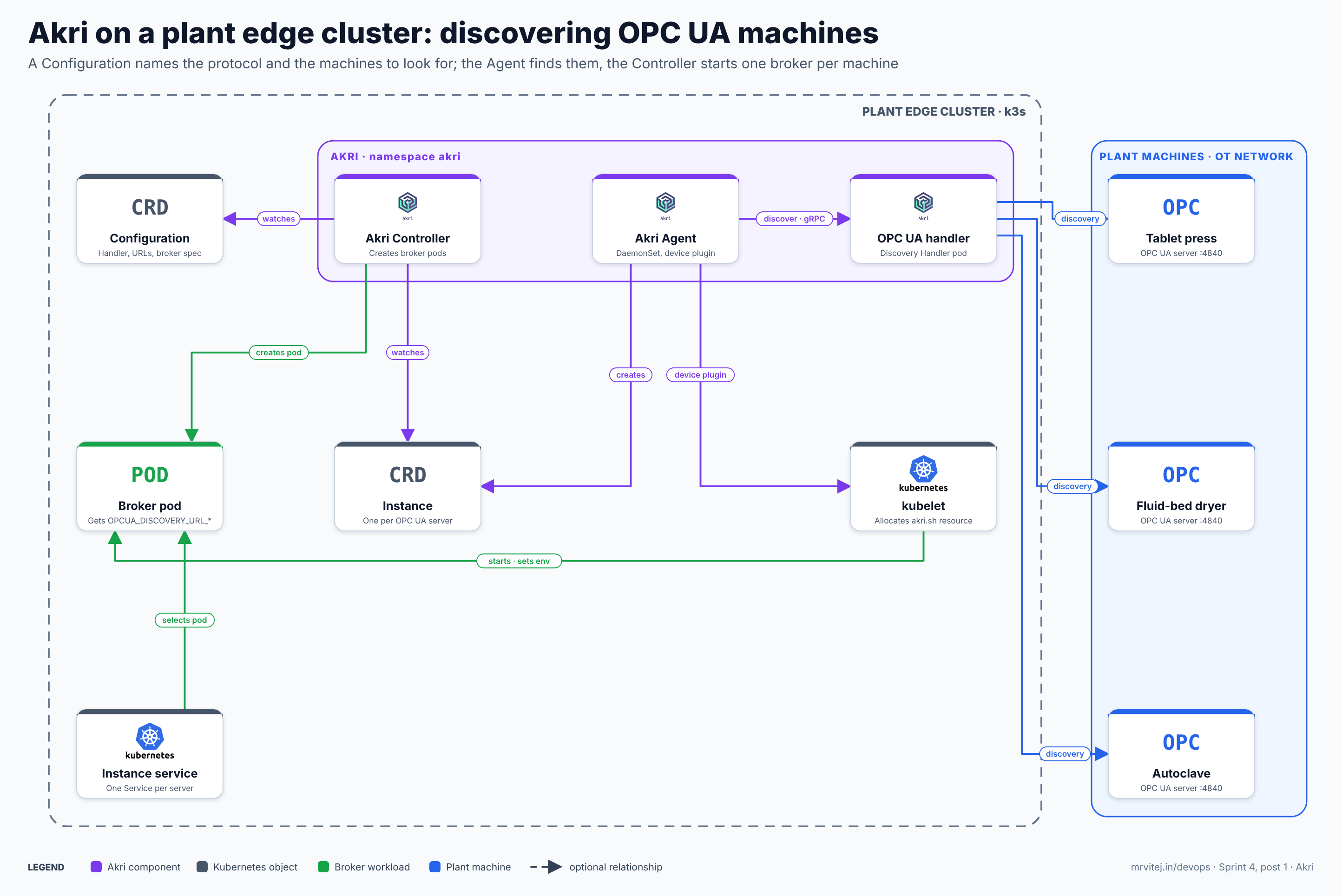
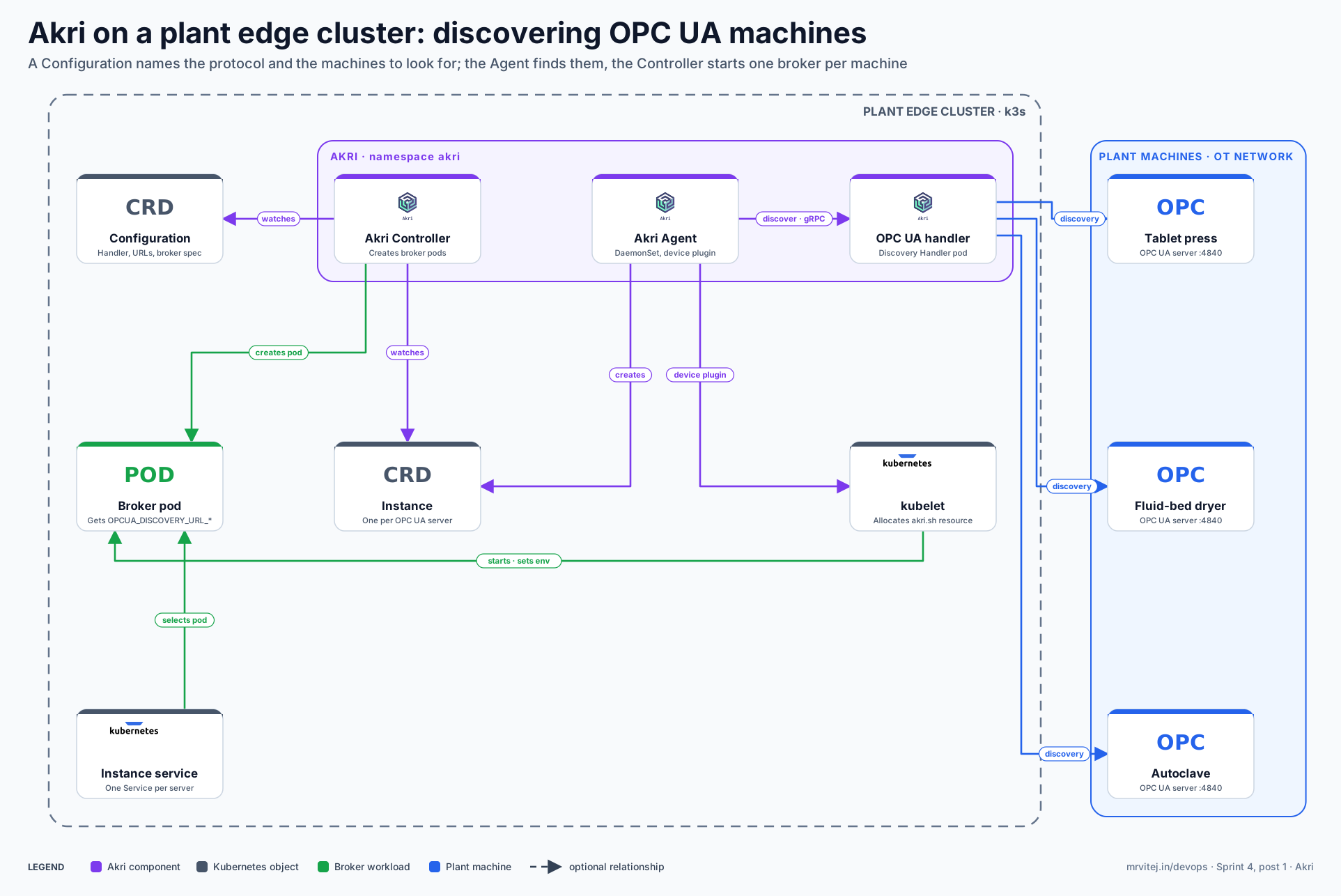
The diagram shows one broker pod and one Instance as examples; Akri creates one of each for every discovered machine. Purple is Akri, grey is a Kubernetes object, green is the broker workload and blue is a plant machine. Open the zoomable diagram, or download it as SVG or PNG.
| Component | Responsibility |
|---|---|
| Configuration | A custom resource where the operator names a device type: which Discovery Handler to use, its discovery details (for OPC UA, the server URLs), the broker pod to run, and a capacity. |
| Discovery Handler | A pod, normally run as a DaemonSet, that implements one protocol and reports the devices it can see to the Agent. |
| Agent | Runs on every node. Asks the handlers to discover, creates an Instance for each device, and implements the Kubernetes device plugin so the kubelet can allocate the device as a resource. |
| Instance | A custom resource that represents one discovered device and tracks which node is using it. Akri maintains it; you are not meant to edit it. |
| Controller | Watches Instances and creates the broker pod for each one, scheduled to a node that can reach the device. |
| Broker pod | Your workload. It receives the device’s connection details as environment variables, for OPC UA OPCUA_DISCOVERY_URL_<hash>, and talks to the device. |
| Services | Akri creates a Service for each Instance and one for the Configuration by default, so applications do not track broker pods. |
Design principle. Treat a physical device like any other resource a pod can request. The operator declares what to look for and what to run; Akri handles the devices that come and go, and the Kubernetes scheduler places the work where the device is reachable.
From Configuration to a broker on one machine
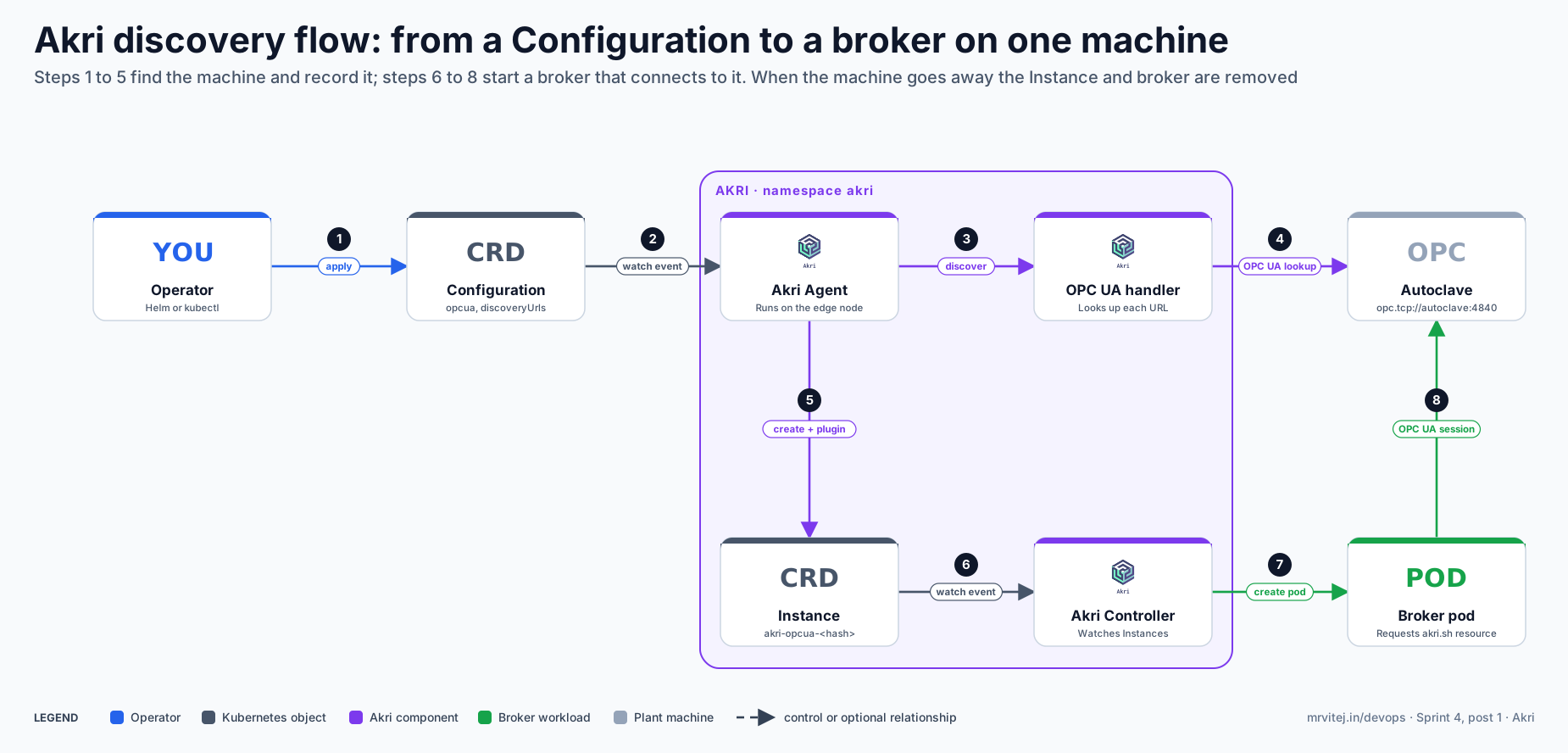
The second diagram follows one OPC UA server, an autoclave, from the moment the Configuration is applied.
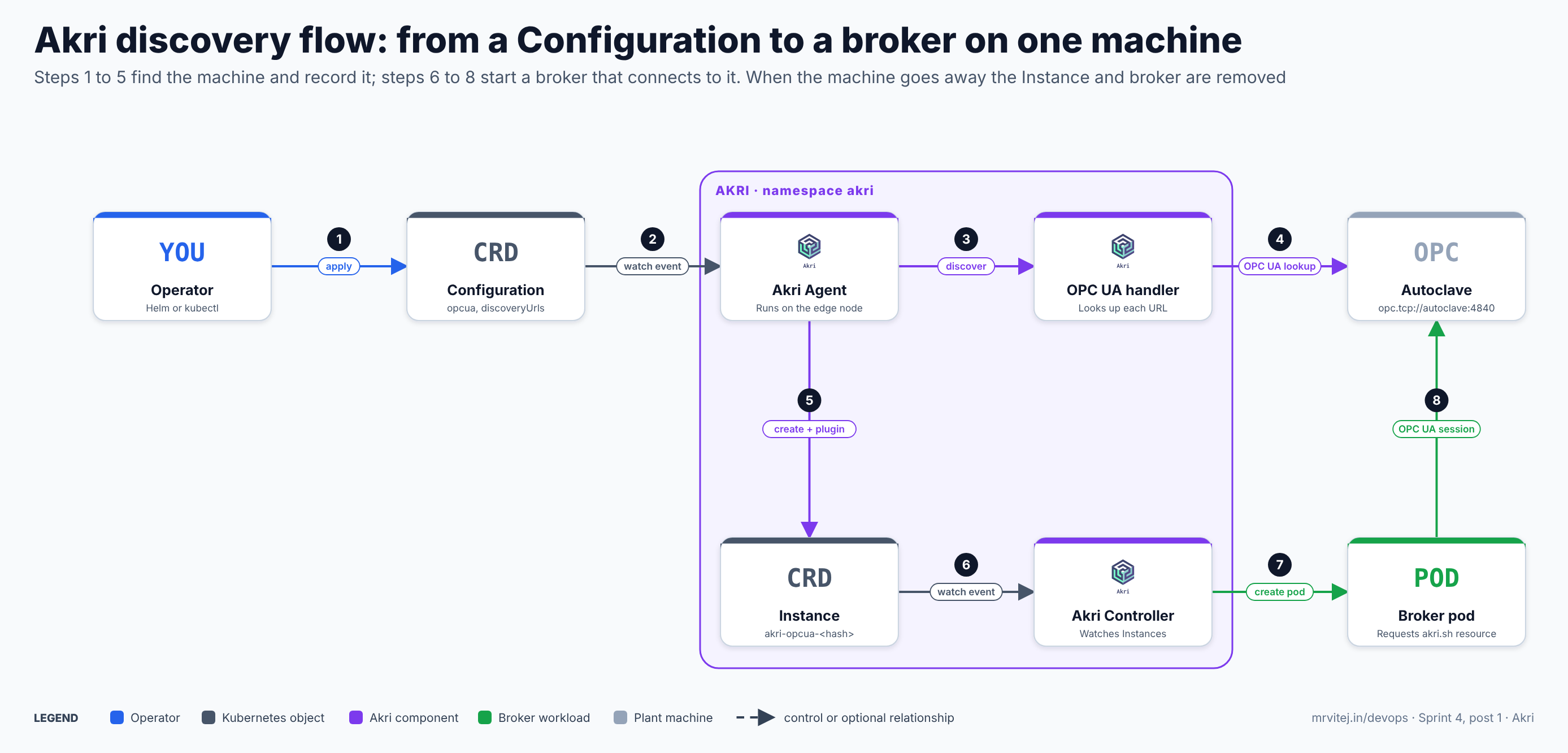
- Apply. The operator applies a Configuration (or installs the Helm chart with the OPC UA values) that lists the discovery URLs.
- Watch event. The Agent on the edge node sees the new Configuration.
- Discover. The Agent calls the OPC UA Discovery Handler over gRPC with the discovery details.
- Query the machine. The handler contacts each discovery URL over OPC UA and returns the servers it reached.
- Record. The Agent creates an Instance for the autoclave and registers a device plugin resource for it.
- Watch event. The Controller sees the new Instance.
- Create the broker. The Controller creates a broker pod that requests the
akri.shresource, so the scheduler places it on a node that can use the device. The kubelet asks the Agent’s device plugin to allocate it, and the connection details arrive as environment variables. - Connect. The broker opens its OPC UA session to the autoclave and does its work.
If a machine stops answering discovery, the Agent removes its Instance and the Controller removes the broker; when it returns, the sequence repeats. Open the zoomable flow diagram, or download it as SVG or PNG.
Production reference design
This design puts Akri on the k3s edge cluster inside a plant, with the OPC UA servers on a separate machine network that the edge node can reach.
- Prepare the edge node. Install k3s on a Linux node with a network interface on the machine network, and check that the cluster is Kubernetes 1.33 or newer, which Akri v0.14.0 requires:
curl -sfL https://get.k3s.io | sh - export KUBECONFIG=/etc/rancher/k3s/k3s.yaml kubectl version - Install Akri with the OPC UA handler. Pin the chart version and tell Akri it runs on k3s:
helm repo add akri-helm-charts https://project-akri.github.io/akri/ helm repo update helm install akri akri-helm-charts/akri \ --version <chart version> \ --namespace akri --create-namespace \ --set kubernetesDistro=k3s \ --set opcua.discovery.enabled=true - Declare the machines. Keep the Configuration in Git rather than in Helm flags. The broker image below is the project’s sample OPC UA broker, which subscribes to one node and serves its latest value; replace it with your own reader and pin an image digest:
apiVersion: akri.sh/v0 kind: Configuration metadata: name: plant-opcua namespace: akri spec: discoveryHandler: name: opcua discoveryDetails: |+ discoveryUrls: - "opc.tcp://tablet-press.machines.local:4840/" - "opc.tcp://dryer.machines.local:4840/" - "opc.tcp://autoclave.machines.local:4840/" brokerProperties: IDENTIFIER: "AutoclaveTemperature" NAMESPACE_INDEX: "2" brokerPodSpec: containers: - name: opcua-broker image: ghcr.io/project-akri/examples/opcua-monitoring-broker:latest resources: requests: "{{PLACEHOLDER}}": "1" memory: 76Mi limits: "{{PLACEHOLDER}}": "1" memory: 200Mi capacity: 1{{PLACEHOLDER}}is replaced by Akri with the device’s resource name.capacity: 1allows one broker per machine. SetIDENTIFIERandNAMESPACE_INDEXto the node ID your server exposes. - Check discovery. Each machine should appear as an Instance, with a broker pod and a Service:
kubectl get pods -n akri kubectl get akric,akrii -n akri kubectl get pods -A -l akri.sh/configuration=plant-opcua - Secure the sessions. With the Helm template,
--set opcua.configuration.mountCertificates=truemounts a secret namedopcua-broker-credentials, with the keysclient_certificate,client_key,ca_certificateandca_crl, into the brokers at/etc/opcua-certs/client-pki. With a hand-written Configuration, add the equivalent volume tobrokerPodSpec. Use signed and encrypted OPC UA connections and a trust list that matches the plant’s security policy. - Use the resource directly when needed. Any pod can request the Configuration-level resource instead of relying on the Controller:
resources: limits: akri.sh/plant-opcua: "1" - Filter and observe. Add an
applicationNamesfilter to the discovery details (actionIncludeorExclude, with a list of names) to restrict which servers are accepted, and scrape Akri’s Prometheus metrics from the Agent and Controller.
Typical production uses include discovering OPC UA servers on a factory floor, attaching camera workloads to ONVIF cameras, and giving a pod access to USB devices only on the nodes that have them. Check each Helm value and CRD field against the documentation for the release you install, because the project’s example images and defaults have moved between releases.
Where it fits in the platform
In the Sprint 4 plant monitoring project, Akri runs on the plant’s k3s edge cluster and discovers the OPC UA servers of the tablet presses, fluid-bed dryers, autoclaves, blister lines, cleanroom air handling and cold store. The Instances become a live inventory of which machines the edge can reach, and the broker for each machine is the hand-off point to the next stage: reading its tags and publishing them to MQTT, which the next briefs cover. Akri does not read tag values, store history or raise alarms; it answers “which machines are there, and where should the reader run?”. Part 1 of the project installs it, and Part 2 connects it to the data path.
Operational considerations
- Network reach and placement. Discovery Handlers and brokers must reach the OPC UA servers, so run them on nodes with an interface on the machine network and allow only those nodes through the network policy and plant firewall.
- OPC UA security. Do not leave sessions on the “None” security policy in a real plant. Manage client certificates and trust lists as secrets and rotate them; discovery alone does not prove a server is the machine it claims to be.
- Version and maintenance. v0.14.0 modernised the Kubernetes and Rust stacks and is the first release since v0.13.8, and moved the sample brokers to the
project-akri/examplesrepository, so older image paths no longer resolve. Mirror the images you use into the plant registry and pin them by digest. The release notes also list open advisories in theopcuacrate that the OPC UA handler still depends on, with a migration tracked upstream, so review them against your own risk assessment. - Capacity. The Configuration’s capacity limits how many nodes or pods may use a device. Use 1 when a single reader per machine is intended, higher only for deliberate sharing.
- Environment variable names. Device details arrive in variables whose names end in the Instance hash, such as
OPCUA_DISCOVERY_URL_<hash>. A small entrypoint that reads variables matchingOPCUA_DISCOVERY_URL_*avoids hard-coding the hash.
Adoption
- Microsoft created Akri and documents it for OPC UA and ONVIF discovery on AKS Edge Essentials. Azure IoT Operations includes Akri services that Microsoft describes as a managed commercial version of Akri whose API differs from the CNCF project.
- The project’s first CNCF annual review listed contributors from at least 14 companies, including Microsoft, SUSE, VMware and Fermyon.
- Few named production end users are public. The project’s own documentation and the Microsoft articles are the strongest evidence, so ask the community for current adopters before relying on it widely.
Alternatives
| Solution | Model | Best suited to |
|---|---|---|
| Static endpoint list (ConfigMap or Helm values) | Operators list every machine address | A fixed set of machines with stable addresses; simple and predictable |
| Azure IoT Operations Akri services | Microsoft-managed Akri with Azure Device Registry | Teams already on Azure Arc who want a managed edge stack |
| KubeEdge device management | Device twins and mappers at the edge | Cloud-managed edge nodes and device models; see the KubeEdge brief |
| OPC UA Local Discovery Server with a custom operator | Standard OPC UA discovery plus your own controller | Teams that want full control and can maintain the code |
Strengths and limitations
| Strengths | Limitations |
|---|---|
| Machines become Kubernetes resources that the scheduler understands | Discovery only; reading, storing and alerting are separate jobs |
| Nothing to install on the device; works over standard protocols | Sandbox-stage project; check recent release and maintainer activity before depending on it |
| Handles devices that appear and disappear | The OPC UA handler depends on an older crate with open advisories |
| Extensible with custom Discovery Handlers over gRPC | Sample brokers are demos; you build the real broker |
| Runs on light clusters such as k3s | Linux nodes only, and Kubernetes 1.33 or newer for the latest release |
Recommendation
Assess. Akri is worth a trial when the list of machines or devices changes often, or when different nodes can see different devices. For a plant with a fixed set of machines and stable addresses, a static endpoint list is simpler and has fewer moving parts. Start with the simulated plant, discover a handful of OPC UA servers, check how Instances behave when a server is stopped and restarted, and review the OPC UA handler’s dependency advisories against your security policy before using it near production equipment.
References: CNCF project page · Akri documentation · Akri repository · Akri v0.14.0 release notes · Discover OPC UA servers with Akri (Microsoft) · Akri services in Azure IoT Operations (Microsoft) · CNCF Landscape