Infrastructure code has a review problem that application code does not. A reviewer reading a diff of .tf files sees what the author typed, not what will happen: which resources will be replaced, which will be destroyed, and whether the state the change was planned against is still the state in the cloud. Teams that run terraform apply from laptops also have a second problem, because nobody else can tell who applied what, from which branch, with which credentials.
Atlantis moves the plan and the apply into the pull request. A developer opens a PR, Atlantis posts the plan as a comment, reviewers read the real plan next to the code, and someone with permission comments atlantis apply. The commands run on a server the team controls, with credentials the developers never hold, and every step is recorded in the PR.
CNCF daily · Sprint 4, post 13 of 15 · Automation & Configuration
At a glance
| Category | Provisioning › Automation & Configuration |
| CNCF status | Sandbox (Landscape: accepted 18 June 2024) |
| Written in | Go |
| License | Apache 2.0 |
| Latest version I found | v0.49.0 (the version named in the project’s deployment docs; I did not confirm a release date) |
| Runs | terraform or tofu on the Atlantis host, chosen per server or per project |
| Git hosts | GitHub, GitHub Enterprise, GitLab, Bitbucket, Azure DevOps and Gitea |
| Install | A container image, a Helm chart, Kubernetes manifests, or a plain binary |
| State kept by Atlantis | Locks and plan files on disk or in a lock backend; Terraform state stays in your own backend |
| Interface | PR comments and status checks, a small web UI for locks, and an API |
| Project links | runatlantis.io; CNCF Slack channels #atlantis and #atlantis-contributors |
Atlantis is not an infrastructure as code tool. It does not describe or provision anything on its own. It is the automation around OpenTofu or Terraform, and everything about providers, state and HCL in this post is the behaviour of those tools. The OpenTofu brief covers them in detail.
The problem
Running infrastructure changes safely needs four things at once, and each is easy to get wrong when done by hand:
- Review of the plan, not only the code. The plan is the only description of what will change. If it lives in a terminal on one engineer’s machine, it is not reviewed.
- Serialisation. Two people changing the same state at the same time is a classic cause of conflicts and half-applied changes. Backends offer state locking, but that only protects the moment of the apply, not the window between “I planned” and “I applied”.
- Controlled credentials. Cloud credentials with write access should live in one place with a clear owner, not on every developer’s machine.
- An audit trail. Who approved, who applied, what the plan said, and which commit it came from.
Hosted services such as Terraform Cloud, Spacelift and others solve this as products. Atlantis solves it as software you run yourself, with the pull request as the interface.
Key concepts
- Project. A directory containing Terraform or OpenTofu configuration, together with a workspace. A project is the unit that is planned, locked and applied. Without any configuration, Atlantis treats every directory with changed Terraform files as a project.
- Autoplan. When a PR changes files that a project depends on, Atlantis runs
planfor that project automatically and posts the result. - Plan and apply comments.
atlantis planandatlantis applyin a PR comment run the commands, optionally scoped with-p project,-d diror-w workspace. Extra Terraform flags can be passed after--. - Lock. On
plan, Atlantis locks the directory and workspace for that PR. Another PR that tries to plan the same project is told the project is locked, until the first PR is merged or closed, or someone runsatlantis unlock. - Server-side repo config. A
repos.yamlthat the operator controls. It sets requirements, allowed overrides and workflows per repository. - Repo-level
atlantis.yaml. A file in the repository that declares projects, workflows and autoplan rules, within whatever the server side allows. - Workflow. The list of steps for plan, apply and policy checks. The defaults are
init,planandapply; custom steps can add flags or run commands. - Requirements. Conditions checked before a command runs, such as
approved,mergeableandundiverged. - Policy check. An optional step that runs Conftest against the plan and blocks apply until the policies pass or a named group approves.
Architecture
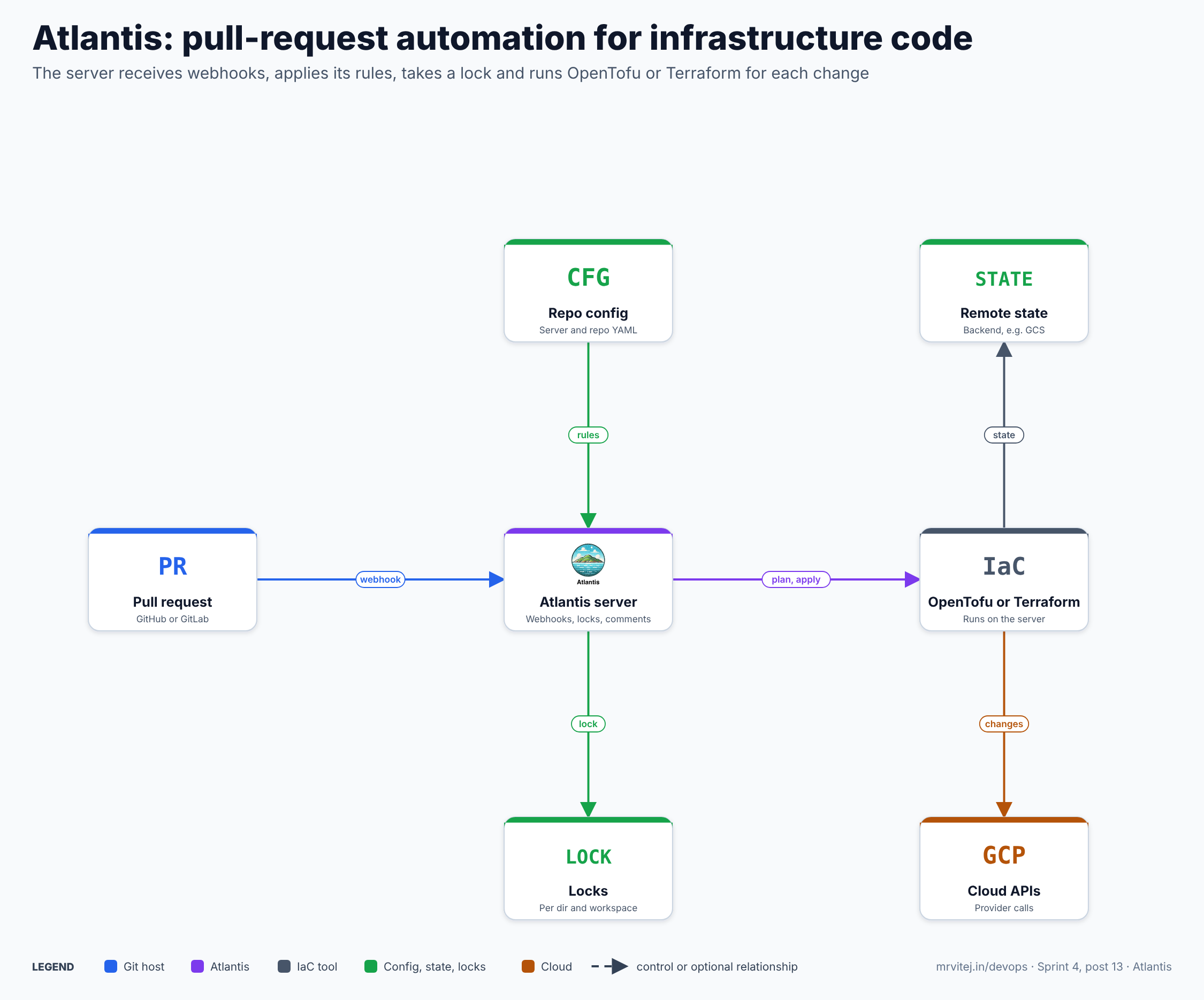
Atlantis is one Go process. It exposes an HTTP endpoint at /events where the Git host sends webhooks, a UI for locks, and optional metrics and API endpoints. When an event arrives, Atlantis authenticates it with the webhook secret, finds the repository’s configuration, checks out the pull request branch into a working directory on its own disk, and runs the configured steps there.
The consequence of that design is worth stating plainly, because it drives the whole security discussion later: Terraform or OpenTofu runs on the Atlantis host, as the Atlantis process, with whatever credentials that host has. Atlantis does not sandbox the tool and does not fetch credentials on the tool’s behalf. The Atlantis docs say cloud credentials come from the host, for example an instance role or service account, environment variables, files, or a secrets tool such as the Vault provider.
The server keeps two kinds of data on disk under its data directory: the working copies and plan files for open pull requests, and, by default, a lock database. Terraform state is not stored there. It stays in whatever backend the Terraform configuration declares, such as a Cloud Storage bucket.
Life of a change
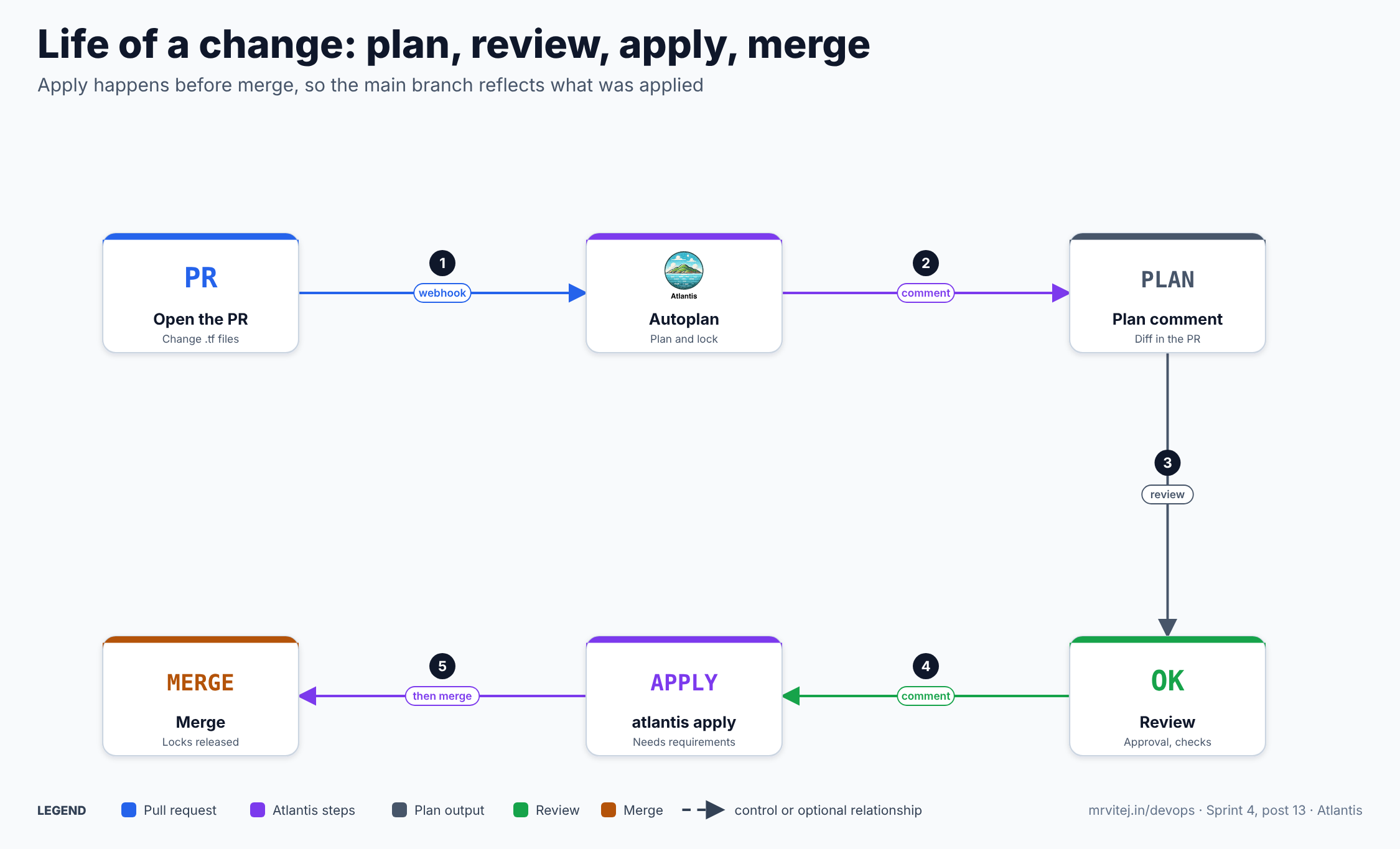
- A PR is opened or updated. The Git host sends a webhook. Atlantis works out which projects the changed files belong to.
- Autoplan runs. Atlantis runs
initandplanin each affected project and takes the lock for the directory and workspace. - The plan is posted as a comment. Reviewers read the plan beside the code. A commit status shows whether the plan succeeded.
- Review. The team reviews and approves in the Git host as usual. If policy checks are enabled, they run after the plan.
- Apply. Someone with permission comments
atlantis apply. Atlantis checks the requirements, then applies the saved plan. - Merge. The PR is merged. The locks are released when the PR is merged or closed.
The order matters. Apply happens before the merge, so main reflects what was applied. If an apply fails, the PR is still open, the lock is still held, and the author can push a fix and plan again. The alternative model, merge first and apply from the main branch, leaves main ahead of reality after any failure. That second model is what pipeline-based flows such as GitHub Actions or Argo-based flows normally do, and the trade-off is covered in the alternatives section.
Install
Atlantis publishes an official image at ghcr.io/runatlantis/atlantis. Every release has an Alpine variant (the unsuffixed tag, or -alpine) and a Debian variant (-debian). One behaviour change in the current docs deserves attention: the default images no longer bundle Terraform or OpenTofu. Atlantis downloads the version it needs on first use, so the server must be told which version to use, with --default-tf-version or the ATLANTIS_DEFAULT_TF_VERSION environment variable. Without it the server refuses to start. For OpenTofu, also set --default-tf-distribution=opentofu and give an OpenTofu version as the default. If the host cannot download binaries (--tf-download=false), build a custom image that carries the binary.
The Helm chart is the common route on Kubernetes:
helm repo add runatlantis https://runatlantis.github.io/helm-charts
helm inspect values runatlantis/atlantis > values.yaml
A minimal values.yaml follows the chart’s documented keys. The token and secret below are placeholders and, in a real cluster, should come from a Kubernetes Secret rather than the file:
orgAllowlist: github.com/example-org/*
defaultTFVersion: "1.11.0"       # example value; pick the version you have tested
# For OpenTofu:
# defaultTFDistribution: opentofu
github:
  user: atlantis-bot
  token: <token>
  secret: <webhook-secret>
helm install atlantis runatlantis/atlantis -f values.yamlThe project’s docs recommend a StatefulSet over a Deployment when you use raw manifests, because Atlantis stores plans and locks on disk: if the pod dies or you upgrade, a persistent volume means plans that have not been applied are not lost. If that data is lost, the fix is to run atlantis plan again, so it is an inconvenience rather than a disaster. There are also documented routes for running Atlantis on a Google Compute Engine instance and on GKE, including a community Terraform configuration for a GKE cluster.
Connect the Git host
Atlantis needs two things from the Git host: a way to authenticate (to read PRs, post comments and set commit statuses) and a webhook that delivers events.
For GitHub, the docs offer a dedicated user with a token, or a GitHub App. The token needs commit statuses (read and write), contents (read), metadata (read) and pull requests (read and write). The App route uses --gh-app-id, --gh-app-key-file and --gh-webhook-secret, creates the webhook for you, and gives per-installation tokens instead of a personal one. The /github-app/setup page used during setup must be protected while it is available.
For a manual webhook, set the payload URL to https://<atlantis-host>/events with content type application/json, the shared webhook secret, and the events Pull request reviews, Pushes, Issue comments and Pull requests. For GitLab, set the URL and the secret token, and tick Push events, Comments and Merge Request events. The same secret must be used for every repository that points at the server. Generate it with a random string tool and make it longer than 24 characters.
Then start the server with the essentials:
atlantis server \
  --atlantis-url="https://atlantis.example.com" \
  --repo-allowlist="github.com/example-org/plant-infra" \
  --repo-config=/etc/atlantis/repos.yaml \
  --default-tf-version=1.11.0 \
  --gh-app-id="$APP_ID" \
  --gh-app-key-file=/secrets/app-key.pem \
  --gh-webhook-secret="$WEBHOOK_SECRET" \
  --write-git-creds
Every flag can also be set as an ATLANTIS_ environment variable or in a config file. The --repo-allowlist flag is the first line of defence: Atlantis ignores webhooks for repositories that are not on it. The version number above is an example, not a recommendation.
A first project
The smallest useful repository has one directory of Terraform and no Atlantis configuration at all. Open a PR that changes a .tf file and Atlantis autoplans it. When there are several environments, add an atlantis.yaml at the root of the repository:
version: 3
automerge: false
parallel_plan: true
projects:
  - name: network-prod
    dir: live/prod/network
    workflow: gcp
    autoplan:
      when_modified: ["*.tf", "*.tfvars", "../modules/**/*.tf"]
      enabled: true
    apply_requirements: [approved, mergeable]
  - name: app-prod
    dir: live/prod/app
    workflow: gcp
    depends_on: [network-prod]
    apply_requirements: [approved, mergeable]
  - name: tofu-sandbox
    dir: live/sandbox
    terraform_distribution: opentofu
    repo_locks:
      mode: on_apply
A few things in this file are easy to miss:
- Listing projects turns off auto-discovery. Once
projectsis present, directories you did not list are not planned, unless you enableautodiscoverwith a mode and optional ignore paths. when_modifiedmakes module changes trigger plans. A project plans when files matching those patterns change, so a change to a shared module under../modulescan plan every project that uses it.depends_onandexecution_order_groupcontrol ordering when projects depend on each other, such as a network that must exist before the application.repo_locks.modecan beon_plan(the default),on_applyordisabled.on_applylets several PRs plan the same project and only serialises the apply.terraform_distributionandterraform_versioncan be set per project, so one repository can mix Terraform and OpenTofu. Autoplan recognises*.tofufiles as well as*.tf.- Requirements can be set per project here, but only if the server side allows it. See the security model.
Autoplanning can be turned off per project with enabled: false, or for the whole server with --disable-autoplan, so plans only run when someone comments.
Commands in the pull request
| Comment | What it does |
|---|---|
atlantis plan |
Plans the projects touched by the PR; -p, -d and -w narrow it |
atlantis apply |
Applies saved plans; -p project applies one project |
atlantis plan -- -lock=false |
Passes extra flags after -- to the Terraform command |
atlantis plan -d live/prod/app -- -destroy |
Plans a destroy with the -destroy flag |
atlantis unlock |
Releases the locks held by the PR |
atlantis cancel |
Stops running or pending operations in the PR |
atlantis import and atlantis state rm |
Run import and state rm through the same permission and requirement checks |
atlantis approve_policies |
Approves failing policy sets, if policy checking is enabled |
Atlantis also picks up env/{workspace}.tfvars files automatically. If you name files env/staging.tfvars and env/production.tfvars, plans in the staging and production workspaces use them without a custom workflow.
Locking
Locking is the feature people notice first, and it is simple to describe: when plan runs for a project, Atlantis locks that directory and workspace for that PR. A second PR that plans the same project sees a message that the project is locked by the first PR, and its plan does not run. The lock is released when the first PR is merged or closed, or when someone comments atlantis unlock. The web UI lists the current locks and lets you discard one.
Why lock at plan time instead of apply time? Because the plan is only valid for the state it was computed against. Locking early means a plan that was reviewed is still a plan against the same state when it is applied, and no other PR can slip an apply in between. The cost is that a forgotten open PR holds the lock, which is why on_apply mode and --disable-repo-locking exist. Disable it only if your state backend lock and your process make it safe.
There is also a global apply lock. A button in the web UI blocks every atlantis apply on the server, which is useful during an incident or a migration. It can be removed with --disable-global-apply-lock. The docs note that the apply check fails closed if the lock backend cannot be reached.
Server-side configuration
The server-side repos.yaml is where the operator, not the repository, decides what is allowed. It is passed with --repo-config (a file) or --repo-config-json (a string). Each entry matches a repository by id, which can be an exact name or a regular expression; when several entries match, the later entries override the earlier ones, so put the broad /.*/ entry first. A reference configuration for the plant-infrastructure repository:
repos:
  - id: /.*/
    branch: /main/
    apply_requirements: [approved, mergeable, undiverged]
    allowed_overrides: [workflow]
    allow_custom_workflows: false

  - id: github.com/example-org/plant-infra
    workflow: gcp
    plan_requirements: [undiverged]
    import_requirements: [approved, mergeable]

workflows:
  gcp:
    plan:
      steps:
        - init
        - plan
    policy_check:
      steps:
        - policy_check:
            extra_args: ["-p /home/atlantis/conftest_policies/"]

policies:
  owners:
    teams:
      - platform-security
  policy_sets:
    - name: gcp-baseline
      path: /home/atlantis/conftest_policies/
      source: local
      approve_count: 1
      prevent_self_approve: true
What the pieces do:
branchlimits which base branches Atlantis acts on, so PRs against other branches are ignored.apply_requirementslists the conditions that must hold beforeatlantis applyruns.allowed_overrideslists the keys a repository may override in its ownatlantis.yaml. Everything not listed is controlled by the server.allow_custom_workflowsdecides whether a repository can define its own workflows. It defaults to false, for a reason explained in the security section.workflowsdefines named workflows that repositories can select (whenworkflowis inallowed_overrides).policiesdefines Conftest policy sets, who owns them and how many approvals a failing check needs.
Other per-repo keys include repo_locks, custom_policy_check, autodiscover, and pre_workflow_hooks and post_workflow_hooks. Pre-workflow hooks run scripts before the default or custom workflows, and can only be defined in server-side config. By default a failing hook does not stop Atlantis from continuing; set --fail-on-pre-workflow-hook-error if it should.
Requirements, one by one
| Requirement | What must be true |
|---|---|
approved |
The PR has at least one approval from someone other than its author |
mergeable |
The Git host reports the PR as mergeable, meaning its own branch protection rules pass |
undiverged |
The project’s files are ahead of the base branch, so the plan was not made against an outdated base |
policies_passed |
Every policy set has passed or been approved |
Three details from the docs matter in practice. First, on GitHub, read permission is enough to approve: the approved requirement counts any non-author approval the host reports, so combine it with branch protection that requires reviews from code owners if you want approvers to be a specific group. Second, an approval is not tied to a particular plan. A reviewer can approve, the author can push a new commit, and Atlantis can plan again; use --discard-approval-on-plan or the Git host’s “dismiss stale reviews” setting if that matters to you. Third, state rm must satisfy both the apply and the import requirements, because it modifies state.
Custom workflows
The default workflow runs init, plan and apply. A custom workflow changes the steps for any of plan, apply, import, state rm or policy check. The available step types are init, plan, apply, show, policy_check, import, state_rm and run, with extra_args on the Terraform steps and env and multienv for run.
The documented use cases show how far this goes:
workflows:
  staging:
    plan:
      steps:
        - init
        - plan:
            extra_args: ["-var-file", "staging.tfvars"]
  production:
    plan:
      steps:
        - init
        - plan:
            extra_args: ["-var-file", "production.tfvars"]
    apply:
      steps:
        - apply:
            extra_args: ["-var-file", "production.tfvars"]
Each entry in extra_args is passed as a single argument. It is not interpreted by a shell, so ;, && and pipes do not work there, though environment references such as $WORKSPACE, $DIR and $ATLANTIS_TERRAFORM_VERSION are expanded. A run step is the escape hatch for anything else, such as running terraform validate, formatting checks, or a script that generates configuration.
The key rule: custom workflows come from either the server-side config or the repository. A repository can choose a server-defined workflow only if allowed_overrides includes workflow, and can define its own only if allow_custom_workflows: true is set for it. Teams that need flexibility should define the workflows centrally and let repositories select them.
Policy checks
Atlantis can run Conftest, which evaluates Open Policy Agent policies, against the plan before apply. Enable it with --enable-policy-checks, define policy sets in server-side config as shown above, and add a policy_check workflow. A simple Rego policy that rejects a public storage bucket is the kind of rule teams write; the policies themselves are your own.
How the check behaves:
- The check runs after
plan, against the plan output in JSON form by default (theSHOWFILE). It can be pointed at the.tffiles instead with ashowandrunstep. - If a policy set fails, the
policies_passedrequirement blocksatlantis apply. - Someone in the policy owners group, or the set’s owners, can run
atlantis approve_policies. Theapprove_countandprevent_self_approvefields decide how many approvals are needed and whether the PR author counts. - Approvals can be made sticky with
sticky_policy_approvals, so a policy approval survives a new plan, andpolicy_item_regexnarrows an approval to matching items. - If you also use
--gh-team-allowlist, you must allowlist thepolicy_checkcommand or a manualatlantis plancannot run it.
A policy check is a control on the plan, not on the environment. It cannot see what is not in the plan, and it does not replace a review.
Cloud authentication without long-lived keys
A recurring mistake with Atlantis is putting a service account key file in a Kubernetes Secret and mounting it into the pod. It works, and it leaves a long-lived credential with write access sitting in the cluster. The preferable setup is to give the Atlantis pod an identity and let the cloud exchange it for short-lived tokens.
Atlantis itself does not manage this. The Atlantis provider-credentials docs list the sources the underlying tools support, and for Google Cloud they mention instance service accounts on Compute Engine. The approach below is general Google Cloud and Terraform practice that I am describing from my own knowledge of GKE rather than from the Atlantis docs, so check the current Google Cloud documentation before relying on it:
- Run Atlantis on a GKE cluster with Workload Identity Federation for GKE enabled.
- Create a Google service account for Atlantis and grant it only the roles needed for the projects it manages. Avoid project-wide Owner.
- Bind the Kubernetes service account that the Atlantis pod uses to that Google service account, so pods using it can obtain its tokens.
- Annotate the Kubernetes service account accordingly. The Helm chart supports service account settings; confirm the exact value names in the chart version you install.
- Do not set
GOOGLE_APPLICATION_CREDENTIALS. The Google provider then uses Application Default Credentials, which resolve to the workload identity on the pod.
Two cautions. The identity that Atlantis runs as is the identity every apply uses, regardless of which developer commented. That is a deliberate property, and it also means this one account is as powerful as everything Atlantis manages. Split the risk by running separate Atlantis instances, or at least separate service accounts through different projects and workflows, for environments with different blast radius, such as a plant’s production infrastructure versus a sandbox. And Terraform state itself contains sensitive values, so the bucket holding it should be as protected as the account that writes to it.
The security model
The Atlantis security page begins from the right premise: Atlantis runs code from pull requests, with credentials. A terraform plan is not a read-only operation in the sense a security reviewer might hope. Terraform can run an external data source, load providers, and execute local-exec provisioners, and a malicious atlantis.yaml can run arbitrary commands if custom workflows are allowed. So anyone who can get a change planned can potentially run code on the Atlantis host and use its credentials.
The documented mitigations map to the controls above:
| Risk | Control |
|---|---|
| A stranger opens a PR | Avoid public repositories; do not enable --allow-fork-prs; set --repo-allowlist |
| A PR declares a malicious provider or data source | Protect planning: bake the providers into the image and deny network egress, use an internal registry, or validate in the plan step |
A PR changes atlantis.yaml to run commands |
Leave allow_custom_workflows false; select workflows from server-side config |
| A forged webhook | Set a webhook secret (Azure DevOps uses basic auth instead) |
| Traffic interception | Serve TLS with --ssl-cert-file and --ssl-key-file, or terminate it at a load balancer |
| Anyone opens the web UI | Enable --web-basic-auth with --web-username and --web-password |
| A user supplies an arbitrary var file | Restrict with --var-file-allowlist |
| Anyone on the team can apply | Restrict with --gh-team-allowlist or an external authorisation command |
Who can apply
By default any team can plan and apply. The GitHub team allowlist changes that. A pair is team:command, and a wildcard matches any team:
atlantis server --gh-team-allowlist="*:plan,*:policy_check,*:unlock,platform-leads:apply"Here everyone can plan, check policy and unlock, and only members of platform-leads can apply. Team names must be slugs in current versions, and child teams inherit what their parent team is allowed. For other Git hosts, or for custom logic, server-side config supports an external team_authz command that Atlantis calls to decide whether a user may run a command.
Layered on top, the approved and mergeable requirements make sure the change was reviewed before the person with permission applies it. The combination to aim for is: anyone can propose and plan, a separate group can apply, and the apply requires a review the author cannot give themselves.
Finally, the Atlantis host is a high-value target. Keep it on a private network where possible, restrict who can exec into the pod, keep the working-directory volume private, and treat plan output as sensitive, since it can contain secrets that providers marked as sensitive only partly redact.
Monitoring and day-2 operations
Atlantis exposes metrics for its operations, including counts of errors and successes and latencies, with both Prometheus and StatsD supported. Enable the Prometheus endpoint in the server-side config:
metrics:
  prometheus:
    endpoint: "/metrics"
The metrics worth alerting on are the error counters for autoplan, plan comments and apply comments. A rising apply error count is an operational signal that deserves a person. Latency summaries show whether plans are slow, which in practice usually means a large state, a slow provider, or too many projects planning in parallel.
For day-2 operations:
- Upgrades. Pin the image tag. When upgrading, remember that open PRs have plan files on disk; with a persistent volume they survive, otherwise re-plan.
- Disk. Working copies and plans accumulate for open PRs, so size the volume and close stale PRs.
- Stuck locks. Use the UI or
atlantis unlockfrom the PR; an automated clean-up of long-lived PRs also helps. - Rate limits. A busy server calls the Git host API often, so watch for throttling on a large installation.
- Drift. An experimental drift-detection feature and an API endpoint exist, and I did not test them, so treat them as experimental until you have evaluated them. A scheduled
planfrom a pipeline is a common alternative. - Backups. The lock database and plan files are recoverable by re-planning; your Terraform state is the data that needs real backup, and that lives in your backend.
Limits worth knowing
- It is a server you operate. You patch it, secure it and keep it available. When it is down, no one can apply from PRs.
- Terraform runs on the host. The host’s credentials and network are the blast radius, and plans are not sandboxed.
- One identity applies everything. Fine-grained per-user cloud permissions are not part of the model.
- Locks are coarse. A lock covers a directory and workspace, and a slow PR can block others.
- Approvals are not bound to a plan. Use branch protection or
--discard-approval-on-planto close the gap. - Comment-driven. Commands live in PR comments, which suits teams on GitHub or GitLab and fits less well with processes that want a formal change ticket.
- It does not manage state, providers or modules. Those belong to your backend, registry and conventions.
- Large repositories. Many projects in one repository need careful autoplan patterns and parallelism, or plan times grow.
Usage cases
- Shared infrastructure repositories. A platform team reviews every network, IAM and cluster change as a PR with the plan attached.
- Self-service for teams. Application teams propose infrastructure changes in their own repos, and a platform group holds apply permission.
- Many environments from one repository. Projects and workflows map to
stagingandproductiondirectories or workspaces. - Policy-gated changes. Conftest rules block public buckets or untagged resources until the policy owners approve.
- OpenTofu migrations. Per-project
terraform_distributionlets a team move one project at a time. - Industrial platforms. In the pharmaceutical-plant machine monitoring design on Google Cloud, plant infrastructure changes could go through the same reviewed pull-request path, with a stricter group allowed to apply to anything the plant depends on; that is one control among several and does not replace the plant’s own change management.
Adoption
The project’s adopters file lists Lambda, Rapid7, CloudScript, Vend and ClickUp, among others, each described in the file’s own words. Lambda uses Atlantis for self-service infrastructure on its internal platform, and Rapid7 runs per-project installations on Kubernetes for its Terraform deployments. The list is voluntary and self-reported, so it shows who is willing to be named and not how large the user base is. The project also holds community meetings and has channels on the CNCF Slack.
Alternatives and neighbours
| Option | Model | Best suited to |
|---|---|---|
| Atlantis | Self-hosted server; plan and apply from PR comments; apply before merge | Teams that want PR-driven workflow without a vendor service, and accept running a server |
| Terraform Cloud and HCP Terraform | Hosted service with runs, state and policy | Teams that prefer a managed service and accept its licensing |
| Spacelift and similar platforms | Hosted or self-hosted platforms with stacks, policies and drift detection | Teams that want a richer product with built-in governance |
| GitHub Actions or GitLab CI | Pipeline runs plan on PR and apply on merge |
Teams that want no extra server and accept merge-then-apply |
| Argo-based flows | GitOps controllers or workflow engines drive plans and applies | Teams already standardised on Argo who want infrastructure in the same loop |
| Manual runs from a laptop | Engineers run commands directly | A one-person project, and not much beyond that |
The honest comparison is between Atlantis and a CI pipeline. A pipeline needs no new service, and credentials can be short-lived through OIDC federation, which is a real advantage. Atlantis gives you plan-in-the-PR and apply-before-merge out of the box, plus locks and per-command permissions that you would otherwise build yourself. Hosted platforms add more governance, and you pay for it in cost and in dependence on a vendor. If your team is happy with merge-then-apply and has a pipeline culture, a pipeline is simpler; if you want the PR to be the control panel for infrastructure, Atlantis is built for that.
Strengths and limitations
| Strengths | Limitations |
|---|---|
| The plan is reviewed next to the code, in the PR | A server to run, patch and secure |
Apply before merge keeps main in line with reality |
Terraform runs on the host with its credentials |
| Locks stop two PRs changing the same project | Coarse locks and long-lived PRs can block others |
| Fine-grained command permissions and requirements | Approvals are not tied to a specific plan |
| Works with Terraform and OpenTofu, many Git hosts | One apply identity for everything it manages |
| Policy checks with Conftest and approval groups | Comment-driven interface suits some teams more than others |
Project status
Atlantis is a CNCF Sandbox project, accepted on 18 June 2024 per the Landscape entry. It is Apache 2.0 licensed and written in Go, with a public repository, documented security practices and a maintainers file. v0.49.0 is the version named in the current deployment docs. The version is still below 1.0, so read release notes before upgrading, as configuration and image behaviour change between releases, as the removal of bundled Terraform binaries shows.
Recommendation
Adopt for teams that want pull-request-driven infrastructure changes and can run a small, well-secured service; trial it first if your team is happy with a pipeline. Start with one repository and one Atlantis instance in a test project, with a dedicated Google service account that can only change a sandbox. Use a GitHub App rather than a personal token, set --repo-allowlist, a webhook secret and TLS from the first day, and leave allow_custom_workflows off. Define the workflows centrally, require approved, mergeable and undiverged before apply, and restrict apply to a named team. Add Conftest policies only when you have two or three rules you actually want enforced. Only then move on to production: a separate instance or identity, a persistent volume, metrics and alerts on apply errors, and a written answer to the question “who can apply, and what do they apply as?”.
References: Atlantis repository · Atlantis documentation · Deployment · Security · Server-side repo config · Repo-level atlantis.yaml · Command requirements · Locking · Policy checking · CNCF project page · OpenTofu brief