
EMQX is an MQTT broker: the server that devices, gateways and applications connect to so they can publish messages to topics and subscribe to the topics they care about. MQTT is the lightweight publish and subscribe protocol that most industrial and IoT systems use, because it works over unreliable links, keeps headers small and lets a device talk through a single outbound connection. EMQX is written in Erlang, runs as a single node or as a cluster, and adds a SQL-based rule engine and a catalogue of connectors that move selected messages into Kafka, Google Cloud Pub/Sub, databases, HTTP services and other MQTT brokers. It is a NON CNCF tool: the CNCF Landscape lists it under App Definition and Development › Streaming & Messaging, but it is not a CNCF project. It is made by EMQ Technologies. The licence matters and it changed: versions before 5.9.0 were Apache 2.0, and from 5.9.0 the whole product is source-available under the Business Source License 1.1, with free production use for a single node and a commercial licence needed for a production cluster. This brief explains EMQX from the problem it solves to installing, configuring, securing, scaling and operating it, including the licence terms, so one read is enough to decide whether it fits your platform.
CNCF daily · Sprint 4, post 3 of 15 · Streaming & Messaging
At a glance
| Category | App Definition and Development › Streaming & Messaging |
| CNCF status | NON CNCF. A CNCF Landscape item, not a CNCF project |
| Maker | EMQ Technologies |
| Written in | Erlang/OTP |
| License | Business Source License 1.1 from v5.9.0 (May 2025). Free for non-production use and single-node production use; a commercial licence is required for a multi-node production cluster. Each version converts to Apache 2.0 four years after it is published. Versions before 5.9.0 are Apache 2.0 |
| Protocols | MQTT 3.1, 3.1.1 and 5.0 over TCP, TLS, WebSocket and secure WebSocket; QUIC and gateways for other protocols exist as well |
| Configuration | HOCON: emqx.conf, base.hocon, environment variables with the EMQX_ prefix, the Dashboard and the REST API |
| Latest release | 6.3.1 (17 September 2026). Maintained lines include 6.2, 6.1 and 5.10. Check the release notes for the current set |
| Deployment | Docker image, OS packages, Kubernetes with the EMQX Operator or the Helm chart, or the EMQX Cloud service |
| Integrations | Rule engine and data integration for Kafka, Google Pub/Sub, HTTP, databases, MQTT bridges and more |
| Operations | Dashboard on port 18083, REST API, emqx ctl CLI, Prometheus endpoints |
The problem EMQX solves
A factory, a fleet or a building produces a steady stream of small messages from many sources: a temperature reading every few seconds, a state change, an alarm. Sending them straight from each device to a database or cloud service does not scale, because every device needs credentials and a client for every destination, a network outage loses the messages produced during it, and a new consumer means touching every device.
A message broker decouples the two sides. Devices publish to a topic such as plant/line-1/press-3/temperature; consumers subscribe to filters such as plant/line-1/#; the broker handles delivery, buffering for slow or absent subscribers, and access control. MQTT suits this well: connections are persistent and cheap, quality of service levels let a publisher choose between “at most once”, “at least once” and “exactly once” delivery, and a retained message gives a new subscriber the last known value at once.
Plenty of brokers do this. What EMQX adds is scale and built-in data movement. The same product that accepts the connections can filter and reshape messages with SQL and push them to the systems that store and analyse them, so a plain MQTT broker at the edge can feed Kafka or a cloud message service without a separate stream-processing tier.
Key concepts
- Client. Anything that opens an MQTT connection: a gateway, an agent such as Telegraf, an application. A client identifies itself with a client ID and may also present a username, a password or a TLS certificate.
- Topic and topic filter. Topics are
/-separated strings. A filter can use+for one level and#for all remaining levels, soplant/+/press-3/#matches many topics. - Quality of service (QoS). Level 0 sends once, level 1 retries until acknowledged and may deliver duplicates, level 2 uses a four-step handshake to deliver exactly once between two parties.
- Session. The broker’s record of a client: its subscriptions and the QoS 1 and 2 messages not yet delivered. A client that connects with a clean start discards it; one that reconnects without a clean start resumes it.
- Retained message. The last message published to a topic with the retain flag, stored and sent to every new subscriber of that topic.
- Shared subscription. A subscription such as
$share/workers/plant/+/alarmswhere the broker spreads messages across the group’s members, so several consumers share one workload. - Listener. A port and protocol the broker accepts connections on: TCP 1883, TLS 8883, WebSocket 8083 and secure WebSocket 8084 by default.
- Authentication and authorization. Authentication decides whether a client may connect. Authorization decides which topics it may publish to and subscribe to. Both run as chains of sources that are tried in order.
- Rule. A SQL statement that selects messages or events (a client connecting, a message delivered, a message dropped) and runs one or more actions on the result.
- Connector, action and source. A connector holds the connection to an external system. An action (sink) sends rule output through a connector; a source brings data from the external system into MQTT.
- Core and replicant nodes. In a cluster, core nodes store the shared state; replicant nodes handle client traffic and fetch state from the cores, which lets the client-facing tier scale out without growing the replicated database.
- Durable sessions. An optional feature that keeps sessions and their messages in a replicated on-disk store, so a node restart does not lose offline subscribers’ messages.
Architecture
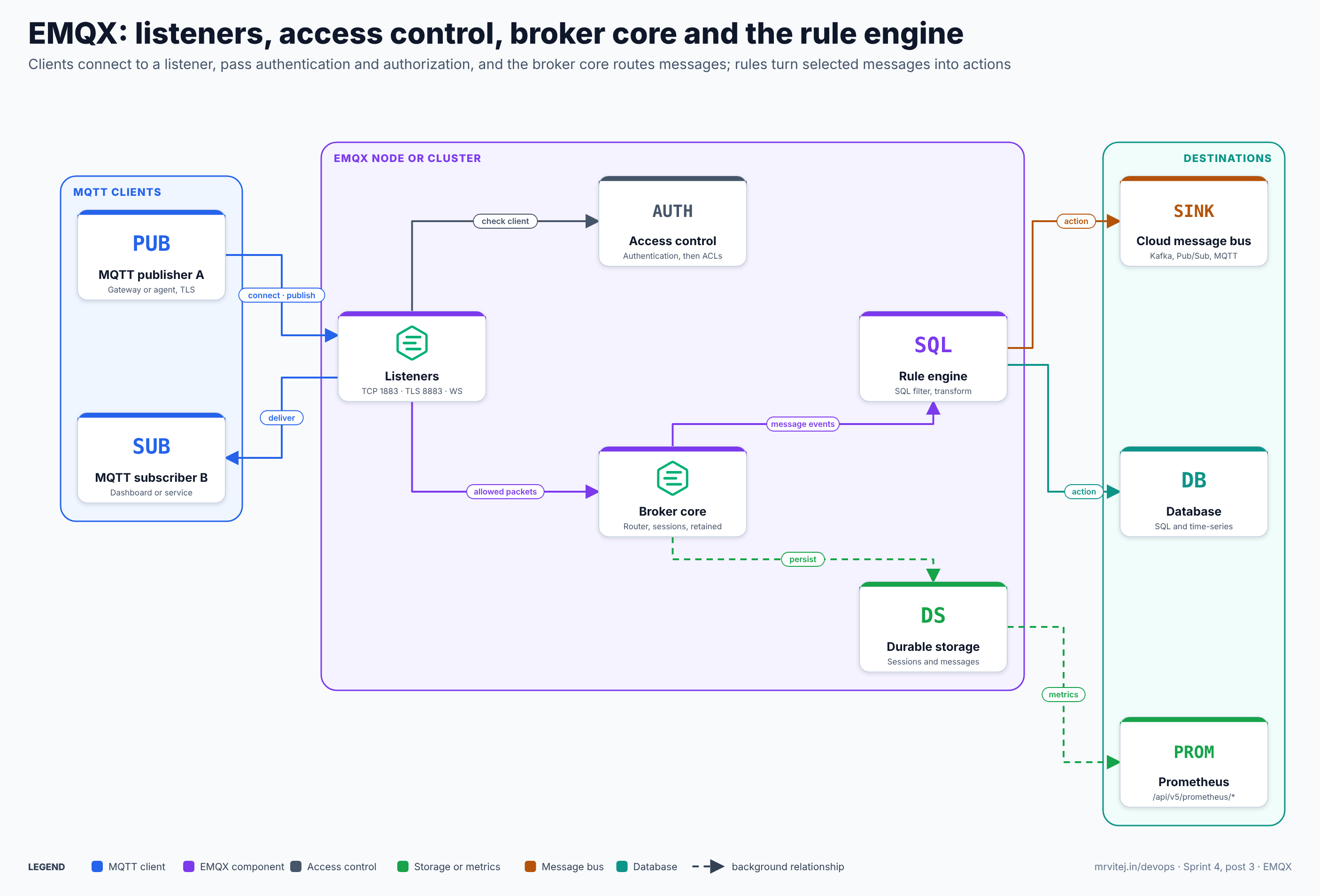
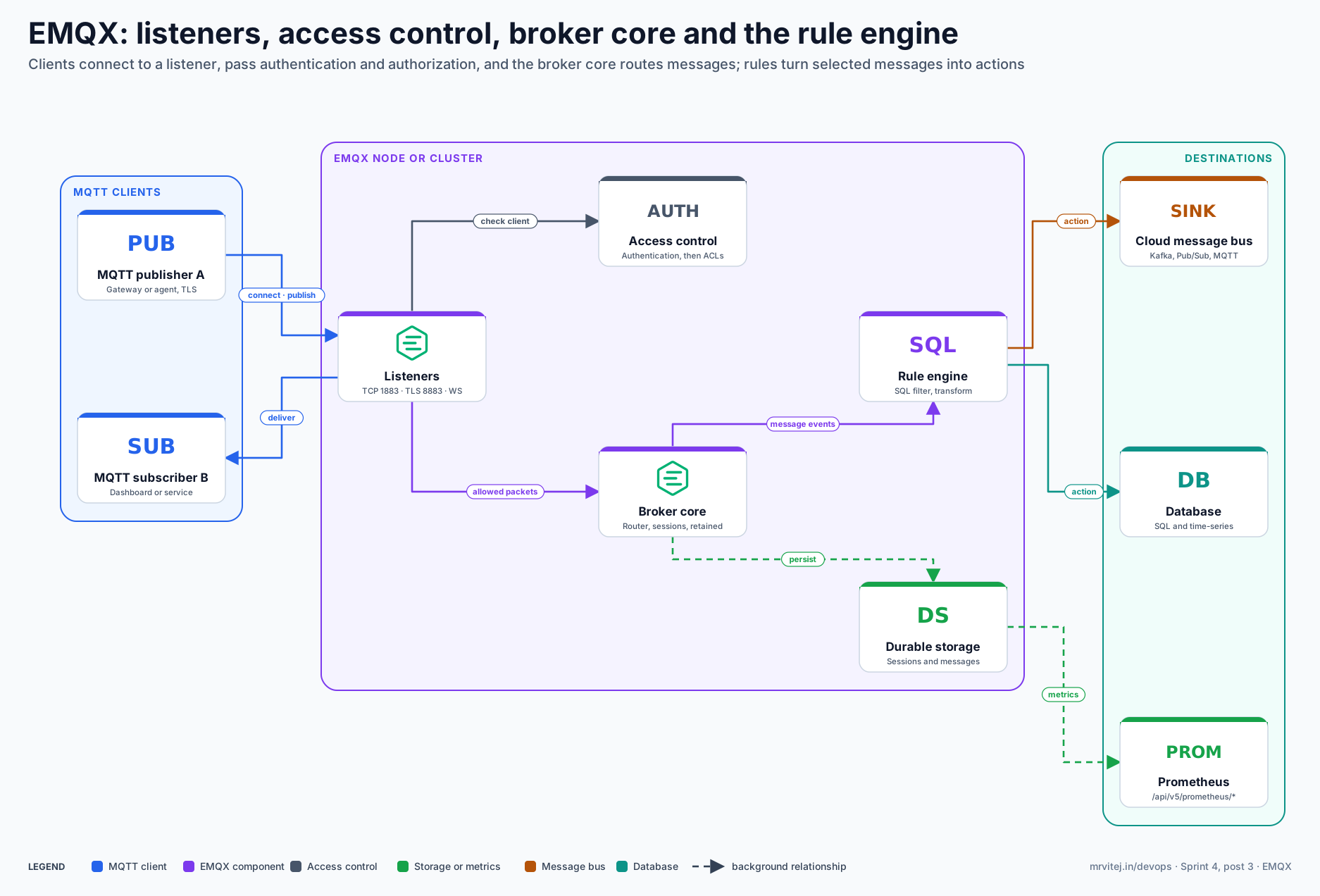
One EMQX node, or a cluster of them, sits between MQTT clients and the destinations. Blue is an MQTT client, purple an EMQX component, grey access control, green storage or metrics, orange a message bus and teal a database. Open the zoomable diagram, or download it as SVG or PNG.
| Component | What it does |
|---|---|
| Listeners | Accept connections on TCP, TLS, WebSocket and secure WebSocket ports, apply connection limits and TLS settings, and hand packets to the broker |
| Access control | Runs the authentication chain when a client connects and the authorization chain on every publish and subscribe |
| Broker core | Keeps the subscription routing table, sessions, in-flight messages and retained messages, and delivers each publish to matching subscribers |
| Rule engine | Receives message and client events, evaluates SQL rules and runs actions on matching events |
| Durable storage | Optional replicated on-disk storage for sessions and messages |
| Destinations | Kafka, Google Pub/Sub, databases, HTTP endpoints or another MQTT broker, reached through connectors |
| Dashboard, API and CLI | Port 18083 serves the web Dashboard and the REST API; emqx ctl administers a node from the shell |
Clustering
Nodes of a cluster share the subscription routing table, so a message published on one node reaches a subscriber connected to another. EMQX 5 and later use a core and replicant design built on Mria, a database layer for Erlang: core nodes run the replicated database, while replicant nodes hold a read replica and serve connections. A small cluster can run only core nodes; a large one keeps a few cores (typically three) and scales replicants with the number of clients. Nodes find each other through a discovery strategy such as a static list, DNS or the Kubernetes API, and talk over Erlang distribution (port 4370 in the Kubernetes headless Service) and a second RPC channel (5369). Put a load balancer, not a DNS round-robin, in front of the listeners, because MQTT connections are long-lived.
From a connection to a delivered message
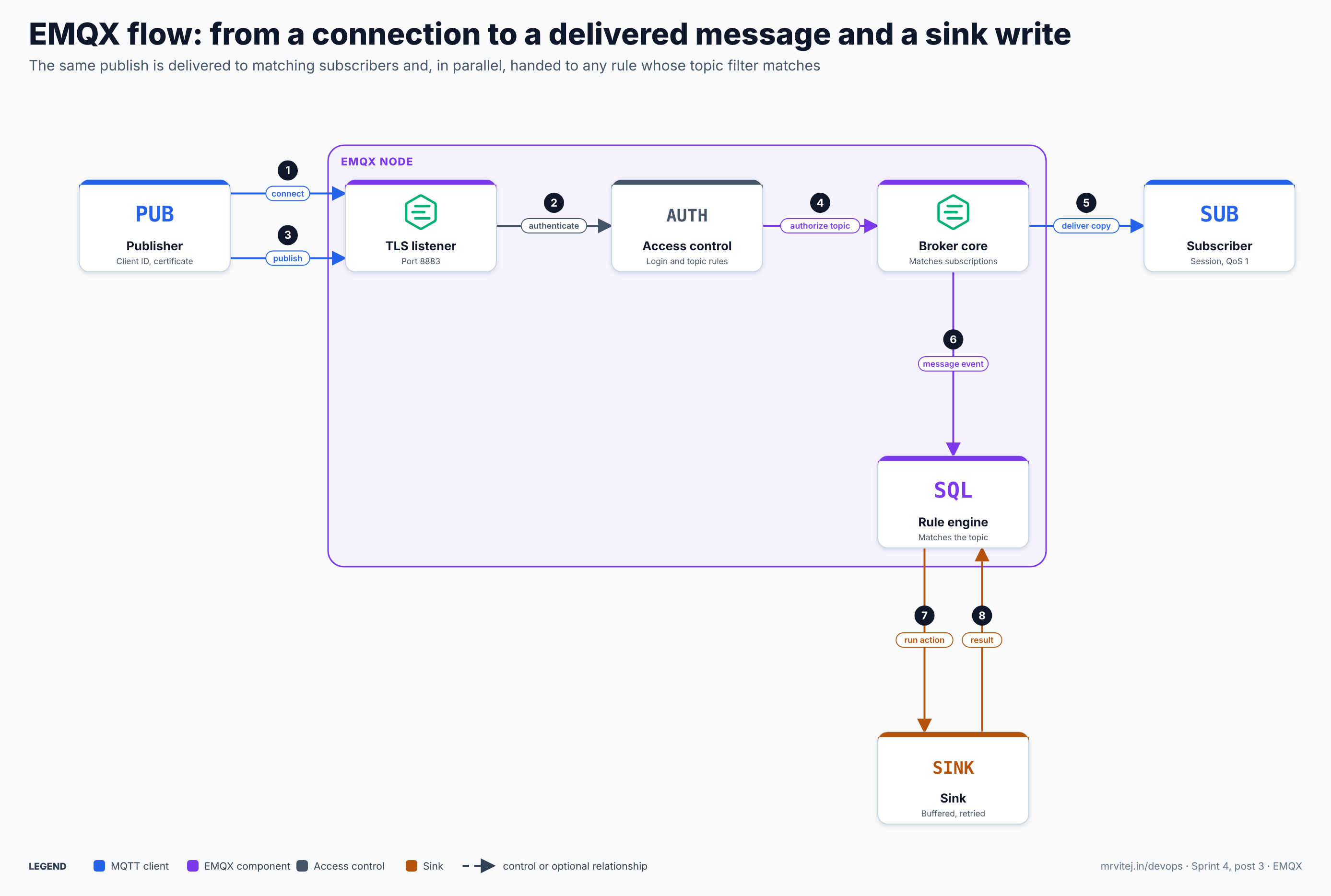
- Connect. The publisher opens a TLS connection to port 8883 and sends an MQTT CONNECT packet with its client ID and credentials.
- Authenticate. The listener passes the credentials to the authentication chain. The first source that gives a definite answer decides; a client that fails is refused.
- Publish. The client sends a PUBLISH packet for a topic with a QoS level.
- Authorize. The authorization chain checks the client against the topic and the action. A denied publish is dropped or, depending on configuration, disconnects the client.
- Deliver. The broker core matches the topic against subscriptions and delivers a copy to each subscriber, queuing it in the session of an offline subscriber that asked for a persistent session.
- Raise an event. In parallel, the core hands the message to the rule engine as a message event.
- Run the action. Every rule whose topic filter and
WHEREclause match runs its actions, for example writing a record to Kafka. Actions are queued and buffered so a slow destination does not stall the broker. - Count the result. Each action’s success, failure and retry counts are added to the rule metrics, which are visible in the Dashboard and in Prometheus.
Recap: authentication is about who the client is, authorization is about what it may do, and the rule engine works on a copy of the message, so a failing sink never blocks delivery to subscribers.
Install and first run
Docker, one node
The official images are on Docker Hub. The documentation currently uses the emqx/emqx-enterprise repository for 6.x releases (the unified product); the emqx/emqx repository carried the unified 5.9 line from May 2025. Pin an exact tag rather than latest.
docker run -d --name emqx \
  --hostname node1.emqx.local \
  -e EMQX_NODE_NAME=emqx@node1.emqx.local \
  -p 1883:1883 -p 8083:8083 -p 8084:8084 -p 8883:8883 -p 18083:18083 \
  -v $PWD/data:/opt/emqx/data \
  -v $PWD/log:/opt/emqx/log \
  emqx/emqx-enterprise:6.3.1
Notes that save time:
- For a single-node deployment, set
EMQX_NODE_NAMEtoemqx@<host>and give the container the same hostname, otherwise the node name changes when the container is recreated and persistent state is orphaned. - Persist
/opt/emqx/data(databases, generated config, authorization rules, durable storage) and/opt/emqx/log. The container user is not root, so the host directories must be writable by it. - From EMQX 6.3.0 the official image sets
EMQX_NODE__DEFAULT_LISTENER_ADDRESS=allwhen it is unset, so listeners that give only a port are reachable through published ports. Listeners with an explicit IP inbindare unchanged. - The runtime image has no package manager, so debugging tools cannot be installed inside a running container.
Open the Dashboard at http://localhost:18083. The first login uses a default administrator account that the Dashboard forces you to change; do that before anything else, and never publish port 18083 to an untrusted network.
Smoke test with any MQTT client, for example mosquitto_sub and mosquitto_pub:
mosquitto_sub -h localhost -p 1883 -t 'demo/#' -v &
mosquitto_pub -h localhost -p 1883 -t 'demo/hello' -m '{"temp": 21.5}'
Kubernetes
Two supported routes exist and the documentation recommends the Operator for production:
- EMQX Operator. It adds a custom resource,
kind: EMQXinapps.emqx.io/v2beta1, and manages the cluster for you: a StatefulSet for core nodes, a ReplicaSet for replicant nodes, headless and listener Services, rolling upgrades and scaling. It needs cert-manager and a Kubernetes version of 1.24 or later. - Helm chart. A chart maintained by the EMQX team that renders StatefulSets, Services and ConfigMaps from
values.yaml, with no extra controller. It suits evaluation and teams who want direct control.
helm repo add jetstack https://charts.jetstack.io
helm repo add emqx https://repos.emqx.io/charts
helm repo update
helm upgrade --install cert-manager jetstack/cert-manager \
  --namespace cert-manager --create-namespace --set crds.enabled=true
helm upgrade --install emqx-operator emqx/emqx-operator \
  --namespace emqx-operator-system --create-namespace
Then declare a cluster. The field names below follow the Operator’s v2beta1 API as described in its getting-started guide; check the Operator reference for your version before applying.
apiVersion: apps.emqx.io/v2beta1
kind: EMQX
metadata:
  name: broker
spec:
  image: emqx/emqx-enterprise:6.3.1
  coreTemplate:
    spec:
      replicas: 3
  replicantTemplate:
    spec:
      replicas: 2
Remember the licence when you choose this layout: five nodes is a cluster, and a production cluster needs a commercial licence (see Licensing below).
Configuration reference
EMQX 5 and later use HOCON, a superset of JSON that allows comments, unquoted keys and nested blocks. Configuration reaches a node in four ways, and understanding which wins avoids a lot of confusion:
- Environment variables with the
EMQX_prefix, where__stands for a dot.EMQX_NODE__COOKIEsetsnode.cookie. They take precedence over files. emqx.conf, the file you manage in Git or a ConfigMap. Settings here are read at startup.- The Dashboard and REST API, which store changes in the node’s data directory and apply most of them without a restart. If a setting is also in
emqx.conf, the file is the source of truth at the next restart, so decide where each setting lives. - Defaults compiled into the release.
Settings you will touch first:
| Setting | Purpose |
|---|---|
node.name, node.cookie |
Node identity and the shared secret for Erlang distribution. Use a long random cookie and keep it in a Secret |
cluster.discovery_strategy |
manual, static, dns, etcd or k8s, with the strategy’s own settings |
listeners.tcp.default, listeners.ssl.default, listeners.ws.default, listeners.wss.default |
Listener bind address, connection limit and TLS options |
authentication |
The authentication chain |
authorization |
The authorization sources, no_match and deny_action |
mqtt.* |
Protocol limits: maximum packet size, keep-alive multiplier, session expiry, queue lengths |
durable_sessions |
Persistent sessions and message retention |
rule_engine, connectors, actions |
Data integration objects |
dashboard.listeners.http, dashboard.default_username |
Dashboard port and the initial account |
TLS listeners
EMQX enables a TLS listener on 8883 with one-way authentication by default: the client verifies the broker, and the broker does not verify the client. For industrial clients, use mutual TLS so each device or gateway has its own certificate:
listeners.ssl.default {
  bind = "0.0.0.0:8883"
  max_connections = 100000
  ssl_options {
    cacertfile = "/etc/emqx/certs/ca.pem"
    certfile   = "/etc/emqx/certs/server.pem"
    keyfile    = "/etc/emqx/certs/server.key"
    verify = verify_peer
    fail_if_no_peer_cert = true
  }
}
cacertfile holds the CA that issues client certificates, certfile is the server certificate chain with intermediates appended after the leaf, verify_peer turns on client-certificate verification and fail_if_no_peer_cert = true refuses clients that send none. Certificate revocation checking can be switched on with enable_crl_check on the same listener. Turn off the plain TCP listener on 1883 outside the cluster network, or bind it to loopback.
Security
Authenticate everyone. A fresh broker lets any client connect. Add at least one authentication source before exposing a listener. The common choices are the built-in database (users and password hashes stored by EMQX), an external database such as PostgreSQL or Redis, an HTTP service that you write, JWT, and certificate-based authentication on a TLS listener. Chain them in order; a client that fails one source can be passed to the next, and you can add a precondition so a source only applies to some clients. A built-in database source looks like this:
authentication = [
  {
    mechanism = password_based
    backend = built_in_database
    user_id_type = username
    password_hash_algorithm { name = bcrypt, salt_rounds = 10 }
  }
]
When clients present certificates, a common pattern is to take the username or client ID from the certificate subject so a certificate and an identity cannot drift apart; the listener’s peer_cert_as_username and peer_cert_as_clientid options exist for this.
Authorize by topic. Authorization sources are evaluated in order and the first rule that matches decides. The file-based source uses Erlang-tuple rules, with topic placeholders so that one rule covers every client:
%% Each client may publish only under its own ID and subscribe to commands for itself.
{allow, all, publish,   ["plant/line-1/${clientid}/#"]}.
{allow, all, subscribe, ["cmd/${clientid}/#"]}.
%% Operators may read everything under the plant.
{allow, {user, "operator"}, subscribe, ["plant/#"]}.
%% Nobody subscribes to the broker's own system topics or the root wildcard.
{deny, all, subscribe, ["$SYS/#", {eq, "#"}, {eq, "+/#"}]}.
%% Everything else is refused.
{deny, all}.
and the matching configuration refuses anything the rules do not allow:
authorization {
  no_match = deny
  deny_action = ignore
  sources = [
    { type = file, enable = true, path = "etc/acl.conf" }
  ]
}
The documentation’s own advice is to end the file with {deny, all} and set no_match = deny in production, because the shipped default rule allows everything. The file source suits generic rules; for hundreds of per-client rules use the built-in database or an external source, and keep the file as the last safety net. If the rules are edited in the Dashboard or API, EMQX writes the new file under data/authz/acl.conf and stops reading the original, so do not mix both methods without knowing which one is live.
Protect the management surface. The Dashboard and REST API listen on 18083. Create a dedicated API key per integration, give each the narrowest role (for example a monitoring key for Prometheus), and put the port behind an ingress or private network. From EMQX 6.3.0 Prometheus scrape endpoints require authentication by default.
Limits and hygiene. Set max_connections per listener, per-client rate limits, a maximum packet size and a short authentication timeout. Keep Erlang distribution ports (4370, 5369) reachable only between cluster nodes and protect the cookie. Rotate certificates before they expire; the emqx_cert_expiry_at metric shows the expiry date of listener certificates so an alert can fire first.
The rule engine and data integration
A rule is SQL over events. The FROM clause names a topic filter or a built-in event, SELECT picks and renames fields and can call functions, and WHERE filters. JSON payloads are addressed with dots:
SELECT
  clientid,
  topic,
  payload.machine AS machine,
  payload.temp    AS temp,
  timestamp       AS ts
FROM
  "plant/+/+/temperature"
WHERE
  payload.temp > 80
This rule fires only for hot readings. Each rule can carry several actions. EMQX provides a built-in republish action that publishes the result to another topic (for example an alerts/ topic), and sinks that send the result through a connector to an external system: Kafka producers, Google Cloud Pub/Sub, HTTP servers, MySQL, PostgreSQL and many others, plus a remote MQTT broker for bridging. The reverse direction uses sources: a Kafka consumer, a Pub/Sub subscription or a remote MQTT subscription can feed messages into the local broker.
Actions run asynchronously through a buffered queue. Each sink has resource options for queue size, batch size and retry behaviour, and a mode that controls whether the buffer lives in memory or can spill to disk, so when a destination is unavailable the broker keeps accepting messages and the sink catches up after recovery, within the buffer limits you set. Use the Dashboard’s rule test feature to run a rule against a sample payload before enabling it.
Forwarding to Google Cloud Pub/Sub
The Pub/Sub integration is a producer connector plus a sink action. The connector authenticates to Google Cloud with a service account key or with workload identity federation; the sink maps an MQTT message to a Pub/Sub topic, with payload and attribute templates and an optional ordering key taken from the message, for example the client ID. A typical setup:
- In Google Cloud, create a topic and a pull subscription for testing, and a service account with the Pub/Sub Publisher role on that topic.
- In EMQX, create a Google PubSub Producer connector with the credential (prefer workload identity federation when EMQX itself runs outside Google Cloud) and test connectivity.
- Create a rule such as the SQL above and add a Pub/Sub sink action that points at the connector and the topic.
- Publish a message that matches and pull it from the subscription to confirm.
From Pub/Sub the data can reach Dataflow, BigQuery, Cloud Storage, Cloud Run and other Google Cloud services.
Bridging to another MQTT broker
The same mechanism connects a local broker to a remote one: an MQTT connector holds the TLS connection to the remote broker, a sink republishes selected local topics to it with a topic mapping, and a source can subscribe to remote topics. This is the usual pattern for an edge broker that forwards a filtered subset of its traffic to a central broker.
Production reference design
- Pick the topology from the licence and the scale. One node (or several independent single nodes, one per site) needs no licence for production. A cluster for availability needs the commercial licence. Plan this before you design, not after.
- Run three core nodes for a production cluster and add replicants as the client count grows. Spread nodes across failure domains; give each core node a persistent volume.
- Expose only the TLS listener. Terminate nothing at the load balancer if you use client certificates; use a layer 4 balancer so the broker sees the certificate. Close 1883 to the outside.
- Use mutual TLS and topic ACLs together. Authentication proves the identity; ACLs with
${clientid}placeholders confine each device to its own subtree. End the rules with a deny and setno_match = deny. - Turn on durable sessions if devices disconnect for long periods. Add the setting to the configuration file and restart the node; it cannot be changed from the Dashboard or API.
durable_sessions {
  enable = true
}
Messages for durable sessions are stored once on each replica however many sessions subscribe, and retention is controlled by durable_sessions.message_retention_period. Monitor the emqx_ds_egress_* metrics.
- Isolate sinks. One connector per destination and per criticality, queue sizes set to what you can afford to lose or hold, and alerts on sink failure and queue-full counters.
- Keep configuration in Git. Put
emqx.conf, ACL files and the rule and connector definitions in version control and load them at start-up, and use the Dashboard for inspection rather than as the source of truth. Secrets come from your secret manager through environment variables. - Plan upgrades. Use rolling upgrades within a release line and read the notes before crossing a major version: sessions did not survive the move from v5 to v6 in at least one community integration’s notes, so test the path with real session state.
Monitoring and day-2 operations
EMQX exposes Prometheus metrics at /api/v5/prometheus/stats (connections, sessions, subscriptions, messages in and out), /api/v5/prometheus/auth (authentication and authorization outcomes), and /api/v5/prometheus/data_integration (rules, connectors and actions), with more endpoints for schema validation, message transformation and topic metrics. Add the mode parameter to choose node or cluster scope where supported. Create an API key with the monitoring scope and use HTTP basic authentication in the scrape job:
scrape_configs:
  - job_name: emqx_stats
    metrics_path: /api/v5/prometheus/stats
    basic_auth:
      username: <API_KEY>
      password: <SECRET_KEY>
    static_configs:
      - targets: ['emqx-dashboard.emqx.svc:18083']
  - job_name: emqx_data_integration
    metrics_path: /api/v5/prometheus/data_integration
    basic_auth:
      username: <API_KEY>
      password: <SECRET_KEY>
    static_configs:
      - targets: ['emqx-dashboard.emqx.svc:18083']
A Grafana dashboard template is available from the Dashboard’s monitoring page. Alerts worth having: connection count against the configured limit, authentication failures per minute, message drop counts, sink failure and queue-full counters, listener certificate expiry, and cluster membership (a node missing from emqx ctl cluster status).
Routine commands from inside a pod or container:
emqx ctl status            # node running state
emqx ctl cluster status    # members of the cluster
emqx ctl clients list      # connected clients
emqx ctl listeners         # listener status
Capacity planning tips: raise the operating system’s file descriptor limit, because each connection uses one; measure memory per connection with your real session and subscription profile; and set per-listener and per-client limits so one misbehaving gateway cannot starve the rest.
Licensing
Because the licence is the part of EMQX most likely to change a decision, here it is in one place. Until v5.8 there were two products: an open-source edition under Apache 2.0 and an enterprise edition under BSL 1.1. From v5.9.0 (released 2 May 2025) there is one product with every feature, under BSL 1.1 with an Additional Use Grant:
- Non-production use, such as development and testing, is free.
- Production use of a single node is free, provided you do not offer EMQX itself as a service or embed it in a product sold to third parties. You may run any number of independent single nodes.
- A production cluster of more than one node needs a licence file loaded, from the vendor or through the EMQX Cloud service.
- Accredited educational institutions and non-profits may use it in production without node limits, provided the use is non-commercial.
- Each release converts to Apache 2.0 four years after publication.
BSL 1.1 is source-available, not OSI open source. If your organisation requires an OSI-approved licence, the 5.8 line and earlier (Apache 2.0) or a different broker is the answer; if a vendor relationship and a licence fee are acceptable, the clustering and integration features are the main value. Read the licence text and the FAQ with your legal team, because the terms above are a summary.
Usage cases
- Industrial and IoT telemetry. Gateways publish machine and sensor data; EMQX authenticates them, fans the data out to dashboards and rules, and forwards selected streams to Kafka or a cloud message service.
- Edge broker with a central bridge. A single node at a plant or site collects local traffic and bridges a filtered subset to a central broker or cloud service, buffering during outages.
- Connected vehicles and devices. A clustered broker holds millions of long-lived connections, with per-device ACLs and commands sent back down on per-client topics.
- Event routing without code. SQL rules filter and reshape events and trigger HTTP calls, database writes or republished alerts.
In the Sprint 4 final project, a pharmaceutical plant’s machine data is published to an MQTT broker like this one and forwarded from there to Google Cloud.
Version and project status
EMQX is actively developed in the public GitHub repository, with frequent releases. As of the documentation’s release notes, 6.3.1 was published on 17 September 2026 and 6.3.0 on 3 September 2026; 6.2.3, 6.1.4 and 5.10.4 also received fixes this year. EMQ’s release policy has three tiers: monthly internal releases, feature releases for on-premise users with support of about 18 months, and an annual long-term support release, normally the June feature release. Version 5.8 was the last Apache 2.0 line. EMQ reports more than 1,500 customers and more than 500 million connected devices on its own site; treat those as vendor figures.
Adoption
EMQ’s website lists customers it describes as trusted users, including BMW, Ericsson, Geely, HPE, Lucid, PepsiCo, Signify, Verifone and Volkswagen, and publishes case stories such as SAIC Volkswagen for connected vehicles, Signify for smart lighting and Sunways for solar energy management. These are vendor-published customer references, not independent audits, and a logo on a page does not describe how a given team deploys the product, so ask for a reference call for anything critical.
Alternatives
| Solution | Model | Best suited to |
|---|---|---|
| Eclipse Mosquitto | Lightweight open-source MQTT broker, single process, Eclipse licence | Small sites and edge gateways that need a simple broker without clustering |
| HiveMQ | Commercial MQTT platform with an open-source community edition | Enterprises that want a vendor-supported clustered broker with enterprise extensions |
| VerneMQ | Open-source clustered MQTT broker in Erlang | Teams that want a clustered open-source broker and can live with a smaller ecosystem |
| NanoMQ | Very small open-source MQTT broker from the EMQ family | Resource-constrained edge devices |
| RabbitMQ with MQTT plugin | General message broker with an MQTT plugin | Teams that already run RabbitMQ and have modest MQTT needs |
| Managed cloud IoT services | Provider-hosted device messaging | Teams that want no broker to operate. Google Cloud IoT Core was retired in 2023, so Google Cloud customers run their own broker or use a partner service |
Strengths and limitations
| Strengths | Limitations |
|---|---|
| Scales to very large connection counts with a core and replicant cluster | Production clustering needs a commercial licence since v5.9.0 |
| SQL rule engine and connectors remove a separate stream-processing step for common cases | BSL 1.1 is source-available, not OSI open source, which some organisations cannot accept |
| Full MQTT 5.0 feature set, shared subscriptions, retained messages and durable sessions | Configuration has several layers (files, environment, Dashboard, API) and needs a clear policy |
| Mature access control: TLS client certificates, many authentication sources, ACLs with placeholders | The default authorization rule allows everything until you change it |
| Kubernetes Operator and Helm chart, Prometheus metrics, Dashboard and API | Erlang operations knowledge helps when debugging a large cluster |
Recommendation
Trial. EMQX is a strong choice when you need an MQTT broker that can grow from one edge node to a large cluster and move data onward without extra moving parts. Start with a single node, which is free for production, mutual TLS and ACLs with ${clientid} placeholders, and one rule with one sink; measure it with your real payloads. Decide on the licence before you design for clustering, and if an OSI-approved licence is a hard requirement choose Mosquitto, VerneMQ or an Apache-licensed 5.8 deployment instead.
References: EMQX documentation · Install with Docker · Deploy on Kubernetes · ACL file authorization · Durable sessions · Prometheus integration · GCP Pub/Sub integration · EMQX licensing FAQ · EMQX on GitHub · CNCF Landscape entry