External Secrets Operator, usually shortened to ESO, is a Kubernetes operator that reads secrets from an external secret-management system and writes them into the cluster as ordinary Kubernetes Secrets. The problem it removes is the awkward gap between where secrets should live (a managed secret store with its own access control, audit log and rotation) and where Kubernetes workloads expect to find them (a Secret object, an environment variable or a mounted file). Instead of copying values into manifests, Helm values or CI variables, a team commits a small custom resource that says which remote secret to fetch and which Secret to create, and the operator does the rest and keeps it current. ESO grew out of earlier projects, including GoDaddy’s Node.js kubernetes-external-secrets, was rewritten in Go, and joined the CNCF Sandbox on July 26, 2022. The project applied for Incubation in November 2024, and the CNCF project page and Landscape still list it as Sandbox. This brief explains ESO from the problem it solves to installing, using, securing and monitoring it, with a worked Google Cloud Secret Manager example, so one read is enough to decide whether it belongs in your platform.
CNCF daily · Sprint 4, post 11 of 15 · Security & Compliance
At a glance
| Category | Provisioning › Security & Compliance |
| CNCF status | Sandbox. Accepted July 26, 2022 |
| Written in | Go |
| License | Apache 2.0 |
| Main resources | SecretStore, ClusterSecretStore, ExternalSecret, ClusterExternalSecret (API external-secrets.io/v1); PushSecret, ClusterPushSecret and the generators (v1alpha1) |
| Stable providers | AWS Secrets Manager, AWS Parameter Store, Akeyless, Azure Key Vault, CyberArk Secrets Manager, GCP Secret Manager, HashiCorp Vault, IBM Cloud Secrets Manager, Oracle Vault and Previder; Kubernetes and SecretServer are beta, and the rest are alpha |
| Releases | v1.0 on November 7, 2025 and v2.0 on February 6, 2026. The support page lists 2.14 (October 16, 2026) as the current minor line |
| Support policy | Only the latest minor version is supported, and every minor line is tested against one Kubernetes release |
| Install | Helm chart external-secrets from https://charts.external-secrets.io |
The problem ESO solves
A Kubernetes Secret is a delivery mechanism, not a secret manager. Its values are base64 encoded, not encrypted by the object itself, and the object has no notion of where the value came from, who changed it last or when it should rotate. Teams that rely on Secrets alone tend to end up in one of three places: values pasted into Helm values or CI variables, encrypted files in Git that every cluster must be able to decrypt, or a manual copy step from a cloud console that nobody remembers to repeat when a password changes.
ESO moves the source of truth to a system built for the job, such as Google Cloud Secret Manager, which has IAM, versioning, audit logging and replication, and treats the Kubernetes Secret as a cached copy. Git holds only references: the name of a remote secret, never its value. Rotating a secret becomes a change in the provider, and the cluster picks it up at the next refresh. Application code does not change, because it still reads a normal Secret.
Key concepts
| Term | Meaning |
|---|---|
| Provider | The external system that holds the values: a cloud secret manager, a vault, a password manager or another Kubernetes cluster. |
| SecretStore | A namespaced resource that says how to reach one provider: which provider, which account or project and how to authenticate. |
| ClusterSecretStore | The same, but cluster-scoped, so ExternalSecrets in any namespace can reference it, optionally limited by namespace conditions. |
| ExternalSecret | A namespaced resource that says what to fetch (keys, properties, versions) and what Secret to produce. The controller uses it as a blueprint. |
| ClusterExternalSecret | A cluster-scoped resource that creates the same ExternalSecret in every namespace that matches a label selector. |
| PushSecret | The reverse direction: pushes values from a Kubernetes Secret, or from a generator, into a provider. |
| Generator | A resource that produces values, such as a random password or a short-lived registry token, for use in an ExternalSecret or a PushSecret. |
| Reconcile | One pass of the controller: read the ExternalSecret and its store, fetch the data, render the template and apply the Secret. |
Architecture
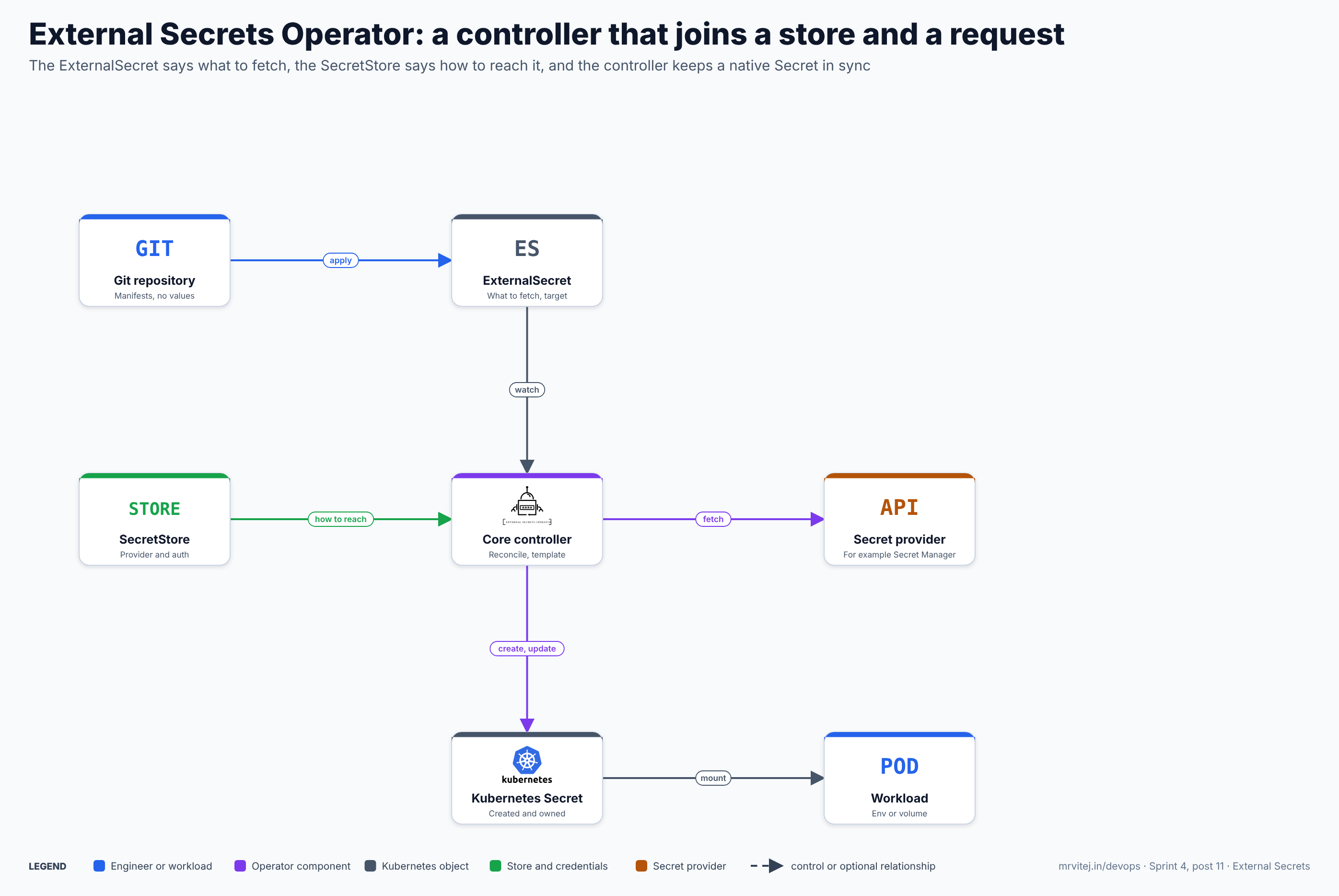
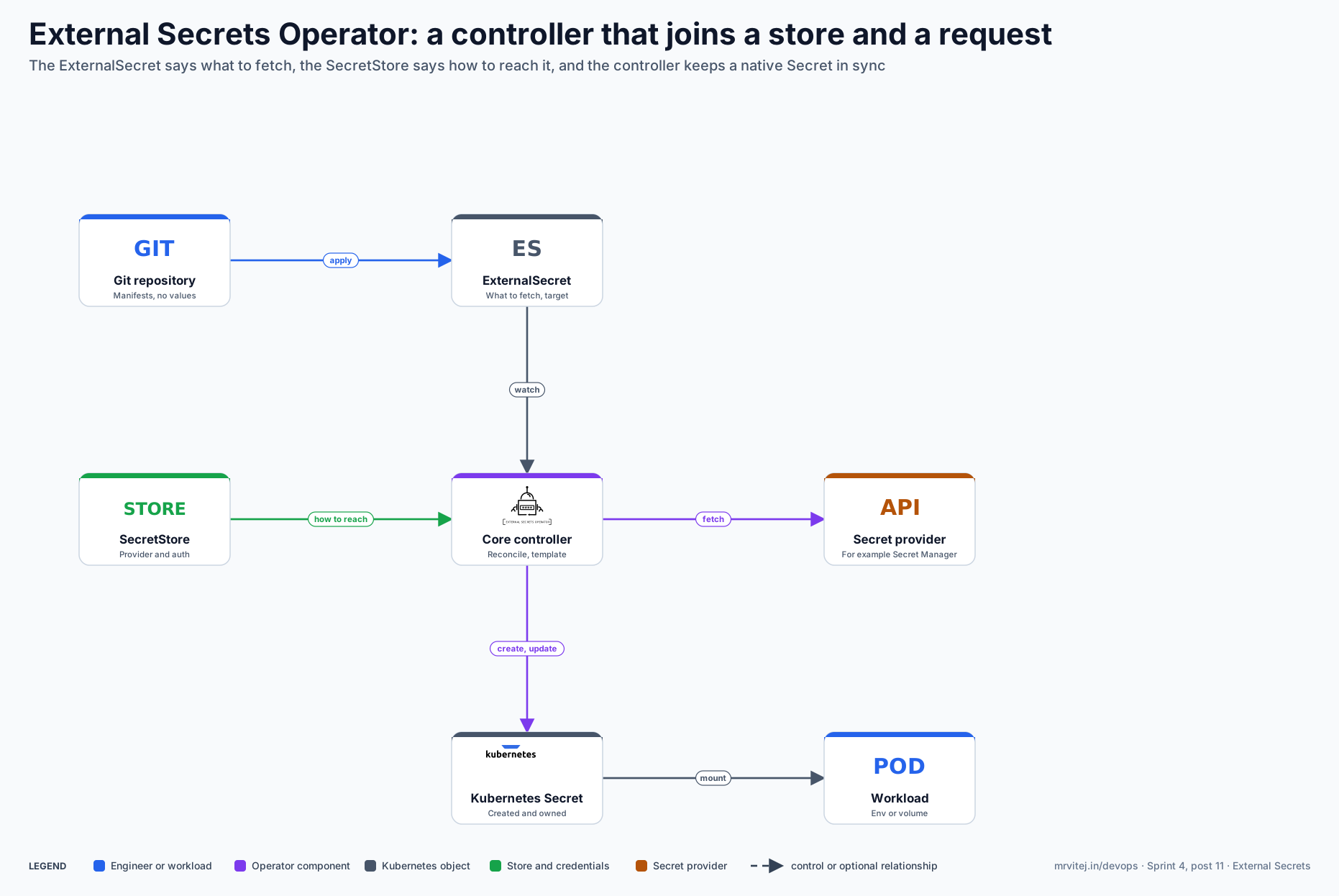
The diagram shows one ExternalSecret and one provider as examples; a cluster usually has many of each, and several stores for several providers. Blue is an engineer or workload, purple is the operator, grey is a Kubernetes object, green is the store and its credentials and orange is the provider. Open the zoomable diagram, or download it as SVG or PNG.
| Component | Responsibility |
|---|---|
| Git repository | Holds the manifests for stores and ExternalSecrets. They contain names and references, never secret values, so they are safe to review and to store in Git. |
| ExternalSecret | Declares what to fetch (data for single keys, dataFrom for many), how often to refresh, and the target Secret with its template, type and policies. |
| SecretStore | Declares the provider and how to authenticate to it. Keeping this apart from the ExternalSecret separates “who may reach the provider” from “which values this app needs”. |
| Core controller | Reconciles stores and ExternalSecrets. It builds a provider client from the store, fetches the values, decodes them, renders the template and creates or updates the Secret. |
| Secret provider | The system of record. ESO adds no storage of its own; it reads from, and in the push direction writes to, this API. |
| Kubernetes Secret | The result. By default the ExternalSecret owns it through an owner reference, so deleting the ExternalSecret removes it. |
| Workload | Consumes the Secret in the normal way: environment variables, a mounted volume or an image pull secret. |
The Helm chart installs two more components that are not on the diagram: a webhook, which validates the custom resources at admission, and a cert controller, which creates and rotates the webhook’s certificates. They matter operationally, because a failing webhook can block changes to ESO resources.
Design principle. Separate the question “how do I reach this provider” from “what does this workload need”. Platform engineers own stores and their credentials; application teams own ExternalSecrets that name the keys they need. The cluster’s copy of a secret is derived, replaceable data.
From a manifest to a Secret in a pod
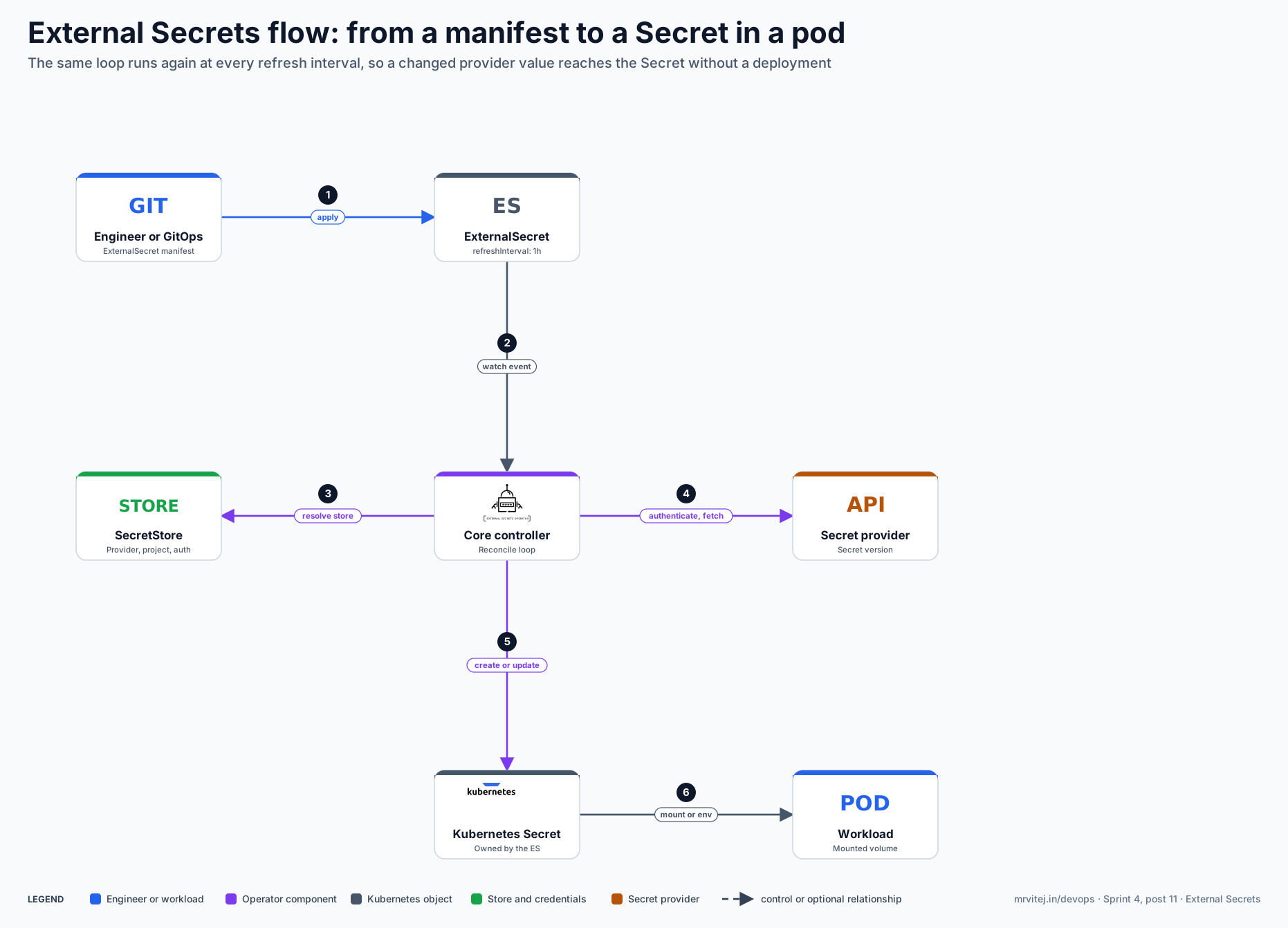
The second diagram follows one ExternalSecret from the moment it is applied.
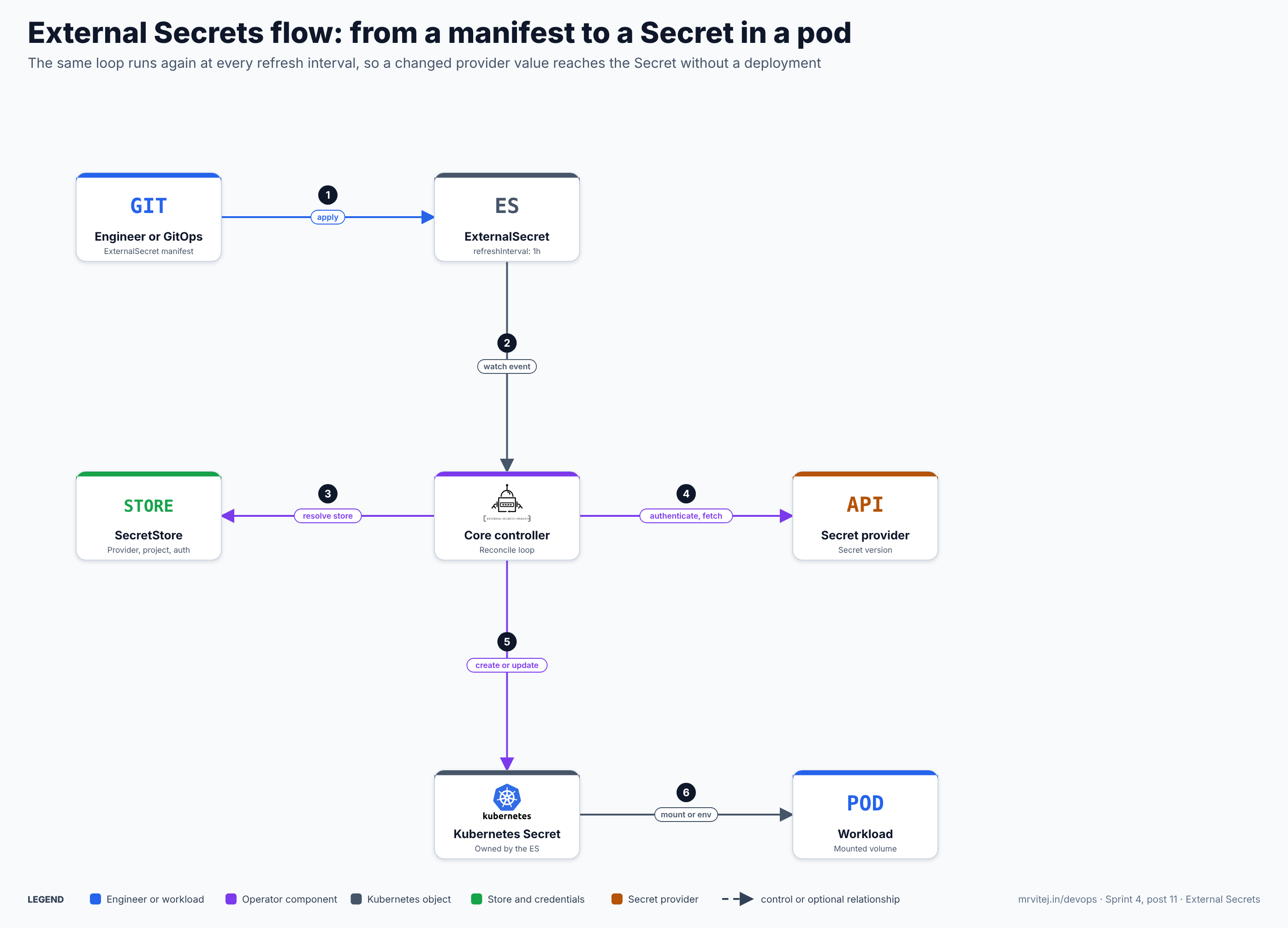
- Apply. An engineer or a GitOps tool applies an ExternalSecret.
- Watch event. The core controller sees the new or changed ExternalSecret.
- Resolve the store. The controller looks up the SecretStore or ClusterSecretStore named in
secretStoreRef. It stops if the store does not exist, if itscontrollerfield does not match this installation, or if a ClusterSecretStore’s conditions exclude the namespace. - Authenticate and fetch. The controller builds a provider client with the credentials the store describes, fetches the requested keys and decodes them where needed.
- Create or update. The controller renders the target template and creates or updates the Kubernetes Secret.
- Mount or env. A workload reads the Secret as a volume or as environment variables.
The loop repeats at every refreshInterval, and when the ExternalSecret changes. A volume mounted from a Secret updates in place after the kubelet syncs it, but environment variables are read once at container start, so a pod that uses them needs a restart to see a new value. Open the zoomable flow diagram, or download it as SVG or PNG.
Install ESO
ESO is installed with Helm into its own namespace. The chart deploys the core controller, the webhook and the cert controller, and installs the custom resource definitions by default.
- Check the cluster. ESO publishes a support table that lists the Kubernetes version each minor line is tested against. Other versions are not tested, so read the table for the release you plan to run.
- Install the chart. Pin the chart version; ESO treats each new minor release as a possible source of changes, so an unpinned install is an unreviewed upgrade:
helm repo add external-secrets https://charts.external-secrets.io helm repo update helm install external-secrets external-secrets/external-secrets \ --version <chart version> \ --namespace external-secrets --create-namespace - Check the result.
Expect the controller, webhook and cert-controller pods to be Running. A store reportskubectl get pods -n external-secrets kubectl get crd | grep external-secrets.io kubectl get clustersecretstores,externalsecrets -AValidorReadyonce ESO has validated its configuration against the provider. - Run it highly available if it matters. Set
replicaCountabove one for the controller and enable leader election withleaderElect=true, so only one instance reconciles at a time. The webhook and cert controller have their own replica settings. - Remove it.
helm uninstallleaves the custom resource definitions in place, as Helm does for CRDs. Delete them yourself only when you are sure no ExternalSecret is still in use, because removing a CRD deletes every resource of that kind.
Stores and providers
A SecretStore holds the provider block and its authentication. The provider key (gcpsm, aws, vault, azurekv and many others) decides which fields follow. The project grades each provider as stable, beta or alpha and records who maintains it, and a feature table shows which providers support finding secrets by name or tag, pushing, merge and delete policies. Read that table before choosing, because a feature that works for one provider may not exist for another.
| Provider | Stability | Typical authentication |
|---|---|---|
GCP Secret Manager (gcpsm) |
Stable | GKE Workload Identity, Workload Identity Federation, or a service account key |
AWS Secrets Manager and Parameter Store (aws) |
Stable | IAM roles for service accounts, or access keys held in a Secret |
HashiCorp Vault (vault) |
Stable | Kubernetes auth with a service account, tokens, AppRole and others |
Azure Key Vault (azurekv) |
Stable | Workload identity, managed identity or a service principal |
Kubernetes (kubernetes) |
Beta | A service account on another namespace or cluster; used to fan a Secret out |
Prefer short-lived, identity-based authentication (workload identity, IAM roles for service accounts, Kubernetes auth) over a long-lived key stored in a Secret, which only moves the original problem one level down. Each provider’s page lists its authentication options and the permissions it needs.
The ExternalSecret in detail
A minimal ExternalSecret names a store, a target and the keys to fetch:
apiVersion: external-secrets.io/v1
kind: ExternalSecret
metadata:
  name: app-credentials
  namespace: payments
spec:
  refreshInterval: 1h
  secretStoreRef:
    name: gcp-secrets
    kind: ClusterSecretStore
  target:
    name: app-credentials
    creationPolicy: Owner
  data:
    - secretKey: api-token          # key in the Kubernetes Secret
      remoteRef:
        key: payments-api-token     # name in the provider
        version: latest
Fetching one key or many
datamaps individual remote keys to keys in the Secret.remoteReftakeskey, an optionalpropertyto pick one field from a JSON value, and an optionalversion.dataFrom.extractreads one remote secret that contains JSON and turns every property into a key of the Secret.dataFrom.findsearches the provider by name pattern (a regular expression) or, where the provider supports it, by tags, and pulls every match. Search support differs by provider.dataFrom.rewritereshapes the resulting keys with stackable operations: a regular-expression rewrite (for example to strip a common path prefix), amergethat combines JSON values into one map, and atransformthat applies a Go template to each key. Rewrites are the way to avoid collisions whenfindmatches many secrets with similar names.dataFrom.sourceRef.generatorReftakes values from a generator, covered below.
Templating
By default the Secret contains the fetched values under the keys you chose. The target.template field lets you build the final content instead, using Go templates (set engineVersion: v2). Template values can use every fetched key, and a set of helper functions covers common conversions, such as base64 decoding, extracting a certificate and key from a PKCS#12 bundle, or generating an htpasswd entry.
  target:
    name: app-db
    template:
      type: Opaque
      engineVersion: v2
      data:
        DATABASE_URL: "postgresql://app:{{ .password }}@db.payments.svc:5432/app"
        config.yaml: |
          database:
            user: app
            password: "{{ .password }}"
Templates can also be pulled from a ConfigMap or Secret with templateFrom, which keeps large files out of the ExternalSecret, and mergePolicy: Merge combines the template with the plain fetched data. Referencing a key that does not exist raises an error instead of rendering an empty string. When ExternalSecrets are installed through Helm, escape the braces (a raw string in backticks) so Helm does not try to render the template.
Refresh, creation and deletion policies
Three fields control the lifecycle of the Secret, and their defaults are safe:
| Field | Values | Behaviour |
|---|---|---|
refreshPolicy |
Periodic (default), OnChange, CreatedOnce |
Periodic re-fetches every refreshInterval. OnChange refreshes only when the ExternalSecret itself changes. CreatedOnce creates the Secret once and never updates it. An interval of 0 behaves like CreatedOnce. |
target.creationPolicy |
Owner (default), Orphan, Merge, None |
Owner creates the Secret and sets an owner reference. Orphan creates it without one, so it survives deleting the ExternalSecret. Merge expects the Secret to exist and writes only its keys into it. None neither creates nor updates. |
target.deletionPolicy |
Retain (default), Delete, Merge |
What to do when the remote secret disappears: keep the Secret as it is, delete it, or remove only the affected keys. |
Some combinations are refused because they could delete a Secret that ESO does not own, such as Delete with Merge or with None. With Orphan and a periodic refresh, manual edits to the Secret are overwritten at the next sync, so treat the Secret as generated. Several ExternalSecrets can write to one Secret with Merge only if their keys do not collide; otherwise the values alternate on every sync.
Recent releases also let a periodic ExternalSecret carry syncWindows, evaluated in UTC, that allow or block refreshes during given hours, which helps keep provider calls out of a maintenance window.
Fan out and share
A ClusterExternalSecret creates an ExternalSecret in every namespace that matches namespaceSelectors (a list of label selectors, any of which may match). Use it to deliver the same Secret, such as a registry credential or a CA bundle, to many namespaces:
apiVersion: external-secrets.io/v1
kind: ClusterExternalSecret
metadata:
  name: registry-credentials
spec:
  externalSecretName: registry-credentials
  namespaceSelectors:
    - matchLabels:
        team-registry: "true"
  refreshTime: 1m
  externalSecretSpec:
    refreshInterval: 1h
    secretStoreRef:
      name: gcp-secrets
      kind: ClusterSecretStore
    target:
      name: registry-credentials
    dataFrom:
      - extract:
          key: registry-credentials
Every namespace gets its own ExternalSecret and each one polls the provider independently. When the selector matches more than a handful of namespaces, the project recommends pulling the value from the provider once into a single in-cluster Secret, exposing that Secret through a ClusterSecretStore that uses the Kubernetes provider, and letting the ClusterExternalSecret fan out from there. That keeps the number of provider calls constant however many namespaces match. An annotation external-secrets.io/force-sync on a ClusterExternalSecret triggers an immediate sync when its value changes.
PushSecret and generators
ESO also works in the other direction. A PushSecret takes a Kubernetes Secret (or the output of a generator) and writes it to one or more stores, with an updatePolicy (replace existing remote values or not) and a deletionPolicy (delete the remote secret when the PushSecret is deleted, or leave it). It suits two cases: seeding a provider from a secret that a cluster component created, and publishing a generated credential that other systems must also read.
A generator produces values on demand. The built-in set includes random passwords, UUIDs, SSH keys, and short-lived tokens for registries and other services such as Google Container Registry, Amazon ECR, Azure Container Registry, GitHub and Quay; a ClusterGenerator defines one once for the whole cluster. A generator keeps no state: every reconcile produces a new set of values, and two ExternalSecrets cannot share one generated value. A refreshing ExternalSecret that uses a Password generator therefore rotates the password at every interval, which is right for a database credential that something else rotates in step, and wrong for one that is already in use. Pick a long refreshInterval, or push the generated value to a provider and read it back from there.
apiVersion: generators.external-secrets.io/v1alpha1
kind: Password
metadata:
  name: strong-password
  namespace: payments
spec:
  length: 32
  digits: 5
  symbols: 5
  symbolCharacters: "-_$@"
---
apiVersion: external-secrets.io/v1alpha1
kind: PushSecret
metadata:
  name: push-generated-password
  namespace: payments
spec:
  refreshInterval: 24h
  updatePolicy: Replace
  deletionPolicy: None
  secretStoreRefs:
    - name: gcp-secrets
      kind: ClusterSecretStore
  selector:
    generatorRef:
      apiVersion: generators.external-secrets.io/v1alpha1
      kind: Password
      name: strong-password
  data:
    - match:
        secretKey: password
        remoteRef:
          remoteKey: payments-db-password
The Secret Manager provider page documents extra push options through the PushSecretMetadata block: replicationLocations to limit where a secret is replicated, cmekKeyName to encrypt it with a Cloud KMS key (the store then needs a location, because those keys are regional), and a mergePolicy that decides whether existing labels are replaced or kept. It does not name the IAM role needed for writing, so grant the narrowest role that can create secrets and add versions, and test it.
Production reference design on Google Cloud
This design runs ESO on GKE and reads secrets from Google Cloud Secret Manager with no stored credentials, using Workload Identity Federation for GKE. The same shape applies on other clouds with their own identity mechanism.
- Prepare the secrets and the cluster. Create the secret in Secret Manager and enable Workload Identity Federation on the cluster, which provides the pool
PROJECT_ID.svc.id.goog:gcloud secrets create payments-db-password --replication-policy=automatic printf '%s' "$PASSWORD" | gcloud secrets versions add payments-db-password --data-file=- - Install ESO as above, into the
external-secretsnamespace, and create a Kubernetes service account for the store to use:kubectl create serviceaccount eso-gcp -n external-secrets - Grant access to that service account directly. GKE lets you use the Kubernetes service account as an IAM principal, so no Google service account or key is needed. Bind the accessor role to the secrets that namespace should read, not to the whole project:
The provider page warns about project-wide grants: anyone who can create an ExternalSecret that uses the store could then read every secret in the project. An alternative is to annotate the Kubernetes service account withgcloud secrets add-iam-policy-binding payments-db-password \ --role=roles/secretmanager.secretAccessor \ --member="principal://iam.googleapis.com/projects/${PROJECT_NUMBER}/locations/global/workloadIdentityPools/${PROJECT_ID}.svc.id.goog/subject/ns/external-secrets/sa/eso-gcp"iam.gke.io/gcp-service-accountand bindroles/iam.workloadIdentityUseron a Google service account that holds the accessor role, which keeps one more indirection. - Create the store. A ClusterSecretStore lets many namespaces share one identity, so limit it with conditions and name the service account’s namespace, which is required for cluster-scoped stores:
On GKE the cluster name, location and project are detected from the metadata server. SetapiVersion: external-secrets.io/v1 kind: ClusterSecretStore metadata: name: gcp-secrets spec: conditions: - namespaceSelector: matchLabels: secrets.example.com/gcp: "true" provider: gcpsm: projectID: my-project auth: workloadIdentity: serviceAccountRef: name: eso-gcp namespace: external-secretsclusterProjectID,clusterLocationandclusterNamewhen the cluster and the secrets are in different projects or when detection is unavailable. - Create the ExternalSecret in an application namespace that carries the matching label, using the template shown earlier. Check the result:
A healthy ExternalSecret showskubectl get clustersecretstore gcp-secrets kubectl get externalsecret -n payments kubectl describe externalsecret app-db -n payments kubectl get secret app-db -n payments -o jsonpath='{.data.DATABASE_URL}' | base64 -dSecretSyncedas its condition.PermissionDeniedonsecretmanager.versions.accessmeans the IAM binding does not match the principal the store uses. - Choose the Google Cloud options that fit. Set
locationon the store to use regional secrets. SetsecretVersionSelectionPolicytoLatestOrFetchif you want ESO to fall back to the newest enabled version whenlatestis disabled or destroyed; that policy also needs a role that can list versions, such asroles/secretmanager.viewer. The default,LatestOrFail, fails the sync instead. - Use Workload Identity Federation outside GKE. For other clusters (on-premises, EKS, AKS) the store uses
auth.workloadIdentityFederationwith anaudiencethat names the workload identity pool provider and aserviceAccountRef; the IAM member is then aprincipal://for the federated subject. Exactly one ofserviceAccountRef,credConfigorawsSecurityCredentialsmay be set. - Avoid a static key if at all possible. A JSON service account key in a Secret works anywhere, but it is a long-lived credential that must itself be protected and rotated.
Typical production uses are database credentials, API tokens, TLS material, image pull secrets and per-environment configuration that was previously held in CI variables.
Security
- ESO is a privileged component. It can create, read and update Secrets in every namespace and it holds the credentials for your providers. Treat the
external-secretsnamespace like a control-plane namespace: restrict who can deploy there, because a malicious workload in it can use the operator’s service account. - Who may write which resources. Write access to a ClusterSecretStore, to an ExternalSecret that references one, or to a PushSecret is, in effect, read or write access to the provider with the store’s identity. Use Kubernetes RBAC to give application teams only ExternalSecrets in their own namespaces.
- Narrow the store. Add
conditionsto every ClusterSecretStore with anamespaceSelectoror a list of namespaces, so a store can be used only where you intend. A namespaced SecretStore is a smaller trust boundary than a cluster-wide one and is the better default for shared clusters. - Turn off what you do not use. The Helm chart can disable reconciliation and CRD installation for ClusterSecretStore, ClusterExternalSecret, SecretStore and PushSecret (
processClusterStore,processClusterExternalSecret,processSecretStore,processPushSecretand thecrds.create*values), andscopedRBACwithscopedNamespaceruns ESO against a single namespace. Disabling a CRD does not stop reconciliation, so set both. - Scope token creation.
rbac.serviceAccountTokenCreate=falseremoves the broad permission to mint service account tokens, and you then grant it per service account through a Role that usesresourceNames. - Network and pods. The controller needs to reach the Kubernetes API and your providers (prefer private endpoints), and the webhook must be reachable from the API server on port 10250. ESO does not ship network policies, so write them, starting from default deny. ESO pods meet the restricted Pod Security Standard by default.
- Policy on top. The project suggests a policy engine such as Kyverno or OPA Gatekeeper to deny providers you do not use, to restrict
remoteRef.keyto allowed prefixes and to restrict which ClusterSecretStores an ExternalSecret may name. - A Secret is still a Secret. The synced copy sits in etcd, so enable encryption at rest for Secrets and limit who can read them. If you must keep values out of etcd entirely, see the CSI driver in the alternatives table.
- Supply chain. Releases carry an SBOM and provenance files, also attached to the container images. Review release notes and advisories for each upgrade; advisories exist for templating and other components, for example GO-2026-4330 for the
getSecretKeytemplate function in an early 1.x release.
Monitoring and day-2 operations
The controller exposes Prometheus metrics on /metrics. Enable a ServiceMonitor with --set serviceMonitor.enabled=true, or a plain metrics Service with metrics.service.enabled=true; the webhook and cert controller have their own webhook.metrics.service.enabled and certController.metrics.service.enabled values.
| Metric | What it tells you |
|---|---|
externalsecret_status_condition |
Whether each ExternalSecret is currently ready; alert when one is not for longer than a refresh interval |
externalsecret_sync_calls_total and externalsecret_sync_calls_error |
Sync attempts and failures |
externalsecret_provider_api_calls_count |
Calls to the provider by provider, call and status; useful for API quotas and cost |
externalsecret_reconcile_duration |
How long a reconcile takes |
secretstore_status_condition and clustersecretstore_status_condition |
Whether stores validate; an expired credential shows up here first |
pushsecret_status_condition, clusterexternalsecret_status_condition |
Health of the other resource types |
controller_runtime_* and workqueue_depth |
Standard controller metrics, including reconcile errors and queue depth |
A Grafana dashboard and suggested alerts are published with the docs: the webhook error rate and latency, queue depth that stays above zero (secret updates are late), reconcile latency and reconcile errors. After a restart the queue depth equals the number of resources, so measure how long a full reconcile takes in your largest cluster.
| Symptom | Check |
|---|---|
ExternalSecret SecretSyncedError |
kubectl describe it for the provider message; the cause is usually a wrong key, a missing version or PermissionDenied |
| Store not ready | The credentials, the project or account and the network path to the provider; for workload identity, that the IAM member matches the service account |
| Secret did not change after a provider update | refreshPolicy is not Periodic, the interval has not elapsed, or the template renders a cached value; the pod may need a restart if it reads environment variables |
| Resources cannot be created or updated | The ESO webhook is down or its certificate has expired; check the webhook and cert-controller pods |
| Provider rate limits | Many ExternalSecrets with short intervals; lengthen intervals, use fan-out through the Kubernetes provider, or use OnChange for values that rarely change |
Usage cases
- Cloud secrets for workloads. Bring database passwords and API tokens from Secret Manager, AWS Secrets Manager, Key Vault or Vault into the namespaces that need them, with identity-based access and no values in Git.
- GitOps without secret values. Commit ExternalSecrets next to the application manifests so Argo CD or Flux applies the full definition while the values stay in the provider.
- Generated and rotated credentials. Pair a generator with a PushSecret so a cluster component can create a credential and publish it for other systems.
- Fan-out. Deliver a registry credential or a CA bundle to every team namespace with a ClusterExternalSecret.
- Multi-cluster consistency. Point every cluster at the same provider, so a rotated value reaches all of them without per-cluster steps.
- In the Sprint 4 project. The final project of this sprint, a machine-monitoring platform for a pharmaceutical plant built on Google Cloud, uses External Secrets Operator to bring Secret Manager values into the plant clusters.
Operational considerations
- Version policy. Only the latest minor line is supported, new lines have appeared every one to three weeks recently, and each line is tested against one Kubernetes release. Plan a regular upgrade cadence, upgrade one minor at a time, read the release notes and test in a non-production cluster first. Teams that cannot keep that pace should look at a vendor-supported distribution.
- API versions. ExternalSecret, SecretStore, ClusterSecretStore and ClusterExternalSecret are
v1. PushSecret, ClusterPushSecret and the generators are stillv1alpha1, so manifests that use them can need changes when those APIs move. - Sizing. The controller works from a work queue, so the cost grows with the number of ExternalSecrets and their refresh rate. Watch queue depth and reconcile latency, and keep intervals as long as your rotation needs allow.
- Availability. If ESO or the provider is down, existing Secrets stay as they are and pods keep running; only updates stop. A new pod that needs a Secret that was never created cannot start, so decide how a first sync is handled during a provider outage.
- Ownership surprises. With
creationPolicy: Owner, deleting an ExternalSecret deletes the Secret and can break running pods at their next restart. UseOrphanwith care, because it overwrites manual changes. - Pod reloads. A changed Secret does not restart pods by itself. Use a reload mechanism, or mount the Secret as a volume and let the application re-read the file.
Adoption
- ESO is a Sandbox project with a broad provider ecosystem. The README names its sponsors as External Secrets Inc., Container Solutions, Form3 and Pento, and the project keeps an
ADOPTERS.mdfile in its repository for end users to add themselves; read it for the current list. - Named references that can be checked in vendor documentation show where ESO is used as a component: VMware’s Tanzu Application Platform packages it and offers a CLI plug-in (in beta); the Big Bang platform from the US Department of Defense’s Platform One documents it as one of its packages; Rancher’s Application Collection publishes a chart built on the upstream one; Google Distributed Cloud connected documents using it with Secret Manager; and the CloudNativePG and EDB documentation describe integrating it for database credentials.
- These are product integrations, not named end-user case studies, so ask your own peers and the community for production references before relying on one.
Alternatives
| Solution | Model | Best suited to |
|---|---|---|
| Secrets Store CSI Driver with a provider (for example the Google Secret Manager provider) | Mounts secrets into pods as a volume from a CSI driver (a Kubernetes SIG project); syncing to a Kubernetes Secret is optional and needs a mount | Teams that do not want values stored as Secret objects in etcd |
| Vault Secrets Operator or Vault Agent | HashiCorp’s own integrations that sync or inject secrets from Vault | Environments that use only Vault and want its dynamic secrets and leases |
| Sealed Secrets | Encrypts Secrets so they can be stored in Git; a cluster controller decrypts them | Small setups with no external manager; keys are per cluster, so sharing secrets between clusters means re-sealing |
| SOPS with a GitOps tool | Encrypts files in Git with a cloud KMS or age keys; the GitOps tool decrypts at apply time | Teams that want secrets versioned in Git with KMS-backed keys |
| Bank-Vaults (CNCF Sandbox) | Vault operator and webhook that injects values into pods | Teams standardised on Vault that want injection at the pod |
| Cloud-provider add-ons | Provider-managed integrations for their own secret manager | One cloud and a preference for a managed component over an operator |
Strengths and limitations
| Strengths | Limitations |
|---|---|
| One resource model for many providers; applications keep reading normal Secrets | The synced copy lives in etcd and is readable by anyone with the right RBAC |
| Source of truth, access control and audit stay in a system built for secrets | Privileged operator; a compromised ESO or a loose ClusterSecretStore exposes a lot |
| Works with GitOps: manifests hold references, not values | Only the latest minor release is supported, with frequent releases |
| Templating, rewrites, generators and push cover most reshaping needs | PushSecret and the generators are still v1alpha1; provider feature support is uneven |
| Metrics, status conditions and a Grafana dashboard ship with it | Environment variables do not update without a restart; refresh depends on intervals, not events |
| Active project with many providers and maintainers from several organisations | Still Sandbox status on the CNCF page, with Incubation pending |
Project status and roadmap
The project reached v1.0 in November 2025 and v2.0 in February 2026, and its release cadence is short. The ExternalSecret, ClusterExternalSecret, SecretStore and ClusterSecretStore APIs are documented as stable, with breaking changes announced and, where the project can, handled by a conversion mechanism. The public roadmap page records finished items such as pushing secrets to a provider, a Grafana dashboard with Prometheus alerts, provider-level metrics, a security model, best-practice and multi-tenancy guides and an SBOM, and lists conformance testing and a penetration test as work still to do. Incubation was applied for in November 2024; track the CNCF project page for the current level.
Recommendation
Adopt for teams that keep secrets in a managed secret store and run Kubernetes workloads that read ordinary Secrets; ESO is the common way to connect the two and the cost of trying it is low. Start with a namespaced SecretStore in one non-production namespace, use identity-based authentication, pin the chart and set an upgrade routine before production. Scope every ClusterSecretStore with conditions, keep application teams to ExternalSecrets in their own namespaces and alert on the status-condition metrics. If your requirement is that secret values never appear as Kubernetes Secret objects, evaluate the Secrets Store CSI Driver instead, and if you can only run a release that is no longer the latest minor line, plan for vendor support.
References: CNCF project page · External Secrets documentation · API overview and resource model · ExternalSecret API · ClusterExternalSecret · Templating · dataFrom rewrite · Ownership and deletion policy · PushSecret · Generators · Google Cloud Secret Manager provider · Security best practices · Threat model · Metrics · Stability and support · Roadmap · Incubation application · External Secrets repository · Secrets Store CSI Driver · CNCF Landscape