
Platform teams spend a large share of their day answering the same questions: why is this pod pending, what changed in this release, which service is throwing 5xx errors. Large language models are good at reading logs, events and manifests and turning them into a plausible explanation, so it is natural to want an assistant that can look at a cluster and say what it sees.
The hard part is not the model. It is everything around it: where the agent runs, what it is allowed to touch, how its tools are defined, who approves a change, and how you see what it did afterwards. kagent is a CNCF Sandbox project that treats those questions the way Kubernetes treats any other workload, with resources, controllers, RBAC and telemetry.
CNCF daily · Sprint 4, post 15 of 15 · Automation & Configuration
At a glance
| Category | Provisioning › Automation & Configuration (the Landscape also lists it under AI Agent / Agent Framework) |
| CNCF status | Sandbox (Landscape: accepted 22 May 2025) |
| Written in | Go for the controller and the built-in agent engine, Python for parts of the runtime, TypeScript for the UI |
| License | Apache 2.0 |
| Latest version I found | v1.0.0-rc3 (a release candidate, and the version the 1.x docs pin); the previous line is 0.10.x |
| Needs | Kubernetes 1.37 or later, PostgreSQL 15 or later, and Agent Substrate (installed alongside) |
| Resources | Harness, AgentTemplate, Agent, ModelConfig, RemoteMCPServer, EgressPolicy (API group api.kagent.dev/v1alpha3) |
| Tools | Any MCP server; a bundled tool server for Kubernetes, Helm, Istio, Argo, Prometheus and more |
| Model providers | OpenAI, Anthropic, Azure OpenAI, Gemini, Amazon Bedrock, Ollama, Mistral, SAP AI Core, Azure AI Foundry and others |
| Protocols | Agent2Agent (A2A) for callers, Model Context Protocol (MCP) for tools |
| Install | kagent install for evaluation, Helm charts for production |
| Project links | kagent.dev; Discord; GitHub: kagent-dev/kagent |
A caution before anything else: 1.0 is a different system from 0.x. It replaces the single Agent resource with three resources, moves agents off Deployments, and has no upgrade path from 0.10.x. Most older blog posts and examples describe 0.x, so check which version a page covers. This post covers the 1.x documentation, and says so where the old model differs.
The problem
Running an agent in production raises questions that a notebook demo skips:
- Where does it run, and what can it break? An agent that executes code or shell commands chosen by a model is running untrusted code.
- What tools does it have? A model with no tools can only talk. A model with a cluster-admin kubeconfig can do anything.
- Who is asking? An agent serving many users needs to keep conversations apart and know who started each one.
- Who approves a change? Reading a pod’s logs is harmless, deleting a Deployment is not.
- How do you see what happened? When an agent gave a wrong answer or took a wrong step, someone has to reconstruct which model call and which tool call led there.
- What does it cost to leave it running? Most of an agent’s life is spent waiting for a person or a model, and a Deployment per agent holds compute through all of that waiting.
kagent’s answer is to make each of these a Kubernetes concern: agents are declared as resources, tools are registered as resources, access is limited through RBAC and egress policy, risky tool calls can require approval, and every request produces OpenTelemetry traces.
What agents do here, and what they do not
The scope of this post is advisory agents: ones that investigate, explain and propose. That is how this tool should be introduced to a team, and how the safety features are designed to be used.
An agent advises. It does not act on production without a person approving the action. kagent gives you the mechanisms for that, and they are not on by default. A tool runs without any pause unless a tool binding sets
requireApproval, and the bundled tool server’s service account is granted broad cluster rights unless you change it. The sections below show how to close both gaps.
Model output can be wrong, can be influenced by text in logs or documents the agent reads, and can sound confident either way. Treat an agent’s answer as a draft for an engineer to verify.
Key concepts
- Harness. A resource that defines how an agent is allowed to run: which runtime executes it, the workload image, the capacity pool, and where idle state is stored. A Harness selects exactly one of
kagent(the built-in Go engine),codex,claude, orbyo(your own image that speaks kagent’s A2A contract). - AgentTemplate. A resource that defines what an agent can do: its model, system prompt, tools, skills and plugins.
- Agent. A resource that pairs one AgentTemplate with one Harness. Callers address the Agent. It reports readiness through four conditions:
Accepted,ResolvedRefs,CompatibleandReady. - Session. One running conversation with an Agent. It is not a Kubernetes resource: kagent’s gRPC API creates it and PostgreSQL stores it.
- Actor. The sandboxed process on Agent Substrate that a Session runs on.
- Agent Substrate. A separate runtime layer that starts capacity in advance, places sandboxed workloads onto it, and suspends idle ones to snapshots.
- ModelConfig. A resource that names one model at one provider and the credentials to reach it.
- RemoteMCPServer. A resource that registers an MCP server. The controller discovers its tools and records them in status.
- Tool binding. An entry in an AgentTemplate’s
toolslist that connects the agent to an MCP server, or to another AgentTemplate used as a subagent. - EgressPolicy. A resource that grants an Agent access to extra HTTP or HTTPS destinations and can have the gateway inject a credential into requests.
Architecture
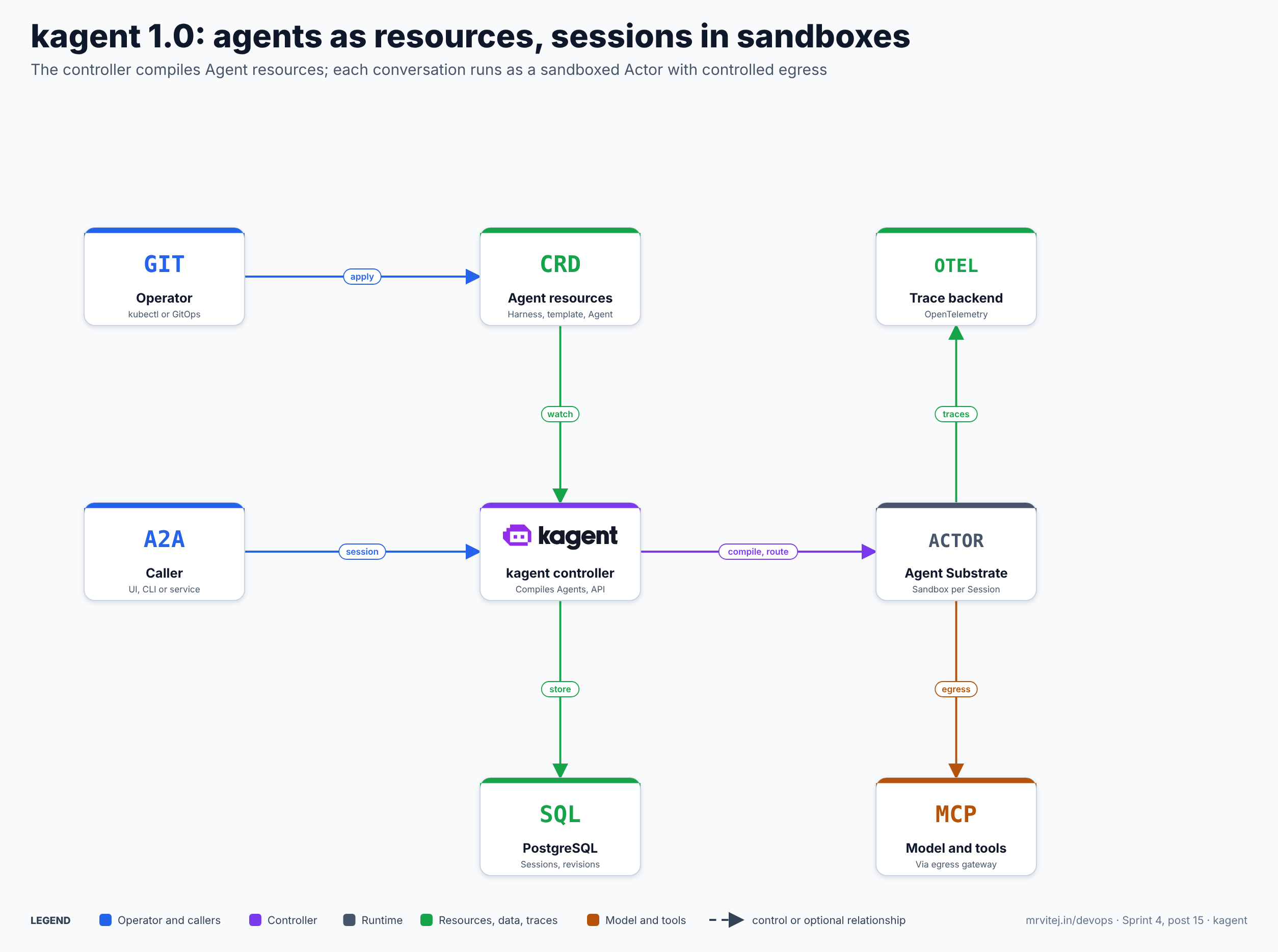
The controller is the centre. It watches Agent resources, resolves the template, harness and model configuration that each one names, and compiles the result into an ActorTemplate, a Substrate resource that sessions are created from. The image, command, arguments, environment and resolved template together form a revision, identified by a digest of its content. Editing any of them produces a new revision at the next reconcile. A Session keeps the revision it started with, so editing an Agent does not change conversations already running.
When a caller creates a Session through the gRPC API, kagent starts an Actor on a worker pool from the Agent’s latest successful revision. The caller then talks to it over A2A, using the Session ID as the A2A contextId. A gateway routes each request to the Actor behind that Session.
Three properties follow from the design:
- Each conversation is isolated. Every Session runs in its own gVisor sandbox with process, network and filesystem isolation by default, with no per-agent
securityContextto maintain. - Idle sessions cost almost nothing. When a turn ends, Substrate writes the Actor’s memory and filesystem to a snapshot and releases the worker. The next message restores it. The Session itself stays
READY. - Credentials stay outside the sandbox. The Actor reaches model providers and MCP servers through an egress gateway that injects credentials, so the key is not meant to sit in the agent’s own environment where injected instructions could read it.
Two authorization planes
kagent splits authorization in two. Kubernetes RBAC governs who can create or edit Harnesses, AgentTemplates and Agents with kubectl. kagent’s own control plane governs Sessions: creating, sharing, deleting and talking to them. Having RBAC access to apply an Agent does not give access to its Sessions, and the separation runs one way, since kagent’s gRPC API also writes the Kubernetes resources. Section “Security” returns to what this means in a default install.
An advisory run
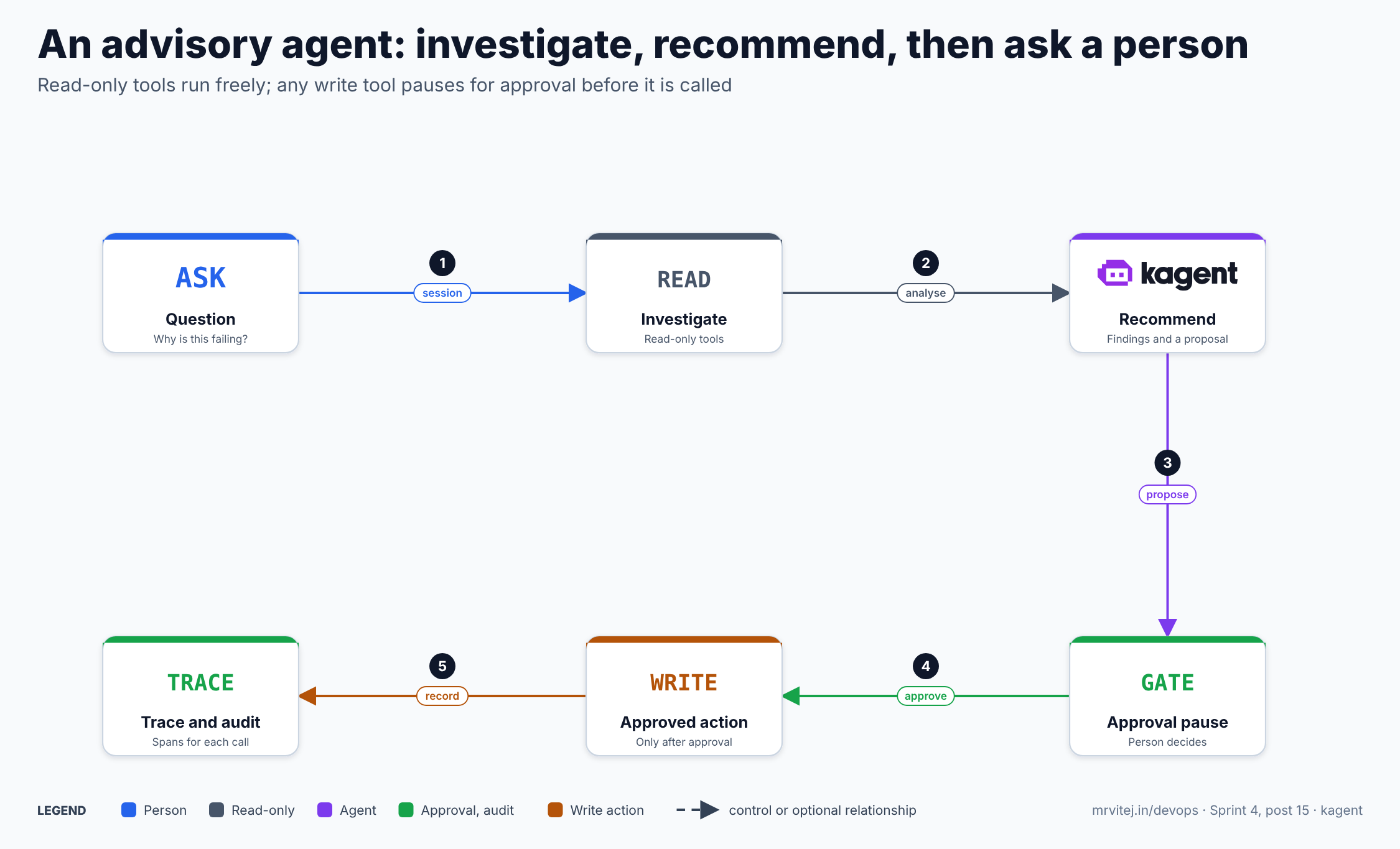
- A person starts a Session and asks a question.
- The agent calls read-only tools to look at pods, events and logs.
- It writes up findings and, where useful, a proposed change.
- If the proposal needs a tool bound with
requireApproval, the task moves toINPUT_REQUIREDand waits. - A person approves or rejects. Only after approval does the tool call run.
- Every model call and tool call is recorded as a span, so the whole turn can be reviewed.
Install
The 1.0 install sets up two systems in the same cluster: Agent Substrate (in ate-system) for sandboxed compute, and kagent (in kagent) for the control plane. Requirements from the install guide:
- Kubernetes 1.37 or later, because Substrate uses the
PodCertificateRequestandClusterTrustBundleAPIs, which are generally available in that release. Check withkubectl api-resources --api-group=certificates.k8s.io. - A model provider API key. The guide uses OpenAI; others are covered below.
- For Helm installs, a PostgreSQL 15 or later database you provide, plus
jq,openssl,psqland thekubectl-ateplugin.
Evaluate with the CLI
curl https://raw.githubusercontent.com/kagent-dev/kagent/refs/heads/main/scripts/get-kagent | bash -s -- --version v<release>
kagent version

cat > kagent-values.yaml <<EOF
config:
  server:
    grpcReflection: true
EOF
cat > kagent-config.yaml <<EOF
install:
  kagent:
    valuesFiles: [kagent-values.yaml]
EOF

kagent --config kagent-config.yaml install --namespace kagent
kubectl rollout status deployment/kagent-controller -n kagent --timeout=300s
kagent install reads your provider key, installs the CRDs, Agent Substrate, a certificate controller, a development PostgreSQL database and kagent, in order. Use <release> for the version you have chosen; I would pick a tested release and not a release candidate for anything beyond evaluation. If your cluster DNS domain is not cluster.local, set global.clusterDomain, because the chart builds the controller and tool-server URLs from it.
Production with Helm
The Helm route installs each chart yourself: CRDs for both projects, the CA and JWT identity pools that Substrate uses for mutual TLS, an egress CA pool (without it every outbound HTTPS call from an agent fails), the database setup, Substrate, and kagent. The kagent chart does not deploy a database. It connects with two logins, an owner login that creates the schema and runs migrations, and a read/write login for runtime queries. Each section creates objects the next needs, so follow the guide in order.
Your first agent
Three resources define a runnable agent. The manifests are from the project’s getting-started guide.
apiVersion: api.kagent.dev/v1alpha3
kind: Harness
metadata:
  name: my-first-harness
  namespace: kagent
spec:
  kagent: {}
  workload:
    image: <kagent runtime image, pinned by digest>
  substrate:
    workerPoolRef:
      name: kagent-default
    snapshotPolicy:
      location: s3://ate-snapshots/kagent/
The kagent: {} block selects the built-in engine. If workload.image is omitted on a kagent, codex or claude Harness, it runs the runtime image shipped with the installed release. The byo harness needs an image pinned by sha256 digest, because a revision must be reproducible.
apiVersion: api.kagent.dev/v1alpha3
kind: AgentTemplate
metadata:
  name: my-first-template
  namespace: kagent
spec:
  description: My first kagent agent
  modelConfig:
    name: default-model-config
  systemPrompt: You are a concise, helpful assistant.
---
apiVersion: api.kagent.dev/v1alpha3
kind: Agent
metadata:
  name: my-first-agent
  namespace: kagent
spec:
  template:
    ref:
      name: my-first-template
  harnessRef:
    name: my-first-harness
default-model-config is created from the API key you supplied at install. An Agent’s spec.template takes either ref (an existing AgentTemplate) or inline (a complete template spec, not an override). Then check readiness and talk to it:
kagent agent get my-first-agent
export SESSION_ID=$(kagent agent session create --agent my-first-agent -o json | jq -r '.session.id')
kagent agent invoke --session $SESSION_ID --task "What is 2+2?"
kagent agent invoke --session $SESSION_ID --task "What did I just ask you?"
READY may show False for a short time after you apply an Agent, because kagent builds a snapshot of the runtime first. If it stays false, read kubectl get agent my-first-agent -n kagent -o jsonpath='{.status.conditions}'; ResolvedRefs covers the template, harness, model config and tool references, and Compatible covers whether the configuration suits the chosen runtime. If a cluster serves both 0.x and 1.x, qualify the resource as agents.api.kagent.dev.
Model providers
A ModelConfig names one model at one provider. Fields: provider (OpenAI, Anthropic, AzureOpenAI, Ollama, Gemini, Bedrock, SAPAICore, Foundry, Mistral and the Vertex AI providers), model, stream (default true), and a block named after the provider for provider-specific settings. Credentials usually come from a Secret in the same namespace through apiKeySecret and apiKeySecretKey.
Google Cloud: read this before planning around Vertex AI
For a team on Google Cloud, the obvious plan is Vertex AI with a workload identity. That does not work in kagent 1.0. The docs state that neither GeminiVertexAI nor AnthropicVertexAI runs, because both authenticate with a service account key that is signed locally to obtain a token, and the egress gateway cannot inject that kind of credential. kagent rejects the ModelConfig and the Agent reports Compatible: False with the reason UnsupportedConfiguration.
What does work for Google models is the Gemini provider, which reaches Gemini through the Google AI Studio API (or a custom endpoint serving the same API) with an API key. Make sure the Google Cloud project has the Gemini API enabled.
kubectl create secret generic kagent-gemini -n kagent --from-literal GOOGLE_API_KEY=$GOOGLE_API_KEYapiVersion: api.kagent.dev/v1alpha3
kind: ModelConfig
metadata:
name: gemini-model-config
namespace: kagent
spec:
apiKeySecret: kagent-gemini
apiKeySecretKey: GOOGLE_API_KEY
model: gemini-3.5-flash
provider: Gemini
gemini: {}The model name is the one in the docs example; check the Gemini API docs for current names. Claude models are available through Anthropic, or Bedrock on a claude Harness. This is a limitation to weigh if your organisation requires model traffic to stay inside Vertex AI.
Other credential options
tokenPassthrough: trueforwards the bearer token from the incoming A2A request to the provider as the API key, so the provider sees the user who started the Session. It is unavailable for the Gemini and Vertex providers, and an unattended run has no user token.actorJwtmakes the egress gateway mint and inject a short-lived token that identifies the Actor, for a gateway or endpoint that must tell agents apart. The token lifetime ranges from 300 to 3600 seconds (default 900).- A ModelConfig sets at most one of
apiKeySecret,tokenPassthroughandactorJwt. - A provider such as OpenAI can point at your own gateway with a
baseUrl, for example an internal LLM proxy.
Tools and MCP
An AgentTemplate’s spec.tools list binds tools. Each binding is either an mcp binding (tools from an MCP server) or a subAgent binding (another AgentTemplate handling delegated work). You must set exactly one.
tools:
  - mcp:
      server:
        kind: RemoteMCPServer
        name: kagent-tool-server
      tools:
        - k8s_get_resources
        - k8s_get_pod_logs
RemoteMCPServer is the only accepted server kind. The optional tools list narrows the binding to the names you give (up to 50); omit it to expose everything the server offers. An AgentTemplate takes at most 50 bindings. On the Claude harness the list does not narrow a server, so limit what the server serves instead.
Register your own MCP server
apiVersion: api.kagent.dev/v1alpha3
kind: RemoteMCPServer
metadata:
  name: runbook-search
  namespace: kagent
spec:
  description: Searches the team's runbooks.
  url: https://mcp.example.com/mcp
  protocol: STREAMABLE_HTTP
The controller connects to the server and records the tools in status.discoveredTools, which is more reliable than any list in the docs:
kubectl get remotemcpserver runbook-search -n kagent \
  -o jsonpath='{range .status.discoveredTools[*]}{.name}{"\t"}{.description}{"\n"}{end}'
A server whose Accepted condition is not True has not been reached, and no tool can be bound from it. For a server that authenticates every caller, set tokenPassthrough: true or actorJwt on the RemoteMCPServer and label it kagent.dev/discovery: disabled, because the controller has no caller token to list tools with. With discovery off, a typo in a tool name surfaces as a failed call at runtime, not as a rejected binding. A server in another namespace can be shared, but only when it admits the template’s namespace.
The bundled tool server
An installation registers two servers, kagent-api (the controller’s own API) and kagent-tool-server. The tool server is one Go binary whose providers shell out to command-line tools inside its own container: Kubernetes, Helm, Istio, Cilium, Argo, Prometheus, Kubescape and utilities. The docs describe 124 tools across Kubernetes, Helm, Istio and Argo Rollouts. For the Kubernetes provider, the read tools include k8s_get_resources, k8s_describe_resource, k8s_get_pod_logs and k8s_get_events. The write tools, marked in the docs with an asterisk, include k8s_apply_manifest, k8s_delete_resource, k8s_scale, k8s_rollout and k8s_execute_command.
The point to absorb: these tools act on your cluster with the tool server’s service account, not with the caller’s credentials. So what the service account can do is the real limit on what an agent can do, whatever the system prompt says.
Make the tool server read-only
Two independent settings close the gap, and the docs warn that setting only one leaves a hole:
kagent-tools:
  tools:
    enabledTools:
      - k8s
      - helm
    args:
      - "--read-only"
  rbac:
    readOnly: true
    additionalRules:
      - apiGroups: ["networking.istio.io"]
        resources: ["virtualservices", "destinationrules", "gateways"]
verbs: ["get", "list", "watch"]| Setting | Effect |
|---|---|
tools.enabledTools |
Registers only the listed providers; omit it to register all |
tools.args: --read-only |
Skips the write tools at registration, so an agent cannot call them |
rbac.readOnly |
Binds the server’s service account to a read-only ClusterRole (get, list, watch) instead of cluster-admin; defaults to false |
rbac.allowSecrets |
With readOnly, grants read access to Secrets; defaults to false |
rbac.additionalRules |
With readOnly, adds read rules for custom resources that the Istio, Cilium and Argo providers read |
Read the default carefully: rbac.readOnly defaults to false, and the docs describe the alternative as replacing cluster-admin. A default install therefore binds the tool server to broad rights. For an advisory agent, set both settings. Leaving Secrets out of the read-only role matters too, since logs and describe output are far less sensitive than Secret contents.
Human approval
For tools that must remain available but should never run unattended, set requireApproval on the binding:
apiVersion: api.kagent.dev/v1alpha3
kind: AgentTemplate
metadata:
  name: cluster-advisor
  namespace: kagent
spec:
  description: Investigates cluster problems and proposes fixes.
  modelConfig:
    name: gemini-model-config
  systemPrompt: |-
    You investigate problems in a Kubernetes cluster using read-only tools.
    Explain what you found and what you would change. Never assume a change
    was made unless a tool result confirms it. When a question cannot be
    answered from your tools, say so.
  tools:
    - mcp:
        server:
          kind: RemoteMCPServer
          name: kagent-tool-server
        tools:
          - k8s_get_resources
          - k8s_describe_resource
          - k8s_get_pod_logs
          - k8s_get_events
    - mcp:
        server:
          kind: RemoteMCPServer
          name: kagent-tool-server
        tools:
          - k8s_rollout
          - k8s_scale
        requireApproval: true
Approval belongs to the binding, not to a tool name, so one server can supply some tools that run freely and others that pause. That is why the example binds the same server twice (the kagent harness supports this; codex and claude reject a server bound more than once). In 0.x, approval was a list of tool names on the Agent resource.
How the pause works:
- The agent stops mid-turn and the A2A task moves to
INPUT_REQUIRED, with atool_approval_requestin the status message. - The client answers with a
tool_approval_responseon the same task, and the agent continues. - The client must request the extension with the header
A2A-Extensions: https://kagent.dev/extensions/hitl/v1. A client that does not request it still gets a plain-text explanation of why the agent stopped, but has no ID to answer with, so the task stays paused. - The agent can also call a built-in
ask_usertool to ask a person a question. For unattended agents, setconfig.runtimeDefaults.builtinTools.disableAskUser: trueso a question does not leave a task waiting forever.
What approval does not cover is the important part. The docs state that a tool runs without a pause unless a binding that sets requireApproval exposes it, including every built-in tool such as file access, shell and web search, and every MCP tool on a binding that omits the field. Approval is also only as strong as the client that presents it: the UI or script that answers the pause decides who approves. Combine approval with the read-only tool server and a sandbox boundary, and treat none of the three as sufficient alone.
Security
- Authentication defaults to
insecure. The chart’sconfig.server.auth.modeisinsecure, in which every request is admitted and the caller’s identity comes from anX-User-Idheader or auser_idquery parameter that the caller chooses. The alternative,trusted-proxy, reads the identity from a bearer token but, per the docs, decodes it without verifying the signature, so it relies on an upstream proxy (the bundled oauth2-proxy can fill that role) that has already validated it. Never expose the controller outside the cluster ininsecuremode. - User authorization permits every check. For user calls, kagent installs an authorizer that allows all of them, whichever authentication mode is on. Sessions are therefore not protected from other authenticated users by kagent itself in this build, so do not put sensitive information in a shared installation.
- Service accounts for automation. Setting
config.server.auth.serviceAccount.authoritylets workloads authenticate with ServiceAccount tokens (audiencekagent-invocation), verified through TokenReview. - Sandboxing. Each Actor runs under gVisor, with policy limiting an Actor to its own resources.
- Egress control. An agent reaches only the destinations its template needs (model, MCP servers, skill sources), which kagent infers. Anything more needs an
EgressPolicy, which only adds access and can have the gateway inject a credential that never enters the sandbox:
apiVersion: api.kagent.dev/v1alpha3
kind: EgressPolicy
metadata:
  name: package-mirror
  namespace: kagent
spec:
  destinations:
    - origin: https://registry.npmjs.org
A policy is selected on the Agent with spec.egressPolicyRefs, and the grant applies to the whole Actor, including subagents.
- Secrets in the prompt path. Agents read logs, events and descriptions, and those can contain secrets. Keep Secrets out of the read-only role, and do not enable content capture in traces unless you accept prompts and replies reaching the tracing backend.
- Prompt injection. Text in a log line or a ticket can try to instruct the agent. The defence is not a better prompt. It is limited tools, a read-only service account, egress limits and approval on anything that changes state.
- Database. Sessions and compiled revisions live in PostgreSQL. Treat it as sensitive and use TLS and separate owner and read/write logins as the docs describe.
Tracing and metrics
Tracing is off by default. Turn it on through Helm values so the controller passes the configuration to every runtime it starts:
config:
  telemetry:
    traces:
      endpoint: http://otel-collector.telemetry.svc.cluster.local:4317
      protocol: grpc
      timeout: 15s
A single request produces spans across three hops, reported under separate OpenTelemetry service names: the controller (kagent-controller), the Substrate router (agentgateway), and each agent runtime under the name of its Agent. In 0.x all agents reported under one kagent service, so dashboards filtered by service need updating. The kagent runtime creates spans for the request, the agent invocation (invoke_agent <agent>), each model call (generate_content <model>) and each tool call (execute_tool <tool>), with correlation attributes such as gen_ai.conversation.id, gen_ai.agent.id and user.id. The docs offer a full stack with Tempo and a lightweight one with Jaeger.
Two cautions from the docs. When config.runtimeDefaults.telemetry.captureContent is true, prompts and replies reach your tracing backend. And on the kagent runtime, the execute_tool span records the tool call’s arguments and reply whatever that setting says, so treat the trace backend as holding sensitive operational data.
For metrics, the controller serves a Prometheus /metrics endpoint over HTTPS when you set controller.metrics.enabled: true. A scrape is accepted only from a service account holding the metrics-reader ClusterRole, and the chart can create a ServiceMonitor. Agent runtimes and Substrate push metrics over OpenTelemetry instead.
Day-2 operations
- One controller replica by default, against the development database the CLI creates. For production, provide your own PostgreSQL and tune replicas and node placement as the operational guide describes.
- Configuration is read once at startup. Controller settings sit under
configin the Helm values, are validated strictly (unknown fields, duplicate keys and quoted booleans are rejected), and need a restart to change. Check them withkagent config validateagainst the rendered ConfigMap. - Durations are in seconds with an
ssuffix (604800s). A Go duration like168hfails validation. - Sessions expire.
config.sessions.idleTtldefaults to 604800 seconds (seven days). Active work and pending lifecycle operations keep a Session alive, but a turn waiting atINPUT_REQUIREDdoes not, so an unanswered approval request expires like an idle Session after the interval, without resuming the agent. - Pin and test upgrades. Only the latest release is supported, and Substrate must not be upgraded independently of kagent. There is no upgrade from 0.10.x, so a move to 1.0 is a new installation with a new database and no session history.
- Debugging. Use the Agent’s status conditions first, then
kagentCLI commands, then traces. - Cost. Idle sessions free their compute, but model calls cost money in every provider. Set budgets and alerts at the provider.
Limits worth knowing
- Young and moving. 1.0 is at release-candidate tags, the API group is
v1alpha3, and the docs call it a migration with no conversion path from 0.x. - Heavy prerequisites. Kubernetes 1.37 or later, PostgreSQL, and Agent Substrate with its own identity setup make this more than a Helm one-liner.
- No Vertex AI in 1.0. Google Cloud teams must use the Gemini API with a key, or another provider.
- Insecure by default. The default authentication and authorization are suitable only for a trial inside a protected network.
- No ready-made agent catalogue in the 1.x docs I read. The install provides the controller, a default model config and the tool server. You write the AgentTemplates.
- Approval depends on the client. A client that does not implement the extension cannot answer a pause.
- Built-in tools are not gated. File, shell and search tools run without approval unless you restrict them another way.
- Model quality. The agent is only as reliable as the model and the context it is given, and long tool lists cost context on every turn.
Usage cases
- Cluster triage assistant. A read-only agent that explains why pods are pending or crash-looping from events and logs.
- Runbook agent. An agent that searches the team’s runbooks through an MCP server and summarises the matching steps.
- Release reviewer. An agent that compares a Helm release’s history and values with what is running, and reports differences.
- Specialist delegation. A coordinator agent that hands questions to a networking or storage specialist template through
subAgentbindings. - Chat-ops with approval. A team channel where a person approves a proposed rollout restart before it runs.
- Industrial platforms. In the pharmaceutical-plant machine monitoring design on Google Cloud, a read-only agent could help engineers read the cluster’s events and logs when a data collector misbehaves, with any change left to a person.
Adoption
kagent was accepted into the CNCF Sandbox on 22 May 2025 according to the Landscape, and its summary there describes helping users learn, install, configure and troubleshoot cloud native projects. The repository has a code of conduct, security policy, contribution guide and design proposals, lists an OpenSSF Best Practices badge, and had a commit on 7 November 2026. I did not find an adopters file in the repository, so I cannot name organisations running it in production. Evaluate it on your own workloads and treat it as early software.
Alternatives and neighbours
| Option | Model | Best suited to |
|---|---|---|
| kagent | Agents, tools and policy as Kubernetes resources; sandboxed sessions; MCP and A2A | Platform teams that want agents managed like other cluster workloads |
| Your own agent framework (LangGraph, CrewAI, and similar) | Code-first agents you deploy yourself | Teams with a framework already; kagent’s byo harness can run an image that speaks its A2A contract |
| Standalone MCP servers (Kubernetes, Helm and others) used from an IDE or desktop assistant | Tools for a personal assistant, with the user’s own credentials | Individual engineers working interactively |
| Cluster diagnostic assistants such as K8sGPT and HolmesGPT | Purpose-built analysis of cluster problems | Teams that want diagnosis without building agents |
| Managed agent platforms from cloud vendors | Hosted agents and model access | Teams that prefer a managed service tied to one cloud |
| Runbook automation and ChatOps without a model | Deterministic scripted responses | Cases where predictable behaviour matters more than flexibility |
The honest comparison is about control. Frameworks give maximum flexibility and leave deployment, isolation, identity and tracing to you. Diagnostic assistants are narrower and simpler. kagent sits in between: a platform that standardises how agents are declared, isolated and observed, at the cost of installing Substrate, a database and a new resource model.
Strengths and limitations
| Strengths | Limitations |
|---|---|
| Agents, tools and model configs as Kubernetes resources, fit for GitOps | 1.0 is a release candidate with a v1alpha3 API and no upgrade from 0.x |
| Per-session gVisor sandbox and suspend and resume | Needs Kubernetes 1.37 or later, PostgreSQL and Agent Substrate |
| MCP tools, subagents, A2A and several model providers | No Vertex AI support in 1.0 |
| Approval gates and agent questions through an A2A extension | Built-in tools are not gated; approval needs a capable client |
| Egress policy with credential injection outside the sandbox | Insecure authentication default; user authorization permits all |
| OpenTelemetry traces across controller, router and runtime | Tracing is off by default, and traces can hold sensitive content |
Project status
kagent is a CNCF Sandbox project under Apache 2.0, with a public repository, an OpenSSF Best Practices badge and design proposals for features such as scoped authorization, OIDC authentication and memory. The latest tag I found is v1.0.0-rc3, and the 1.x documentation pins the same version while its release notes describe 1.0.0. Only the latest release is supported. The jump from 0.x to 1.0 changed the runtime, the resources and the API group, so expect more change before the API settles.
Recommendation
Trial, read-only, in a non-production cluster. kagent is the most complete attempt I have seen to treat AI agents as ordinary platform workloads, and its approval, egress and tracing features are what an operations team needs. It is also new, heavy to install and insecure by default.
Start with a disposable cluster at Kubernetes 1.37 or later and the CLI install. Create one Harness, one AgentTemplate and one Agent. Before giving it any tool, set kagent-tools.rbac.readOnly: true and --read-only, and bind only the four or five read tools you need. Put authentication in front of the controller (trusted-proxy behind a real proxy, plus service account authentication for automation) and keep it off public networks. Use the Gemini provider with an API key if you are on Google Cloud, and accept that Vertex AI is not available in 1.0. Turn on tracing, leave content capture off, and review a few traces before trusting any answer. Add requireApproval bindings for write tools only after a client that can answer the pause exists. Write down the rule your team follows: the agent proposes, a person decides, and nothing it says is acted on without checking.
References: kagent repository · kagent documentation · Installation guide · Your first agent · Model providers · Human in the loop · Tracing · CNCF project page