
Pinniped is an authentication service for Kubernetes clusters. It lets a developer log in once with the organisation’s existing identity provider and then use kubectl against many clusters, without a separate kubeconfig secret, certificate or static token for each one. Pinniped is a NON CNCF tool: the CNCF Landscape lists it under Provisioning › Key Management, but it is not a CNCF project, and in practice it is a cluster authentication layer rather than a key store. It addresses a common multi-cluster problem: each cluster has its own way to authenticate users, so access is granted and removed cluster by cluster, and long-lived credentials sit in kubeconfig files. Pinniped came from VMware’s Tanzu team and is open source under the Apache 2.0 licence.
CNCF daily · Sprint 3, post 17 of 21 · Key Management · NON CNCF
At a glance
| Category | Provisioning › Key Management |
| CNCF status | NON CNCF, listed in the CNCF Landscape |
| Written in | Go |
| License | Apache 2.0 |
| Components | Supervisor (OIDC issuer), Concierge (per-cluster credential exchange), pinniped CLI |
| Identity sources | OpenID Connect providers, LDAP, Active Directory and GitHub |
| Custom resources | FederationDomain, OIDCIdentityProvider, JWTAuthenticator |
| Credential lifetime | Cluster credentials last about 5 minutes and are refreshed; a login session lasts about 9 hours |
| Authorisation | Standard Kubernetes RBAC, using the username and groups Pinniped supplies |
Architecture
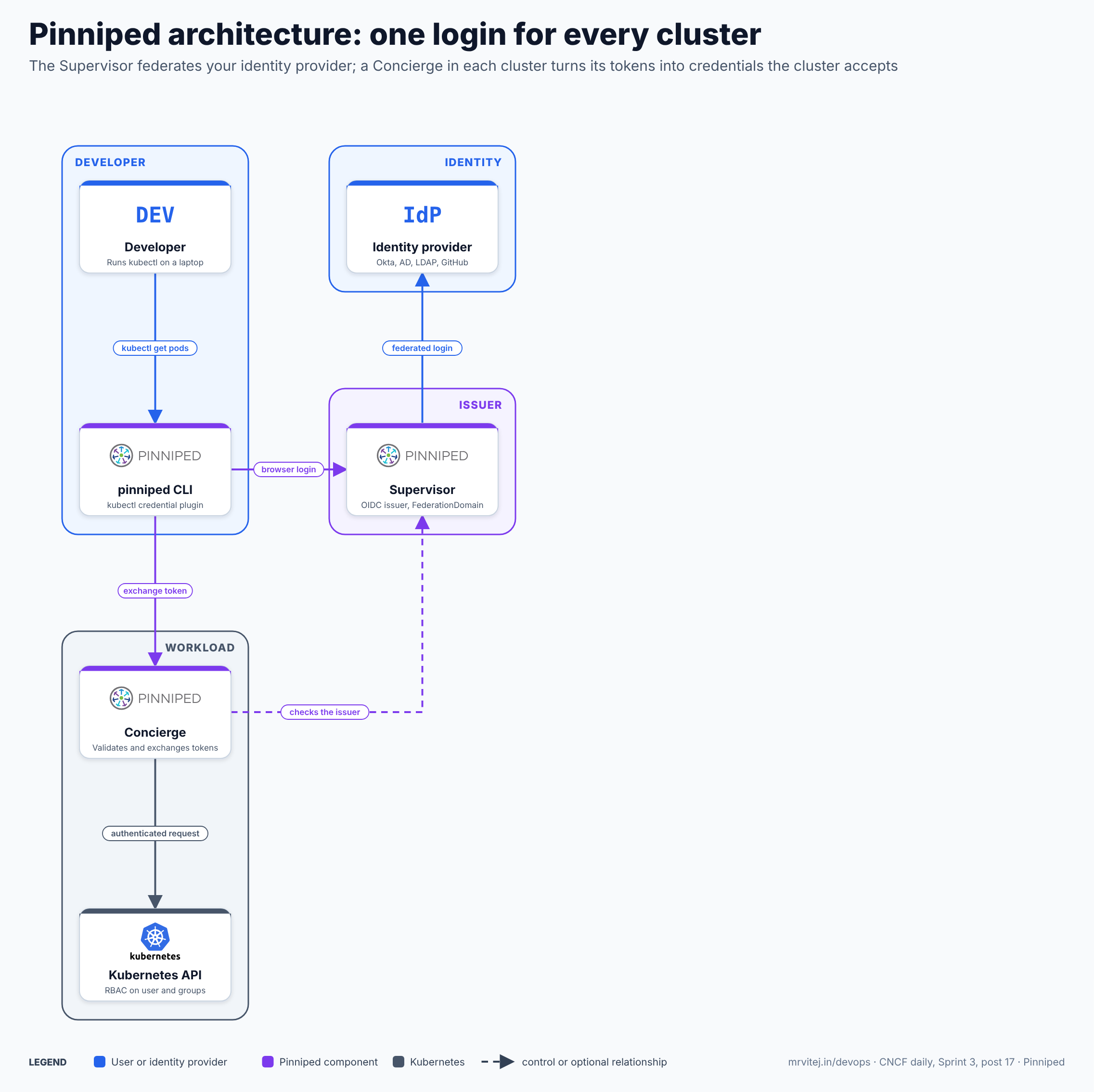
Blue is the developer and the identity provider, purple Pinniped and slate Kubernetes. The identity provider keeps the passwords: Pinniped only federates to it. The dashed arrow is the Concierge checking tokens against the Supervisor’s issuer. Open the zoomable diagram, or download it as SVG or PNG.
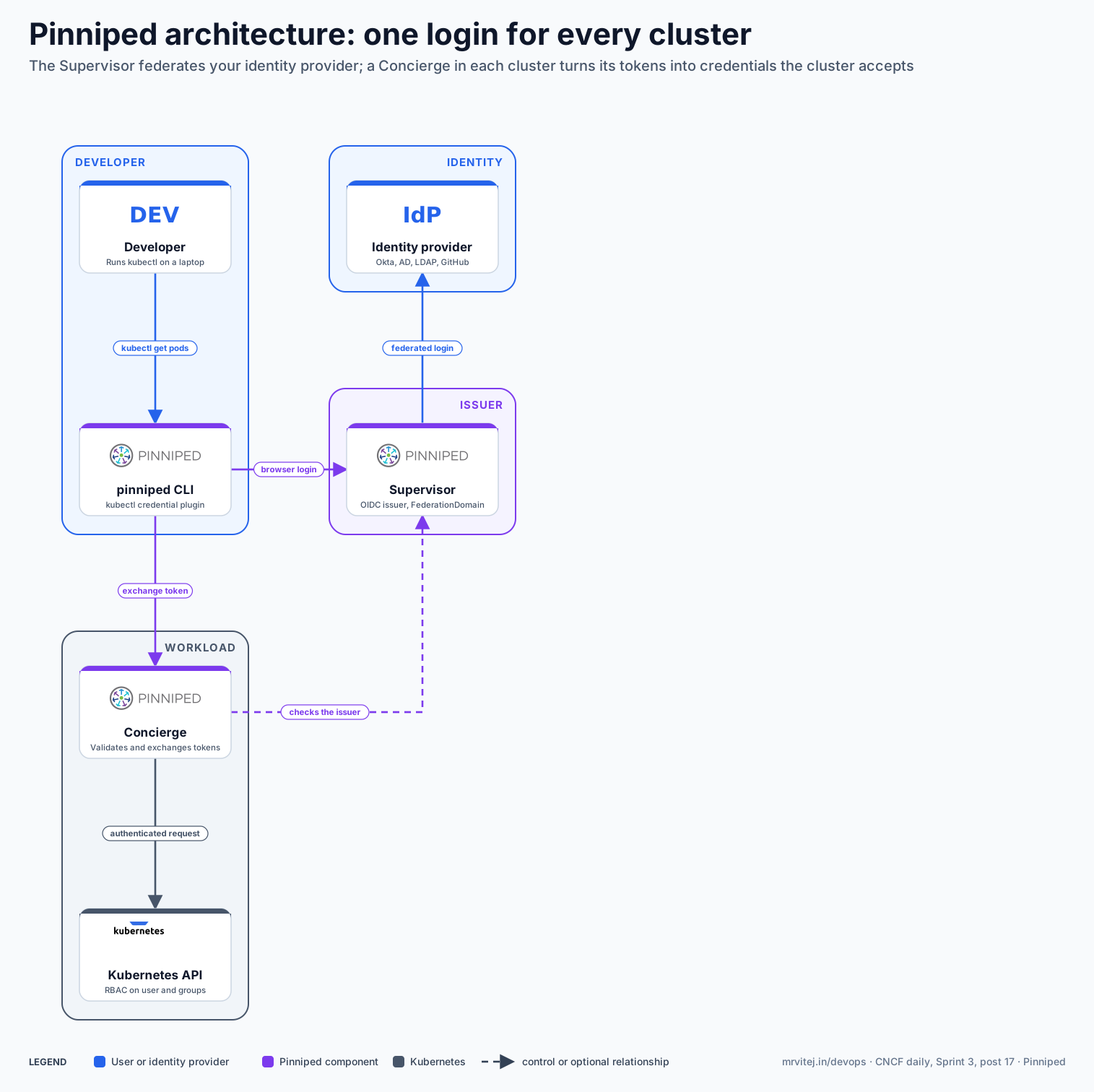
| Component | Responsibility |
|---|---|
| Developer | Runs kubectl with a kubeconfig that names the Pinniped plugin instead of a secret. |
| pinniped CLI | A kubectl credential plugin that opens the browser login, caches tokens and exchanges them for cluster credentials. |
| Supervisor | An OpenID Connect provider with one or more FederationDomains. It signs in users through external providers and issues its own tokens. |
| Identity provider | The system that holds the users, such as Okta, Active Directory, LDAP or GitHub. |
| Concierge | Runs in each workload cluster, trusts the Supervisor through a JWTAuthenticator and exchanges valid tokens for credentials the cluster accepts. |
| Kubernetes API | Receives the authenticated request and applies RBAC to the user and groups. |
Design principle. Separate the one place users log in from the many places they need access. The Supervisor runs where developers have no access and holds the federation, while each cluster only needs to trust its issuer, so adding or removing a user changes one system.
Request flow
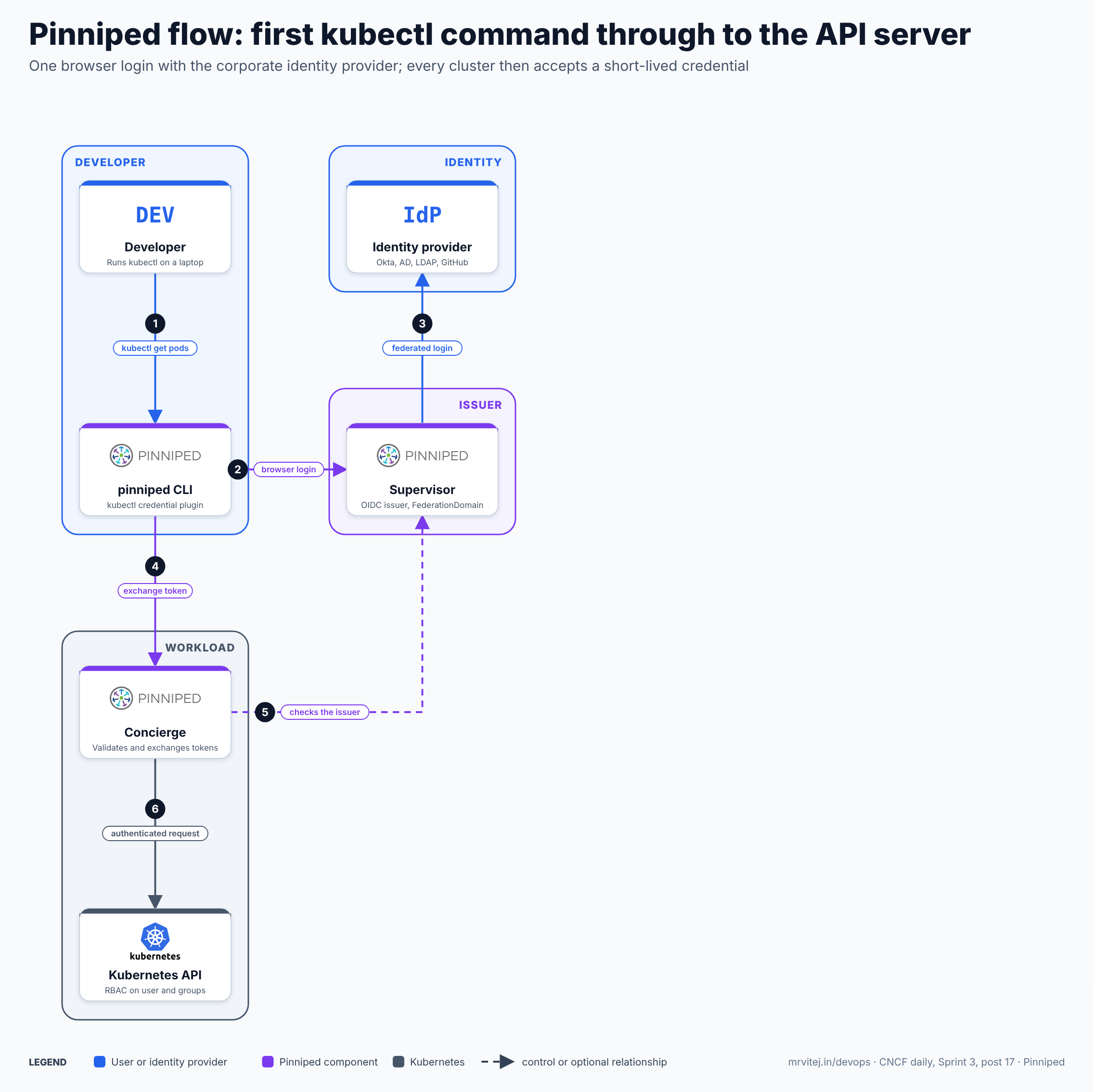
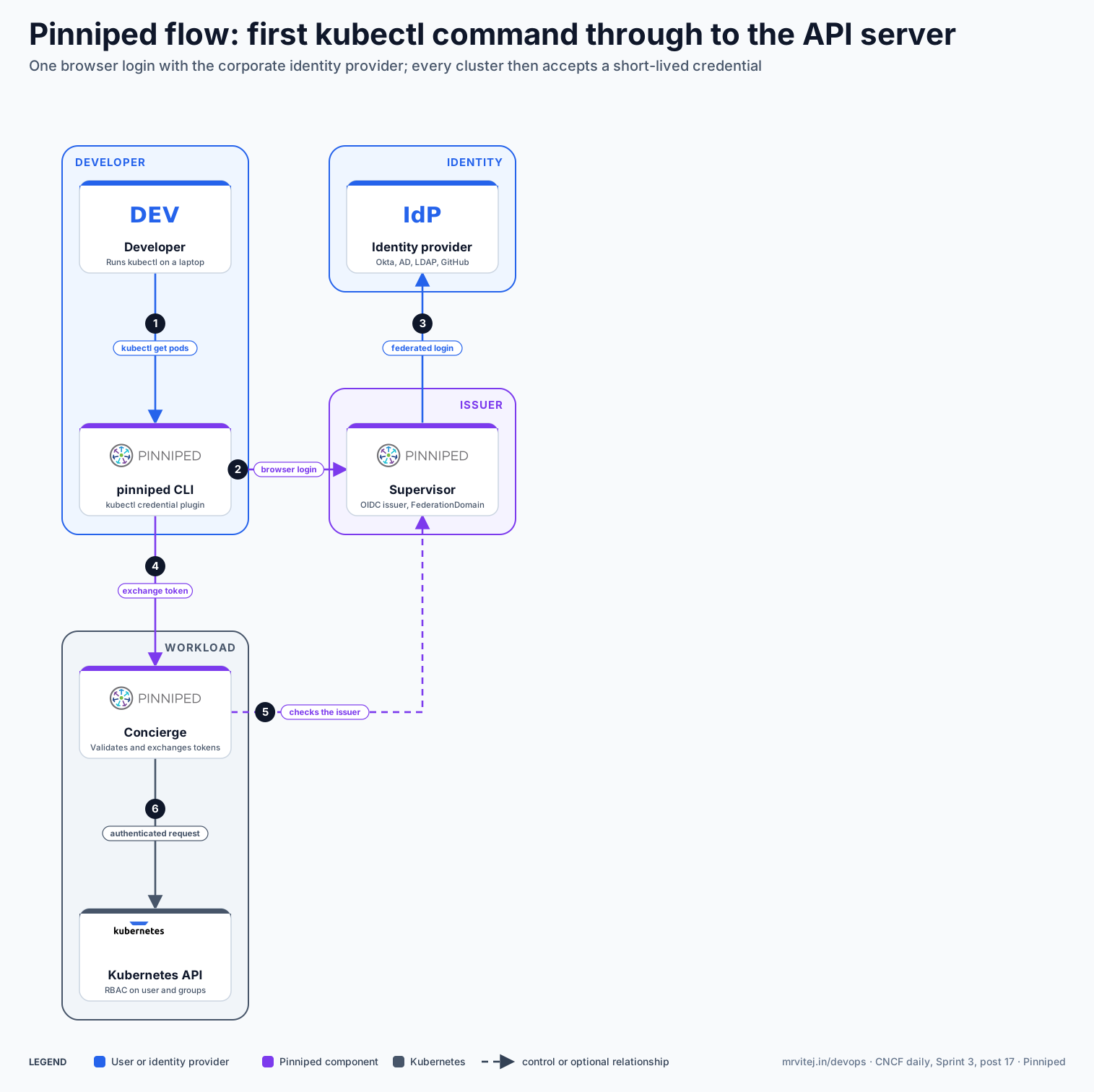
- Run kubectl. The developer runs a command.
kubectlcalls the Pinniped CLI listed in the kubeconfig. - Browser login. With no valid session, the CLI opens a browser at the Supervisor’s issuer address.
- Federated login. The Supervisor redirects the user to the configured identity provider. After a successful login it issues tokens for the FederationDomain.
- Exchange the token. The CLI sends the Supervisor token to the cluster’s Concierge and asks for a credential for that cluster.
- Check the issuer. The Concierge validates the token’s signature, issuer and audience against its
JWTAuthenticatorsettings, which point at the Supervisor. - Authenticated request.
kubectluses the short-lived credential. The API server sees a user name and groups and applies RBAC. For other clusters under the same FederationDomain, the CLI repeats steps 4 to 6 without another browser login.
Open the zoomable flow diagram, or download it as SVG or PNG.
Production reference design
This Sprint 3 design puts one Supervisor in the cloud cluster on Google Compute Engine (self-managed Kubernetes with Calico) and a Concierge in the cloud cluster and in each edge cluster.
- Choose where the Supervisor runs. Use a cluster developers cannot access directly, and give it a public DNS name such as
login.example.comwith a certificate from a CA that browsers trust. - Install the Supervisor from the release manifests published at
get.pinniped.dev, and create your own Service for port 8443. (GCP) A Cloud Load Balancing TCP load balancer works, because the Supervisor terminates TLS itself. Do not expose the internalpinniped-supervisor-apiService. - Create the TLS Secret and the FederationDomain:
apiVersion: config.supervisor.pinniped.dev/v1alpha1 kind: FederationDomain metadata: name: platform namespace: pinniped-supervisor spec: issuer: https://login.example.com/platform tls: secretName: supervisor-tls - Connect the identity provider with an
OIDCIdentityProvider(or an LDAP or GitHub provider) and map its claims to user name and groups, then list it under the FederationDomain’sidentityProviders. - Install the Concierge in every workload cluster and trust the Supervisor, giving each cluster a unique audience:
apiVersion: authentication.concierge.pinniped.dev/v1alpha1 kind: JWTAuthenticator metadata: name: platform-supervisor spec: issuer: https://login.example.com/platform audience: edge-vizag-<unique-random-value> - Hand out kubeconfigs with
pinniped get kubeconfig --kubeconfig <admin-kubeconfig> > developer.yaml, bind RBAC roles to identity-provider groups, and check access withpinniped whoami.
Typical uses include giving platform and application teams single sign-on to many clusters, removing shared admin kubeconfigs and tying cluster access to joiner and leaver processes in the identity provider.
Operational considerations
- Supervisor availability. If the Supervisor is down, nobody can start a new login, although users with valid credentials keep working until they expire (about five minutes for cluster credentials). Run more than one replica.
- Network placement. Developers must reach the Supervisor’s public address, and the Concierge must reach it to read its signing keys. Plan firewall and DNS for every site.
- Managed clusters. Where the Concierge cannot obtain client certificates from the cluster, it can run an impersonation proxy, which changes how clients reach the API server. Test this path on your platform.
- Audience and issuer values. Each cluster needs a unique audience, and tokens are bound to one FederationDomain. Mistakes here show up as authentication failures that are hard to read.
- RBAC is separate. Pinniped authenticates; it does not grant permissions. Bind roles to groups, and keep group names stable in the identity provider.
Adoption
- VMware Tanzu created Pinniped and uses it for cluster authentication in its Kubernetes distributions, and the project is hosted under the
vmware-tanzuorganisation on GitHub. - AWS has published an open source blog post on using Pinniped for multi-cluster authentication on Amazon EKS.
- The project does not publish a large public adopters list, so check its repository and website for current users before relying on it.
Alternatives
| Solution | Model | Best suited to |
|---|---|---|
| Dex (CNCF Sandbox) | OpenID Connect federation proxy | Clusters that need to bridge identity providers, with fewer features around per-cluster credentials |
| Keycloak (CNCF Incubating) | Full identity provider with SSO | A central login service that Pinniped or the API server can also trust; see the Keycloak brief |
| API server OIDC flags | Built-in Kubernetes OIDC authentication | One or two clusters where you control the API server flags |
| Cloud provider IAM (GKE, EKS, AKS) | Provider-managed cluster login | Estates on a single managed Kubernetes service |
| SPIRE (CNCF Graduated) | Workload identity | Services authenticating to each other, not people to clusters; see the SPIRE brief |
Strengths and limitations
| Strengths | Limitations |
|---|---|
| One login for many clusters, with short-lived credentials | Not a CNCF project; its Landscape category (Key Management) is not a good description |
| Works with several identity providers and with managed clusters | The Supervisor is a critical service to run and secure |
| Standard Kubernetes RBAC and no API server flag changes in many cases | Concierge setup differs by platform, which adds testing |
| Open source under Apache 2.0, with a CLI that fits kubectl | Smaller community and fewer public adopters than Dex or Keycloak |
| Federation keeps passwords in the existing identity provider | Needs public DNS and a trusted certificate for the Supervisor |
Recommendation
Trial for teams that run several clusters and want single sign-on to Kubernetes through an existing identity provider. Start with one Supervisor, one Concierge and one test group, and check expiry, revocation and the outage case (Supervisor unreachable) before rolling it out. Teams with one cluster can use the API server’s OIDC support directly, and teams that need a full identity provider should look at Keycloak.
References: Pinniped website · Concierge and Supervisor tutorial · Configure the Supervisor as an OIDC issuer · Pinniped repository · CNCF Landscape entry