
SOPS (Secrets OPerationS) is a command-line editor for encrypted files. You give it a YAML, JSON, ENV, INI or binary file and the recipients who may read it, and it encrypts the values while leaving the keys and structure in plain text. The result is a file you can commit to Git, review in a pull request, and decrypt only where a recipient’s key is available.
It answers a very common DevOps question: where do database passwords, API tokens and Kubernetes Secret values live when everything else is in Git? SOPS lets them live there too, encrypted, without a separate server to run.
CNCF daily · Sprint 5, post 10 of 14 · Security & Compliance
At a glance
| Category | Provisioning, subcategory Security & Compliance (CNCF Landscape) |
| CNCF status | Sandbox. Accepted on 17 May 2023 (CNCF presentations page) |
| Origin | Started at Mozilla in 2015; donated to CNCF in 2023 under a new group of maintainers, and the repository moved to the getsops organisation |
| Written in | Go. A single binary, plus container images on GHCR and Quay |
| License | Mozilla Public License 2.0 |
| Latest release I found | v3.13.3, referenced by a dependency update merged on 23 July 2026. A newer release may exist |
| File formats | YAML, JSON, ENV, INI and BINARY |
| Key backends | AWS KMS, GCP KMS, Azure Key Vault, HuaweiCloud KMS, age and PGP, plus HashiCorp Vault Transit |
| Runs as | A CLI and a Go library (decrypt package). No server and no database |
| Secrets store? | No. SOPS encrypts files; it does not hold, rotate or serve secrets |
The problem SOPS solves
Secrets need version control too. Infrastructure, Helm values and Kubernetes manifests live in Git for review and history. A password in a plain file defeats that; a password kept outside Git breaks the single source of truth.
Whole-file encryption hides everything. If an entire file is an opaque blob, reviewers see nothing useful in a diff and cannot tell which setting changed.
Key handling is awkward. Shared PGP keys, a single master password or a bastion script all become a bottleneck when people join and leave.
SOPS encrypts only values, supports several independent key sources at once, and needs nothing running beyond the CLI.
Key concepts
| Term | Meaning |
|---|---|
| Data key | A random key generated for each file. It encrypts the values with AES-256-GCM |
| Master key / recipient | An AWS KMS key, age public key, PGP key or similar that protects the data key. A copy of the data key is stored in the file encrypted for each recipient |
| Any one recipient is enough | As long as one of the listed KMS or PGP methods still works, you can access the data |
| Creation rule | An entry in .sops.yaml that picks keys and settings by file path or name. The first matching rule wins |
| Key group | A set of master keys. With several key groups, SOPS can use Shamir secret sharing so a threshold of groups is needed |
| MAC | A message authentication code stored encrypted in the file. It covers keys, values and their order, so tampering is detected on decrypt |
| Encrypted and unencrypted regex/suffix | Rules for which values to encrypt. The default _unencrypted suffix leaves a value readable |
sops metadata block |
The section SOPS adds to the file: recipients, wrapped data keys, last-modified time and MAC |
Architecture
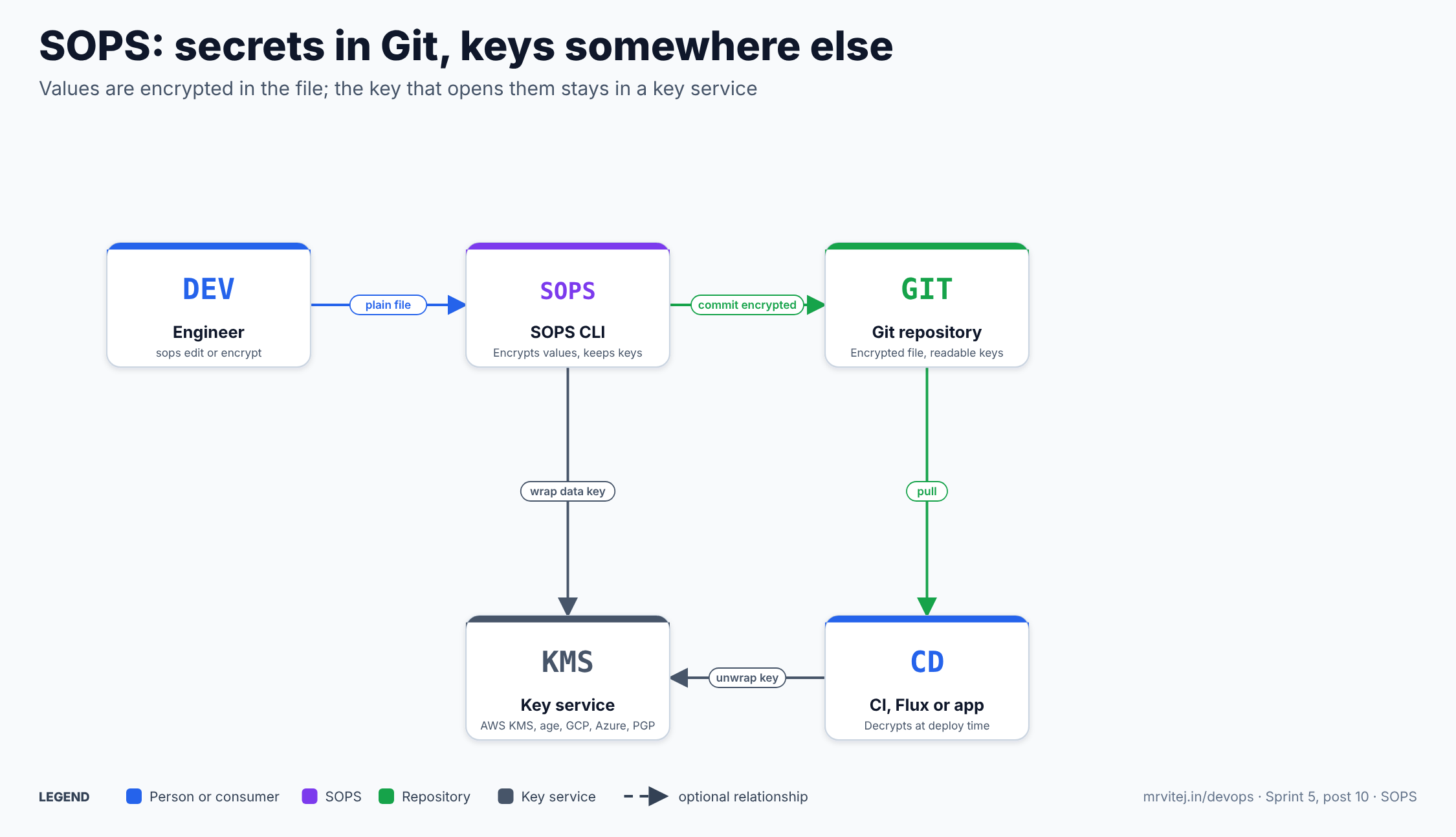
SOPS sits between the engineer and Git; the key service is consulted to wrap and later unwrap the data key. Blue is a person or consumer, purple is SOPS, green is the repository and grey is the key service. Open the zoomable diagram, or download it as SVG or PNG.
| Component | Responsibility |
|---|---|
| SOPS CLI | Opens, edits, encrypts, decrypts, rotates and re-keys files. Chooses keys from .sops.yaml |
| Encrypted file | Same structure as the original; values are ENC[...] strings and a sops: block holds recipients, wrapped keys and the MAC |
| Key service | AWS KMS, GCP KMS, Azure Key Vault, HuaweiCloud KMS, Vault Transit, or local age and PGP keys. Authorises who can unwrap the data key |
| Git | Stores the encrypted file and its history. Diffs show which keys changed |
| Consumer | CI, Flux, Terraform, Ansible or an application that decrypts at deploy time |
Design principle. Keep the secret and the key in different places. The encrypted file is safe to copy around; access is decided by who can use the key, which your cloud IAM or age key distribution already controls.
Encrypt once, open with any listed key
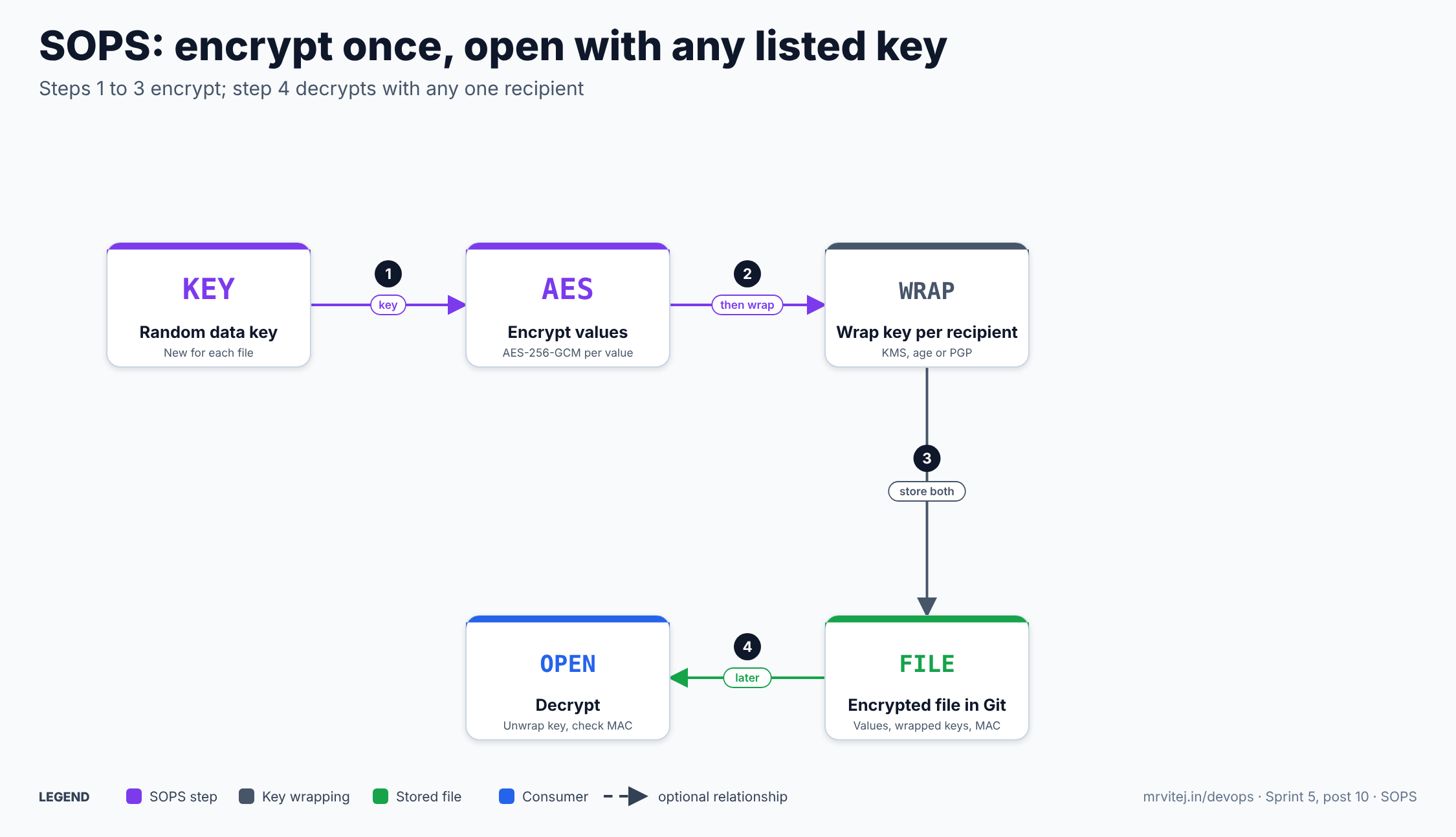
Steps 1 to 3 encrypt; step 4 decrypts with any one recipient. Open the zoomable diagram, or download it as SVG or PNG.
- SOPS generates a random data key for the file.
- It encrypts each value with that key. An encrypted value looks like
ENC[AES256_GCM,data:...,type:str]. - It wraps the data key once per recipient (each KMS key, age recipient or PGP key) and stores the wrapped copies and the MAC in the
sops:block. - To decrypt, SOPS asks any one recipient to unwrap the data key, decrypts the values and recomputes the MAC to check nothing was altered.
SOPS documentation · Identities
Install SOPS
I did not run these here; follow the project’s install page for your platform.
- Binary. Download a pre-built binary and checksums from the releases page. Releases are signed and ship SBOMs and in-toto provenance.
- Homebrew.
brew install sops. - Container.
ghcr.io/getsops/sops:<version>orquay.io/getsops/sops:<version>, with-alpinevariants. - From source. Clone the repository and run
make install. The development docs say Go 1.25 or newer is needed for the main branch. - As a library. Use
github.com/getsops/sops/v3/decrypt. The project guarantees API stability only for that package.
Note the Go module path changed from go.mozilla.org/sops/v3 to github.com/getsops/sops/v3 when the project moved to CNCF.
Using SOPS
All examples are adapted from the official docs and are untested here. Replace the placeholder key identifiers.
With age
# create a key pair; keep the private key out of Git
age-keygen -o keys.txt

# encrypt for one recipient (public key from keys.txt)
sops encrypt --age age1exampleexampleexampleexampleexampleexampleexampleexampleexamp secrets.yaml > secrets.enc.yaml

# decrypt to the terminal
sops decrypt secrets.enc.yaml
When decrypting, SOPS looks for a text file named keys.txt in a sops subdirectory of your user configuration directory. Its contents are age X25519 identities, one per line, tried in turn until one works. SOPS also supports SSH public keys as age recipients.
With AWS KMS
sops encrypt \
  --kms arn:aws:kms:eu-west-1:111122223333:key/00000000-0000-0000-0000-000000000000 \
  secrets.yaml > secrets.enc.yaml

sops decrypt secrets.enc.yaml
SOPS uses the standard AWS credential chain, and a creation rule can name an aws_profile. The caller needs permission on the key:
{
  "Sid": "Allow use of the key",
  "Effect": "Allow",
  "Action": ["kms:Encrypt", "kms:Decrypt", "kms:ReEncrypt*", "kms:GenerateDataKey*", "kms:DescribeKey"],
  "Resource": "*",
  "Principal": { "AWS": ["arn:aws:iam::111122223333:role/sops-example"] }
}
For tighter control the docs show an AWS KMS encryption context: a policy that allows kms:Decrypt only when the request carries specific context values such as an application name and file path.
One config file for the repository
# .sops.yaml
creation_rules:
  # first matching rule wins
  - path_regex: environments/dev/.*\.yaml$
    age: >-
      age1exampledevrecipient000000000000000000000000000000000000000
  - path_regex: environments/prod/.*\.yaml$
    kms: arn:aws:kms:eu-west-1:111122223333:key/00000000-0000-0000-0000-000000000000
  - path_regex: .*\.yaml$
    age: >-
      age1examplecatchall0000000000000000000000000000000000000000
With this file in place, sops environments/prod/db.yaml opens an editor and encrypts on save using the matching rule. Rules can also use encrypted_regex to encrypt only matching keys. A common Kubernetes choice is ^(data|stringData)$ so that only Secret values are encrypted and the rest of the manifest stays plain.
Encrypt only part of a file
creation_rules:
  - path_regex: .*\.yaml$
    encrypted_regex: '^(data|stringData)$'
    age: age1exampleexampleexampleexampleexampleexampleexampleexampleexamp
Values under data or stringData become ENC[...]; metadata and names stay readable, so a reviewer can see which Secret changed. Keys ending in _unencrypted are skipped by default, but they remain covered by the MAC.
Require two groups (Shamir)
creation_rules:
  - path_regex: .*\.prod\.yaml$
    shamir_threshold: 2
    key_groups:
      - kms:
          - arn: arn:aws:kms:eu-west-1:111122223333:key/00000000-0000-0000-0000-000000000000
      - age:
          - age1exampleexampleexampleexampleexampleexampleexampleexampleexamp
With more than one key group SOPS can use Shamir secret sharing so that decrypting needs access to a threshold of the groups.
Use with Flux and Kubernetes
Flux’s kustomize-controller decrypts SOPS files natively. The documented pattern is a Kustomization with decryption.provider: sops and a Secret holding the age key (named sops-age in the guides). Argo CD has no built-in SOPS support and needs a plugin or tool such as KSOPS or a Helm plugin; check that route against your Argo CD version.
In scripts and CI
# decrypt in a pipeline and apply
sops decrypt secret.enc.yaml | kubectl apply -f -
Other documented subcommands include edit, rotate (new data key) and updatekeys (change recipients). I did not re-verify each flag in this pass; run sops --help for your version.
Features
| Area | What you get |
|---|---|
| Formats | YAML, JSON, ENV, INI and binary |
| Key backends | AWS KMS, GCP KMS, Azure Key Vault, HuaweiCloud KMS, age, PGP, Vault Transit |
| Several recipients at once | Mix KMS, age and PGP so any one holder can open the file |
| Key groups and Shamir | Require a threshold of groups for sensitive files |
| Selective encryption | encrypted_regex, unencrypted_regex, and _unencrypted / encrypted suffixes |
| Creation rules | .sops.yaml chooses keys by path or filename; path-specific encryption context for AWS |
| Integrity | A MAC over keys, values and ordering is checked on decrypt; the file can also protect only the encrypted values |
| Editor workflow | sops file decrypts into your $EDITOR and re-encrypts on save |
| Rotation and re-keying | Rotate the data key; add or remove recipients without re-entering secrets |
| Library | Go decrypt package for services that read SOPS files directly |
| Ecosystem | Native Flux support; community Terraform, Ansible, Helm and Kustomize integrations |
Configuration reference
SOPS is configured through .sops.yaml and the command line.
| Key or setting | Purpose |
|---|---|
creation_rules[] |
Ordered rules; the first whose path_regex matches is used. A rule without path_regex matches every file |
path_regex |
Regular expression for the file path |
kms, aws_profile |
AWS KMS key ARNs and the AWS profile to use. A role can be appended to an ARN with + |
age |
One or more age recipients (comma-separated string or list) |
pgp |
PGP fingerprints |
gcp_kms, azure_keyvault, hckms, hc_vault_transit_uri |
Other key services |
key_groups and shamir_threshold |
Groups of keys and how many must cooperate |
encrypted_regex, unencrypted_regex, suffix options |
Choose which values are encrypted |
destination_rules |
Where to publish encrypted output |
--input-type, --output-type |
Force the file format when the extension is misleading |
--extract |
Print just one value from a file |
SOPS_AGE_KEY_FILE, SOPS_AGE_KEY |
Where to find age identities (documented in the age guide; confirm the names for your version) |
Production reference design
- Pick one key service per environment. AWS KMS for prod is common on AWS; age is simple for dev and CI.
- Scope the IAM policy. Encrypt-only for authors, decrypt for the deploy role only, and use encryption context to bind a key to an application.
- Always list at least two recipients, for example a KMS key and an age recovery key, so losing one does not lock you out.
- Commit
.sops.yamlso every engineer encrypts with the same rules. - Encrypt only values that need it with
encrypted_regex, so diffs stay readable. - Add a pre-commit or CI check that rejects unencrypted secret files and checks the
sops:block is present. - Rotate data keys and recipients on a schedule and when people leave, and rotate the underlying secrets too.
- Pin the SOPS version in CI and verify release signatures.
Security
| Area | What to know |
|---|---|
| History | Removing a recipient does not protect a secret that was already readable by them. Anyone who held a key and cloned the repository could decrypt older versions. Rotate the secret itself |
| Private keys | Age private keys and PGP keys must never be committed. SOPS only protects what you encrypt |
| Integrity | The MAC detects edits to keys, values and ordering; a mismatch causes a decrypt error |
| Unencrypted values | Anything in an unencrypted key or outside the regex is readable. The MAC still covers it |
| IAM | Access control is whatever the key service enforces; review key policies |
| Plaintext in memory and pipes | `sops decrypt |
| Supply chain | Releases ship checksums, signatures, SBOMs and in-toto provenance. v3.12.1 was reported by a user as causing an error in a company setup, and v3.12.2 reverted a related change, so test upgrades |
| Reporting | The project asks for security issues through GitHub’s private advisory form |
Monitoring and day-2 operations
SOPS has no daemon to monitor. Day-2 work is about keys and files.
| Task | How |
|---|---|
| Add or remove a recipient | Update .sops.yaml and run the re-key command on existing files |
| Rotate the data key | Use the rotate option so a new data key encrypts all values |
| Rotate the secret | Change the secret itself and commit; encryption does not undo past exposure |
| Upgrade | Pin and test; read the release notes for behaviour changes |
| Audit | Use Git history and cloud key logs (for example KMS call logs) to see who decrypted |
| Check coverage | CI check that all secret files contain a sops: block |
| Symptom | First checks |
|---|---|
| “MAC mismatch” | File edited outside SOPS, or unencrypted values changed by another tool |
| Cannot decrypt | The identity is not a listed recipient, no AWS permission, or keys.txt not found |
| Wrong rule used | .sops.yaml path regex order; the first match wins |
| Diff is noisy | Use encrypted_regex so only secret values change |
| Flux does not decrypt | Missing age Secret in the namespace, or decryption not set on the Kustomization |
Usage cases
- GitOps secrets. Keep Kubernetes Secret manifests encrypted in the repository and let Flux decrypt them in the cluster.
- Terraform and Ansible variables. Store sensitive variable files encrypted next to the code.
- Per-environment config. Different recipients for dev, staging and prod files.
- Shared team secrets. Add or remove people by editing recipients rather than sharing one password.
- CI/CD inputs. Decrypt tokens at build time using a role or age key held by the runner.
- Cold-chain sprint project. The Sprint 5 final project uses SOPS for encrypted configuration in Git with AWS KMS.
Operational considerations
- It is not a secrets manager. No rotation, leasing, dynamic credentials or runtime API. Secrets are as static as the file.
- Decryption happens where the key is. You still need a way to deliver keys or IAM access to CI and the cluster.
- Git history is permanent. Once a value was readable by someone, assume it is known.
- Argo CD fit. Flux has native support; Argo CD needs extra tooling.
- Merge conflicts. Encrypted values merge poorly; resolve by decrypting, merging and re-encrypting.
- Recovery. Lose every listed key and the data is gone; keep an offline recovery recipient.
- Maintainer capacity. The project came to CNCF with a new maintainer group, and open issues are numerous (hundreds on the repository at the time I looked).
Adoption
The project is described as widely used for GitOps; Flux integrates it directly in its kustomize-controller, and community integrations exist for Ansible (a community.sops collection), Terraform (a SOPS provider), Helm, Kustomize and others. I did not find a formal adopters list in this research, so I am not naming individual companies. The GitHub repository shows over 18 thousand stars in one aggregator snapshot, and other pages quote higher counts, so treat star numbers as approximate.
Alternatives
| Solution | Model | Best suited to |
|---|---|---|
| External Secrets Operator | Syncs secrets from AWS Secrets Manager, GCP, Azure Key Vault or Vault into Kubernetes Secrets; Git holds only references | Teams that already run a central secret store and want rotation without Git commits |
| Bitnami Sealed Secrets | Encrypts whole Kubernetes Secrets with a cluster controller’s key | Kubernetes-only teams that want the simplest in-cluster flow; secrets cannot be decrypted outside that cluster’s key |
| HashiCorp Vault | Secrets server with dynamic credentials and leases | Larger platforms needing rotation, audit and short-lived credentials |
| Secrets Store CSI Driver | Mounts secrets from a provider into pods | Workloads that read secrets as files |
| git-crypt, age alone | Whole-file or manual encryption | Small setups |
| Cloud secret managers (AWS Secrets Manager) | Managed storage and rotation | AWS-centred teams |
Strengths and limitations
| Strengths | Limitations |
|---|---|
| Values encrypted, keys visible, so diffs are reviewable | No rotation, leasing or runtime API |
| Many key backends and mixed recipients | Past exposure cannot be undone by re-keying |
| No server or database to run | Key and IAM distribution is your responsibility |
| Native Flux support, works in any CI | Argo CD needs a plugin |
| Integrity check through the MAC | Encrypted values merge poorly |
| Open source, CNCF Sandbox | Sandbox maturity; many open issues |
Project status and roadmap
SOPS was started at Mozilla in 2015 and accepted into the CNCF Sandbox on 17 May 2023. Recent releases include v3.12.1 and v3.12.2 (March 2026) and v3.13.0 to v3.13.3 (mid 2026). The releases include signed artifacts, SBOMs and provenance files. I did not find a published roadmap; the issue tracker and changelog are the source of truth.
Recommendation
Adopt SOPS when you want secrets versioned alongside configuration in Git and you already have AWS KMS, age or another key source; it is especially strong with Flux. Trial it with a single environment and a CI check for unencrypted files. Assess External Secrets Operator or Vault instead if you need rotation, dynamic credentials or secrets kept out of Git entirely, and Sealed Secrets if you only need a Kubernetes-only controller. Before production: list at least two recipients, scope KMS policies, commit .sops.yaml, pin versions and rotate the secrets themselves when access changes.
References: SOPS documentation · Identities · Age · Amazon AWS KMS · Config file · Reference · Installation · CNCF presentations page · CNCF project page · Releases · Flux SOPS guide