
TimescaleDB is an extension that makes PostgreSQL good at time-series data: readings, events, metrics and logs that arrive continuously, are almost never updated, and are queried by time range. You keep PostgreSQL, with its SQL, tools, drivers and ecosystem, and create a hypertable, a table that TimescaleDB automatically splits into time-based chunks. On top of that it adds a compressed columnstore for older data, continuous aggregates that keep rollups up to date incrementally, and background policies that compress, refresh and drop data on a schedule. It is a NON CNCF tool: the CNCF Landscape lists the company’s entry, Timescale, under App Definition and Development › Database, but it is not a CNCF project. The company Timescale renamed itself Tiger Data in June 2025 and kept the TimescaleDB name for the extension. The licence has two parts: the core is Apache 2.0, and the features most people want for production (columnstore compression, continuous aggregates, retention policies and jobs) are under the source-available Timescale License, free to use when you run it yourself. This brief explains TimescaleDB from the problem it solves to installing, designing, securing and operating it, including how to run it on CloudNativePG, so one read is enough to decide whether it fits your platform.
CNCF daily · Sprint 4, post 4 of 15 · Database
At a glance
| Category | App Definition and Development › Database |
| CNCF status | NON CNCF. A CNCF Landscape item (listed as Timescale), not a CNCF project |
| Maker | Tiger Data (formerly Timescale), with community contributors |
| Written in | C, as a PostgreSQL extension |
| License | Two editions. Apache 2 Edition: hypertables and chunks, basic hyperfunctions. Community Edition, under the Timescale License (TSL): everything in Apache 2 plus the columnstore, continuous aggregates, retention policies, jobs and advanced hyperfunctions. Free to run yourself; you may not sell it as a hosted database service |
| Latest release | 2.31.0 (20 October 2026). Feature releases arrive roughly monthly |
| Works with | Current PostgreSQL major versions; check the support matrix for your release |
| Core objects | Hypertable, chunk, columnstore, continuous aggregate, policy job |
| Deployment | OS packages, Docker images, Kubernetes with an operator such as CloudNativePG, or the managed Tiger Cloud service |
| Commercial options | Tiger Cloud (managed) and TimescaleDB Enterprise (self-managed, announced April 2026) |
The problem TimescaleDB solves
Time-series data has a recognisable shape. It arrives in a constant stream of inserts, it is mostly appended and rarely changed, queries ask for “the last hour”, “this week by device” or “hourly averages for a month”, and old data loses value but must often be kept in summarised form. A plain PostgreSQL table handles this at small scale and then degrades: the table and its indexes grow without bound, VACUUM and index maintenance fall behind, queries over recent data scan more than they should, and deleting old rows with DELETE is slow and leaves bloat.
The common alternatives each cost something. A dedicated time-series database brings a new query language, a new operational surface and a separate system to join against your relational data. Hand-built partitioning in PostgreSQL works, but you write and run the scripts that create partitions, drop them and move data between them.
TimescaleDB keeps the data in PostgreSQL and automates the lifecycle: partition by time automatically, compress data as it ages, keep incremental rollups for fast dashboards, and drop expired chunks cheaply. One database serves the time-series tables and the relational tables, and a single SQL query can join them.
Key concepts
- Hypertable. A table you create or convert that looks like one table to queries and is stored as many chunks. You insert and query it with ordinary SQL.
- Chunk. A regular PostgreSQL table holding the rows for one time range. The chunk interval (7 days by default) sets how much time each covers. Dropping a chunk removes a whole time range at once, without scanning rows.
- Partition column. The time column that decides which chunk a row belongs to. From version 2.23, if you do not name one, TimescaleDB uses the first timestamp column and asks you to be explicit when it is ambiguous.
- Rowstore and columnstore. New chunks are in the rowstore, ordinary PostgreSQL row storage with indexes, tuned for fast inserts and point lookups. Older chunks can be converted to the columnstore, a compressed column-oriented layout that TimescaleDB markets as the hybrid row-columnar engine “hypercore”, typically cutting storage by 90 to 98 per cent and making analytical scans faster.
- segmentby and orderby. The two settings that decide how the columnstore lays out data.
segmentbynames the columns you filter on most, such as the device; each distinct value gets its own compressed batches.orderbyis the sort order within a segment, normally time descending. - Continuous aggregate. A materialised view over a hypertable that TimescaleDB refreshes incrementally, so only changed time buckets are recomputed. A real-time option can combine the materialised buckets with the newest raw rows at query time.
- Policy and job. Compression, refresh and retention are scheduled jobs inside PostgreSQL’s background worker pool. You add them with a function call, and you can see and control them through
timescaledb_information.jobs. - Hyperfunctions. SQL functions for time-series work:
time_bucket,first,last,time_bucket_gapfill,locf,interpolate, percentile and approximate-percentile aggregates and more. The basic ones are Apache 2; many of the advanced ones are Community Edition. - Edition.
SHOW timescaledb.license;returnstimescalefor the Community Edition andapachefor the Apache-only build. This is the first thing to check on any installation.
Architecture
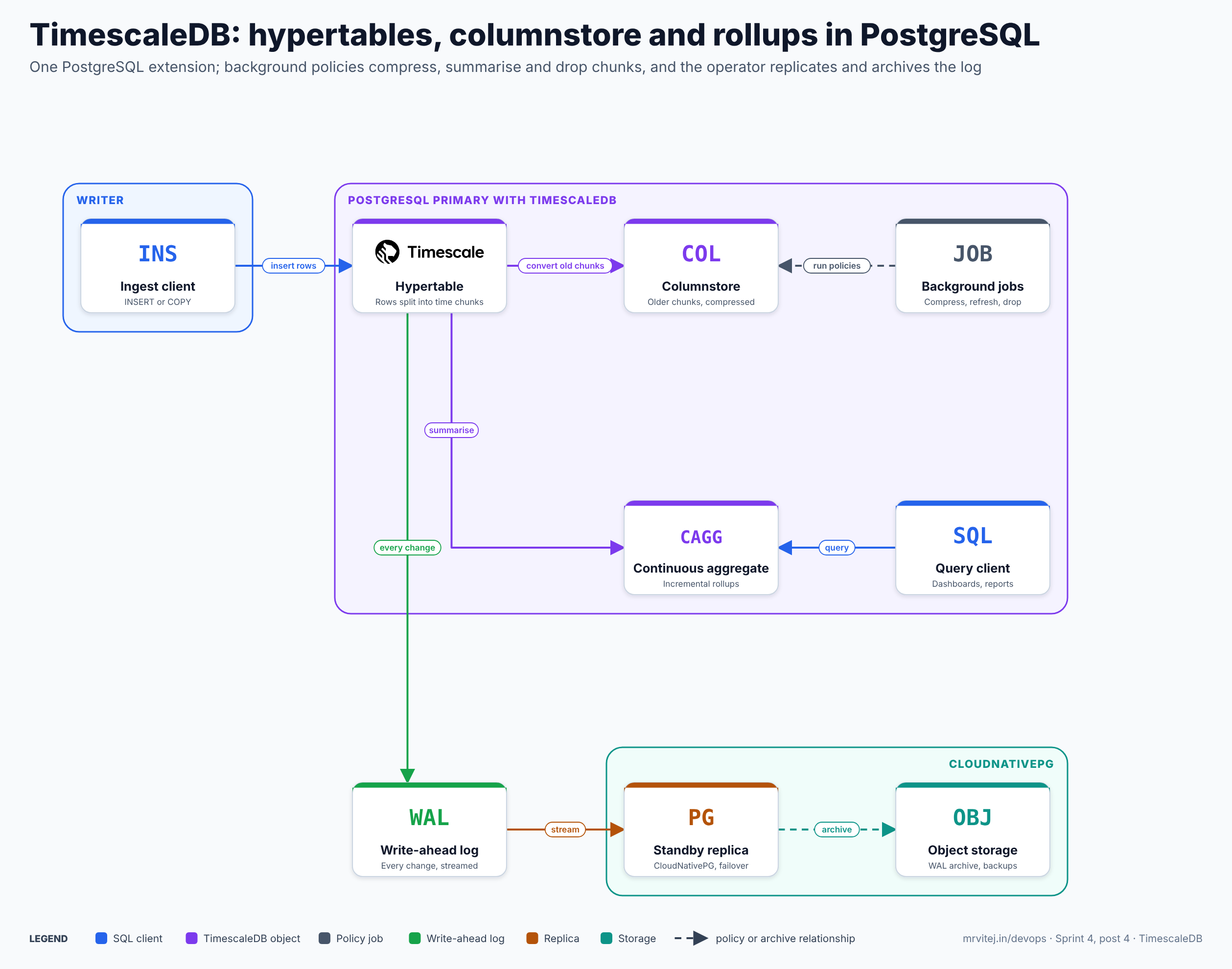
TimescaleDB lives inside one PostgreSQL primary; replication and backup are PostgreSQL’s own. Blue is a SQL client, purple a TimescaleDB object, grey a policy job, green the write-ahead log, orange a replica and teal storage. Open the zoomable diagram, or download it as SVG or PNG.

| Component | What it does |
|---|---|
| Extension library | Loaded at server start through shared_preload_libraries; it hooks the planner and executor so queries on hypertables prune chunks and use vectorised execution |
| Hypertable and chunks | The logical table and its time-based physical tables, with indexes created per chunk |
| Columnstore | Compressed, column-oriented batches for older chunks, with per-batch minimum and maximum metadata that lets queries skip batches |
| Continuous aggregates | Materialised rollups with an invalidation log, so a late-arriving row only recomputes its own bucket |
| Job scheduler and workers | Run policies and user-defined jobs in background worker processes inside PostgreSQL |
| PostgreSQL itself | Write-ahead log, streaming replication, roles, TLS, extensions and tooling are all unchanged |
Chunks and why time ranges matter
When a row arrives, TimescaleDB finds or creates the chunk for its timestamp and inserts there. Queries with a time condition touch only the chunks that overlap it, and the newest chunk, being small, stays in memory with its indexes. Because each chunk is its own table, retention is a metadata operation: dropping a chunk is far cheaper than DELETE plus vacuum. Chunk size is the first design decision. A common guide is to size chunks so that the recent chunks and their indexes fit comfortably in memory, and so each chunk holds enough rows per device to compress well.
From an insert to a dropped chunk
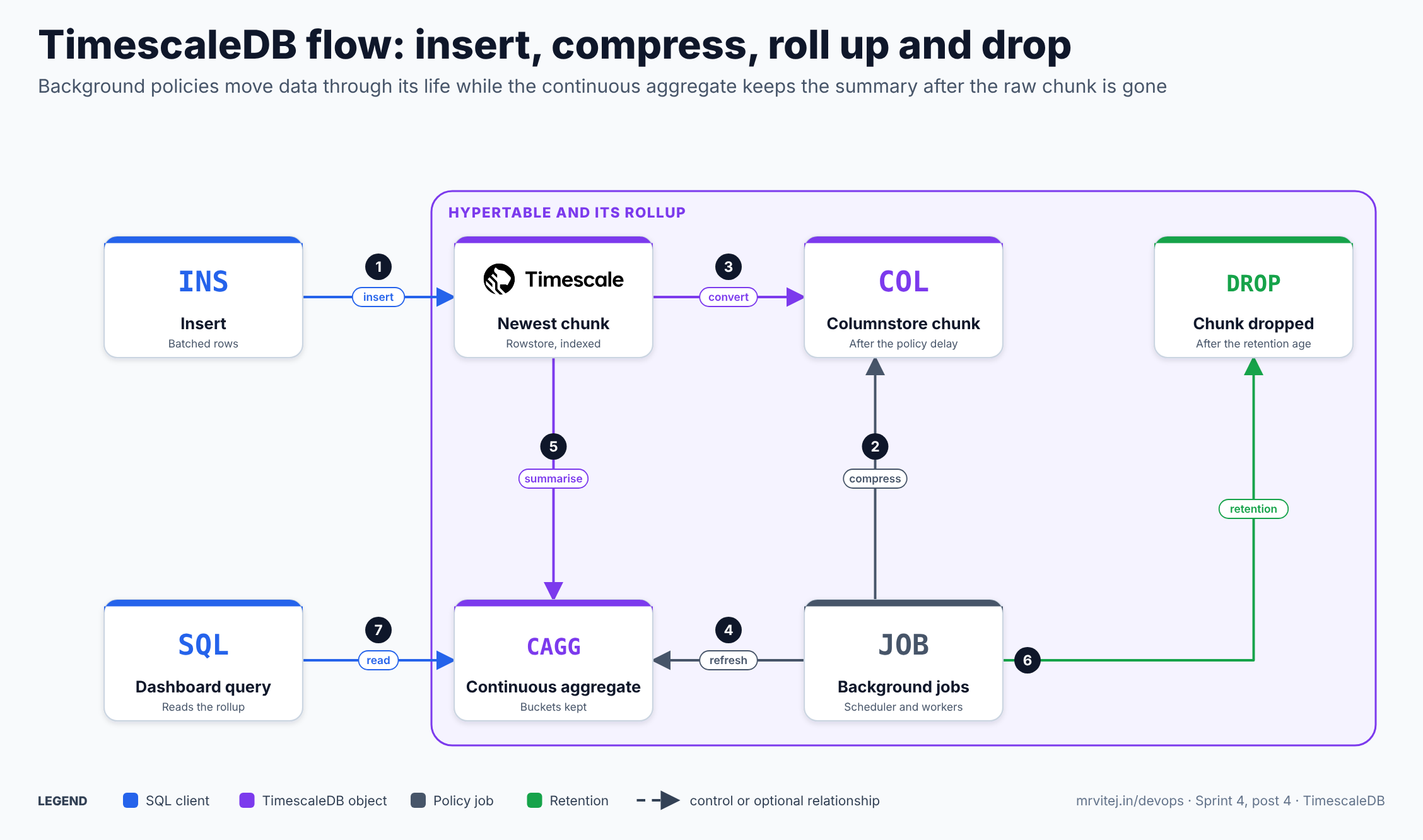
- Insert. Clients insert batches of rows. The chunk for the timestamp receives them. Batching and
COPYmatter more than any setting. - Compression job runs. A scheduled job finds chunks older than the policy’s
afterinterval. - Convert. The job converts each eligible chunk from the rowstore to the columnstore, grouping rows by
segmentbyand sorting byorderby. - Refresh job runs. Another job refreshes the continuous aggregate over its configured window.
- Summarise. The refresh recomputes only the buckets whose source rows changed and stores them.
- Retention. A retention job drops chunks older than the retention age. The continuous aggregate keeps its buckets as long as its refresh window does not reach back over the dropped data.
- Read. Dashboards query the continuous aggregate, which is small and fast, and go to raw data only for recent or detailed questions.
Recap: raw data is kept briefly and in detail, compressed after a short delay, summarised continuously, and dropped on schedule, while the summary lives on.
Licensing
The licence is the first thing to settle, because it decides which features you get.
- Apache 2 Edition is the classic open-source part. It includes hypertables and chunks,
drop_chunks, the basic hyperfunctions such astime_bucket,firstandlast, and the informational views. It does not include the columnstore, continuous aggregates, retention policies or jobs and automation. - Community Edition, under the Timescale License (TSL), includes everything in Apache 2 plus those features and the advanced hyperfunctions. You can run it for free in your own on-premises or cloud infrastructure and modify it for production use, but you cannot sell it as a service, even if you are the main contributor.
- Check what you have with
SHOW timescaledb.license;(timescalemeans Community features are on,apachemeans Apache-only). - Some distributions ship only the Apache build, for example some PostgreSQL-on-Kubernetes packaging and the
-ossDocker tags. A system that was installed “following the documentation” can silently be Apache-only, so verify, because the symptom is missing compression and continuous aggregate functions. - Tiger Data also sells Tiger Cloud, a managed service, and announced TimescaleDB Enterprise, a self-managed commercial edition, in April 2026. Neither is needed to use the Community Edition features described here.
TSL is source-available, not OSI open source. If your organisation requires an OSI-approved licence for the whole stack, use only the Apache edition and plan your own partitioning and retention, or choose a different database.
Install and first run
Docker, one node
The timescale/timescaledb image is PostgreSQL plus the Community Edition extension, with the extension created in the default database and timescaledb-tune applied on first start. Pin both versions in the tag, and avoid the -oss variants if you want compression and aggregates.
docker run -d --name tsdb \
  -e POSTGRES_PASSWORD='change-me' \
  -p 5432:5432 \
  -v tsdb-data:/var/lib/postgresql/data \
  timescale/timescaledb:2.31.0-pg18
Connect and check the edition and version:
docker exec -it tsdb psql -U postgres -c "SHOW timescaledb.license;" \
  -c "SELECT extversion FROM pg_extension WHERE extname = 'timescaledb';"
Packages on a server
Install the extension from the vendor’s package repository for your PostgreSQL version (for example the timescaledb-2-postgresql-18 package on Debian and Ubuntu), then run timescaledb-tune to size the memory and worker settings, restart PostgreSQL, and create the extension in each database:
CREATE EXTENSION IF NOT EXISTS timescaledb;The extension must be in shared_preload_libraries before the server starts; without it CREATE EXTENSION fails with a message to add it and restart.
Kubernetes
TimescaleDB is only an extension, so it does not need a special operator: any PostgreSQL operator works if its image contains the extension. The next section shows how to do this with CloudNativePG, covered in its own brief at /devops/cncf-cloudnativepg.
Designing a hypertable
The choices below matter more than any tuning flag. The examples use neutral device readings.
CREATE TABLE readings (
  time       timestamptz      NOT NULL,
  device_id  text             NOT NULL,
  metric     text             NOT NULL,
  value      double precision,
  quality    smallint         NOT NULL DEFAULT 0
) WITH (
  tsdb.hypertable,
  tsdb.partition_column = 'time',
  tsdb.chunk_interval   = '1 day',
  tsdb.segmentby        = 'device_id, metric',
  tsdb.orderby          = 'time DESC'
);

CREATE INDEX ON readings (device_id, metric, time DESC);
What each option does:
| Option | Meaning | Guidance |
|---|---|---|
tsdb.hypertable |
Create a hypertable rather than a plain table | CREATE TABLE ... WITH syntax exists from 2.20; older releases use create_hypertable() |
tsdb.partition_column |
The time column | Use timestamptz. Primary keys and unique indexes must include it |
tsdb.chunk_interval |
Time covered by each chunk (7 days by default) | Choose so recent chunks and their indexes fit in memory; high-ingest tables often use hours or a day |
tsdb.segmentby |
Columns to group compressed batches by | The columns you always filter on. Low to moderate cardinality; each segment should have many rows per chunk or compression suffers |
tsdb.orderby |
Sort order inside a segment | Usually time DESC |
tsdb.create_default_indexes |
Whether to create the default descending time index | Leave on unless you manage indexes yourself |
When you create a hypertable this way, TimescaleDB also creates a columnstore policy that converts chunks after one chunk interval. On self-hosted 2.20 to 2.22 you add the policy yourself with add_columnstore_policy, and from 2.23 the automatic policy applies. Change the delay if your queries often touch data older than the default:
CALL remove_columnstore_policy('readings');
CALL add_columnstore_policy('readings', after => INTERVAL '2 days');
Check what compression achieved:
SELECT * FROM hypertable_columnstore_stats('readings');
SELECT * FROM chunks_detailed_size('readings');
Older releases and documentation use the names add_compression_policy, compress_chunk and timescaledb.compress; the columnstore names became the preferred ones in 2.18 and the old ones remain as aliases. If a chunk must be corrected after compression, convert it back with convert_to_rowstore, change it, and convert again; from 2.31, move_to_columnstore() can compress chunk rows without blocking concurrent writes.
Continuous aggregates
A continuous aggregate is a materialised view that stays current. Create it WITH NO DATA, then add a refresh policy:
CREATE MATERIALIZED VIEW readings_5m
WITH (timescaledb.continuous) AS
SELECT time_bucket('5 minutes', time) AS bucket,
       device_id,
       metric,
       avg(value) AS avg_value,
       min(value) AS min_value,
       max(value) AS max_value,
       count(*)   AS samples
FROM readings
GROUP BY bucket, device_id, metric
WITH NO DATA;

SELECT add_continuous_aggregate_policy('readings_5m',
  start_offset      => INTERVAL '1 day',
  end_offset        => INTERVAL '10 minutes',
  schedule_interval => INTERVAL '5 minutes');
The policy refreshes the window from one day ago to ten minutes ago, every five minutes. Points to understand:
- Real-time aggregation is off by default for aggregates created on 2.13 or later. Turn it on if dashboards must include the newest bucket:
ALTER MATERIALIZED VIEW readings_5m SET (timescaledb.materialized_only = false);. It combines stored buckets with raw rows at query time, at a cost in latency. - Hierarchical aggregates. You can build an hourly aggregate on the five-minute one, so each level reads a smaller table.
- Manual refresh and backfill.
CALL refresh_continuous_aggregate('readings_5m', now() - INTERVAL '3 days', now());recomputes a window, which you need after loading history. - Retention on the aggregate itself.
SELECT add_retention_policy('readings_5m', drop_after => INTERVAL '1 year');keeps summaries for a year while raw data goes sooner. - Columnstore for aggregates. An aggregate is itself stored as a hypertable, and you can compress it with
ALTER MATERIALIZED VIEW ... SET (timescaledb.enable_columnstore, timescaledb.segmentby = ..., timescaledb.orderby = 'bucket DESC').
Retention and the aggregate trap
SELECT add_retention_policy('readings', drop_after => INTERVAL '30 days');This drops chunks whose data is entirely older than 30 days. The summary survives only if the aggregate’s refresh window never reaches back over the dropped data. The refresh above looks back one day, well inside 30 days, so the five-minute buckets for older periods stay as they were. If you widen start_offset past the retention age, a refresh can treat dropped raw data as a change and rebuild buckets from missing rows. Keep start_offset comfortably shorter than the retention age, and when you back-fill, refresh before the retention job can run. Tiger Data published a detailed explanation of this failure mode in October 2026; the rule of thumb above is the safe pattern.
Querying
-- Latest value per device and metric (benefits from SkipScan on the columnstore)
SELECT DISTINCT ON (device_id, metric) device_id, metric, time, value
FROM readings
ORDER BY device_id, metric, time DESC;

-- Hourly averages for the last day, with gaps filled by the previous value
SELECT time_bucket_gapfill('1 hour', bucket) AS hour,
       device_id,
       locf(avg(avg_value)) AS avg_value
FROM readings_5m
WHERE bucket >= now() - INTERVAL '1 day' AND bucket < now()
  AND device_id = 'device-001' AND metric = 'temperature'
GROUP BY hour, device_id;

-- Join time-series with relational data
SELECT d.site, avg(r.value)
FROM readings r JOIN devices d USING (device_id)
WHERE r.time > now() - INTERVAL '1 hour' AND r.metric = 'temperature'
GROUP BY d.site;
The third query is the practical argument for staying in PostgreSQL: the device catalogue and the readings are in the same database and the same transaction scope.
Production reference design on Kubernetes with CloudNativePG
CloudNativePG runs the PostgreSQL cluster: replicas, failover, backups and recovery, as described in its own brief. TimescaleDB needs three additions: an image that contains the Community extension, the preload setting, and a few PostgreSQL parameters.
Choose the image carefully. Tiger Data’s CloudNativePG guide uses an extension container (timescaledb-oss) mounted with Kubernetes ImageVolume, which needs a recent Kubernetes (1.31 or later recommended) and the feature gate enabled. That container is the Apache-only build, so it has no columnstore, continuous aggregates or retention policies, which are the point of this design. For the full feature set, build your own image from the CloudNativePG base image and the vendor’s Community packages, then verify the edition:
FROM ghcr.io/cloudnative-pg/postgresql:18-system-trixie
USER root
RUN apt-get update && apt-get install -y --no-install-recommends curl gnupg ca-certificates lsb-release \
 && curl -fsSL https://packagecloud.io/timescale/timescaledb/gpgkey | gpg --dearmor -o /usr/share/keyrings/timescaledb.gpg \
 && echo "deb [signed-by=/usr/share/keyrings/timescaledb.gpg] https://packagecloud.io/timescale/timescaledb/debian/ $(lsb_release -c -s) main" > /etc/apt/sources.list.d/timescaledb.list \
 && apt-get update && apt-get install -y --no-install-recommends timescaledb-2-postgresql-18 \
 && rm -rf /var/lib/apt/lists/*
USER 26
Build, scan and push it to your own registry, pin the tag to the PostgreSQL and TimescaleDB versions, and test it before use: CloudNativePG rejects images that do not meet its requirements, and the package repository, package name and base image tag above are the ones to confirm against the current vendor and CloudNativePG documentation. After the first cluster starts, SHOW timescaledb.license; must return timescale.
The cluster:
apiVersion: postgresql.cnpg.io/v1
kind: Cluster
metadata:
  name: tsdb
spec:
  instances: 3
  imageName: registry.example.com/platform/postgresql-timescaledb:18-2.31.0
  storage:
    size: 200Gi
    storageClass: ssd
  walStorage:
    size: 50Gi
  postgresql:
    shared_preload_libraries:
      - timescaledb
    parameters:
      timescaledb.telemetry_level: "off"
      timescaledb.max_background_workers: "16"
      max_worker_processes: "32"
      max_locks_per_transaction: "128"
      shared_buffers: "4GB"
      effective_cache_size: "12GB"
  bootstrap:
    initdb:
      database: app
      owner: app
      postInitApplicationSQL:
        - CREATE EXTENSION IF NOT EXISTS timescaledb;
  resources:
    requests: { cpu: "4", memory: 16Gi }
    limits:   { memory: 16Gi }
Why these settings:
shared_preload_libraries: [timescaledb]is mandatory; CloudNativePG applies it consistently to the primary and every replica.max_locks_per_transactionis raised because queries and maintenance over many chunks take locks per chunk; Tiger Data’s own CloudNativePG example sets 128.timescaledb.max_background_workersmust cover one scheduler per database plus the jobs you want to run at once (the default is 16).max_worker_processesmust be at least the sum of background and parallel workers plus PostgreSQL’s own.timescaledb.telemetry_level: offdisables usage reporting.- Size memory from the working set of recent chunks, not from total data volume.
Backups and recovery. Configure the Barman Cloud plugin and an ObjectStore exactly as in the CloudNativePG brief, with continuous WAL archiving and scheduled base backups. These are physical backups of the whole instance, so hypertables, chunks, the columnstore and policies come back as they were, and point-in-time recovery works. The logical alternative is pg_dump -Fc, restored with SELECT timescaledb_pre_restore(); before and SELECT timescaledb_post_restore(); after, and it must not use pg_restore -j, because parallel restore does not rebuild the TimescaleDB catalogs correctly. Keep the PostgreSQL and TimescaleDB versions in a backup’s metadata, because a restore needs compatible versions. Whatever you choose, rehearse a restore into a scratch cluster, and check timescaledb_information.jobs afterwards.
A schema and policy bootstrap. Keep the DDL in version-controlled migrations and apply it with your migration tool, as one set of statements: the hypertable, the indexes, the columnstore policy, the continuous aggregates and their policies, and the retention policies. Applying them together lets you reason about retention against refresh windows in one place.
Connection pooling. Add a CloudNativePG Pooler in front of the rw Service for many short-lived clients. Writers should batch inserts and use COPY, which beats any pooling setting.
Upgrades. Update the image tag one minor version at a time and let CloudNativePG roll the replicas and then the primary. After the new binary is running, update the extension in each database as the first command of a fresh session, ALTER EXTENSION timescaledb UPDATE;, connecting with psql -X so no startup file loads the old version first. Read the release notes for breaking changes and renamed settings before each jump (2.31.0, for example, renamed a debugging parameter and changed extension hook ordering for pgaudit). Test the sequence on a restored copy of production data.
Security
TimescaleDB adds no separate security layer; PostgreSQL’s controls apply and CloudNativePG supplies most of the Kubernetes side.
- Transport. CloudNativePG creates a CA and server certificates for the cluster; require TLS in
pg_hbarules and connect withsslmode=verify-fullfrom applications. - Roles. Separate roles for writers (INSERT on the hypertable), readers (SELECT on aggregates and the hypertable) and owners (DDL). Grant on the hypertable and the continuous aggregate separately, because they are different objects.
- Policy jobs run with the privileges of the job’s owner. Create policies as the schema owner, not as a superuser, and review user-defined jobs like any other code that runs in the database.
- Secrets. Keep passwords in Kubernetes Secrets, ideally synced from your secret manager, and rotate through the operator.
- Telemetry and supply chain. Disable telemetry where egress is restricted, scan and sign your custom image, and pin versions.
- Auditing. If you use
pgaudit, put it aftertimescaledbinshared_preload_librariesfrom 2.31.0, which allows the hook order to be controlled.
Monitoring and day-2 operations
CloudNativePG exposes PostgreSQL metrics on each pod and supports custom queries from a ConfigMap. Add TimescaleDB-specific checks to it, so Prometheus and your alerting see the policies as well as the database:
-- failing or stalled policy jobs
SELECT j.job_id, j.proc_name, j.hypertable_name,
       s.last_run_status, s.last_successful_finish, s.total_failures, s.consecutive_failures
FROM timescaledb_information.jobs j
JOIN timescaledb_information.job_stats s USING (job_id)
ORDER BY s.consecutive_failures DESC;

-- how stale is each continuous aggregate
SELECT ca.view_name, now() - s.last_successful_finish AS since_refresh
FROM timescaledb_information.continuous_aggregates ca
JOIN timescaledb_information.jobs j ON j.hypertable_name = ca.materialization_hypertable_name
JOIN timescaledb_information.job_stats s USING (job_id);
Alerts worth having: any job with consecutive failures, a refresh age beyond twice its schedule, chunk count growth beyond plan (a sign of too small a chunk interval), compression ratio dropping, disk usage trending to the volume size, replication lag, WAL archive failures and backup age. Operational habits:
- Watch background workers. Every policy is a job; with many hypertables the default pool of 16 can be exhausted, so jobs queue or fail with “out of background workers”. Raise
timescaledb.max_background_workersandmax_worker_processestogether. - Treat chunk count as a capacity metric. Too many tiny chunks slow planning and lock handling; too few huge chunks lose the benefits of time partitioning.
- Re-check segmentby when query patterns change. Settings apply to chunks as they are converted, so a change affects future chunks unless you convert existing ones back and forth.
- Late data into compressed chunks works but is slower; batch and order backfills, and consider pausing a policy with
alter_job(job_id, scheduled => false)during a large correction. - Plan disk for the rowstore window, not for compressed totals: the newest uncompressed chunks and their indexes are what fill volumes.
Usage cases
- Infrastructure and application metrics with long retention, where the same data feeds dashboards and ad-hoc SQL.
- IoT and sensor telemetry from fleets, buildings or equipment, with downsampling for history.
- Financial and event data: ticks, orders and audit events queried by time and instrument.
- Product analytics and logs that need rollups and a join against user or customer tables.
- Energy and utilities meter data, where billing-grade rollups must be accurate and queryable for years.
In the Sprint 4 final project, a pharmaceutical plant’s machine readings are stored in TimescaleDB on CloudNativePG, with rollups for the dashboards.
Version and project status
TimescaleDB is developed in the public timescale/timescaledb repository and the 2.x line ships feature releases about monthly. 2.31.0 (20 October 2026) improved UPDATE and DELETE performance on the columnstore through vectorised key processing, added move_to_columnstore(), introduced a preview Adaptive Integer Compressor that is off by default and planned to be on by default in 2.32.0, and changed extension hook ordering for compatibility with pgaudit. Earlier releases moved the product toward the columnstore vocabulary (2.18), deprecated the experimental hypercore table access method in favour of the columnstore (2.21), introduced CREATE TABLE ... WITH (tsdb.hypertable ...) (2.20), and added vectorised time_bucket() aggregation and composite bloom filters (2.26). The multi-node distributed hypertable feature was discontinued in the 2.1x releases, so scale reads with replicas and writes with a larger primary. The vendor’s public site reports more than 19,000 GitHub stars and a large customer base; treat vendor figures as such.
Adoption
Tiger Data publishes customer stories, including Fluke, Easee, Kempower, Axpo and Cloudflare for analytics and reporting, and describes users in energy, manufacturing, oil and gas, and connected-device companies. Earlier company announcements named organisations including Cisco WebEx, Comcast, Schneider Electric, Uber and Walmart among users of the community and paid products. These are vendor-published references, not independent audits, and a name on a page says little about a given deployment, so ask for a reference call for anything critical.
Alternatives
| Solution | Model | Best suited to |
|---|---|---|
| Plain PostgreSQL with declarative partitioning (and a partition manager) | Built-in features plus your own automation | Small to medium time-series that must stay fully open source, with a team willing to own partition scripts |
| InfluxDB | Purpose-built time-series database with its own query model | Metrics-first workloads where a separate system is acceptable |
| ClickHouse | Column-oriented analytical database | Very large analytical scans and logs where relational joins and updates matter less |
| VictoriaMetrics, Prometheus-compatible stores | Metrics storage with PromQL | Infrastructure metrics scraped by Prometheus, with long retention |
| QuestDB | Time-series database with SQL and very fast ingest | High-ingest event data where PostgreSQL compatibility is not required |
| Managed cloud time-series services | Provider-hosted | Teams that prefer to operate no database at all |
Strengths and limitations
| Strengths | Limitations |
|---|---|
| Full PostgreSQL: SQL, joins, extensions, drivers and operators such as CloudNativePG | The columnstore, aggregates and retention are under the Timescale License, not Apache 2.0 |
| Columnstore typically cuts storage by 90 to 98 per cent | Some packages and images ship the Apache-only build, which lacks the features above |
| Continuous aggregates give fast dashboards without a separate pipeline | Primary keys and unique indexes must include the time column |
| Retention by dropping chunks is cheap and predictable | Policies depend on a finite background worker pool and need monitoring |
| One database for time-series and relational data | Scale-out beyond one primary relies on replicas; the multi-node feature is gone |
Recommendation
Adopt for teams that already run PostgreSQL and have time-series data that outgrows plain tables. Start with a hypertable, a columnstore policy, one continuous aggregate and a retention policy, check timescaledb.license before anything else, and use your own Community image on CloudNativePG rather than the Apache-only extension container. If an OSI-approved licence is a hard requirement, use plain PostgreSQL partitioning or another database. Plan chunk interval, segmentby and refresh windows against retention before the data volume grows, because those are the hardest decisions to change.
References: TimescaleDB documentation · TimescaleDB editions and licence · Licence text · CREATE TABLE for hypertables · Data retention with continuous aggregates · Logical backup and restore · Run on CloudNativePG · TimescaleDB 2.31.0 release · TimescaleDB on GitHub · CNCF Landscape entry