This is Part 1 of the five-part build in the Sprint 4 project overview. By the end you have the Google Cloud foundation, a plant network that has no inbound path from the internet, a cluster running Atlantis so that every later change arrives as a reviewed pull request, a small k3s cluster standing in for the plant edge, and Akri discovering a test OPC UA server.
What this is and is not. This is engineering guidance, not legal or regulatory advice, and nothing here is validated or compliant on its own. I wrote the commands and manifests from current official documentation and from the tool briefs, and I did not run
tofu validate,tofu applyor any of the cluster steps against a live Google Cloud account. The section “What I could not test” lists every gap. Treat each checkpoint as the real test and expect to fix small things.
What you build, and in what order
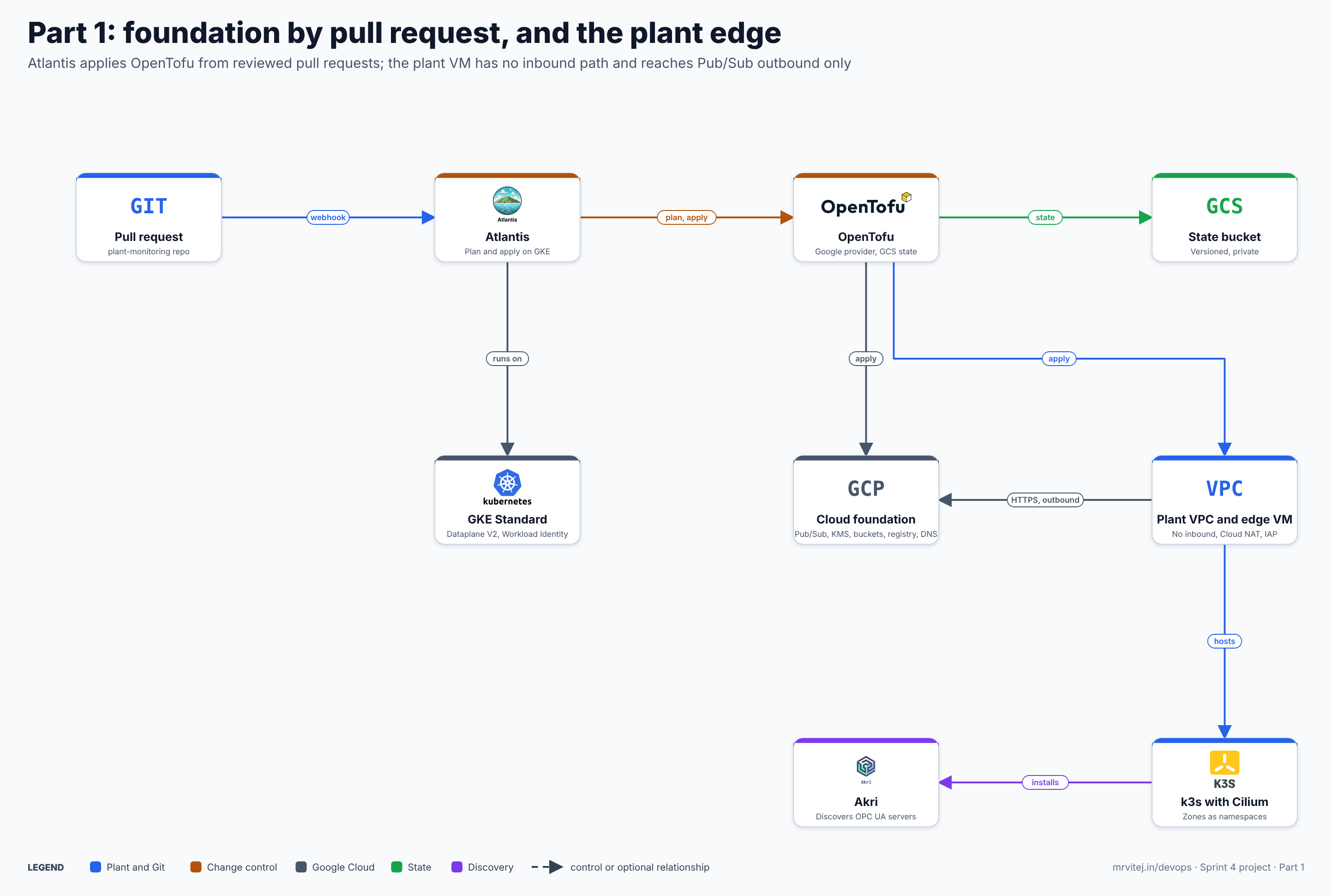
There is a chicken-and-egg problem. Atlantis runs on GKE, but GKE is created by OpenTofu. The way out is to split the infrastructure in two stacks:
infra/foundation: applied by hand, once. It holds only what Atlantis needs in order to exist: the two networks, Cloud NAT, the GKE cluster, the Atlantis service account, a static IP and the DNS zone.infra/platform: applied only through Atlantis pull requests. It holds Pub/Sub, Cloud KMS, the evidence and backup buckets, Secret Manager, Artifact Registry and the edge VM.
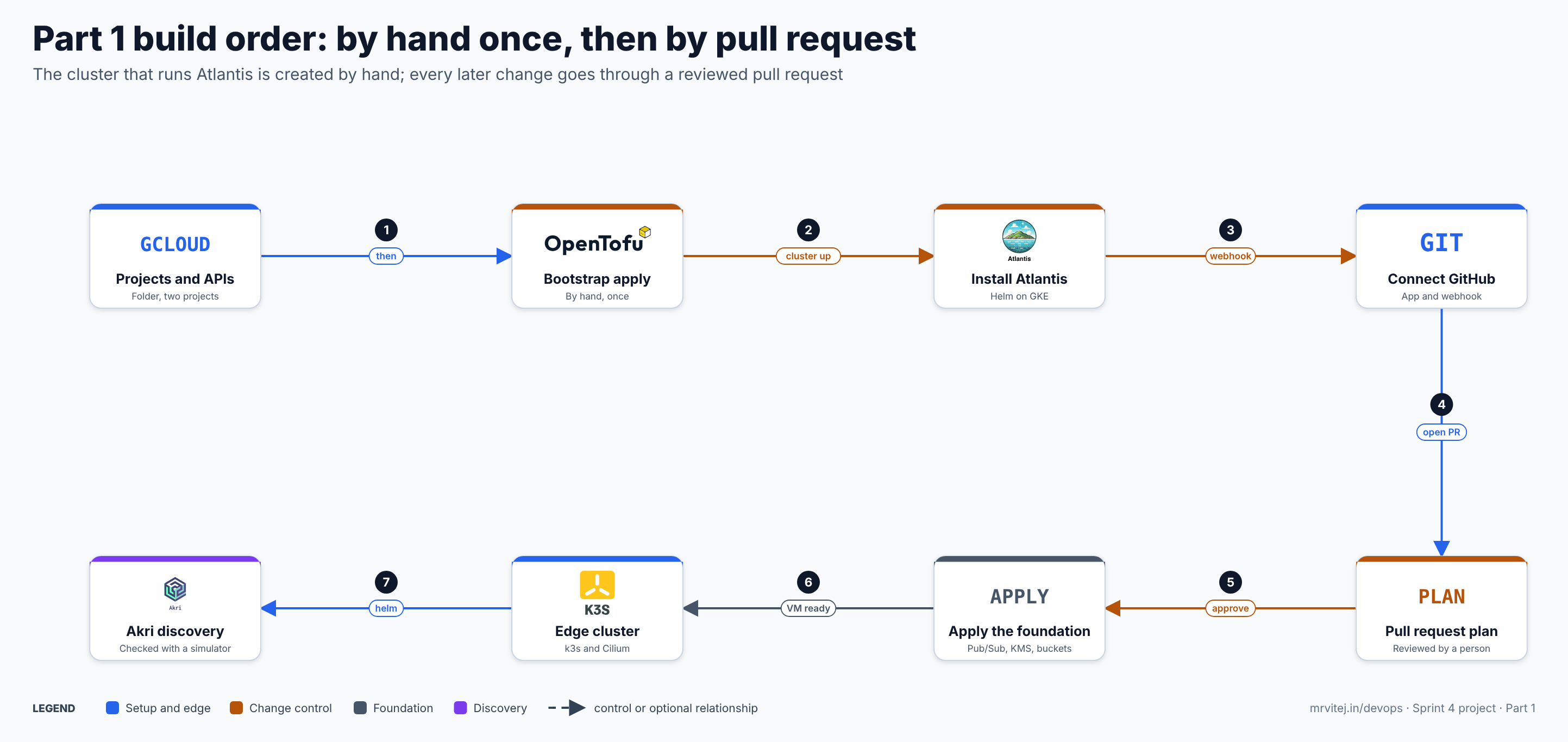
The sections are numbered so that the checkpoints are easy to find:
- Prerequisites
- Projects, APIs, billing and naming
- The repository and the state bucket
- The foundation stack (network zones, GKE, Atlantis identity)
- Install Atlantis and connect GitHub
- The platform stack, applied by pull request
- The plant edge: k3s and Cilium
- Akri and a discovery check
- Troubleshooting, cost and cleanup, and what I could not test
1. Prerequisites
| Item | Version or detail | Why |
|---|---|---|
| Google Cloud account with billing | One billing account you can link to projects | GKE and the VMs are billed. The cost section below has a dated estimate. |
gcloud CLI |
Current release; run gcloud version and keep the output |
Project setup and the IAP SSH tunnel |
| OpenTofu | 1.13.2 or newer (the latest release I found, 21 October 2026) | See OpenTofu |
| Google provider | ~> 7.0 (I did not confirm the patch version) |
Resources below |
kubectl and Helm |
Any current release | Cluster work |
A GitHub account and a new private repository named plant-monitoring |
Repository layout is in the overview | Pull requests and the Atlantis webhook |
| A DNS name you control | For example plant.example.com, with the ability to set NS records at the registrar |
Atlantis needs a public HTTPS URL for the webhook |
| Your public IP address | Used as the one allowed address for the GKE control plane | Authorised networks |
If you have no domain, there is no tested alternative. A nip.io hostname with a Google-managed certificate is a possible route, but I did not test it, so it is not described here.
Set these shell variables once and keep the shell open. Replace the values in capitals.
export SUFFIX=abc123                      # any short unique string; project IDs are global
export ORG_ID=""                          # your organisation ID, or leave empty if you have none
export BILLING_ACCOUNT=XXXXXX-XXXXXX-XXXXXX
export REGION=asia-south1
export ZONE=asia-south1-a
export CLOUD_PROJECT=plant-cloud-$SUFFIX
export EDGE_PROJECT=plant-edge-$SUFFIX
export STATE_BUCKET=plant-tfstate-$SUFFIX
export DNS_NAME=plant.example.com         # without the trailing dot
export MY_IP=$(curl -s https://ifconfig.me)/32
export GH_ORG=YOUR-GITHUB-ORG-OR-USER
2. Projects, APIs, billing and naming
The overview chose a folder plant-monitoring with two projects, plant-cloud and plant-edge. Two projects are the first boundary between the cloud and the plant. A folder needs an organisation, so with a personal account you create the projects at the top level and lose nothing else.
# Only with an organisation:
if [ -n "$ORG_ID" ]; then
  gcloud resource-manager folders create \
    --display-name=plant-monitoring --organization=$ORG_ID
  # note the folder ID in the output, then:
  export FOLDER_FLAG="--folder=<FOLDER_ID>"
else
  export FOLDER_FLAG=""
fi

gcloud projects create $CLOUD_PROJECT --name=plant-cloud $FOLDER_FLAG
gcloud projects create $EDGE_PROJECT  --name=plant-edge  $FOLDER_FLAG

gcloud billing projects link $CLOUD_PROJECT --billing-account=$BILLING_ACCOUNT
gcloud billing projects link $EDGE_PROJECT  --billing-account=$BILLING_ACCOUNT
Enable the APIs. Pub/Sub is enabled in both projects on purpose: the edge VM’s service account lives in plant-edge, and the API is called on behalf of that project.
gcloud services enable --project=$CLOUD_PROJECT \
  compute.googleapis.com container.googleapis.com iam.googleapis.com \
  iamcredentials.googleapis.com cloudresourcemanager.googleapis.com \
  serviceusage.googleapis.com pubsub.googleapis.com storage.googleapis.com \
  cloudkms.googleapis.com secretmanager.googleapis.com \
  artifactregistry.googleapis.com dns.googleapis.com \
  logging.googleapis.com monitoring.googleapis.com

gcloud services enable --project=$EDGE_PROJECT \
  compute.googleapis.com iam.googleapis.com iamcredentials.googleapis.com \
  cloudresourcemanager.googleapis.com serviceusage.googleapis.com \
  pubsub.googleapis.com iap.googleapis.com logging.googleapis.com \
  monitoring.googleapis.com
Naming and labels. Every resource below is named plant-<what> and carries the labels system = plant-monitoring, env = lab and managed-by = opentofu. Labels are what cost reports and cleanup scripts filter on. Change env to prod only for a real deployment.
Checkpoint 2. gcloud services list --project=$CLOUD_PROJECT --enabled | grep -c googleapis prints a number of at least 12, and gcloud billing projects describe $CLOUD_PROJECT shows billingEnabled: true.
3. The repository and the state bucket
Clone your empty repository and create the layout. The overview lists the full tree; this part fills infra/ and atlantis/.
git clone git@github.com:$GH_ORG/plant-monitoring.git && cd plant-monitoring
mkdir -p infra/foundation infra/platform atlantis edge
OpenTofu keeps its record of what exists (the state) in a Cloud Storage bucket. The bucket is created with gcloud, not with OpenTofu, because the state cannot live in a bucket the same state creates. Enable versioning so a bad apply can be rolled back, and block public access.
gcloud storage buckets create gs://$STATE_BUCKET \
  --project=$CLOUD_PROJECT --location=$REGION \
  --uniform-bucket-level-access --public-access-prevention

gcloud storage buckets update gs://$STATE_BUCKET --versioning
gcloud storage buckets update gs://$STATE_BUCKET \
  --update-labels=system=plant-monitoring,env=lab,managed-by=gcloud
The gcs backend locks state itself while an operation runs, so two applies cannot collide. Both stacks use the same bucket with different prefixes. The bucket name is passed at init time instead of being written into the code, so nothing in the repository is account specific.
echo "bucket = \"$STATE_BUCKET\"" > infra/foundation/backend.hcl
cp infra/foundation/backend.hcl infra/platform/backend.hcl
(The bucket name is not a secret, so committing backend.hcl is fine. Atlantis needs it to be in the repository.)
Checkpoint 3. gcloud storage buckets describe gs://$STATE_BUCKET --format="value(versioning.enabled,iamConfiguration.publicAccessPrevention)" prints True and enforced.
4. The foundation stack
This stack is applied by hand, once. Every file is shown in full.
4.1 Providers, backend and variables
infra/foundation/versions.tf
terraform {
  required_version = ">= 1.13.0"

  required_providers {
    google = {
      source  = "hashicorp/google"
      version = "~> 7.0"
    }
  }

  backend "gcs" {
    prefix = "foundation"
  }
}

provider "google" {
  region = var.region
}
infra/foundation/variables.tf
variable "project_cloud" { type = string }
variable "project_edge"  { type = string }
variable "region" {
  type    = string
  default = "asia-south1"
}
variable "zone" {
  type    = string
  default = "asia-south1-a"
}
variable "dns_name" {
  type        = string
  description = "Zone apex without the trailing dot, for example plant.example.com"
}
variable "admin_cidr" {
  type        = string
  description = "Your public IP as a /32. The only address allowed to reach the GKE control plane."
}

locals {
  labels = {
    system     = "plant-monitoring"
    env        = "lab"
    managed-by = "opentofu"
  }
}
infra/foundation/terraform.tfvars (replace the values; do not put secrets here)
project_cloud = "plant-cloud-abc123"
project_edge  = "plant-edge-abc123"
dns_name      = "plant.example.com"
admin_cidr    = "203.0.113.7/32"
4.2 Network zones
The plant has four zones, and the network shows them:
| Zone | Where | Range | Purpose |
|---|---|---|---|
| Machines | plant-vpc, subnet machines |
10.10.1.0/24 | Machine controllers. Nothing reaches them except the edge on OPC UA (4840). |
| Edge | plant-vpc, subnet edge |
10.10.2.0/24 | The k3s edge VM |
| DMZ | plant-vpc, subnet dmz |
10.10.3.0/24 | Reserved for anything that must talk to both sides. Denied to the machines. |
| Cloud | cloud-vpc, subnet cloud |
10.20.0.0/20, pods 10.24.0.0/14, services 10.28.0.0/20 | GKE |
There is no peering and no VPN between the two networks. The only path from the plant to the cloud is outbound HTTPS from the edge to the Pub/Sub API.
infra/foundation/network.tf
# ---------- cloud-vpc ----------
resource "google_compute_network" "cloud" {
  project                 = var.project_cloud
  name                    = "cloud-vpc"
  auto_create_subnetworks = false
}

resource "google_compute_subnetwork" "cloud" {
  project                  = var.project_cloud
  name                     = "cloud"
  region                   = var.region
  network                  = google_compute_network.cloud.id
  ip_cidr_range            = "10.20.0.0/20"
  private_ip_google_access = true

  secondary_ip_range {
    range_name    = "pods"
    ip_cidr_range = "10.24.0.0/14"
  }
  secondary_ip_range {
    range_name    = "services"
    ip_cidr_range = "10.28.0.0/20"
  }
}

resource "google_compute_router" "cloud" {
  project = var.project_cloud
  name    = "cloud-router"
  region  = var.region
  network = google_compute_network.cloud.id
}

resource "google_compute_router_nat" "cloud" {
  project                            = var.project_cloud
  name                               = "cloud-nat"
  router                             = google_compute_router.cloud.name
  region                             = var.region
  nat_ip_allocate_option             = "AUTO_ONLY"
  source_subnetwork_ip_ranges_to_nat = "ALL_SUBNETWORKS_ALL_IP_RANGES"

  log_config {
    enable = true
    filter = "ERRORS_ONLY"
  }
}

# ---------- plant-vpc ----------
resource "google_compute_network" "plant" {
  project                 = var.project_edge
  name                    = "plant-vpc"
  auto_create_subnetworks = false
}

resource "google_compute_subnetwork" "plant" {
  for_each = {
    machines = "10.10.1.0/24"
    edge     = "10.10.2.0/24"
    dmz      = "10.10.3.0/24"
  }

  project                  = var.project_edge
  name                     = each.key
  region                   = var.region
  network                  = google_compute_network.plant.id
  ip_cidr_range            = each.value
  private_ip_google_access = true
}

resource "google_compute_router" "plant" {
  project = var.project_edge
  name    = "plant-router"
  region  = var.region
  network = google_compute_network.plant.id
}

resource "google_compute_router_nat" "plant" {
  project                            = var.project_edge
  name                               = "plant-nat"
  router                             = google_compute_router.plant.name
  region                             = var.region
  nat_ip_allocate_option             = "AUTO_ONLY"
  source_subnetwork_ip_ranges_to_nat = "ALL_SUBNETWORKS_ALL_IP_RANGES"

  log_config {
    enable = true
    filter = "ERRORS_ONLY"
  }
}

# ---------- plant-vpc firewall ----------
# A VPC denies all ingress by default. These rules open only what is named.

resource "google_compute_firewall" "plant_iap_ssh" {
  project   = var.project_edge
  name      = "plant-allow-iap-ssh"
  network   = google_compute_network.plant.name
  direction = "INGRESS"
  priority  = 1000

  source_ranges = ["35.235.240.0/20"] # Identity-Aware Proxy TCP forwarding
  target_tags   = ["edge-vm"]

  allow {
    protocol = "tcp"
    ports    = ["22"]
  }
}

resource "google_compute_firewall" "plant_edge_to_machines" {
  project   = var.project_edge
  name      = "plant-allow-opcua-edge-to-machines"
  network   = google_compute_network.plant.name
  direction = "INGRESS"
  priority  = 1000

  source_ranges = ["10.10.2.0/24"]
  target_tags   = ["machine"]

  allow {
    protocol = "tcp"
    ports    = ["4840"]
  }
}

resource "google_compute_firewall" "plant_deny_dmz_to_machines" {
  project   = var.project_edge
  name      = "plant-deny-dmz-to-machines"
  network   = google_compute_network.plant.name
  direction = "INGRESS"
  priority  = 900

  source_ranges = ["10.10.3.0/24"]
  target_tags   = ["machine"]

  deny {
    protocol = "all"
  }

  log_config {
    metadata = "INCLUDE_ALL_METADATA"
  }
}
Two honest notes. First, the edge VM reaches pubsub.googleapis.com through Private Google Access, but it still needs Cloud NAT for GitHub, the k3s installer and package repositories, so the plant is not fully closed to outbound traffic. A real plant would restrict egress further, for example with FQDN-based firewall rules; I did not build that. Second, a firewall rule that targets the tag machine protects nothing until a VM with that tag exists. In this lab the simulated machines run as pods on the edge cluster, so these two rules show the zone design but are not exercised. They are checked as resources, not as traffic.
4.3 GKE Standard with Dataplane V2 and Workload Identity
infra/foundation/gke.tf
resource "google_service_account" "gke_nodes" {
  project      = var.project_cloud
  account_id   = "plant-gke-nodes"
  display_name = "GKE node service account"
}

resource "google_project_iam_member" "gke_nodes" {
  for_each = toset([
    "roles/logging.logWriter",
    "roles/monitoring.metricWriter",
    "roles/monitoring.viewer",
    "roles/artifactregistry.reader",
  ])
  project = var.project_cloud
  role    = each.value
  member  = "serviceAccount:${google_service_account.gke_nodes.email}"
}

resource "google_container_cluster" "main" {
  project  = var.project_cloud
  name     = "plant-gke"
  location = var.zone # a zone makes this a zonal cluster

  network    = google_compute_network.cloud.id
  subnetwork = google_compute_subnetwork.cloud.id

  # Create the pool separately so it can be changed without recreating the cluster.
  remove_default_node_pool = true
  initial_node_count       = 1

  # Dataplane V2 (Cilium based). Do not also set a network_policy block:
  # Dataplane V2 enforces Kubernetes NetworkPolicy by itself.
  datapath_provider = "ADVANCED_DATAPATH"

  release_channel {
    channel = "REGULAR"
  }

  # Workload Identity Federation for GKE: Pods act as Google identities
  # without any downloaded key.
  workload_identity_config {
    workload_pool = "${var.project_cloud}.svc.id.goog"
  }

  ip_allocation_policy {
    cluster_secondary_range_name  = "pods"
    services_secondary_range_name = "services"
  }

  private_cluster_config {
    enable_private_nodes    = true
    enable_private_endpoint = false
    master_ipv4_cidr_block  = "172.16.0.0/28"
  }

  master_authorized_networks_config {
    cidr_blocks {
      cidr_block   = var.admin_cidr
      display_name = "admin"
    }
  }

  resource_labels     = local.labels
  deletion_protection = false # lab setting; set true for anything you keep
}

resource "google_container_node_pool" "main" {
  project    = var.project_cloud
  name       = "main"
  location   = var.zone
  cluster    = google_container_cluster.main.name
  node_count = 3

  node_config {
    machine_type    = "e2-standard-8"
    disk_size_gb    = 100
    service_account = google_service_account.gke_nodes.email
    oauth_scopes    = ["https://www.googleapis.com/auth/cloud-platform"]
    labels          = local.labels

    workload_metadata_config {
      mode = "GKE_METADATA" # required for Workload Identity on the node pool
    }
    shielded_instance_config {
      enable_secure_boot          = true
      enable_integrity_monitoring = true
    }
  }

  management {
    auto_repair  = true
    auto_upgrade = true
  }
}
4.4 The identity Atlantis runs as
Atlantis runs OpenTofu as the Atlantis process, with whatever credentials its host has, which the Atlantis brief explains in detail. Here that identity is a Google service account reached through Workload Identity, so no key file exists anywhere on the Google side:
- A Google service account
plant-atlantis. - A binding that lets the Kubernetes service account
atlantis/atlantisact as it (roles/iam.workloadIdentityUser). - The roles it needs to apply the platform stack.
infra/foundation/atlantis-identity.tf
resource "google_service_account" "atlantis" {
  project      = var.project_cloud
  account_id   = "plant-atlantis"
  display_name = "Atlantis, applies the platform stack"
}

# The Kubernetes service account atlantis/atlantis may act as the Google one.
resource "google_service_account_iam_member" "atlantis_wi" {
  service_account_id = google_service_account.atlantis.name
  role               = "roles/iam.workloadIdentityUser"
  member             = "serviceAccount:${var.project_cloud}.svc.id.goog[atlantis/atlantis]"
}

locals {
  atlantis_cloud_roles = [
    "roles/pubsub.admin",
    "roles/storage.admin",
    "roles/cloudkms.admin",
    "roles/secretmanager.admin",
    "roles/artifactregistry.admin",
    "roles/iam.serviceAccountAdmin",
    "roles/iam.serviceAccountUser",
    "roles/resourcemanager.projectIamAdmin",
  ]
  atlantis_edge_roles = [
    "roles/compute.admin",
    "roles/iam.serviceAccountAdmin",
    "roles/iam.serviceAccountUser",
    "roles/resourcemanager.projectIamAdmin",
  ]
}

resource "google_project_iam_member" "atlantis_cloud" {
  for_each = toset(local.atlantis_cloud_roles)
  project  = var.project_cloud
  role     = each.value
  member   = "serviceAccount:${google_service_account.atlantis.email}"
}

resource "google_project_iam_member" "atlantis_edge" {
  for_each = toset(local.atlantis_edge_roles)
  project  = var.project_edge
  role     = each.value
  member   = "serviceAccount:${google_service_account.atlantis.email}"
}

# Read and write the state, and nothing else in that bucket.
resource "google_storage_bucket_iam_member" "atlantis_state" {
  bucket = "plant-tfstate-${replace(var.project_cloud, "plant-cloud-", "")}"
  role   = "roles/storage.objectAdmin"
  member = "serviceAccount:${google_service_account.atlantis.email}"
}

output "atlantis_gsa_email" {
  value = google_service_account.atlantis.email
}
These roles are broad on purpose, because the platform stack creates buckets, keys, secrets and IAM bindings. The important consequence is that anyone who can get a pull request applied can create IAM bindings. The protection is not the role list; it is the approval rule in section 5.3 and branch protection on main. A tighter set (custom roles, or one service account per stack) is better for a real plant, and I did not build it.
4.5 The static IP and the DNS zone
Atlantis needs a public HTTPS address before it can receive webhooks, so these two live in the foundation stack.
infra/foundation/edge-dns.tf
resource "google_compute_global_address" "atlantis" {
  project = var.project_cloud
  name    = "atlantis-ip"
}

resource "google_dns_managed_zone" "plant" {
  project     = var.project_cloud
  name        = "plant"
  dns_name    = "${var.dns_name}."
  description = "Zone for the plant monitoring project"
  labels      = local.labels
}

resource "google_dns_record_set" "atlantis" {
  project      = var.project_cloud
  managed_zone = google_dns_managed_zone.plant.name
  name         = "atlantis.${var.dns_name}."
  type         = "A"
  ttl          = 300
  rrdatas      = [google_compute_global_address.atlantis.address]
}

output "atlantis_ip" {
  value = google_compute_global_address.atlantis.address
}

output "dns_name_servers" {
  value = google_dns_managed_zone.plant.name_servers
}
Later records, for example Grafana and Keycloak in Part 3, are added through pull requests in the platform stack.
4.6 Apply it
cd infra/foundation
tofu init -backend-config=backend.hcl
tofu validate
tofu plan -out=foundation.plan
tofu apply foundation.plan
Read the plan before you apply it. You should see about 40 resources to add and none to change or destroy. The cluster takes several minutes. Then connect to it and fetch the outputs.
tofu output
gcloud container clusters get-credentials plant-gke \
  --zone $ZONE --project $CLOUD_PROJECT
kubectl get nodes
At your registrar, set the NS records for plant.example.com to the four dns_name_servers from the output. Until you do, the managed certificate in section 5 stays in a provisioning state.
Checkpoint 4. kubectl get nodes shows 3 nodes Ready. Dataplane V2 is on if gcloud container clusters describe plant-gke --zone $ZONE --project $CLOUD_PROJECT --format="value(networkConfig.datapathProvider)" prints ADVANCED_DATAPATH. Workload Identity is on if --format="value(workloadIdentityConfig.workloadPool)" prints <project>.svc.id.goog. dig +short NS plant.example.com returns Google name servers once DNS has propagated.
5. Install Atlantis and connect GitHub
5.1 Create the GitHub App
For GitHub, Atlantis can use a user token or a GitHub App. An App is the better choice because it is not tied to a person. In your GitHub organisation or account, go to Settings, Developer settings, GitHub Apps, New GitHub App, and set:
- Webhook URL:
https://atlantis.plant.example.com/events(your name) - Webhook secret: a random string you generate (
openssl rand -hex 32); keep it in$WEBHOOK_SECRET - Repository permissions: Contents read-only; Pull requests read and write; Commit statuses read and write; Issues read and write (for comments); Metadata read-only
- Subscribe to events: Pull request, Pull request review, Issue comment, Push
- Where can this app be installed: Only on this account
Generate a private key (a .pem file), note the App ID and the app’s slug, and install the App on the plant-monitoring repository. Be clear about what this is: the GitHub App private key is a long-lived credential. “No long-lived keys” is achieved on the Google Cloud side with Workload Identity; the GitHub side still has one key, which you store only in the cluster Secret and in a password manager.
5.2 Install with Helm
Namespace and a ManagedCertificate-based ingress first. Save as atlantis/ingress.yaml:
apiVersion: networking.gke.io/v1
kind: ManagedCertificate
metadata:
  name: atlantis-cert
  namespace: atlantis
spec:
  domains:
    - atlantis.plant.example.com
---
apiVersion: cloud.google.com/v1
kind: BackendConfig
metadata:
  name: atlantis
  namespace: atlantis
spec:
  healthCheck:
    type: HTTP
    requestPath: /healthz
---
apiVersion: networking.k8s.io/v1
kind: Ingress
metadata:
  name: atlantis
  namespace: atlantis
  annotations:
    kubernetes.io/ingress.class: gce
    kubernetes.io/ingress.global-static-ip-name: atlantis-ip
    networking.gke.io/managed-certificates: atlantis-cert
spec:
  defaultBackend:
    service:
      name: atlantis
      port:
        number: 80
The Atlantis server-side repository config, saved as atlantis/repos.yaml for reference (it goes into the chart values below):
repos:
  - id: github.com/YOUR-GH-ORG/plant-monitoring
    branch: /^main$/
    apply_requirements: [approved, mergeable]
    workflow: plant
    allowed_overrides: []
    allow_custom_workflows: false
    delete_source_branch_on_merge: true

workflows:
  plant:
    plan:
      steps:
        - init:
            extra_args: ["-backend-config=backend.hcl"]
        - plan
    apply:
      steps:
        - apply
Chart values, saved as atlantis/values.yaml:
atlantisUrl: https://atlantis.plant.example.com
orgAllowlist: github.com/YOUR-GH-ORG/plant-monitoring

defaultTFDistribution: opentofu
defaultTFVersion: 1.13.2

githubApp:
  id: 123456          # your App ID
  slug: your-app-slug

serviceAccount:
  create: true
  name: atlantis
  annotations:
    iam.gke.io/gcp-service-account: plant-atlantis@plant-cloud-abc123.iam.gserviceaccount.com

service:
  type: NodePort
  annotations:
    cloud.google.com/backend-config: '{"default": "atlantis"}'

repoConfig: |
  repos:
    - id: github.com/YOUR-GH-ORG/plant-monitoring
      branch: /^main$/
      apply_requirements: [approved, mergeable]
      workflow: plant
      allowed_overrides: []
      allow_custom_workflows: false
      delete_source_branch_on_merge: true
  workflows:
    plant:
      plan:
        steps:
          - init:
              extra_args: ["-backend-config=backend.hcl"]
          - plan
      apply:
        steps:
          - apply
Install. The webhook secret and the private key are passed from your shell and not written to a file that is committed.
helm repo add runatlantis https://runatlantis.github.io/helm-charts
helm repo update

# Confirm the value names in this chart version before installing.
helm show values runatlantis/atlantis | grep -n -E 'githubApp|atlantisUrl|repoConfig|orgAllowlist|defaultTF|serviceAccount' | head -30

kubectl create namespace atlantis

helm install atlantis runatlantis/atlantis \
  --namespace atlantis \
  -f atlantis/values.yaml \
  --set-file githubApp.key=./your-app.private-key.pem \
  --set githubApp.secret="$WEBHOOK_SECRET"

kubectl apply -f atlantis/ingress.yaml
kubectl -n atlantis rollout status statefulset/atlantis
The helm show values line is not decoration. I verified the chart name, the repository URL and the keys orgAllowlist, defaultTFVersion, defaultTFDistribution, github.* and serviceAccount.annotations against the docs, but I did not confirm the githubApp.*, repoConfig, atlantisUrl and service.annotations names against the chart’s current values.yaml. If one differs, adjust the key; the meaning is the same.
5.3 Approval rules: who can apply
Three controls work together, and the third is the one that matters most:
orgAllowlistmakes Atlantis ignore every other repository.apply_requirements: [approved, mergeable]inrepos.yamlmeansatlantis applyis refused until the pull request is approved and mergeable.allowed_overrides: []andallow_custom_workflows: falsemean a pull request cannot change the workflow (for example to run a script as Atlantis). Without this, a pull request author could run arbitrary code with the Atlantis service account’s roles.
On GitHub, protect main (Settings, Branches): require a pull request, require one approval from someone who is not the author, and require the Atlantis status check atlantis/plan to pass. Whether the approval truly comes from a second person is a GitHub setting, not an Atlantis one.
5.4 Optional hardening: a network policy for Atlantis
Dataplane V2 enforces Kubernetes NetworkPolicy. This policy allows only the Atlantis port in, and leaves egress open because Atlantis must reach GitHub, the OpenTofu release site and Google APIs.
apiVersion: networking.k8s.io/v1
kind: NetworkPolicy
metadata:
  name: atlantis-ingress
  namespace: atlantis
spec:
  podSelector: {}
  policyTypes: [Ingress]
  ingress:
    - ports:
        - protocol: TCP
          port: 4141
I did not verify that Google load balancer traffic and health checks pass a policy like this on Dataplane V2, so apply it only after checkpoint 5 passes, and if the webhook stops arriving, remove it with kubectl -n atlantis delete networkpolicy atlantis-ingress.
Checkpoint 5.
kubectl -n atlantis get podsshowsatlantis-0Running.kubectl -n atlantis get managedcertificate atlantis-cert -o jsonpath='{.status.certificateStatus}'printsActive. It can take 15 to 60 minutes after DNS is correct.curl -s https://atlantis.plant.example.com/healthzreturns a healthy response.- In the GitHub App’s “Advanced” tab, the most recent webhook delivery shows a 200 response.
kubectl -n atlantis exec atlantis-0 -- sh -c 'curl -s -H "Metadata-Flavor: Google" http://metadata.google.internal/computeMetadata/v1/instance/service-accounts/default/email'printsplant-atlantis@.... That is the Workload Identity check: the Pod sees the Google identity, and no key file was mounted.
6. The platform stack, applied by pull request
This stack is the first thing that goes through Atlantis. Create a branch platform-foundation and add these files.
infra/platform/versions.tf
terraform {
  required_version = ">= 1.13.0"

  required_providers {
    google = {
      source  = "hashicorp/google"
      version = "~> 7.0"
    }
  }

  backend "gcs" {
    prefix = "platform"
  }
}

provider "google" {
  region = var.region
}
infra/platform/variables.tf
variable "project_cloud" { type = string }
variable "project_edge"  { type = string }
variable "region" {
  type    = string
  default = "asia-south1"
}
variable "zone" {
  type    = string
  default = "asia-south1-a"
}

variable "evidence_retention_seconds" {
  type        = number
  default     = 86400 # one day, for the lab. The overview example uses 7 years: 220752000.
  description = "Retention for the evidence bucket. Set it from the company's own retention rule."
}

variable "lock_evidence" {
  type        = bool
  default     = false
  description = "Locks the retention policy. IRREVERSIBLE. See section 6.3."
}

locals {
  labels = {
    system     = "plant-monitoring"
    env        = "lab"
    managed-by = "opentofu"
  }
}

data "google_project" "cloud" {
  project_id = var.project_cloud
}
infra/platform/terraform.tfvars
project_cloud = "plant-cloud-abc123"
project_edge  = "plant-edge-abc123"
6.1 Pub/Sub, KMS, buckets, secrets and the registry
The overview chose Pub/Sub over Managed Kafka. Delivery is at least once, so every consumer must insert idempotently; Part 3 does that. The subscription has a dead-letter topic so a message that keeps failing is kept for inspection and does not block the others.
infra/platform/pubsub.tf
resource "google_pubsub_topic" "telemetry" {
  project = var.project_cloud
  name    = "plant-telemetry"
  labels  = local.labels
}

resource "google_pubsub_topic" "telemetry_dlq" {
  project = var.project_cloud
  name    = "plant-telemetry-dlq"
  labels  = local.labels
}

resource "google_pubsub_subscription" "telemetry_ingest" {
  project = var.project_cloud
  name    = "telemetry-ingest"
  topic   = google_pubsub_topic.telemetry.id
  labels  = local.labels

  ack_deadline_seconds       = 30
  message_retention_duration = "604800s" # 7 days
  retain_acked_messages      = false

  dead_letter_policy {
    dead_letter_topic     = google_pubsub_topic.telemetry_dlq.id
    max_delivery_attempts = 5
  }

  retry_policy {
    minimum_backoff = "10s"
    maximum_backoff = "300s"
  }
}

resource "google_pubsub_subscription" "telemetry_dlq_pull" {
  project = var.project_cloud
  name    = "telemetry-dlq-pull"
  topic   = google_pubsub_topic.telemetry_dlq.id
  labels  = local.labels

  message_retention_duration = "604800s"
}

# The Pub/Sub service agent needs rights for dead lettering.
locals {
  pubsub_agent = "serviceAccount:service-${data.google_project.cloud.number}@gcp-sa-pubsub.iam.gserviceaccount.com"
}

resource "google_pubsub_topic_iam_member" "dlq_publisher" {
  project = var.project_cloud
  topic   = google_pubsub_topic.telemetry_dlq.name
  role    = "roles/pubsub.publisher"
  member  = local.pubsub_agent
}

resource "google_pubsub_subscription_iam_member" "dlq_subscriber" {
  project      = var.project_cloud
  subscription = google_pubsub_subscription.telemetry_ingest.name
  role         = "roles/pubsub.subscriber"
  member       = local.pubsub_agent
}

# ---------- identities on the topic ----------
# The edge VM publishes; the ingest workload on GKE subscribes.
resource "google_service_account" "edge_vm" {
  project      = var.project_edge
  account_id   = "plant-edge-vm"
  display_name = "Plant edge VM, publishes telemetry"
}

resource "google_pubsub_topic_iam_member" "edge_publisher" {
  project = var.project_cloud
  topic   = google_pubsub_topic.telemetry.name
  role    = "roles/pubsub.publisher"
  member  = "serviceAccount:${google_service_account.edge_vm.email}"
}

resource "google_service_account" "ingest" {
  project      = var.project_cloud
  account_id   = "plant-ingest"
  display_name = "Ingest workload on GKE, subscribes to telemetry"
}

resource "google_pubsub_subscription_iam_member" "ingest_subscriber" {
  project      = var.project_cloud
  subscription = google_pubsub_subscription.telemetry_ingest.name
  role         = "roles/pubsub.subscriber"
  member       = "serviceAccount:${google_service_account.ingest.email}"
}

# The Kubernetes service account ingest/telegraf (created in Part 3)
# may act as the Google one.
resource "google_service_account_iam_member" "ingest_wi" {
  service_account_id = google_service_account.ingest.name
  role               = "roles/iam.workloadIdentityUser"
  member             = "serviceAccount:${var.project_cloud}.svc.id.goog[ingest/telegraf]"
}
infra/platform/storage-kms.tf
# ---------- Cloud KMS ----------
resource "google_kms_key_ring" "plant" {
  project  = var.project_cloud
  name     = "plant"
  location = var.region
}

resource "google_kms_crypto_key" "evidence" {
  name            = "evidence"
  key_ring        = google_kms_key_ring.plant.id
  rotation_period = "7776000s" # 90 days
  labels          = local.labels

  lifecycle {
    prevent_destroy = true
  }
}

# Cloud Storage must be allowed to use the key.
data "google_storage_project_service_account" "gcs" {
  project = var.project_cloud
}

resource "google_kms_crypto_key_iam_member" "gcs_evidence" {
  crypto_key_id = google_kms_crypto_key.evidence.id
  role          = "roles/cloudkms.cryptoKeyEncrypterDecrypter"
  member        = "serviceAccount:${data.google_storage_project_service_account.gcs.email_address}"
}

# ---------- evidence bucket: retention, optional lock, customer-managed key ----------
resource "google_storage_bucket" "evidence" {
  project                     = var.project_cloud
  name                        = "${var.project_cloud}-evidence"
  location                    = var.region
  uniform_bucket_level_access = true
  public_access_prevention    = "enforced"
  labels                      = local.labels

  versioning {
    enabled = true
  }

  encryption {
    default_kms_key_name = google_kms_crypto_key.evidence.id
  }

  retention_policy {
    retention_period = var.evidence_retention_seconds
    is_locked        = var.lock_evidence
  }

  depends_on = [google_kms_crypto_key_iam_member.gcs_evidence]
}

# ---------- backups bucket (used by Velero in Part 4): no lock ----------
resource "google_storage_bucket" "backups" {
  project                     = var.project_cloud
  name                        = "${var.project_cloud}-backups"
  location                    = var.region
  uniform_bucket_level_access = true
  public_access_prevention    = "enforced"
  labels                      = local.labels

  lifecycle_rule {
    condition {
      age = 90
    }
    action {
      type = "Delete"
    }
  }
}
infra/platform/secrets-registry.tf
# ---------- Secret Manager: containers only ----------
# The values are never in the code or in the state. Add each one with gcloud
# (section 6.4). Part 3 reads them through external-secrets.
resource "google_secret_manager_secret" "emqx_admin" {
  project   = var.project_cloud
  secret_id = "emqx-admin-password"
  labels    = local.labels

  replication {
    auto {}
  }
}

resource "google_secret_manager_secret" "grafana_admin" {
  project   = var.project_cloud
  secret_id = "grafana-admin-password"
  labels    = local.labels

  replication {
    auto {}
  }
}

# ---------- Artifact Registry ----------
resource "google_artifact_registry_repository" "plant" {
  project       = var.project_cloud
  location      = var.region
  repository_id = "plant"
  format        = "DOCKER"
  description   = "Images built for the plant monitoring project"
  labels        = local.labels
}
infra/platform/edge-vm.tf
data "google_compute_subnetwork" "edge" {
  project = var.project_edge
  name    = "edge"
  region  = var.region
}

resource "google_compute_instance" "edge" {
  project      = var.project_edge
  name         = "plant-edge-1"
  zone         = var.zone
  machine_type = "e2-standard-4"
  tags         = ["edge-vm"]
  labels       = local.labels

  boot_disk {
    initialize_params {
      image = "debian-cloud/debian-12"
      size  = 50
      type  = "pd-balanced"
    }
  }

  network_interface {
    subnetwork = data.google_compute_subnetwork.edge.id
    # No access_config block: the VM has no external IP.
  }

  service_account {
    email  = google_service_account.edge_vm.email
    scopes = ["cloud-platform"]
  }

  shielded_instance_config {
    enable_secure_boot          = true
    enable_integrity_monitoring = true
  }

  metadata = {
    enable-oslogin = "TRUE"
  }
}

output "edge_vm_name" {
  value = google_compute_instance.edge.name
}
6.2 The Atlantis project file
atlantis.yaml at the repository root tells Atlantis which directory is a project and when to plan it. Only platform is a project. The foundation stack is deliberately absent, so a pull request can never change the cluster Atlantis runs on.
version: 3
automerge: false
parallel_plan: false
parallel_apply: false

projects:
  - name: platform
    dir: infra/platform
    workspace: default
    terraform_distribution: opentofu
    terraform_version: v1.13.2
    autoplan:
      enabled: true
      when_modified: ["*.tf", "*.tfvars", "backend.hcl"]
    apply_requirements: [approved, mergeable]
6.3 Open the pull request
cd ~/plant-monitoring        # the repository root
git checkout -b platform-foundation
git add infra atlantis atlantis.yaml
git commit -m "Platform stack: Pub/Sub, KMS, buckets, secrets, registry, edge VM"
git push -u origin platform-foundation
gh pr create --fill          # or open the pull request on GitHub
What you should see on the pull request:
- Within a minute, Atlantis posts a comment with the plan for project
platform, about 25 to 30 resources to add. Read it. Look for the KMS key (withprevent_destroy), the evidence bucket withretention_period = 86400andis_locked = false, the edge VM without an external IP, and nothing unexpected. - Get a second person to approve (or, in a lab, temporarily relax the approval rule on your own repository and say so in your notes; do not do that for a real plant).
- Comment
atlantis apply. Atlantis applies and replies with the output. - Merge the pull request.
Locking the bucket. Bucket lock makes the retention policy permanent: afterwards the retention period can be lengthened but never shortened or removed, and the bucket cannot be deleted until every object in it has passed its retention period. Key versions that encrypted locked objects cannot be destroyed early either. This is the property that gives the evidence bucket its meaning, so do it as its own small pull request, after a person has agreed the retention period:
# infra/platform/terraform.tfvars
lock_evidence              = true
evidence_retention_seconds = 86400   # lab: one day. Plant: the period in the company's own rule.
I recommend practising once in the lab with the one-day value. Do not use a lock in the lab with a long period.
Checkpoint 6.
gcloud pubsub topics list --project=$CLOUD_PROJECT --format="value(name)"
gcloud storage buckets describe gs://$CLOUD_PROJECT-evidence \
  --format="yaml(retentionPolicy,default_kms_key,versioning)"
gcloud artifacts repositories list --project=$CLOUD_PROJECT --location=$REGION
gcloud secrets list --project=$CLOUD_PROJECT
gcloud compute instances describe plant-edge-1 --zone=$ZONE --project=$EDGE_PROJECT \
  --format="value(networkInterfaces[0].accessConfigs)"
You should see two topics, a retention policy of 86400 seconds with the key named, a repository plant, two secrets, and an empty last line (no external IP). Plan again with atlantis plan on a new pull request that changes nothing: the plan must say “No changes”.
6.4 Put values into the secrets
Do this at the terminal, never in a pull request. The value goes in once and is not written to a file.
openssl rand -base64 24 | tr -d '\n' | \
  gcloud secrets versions add emqx-admin-password --project=$CLOUD_PROJECT --data-file=-
openssl rand -base64 24 | tr -d '\n' | \
  gcloud secrets versions add grafana-admin-password --project=$CLOUD_PROJECT --data-file=-
Secret Manager bills per active secret version per location (six versions free each month), which is negligible here.
A deviation from the overview. The overview planned customer-managed encryption for Secret Manager as well. I did not apply it: it needs a regional secret with a key in the same location and a grant to the Secret Manager service agent, and I did not verify those arguments. The secrets use Google-managed encryption for now. Only the evidence bucket uses the key from Cloud KMS.
7. The plant edge: k3s and Cilium
A small virtual machine, plant-edge-1, stands in for the plant edge. It has no external IP and no inbound firewall rule except SSH from Google’s Identity-Aware Proxy range. You reach it with an IAP tunnel and the OS Login that the VM enables. (If you did not create the project yourself, your user needs roles/iap.tunnelResourceAccessor and roles/compute.osLogin on the edge project.)
gcloud compute ssh plant-edge-1 --zone $ZONE --project $EDGE_PROJECT --tunnel-through-iapEverything below runs on the VM.
7.1 k3s with no built-in networking
Cilium replaces k3s’s default flannel and network policy controller, so both are disabled when k3s starts. Traefik is also disabled; Part 2 and Part 3 bring their own ingress and brokers.
curl -sfL https://get.k3s.io | INSTALL_K3S_EXEC='server --flannel-backend=none --disable-network-policy --disable=traefik' sh -

sudo k3s --version
mkdir -p ~/.kube && sudo cp /etc/rancher/k3s/k3s.yaml ~/.kube/config && sudo chown $USER ~/.kube/config
export KUBECONFIG=~/.kube/config
kubectl get nodes
The node reports NotReady until a network plugin exists. That is expected. Record the version printed by k3s --version; Akri needs Kubernetes 1.33 or newer, and I did not look up which k3s release first meets that, so check it yourself.
7.2 Cilium
Install the Cilium CLI from its official release, with the checksum check from the Cilium documentation.
CILIUM_CLI_VERSION=$(curl -s https://raw.githubusercontent.com/cilium/cilium-cli/main/stable.txt)
CLI_ARCH=amd64
curl -L --fail --remote-name-all \
  https://github.com/cilium/cilium-cli/releases/download/${CILIUM_CLI_VERSION}/cilium-linux-${CLI_ARCH}.tar.gz{,.sha256sum}
sha256sum --check cilium-linux-${CLI_ARCH}.tar.gz.sha256sum
sudo tar xzvfC cilium-linux-${CLI_ARCH}.tar.gz /usr/local/bin
rm cilium-linux-${CLI_ARCH}.tar.gz{,.sha256sum}

cilium install --set ipam.operator.clusterPoolIPv4PodCIDRList="10.42.0.0/16"
cilium status --wait
kubectl get nodes
The pod range 10.42.0.0/16 is the k3s default, and it matches the setting above.
7.3 Helm and the plant zone namespaces
curl -fsSL https://raw.githubusercontent.com/helm/helm/main/scripts/get-helm-3 | bash
helm version
The overview put the plant zone in three namespaces: ot-sim (the simulated machines), ingest (Telegraf) and mqtt (EMQX). Each starts with a default-deny policy that allows only DNS, so later parts add exactly the flows they need.
Save as edge/zones.yaml:
apiVersion: v1
kind: Namespace
metadata:
  name: ot-sim
  labels: { plant.zone: machines }
---
apiVersion: v1
kind: Namespace
metadata:
  name: ingest
  labels: { plant.zone: edge }
---
apiVersion: v1
kind: Namespace
metadata:
  name: mqtt
  labels: { plant.zone: edge }
---
apiVersion: networking.k8s.io/v1
kind: NetworkPolicy
metadata: { name: default-deny, namespace: ot-sim }
spec:
  podSelector: {}
  policyTypes: [Ingress, Egress]
  egress:
    - to:
        - namespaceSelector:
            matchLabels: { kubernetes.io/metadata.name: kube-system }
      ports:
        - { protocol: UDP, port: 53 }
        - { protocol: TCP, port: 53 }
---
apiVersion: networking.k8s.io/v1
kind: NetworkPolicy
metadata: { name: default-deny, namespace: ingest }
spec:
  podSelector: {}
  policyTypes: [Ingress, Egress]
  egress:
    - to:
        - namespaceSelector:
            matchLabels: { kubernetes.io/metadata.name: kube-system }
      ports:
        - { protocol: UDP, port: 53 }
        - { protocol: TCP, port: 53 }
---
apiVersion: networking.k8s.io/v1
kind: NetworkPolicy
metadata: { name: default-deny, namespace: mqtt }
spec:
  podSelector: {}
  policyTypes: [Ingress, Egress]
  egress:
    - to:
        - namespaceSelector:
            matchLabels: { kubernetes.io/metadata.name: kube-system }
      ports:
        - { protocol: UDP, port: 53 }
        - { protocol: TCP, port: 53 }
Copy it to the VM (or paste it with cat > edge/zones.yaml), then:
kubectl apply -f edge/zones.yaml
kubectl get networkpolicy -A
7.4 The secure connection to Google Cloud
There is no VPN and no key. The VM has a service account (plant-edge-vm) attached, and the only role it holds on the cloud side is roles/pubsub.publisher on one topic. Prove both halves:
# On the VM: publish one test message.
gcloud pubsub topics publish plant-telemetry \
  --project=plant-cloud-abc123 --message='{"check":"edge-to-cloud"}'
# On your laptop: receive it.
gcloud pubsub subscriptions pull telemetry-ingest \
--project=$CLOUD_PROJECT --auto-ack --limit=1Then prove the negative: from the VM, gcloud storage ls gs://plant-cloud-abc123-evidence must fail with a permission error, because the VM has no role on the bucket. And from the laptop, gcloud compute firewall-rules list --project=$EDGE_PROJECT --format="table(name,direction,sourceRanges.list())" shows only the IAP range and the zone rules as ingress sources.
The decision about how EMQX itself authenticates to Pub/Sub is made in Part 2. EMQX may or may not be able to use the VM’s attached identity; I did not verify that, and Part 2 checks it and falls back to a tightly scoped key if needed.
Checkpoint 7. kubectl get nodes on the VM shows Ready, cilium status ends with all components OK, the three namespaces exist with a default-deny policy each, the test message arrives on your laptop, and the evidence bucket listing from the VM is denied.
8. Akri and a discovery check
Akri discovers OPC UA servers and records each as an Instance. The real simulator comes in Part 2. For this check, a throwaway OPC UA server stands in. It runs in its own namespace akri-check, which has no network policy, so the test is not tangled up with the zone policies.
8.1 A stub OPC UA server
This uses the open-source asyncua Python library inside a stock Python image. It installs the library when the Pod starts, so it needs outbound access, and the image tag is the only version I did not pin to something I confirmed. Save as edge/opcua-stub.yaml:
apiVersion: v1
kind: Namespace
metadata:
  name: akri-check
---
apiVersion: v1
kind: ConfigMap
metadata:
  name: opcua-stub
  namespace: akri-check
data:
  server.py: |
    import asyncio
    from asyncua import Server

    async def main():
        server = Server()
        await server.init()
        server.set_endpoint("opc.tcp://0.0.0.0:4840/")
        server.set_server_name("Plant stub OPC UA server")
        async with server:
            while True:
                await asyncio.sleep(1)

    asyncio.run(main())
---
apiVersion: apps/v1
kind: Deployment
metadata:
  name: opcua-stub
  namespace: akri-check
spec:
  replicas: 1
  selector:
    matchLabels: { app: opcua-stub }
  template:
    metadata:
      labels: { app: opcua-stub }
    spec:
      containers:
        - name: server
          image: python:3.12-slim
          command: ["sh", "-c", "pip install --no-cache-dir asyncua && python /app/server.py"]
          ports:
            - containerPort: 4840
          volumeMounts:
            - { name: code, mountPath: /app }
      volumes:
        - name: code
          configMap: { name: opcua-stub }
---
apiVersion: v1
kind: Service
metadata:
  name: opcua-stub
  namespace: akri-check
spec:
  selector: { app: opcua-stub }
  ports:
    - { port: 4840, targetPort: 4840 }
kubectl apply -f edge/opcua-stub.yaml
kubectl -n akri-check rollout status deployment/opcua-stub
kubectl -n akri-check logs deployment/opcua-stub | tail -38.2 Install Akri with the OPC UA discovery handler
Akri’s brief lists the keys. The discovery URL is set in a values file because array values are awkward on the command line. Save as edge/akri-values.yaml:
opcua:
  discovery:
    enabled: true
  configuration:
    enabled: true
    discoveryDetails:
      discoveryUrls:
        - "opc.tcp://opcua-stub.akri-check.svc.cluster.local:4840/"
helm repo add akri-helm-charts https://project-akri.github.io/akri/
helm repo update
helm install akri akri-helm-charts/akri -f edge/akri-values.yaml
kubectl get pods -o wide
kubectl get akric
kubectl get akriiThe pods you should see are the Akri Controller, the Agent and the OPC UA Discovery Handler. kubectl get akric lists a Configuration named for the handler, and kubectl get akrii lists one Instance once the handler has contacted the stub. No broker image is set, so Akri records the device and starts no broker; the Instance is the evidence. Inspect it:
kubectl get akrii -o yaml | head -40Checkpoint 8. kubectl get akrii shows exactly one Instance for the stub within about a minute. Delete the stub to see the lifecycle: kubectl -n akri-check delete deployment opcua-stub, and the Instance disappears after the next discovery cycle. Re-apply the manifest and it returns.
Part 2 replaces the stub with the simulated machines in ot-sim, and the Akri Configuration then points at them; the network policy for that flow is written there.
9. Troubleshooting
| Symptom | Likely cause | What to do |
|---|---|---|
tofu init says the bucket name is missing |
-backend-config=backend.hcl was not passed |
Run tofu init -backend-config=backend.hcl in the stack directory |
Error 403 creating GKE or a bucket |
An API is not enabled, or billing is not linked | Re-run the gcloud services enable commands and check gcloud billing projects describe |
| GKE create fails on IP ranges | The secondary ranges overlap an existing range | Change the pods and services ranges in network.tf |
| Nodes cannot pull images | Cloud NAT missing, or private nodes without NAT | Check the NAT resource and gcloud compute routers get-status cloud-router --region $REGION |
Managed certificate stays Provisioning |
NS records at the registrar are wrong or not propagated yet | dig +short NS plant.example.com; wait, then check again |
| Webhook delivery in GitHub shows a timeout or 502 | Backend health check failing | Check the BackendConfig health path, kubectl -n atlantis describe ingress atlantis, and the network policy from 5.4 |
atlantis plan fails with could not find backend config |
The init step did not pass backend.hcl |
Confirm extra_args in the workflow and that backend.hcl is in infra/platform |
| Atlantis cannot clone with the GitHub App | The App is not installed on the repository, or a permission is missing | Reinstall the App and check the permission list in 5.1; I did not verify whether --write-git-creds is also needed |
Error 403 from OpenTofu during the platform plan |
A role is missing on the Atlantis service account | Read the error for the permission name and add the role in atlantis-identity.tf; apply the foundation by hand |
atlantis apply is refused |
The approval rule is working as set | Get the approval and a clean mergeable state |
| Cilium Pods crash on the VM | Pod range mismatch or leftover flannel state | Reinstall k3s with the flags in 7.1 and Cilium with the range in 7.2 |
kubectl get akrii is empty |
The URL is unreachable from the handler, or the stub is still installing | kubectl -n akri-check logs deployment/opcua-stub; check the handler logs |
| Test publish from the VM fails with 403 | The service account lacks the publisher role or the API is off in the edge project | Check google_pubsub_topic_iam_member.edge_publisher and that Pub/Sub is enabled in $EDGE_PROJECT |
Cost note
The overview estimated the running stack at about $1.13 an hour: three e2-standard-8 GKE nodes plus the e2-standard-4 edge VM. That figure is my own arithmetic from published prices, read on 8 November 2026, so check it against the Google Cloud pricing calculator. GKE also charges a $0.10 an hour management fee per cluster, which the free-tier credit of $74.40 a month covers for one zonal cluster. Cloud NAT, Pub/Sub, KMS and storage at this volume are small, but I did not recompute them. A build session of about six hours therefore costs roughly $7 plus a few dollars for the rest. Destroy at the end of each session, as below, unless you are continuing straight into Part 2.
Cleanup
Order matters, because Atlantis and the cluster are the last things to go.
# 1. Edge: delete the stub and Akri (on the VM).
kubectl delete namespace akri-check
helm uninstall akri
kubectl delete crd instances.akri.sh configurations.akri.sh

# 2. Platform stack: destroy by hand from your laptop with the Atlantis role's rights,
#    or with your own account. The KMS key ring and key cannot be deleted, only scheduled.
#    prevent_destroy on the key will stop a full destroy; remove that lifecycle block first
#    for a lab you intend to throw away.
cd infra/platform
tofu init -backend-config=backend.hcl
tofu destroy

# 3. Foundation: the cluster, networks, NAT and DNS.
cd ../foundation
tofu init -backend-config=backend.hcl
tofu destroy

# 4. The state bucket and the projects.
gcloud storage rm -r gs://$STATE_BUCKET
gcloud projects delete $CLOUD_PROJECT
gcloud projects delete $EDGE_PROJECT
If you locked the evidence bucket, tofu destroy cannot delete it until every object has passed its retention period. With the one-day lab value and an empty bucket there is nothing to wait for. I did not verify how project deletion behaves while a locked bucket still holds objects.
Also remove the GitHub App, the webhook and the NS records at your registrar.
What I could not test
- No
tofu validate,planorapplywas run. Every HCL block was written from the provider documentation and the Google Cloud docs I read, not from a successful run. Expect to fix argument names. I did not confirm the exact 7.x provider patch version. - Atlantis Helm values: the chart name, repository, and the keys
orgAllowlist,defaultTFVersion,defaultTFDistribution,github.*andserviceAccount.annotationswere checked against the docs.githubApp.*,atlantisUrl,repoConfigandservice.annotationswere not. Section 5.2 shows thehelm show valuescheck. - Atlantis with Workload Identity, a GitHub App and OpenTofu on GKE is a combination I did not run. I did not confirm whether the GitHub App path needs
--write-git-creds. - The load balancer path: the ManagedCertificate, BackendConfig health check and the optional network policy for Atlantis are from general GKE documentation and were not run. The no-domain route is untested.
- Secret Manager encryption with a customer-managed key was not applied (stated in 6.4).
- Firewall rules for the zones are resources only; no machine VM exists to exercise them, so the traffic rules are untested.
- Metadata-server behaviour: I believe a Pod on a Workload Identity node pool sees the Google identity and not the node’s, but I did not run the check beyond writing it into checkpoint 5.
- k3s version: I did not look up which k3s release first supports Kubernetes 1.33, which Akri needs.
- Akri discovery was written from Akri’s brief and chart keys. The stub server image installs a library when it starts and was not run; the real simulator arrives in Part 2.
- EMQX authentication to Pub/Sub from the edge VM is not tested and is decided in Part 2.
- Costs are estimates from published prices, not from a bill.
- Nothing here is validated for use in a regulated plant. Validation, change-control records and the decision about retention periods belong to the company’s quality unit.
What comes next
Part 2 builds the simulated machines and the path from OPC UA to MQTT: Sprint 4 project, Part 2: Machines to MQTT. It decides how EMQX authenticates to Pub/Sub and replaces the stub with the simulator in ot-sim.
Briefs for the tools used here: OpenTofu, Atlantis, Cilium, k3s, Akri and Kubernetes. The scenario, requirements and the full architecture are in the project overview.