This is Part 1 of the five-part build in the Sprint 5 project overview. By the end you have an AWS account laid out for the project, a private network, an EKS hub, a Kafka cluster, keys and secrets, a registry and a DNS zone, Argo CD syncing from Git, Crossplane creating the locked evidence buckets and the IoT Core things from Kubernetes manifests, and a k0s cluster on a VM standing in for a depot.
Where this part fits. This part builds the AWS foundation, the EKS hub, Crossplane and the depot cluster (marked Part 1 on the overall diagram). Open the zoomable Sprint 5 architecture or read the Overview.
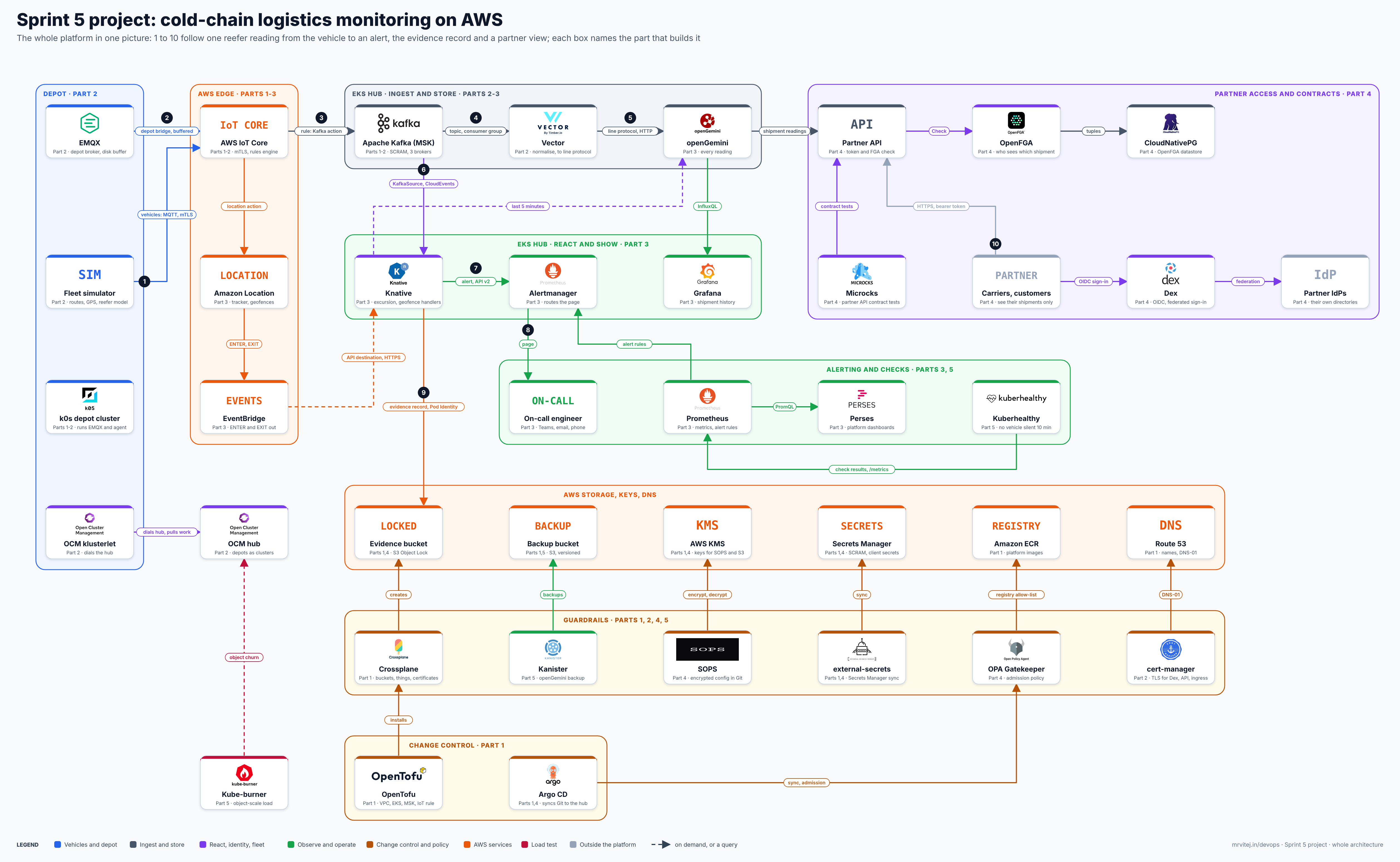
What this is and is not. This is engineering guidance, not legal or regulatory advice, and nothing here is validated or compliant on its own. It is a reference blueprint: it sets out the intended flow and the wiring between the tools. Versions, chart keys, provider kinds and field names change between releases, so each section gives a check to confirm them on your version. If you hit a bug or a mismatch, use the “Suggest a correction” link on this page.
What you build, and in what order
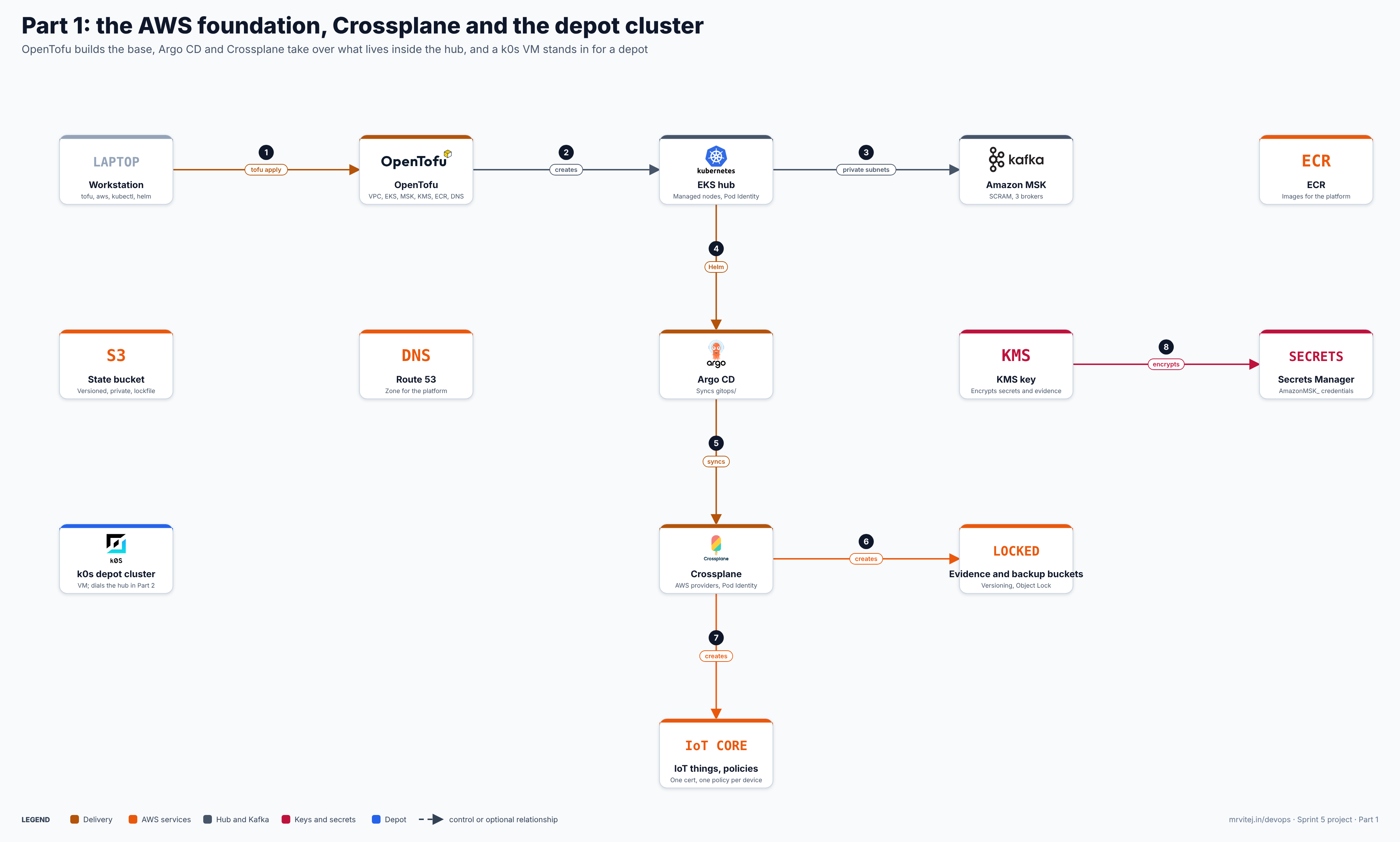
One image, the layers of this part. Open the zoomable diagram, or download it as SVG or PNG.
The work splits in two, by who owns the resource:
- OpenTofu owns the base: state bucket, VPC, EKS, MSK, KMS, Secrets Manager containers, ECR and Route 53. These are the things Crossplane needs in order to exist, or that rarely change.
- Crossplane owns what applications ask for: the evidence and backup buckets, and the IoT things, certificates and policies. They are Kubernetes objects, reviewed in Git, reconciled continuously.
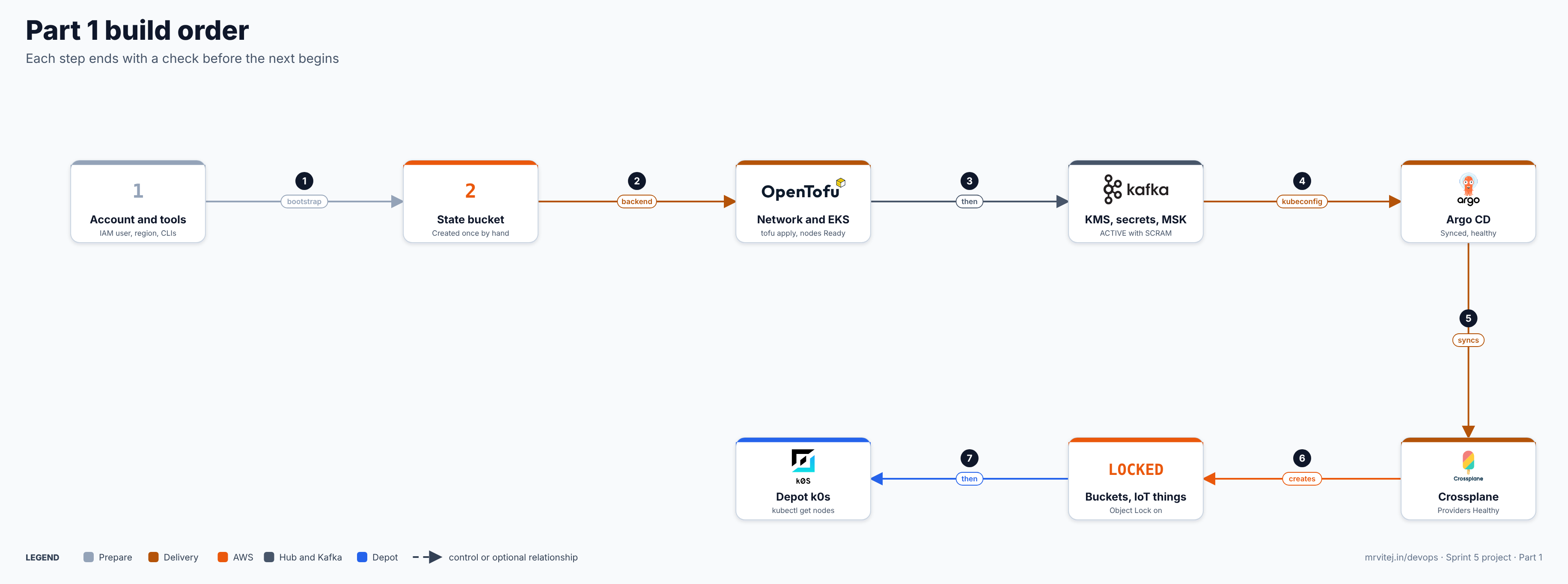
- Prerequisites
- Account, region and variables
- The repository and the state bucket
- The foundation stack: network zones, EKS, KMS, secrets, MSK, ECR, Route 53
- Argo CD
- Crossplane and its AWS providers
- Evidence and backup buckets with Object Lock
- IoT Core things, policies and certificates
- The depot: k0s on a VM
- Troubleshooting, cost, cleanup, design notes
1. Prerequisites
| Item | Version or detail | Why |
|---|---|---|
| AWS account with billing | An account you may spend in; MFA on the root user | MSK and EKS are billed hourly |
| AWS CLI v2 | Current release; keep aws --version |
Bootstrap and checks |
| OpenTofu | Current stable (tofu version) |
See OpenTofu |
| AWS provider | ~> 6.0 |
Resources below |
kubectl, Helm |
Current releases | Cluster work |
A GitHub repository cold-chain |
Layout in the overview | Argo CD syncs from it |
| A domain you control | Ability to set NS records | Route 53 delegation |
| An Ubuntu 24.04 VM | 2 vCPU, 4 GB RAM, 30 GB disk, outbound internet | The depot stand-in |
| Your public IP | Allowed on the EKS public endpoint | Restricts the API |
2. Account, region and variables
Use a dedicated account or a sandbox you can throw away: Object Lock buckets in compliance mode cannot be emptied early (see section 7). Create an IAM Identity Center user or an IAM user with MFA for the build, with administrator rights for the lab only. Do not use the root user for daily work.
export AWS_REGION=ap-south-1
export AWS_DEFAULT_REGION=$AWS_REGION
export SUFFIX=abc123                     # short and unique; bucket names are global
export STATE_BUCKET=coldchain-tfstate-$SUFFIX
export DOMAIN=coldchain.example.com
export MY_IP=$(curl -s https://ifconfig.me)/32
export GH_ORG=YOUR-GITHUB-ORG-OR-USER
aws sts get-caller-identity
Expected: your account ID and the user ARN. Checkpoint: the account ID is the one you intend to build in.
3. The repository and the state bucket
mkdir -p cold-chain/{infra/foundation,gitops/apps,crossplane,depot} && cd cold-chain
git init -b main
The state bucket is the one thing created by hand, because OpenTofu needs it before it can store anything.
aws s3api create-bucket --bucket $STATE_BUCKET --region $AWS_REGION \
  --create-bucket-configuration LocationConstraint=$AWS_REGION
aws s3api put-bucket-versioning --bucket $STATE_BUCKET \
  --versioning-configuration Status=Enabled
aws s3api put-public-access-block --bucket $STATE_BUCKET \
  --public-access-block-configuration BlockPublicAcls=true,IgnorePublicAcls=true,BlockPublicPolicy=true,RestrictPublicBuckets=true
aws s3api put-bucket-encryption --bucket $STATE_BUCKET \
  --server-side-encryption-configuration '{"Rules":[{"ApplyServerSideEncryptionByDefault":{"SSEAlgorithm":"AES256"}}]}'
Verify:
aws s3api get-bucket-versioning --bucket $STATE_BUCKET
aws s3api get-public-access-block --bucket $STATE_BUCKET
Expected: "Status": "Enabled" and all four public-access flags true. Checkpoint: versioning on, public access blocked.
OpenTofu’s S3 backend locks state with a lock file in the same bucket (use_lockfile = true), so no DynamoDB table is needed.
4. The foundation stack
4.1 Providers, backend and variables
infra/foundation/versions.tf:
terraform {
  required_version = ">= 1.10"
  required_providers {
    aws    = { source = "hashicorp/aws", version = "~> 6.0" }
    random = { source = "hashicorp/random", version = "~> 3.6" }
  }
  backend "s3" {
    # bucket and region are passed at init time (see below)
    key          = "foundation/terraform.tfstate"
    use_lockfile = true
    encrypt      = true
  }
}

provider "aws" {
  region = var.region
  default_tags {
    tags = { project = "cold-chain", managed-by = "opentofu" }
  }
}infra/foundation/variables.tf:
variable "region"           { default = "ap-south-1" }
variable "name"             { default = "coldchain" }
variable "domain"           { type = string }
variable "my_ip_cidr"       { type = string }
variable "cluster_version"  { type = string }   # see the check below
variable "kafka_version"    { type = string }   # see the check below
variable "associate_scram"  { default = false } # set true on the second apply
Find the versions the account offers right now and write them into terraform.tfvars:
aws eks describe-cluster-versions --query 'clusterVersions[].[clusterVersion,status]' --output table
aws kafka list-kafka-versions --query 'KafkaVersions[].Version' --output text
Choose the newest Kubernetes version that the add-ons below list as supported (aws eks describe-addon-versions --addon-name eks-pod-identity-agent --kubernetes-version <v>), and a current Kafka version offered for Standard brokers.
# infra/foundation/terraform.tfvars
domain          = "coldchain.example.com"
my_ip_cidr      = "203.0.113.10/32"
cluster_version = "1.37"      # example: confirm with the commands above
kafka_version   = "3.9.x"     # example: confirm with list-kafka-versions
4.2 Network zones
One VPC, three private subnets for nodes and brokers, three public subnets for load balancers and the NAT gateway. A single NAT gateway keeps the lab cheap; use one per zone in production.
infra/foundation/network.tf:
data "aws_availability_zones" "az" { state = "available" }

locals {
  azs = slice(data.aws_availability_zones.az.names, 0, 3)
}

module "vpc" {
  source  = "terraform-aws-modules/vpc/aws"
  version = "~> 6.0"

  name = var.name
  cidr = "10.40.0.0/16"
  azs  = local.azs

  private_subnets = ["10.40.0.0/20", "10.40.16.0/20", "10.40.32.0/20"]
  public_subnets  = ["10.40.240.0/24", "10.40.241.0/24", "10.40.242.0/24"]

  enable_nat_gateway = true
  single_nat_gateway = true

  public_subnet_tags  = { "kubernetes.io/role/elb" = 1 }
  private_subnet_tags = { "kubernetes.io/role/internal-elb" = 1 }
}
The zones, and what may talk to what:
| Zone | Where | Inbound | Outbound |
|---|---|---|---|
| Public | Public subnets | Load balancers only (later parts) | Internet |
| Hub | Private subnets, EKS nodes | From load balancers; API only from my_ip_cidr |
NAT, MSK 9096, AWS APIs |
| Data | Private subnets, MSK | 9096 from the hub node group and the IoT VPC destination only | None needed |
| Depot | Your VM or site | Nothing from the internet | 443 to the hub API, 8883 to IoT Core |
4.3 KMS, Secrets Manager and the MSK credentials
MSK reads SCRAM credentials from Secrets Manager. The secret name must start with AmazonMSK_ and the secret must be encrypted with a customer-managed key, not the default key. The password is never written in code: the secret is created empty here and filled with the CLI.
infra/foundation/security.tf:
data "aws_caller_identity" "me" {}

resource "aws_kms_key" "platform" {
  description             = "cold-chain platform key"
  enable_key_rotation     = true
  deletion_window_in_days = 7
}

resource "aws_kms_alias" "platform" {
  name          = "alias/${var.name}-platform"
  target_key_id = aws_kms_key.platform.key_id
}

# Container only. The value is added with the CLI in section 4.6.
resource "aws_secretsmanager_secret" "msk_ingest" {
  name       = "AmazonMSK_${var.name}_ingest"
  kms_key_id = aws_kms_key.platform.arn
}
4.4 EKS with Pod Identity
infra/foundation/eks.tf:
module "eks" {
  source  = "terraform-aws-modules/eks/aws"
  version = "~> 21.0"

  name               = "${var.name}-hub"
  kubernetes_version = var.cluster_version

  vpc_id     = module.vpc.vpc_id
  subnet_ids = module.vpc.private_subnets

  endpoint_public_access       = true
  endpoint_public_access_cidrs = [var.my_ip_cidr]
  endpoint_private_access      = true

  enable_cluster_creator_admin_permissions = true

  addons = {
    coredns                = {}
    kube-proxy             = {}
    vpc-cni                = { before_compute = true }
    eks-pod-identity-agent = { before_compute = true }
  }

  eks_managed_node_groups = {
    main = {
      instance_types = ["m6i.large"]
      min_size       = 3
      max_size       = 5
      desired_size   = 3
    }
  }
}
4.5 MSK, ECR and Route 53
infra/foundation/data.tf:
resource "aws_security_group" "msk" {
  name   = "${var.name}-msk"
  vpc_id = module.vpc.vpc_id
}

# SCRAM over TLS listens on 9096. Only the hub nodes may connect for now;
# Part 2 adds the IoT Core VPC destination.
resource "aws_vpc_security_group_ingress_rule" "msk_from_nodes" {
  security_group_id            = aws_security_group.msk.id
  referenced_security_group_id = module.eks.node_security_group_id
  from_port                    = 9096
  to_port                      = 9096
  ip_protocol                  = "tcp"
}

resource "aws_msk_cluster" "main" {
  cluster_name           = var.name
  kafka_version          = var.kafka_version
  number_of_broker_nodes = 3

  broker_node_group_info {
    instance_type   = "kafka.m7g.large"
    client_subnets  = module.vpc.private_subnets
    security_groups = [aws_security_group.msk.id]
    storage_info {
      ebs_storage_info { volume_size = 100 }
    }
  }

  client_authentication {
    sasl { scram = true }
  }

  encryption_info {
    encryption_in_transit {
      client_broker = "TLS"
      in_cluster    = true
    }
    encryption_at_rest_kms_key_arn = aws_kms_key.platform.arn
  }
}

resource "aws_msk_scram_secret_association" "ingest" {
  count           = var.associate_scram ? 1 : 0
  cluster_arn     = aws_msk_cluster.main.arn
  secret_arn_list = [aws_secretsmanager_secret.msk_ingest.arn]
}

resource "aws_ecr_repository" "platform" {
  for_each             = toset(["ingest-handler", "excursion-handler", "geofence-handler", "partner-api", "simulator"])
  name                 = "${var.name}/${each.key}"
  image_tag_mutability = "IMMUTABLE"
  image_scanning_configuration { scan_on_push = true }
  encryption_configuration {
    encryption_type = "KMS"
    kms_key         = aws_kms_key.platform.arn
  }
}

resource "aws_route53_zone" "main" { name = var.domain }infra/foundation/outputs.tf:
output "cluster_name"       { value = module.eks.cluster_name }
output "oidc_provider_arn"  { value = module.eks.oidc_provider_arn }
output "kms_key_arn"        { value = aws_kms_key.platform.arn }
output "msk_cluster_arn"    { value = aws_msk_cluster.main.arn }
output "msk_secret_arn"     { value = aws_secretsmanager_secret.msk_ingest.arn }
output "name_servers"       { value = aws_route53_zone.main.name_servers }
4.6 Apply, then add the credentials
cd infra/foundation
tofu init -backend-config="bucket=$STATE_BUCKET" -backend-config="region=$AWS_REGION"
tofu validate
tofu plan -out=plan1
tofu apply plan1          # EKS and MSK each take 15 to 30 minutes
Now put the SCRAM credentials in, then associate them (the second apply):
SECRET_ARN=$(tofu output -raw msk_secret_arn)
KMS_ARN=$(tofu output -raw kms_key_arn)
PASS=$(openssl rand -base64 24 | tr -d '/+=')
aws secretsmanager put-secret-value --secret-id "$SECRET_ARN" \
  --secret-string "{\"username\":\"ingest\",\"password\":\"$PASS\"}"
unset PASS
tofu apply -var associate_scram=true
Do not write associate_scram=true into terraform.tfvars and forget it: keep the flag on the command line, or move it into the file once the secret has a value, so a fresh checkout does not try to associate an empty secret.
Point kubectl at the hub and check:
aws eks update-kubeconfig --name coldchain-hub --region $AWS_REGION
kubectl get nodes
aws kafka describe-cluster-v2 --cluster-arn $(tofu output -raw msk_cluster_arn) \
  --query 'ClusterInfo.State'
aws kafka list-scram-secrets --cluster-arn $(tofu output -raw msk_cluster_arn)
aws kafka get-bootstrap-brokers --cluster-arn $(tofu output -raw msk_cluster_arn) \
  --query 'BootstrapBrokerStringSaslScram'
Expected: three nodes Ready; the state "ACTIVE"; the secret ARN listed; and a bootstrap string whose ports are 9096. Keep that string: Parts 2 and 3 use it.
Delegate the domain: set the four NS records printed by tofu output name_servers at your registrar.
Checkpoint: nodes Ready, MSK ACTIVE with the secret associated, nothing in the state bucket marked public.
5. Argo CD
helm repo add argo https://argoproj.github.io/argo-helm
helm repo update
helm install argocd argo/argo-cd -n argocd --create-namespace --wait
kubectl -n argocd get pods
Expected: the server, repo-server, application-controller, redis and applicationset pods Running. Argo CD pulls from Git, so the repository must be reachable. For a private repository, add it under Settings, Repositories, with a read-only deploy key.
Create the root application that syncs the gitops/apps folder. gitops/root.yaml:
apiVersion: argoproj.io/v1alpha1
kind: Application
metadata:
  name: root
  namespace: argocd
spec:
  project: default
  source:
    repoURL: https://github.com/YOUR-ORG/cold-chain.git
    targetRevision: main
    path: gitops/apps
  destination:
    server: https://kubernetes.default.svc
    namespace: argocd
  syncPolicy:
    automated: { prune: true, selfHeal: true }
git add -A && git commit -m "foundation" && git push -u origin main # after adding the remote
kubectl apply -f gitops/root.yaml
kubectl -n argocd get applicationsCheckpoint: root shows Synced and Healthy.
6. Crossplane and its AWS providers
6.1 The identities
Crossplane’s provider pods need AWS rights. They get them through EKS Pod Identity: no keys in the cluster. Each provider gets its own role and its own service account name, so the association is exact. infra/foundation/crossplane-iam.tf:
data "aws_iam_policy_document" "pod_trust" {
  statement {
    actions    = ["sts:AssumeRole", "sts:TagSession"]
    principals {
      type        = "Service"
      identifiers = ["pods.eks.amazonaws.com"]
    }
  }
}

resource "aws_iam_role" "xp_s3" {
  name               = "${var.name}-crossplane-s3"
  assume_role_policy = data.aws_iam_policy_document.pod_trust.json
}

resource "aws_iam_role_policy" "xp_s3" {
  role = aws_iam_role.xp_s3.id
  policy = jsonencode({
    Version = "2012-10-17"
    Statement = [{
      Effect   = "Allow"
      Action   = ["s3:*"]
      Resource = ["arn:aws:s3:::${var.name}-*", "arn:aws:s3:::${var.name}-*/*"]
    }]
  })
}

resource "aws_iam_role" "xp_iot" {
  name               = "${var.name}-crossplane-iot"
  assume_role_policy = data.aws_iam_policy_document.pod_trust.json
}

resource "aws_iam_role_policy" "xp_iot" {
  role = aws_iam_role.xp_iot.id
  policy = jsonencode({
    Version = "2012-10-17"
    Statement = [{
      Effect   = "Allow"
      Action   = ["iot:*"]
      Resource = "*"
    }]
  })
}

resource "aws_eks_pod_identity_association" "xp_s3" {
  cluster_name    = module.eks.cluster_name
  namespace       = "crossplane-system"
  service_account = "provider-aws-s3"
  role_arn        = aws_iam_role.xp_s3.arn
}

resource "aws_eks_pod_identity_association" "xp_iot" {
  cluster_name    = module.eks.cluster_name
  namespace       = "crossplane-system"
  service_account = "provider-aws-iot"
  role_arn        = aws_iam_role.xp_iot.arn
}
iot:* on * is a lab shortcut. Narrow it to the actions the resources below use once they work. The S3 role is limited to buckets named coldchain-*.
tofu apply
aws eks list-pod-identity-associations --cluster-name coldchain-hub
6.2 Install Crossplane through Argo CD
gitops/apps/crossplane.yaml:
apiVersion: argoproj.io/v1alpha1
kind: Application
metadata:
  name: crossplane
  namespace: argocd
spec:
  project: default
  source:
    repoURL: https://charts.crossplane.io/stable
    chart: crossplane
    targetRevision: 2.4.3        # the version this blueprint pins; confirm the newest stable
  destination:
    server: https://kubernetes.default.svc
    namespace: crossplane-system
  syncPolicy:
    automated: { prune: true, selfHeal: true }
    syncOptions: [CreateNamespace=true]
6.3 The providers
gitops/apps/crossplane-providers.yaml points Argo CD at the crossplane/ folder:
apiVersion: argoproj.io/v1alpha1
kind: Application
metadata:
  name: crossplane-providers
  namespace: argocd
spec:
  project: default
  source:
    repoURL: https://github.com/YOUR-ORG/cold-chain.git
    targetRevision: main
    path: crossplane
  destination:
    server: https://kubernetes.default.svc
    namespace: crossplane-system
  syncPolicy:
    automated: { prune: true, selfHeal: true }
syncOptions: [SkipDryRunOnMissingResource=true]crossplane/providers.yaml: the runtime configs pin each provider’s service account name so that the Pod Identity associations match.
apiVersion: pkg.crossplane.io/v1beta1
kind: DeploymentRuntimeConfig
metadata:
  name: provider-aws-s3
spec:
  serviceAccountTemplate:
    metadata:
      name: provider-aws-s3
---
apiVersion: pkg.crossplane.io/v1beta1
kind: DeploymentRuntimeConfig
metadata:
  name: provider-aws-iot
spec:
  serviceAccountTemplate:
    metadata:
      name: provider-aws-iot
---
apiVersion: pkg.crossplane.io/v1
kind: Provider
metadata:
  name: provider-aws-s3
spec:
  package: xpkg.upbound.io/upbound/provider-aws-s3:v2.6.1   # pin the newest v2 you can see
  runtimeConfigRef: { name: provider-aws-s3 }
---
apiVersion: pkg.crossplane.io/v1
kind: Provider
metadata:
  name: provider-aws-iot
spec:
  package: xpkg.upbound.io/upbound/provider-aws-iot:v2.6.1
  runtimeConfigRef: { name: provider-aws-iot }
The ProviderConfig tells both providers to use Pod Identity. In the v2 providers, the namespaced aws.m.upbound.io API is used; put the managed resources in the same namespace as this config. crossplane/providerconfig.yaml:
apiVersion: v1
kind: Namespace
metadata:
  name: aws-resources
---
apiVersion: aws.m.upbound.io/v1beta1
kind: ProviderConfig
metadata:
  name: default
  namespace: aws-resources
spec:
  credentials:
    source: PodIdentity
Commit, push and watch:
git add -A && git commit -m "crossplane and providers" && git push
kubectl -n argocd get applications
kubectl get providers
kubectl -n crossplane-system get pods
Expected: both providers INSTALLED True and HEALTHY True, and the provider pods Running with the service accounts provider-aws-s3 and provider-aws-iot. Check the identity reached the pod:
kubectl -n crossplane-system exec deploy/$(kubectl -n crossplane-system get deploy -o name | grep provider-aws-s3 | cut -d/ -f2) -- env | grep AWS_CONTAINERExpected: AWS_CONTAINER_CREDENTIALS_FULL_URI is set, which is how Pod Identity delivers credentials.
Checkpoint: both providers Healthy.
7. Evidence and backup buckets with Object Lock
Object Lock needs versioning, and a bucket must be created with Object Lock enabled. Compliance mode means no one, including the root user, can delete a locked version until its retention ends. Practise on the drill bucket first and keep locked buckets out of any account you intend to delete early.
crossplane/buckets.yaml:
apiVersion: s3.aws.m.upbound.io/v1beta1
kind: Bucket
metadata:
  name: coldchain-drill-abc123          # replace abc123 with your SUFFIX
  namespace: aws-resources
spec:
  forProvider:
    region: ap-south-1
    objectLockEnabled: true
  providerConfigRef: { kind: ProviderConfig, name: default }
---
apiVersion: s3.aws.m.upbound.io/v1beta1
kind: BucketVersioning
metadata:
  name: coldchain-drill-abc123
  namespace: aws-resources
spec:
  forProvider:
    region: ap-south-1
    bucketRef: { name: coldchain-drill-abc123 }
    versioningConfiguration:
      status: Enabled
  providerConfigRef: { kind: ProviderConfig, name: default }
---
apiVersion: s3.aws.m.upbound.io/v1beta1
kind: BucketObjectLockConfiguration
metadata:
  name: coldchain-drill-abc123
  namespace: aws-resources
spec:
  forProvider:
    region: ap-south-1
    bucketRef: { name: coldchain-drill-abc123 }
    rule:
      defaultRetention:
        mode: COMPLIANCE
        days: 1
  providerConfigRef: { kind: ProviderConfig, name: default }
---
apiVersion: s3.aws.m.upbound.io/v1beta1
kind: Bucket
metadata:
  name: coldchain-evidence-abc123
  namespace: aws-resources
spec:
  forProvider:
    region: ap-south-1
    objectLockEnabled: true
  providerConfigRef: { kind: ProviderConfig, name: default }
---
apiVersion: s3.aws.m.upbound.io/v1beta1
kind: BucketVersioning
metadata:
  name: coldchain-evidence-abc123
  namespace: aws-resources
spec:
  forProvider:
    region: ap-south-1
    bucketRef: { name: coldchain-evidence-abc123 }
    versioningConfiguration:
      status: Enabled
  providerConfigRef: { kind: ProviderConfig, name: default }
---
apiVersion: s3.aws.m.upbound.io/v1beta1
kind: BucketObjectLockConfiguration
metadata:
  name: coldchain-evidence-abc123
  namespace: aws-resources
spec:
  forProvider:
    region: ap-south-1
    bucketRef: { name: coldchain-evidence-abc123 }
    rule:
      defaultRetention:
        mode: GOVERNANCE       # lab. Production evidence uses COMPLIANCE and your own retention period.
        days: 30
  providerConfigRef: { kind: ProviderConfig, name: default }
---
apiVersion: s3.aws.m.upbound.io/v1beta1
kind: Bucket
metadata:
  name: coldchain-backup-abc123
  namespace: aws-resources
spec:
  forProvider:
    region: ap-south-1
  providerConfigRef: { kind: ProviderConfig, name: default }
---
apiVersion: s3.aws.m.upbound.io/v1beta1
kind: BucketVersioning
metadata:
  name: coldchain-backup-abc123
  namespace: aws-resources
spec:
  forProvider:
    region: ap-south-1
    bucketRef: { name: coldchain-backup-abc123 }
    versioningConfiguration:
      status: Enabled
  providerConfigRef: { kind: ProviderConfig, name: default }
Encryption with the platform key and a public access block are added the same way, with BucketServerSideEncryptionConfiguration and BucketPublicAccessBlock; confirm the field names with kubectl explain below. Commit, push, then:
kubectl -n aws-resources get buckets.s3.aws.m.upbound.io
kubectl explain bucketobjectlockconfigurations.s3.aws.m.upbound.io.spec.forProvider.rule
aws s3api get-object-lock-configuration --bucket coldchain-drill-abc123
Expected: READY True and SYNCED True; the CLI shows "ObjectLockEnabled": "Enabled" with the default retention. Now try the lock on the drill bucket:
echo test > e.txt
aws s3api put-object --bucket coldchain-drill-abc123 --key e.txt --body e.txt
VID=$(aws s3api list-object-versions --bucket coldchain-drill-abc123 --query 'Versions[0].VersionId' --output text)
aws s3api delete-object --bucket coldchain-drill-abc123 --key e.txt --version-id $VID
Expected: the last command fails with AccessDenied because the version is locked. A delete without a version ID only adds a delete marker and the locked version stays.
Checkpoint: the drill version cannot be deleted; the evidence and backup buckets show versioning enabled.
8. IoT Core things, policies and certificates
Each device gets one thing, one certificate and one policy limited to its own topic prefix. crossplane/iot-reefer-001.yaml:
apiVersion: iot.aws.m.upbound.io/v1beta1
kind: Thing
metadata:
  name: reefer-001
  namespace: aws-resources
spec:
  forProvider:
    region: ap-south-1
  providerConfigRef: { kind: ProviderConfig, name: default }
---
apiVersion: iot.aws.m.upbound.io/v1beta1
kind: Policy
metadata:
  name: reefer-001
  namespace: aws-resources
spec:
  forProvider:
    region: ap-south-1
    policy: |
      {
        "Version": "2012-10-17",
        "Statement": [
          { "Effect": "Allow", "Action": "iot:Connect",
            "Resource": "arn:aws:iot:ap-south-1:ACCOUNT_ID:client/reefer-001" },
          { "Effect": "Allow", "Action": "iot:Publish",
            "Resource": "arn:aws:iot:ap-south-1:ACCOUNT_ID:topic/fleet/reefer-001/telemetry" }
        ]
      }
  providerConfigRef: { kind: ProviderConfig, name: default }
---
apiVersion: iot.aws.m.upbound.io/v1beta1
kind: Certificate
metadata:
  name: reefer-001
  namespace: aws-resources
spec:
  forProvider:
    region: ap-south-1
    active: true
  writeConnectionSecretToRef:
    name: reefer-001-cert
  providerConfigRef: { kind: ProviderConfig, name: default }
Replace ACCOUNT_ID. Two attachment objects bind the pieces (PolicyAttachment policy to certificate, ThingPrincipalAttachment thing to certificate); write them with kubectl explain for the exact selector fields on your provider version.
kubectl -n aws-resources get things.iot.aws.m.upbound.io,policies.iot.aws.m.upbound.io,certificates.iot.aws.m.upbound.io
aws iot list-things --query 'things[].thingName'
aws iot describe-endpoint --endpoint-type iot:Data-ATS
Expected: reefer-001 listed, and an endpoint of the form xxxx-ats.iot.ap-south-1.amazonaws.com. Keep the endpoint: Part 2 uses it.
With AWS-generated keys, the certificate’s private key lands in the connection secret. That secret is a credential: Part 4 moves such secrets under SOPS, and Part 2 copies the certificate to the depot. A certificate signing request generated on the device keeps the private key off the cluster; the field for that on this provider was not confirmed here, so check kubectl explain certificates.iot.aws.m.upbound.io.spec.forProvider.
Checkpoint: thing, policy and certificate exist and are attached.
9. The depot: k0s on a VM
The depot is a small cluster with no AWS credentials. It only dials out. On the Ubuntu VM:
curl --proto '=https' --tlsv1.2 -sSf https://get.k0s.sh | sudo sh
sudo k0s install controller --single
sudo k0s start
sleep 30
sudo k0s status
sudo k0s kubectl get nodes
Expected: k0s status shows Role: controller and Workloads: true, and the node is Ready. To use plain kubectl from the VM:
mkdir -p ~/.kube
sudo k0s kubeconfig admin > ~/.kube/config
kubectl get pods -A
Limit the VM’s outbound traffic to what the depot needs, and nothing inbound:
sudo ufw default deny incoming
sudo ufw default allow outgoing
sudo ufw allow ssh        # from your IP only, in a real site
sudo ufw enable
Check reachability to the two endpoints it will use in Part 2:
curl -sk --max-time 5 -o /dev/null -w "%{http_code}\n" https://$(aws eks describe-cluster --name coldchain-hub --query cluster.endpoint --output text | sed 's#https://##')/healthz
nc -vz <your-iot-endpoint> 8883
Run the first from a machine with the AWS CLI; the second from the VM. Expected: an HTTP code (401 or 403 is fine: the API answered) and a successful connect on 8883. Checkpoint: k0s status healthy, the node Ready, 8883 reachable.
10. Troubleshooting
| Symptom | Likely cause | Fix |
|---|---|---|
tofu init cannot reach the bucket |
Wrong region or name in -backend-config |
Re-run with the values from section 2 |
| Backend lock error | A previous run was killed | tofu force-unlock <ID> after confirming nobody else is running |
| Nodes not Ready | VPC CNI or Pod Identity add-on not up before nodes | Keep before_compute = true; check kubectl -n kube-system get pods |
kubectl times out |
Your IP changed | Update my_ip_cidr and apply |
| MSK association rejected | Secret uses the default key, wrong name prefix, or has no value | Name must start with AmazonMSK_; use the customer key; put a value first |
Provider pod AccessDenied |
Association service account name differs | Names must be exactly provider-aws-s3 and provider-aws-iot |
Provider never Healthy |
Package version not found | Pin a version listed on the Upbound Marketplace |
Bucket SYNCED False |
Name taken, or a field name differs | kubectl describe; confirm with kubectl explain |
get-object-lock-configuration fails |
Bucket created without Object Lock | Object Lock must be set at creation; recreate the drill bucket |
| k0s node NotReady | Not enough time or memory | Wait a minute; check sudo k0s status and journalctl -u k0scontroller |
Cost note
Read on 18 November 2026 (US East list prices; Mumbai, EC2, IoT and S3 prices were not read): EKS control plane $0.10 per hour, Amazon MSK kafka.m7g.large about $0.204 per broker hour (three brokers about $0.61 per hour, roughly $447 a month), MSK storage $0.10 per GB-month. Add three m6i.large nodes and one NAT gateway. Treat MSK and the nodes as the cost to watch: build, check, and destroy in the same sitting if you can.
Cleanup
Order matters: Crossplane-managed resources first, then the OpenTofu stack, with MSK going last of the paid items.
# 1. Remove the Crossplane objects (Argo CD would put them back, so delete the applications first).
kubectl -n argocd delete application root crossplane-providers
kubectl -n aws-resources delete things.iot.aws.m.upbound.io,policies.iot.aws.m.upbound.io,certificates.iot.aws.m.upbound.io --all
# Buckets with locked versions cannot be emptied until retention ends. Governance mode
# can be bypassed with s3:BypassGovernanceRetention; compliance mode cannot.

# 2. Destroy the foundation.
cd infra/foundation
tofu destroy
# The KMS key is scheduled for deletion, not deleted at once (7 days here).

# 3. The state bucket, last.
aws s3 rb s3://$STATE_BUCKET --force   # empty versions first if the bucket has them

# 4. The depot VM.
sudo k0s stop && sudo k0s reset
Design notes and version checks
- Versions. Crossplane 2.4.3 is pinned; confirm the newest stable. The provider tag
v2.6.1was the latest I saw for the family; confirm per provider (provider-aws-s3,provider-aws-iot). The EKS Kubernetes version and the MSK Kafka version are chosen with the commands in section 4.1, not copied from this post. - Provider API. The v2 providers use namespaced kinds in
aws.m.upbound.iogroups. Kind and field names in sections 7 and 8 follow that API; confirm withkubectl explainon your version, especially the attachment kinds and the certificate CSR field. - Authentication.
source: PodIdentityand Pod Identity associations are the recommended route over static keys; IRSA is the alternative if the cluster has an OIDC provider and you prefer annotations. - MSK. Standard brokers with SASL/SCRAM. SCRAM needs a customer-managed key and an
AmazonMSK_secret name. Whether Express brokers accept SCRAM was not confirmed, so this build uses Standard. MSK Serverless is not supported by the IoT Core Kafka action. - State locking.
use_lockfile = trueneeds OpenTofu 1.10 or newer. - Object Lock. Needs versioning and cannot be turned off. The evidence bucket is in governance mode here so the lab can be cleaned up; choose compliance mode and a retention period from your quality policy for real records.
- Not wired in this part. The Kafka rule and VPC destination for IoT Core are in Part 2. Whether the Crossplane provider covers them was not confirmed, so Part 2 plans to create them in OpenTofu.
- Credentials in state. The MSK password is never in code or state. The IoT private key is in a cluster Secret until Part 4.
Setup checklist
- 1. Account and tools: done when
aws sts get-caller-identityshows the intended account and the CLIs print versions. - 2. State bucket: done when versioning is
Enabledand the public access block is on. - 3. Network and EKS: done when
kubectl get nodesshows three Ready nodes. - 4. KMS, secrets, MSK: done when the cluster state is
ACTIVEandlist-scram-secretsshows the secret. - 5. Argo CD: done when
rootis Synced and Healthy. - 6. Crossplane: done when both providers are Healthy.
- 7. Buckets: done when the drill version cannot be deleted and evidence and backup show versioning enabled.
- 8. IoT things: done when
aws iot list-thingsshowsreefer-001and the endpoint is noted. - 9. Depot: done when
k0s statusis healthy and port 8883 is reachable.
Tools used
OpenTofu, Crossplane, Argo CD, k0s, Apache Kafka, Kubernetes, external-secrets (used from Part 2).
What comes next
Part 2 sends vehicle readings to the hub: the simulator, EMQX on the depot, IoT Core to Kafka, Vector and Open Cluster Management to bring the depot under the hub.