Sprint 5 ends with one project: live monitoring for a fleet of refrigerated trucks, containers and depot cold rooms, built on AWS, that any DevOps engineer can reproduce without a single truck. This overview fixes the scenario, the requirements, the architecture, the AWS design, the wiring of the 14 tools introduced this sprint, the cost and the repository layout. Five build parts follow, one every half day. Read this post once, then build from Part 1.
What this is and is not. The posts give engineering guidance for a setting where temperature records matter. They are not legal or regulatory advice, and nothing here is validated or compliant on its own. Whether a system meets a company’s quality policy, or any regulation that applies to it, is decided by the company’s quality unit through its own validation. The five build parts are a reference blueprint: the architecture, the flow and the wiring between the tools, with the checks that confirm each step. If you hit a bug or an error while following them, use the “Suggest a correction” link at the bottom of the page and the post will be corrected. The section “Design notes and version checks” lists the choices worth confirming on your own account.
The scenario
A pharmaceutical and food distributor moves temperature-controlled goods. It runs about 400 refrigerated trucks and vans, 2,000 reefer containers and parcel shippers, and 40 depots with cold rooms. Each of them reports temperature, humidity, door state, compressor state, battery and position every 10 to 60 seconds. Most goods must stay between 2 and 8 degrees Celsius; frozen goods must stay at minus 20.
The example targets, which each operator would adjust:
- an excursion alert within 60 seconds of a limit being crossed, for example above 8 degrees for 5 minutes;
- a mean kinetic temperature summary for each shipment;
- geofence events when a vehicle reaches or leaves a depot or a customer;
- no data lost when a vehicle or depot is offline for up to 6 hours;
- chain-of-custody events (door opened, handover) that cannot be edited;
- carriers and customers who see only their own shipments;
- evidence kept for the period the company’s quality policy sets.
What makes it different from Sprint 4’s single plant is that the sources move, sit behind cellular links that come and go, and are spread over many small sites.
There is no fleet in this build. A route and GPS simulator with a simple reefer temperature model stands in for the vehicles, a virtual machine running k0s stands in for a depot, and a hub on EKS holds the platform. The simulator is not a Landscape project; it is a small Python program that Part 2 gives in full.
Requirements
| Requirement | Example target | How the design meets it | Built in |
|---|---|---|---|
| Alert quickly | Within 60 s of a limit being crossed for 5 minutes | Knative handler with a minimum of one replica checks the last 5 minutes in openGemini on each reading; Alertmanager pages the on-call engineer | Part 3 |
| No loss in an outage | Up to 6 hours | Vehicles queue on their own disk; depots queue in EMQX on disk; Kafka keeps the data once it arrives; Vector commits its offset only after the write | Parts 2 and 5 |
| Geofence events | Depot and customer arrival | IoT Core location action feeds an Amazon Location tracker; ENTER and EXIT events go through EventBridge to a Knative handler | Part 3 |
| Evidence that cannot be edited | Retention per the quality policy | S3 Object Lock in compliance mode, one object per alert and custody event, written by the handler | Parts 1 and 4 |
| Partners see their own shipments | Carrier A cannot read carrier B | Dex signs partners in through their own identity providers; the partner API asks OpenFGA before it answers | Part 4 |
| Contracts for partner APIs | No breaking change unnoticed | OpenAPI contract in Git; Microcks mocks it for partners and tests the real API against it | Part 4 |
| Secrets and keys | None in plain text in Git | external-secrets for AWS secrets; SOPS with AWS KMS for values that must live in Git | Parts 1 and 4 |
| Recoverable | Restore after loss | Kanister backs up openGemini to S3; CloudNativePG backs up PostgreSQL; Git rebuilds the cluster objects | Part 5 |
| Scales to the fleet | 400 vehicles, 2,000 containers, 40 depots | Kube-burner loads the Kubernetes side; the simulator loads the telemetry side | Part 5 |
| Noticed when silent | No vehicle silent for 10 minutes | Kuberhealthy check queries openGemini and reports to Prometheus | Part 5 |
Three limits are worth saying now. The 60-second target applies while the vehicle has a link, because the alert path runs in the cloud; a vehicle that needs a warning in the cab while offline needs an on-device rule, which Part 2 shows for the simulator as an extension and is not a validated function. Kube-burner creates Kubernetes objects and measures the cluster; it does not generate MQTT telemetry, so the fleet-scale telemetry test uses the simulator, and Part 5 says so. And no part of this replaces the reefer unit’s own controller and alarm.
Architecture
The shape is vehicles and depots on cellular and site networks, AWS IoT Core as the front door, Amazon MSK as the backbone, an EKS hub that stores, reacts, shows and serves partners, and a ring of guardrails and operations tools around it.
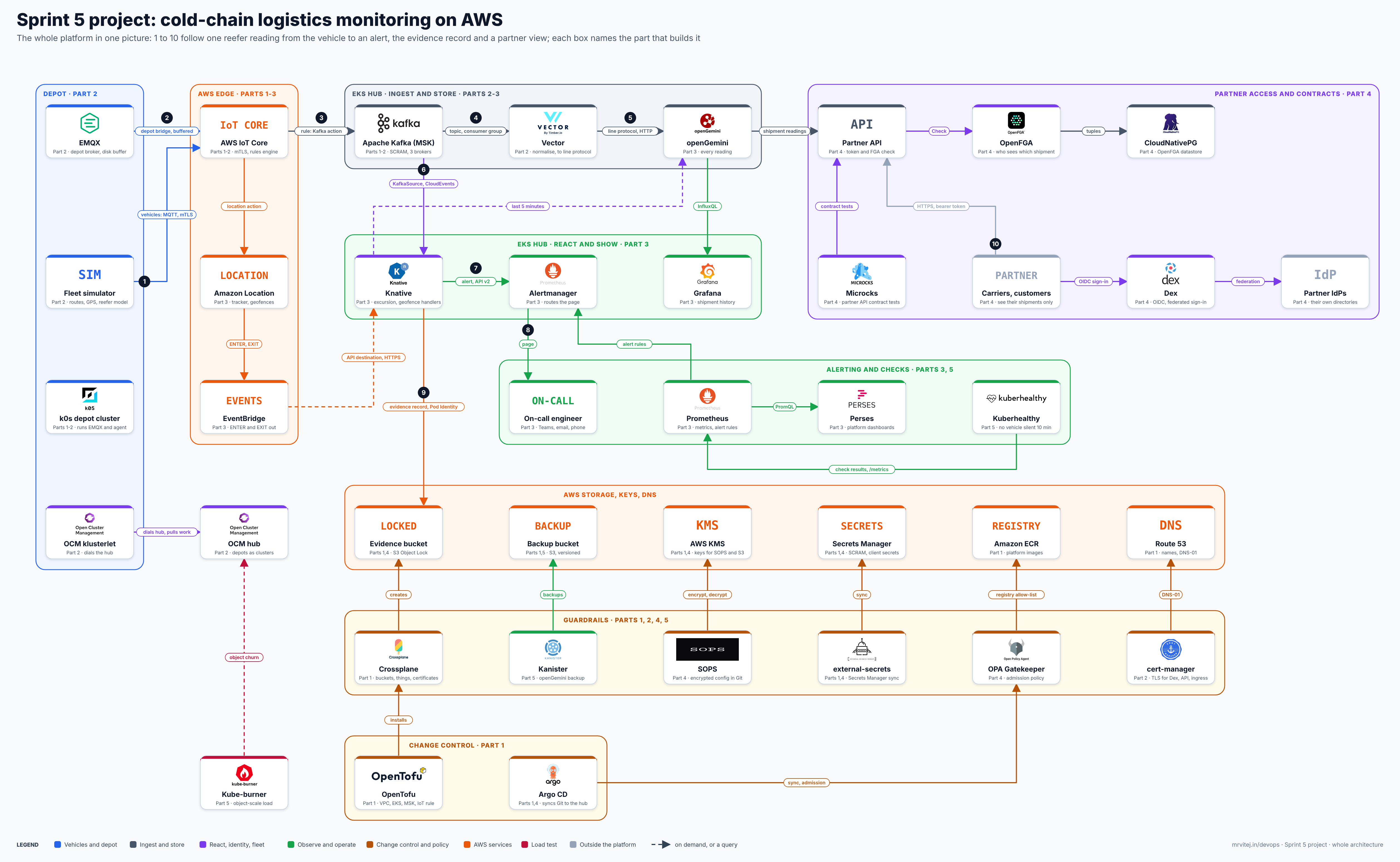
One image, every Sprint 5 tool with its logo. Open the zoomable diagram (scroll or pinch to zoom, drag to pan), or download it as SVG or PNG.
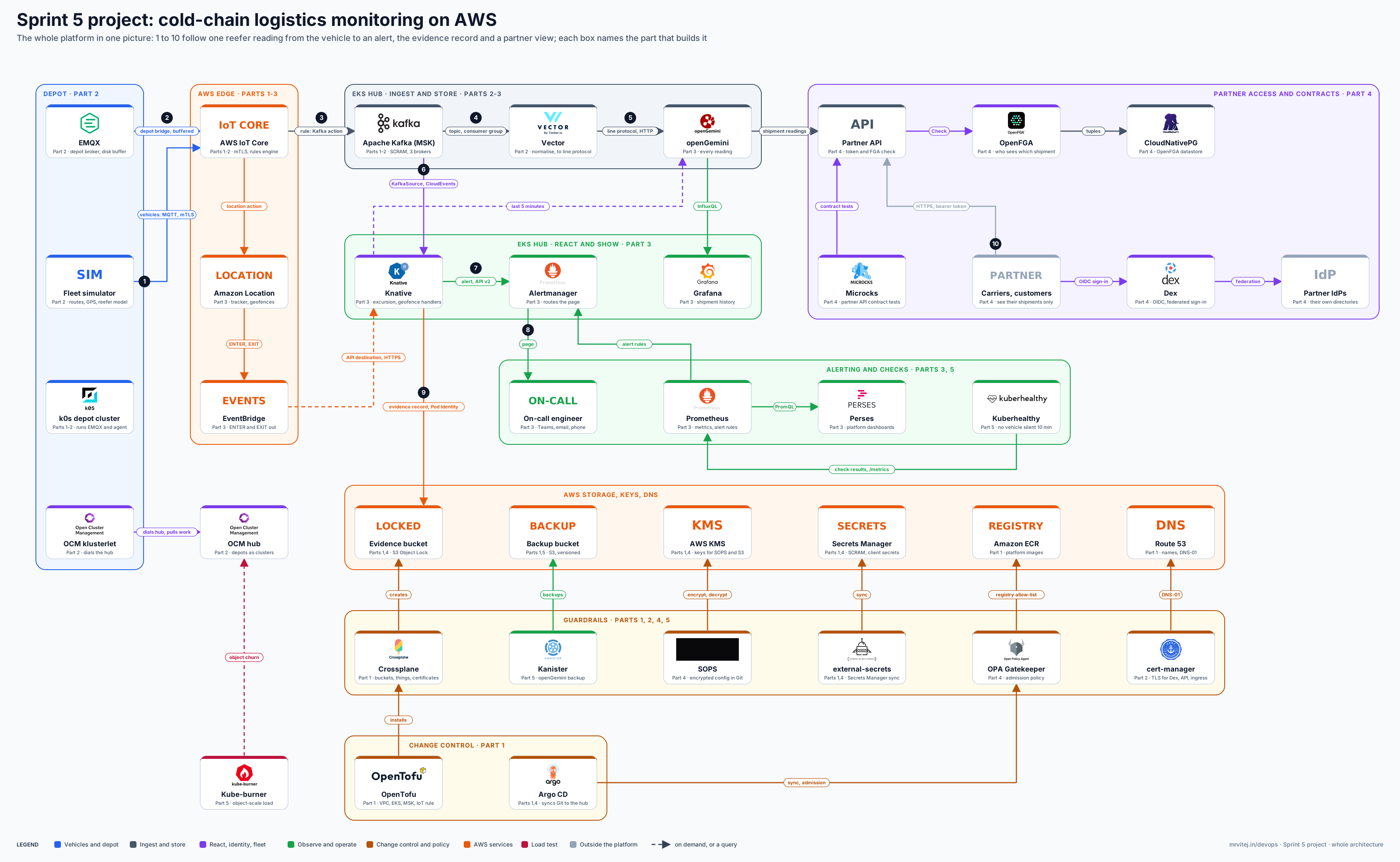
Blue is the vehicle and depot side, grey ingest and storage, purple reaction, identity and fleet management, green observability and operations, brown change control and policy, orange the AWS services, red the load test. Dashed arrows are on demand or queries. The numbers 1 to 10 follow one reading. Cilium, KServe and Velero from earlier sprints are not drawn because the project does not need them (see “Decisions”), and Loki is left out because the platform logs stay on the nodes’ default path in this build.
The second diagram follows one reading through the system.
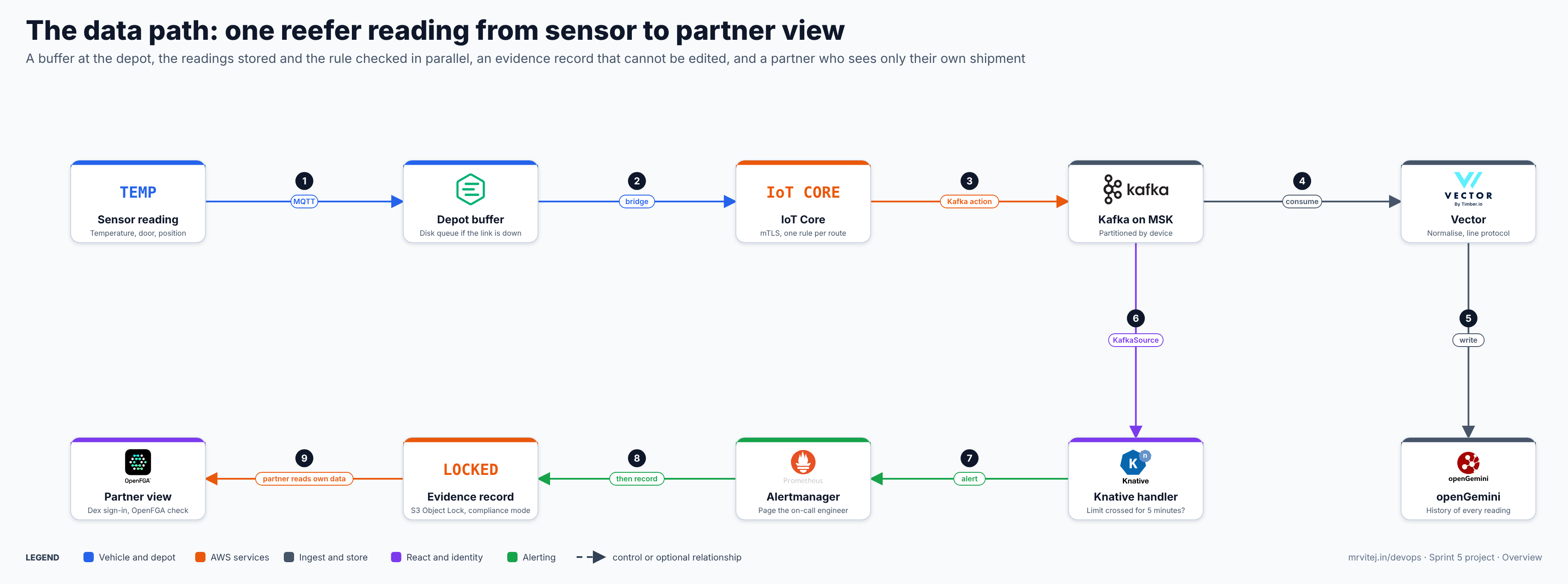
- A reading is published. A vehicle’s logger or the simulator publishes JSON over MQTT with mutual TLS to AWS IoT Core. Each vehicle has its own certificate and policy.
- The depot buffers. Depot sensors publish to EMQX on the k0s cluster. EMQX queues messages on disk while the link is down and bridges them to IoT Core when it returns.
- IoT Core routes. One rule sends every reading to a Kafka topic through a VPC destination; a second rule sends latitude and longitude to the Amazon Location tracker.
- Vector consumes. Vector reads the topic as a consumer group, normalises units and field names, and drops duplicates by device and timestamp where it can.
- openGemini stores. Vector writes InfluxDB line protocol over HTTP and commits the Kafka offset only after the write succeeds.
- Knative reacts. A KafkaSource reads the same topic with its own consumer group and delivers CloudEvents to a handler.
- An alert is raised. The handler asks openGemini for the last 5 minutes of the device, and if every value is above the limit it posts an alert to Alertmanager.
- A person is told. Alertmanager routes the alert to Teams, email or the phone of the on-call engineer.
- Evidence is kept. The handler writes one record per alert and per custody event to an S3 bucket with Object Lock, so it cannot be edited.
- A partner sees their own shipment. The partner signs in through Dex, which federates to their identity provider; the partner API checks the token, asks OpenFGA whether this user may see this shipment, and only then reads from openGemini.
Geofences take a side path. The location rule updates a tracker, the tracker evaluates its geofences, and EventBridge sends ENTER and EXIT events to a Knative handler, which records a custody event.
The tools and how they are wired
Every one of the 14 tools from this sprint appears first, followed by the tools reused from earlier sprints and the AWS services. “Part” names the part whose steps and checkpoints install and prove the tool. Where a brief on this site covers a tool, the link goes there; there is no separate brief on this site for Grafana, so that row has no link.
| Tool | From | Part that wires it | Connects to | What travels |
|---|---|---|---|---|
| k0s | Sprint 5, post 1 · k0s | Parts 1 and 2 | EMQX, the OCM agent, the OCM hub | Kubernetes API calls; the depot cluster itself |
| Open Cluster Management | Sprint 5, post 2 · OCM | Part 2 | Depot clusters (klusterlet dials out to the hub) | Registration, ManifestWork, status |
| Vector | Sprint 5, post 3 · Vector | Part 2 | Kafka (source), openGemini (sink) | JSON readings in; InfluxDB line protocol out |
| Apache Kafka (Amazon MSK) | Sprint 5, post 4 · Apache Kafka | Parts 1 and 2 | IoT Core, Vector, Knative | Readings by device key; SASL/SCRAM over TLS |
| openGemini | Sprint 5, post 5 · openGemini | Part 3 | Vector, Knative handler, Grafana, partner API, Kanister | Line protocol writes; InfluxQL queries |
| Knative | Sprint 5, post 6 · Knative | Part 3 | Kafka, EventBridge, Alertmanager, S3, openGemini | CloudEvents; alerts; evidence records |
| Microcks | Sprint 5, post 7 · Microcks | Part 4 | Partner API contract in Git, the partner API | Mock responses; contract test results |
| Dex | Sprint 5, post 8 · Dex | Part 4 | Partners’ identity providers, the partner API, Grafana | OIDC tokens with a groups claim |
| OpenFGA | Sprint 5, post 9 · OpenFGA | Part 4 | Partner API, PostgreSQL | Check requests; relationship tuples |
| SOPS | Sprint 5, post 10 · SOPS | Part 4 | AWS KMS, Git, Argo CD, OpenTofu | Encrypted files; data-key decrypt calls |
| Crossplane | Sprint 5, post 11 · Crossplane | Part 1 | AWS APIs through Pod Identity | S3 buckets, IoT things, certificates and policies as Kubernetes objects |
| Kanister | Sprint 5, post 12 · Kanister | Part 5 | openGemini, the backup bucket | Backup and restore actions; backup files |
| Kube-burner | Sprint 5, post 13 · Kube-burner | Part 5 | Hub and depot Kubernetes APIs, Prometheus | Object churn; latency measurements |
| Kuberhealthy | Sprint 5, post 14 · Kuberhealthy | Part 5 | openGemini, Prometheus | Check pods; pass or fail per check |
| Kubernetes (EKS, k0s) | Sprint 1 · Kubernetes | Part 1 | everything | EKS for the hub, k0s for depots |
| EMQX | Sprint 4 · EMQX | Part 2 | Depot sensors, IoT Core | MQTT in; MQTT over mTLS out; disk queue |
| CloudNativePG | Sprint 4 · CloudNativePG | Part 4 | OpenFGA, S3 | PostgreSQL; its own backups to S3 |
| Keycloak | Sprint 4 · Keycloak | Part 4 | Microcks only | Microcks’ own sign-in; not exposed to partners |
| Argo CD | Sprint 2 · Argo | Parts 1 and 4 | Git, the hub API | Manifests synced to the hub |
| OpenTofu | Sprint 2 · OpenTofu | Part 1 | AWS APIs | VPC, EKS, MSK, IoT rules, Location resources |
| Prometheus, Alertmanager | Sprint 2 · Prometheus | Part 3 | Knative, Kuberhealthy, Kafka and Vector metrics, receivers | Metrics; alerts to Teams, email and phone |
| Perses | Sprint 4 · Perses | Part 3 | Prometheus | PromQL; platform dashboards |
| Grafana | Earlier sprint, no brief on this site | Part 3 | openGemini, Dex | InfluxQL reads; sign-in through Dex |
| OPA Gatekeeper | Sprint 4 · OPA | Part 4 | Kubernetes admission | Allow-list of ECR images; resource limits |
| external-secrets | Sprint 4 · external-secrets | Parts 1 and 4 | Secrets Manager | Kafka credentials, client secrets as Kubernetes Secrets |
| cert-manager | Sprint 2 · cert-manager | Part 2 | Route 53 | Certificates for Dex, the partner API and ingress |
| AWS IoT Core | AWS service | Parts 1 and 2 | Devices, MSK, Location | MQTT over mTLS; rule actions |
| Amazon MSK | AWS service | Parts 1 and 2 | IoT Core, Vector, Knative | Kafka protocol, SASL/SCRAM |
| Amazon Location Service | AWS service | Part 3 | IoT Core, EventBridge | Positions in; ENTER and EXIT out |
| Amazon EventBridge | AWS service | Part 3 | Location, Knative | Geofence events over HTTPS |
| S3 with Object Lock, KMS, Secrets Manager, ECR, Route 53 | AWS services | Parts 1 and 4 | See the diagram | Evidence, keys, secrets, images, names |
Does every tool wire?
Yes, with limits stated plainly. Nothing here is run live; each claim below comes from the official documentation read on 18 November 2026, and the parts give a checkpoint for every item.
| Tool | Wires? | The limit |
|---|---|---|
| k0s | Yes | The depot is a virtual machine; vehicles run the simulator, not k0s |
| Open Cluster Management | Yes | The klusterlet dials the hub, so the hub API must be reachable from the depot |
| Vector | Yes, as a design | The Kafka source and the InfluxDB-protocol sink are documented separately; the pair into openGemini is a design with checks for field types, tags and authentication |
| Apache Kafka | Yes | IoT Core’s Kafka action does not support MSK Serverless and needs a VPC destination |
| openGemini | Yes | Backup writes to a local path; Part 5 adds the copy to S3 |
| Knative | Yes | Scale-to-zero would add start-up delay, so the alert handler keeps a minimum of one replica |
| Microcks | Yes | It brings its own Keycloak and MongoDB, so it does not use Dex |
| Dex | Yes | Only partners and Grafana sign in through it in this build |
| OpenFGA | Yes | Needs PostgreSQL, which adds CloudNativePG |
| SOPS | Partly | Argo CD has no built-in SOPS support, so Part 4 adds a plugin and checks it; OpenTofu and Git workflows work directly |
| Crossplane | Partly | Buckets, things, certificates and policies are its job; Location resources, the Kafka rule and the VPC destination stay with OpenTofu until the provider coverage is confirmed |
| Kanister | Partly | It runs the openGemini backup call and copies the result; restore needs openGemini stopped, so the restore action scales it down first |
| Kube-burner | Partly | It generates Kubernetes objects, not telemetry; the telemetry load comes from the simulator |
| Kuberhealthy | Yes | The check is a custom pod; there is no built-in “vehicle silent” check |
The AWS design
Region, accounts and names
One region and one account for the build. The series uses ap-south-1 (Mumbai), near the author. Amazon Location Service is available there; IoT Core, MSK and EKS are assumed to be, and Part 1 checks each with one command. Use a throwaway account or a clearly tagged set of resources, because Object Lock cannot be undone (see below).
Network
- One VPC with three private subnets across three zones for the EKS nodes and the MSK brokers, and public subnets only for the load balancers and NAT.
- IoT Core reaches Kafka through a VPC destination: the rules engine creates a network interface in each subnet you list. The documentation says the broker listener port must be in the range 9000 to 9100, and that security groups must allow traffic from within the VPC on it. MSK’s TLS and SASL/SCRAM listeners are on ports in that range, which Part 1 confirms against the cluster’s bootstrap string.
- The hub API endpoint has to be reachable by the depot klusterlets. Part 2 uses the EKS public endpoint limited to the depot’s address range; a private endpoint plus a VPN works the same way.
EKS
An EKS cluster for the hub. On 18 November 2026 the AWS documentation lists Kubernetes 1.34, 1.35, 1.36 and 1.37 in standard support; 1.37 is the newest, released on EKS on 1 October 2026, and 1.34 leaves standard support on 2 December 2026. Part 1 uses the newest version that every add-on in the build supports. Standard support costs $0.10 per cluster per hour and extended support $0.60, so do not start a new build on a version near the end of its window.
Messaging: Amazon MSK, not a self-run Kafka
The plan left this open until the documentation was checked. I checked it on 18 November 2026 and chose Amazon MSK Provisioned with Standard brokers and SASL/SCRAM.
| Question | Amazon MSK Provisioned | Self-run Kafka on EKS |
|---|---|---|
| Can IoT Core write to it? | Yes. The Kafka action names MSK and self-managed clusters, through a VPC destination | Yes, with the same VPC destination; brokers must be reachable on a port from 9000 to 9100 |
| What does IoT Core need for authentication? | SSL with a keystore or SASL_SSL with PLAIN, SCRAM-SHA-512 or GSSAPI; secrets held in Secrets Manager |
The same, and you create and rotate the credentials yourself |
| MSK Serverless? | Not supported by the action: it needs IAM authentication, which the action does not support | Not applicable |
| What do you operate? | Broker sizing, topic settings; AWS patches and replaces brokers | Brokers, KRaft controllers, storage, upgrades, advertised listeners, DNS for the VPC destination |
| What does it cost at idle? | Three brokers at $0.204 an hour for kafka.m7g.large in US East, so about $0.61 an hour for the three before storage | Node and volume cost only, but your time |
| Link to the Kafka brief | Same Kafka; the brief explains topics, partitions and consumer groups | The brief’s install section applies directly |
So the choice is MSK, for one reason: the front door is an IoT Core rule that must reach the brokers over a VPC destination with managed credentials, and MSK is the least work to make that path reliable. The cost is the floor of three brokers, not the load. The example fleet publishes roughly 2,440 sources every 30 seconds on average, which is about 80 messages a second, far below what one broker handles. A reader on a tight budget can run a three-node Kafka from the brief on EKS and keep everything else unchanged; the topic name, the consumer groups and the IoT rule stay the same, and only the bootstrap address and credentials change. The brief’s install section covers the cluster itself.
Two details to confirm in Part 1: the Kafka version offered for Standard brokers (the AWS documentation lists 4.2 as available on Express brokers only, so pin the newest version offered for Standard brokers that uses KRaft), and the rules MSK sets for SCRAM secrets, which must live in Secrets Manager and be encrypted with a customer managed KMS key. I did not confirm whether Express brokers accept SCRAM, so the design uses Standard.
IoT Core: identity, rules and offline behaviour
Each vehicle and each depot bridge has one certificate and one policy that allows it to publish to its own topic prefix only (fleet/<device>/telemetry). Crossplane creates the things, certificates and policies from a claim, so adding a vehicle is a Git commit. Two rules read the topics: one sends the full payload to Kafka with the device ID as the message key, so one vehicle stays in one partition, and one sends latitude and longitude to the tracker with the location action, which needs a role that may call geo:BatchUpdateDevicePosition.
Offline behaviour lives on the device side. A vehicle logger queues readings on its own disk and publishes them in order when the link returns; the simulator does the same with a file queue. IoT Core is not a buffer for the publisher.
Geofences
An Amazon Location tracker linked to a geofence collection evaluates each position. Events reach EventBridge only when a device enters or exits a geofence, and the same event can be delivered more than once, so the handler de-duplicates on the event ID. An EventBridge rule sends them to the Knative broker through an API destination, which has a 5-second client timeout, does not support mutual TLS, and retries on timeout. So the broker ingress is exposed over HTTPS with an API key, answers quickly, and the handler is idempotent. EventBridge sends its own event envelope, so an input transformer must shape the body and the content type into a CloudEvent; Part 3 gives the template and a checkpoint.
Evidence: S3 Object Lock
The evidence bucket is created with Object Lock enabled, which requires versioning and, once on, cannot be switched off. In compliance mode a protected object version cannot be overwritten or deleted by any user, including the root user, until the retention date passes. The documented way to delete a compliance-mode object early is to close the account. That is the point in production and a trap in a lab: practise on a drill bucket with a one-day retention, and set the real period only after the quality unit has agreed it. Keep locked buckets out of any account you plan to delete.
Keys, secrets, registry and DNS
- AWS KMS holds a key for SOPS and keys for the buckets.
- Secrets Manager holds the Kafka SCRAM credentials and Dex client secrets; external-secrets copies them into Kubernetes Secrets.
- Amazon ECR holds the platform images; Gatekeeper allows only that registry.
- Route 53 hosts the zone for Dex, the partner API and the Knative ingress, and answers cert-manager’s DNS-01 challenges.
Identity for workloads
Workloads on EKS get AWS access without keys through EKS Pod Identity (IAM Roles for Service Accounts is the older route and works too). Part 1 uses it for Crossplane, external-secrets, the Knative handler’s S3 writes and Kanister. Depot clusters are not on EKS, so they hold no AWS credentials at all: devices and the EMQX bridge authenticate to IoT Core with X.509 certificates.
The depot
The depot is one k0s cluster on a virtual machine in its own network, standing in for a server in a distribution centre. It runs EMQX with a disk-backed queue, the Open Cluster Management klusterlet, and a small sensor simulator for the cold rooms. EMQX bridges to IoT Core with mutual TLS and keeps messages on disk while the link is down.
The hub reaches the depot only through the klusterlet, which dials out: the depot needs an outbound path to the hub API and to IoT Core, and nothing inbound. OCM then places the depot’s manifests (EMQX, the bridge configuration, network policy) with a ManifestWork or a Placement, so a new depot joins with one command and receives the same baseline. If the hub is unreachable, the agents keep working and resume when it returns.
Vehicles do not run Kubernetes in this build. A real fleet could run k0s on a vehicle gateway, and the same OCM and EMQX pieces would apply, but the simulator stands in and nothing in the parts depends on it.
GDP-style mapping and chain of custody
Good distribution practice for medicinal products asks, in outline, for temperature records that are trustworthy and for evidence that excursions were noticed and handled. The table maps technical controls in this build to those aims. It is a mapping of engineering controls, not an assessment: whether a control is enough is for the company’s quality unit to decide.
| Aim | What the platform does | Where |
|---|---|---|
| Attributable | Every reading carries device ID, source timestamp and the certificate that signed in; every platform change is a Git commit; partners sign in through Dex | Parts 2 and 4 |
| Original | Raw readings land unchanged in openGemini; derived values such as mean kinetic temperature are written elsewhere | Part 3 |
| Contemporaneous | The device timestamp is kept; the cloud adds a receive time separately | Parts 2 and 3 |
| Complete | Device and depot queues, Kafka retention, offset committed after the write, a game day that counts readings after an outage | Parts 2 and 5 |
| Enduring | Object Lock evidence, database backups to S3 | Parts 4 and 5 |
| Available | Kanister and CloudNativePG restores exercised once | Part 5 |
| Access control | Per-shipment checks in OpenFGA; secrets in Secrets Manager and KMS-encrypted files | Part 4 |
| Excursion handled | Alert, page, and a locked record of the alert | Part 3 |
Mean kinetic temperature is the single temperature that would cause the same thermal stress as the varying temperatures recorded. It weights warm periods more than a plain average. The common form uses an activation energy of about 83.144 kJ/mol, so that ΔH/R is about 10,000 kelvin: MKT = (ΔH/R) / −ln((Σ e^(−ΔH/R·Tᵢ)) / n), with temperatures in kelvin. Part 3 computes it per shipment in a small job from the stored readings; it is a summary, not a release decision.
Prerequisites
Accounts and roles
- An AWS account with billing enabled, ideally dedicated to the lab, and an administrator role for the person building. The workloads get narrow roles through Pod Identity; each part lists them as it creates them.
- A GitHub account and a repository for the platform code.
- A domain you can delegate to Route 53 (optional; Part 1 has a no-domain path using the load balancer name, with the limits that implies for TLS and OIDC).
- An address range or VPN for the depot virtual machine, which can be a laptop or a second cloud VM.
Tools on your workstation and versions
| Tool | Version to use | Source of the version |
|---|---|---|
| AWS CLI v2, kubectl, Helm | current stable | each part pins the output of aws --version, kubectl version --client and helm version |
| OpenTofu | current stable | the OpenTofu brief; Part 1 pins the output of tofu version |
| EKS | newest version every add-on supports (1.37 is the newest on 18 Nov 2026) | EKS version calendar |
| Apache Kafka | newest KRaft version MSK offers for Standard brokers; Kafka 4.4.0 shipped on 22 Oct 2026 | the Kafka brief and the MSK versions page |
| k0s | the version matching the hub’s Kubernetes line | the k0s brief |
| Open Cluster Management | current release; pin with clusteradm |
the OCM brief |
| Vector | 0.61.0 (29 Oct 2026) or newer | the Vector brief |
| openGemini | v1.5.2 (v1.5.3 was a release candidate) | the openGemini brief |
| Knative | v1.24.0 (26 Oct 2026) | the Knative brief |
| Microcks | 1.15.0 | the Microcks brief |
| Dex | v2.46.1 | the Dex brief |
| OpenFGA | v1.18.0 or newer | the OpenFGA brief |
| SOPS | v3.13.3 or newer | the SOPS brief |
| Crossplane | v2.4.3 (v2.5 was listed for November 2026) | the Crossplane brief |
| Kanister, Kube-burner | the latest release on the day | the Kanister and Kube-burner briefs, which say the latest was not confirmed |
| Kuberhealthy | v3.0.20 or newer | the Kuberhealthy brief |
| Python | 3.11 or newer | for the simulator and the mean kinetic temperature job |
Versions of the reused tools (Argo CD, Prometheus, Perses, Gatekeeper, external-secrets, cert-manager, EMQX, CloudNativePG, Keycloak) are pinned in the part that installs them, against the official release page on that day. A quick check that the workstation is ready:
aws --version
aws sts get-caller-identity
tofu version
kubectl version --client
helm version
python3 --version
Expected: each command prints a version, get-caller-identity shows the account you intend to use, and Python is 3.11 or newer.
Cost estimate, read on 18 November 2026
Only prices I could read from AWS pages on the day are used, and they are US East (N. Virginia) list prices. Mumbai prices differ and were not on the pages I read, so treat every figure as the shape of the bill and confirm it in the AWS Pricing Calculator.
| Item | Price read | Source |
|---|---|---|
| EKS cluster, standard support | $0.10 per cluster per hour | EKS pricing |
| EKS cluster, extended support | $0.60 per cluster per hour | EKS pricing |
| MSK Standard broker, kafka.m7g.large | $0.204 per hour | MSK pricing example |
| MSK storage | $0.10 per GB-month | MSK pricing page |
| EC2 nodes, IoT Core messages, Location requests, S3, KMS, Secrets Manager | not captured, so not itemised |
What the captured lines add up to: the EKS cluster fee is about $73 for a 730-hour month, and three MSK brokers are $0.612 an hour, so about $447 a month before storage and data transfer. A three-day build that runs MSK for 10 hours a day is 30 hours, about $18 for the brokers, and the EKS fee for the same hours is $3. The nodes (a few general-purpose instances for the hub, one small virtual machine for the depot) are the part I could not price; size them from the requests each part gives. The cheapest saving is not leaving MSK running: create it in Part 1 and destroy it in Part 5.
Cleanup summary
Each part ends with a cleanup block that removes only what it created. The order, from the last part to the first:
- Part 5: Kube-burner jobs, Kuberhealthy checks, Kanister blueprints and backups.
- Part 4: Dex, OpenFGA, Microcks, policies; do not apply compliance-mode retention to the lab evidence bucket.
- Part 3: handlers, dashboards, openGemini data.
- Part 2: depot cluster, EMQX bridge, the simulator, the IoT rules.
- Part 1: Crossplane-managed resources first, then the OpenTofu stack, with MSK destroyed last of the paid items. A locked bucket cannot be deleted early.
Repository and namespace layout
One repository, cold-chain, holds everything. Parts create the folders as they need them.
cold-chain/
  infra/              OpenTofu: VPC, EKS, MSK, IoT rules and VPC destination, Location, KMS, Route 53, ECR
  gitops/             Argo CD applications: platform/ and apps/
  crossplane/         Providers, compositions, claims for buckets, things, certificates, policies
  depot/              k0s depot manifests: EMQX, bridge config, OCM agent, network policy
  ocm/                Placements and ManifestWorks that put the baseline on every depot
  platform/           Vector, openGemini, Knative handlers, Alertmanager rules, Grafana, Perses
  access/             Dex, OpenFGA model and tuples, the partner API, the OpenAPI contract
  contracts/          OpenAPI and Microcks examples
  policy/             Gatekeeper templates and constraints
  secrets/            SOPS-encrypted files (.sops.yaml at the root)
  ops/                Kanister blueprints, Kube-burner configs, Kuberhealthy checks
  simulator/          Route, GPS and reefer model; the vehicle and depot publishers
docs/ Runbooks and the validation evidence checklist| Cluster | Namespaces |
|---|---|
| Hub (EKS) | argocd, crossplane-system, cert-manager, external-secrets, gatekeeper-system, ocm (the cluster manager), ingest, store, react, access, monitoring, kanister, kuberhealthy, microcks, cnpg-system |
| Depot (k0s) | mqtt, open-cluster-management-agent, sensors |
These names are the series’ convention, not required by the tools.
The simulated fleet
The simulator is a Python program that publishes MQTT with the AWS IoT Device SDK or any MQTT 5 client over mutual TLS. Each vehicle follows a route between depots and customers on a map, publishing every 10 to 60 seconds a JSON message with device ID, timestamp, temperature, humidity, door state, compressor state, battery and position. A reefer model drifts the cargo temperature towards the set point, rises when the door is open or the compressor is off, and has scheduled excursions. Seeds are fixed so a test is repeatable, and a disk queue lets a vehicle go offline for hours and replay in order.
The lab runs 12 vehicles, 4 containers and one depot with 3 cold rooms. A knob raises that towards the 400, 2,000 and 40 of the example. Part 5 runs the scale test and gives the measurements to expect for each stage, but the example scale is a design target until you run it on your own account.
| Source type | Readings | Normal range | Scheduled excursion |
|---|---|---|---|
| Chilled truck | temperature, humidity, door, compressor, position | 2 to 8 °C | Door left open for 6 minutes |
| Frozen container | temperature, battery, position | below −18 °C | Compressor off for 20 minutes |
| Depot cold room | temperature, humidity, door | 2 to 8 °C | Door left open |
| Parcel shipper | temperature, position | 2 to 8 °C | Left in the sun |
These ranges are illustrative values for a demonstration and are not specification limits for any product. A real operator sets its own limits.
Decisions
| Decision | What I chose | Why |
|---|---|---|
| Messaging | Amazon MSK Provisioned, Standard brokers, SASL/SCRAM | The IoT rule must reach the brokers over a VPC destination with managed credentials; MSK Serverless is not supported by the action |
| Depot buffer | EMQX from Sprint 4, not in the planned list | No Sprint 5 tool queues MQTT on disk; EMQX does, and bridges to IoT Core |
| Foundation split | OpenTofu builds what must exist before the cluster (VPC, EKS, MSK, KMS, Location, the Kafka rule and VPC destination); Crossplane owns what the platform asks for (buckets, things, certificates, policies) | Keeps one owner per resource; the Crossplane provider’s coverage of the Kafka action and the VPC destination was not confirmed |
| Secrets | external-secrets for secrets that live in AWS; SOPS with KMS for values that must live in Git | Each secret has one home; SOPS needs an Argo CD plugin, which Part 4 checks |
| Database for OpenFGA | CloudNativePG, not RDS | Reuses a Sprint 4 tool and keeps a PostgreSQL the platform backs up itself |
| Backups | Kanister for openGemini; CloudNativePG’s own backups for PostgreSQL; Git for cluster objects | Each tool backs up what it understands |
| Dashboards | Grafana for shipment history from openGemini; Perses for platform metrics | Grafana’s InfluxQL data source suits openGemini; Perses suits Prometheus |
| Left out, not drawn | Cilium, KServe, Velero, Loki | No model is served, EKS and k0s have their own network policy support, Git and Kanister cover recovery, and logs stay on the nodes |
| Microcks identity | Its own Keycloak, internal only | Microcks is built around Keycloak; Dex stays for partners |
Design notes and version checks
Choices in this blueprint worth confirming on your own account before you build:
- AWS prices and quotas. Prices above are US East list prices; Mumbai differs. Check EKS, MSK and EC2 quotas in the region before Part 1.
- MSK. The Kafka version offered for Standard brokers, the ports of the SASL/SCRAM listener against the 9000 to 9100 rule, the SCRAM secret and KMS key rules, and whether Express brokers fit your needs.
- Vector to openGemini. The sink is Vector’s InfluxDB line protocol output and the target is openGemini’s
/writeendpoint; confirm field types, tags and authentication on your versions. - EventBridge to Knative. The API destination’s 5-second timeout and lack of mutual TLS, the input transformer that makes a CloudEvent, and idempotent handling.
- Crossplane providers. Confirm which AWS provider families cover S3 Object Lock, IoT certificates and policies, and whether they expose the Kafka action and the VPC destination; if not, they stay in OpenTofu.
- Kanister and openGemini. The backup call writes to a local path and remote backup is documented as not supported, so the blueprint copies the files to S3; restore uses openGemini’s recover tool with the service stopped.
- SOPS in Argo CD. A plugin is needed; confirm it can reach KMS through Pod Identity.
- Kube-burner. It loads Kubernetes objects, not telemetry.
- Validation. Nothing here is validated for use in a regulated distribution chain; that belongs to the company’s quality unit.
If a part finds that something above needs changing, it says so at the top and this overview is updated. Found an error? Use “Suggest a correction” at the bottom of the page.
The five parts
- Part 1, AWS foundation (19 Nov, 6 AM IST): OpenTofu, the VPC, EKS, MSK, IoT Core, KMS, ECR, Route 53, Crossplane with the S3 Object Lock buckets, the depot k0s cluster.
- Part 2, Vehicles to the hub (19 Nov, 10 PM IST): the simulator, IoT Core rules, Kafka, Vector, EMQX at the depot, Open Cluster Management.
- Part 3, Store and react (20 Nov, 6 AM IST): openGemini, the Knative handlers for excursions and geofences, Alertmanager, dashboards.
- Part 4, Access, secrets and evidence (20 Nov, 10 PM IST): Dex, OpenFGA, SOPS, the partner API with Microcks contract tests, immutable evidence.
- Part 5, Operate (21 Nov, 6 AM IST): Kanister backups and a restore test, the Kube-burner scale test, Kuberhealthy checks, cost and teardown.
The parts link here and are linked from here as they are published.
Setup order and checklist
Build in this order. Each part starts from the state the previous part leaves, so do not start a part until the last item of the one before it is ticked.
Order at a glance: foundation (Part 1) → vehicles to the hub (Part 2) → store and react (Part 3) → access, secrets and evidence (Part 4) → operate (Part 5).
Part 1: AWS foundation
- Account, region and workstation tools in place:
aws sts get-caller-identityshows the lab account - OpenTofu state bucket created with versioning on and public access blocked
- VPC, subnets and EKS applied: all nodes
Readyand the control plane on the chosen version - MSK cluster
ACTIVEwith SCRAM enabled and the credentials in Secrets Manager - Argo CD installed and syncing the repository
- Crossplane installed with the AWS providers healthy
- Evidence and backup buckets created with versioning and Object Lock (drill bucket with a one-day retention)
- Depot k0s cluster running:
k0s statusshows it running andkubectl get nodesshowsReady
Part 2: Vehicles to the hub
- cert-manager issuing a test certificate through Route 53
- Vehicle things, certificates and policies created by claim:
aws iot list-thingsshows them - IoT rule to Kafka enabled: a test message appears on the topic with the device ID as key
- Vector consuming with its own consumer group and no lag
- EMQX at the depot bridged to IoT Core with its queue on disk
- Link-outage test: 30 minutes offline, every reading present afterwards in order
- OCM klusterlet joined: the depot shows
HUB ACCEPTED,JOINEDandAVAILABLE
Part 3: Store and react
- openGemini database and retention policy created; a line-protocol write succeeds
- Vector writes and the count in openGemini matches the count produced
- Knative installed with the Kafka source; the alert handler has a minimum of one replica
- Excursion test: a scheduled excursion produces a page within 60 seconds of the 5-minute condition
- Location tracker and geofence collection created; an ENTER event reaches the handler through EventBridge
- Alertmanager routes to Teams or email; Prometheus rules loaded
- Grafana and Perses dashboards load
Part 4: Access, secrets and evidence
- external-secrets serving Kafka credentials from Secrets Manager
- SOPS-encrypted file decrypts through KMS in the pipeline and in Argo CD
- Gatekeeper rejects an image from outside ECR
- PostgreSQL on CloudNativePG running; OpenFGA migrated and a model loaded
- Dex signs a test partner in through an external identity provider
- Partner A cannot read partner B’s shipment: the partner API returns 403 for the wrong shipment
- Microcks contract test passes against the partner API
- Evidence record written for an alert and for a geofence event; delete attempt on the drill bucket fails
Part 5: Operate
- Kanister backup of openGemini lands in the backup bucket
- Restore test: data after restore matches the data before
- CloudNativePG backup and restore exercised
- Kube-burner job runs against the hub and a depot, results in Prometheus
- Simulator at the larger scale: lag, latency and alert time recorded
- Kuberhealthy “no vehicle silent for 10 minutes” check goes red when a vehicle is stopped
- Teardown done when you finish: MSK destroyed, no locked bucket in the account you delete
When every box is ticked, the 14 tools are wired and each has a check you can show.
Sources: AWS IoT Core Apache Kafka action · Kafka VPC destinations · IoT Core Location action · Amazon MSK pricing · MSK supported Kafka versions · EKS Kubernetes versions · EKS pricing · Amazon Location events with EventBridge · Amazon Location regions · EventBridge API destinations · S3 Object Lock · openGemini backup and restore · Upbound provider-aws-iot