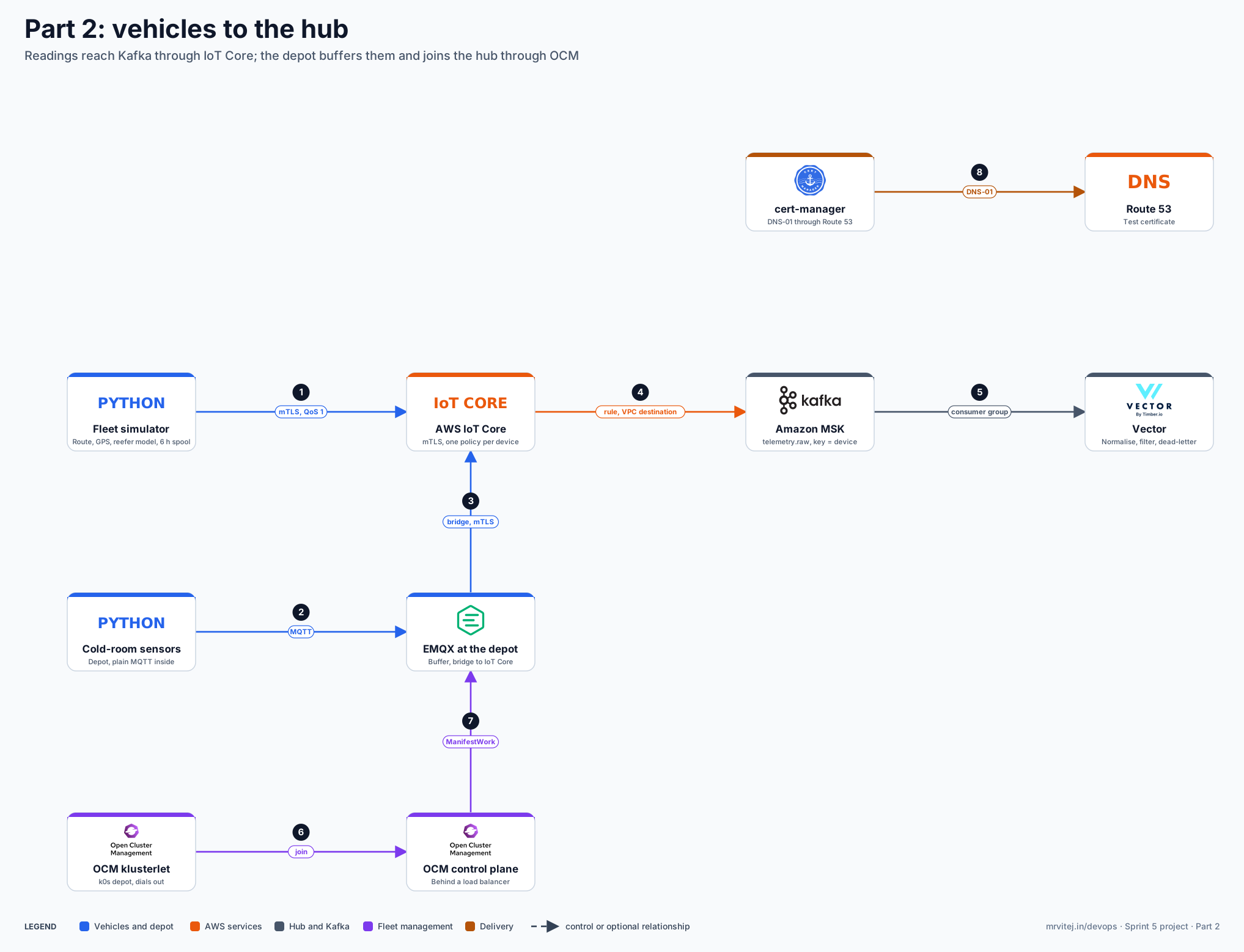
This is Part 2 of the five-part build in the Sprint 5 project overview. Part 1 left you with the AWS foundation: an EKS hub, Amazon MSK with SCRAM, RDS, KMS, Secrets Manager, ECR, Route 53, Argo CD, Crossplane with healthy AWS providers, locked evidence buckets, an IoT thing, and a k0s depot cluster on a VM. This part makes data flow: a fleet simulator publishes readings to AWS IoT Core, a rule puts them on a Kafka topic, Vector normalises and filters them, Open Cluster Management registers the depot, and EMQX at the depot buffers readings and bridges them to IoT Core. It ends with a link-outage test and a checker that shows whether any reading was lost.
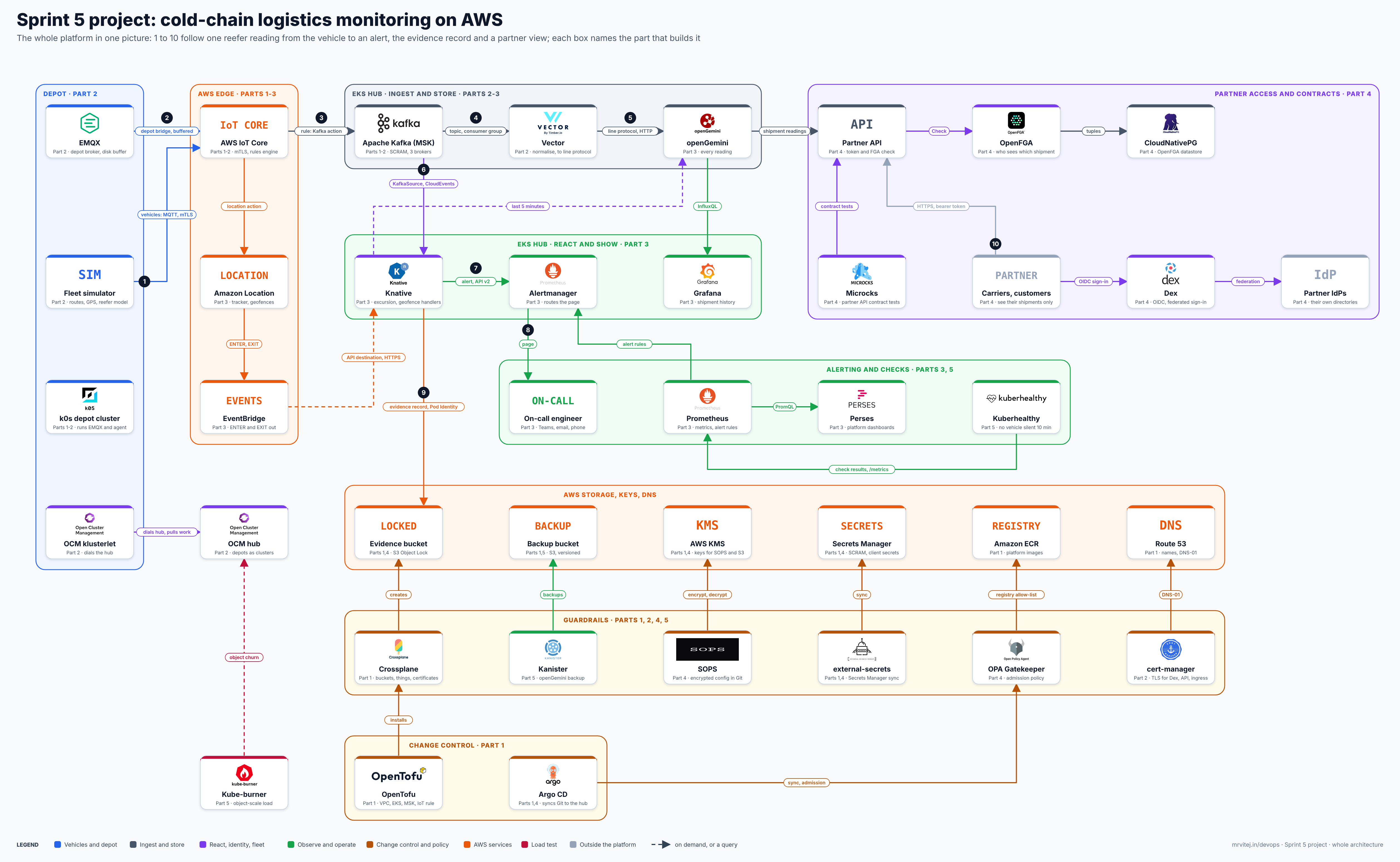
Where this part fits. This part moves readings from vehicles and the depot to the hub (marked Part 2 on the overall diagram). Open the zoomable Sprint 5 architecture or read the Overview.
What this is and is not. This is engineering guidance, not legal or regulatory advice, and nothing here is validated or compliant on its own. It is a reference blueprint: it sets out the intended flow and the wiring between the tools. Chart keys, API field names and kinds change between releases, so each section says what to confirm on your version. The “Not tested” list in the design notes says plainly what I could not run. If you hit a mismatch, use the “Suggest a correction” link on this page.
What you build, and in what order
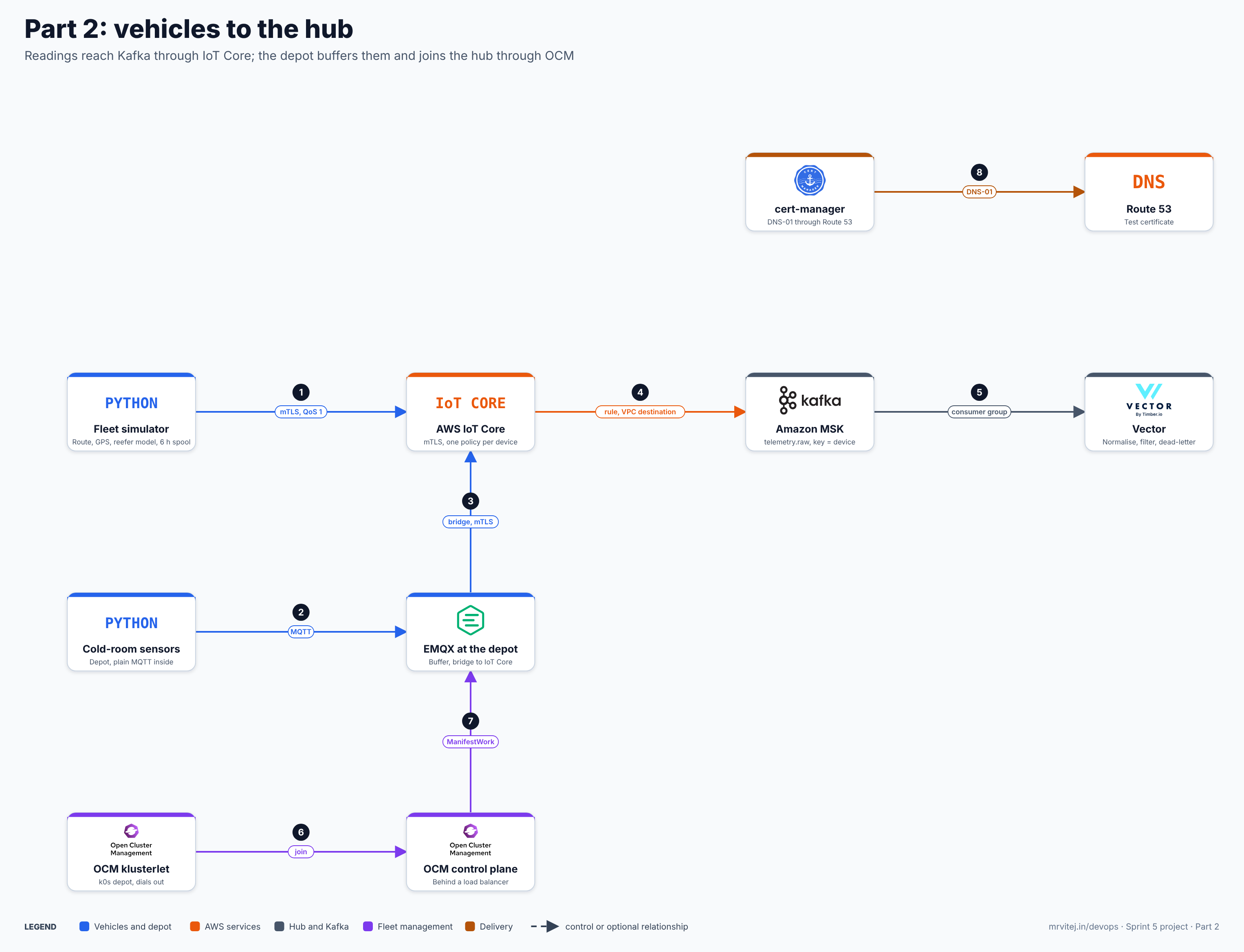
One image, the layers of this part. Open the zoomable diagram, or download it as SVG or PNG.
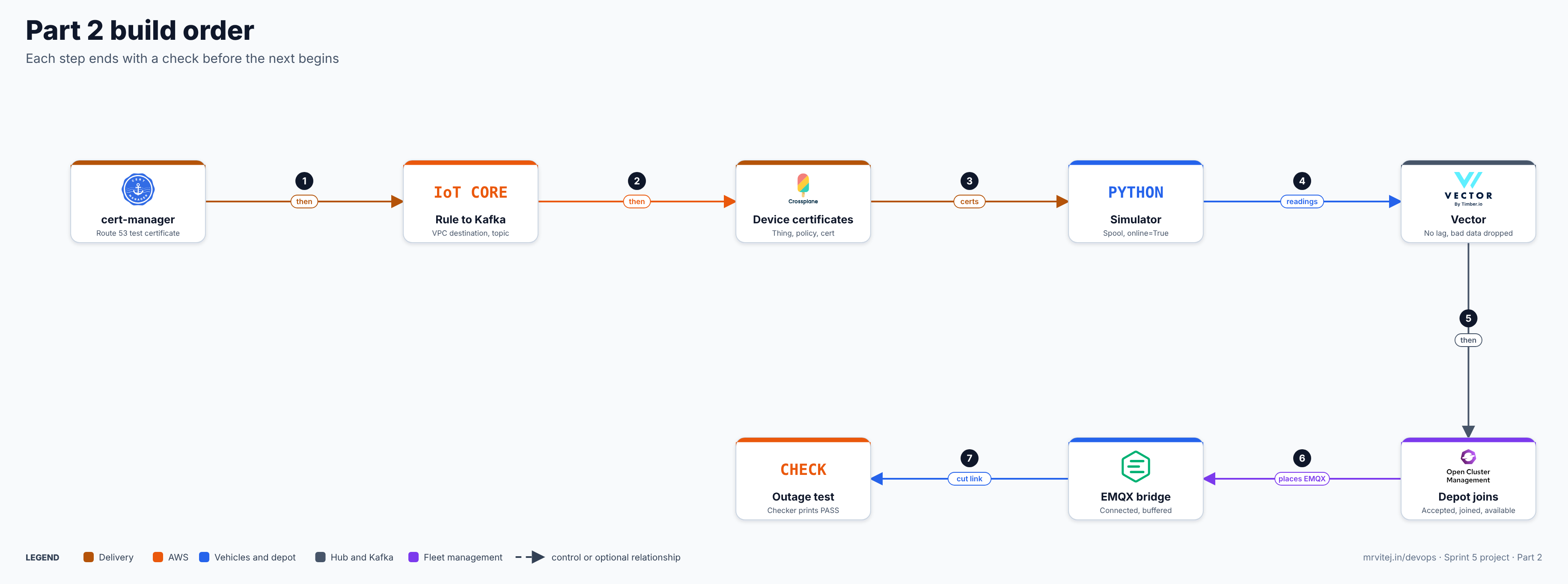
- Prerequisites and versions
- cert-manager with Route 53
- IoT Core to Kafka: the rule, the VPC destination and the topic
- Device certificates for vehicles and the depot
- The fleet simulator and its spool
- Vector: normalise and filter
- Open Cluster Management: register the depot
- EMQX at the depot and the bridge to IoT Core
- The link-outage test
- Troubleshooting, cost, cleanup, design notes and checklist
A change to the overview. The overview and the task for this slot named Tremor for event processing. On 12 November the sprint swapped Tremor for Vector (see the swap log in the sprint plan), and this part uses Vector. The overview also said the hub runs a standard OCM hub that the depot joins. Section 7 explains why that changes on EKS.
1. Prerequisites and versions
| Item | Version or detail | Why |
|---|---|---|
| Part 1 complete | Every Part 1 checkpoint passes | Everything here builds on it |
kubectl contexts |
hub (EKS) and depot (k0s) |
Two clusters |
| Python | 3.11 or newer, with paho-mqtt 2.x and confluent-kafka |
Simulator and checker |
clusteradm |
Current release | Joining the depot |
| cert-manager | v1.21.0 (pinned in Sprint 4 Part 2; confirm the newest) | Test certificate |
| Vector | Helm chart vector/vector; pin the version helm search repo vector shows |
Vector brief |
| EMQX | emqx/emqx-enterprise:6.3.1, one node (free for production under the licence terms, as in Sprint 4) |
EMQX brief |
| Kafka client image | apache/kafka:4.4.0 for the topic and checks |
Kafka brief |
| Amazon Root CA 1 | AmazonRootCA1.pem from the Amazon Trust Services repository |
Server certificate check for IoT Core |
Export what the later steps need (values come from Part 1):
export AWS_REGION=ap-south-1
export DOMAIN=coldchain.example.com
cd cold-chain/infra/foundation
export SECRET_ARN=$(tofu output -raw msk_secret_arn)
export KMS_ARN=$(tofu output -raw kms_key_arn)
export BOOT=$(aws kafka get-bootstrap-brokers --cluster-arn $(tofu output -raw msk_cluster_arn) \
  --query BootstrapBrokerStringSaslScram --output text)
export IOT_ENDPOINT=$(aws iot describe-endpoint --endpoint-type iot:Data-ATS --query endpointAddress --output text)
cd ../..
echo "$BOOT"; echo "$IOT_ENDPOINT"
kubectl --context hub get nodes
Expected: broker addresses on port 9096, an endpoint like xxxx-ats.iot.ap-south-1.amazonaws.com, and three Ready nodes. Download the root CA once:
mkdir -p certs && curl -s -o certs/AmazonRootCA1.pem https://www.amazontrust.com/repository/AmazonRootCA1.pem
openssl x509 -in certs/AmazonRootCA1.pem -noout -subject
Add certs/ to .gitignore now: private keys will land there.
Checkpoint 1. The two exports print, both clusters answer, and the root CA subject shows Amazon Root CA 1.
2. cert-manager with Route 53
cert-manager proves control of the domain by writing a DNS record in Route 53 (a DNS-01 challenge). It gets AWS access through Pod Identity, like Crossplane in Part 1.
Add to infra/foundation/cert-manager-iam.tf:
resource "aws_iam_role" "cert_manager" {
  name               = "${var.name}-cert-manager"
  assume_role_policy = data.aws_iam_policy_document.pod_trust.json
}

resource "aws_iam_role_policy" "cert_manager" {
  role = aws_iam_role.cert_manager.id
  policy = jsonencode({
    Version = "2012-10-17"
    Statement = [
      { Effect = "Allow", Action = "route53:GetChange", Resource = "arn:aws:route53:::change/*" },
      { Effect = "Allow", Action = ["route53:ChangeResourceRecordSets", "route53:ListResourceRecordSets"],
        Resource = "arn:aws:route53:::hostedzone/${aws_route53_zone.main.zone_id}" },
      { Effect = "Allow", Action = "route53:ListHostedZonesByName", Resource = "*" }
    ]
  })
}

resource "aws_eks_pod_identity_association" "cert_manager" {
  cluster_name    = module.eks.cluster_name
  namespace       = "cert-manager"
  service_account = "cert-manager"
  role_arn        = aws_iam_role.cert_manager.arn
}(cd infra/foundation && tofu apply)Install it through Argo CD, as in Part 1. gitops/apps/cert-manager.yaml:
apiVersion: argoproj.io/v1alpha1
kind: Application
metadata:
  name: cert-manager
  namespace: argocd
spec:
  project: default
  source:
    repoURL: quay.io/jetstack/charts
    chart: cert-manager
    targetRevision: v1.21.0
    helm:
      values: |
        crds:
          enabled: true
  destination:
    server: https://kubernetes.default.svc
    namespace: cert-manager
  syncPolicy:
    automated: { prune: true, selfHeal: true }
    syncOptions: [CreateNamespace=true]
If your Argo CD version does not accept an OCI chart in repoURL this way, install with Helm instead: helm install cert-manager oci://quay.io/jetstack/charts/cert-manager --version v1.21.0 -n cert-manager --create-namespace --set crds.enabled=true.
Then the issuer and a test certificate. Use the Let’s Encrypt staging endpoint: it has generous limits and issues untrusted certificates, which is right for a test. gitops/platform/issuer.yaml (apply it with kubectl now; Argo CD can own it later):
apiVersion: cert-manager.io/v1
kind: ClusterIssuer
metadata: { name: letsencrypt-staging }
spec:
  acme:
    server: https://acme-staging-v02.api.letsencrypt.org/directory
    email: you@example.com
    privateKeySecretRef: { name: letsencrypt-staging-key }
    solvers:
      - dns01:
          route53:
            region: ap-south-1
---
apiVersion: cert-manager.io/v1
kind: Certificate
metadata: { name: test, namespace: default }
spec:
  secretName: test-tls
  dnsNames: ["test.coldchain.example.com"]
  issuerRef: { name: letsencrypt-staging, kind: ClusterIssuer }
Replace the e-mail and the domain, then:
kubectl --context hub apply -f gitops/platform/issuer.yaml
kubectl --context hub get certificate test -w
Expected: READY True within a few minutes. If it stays False, kubectl describe challenge shows why. For the Route 53 solver to use Pod Identity, the cert-manager version must read the container credentials URL that Pod Identity injects; the documentation describes IRSA and Pod Identity as supported, but confirm on your version.
Checkpoint 2. The test certificate is READY True. Delete it afterwards: kubectl delete certificate test.
3. IoT Core to Kafka: the rule, the VPC destination and the topic
IoT Core cannot reach a private Kafka cluster without help. A VPC destination makes the rules engine create a network interface in each subnet you list, and the Kafka rule action sends through it. SCRAM credentials are read from Secrets Manager with the get_secret SQL function, using a role you provide. MSK Serverless is not supported by this action because it only offers IAM authentication, which the action does not support; that is why Part 1 built MSK Provisioned.
3.1 The rule, with OpenTofu
infra/foundation/iot-kafka.tf:
variable "kafka_topic" { default = "telemetry.raw" }

data "aws_iam_policy_document" "iot_trust" {
  statement {
    actions = ["sts:AssumeRole"]
    principals {
      type        = "Service"
      identifiers = ["iot.amazonaws.com"]
    }
  }
}

# Role the VPC destination uses to create network interfaces.
resource "aws_iam_role" "iot_vpc" {
  name               = "${var.name}-iot-vpc-destination"
  assume_role_policy = data.aws_iam_policy_document.iot_trust.json
}

resource "aws_iam_role_policy" "iot_vpc" {
  role = aws_iam_role.iot_vpc.id
  policy = jsonencode({
    Version = "2012-10-17"
    Statement = [{
      Effect = "Allow"
      Action = [
        "ec2:CreateNetworkInterface", "ec2:CreateNetworkInterfacePermission",
        "ec2:DescribeNetworkInterfaces", "ec2:DeleteNetworkInterface",
        "ec2:DescribeVpcs", "ec2:DescribeVpcAttribute", "ec2:DescribeSubnets",
        "ec2:DescribeSecurityGroups"
      ]
      Resource = "*"
    }]
  })
}

# Role the rule uses to read the SCRAM secret and decrypt it with the platform key.
resource "aws_iam_role" "iot_kafka" {
  name               = "${var.name}-iot-rule-kafka"
  assume_role_policy = data.aws_iam_policy_document.iot_trust.json
}

resource "aws_iam_role_policy" "iot_kafka" {
  role = aws_iam_role.iot_kafka.id
  policy = jsonencode({
    Version = "2012-10-17"
    Statement = [
      { Effect = "Allow", Action = ["secretsmanager:GetSecretValue", "secretsmanager:DescribeSecret"],
        Resource = aws_secretsmanager_secret.msk_ingest.arn },
      { Effect = "Allow", Action = ["kms:Decrypt"], Resource = aws_kms_key.platform.arn }
    ]
  })
}

resource "aws_security_group" "iot_dest" {
  name   = "${var.name}-iot-destination"
  vpc_id = module.vpc.vpc_id
}

resource "aws_vpc_security_group_egress_rule" "iot_to_msk" {
  security_group_id            = aws_security_group.iot_dest.id
  referenced_security_group_id = aws_security_group.msk.id
  from_port                    = 9096
  to_port                      = 9096
  ip_protocol                  = "tcp"
}

resource "aws_vpc_security_group_ingress_rule" "msk_from_iot" {
  security_group_id            = aws_security_group.msk.id
  referenced_security_group_id = aws_security_group.iot_dest.id
  from_port                    = 9096
  to_port                      = 9096
  ip_protocol                  = "tcp"
}

resource "aws_iot_topic_rule_destination" "kafka" {
  vpc_configuration {
    role_arn        = aws_iam_role.iot_vpc.arn
    security_groups = [aws_security_group.iot_dest.id]
    subnet_ids      = module.vpc.private_subnets
    vpc_id          = module.vpc.vpc_id
  }
}

resource "aws_iot_topic_rule" "telemetry_to_kafka" {
  name        = "coldchain_telemetry_to_kafka"
  enabled     = true
  sql_version = "2016-03-23"
  # device_id comes from the topic, which the device's policy restricts,
  # so a device cannot claim to be another one in the payload.
  sql = "SELECT *, topic(2) AS device_id, timestamp() AS iot_received_ms FROM 'fleet/+/telemetry'"

  kafka {
    destination_arn = aws_iot_topic_rule_destination.kafka.arn
    topic           = var.kafka_topic
    key             = "$${topic(2)}"
    client_properties = {
      "bootstrap.servers"    = aws_msk_cluster.main.bootstrap_brokers_sasl_scram
      "security.protocol"    = "SASL_SSL"
      "sasl.mechanism"       = "SCRAM-SHA-512"
      "sasl.scram.username"  = "$${get_secret('${aws_secretsmanager_secret.msk_ingest.name}', 'SecretString', 'username', '${aws_iam_role.iot_kafka.arn}')}"
      "sasl.scram.password"  = "$${get_secret('${aws_secretsmanager_secret.msk_ingest.name}', 'SecretString', 'password', '${aws_iam_role.iot_kafka.arn}')}"
      "acks"                 = "all"
      "compression.type"     = "lz4"
    }
  }
}
The $$ in front of each { stops OpenTofu from reading the AWS substitution templates as its own. Apply and wait for the destination:
cd infra/foundation && tofu apply && cd ../..
aws iot list-topic-rule-destinations --query 'destinationSummaries[].[arn,status]' --output table
Expected: the destination goes from IN_PROGRESS to ENABLED in a few minutes. The rule is created even before then, but messages only flow once it is enabled.
3.2 The topic, with a Kubernetes Job
MSK sits in private subnets, so create the topic from inside the hub. Put the SCRAM credentials in a Secret without writing them to a file:
kubectl --context hub create namespace ingest
PASS=$(aws secretsmanager get-secret-value --secret-id "$SECRET_ARN" --query SecretString --output text | jq -r .password)
kubectl --context hub -n ingest create secret generic msk-scram \
  --from-literal=username=ingest --from-literal=password="$PASS" --from-literal=bootstrap="$BOOT"
unset PASS
Part 4 moves this to external-secrets; until then it is a manual Secret. platform/kafka-tools.yaml:
apiVersion: v1
kind: ConfigMap
metadata: { name: kafka-client, namespace: ingest }
data:
  run.sh: |
    #!/bin/sh
    cat > /tmp/client.properties <<EOF
    security.protocol=SASL_SSL
    sasl.mechanism=SCRAM-SHA-512
    sasl.jaas.config=org.apache.kafka.common.security.scram.ScramLoginModule required username="$KAFKA_USER" password="$KAFKA_PASS";
    EOF
    exec "$@" --command-config /tmp/client.properties --bootstrap-server "$KAFKA_BOOT"
---
apiVersion: batch/v1
kind: Job
metadata: { name: create-topic, namespace: ingest }
spec:
  backoffLimit: 1
  template:
    spec:
      restartPolicy: Never
      containers:
        - name: kafka
          image: apache/kafka:4.4.0
          command: ["/bin/sh", "/cfg/run.sh", "/opt/kafka/bin/kafka-topics.sh", "--create", "--if-not-exists",
                    "--topic", "telemetry.raw", "--partitions", "6", "--replication-factor", "3",
                    "--config", "min.insync.replicas=2", "--config", "retention.ms=604800000"]
          env:
            - { name: KAFKA_USER, valueFrom: { secretKeyRef: { name: msk-scram, key: username } } }
            - { name: KAFKA_PASS, valueFrom: { secretKeyRef: { name: msk-scram, key: password } } }
            - { name: KAFKA_BOOT, valueFrom: { secretKeyRef: { name: msk-scram, key: bootstrap } } }
          volumeMounts: [{ name: cfg, mountPath: /cfg }]
      volumes:
        - { name: cfg, configMap: { name: kafka-client } }
kubectl --context hub apply -f platform/kafka-tools.yaml
kubectl --context hub -n ingest wait --for=condition=complete job/create-topic --timeout=180s
kubectl --context hub -n ingest logs job/create-topicExpected: Created topic telemetry.raw. Six partitions and a replication factor of 3 match three brokers; the key (the device ID) keeps one device in one partition, so its readings stay in order.
3.3 The first message, end to end
Publish through the AWS API (this uses your IAM identity, not a device certificate, and proves the rule and the Kafka path):
aws iot-data publish --topic fleet/reefer-001/telemetry --cli-binary-format raw-in-base64-out \
  --payload '{"device_id":"reefer-001","seq":1,"ts":"2026-11-19T17:00:00.000Z","temp_c":4.8}'
Read it back with a one-off pod:
kubectl --context hub -n ingest run consume --rm -i --restart=Never --image=apache/kafka:4.4.0 \
  --overrides='{"spec":{"containers":[{"name":"consume","image":"apache/kafka:4.4.0","stdin":true,
  "command":["/bin/sh","/cfg/run.sh","/opt/kafka/bin/kafka-console-consumer.sh","--topic","telemetry.raw","--from-beginning","--max-messages","1","--property","print.key=true"],
  "env":[{"name":"KAFKA_USER","valueFrom":{"secretKeyRef":{"name":"msk-scram","key":"username"}}},
  {"name":"KAFKA_PASS","valueFrom":{"secretKeyRef":{"name":"msk-scram","key":"password"}}},
  {"name":"KAFKA_BOOT","valueFrom":{"secretKeyRef":{"name":"msk-scram","key":"bootstrap"}}}],
  "volumeMounts":[{"name":"cfg","mountPath":"/cfg"}]}],"volumes":[{"name":"cfg","configMap":{"name":"kafka-client"}}]}}'
Expected: the key reefer-001, then a JSON message with device_id, iot_received_ms and your fields. If nothing arrives within a minute, see the troubleshooting table: IoT rule errors are logged only if you enable the rule’s error action or IoT logging, so check the destination status and the security groups first.
Checkpoint 3. The destination is ENABLED, the topic exists, and the test message appears with the device ID as its key.
4. Device certificates for vehicles and the depot
Each device gets one thing, one certificate and one policy limited to its own client ID and topic. Part 1 created reefer-001 by hand-written manifests; this script writes the same set, plus the two attachments, for any name. crossplane/gen-device.sh:
#!/usr/bin/env bash
# usage: gen-device.sh <name> <client-id-pattern>   e.g.  gen-device.sh reefer-002 reefer-002
set -euo pipefail
NAME=$1; CLIENT=$2; ACCOUNT=$(aws sts get-caller-identity --query Account --output text)
cat <<EOF
---
apiVersion: iot.aws.m.upbound.io/v1beta1
kind: Thing
metadata: { name: ${NAME}, namespace: aws-resources }
spec:
  forProvider: { region: ap-south-1 }
  providerConfigRef: { kind: ProviderConfig, name: default }
---
apiVersion: iot.aws.m.upbound.io/v1beta1
kind: Policy
metadata: { name: ${NAME}, namespace: aws-resources }
spec:
  forProvider:
    region: ap-south-1
    policy: |
      {"Version":"2012-10-17","Statement":[
        {"Effect":"Allow","Action":"iot:Connect","Resource":"arn:aws:iot:ap-south-1:${ACCOUNT}:client/${CLIENT}"},
        {"Effect":"Allow","Action":"iot:Publish","Resource":"arn:aws:iot:ap-south-1:${ACCOUNT}:topic/fleet/${NAME}/telemetry"}]}
  providerConfigRef: { kind: ProviderConfig, name: default }
---
apiVersion: iot.aws.m.upbound.io/v1beta1
kind: Certificate
metadata: { name: ${NAME}, namespace: aws-resources }
spec:
  forProvider: { region: ap-south-1, active: true }
  writeConnectionSecretToRef: { name: ${NAME}-cert }
  providerConfigRef: { kind: ProviderConfig, name: default }
---
apiVersion: iot.aws.m.upbound.io/v1beta1
kind: PolicyAttachment
metadata: { name: ${NAME}, namespace: aws-resources }
spec:
  forProvider:
    region: ap-south-1
    policyRef: { name: ${NAME} }
    targetRef: { name: ${NAME} }
  providerConfigRef: { kind: ProviderConfig, name: default }
---
apiVersion: iot.aws.m.upbound.io/v1beta1
kind: ThingPrincipalAttachment
metadata: { name: ${NAME}, namespace: aws-resources }
spec:
  forProvider:
    region: ap-south-1
    thingRef: { name: ${NAME} }
    principalRef: { name: ${NAME} }
  providerConfigRef: { kind: ProviderConfig, name: default }
EOF
Vehicles use their name as the MQTT client ID. The depot bridge cannot: EMQX’s MQTT connector builds client IDs itself for its connection pool, so the depot policy allows a client ID prefix (depot-vizag-1*) and the connector sets a matching prefix (section 8).
chmod +x crossplane/gen-device.sh
for d in reefer-002 reefer-003; do crossplane/gen-device.sh $d $d > crossplane/iot-$d.yaml; done
crossplane/gen-device.sh depot-vizag-1 'depot-vizag-1*' > crossplane/iot-depot-vizag-1.yaml
git add crossplane && git commit -m "iot devices" && git push
Argo CD applies the crossplane/ folder (Part 1). Check:
kubectl --context hub -n aws-resources get things.iot.aws.m.upbound.io,certificates.iot.aws.m.upbound.io,policyattachments.iot.aws.m.upbound.io,thingprincipalattachments.iot.aws.m.upbound.io
aws iot list-things --query 'things[].thingName' --output text
aws iot list-thing-principals --thing-name reefer-002
Expected: every object READY True and the thing has one principal (the certificate ARN). The attachment kinds and their *Ref field names follow the provider’s API as I understand it; confirm with kubectl explain policyattachments.iot.aws.m.upbound.io.spec.forProvider and fix the script if a name differs. Then pull each certificate out of its connection Secret:
kubectl --context hub -n aws-resources get secret reefer-001-cert -o json | jq '.data | keys'The key names are what the provider writes (I expect certificate_pem and private_key; check the output). Then:
for d in reefer-001 reefer-002 reefer-003 depot-vizag-1; do
  mkdir -p certs/$d
  kubectl --context hub -n aws-resources get secret $d-cert -o jsonpath='{.data.certificate_pem}' | base64 -d > certs/$d/cert.pem
  kubectl --context hub -n aws-resources get secret $d-cert -o jsonpath='{.data.private_key}' | base64 -d > certs/$d/key.pem
  chmod 600 certs/$d/key.pem
done
openssl x509 -in certs/reefer-001/cert.pem -noout -subject -dates
Checkpoint 4. Four device folders hold a certificate and a key, and openssl prints a validity window. The private keys are now on your workstation and in cluster Secrets. That is a lab shortcut; section 10 says what production does instead.
5. The fleet simulator and its spool
One Python program plays a vehicle, a container or a depot cold room. It has three jobs: model the reefer, follow a route, and never lose a reading while the link is down. Readings go into a local SQLite file first and leave it only after the broker acknowledges them (QoS 1). On reconnect the spool drains oldest first, before new readings are sent, so order is kept. Readings older than the retention window (six hours by default) are dropped and counted.
simulator/requirements.txt:
paho-mqtt>=2.1,<3simulator/fleet.py:
#!/usr/bin/env python3
"""Cold-chain fleet simulator: reefer model, route, GPS, MQTT with a disk spool."""
import argparse, json, math, random, sqlite3, ssl, sys, time
from datetime import datetime, timezone
import paho.mqtt.client as mqtt

# Illustrative waypoints (Mumbai, Navi Mumbai, Pune). A route is a loop.
ROUTE = [(19.0760, 72.8777), (19.0330, 73.0297), (18.9894, 73.1175), (18.5204, 73.8567)]
AMBIENT_C = 32.0

def iso(t): return datetime.fromtimestamp(t, timezone.utc).isoformat(timespec="milliseconds").replace("+00:00", "Z")

class Reefer:
    """Cargo temperature drifts towards ambient; the compressor pulls it back."""
    def __init__(self, setpoint, band=1.5):
        self.sp, self.band = setpoint, band
        self.temp = setpoint
        self.compressor = True
        self.door_open = False
    def step(self, dt):
        k = 0.00176 if self.door_open else 0.0004          # heat gain per second
        self.temp += (AMBIENT_C - self.temp) * k * dt
        if self.compressor:
            self.temp -= 0.035 * dt                           # cooling per second
        if self.temp > self.sp + self.band: self.compressor = True
        if self.temp < self.sp - self.band: self.compressor = False
        self.temp += random.gauss(0, 0.05)
        return self.temp

class Route:
    def __init__(self, speed_kmh=50):
        self.leg, self.f, self.speed = 0, 0.0, speed_kmh
    def step(self, dt):
        a, b = ROUTE[self.leg], ROUTE[(self.leg + 1) % len(ROUTE)]
        km = math.hypot((b[0]-a[0])*111.0, (b[1]-a[1])*111.0*math.cos(math.radians(a[0])))
        self.f += (self.speed * dt / 3600.0) / max(km, 0.1)
        if self.f >= 1.0: self.f, self.leg = 0.0, (self.leg + 1) % len(ROUTE)
        a, b = ROUTE[self.leg], ROUTE[(self.leg + 1) % len(ROUTE)]
        return a[0] + (b[0]-a[0])*self.f, a[1] + (b[1]-a[1])*self.f

class Spool:
    def __init__(self, path, retention_s):
        self.db = sqlite3.connect(path, isolation_level=None)
        self.db.execute("CREATE TABLE IF NOT EXISTS q(id INTEGER PRIMARY KEY AUTOINCREMENT, ts REAL, body TEXT)")
        self.retention, self.dropped = retention_s, 0
    def add(self, ts, make_body):
        cur = self.db.execute("INSERT INTO q(ts, body) VALUES (?, '')", (ts,))
        seq = cur.lastrowid                                    # never reused, so a restart keeps counting
        self.db.execute("UPDATE q SET body=? WHERE id=?", (make_body(seq), seq))
    def prune(self):
        cur = self.db.execute("DELETE FROM q WHERE ts < ?", (time.time() - self.retention,))
        self.dropped += cur.rowcount
    def head(self, n=50):
        return self.db.execute("SELECT id, body FROM q ORDER BY id LIMIT ?", (n,)).fetchall()
    def ack(self, i): self.db.execute("DELETE FROM q WHERE id=?", (i,))
    def depth(self): return self.db.execute("SELECT COUNT(*) FROM q").fetchone()[0]

def main():
    p = argparse.ArgumentParser()
    p.add_argument("--device", required=True)
    p.add_argument("--mode", choices=["iot", "emqx"], default="iot")
    p.add_argument("--host", required=True)              # IoT endpoint, or the EMQX host
    p.add_argument("--port", type=int)
    p.add_argument("--certdir", default="certs")
    p.add_argument("--kind", choices=["truck", "container", "coldroom"], default="truck")
    p.add_argument("--room", default="")                 # cold room name (emqx mode)
    p.add_argument("--depot", default="vizag-1")
    p.add_argument("--interval", type=float, default=10.0)
    p.add_argument("--spool", default=None)
    p.add_argument("--retention-hours", type=float, default=6.0)
    p.add_argument("--door-open-at", type=float, default=-1, help="seconds after start")
    p.add_argument("--door-open-for", type=float, default=360)
    a = p.parse_args()

    setpoint = {"truck": 5.0, "container": -20.0, "coldroom": 5.0}[a.kind]
    reefer, route = Reefer(setpoint), Route()
    spool = Spool(a.spool or f"{a.device}{('-' + a.room) if a.room else ''}.spool.db", a.retention_hours * 3600)
    if a.mode == "iot":
        client_id, topic, port = a.device, f"fleet/{a.device}/telemetry", a.port or 8883
    else:
        client_id, topic, port = f"sensor-{a.room}", f"depot/{a.depot}/{a.room}/telemetry", a.port or 1883

    connected = {"ok": False}
    c = mqtt.Client(mqtt.CallbackAPIVersion.VERSION2, client_id=client_id, protocol=mqtt.MQTTv311)
    if a.mode == "iot":
        c.tls_set(ca_certs=f"{a.certdir}/AmazonRootCA1.pem",
                  certfile=f"{a.certdir}/{a.device}/cert.pem", keyfile=f"{a.certdir}/{a.device}/key.pem",
                  tls_version=ssl.PROTOCOL_TLS_CLIENT)
    c.on_connect = lambda cl, u, f, rc, props=None: connected.update(ok=not getattr(rc, "is_failure", rc != 0))
    c.on_disconnect = lambda cl, u, f, rc, props=None: connected.update(ok=False)
    c.reconnect_delay_set(min_delay=1, max_delay=30)
    c.connect_async(a.host, port, keepalive=30)
    c.loop_start()

    t0 = time.time()
    device_id = a.device
    while True:
        now = time.time()
        reefer.door_open = a.door_open_at >= 0 and a.door_open_at <= now - t0 < a.door_open_at + a.door_open_for
        temp = reefer.step(a.interval)
        lat, lon = route.step(a.interval) if a.kind != "coldroom" else (None, None)
        def body(seq, now=now, temp=temp, lat=lat, lon=lon):
            d = {"device_id": device_id, "seq": seq, "ts": iso(now), "temp_c": round(temp, 2),
                 "humidity": round(random.uniform(55, 70), 1), "door_open": reefer.door_open,
                 "compressor_on": reefer.compressor}
            if a.room: d["room"] = a.room
            if lat is not None: d.update(lat=round(lat, 5), lon=round(lon, 5), battery_pct=round(max(20, 100 - (now - t0) / 3600), 1))
            return json.dumps(d, separators=(",", ":"))
        spool.add(now, body)
        spool.prune()
        if connected["ok"]:
            for i, b in spool.head():                      # oldest first, in order
                info = c.publish(topic, b, qos=1)
                info.wait_for_publish(timeout=5)
                if not info.is_published(): break
                spool.ack(i)
        print(f"{iso(time.time())} temp={temp:.2f} door={reefer.door_open} online={connected['ok']} spooled={spool.depth()} dropped={spool.dropped}", flush=True)
        time.sleep(a.interval)

if __name__ == "__main__":
    sys.exit(main())
The reefer numbers are illustrative and are not specification limits for any product. I ran the temperature model and the spool offline (without MQTT): with a door open for six minutes from 300 s, a 5 °C chilled load peaked at 9.3 °C and the compressor pulled it back within the hour; the spool kept sequence numbers, acknowledged readings in order and dropped one reading older than the retention window.
Run one vehicle first:
python3 -m venv .venv && . .venv/bin/activate && pip install -r simulator/requirements.txt
python simulator/fleet.py --device reefer-001 --host $IOT_ENDPOINT --interval 10 --door-open-at 120
Expected output, one line every 10 seconds:
2026-11-19T17:20:10.123Z temp=5.02 door=False online=True spooled=0 dropped=0online=True means the TLS handshake and the policy both passed; spooled=0 means every reading was acknowledged. If online=False stays, see the troubleshooting table. Leave it running, and in another terminal start the other two with an excursion each:
python simulator/fleet.py --device reefer-002 --host $IOT_ENDPOINT --door-open-at 300 &
python simulator/fleet.py --device reefer-003 --host $IOT_ENDPOINT --kind container &
Checkpoint 5. Three vehicles show online=True and spooled=0, and the consumer from section 3.3 (run with --max-messages 20) shows readings from all three keys.
6. Vector: normalise and filter
Vector reads telemetry.raw as its own consumer group, parses each JSON message, checks the fields, converts the timestamp, drops readings that cannot be right, and keeps the bad ones as evidence in a separate output. In this part it writes to its console so you can see the result. Part 3 adds the openGemini sink and the Knative source; Vector commits its offsets only after a sink accepts an event, so nothing is lost when a sink is down.
platform/vector-values.yaml:
role: Stateless-Aggregator
replicas: 2
env:
  - { name: KAFKA_BOOTSTRAP, valueFrom: { secretKeyRef: { name: msk-scram, key: bootstrap } } }
  - { name: KAFKA_USERNAME,  valueFrom: { secretKeyRef: { name: msk-scram, key: username } } }
  - { name: KAFKA_PASSWORD,  valueFrom: { secretKeyRef: { name: msk-scram, key: password } } }
customConfig:
  data_dir: /vector-data-dir
  api: { enabled: true, address: 127.0.0.1:8686 }
  sources:
    from_kafka:
      type: kafka
      bootstrap_servers: "${KAFKA_BOOTSTRAP}"
      group_id: vector-normaliser
      topics: [telemetry.raw]
      auto_offset_reset: earliest
      sasl:
        enabled: true
        mechanism: SCRAM-SHA-512
        username: "${KAFKA_USERNAME}"
        password: "${KAFKA_PASSWORD}"
      tls: { enabled: true }
  transforms:
    normalise:
      type: remap
      inputs: [from_kafka]
      drop_on_error: true
      reroute_dropped: true
      source: |
        . = parse_json!(.message)
        .device_id = to_string!(.device_id)
        .seq = to_int!(.seq)
        .temp_c = to_float!(.temp_c)
        .ts = parse_timestamp!(.ts, format: "%+")
        .received_at = now()
        .kind = if starts_with(.device_id, "reefer") { "vehicle" } else if starts_with(.device_id, "depot") { "depot" } else { "other" }
    keep_valid:
      type: filter
      inputs: [normalise]
      condition: |
        .temp_c > -60.0 && .temp_c < 60.0 && .seq > 0
  sinks:
    show:
      type: console
      inputs: [keep_valid]
      encoding: { codec: json }
    show_dropped:
      type: console
      inputs: [normalise.dropped]
      encoding: { codec: json }
helm repo add vector https://helm.vector.dev && helm repo update
helm search repo vector/vector
helm install vector vector/vector -n ingest -f platform/vector-values.yaml --kube-context hub
kubectl --context hub -n ingest get pods -l app.kubernetes.io/name=vector
kubectl --context hub -n ingest logs deploy/vector --tail=5Expected: two Running pods, and log lines that are JSON objects with device_id, kind, received_at and a normalised ts. A second check shows the consumer group has no lag:
kubectl --context hub -n ingest run lag --rm -i --restart=Never --image=apache/kafka:4.4.0 \
  --overrides='{"spec":{"containers":[{"name":"lag","image":"apache/kafka:4.4.0","stdin":true,
  "command":["/bin/sh","/cfg/run.sh","/opt/kafka/bin/kafka-consumer-groups.sh","--describe","--group","vector-normaliser"],
  "env":[{"name":"KAFKA_USER","valueFrom":{"secretKeyRef":{"name":"msk-scram","key":"username"}}},
  {"name":"KAFKA_PASS","valueFrom":{"secretKeyRef":{"name":"msk-scram","key":"password"}}},
  {"name":"KAFKA_BOOT","valueFrom":{"secretKeyRef":{"name":"msk-scram","key":"bootstrap"}}}],
  "volumeMounts":[{"name":"cfg","mountPath":"/cfg"}]}],"volumes":[{"name":"cfg","configMap":{"name":"kafka-client"}}]}}'
Expected: a LAG column of 0 (or a few messages) for each of the six partitions. Test the filter by publishing an impossible reading:
aws iot-data publish --topic fleet/reefer-001/telemetry --cli-binary-format raw-in-base64-out \
  --payload '{"device_id":"reefer-001","seq":999999,"ts":"2026-11-19T17:30:00.000Z","temp_c":900.0}'
kubectl --context hub -n ingest logs deploy/vector --tail=20 | grep 999999 || echo "dropped as expected"
The reading never reaches keep_valid. Chart keys (env, customConfig, role) and the console sink’s options change between versions: run helm show values vector/vector and vector validate against your version before relying on them.
Checkpoint 6. Vector is running with no lag, normalised events appear in its log, and the 900 °C reading does not.
7. Open Cluster Management: register the depot
The plan was a standard OCM hub on EKS with the depot joining it. The OCM installation guide points the other way: the join starts with a certificate signing request that the hub must sign for the new cluster, and it says to use the multicluster control plane where the Kubernetes distribution (EKS is the example it gives) does not support that. The multicluster control plane page says the same and adds that it can be exposed through a load balancer. A separate OCM page on running on EKS uses AWS IAM roles for authentication, and that route only works for managed clusters that are themselves on EKS, which a k0s depot is not. So the hub’s OCM is the multicluster control plane, installed from its Helm chart into the ocm namespace. It has its own API server, and the depot dials that, not the EKS API.
7.1 Install the control plane on the hub
helm repo add ocm https://open-cluster-management.io/helm-charts/ && helm repo update
helm show values ocm/multicluster-controlplane | less      # find the service and hostname options
helm install multicluster-controlplane ocm/multicluster-controlplane -n ocm --create-namespace --kube-context hub
kubectl --context hub -n ocm get pods,svc
Expected: the control plane pod Running and a Service. The depot sits outside the VPC, so the Service has to be reachable from the internet, restricted to the depot’s address. If the chart has a service-type value, set it; otherwise add a Service of your own. First find the pod labels:
kubectl --context hub -n ocm get pods --show-labelsplatform/ocm-lb.yaml (replace the selector with the labels you saw, the port with the one the control plane listens on, and the source range with the depot’s egress address):
apiVersion: v1
kind: Service
metadata:
  name: ocm-controlplane-public
  namespace: ocm
  annotations:
    service.beta.kubernetes.io/aws-load-balancer-type: nlb
spec:
  type: LoadBalancer
  loadBalancerSourceRanges: ["203.0.113.20/32"]
  selector: { app: multicluster-controlplane }   # replace with the real labels
  ports: [{ name: api, port: 443, targetPort: 9443 }]   # replace targetPort with the real one
The nlb annotation is the older in-tree way to ask for a Network Load Balancer; this hub has no AWS Load Balancer Controller yet, so check that an NLB appears (aws elbv2 describe-load-balancers) and, if your cluster version rejects the annotation, install the controller. Then:
kubectl --context hub apply -f platform/ocm-lb.yaml
kubectl --context hub -n ocm get svc ocm-controlplane-public -w      # wait for EXTERNAL-IP
export HUB_API=https://$(kubectl --context hub -n ocm get svc ocm-controlplane-public -o jsonpath='{.status.loadBalancer.ingress[0].hostname}')
kubectl --context hub -n ocm get secret multicluster-controlplane-kubeconfig -o jsonpath='{.data.kubeconfig}' | base64 -d > hub-ocm.kubeconfig
The kubeconfig points at the in-cluster address. Edit its server: line to $HUB_API only if the certificate’s names include the load balancer address; if not, the join fails on a name mismatch (see the troubleshooting table) and the control plane needs a hostname option from the chart values.
7.2 Join the depot
On the depot VM (the k0s cluster from Part 1; clusteradm installed there):
curl -L https://raw.githubusercontent.com/open-cluster-management-io/clusteradm/main/install.sh | bashOn your workstation, ask the control plane for a join command. Do not run clusteradm init against a multicluster control plane: it is already initialised.
clusteradm --kubeconfig hub-ocm.kubeconfig get token --use-bootstrap-tokenIt prints a token. On the depot VM, use it:
clusteradm join --hub-token <token> --hub-apiserver $HUB_API --cluster-name depot-vizag-1 --wait
kubectl get pods -n open-cluster-management-agent
Expected: the klusterlet agent pods appear (the namespace name comes from the guide; check yours). Back on your workstation, accept the cluster:
clusteradm --kubeconfig hub-ocm.kubeconfig accept --clusters depot-vizag-1
kubectl --kubeconfig hub-ocm.kubeconfig get managedclusters
Expected:
NAME             HUB ACCEPTED   MANAGED CLUSTER URLS   JOINED   AVAILABLE   AGE
depot-vizag-1    true           https://...            True     True        1m
The join flags in the OCM guide vary by version (for example --singleton and --force-internal-endpoint-lookup appear in some examples); the form above is the basic one.
Checkpoint 7. The depot shows HUB ACCEPTED, JOINED and AVAILABLE true.
8. EMQX at the depot and the bridge to IoT Core
8.1 Storage on the depot
k0s has no default storage class. Install a simple one for the lab:
kubectl --context depot apply -f https://raw.githubusercontent.com/rancher/local-path-provisioner/v0.0.32/deploy/local-path-storage.yaml
kubectl --context depot patch storageclass local-path -p '{"metadata":{"annotations":{"storageclass.kubernetes.io/is-default-class":"true"}}}'
Confirm the manifest version on the project’s release page. On a real depot use storage you can back up.
8.2 The device certificate and the admin password
The depot has no AWS credentials, but the bridge needs its IoT certificate. Copy it by hand (Part 4 revisits this with SOPS), and set the Dashboard password:
kubectl --context depot create namespace mqtt
kubectl --context depot -n mqtt create secret generic iot-bridge-cert \
  --from-file=AmazonRootCA1.pem=certs/AmazonRootCA1.pem \
  --from-file=depot.crt=certs/depot-vizag-1/cert.pem --from-file=depot.key=certs/depot-vizag-1/key.pem
kubectl --context depot -n mqtt create secret generic emqx-admin --from-literal=password="$(openssl rand -base64 18 | tr -d '/+=')"
8.3 EMQX, placed by OCM
The hub places the EMQX manifests on the depot with a ManifestWork, so a new depot receives the same baseline. depot/emqx-work.yaml:
apiVersion: work.open-cluster-management.io/v1
kind: ManifestWork
metadata:
  name: emqx-baseline
  namespace: depot-vizag-1
spec:
  workload:
    manifests:
      - apiVersion: v1
        kind: Service
        metadata: { name: emqx, namespace: mqtt }
        spec:
          selector: { app: emqx }
          ports:
            - { name: mqtt, port: 1883 }
            - { name: dashboard, port: 18083 }
      - apiVersion: apps/v1
        kind: StatefulSet
        metadata: { name: emqx, namespace: mqtt }
        spec:
          serviceName: emqx
          replicas: 1
          selector: { matchLabels: { app: emqx } }
          template:
            metadata: { labels: { app: emqx } }
            spec:
              containers:
                - name: emqx
                  image: emqx/emqx-enterprise:6.3.1
                  ports: [{ containerPort: 1883 }, { containerPort: 18083 }]
                  env:
                    - { name: EMQX_NODE__COOKIE, value: depot-cookie-change-me }
                    - { name: EMQX_DASHBOARD__DEFAULT_PASSWORD, valueFrom: { secretKeyRef: { name: emqx-admin, key: password } } }
                  volumeMounts:
                    - { name: data, mountPath: /opt/emqx/data }
                    - { name: iot-cert, mountPath: /etc/emqx/certs, readOnly: true }
              volumes:
                - { name: iot-cert, secret: { secretName: iot-bridge-cert, defaultMode: 0440 } }
          volumeClaimTemplates:
            - metadata: { name: data }
              spec:
                accessModes: [ReadWriteOnce]
                resources: { requests: { storage: 10Gi } }
      - apiVersion: networking.k8s.io/v1
        kind: NetworkPolicy
        metadata: { name: emqx-ingress, namespace: mqtt }
        spec:
          podSelector: { matchLabels: { app: emqx } }
          policyTypes: [Ingress]
          ingress:
            - from:
                - namespaceSelector: { matchLabels: { kubernetes.io/metadata.name: sensors } }
              ports: [{ port: 1883 }]
kubectl --context depot create namespace sensors
kubectl --kubeconfig hub-ocm.kubeconfig apply -f depot/emqx-work.yaml
kubectl --kubeconfig hub-ocm.kubeconfig -n depot-vizag-1 get manifestwork emqx-baseline -o jsonpath='{.status.conditions[*].type}'
kubectl --context depot -n mqtt get podsExpected: the work shows Applied and Available, and emqx-0 becomes Running. Two limits of the lab: the listener inside the depot is plain MQTT, kept off the network by the policy above; production uses the TLS listener and client certificates described in the Sprint 4 EMQX section. The NetworkPolicy only takes effect if the depot’s CNI enforces it; k0s’s default network plugin may need to be set to one that does, so check.
8.4 The bridge
Open the Dashboard through a port-forward (kubectl --context depot -n mqtt port-forward svc/emqx 18083:18083, then http://localhost:18083, user admin) and create the same three objects from the REST API. Log in for a token and keep the password out of your shell history:
PASS=$(kubectl --context depot -n mqtt get secret emqx-admin -o jsonpath='{.data.password}' | base64 -d)
TOKEN=$(curl -s -X POST localhost:18083/api/v5/login -H 'content-type: application/json' \
  -d "{\"username\":\"admin\",\"password\":\"$PASS\"}" | jq -r .token); unset PASS
The connector (mutual TLS to IoT Core; the client ID prefix must match the policy’s depot-vizag-1*):
curl -s -X POST localhost:18083/api/v5/connectors -H "authorization: Bearer $TOKEN" -H 'content-type: application/json' -d "{
  \"type\": \"mqtt\", \"name\": \"iot_core\",
  \"server\": \"$IOT_ENDPOINT:8883\", \"proto_ver\": \"v4\", \"clean_start\": true,
  \"clientid_prefix\": \"depot-vizag-1\", \"pool_size\": 1,
  \"ssl\": {\"enable\": true, \"verify\": \"verify_peer\",
    \"cacertfile\": \"/etc/emqx/certs/AmazonRootCA1.pem\",
    \"certfile\": \"/etc/emqx/certs/depot.crt\", \"keyfile\": \"/etc/emqx/certs/depot.key\"}
}" | jq .status
The action (the sink with its buffer) and the rule that feeds it:
curl -s -X POST localhost:18083/api/v5/actions -H "authorization: Bearer $TOKEN" -H 'content-type: application/json' -d '{
  "type": "mqtt", "name": "to_iot", "connector": "iot_core", "enable": true,
  "parameters": {"topic": "fleet/depot-vizag-1/telemetry", "qos": 1, "retain": false, "payload": "${payload}"},
  "resource_opts": {"query_mode": "async", "inflight_window": 1, "worker_pool_size": 1,
                    "request_ttl": "7h", "max_buffer_bytes": "2GB"}
}' | jq .status

curl -s -X POST localhost:18083/api/v5/rules -H "authorization: Bearer $TOKEN" -H 'content-type: application/json' -d '{
  "id": "depot_to_iot", "enable": true,
  "sql": "SELECT payload FROM \"depot/vizag-1/+/telemetry\"",
  "actions": ["mqtt:to_iot"]
}' | jq .id
The values, one by one: a request TTL of 7 hours because the default of 45 seconds drops anything that waits longer, and the target is six hours plus margin; a 2 GB buffer instead of the small default (a depot message is about 260 bytes, so six hours of three rooms is far below that, but size it for the real scale); an inflight window of 1 with one worker keeps the order of messages, at the cost of throughput. Check the connector and action status:
curl -s localhost:18083/api/v5/connectors/mqtt:iot_core -H "authorization: Bearer $TOKEN" | jq .status
curl -s localhost:18083/api/v5/actions/mqtt:to_iot -H "authorization: Bearer $TOKEN" | jq .status
Expected: "connected" for both. The field names above follow the EMQX REST API as I know it (and the Dashboard fields I used in Sprint 4); if a request is rejected, create the objects in the Dashboard and export them with GET /api/v5/connectors.
Start three cold-room sensors inside the depot. The script goes in a ConfigMap and each sensor is a Pod:
kubectl --context depot -n sensors create configmap fleet --from-file=simulator/fleet.py
for r in room-1 room-2 room-3; do
kubectl --context depot -n sensors apply -f - <<EOF
apiVersion: v1
kind: Pod
metadata: { name: sim-$r, namespace: sensors }
spec:
  containers:
    - name: sim
      image: python:3.12-slim
      command: ["sh", "-c", "pip install -q 'paho-mqtt>=2.1,<3' && exec python /sim/fleet.py --device depot-vizag-1 --mode emqx --host emqx.mqtt.svc --kind coldroom --room $r --spool /tmp/$r.db"]
      volumeMounts: [{ name: sim, mountPath: /sim }]
  volumes: [{ name: sim, configMap: { name: fleet } }]
EOF
done
Check that the depot’s readings reach Kafka (the consumer from section 3.3 shows keys depot-vizag-1) and Vector’s log shows "kind":"depot" events.
Checkpoint 8. The connector and action are connected, and depot readings appear in the Kafka topic with the key depot-vizag-1.
9. The link-outage test
The point of the spool and the bridge buffer is that a link outage loses nothing. This test cuts the link, lets readings pile up, restores it, and then checks every reading.
9.1 The checker
ops/check_series.py reads the topic from the start and, for each device (and room), checks that seq is contiguous and in order:
#!/usr/bin/env python3
import json, os, sys, time, uuid
from collections import defaultdict
from confluent_kafka import Consumer

c = Consumer({
    "bootstrap.servers": os.environ["KAFKA_BOOT"], "group.id": "checker-" + uuid.uuid4().hex[:8],
    "auto.offset.reset": "earliest", "enable.auto.commit": False,
    "security.protocol": "SASL_SSL", "sasl.mechanism": "SCRAM-SHA-512",
    "sasl.username": os.environ["KAFKA_USER"], "sasl.password": os.environ["KAFKA_PASS"],
})
c.subscribe(["telemetry.raw"])
since = float(sys.argv[1]) if len(sys.argv) > 1 else 0        # epoch seconds: ignore older readings
series, idle = defaultdict(list), 0
while idle < 20:
    m = c.poll(1.0)
    if m is None or m.error(): idle += 1; continue
    idle = 0
    d = json.loads(m.value())
    if d.get("iot_received_ms", 0) / 1000 < since: continue
    series[(d["device_id"], d.get("room", ""))].append(d["seq"])
ok = True
for k, seqs in sorted(series.items()):
    gaps = [(a, b) for a, b in zip(seqs, seqs[1:]) if b > a + 1]
    back = [(a, b) for a, b in zip(seqs, seqs[1:]) if b < a]
    dup = len(seqs) - len(set(seqs))
    print(f"{k[0]:16} {k[1]:8} n={len(seqs):5} first={seqs[0]} last={seqs[-1]} gaps={len(gaps)} out_of_order={len(back)} duplicates={dup}")
    ok &= not gaps and not back
print("RESULT:", "PASS" if ok else "FAIL")
Duplicates are reported but do not fail the check: QoS 1 delivers at least once, so a duplicate is possible after a retry, and the Part 3 handlers must tolerate them. Run it as a Job:
kubectl --context hub -n ingest create configmap checker --from-file=ops/check_series.py
kubectl --context hub -n ingest apply -f - <<'EOF'
apiVersion: batch/v1
kind: Job
metadata: { name: check-series, namespace: ingest }
spec:
  backoffLimit: 0
  template:
    spec:
      restartPolicy: Never
      containers:
        - name: check
          image: python:3.12-slim
          command: ["sh", "-c", "pip install -q confluent-kafka && python /ops/check_series.py $SINCE"]
          env:
            - { name: SINCE, value: "0" }
            - { name: KAFKA_USER, valueFrom: { secretKeyRef: { name: msk-scram, key: username } } }
            - { name: KAFKA_PASS, valueFrom: { secretKeyRef: { name: msk-scram, key: password } } }
            - { name: KAFKA_BOOT, valueFrom: { secretKeyRef: { name: msk-scram, key: bootstrap } } }
          volumeMounts: [{ name: ops, mountPath: /ops }]
      volumes: [{ name: ops, configMap: { name: checker } }]
EOF
Set SINCE to the epoch second at which you started the test (date +%s) so older readings are ignored.
9.2 Cut the vehicle link for 30 minutes
Restart the three vehicles with fresh spools so the sequence starts clean, note the start time, then cut port 8883 on the machine running them:
rm -f reefer-00*.spool.db; date +%s                         # note this number as SINCE
# ... start the three vehicles as in section 5, wait 5 minutes ...
sudo iptables -I OUTPUT -p tcp --dport 8883 -j DROP         # the link is down
sleep 1800                                                   # 30 minutes; watch spooled= grow
sudo iptables -D OUTPUT -p tcp --dport 8883 -j DROP          # the link is back
sleep 300                                                    # the spool drains
While down, each simulator prints online=False and spooled= rising by one every 10 seconds (about 180 per half hour per vehicle). After the link returns, spooled falls back to 0 as the backlog is sent in order. Then run the checker.
Expected result:
reefer-001                        n=  270 first=1 last=270 gaps=0 out_of_order=0 duplicates=0
reefer-002                        n=  270 first=1 last=270 gaps=0 out_of_order=0 duplicates=0
reefer-003                        n=  270 first=1 last=270 gaps=0 out_of_order=0 duplicates=0
RESULT: PASS
Your counts will differ with how long you run it. What matters is gaps=0 and out_of_order=0 across the outage. That is the result I expect from the design; I have not run it, so treat this block as the shape of a pass, not a measurement. A FAIL with gaps right after the outage means the spool pruned (retention shorter than the outage), or the simulator was restarted without its spool file.
9.3 Cut the depot link for 10 minutes
On the depot VM, block 8883 the same way, wait ten minutes, restore it, and run the checker with the depot series. The sensors publish to EMQX, which keeps messages in its buffer while the bridge is down and delivers them in order when it returns. Watch the buffer in the Dashboard (the action’s page shows queued messages; labels vary by version).
sudo iptables -I OUTPUT -p tcp --dport 8883 -j DROP; sleep 600; sudo iptables -D OUTPUT -p tcp --dport 8883 -j DROPWhat this does and does not prove. The sink buffer I configured is the one the EMQX documentation describes for outages. EMQX’s own note, which I found while writing Sprint 4, says that when the buffer outgrows its in-memory size it spills to disk, but after a broker restart it discards the existing segments. So the test proves a link outage, not a broker restart. The EMQX catalog also lists an “MQTT Bridge with Disk Queue” plugin that buffers messages on disk per bridge and retries when the remote broker is unavailable; its documentation shows queue.max_total_bytes (1 GB per partition by default), buffer_pool_size (4 by default), filter_topic, and TLS options. I could not read its full configuration reference or confirm which EMQX editions include it, so I did not build on it. If your depot must survive a restart with data in flight, evaluate that plugin and repeat this test with a broker restart in the middle.
Checkpoint 9. The checker prints PASS for the three vehicles after a 30-minute outage and for the depot after a 10-minute outage.
10. Troubleshooting, cost, cleanup, design notes and checklist
Troubleshooting
| Symptom | Likely cause | Fix |
|---|---|---|
Simulator online=False from the start |
Wrong endpoint, certificate not active, or the policy not attached | aws iot list-thing-principals, aws iot list-attached-policies --target <cert-arn>; use the -ats endpoint |
| Connects, then drops immediately | Client ID does not match the policy | Vehicles use the device name; the policy names exactly that client |
| TLS error on connect | Wrong root CA | Use Amazon Root CA 1 from the Amazon Trust Services repository |
| Nothing on the Kafka topic | Destination not ENABLED, or a security group blocks 9096 |
Check list-topic-rule-destinations; the destination group needs egress and MSK needs ingress |
| Rule matches but Kafka rejects | SCRAM secret not associated, or the rule role cannot decrypt | Part 1’s association; the rule role needs GetSecretValue and kms:Decrypt |
| Key is empty or wrong | topic(2) template not substituted |
Confirm substitution templates in the key field on your provider version |
| Vector cannot connect | Credentials Secret missing or wrong namespace | The msk-scram Secret must be in ingest |
| Vector drops everything | VRL parse error | vector validate; see the normalise.dropped output |
Certificate stays False |
Pod Identity not reaching cert-manager, or the zone not delegated | kubectl describe challenge; check the NS records at the registrar |
| Depot join waits for CSRs | Joined to the EKS API instead of the control plane | Use the multicluster control plane address and get token --use-bootstrap-token |
| Join fails on certificate name | The control plane’s certificate lacks the load balancer name | Set the hostname option from the chart values and reinstall |
EMQX connector disconnected |
Certificate path, wrong endpoint, or the policy does not allow the client ID prefix | Check /etc/emqx/certs inside the pod; the policy must allow depot-vizag-1* |
| Checker shows gaps after outage | Retention shorter than the outage, or the spool file was deleted | Keep the spool file; set --retention-hours above the outage |
Cost note
Part 1’s prices still apply (EKS, MSK, nodes, NAT, RDS). New in this part: one Network Load Balancer for the OCM control plane (it runs while it exists), IoT Core connections and messages, a few Route 53 queries, and the small Vector and checker pods on the existing nodes. I did not read IoT Core, NLB or Route 53 prices on the day, so I give no figures. The vehicles and sensors run on your own machine and the depot VM. Delete the load balancer and stop the simulators when you are not testing.
Cleanup
# Stop the simulators and remove local spools.
pkill -f fleet.py; rm -f *.spool.db
# Remove the depot workloads and the cluster registration.
kubectl --kubeconfig hub-ocm.kubeconfig delete -f depot/emqx-work.yaml
kubectl --context depot delete namespace sensors mqtt
clusteradm unjoin --cluster-name depot-vizag-1        # on the depot VM
# Remove hub workloads.
helm --kube-context hub -n ingest uninstall vector
kubectl --context hub delete -f platform/ocm-lb.yaml  # releases the load balancer
helm --kube-context hub -n ocm uninstall multicluster-controlplane
kubectl --context hub delete namespace ingest ocm
# Remove IoT things and certificates (Crossplane), then the rule and destination (OpenTofu).
git rm crossplane/iot-reefer-00{2,3}.yaml crossplane/iot-depot-vizag-1.yaml && git commit -m "remove devices" && git push
(cd infra/foundation && tofu destroy -target=aws_iot_topic_rule.telemetry_to_kafka -target=aws_iot_topic_rule_destination.kafka)
rm -rf certs                                          # private keys on your workstation
Part 5 has the full teardown order. Delete the NLB before destroying the VPC, or the destroy hangs on its network interfaces.
Design notes and version checks
- Event processing. Vector (NON CNCF) replaced Tremor on 12 November because Tremor looked dormant. It reads Kafka as its own consumer group and commits offsets only after a sink accepts the event, so an unavailable sink delays data and does not lose it.
- OCM on EKS. The hub uses the multicluster control plane. The OCM documents say a standard hub needs CSR support that EKS lacks, and that the EKS route using IAM roles only suits clusters that are on EKS. I did not run the Helm chart, so the service, hostname and port options are the part most likely to need adjusting. The depot dials a load balancer restricted by source address, so the EKS API does not need to be reachable from the depot; section 9 of Part 1 asked for that and is corrected in the same commit as this part.
- IoT rule. The
get_secretfunction reads the SCRAM username and password at run time, so no credential is in the rule’s text. Thekeytemplate and the exact destination role actions come from the AWS Kafka-rule and VPC-destination documentation as I read them; the role actions are a list I assembled, so compare it with the VPC destinations page. - Client IDs. Vehicles connect with their own name. The depot bridge cannot fix its client ID, so its policy allows a prefix. A looser
Connectresource is a weaker control, which is why the depot policy still limits publishing to one topic. - Spool order. Draining the spool before sending new readings keeps order. Sending live readings while the backlog drains would interleave them. The cost is that live data is delayed until the backlog is gone.
- At-least-once. MQTT QoS 1 and Kafka producers can both repeat a message. Consumers dedupe on
device_idandseq. - Keys and credentials. IoT private keys sit in a cluster Secret and on your workstation, and the depot copy is a hand-made Secret. The CSR route (generate the key on the device) avoids that; the provider field for it was not confirmed. Part 4 adds SOPS and external-secrets.
- Versions. cert-manager v1.21.0 and EMQX Enterprise 6.3.1 come from Sprint 4. Pin the Vector and OCM chart versions you install and record
clusteradm version.
Not tested
Apart from that offline run of the simulator’s model and spool, I ran none of the commands or code in this post. Specifically unconfirmed: the OCM control plane chart’s service options and the join flags; the EMQX REST field names (including clientid_prefix); the Crossplane attachment kinds and the connection-secret key names; the VPC destination role actions; the Kafka rule’s key template; cert-manager’s Route 53 solver with Pod Identity; the Vector chart’s env and customConfig handling; and the outage test numbers. I compiled the simulator and the checker and ran the simulator’s temperature model and spool offline (results in section 5), but I have not run either against MQTT or Kafka.
Setup checklist
- 1. Prerequisites: done when the exports print and both clusters answer.
- 2. cert-manager: done when the Route 53 test certificate is
READY True. - 3. IoT to Kafka: done when the destination is
ENABLEDand a test message appears with the device ID as its key. - 4. Device certificates: done when four device folders hold a certificate and key.
- 5. Simulator: done when three vehicles show
online=Trueandspooled=0. - 6. Vector: done when it consumes with no lag and drops a 900 °C reading.
- 7. OCM: done when
depot-vizag-1showsHUB ACCEPTED,JOINEDandAVAILABLE. - 8. EMQX bridge: done when the connector and action are
connectedand depot readings reach Kafka. - 9. Outage test: done when the checker prints
PASSafter 30 minutes offline for the vehicles and 10 for the depot.
Tools used
AWS IoT Core and Amazon MSK with Apache Kafka, Vector, Open Cluster Management, EMQX, cert-manager, Crossplane, OpenTofu, k0s, Argo CD.
What comes next
Part 3 stores and reacts. Vector gets its openGemini sink, Knative and EventBridge react to excursions and geofences, Amazon Location tracks the fleet, and Grafana, Alertmanager and Prometheus show and page. Handlers write excursion cases to the RDS database from Part 1.